
Imagine you open a new restaurant in the heart of your city. The food is incredible, the prices are fair, and the ambience is perfect. But there is one problem: nobody can find you.
Now imagine a similar restaurant a few blocks away. The food is average, but every time someone types “best restaurant near me” into Google, that restaurant appears first. Naturally, it is packed every night, while your wonderful place sits half empty.
This is exactly what happens on the internet every single day, and SEO is the difference between the two restaurants.
SEO stands for Search Engine Optimization. In simple terms, it is the practice of making your website easier for Google (and other search engines) to find, understand, and recommend to people who are searching for what you offer.
When someone types a question or a phrase into Google, Google goes through billions of web pages in a fraction of a second and decides which ones best answer that query. SEO is the work you do to influence that decision, to make Google choose your website over your competitors.
The best part? Unlike paid advertising, organic traffic from SEO is free. Once you rank, Google sends visitors to your website every single day without you spending money on ads.
This guide is written for absolute beginners. No technical background is needed. By the time you finish reading, you will have a clear and confident understanding of what SEO is, how it works, why it matters, and what you need to do to get started.
| 📘 What You Will Learn in This Guide
What SEO means and why it is important How search engines like Google discover and rank websites The four main types of SEO What SERPs are and why they matter What ranking factors does Google use SEO best practices every beginner should follow SEO-friendly web design principles The key metrics you need to track Essential SEO tools (including free ones) Common mistakes beginners make, and how to avoid them The future of SEO in the age of AI Answers to the most common beginner questions |
What Is SEO? (A Beginner-Friendly Explanation)
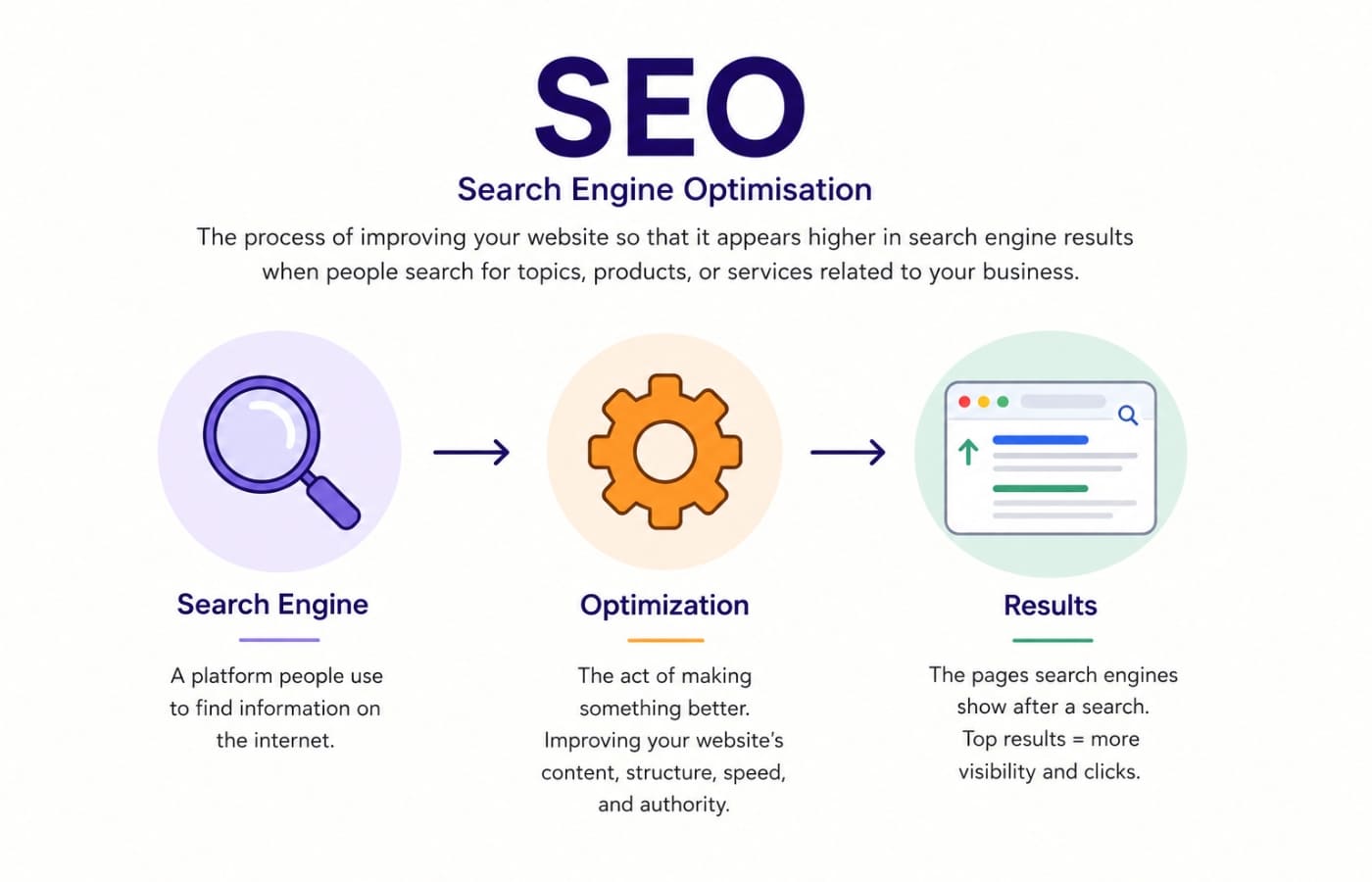
SEO stands for Search Engine Optimization. It is the process of improving your website so that it appears higher in search engine results pages, like Google, when people search for topics, products, or services related to your business.
Let us break that definition down into three parts:
Search Engine: A platform people use to find information on the internet. Google is by far the most popular, handling over 90% of all searches worldwide. Others include Bing, Yahoo, and DuckDuckGo.
Optimization: The act of making something better. In SEO, this means improving your website’s content, structure, speed, and authority so that search engines find it more relevant and trustworthy.
Results: The pages Google shows after a search. Appearing near the top of those results, ideally in the first three positions, means far more people see and click on your website.
In even simpler terms: SEO is the work that helps the right people find your website at the right moment, when they are searching for exactly what you offer.
A Real-World Example of SEO
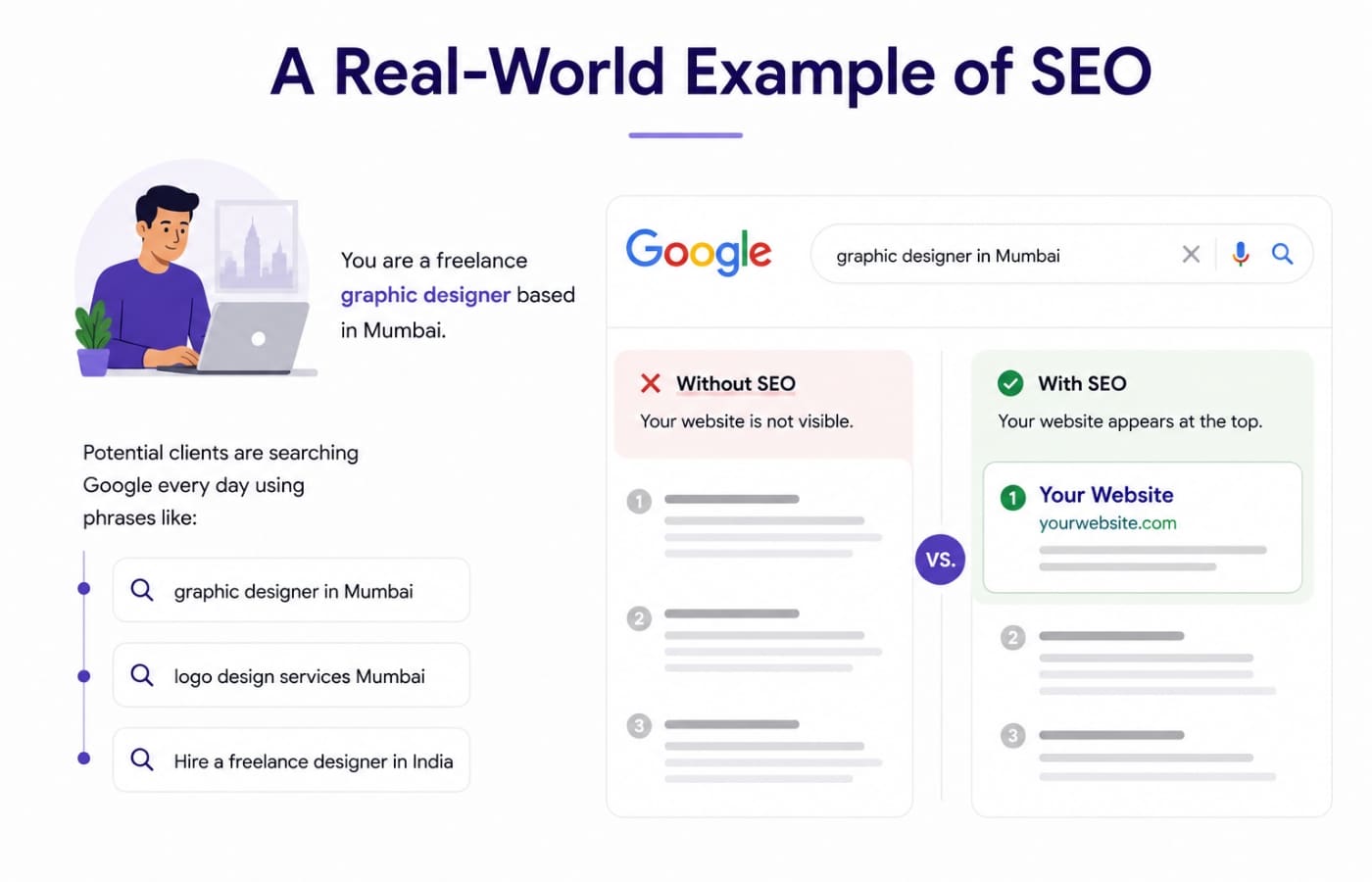
Let us say you are a freelance graphic designer based in Mumbai. Potential clients are searching Google every day using phrases like:
- “graphic designer in Mumbai”
- “logo design services Mumbai”
- “Hire a freelance designer in India”
If your website does not appear in the results for these searches, those potential clients will never find you, no matter how talented you are. But if your website is well-optimized, Google will show it to exactly the right people at the exact moment they are looking to hire.
That is the power of SEO. It connects businesses with customers who are already looking for them.
What SEO Is NOT
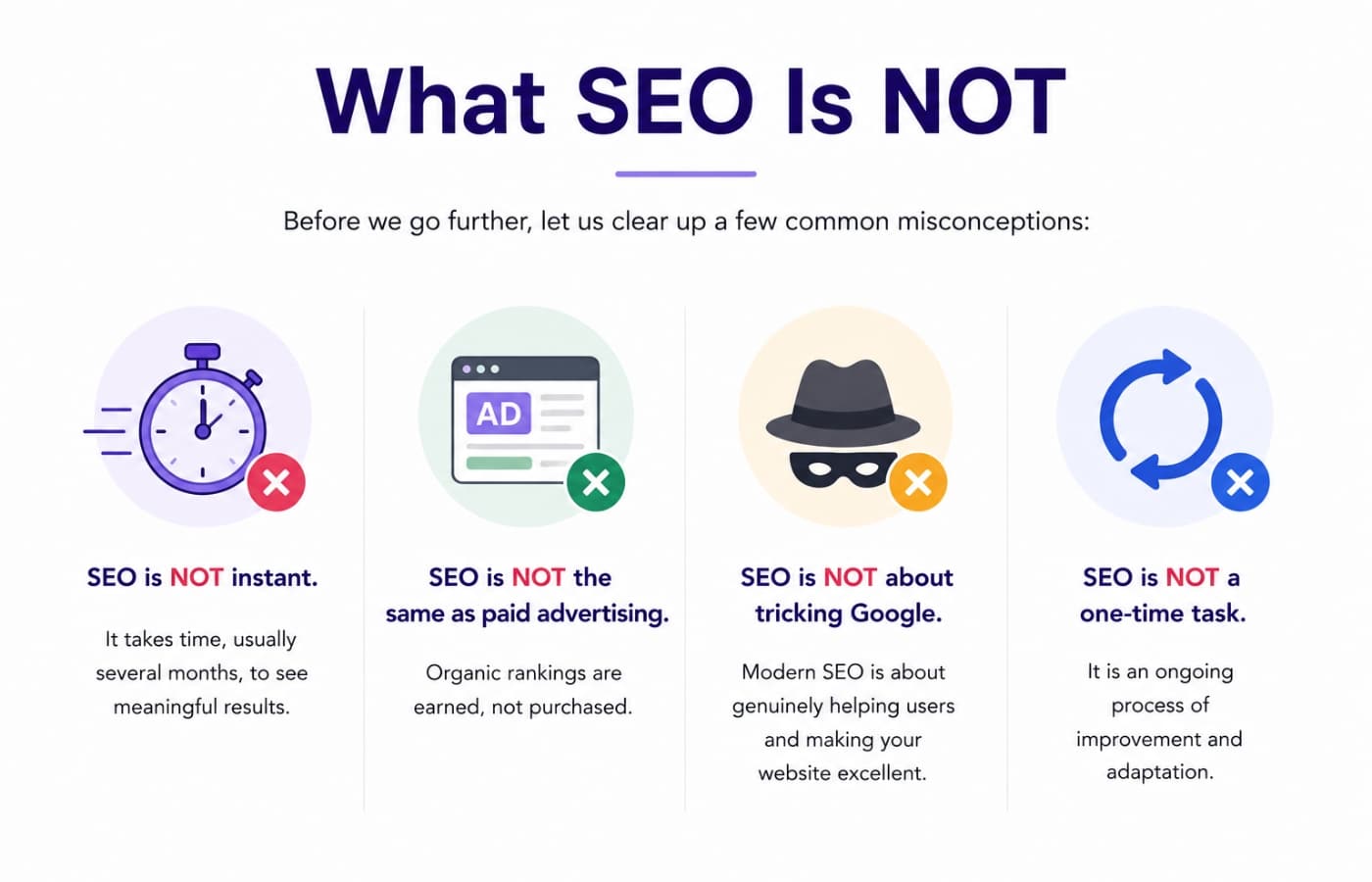
Before we go further, let us clear up a few common misconceptions:
- SEO is NOT instant. It takes time, usually several months, to see meaningful results.
- SEO is NOT the same as paid advertising. Organic rankings are earned, not purchased.
- SEO is NOT about tricking Google. Modern SEO is about genuinely helping users and making your website excellent.
- SEO is NOT a one-time task. It is an ongoing process of improvement and adaptation.
Why Is SEO Important?
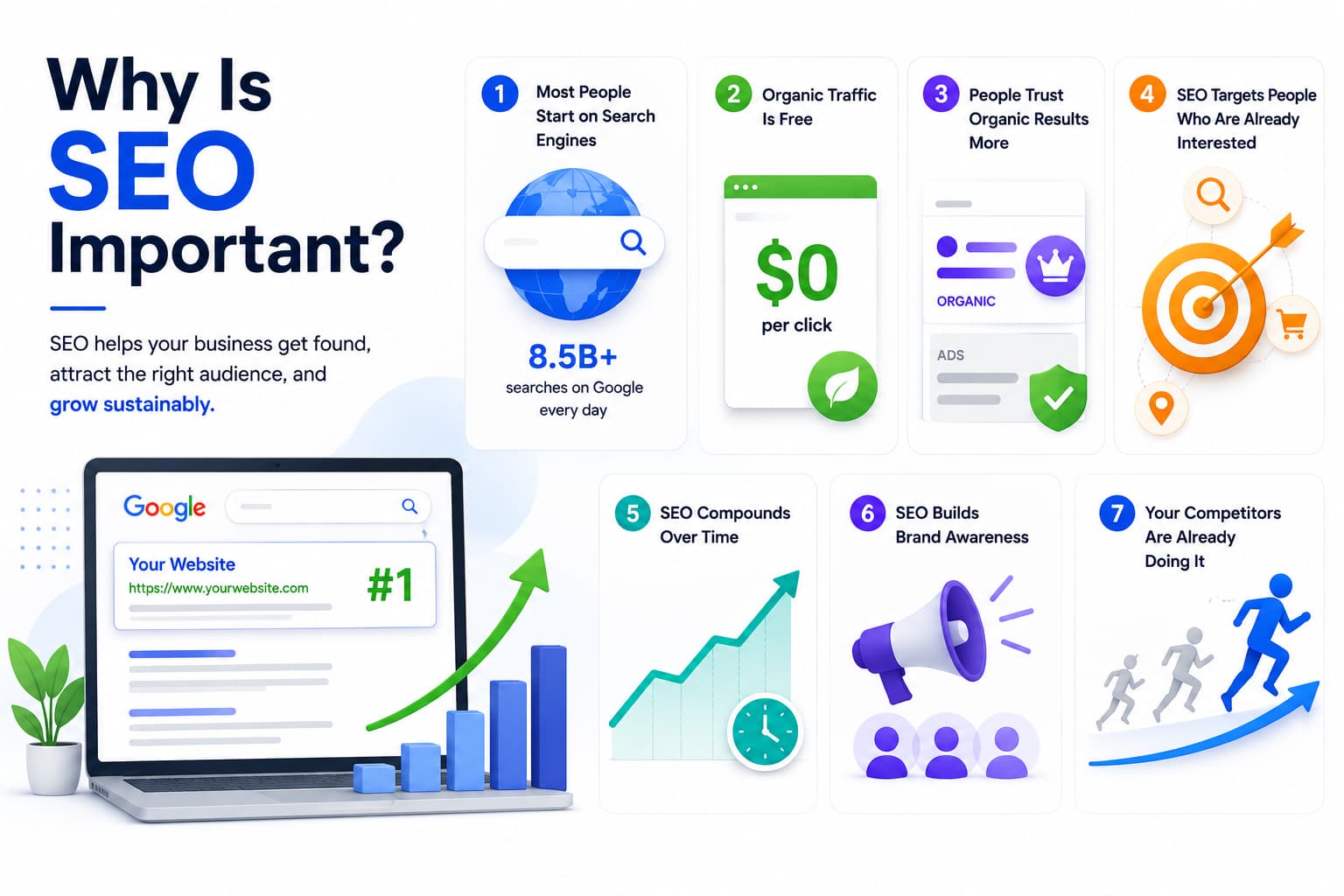
With billions of websites competing for attention online, SEO is what separates the websites people find from the ones that remain invisible. Here is a deeper look at why SEO matters so much:
1. Most People Start Their Journey on a Search Engine
Think about your own behaviour. When you want to buy something, learn something, or find a local service, where do you go first? Most people go to Google. In fact, Google processes over 8.5 billion searches every single day. If your website does not appear in those results, you are invisible to the vast majority of potential customers.
2. Organic Traffic Is Free
Unlike Google Ads, where you pay for every visitor, organic SEO traffic costs nothing per click. Once your pages rank well, they can bring hundreds or thousands of visitors every month without ongoing advertising spend. This makes SEO one of the highest return-on-investment activities in digital marketing.
3. People Trust Organic Results More Than Ads
Studies consistently show that users trust organic search results more than paid advertisements. When your website appears naturally at the top of Google, it signals credibility and authority. Users perceive top-ranking websites as the most relevant and trustworthy options.
4. SEO Targets People Who Are Already Interested
One of SEO’s biggest advantages is intent. When someone searches “how to fix a leaking tap,” they are already looking for a solution. When a plumber’s website ranks for that term, they are reaching someone who actively needs their service right now. This is far more powerful than interrupting someone with an ad they did not ask for.
5. SEO Compounds Over Time
Paid ads deliver results only while your budget lasts. The moment you stop paying, the traffic stops. SEO, on the other hand, compounds. The content and authority you build today continue to pay dividends for months and years. A well-written blog post published today might bring traffic consistently for the next five years.
6. SEO Builds Brand Awareness
Even when people do not click your website, seeing it appear repeatedly in search results builds brand recognition and familiarity. This is sometimes called the “billboard effect”; repeated exposure builds trust over time.
7. Your Competitors Are Already Doing It
In nearly every industry, your competitors are investing in SEO. Every day you delay is a day they are building authority, earning backlinks, and capturing customers that could have been yours. Conversely, strong SEO creates a competitive advantage that is genuinely difficult for rivals to replicate quickly.
| 📊 SEO by the Numbers
Google processes 8.5 billion searches per day Organic search drives 53% of all website traffic (BrightEdge) The #1 result on Google earns an average click-through rate of 27.6% 75% of users never scroll past the first page of search results SEO leads have a 14.6% close rate vs. 1.7% for outbound marketing |
How Do Search Engines Work?
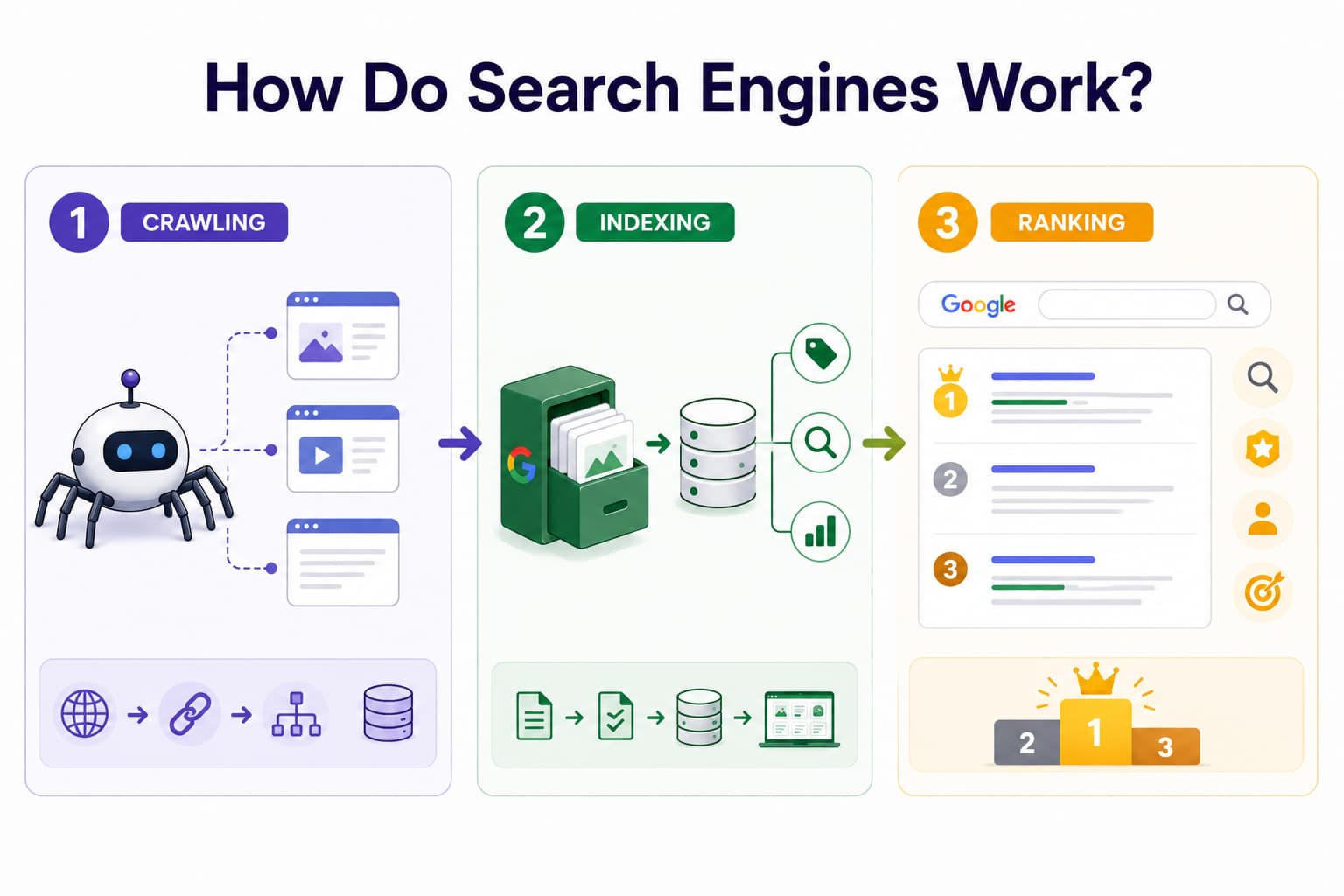
To do SEO effectively, you need to understand how search engines actually operate. At its core, a search engine like Google has one job: to show the most relevant, trustworthy, and helpful results for any given search query.
To do this, Google goes through a continuous, three-stage process: Crawling, Indexing, and Ranking. Understanding these stages is fundamental to understanding SEO.
Stage 1: Crawling – Discovering Content
Google uses automated programs called “crawlers” or “spiders”, most commonly known as Googlebot. These programs browse the internet continuously, following links from one page to another, discovering new pages and checking for updates to existing ones.
Think of Googlebot like a scout exploring an enormous, ever-expanding city. The scout travels along roads (links) to find buildings (web pages). If a building is on a road with no signs pointing to it, the scout might never find it.
This is why links matter for SEO, both internal links (links within your own website connecting your pages) and external links (links from other websites pointing to yours). More links pointing to a page mean Googlebot is more likely to find it quickly.
You can also submit a sitemap to Google, essentially a map of all the pages on your website, through Google Search Console. This helps Google discover all your content efficiently, even pages that might not have many links pointing to them.
Key implication for beginners: Make sure your website is easy to crawl. Avoid pages that are blocked from Googlebot, broken links that lead to dead ends, and orphan pages that no other page links to.
Stage 2: Indexing – Storing and Organising Content
After Googlebot crawls a page, Google analyses its content in depth, including the text, images, videos, structured data, and more. It then stores this information in a massive database called the Google Index.
The Google Index is like the world’s largest library catalogue. When Google indexes your page, it catalogues it under relevant topics, keywords, and signals so it can be retrieved when a matching search happens.
Importantly, not every page that gets crawled gets indexed. Google may choose not to index a page if it:
- Has very thin or low-quality content
- Is a near-duplicate of another page
- Has a “noindex” directive telling Google to ignore it
- Is blocked in the website’s robots.txt file
- Has technical errors that prevent proper rendering
Key implication for beginners: Create original, high-quality content on every page. Use Google Search Console to check whether your important pages have been indexed. Fix technical issues that might prevent indexing.
Stage 3: Ranking – Choosing the Best Results
Ranking is where SEO gets most interesting. When someone types a query into Google, the search engine searches its entire index and must decide, in under a second, which pages best answer that query, and in what order to display them.
To make this decision, Google uses a complex algorithm that evaluates hundreds of ranking signals simultaneously. These signals measure things like:
- How relevant is this page to the search query?
- How trustworthy and authoritative is this website?
- How good is the experience of using this page?
- Does this page genuinely satisfy the searcher’s intent?
Google’s algorithm is updated thousands of times per year. Most updates are minor and barely noticeable, but several major updates each year can significantly shift rankings. This is why SEO requires ongoing attention, not because the fundamentals change, but because the standards for quality keep rising.
Key implication for beginners: Do not try to trick Google’s algorithm. Focus on creating genuinely excellent content that fully satisfies user intent and building a trustworthy, well-structured website. Google’s goal and your goal should be aligned: to give users the best possible experience.
| 🔍 Step-by-Step: How Google Finds and Ranks a New Blog Post
Step 1: You publish a new blog post and link to it from your homepage or another page. Step 2: Googlebot follows that link and crawls your new post, usually within a few days. Step 3: Google analyses the content: your headings, body text, images, links, page speed, and more. Step 4: Google adds the page to its index, categorising it by topic and relevance. Step 5: A user searches a relevant query. Google compares your post to all indexed pages on that topic. Step 6: Based on hundreds of signals, Google decides your post deserves position #8 on page 1. Step 7: Over the next few weeks, as users click your result and find it helpful, Google may move you to position #4. Step 8: You earn more backlinks. Your post climbs to position #2. Traffic compounds. |
The Four Main Types of SEO
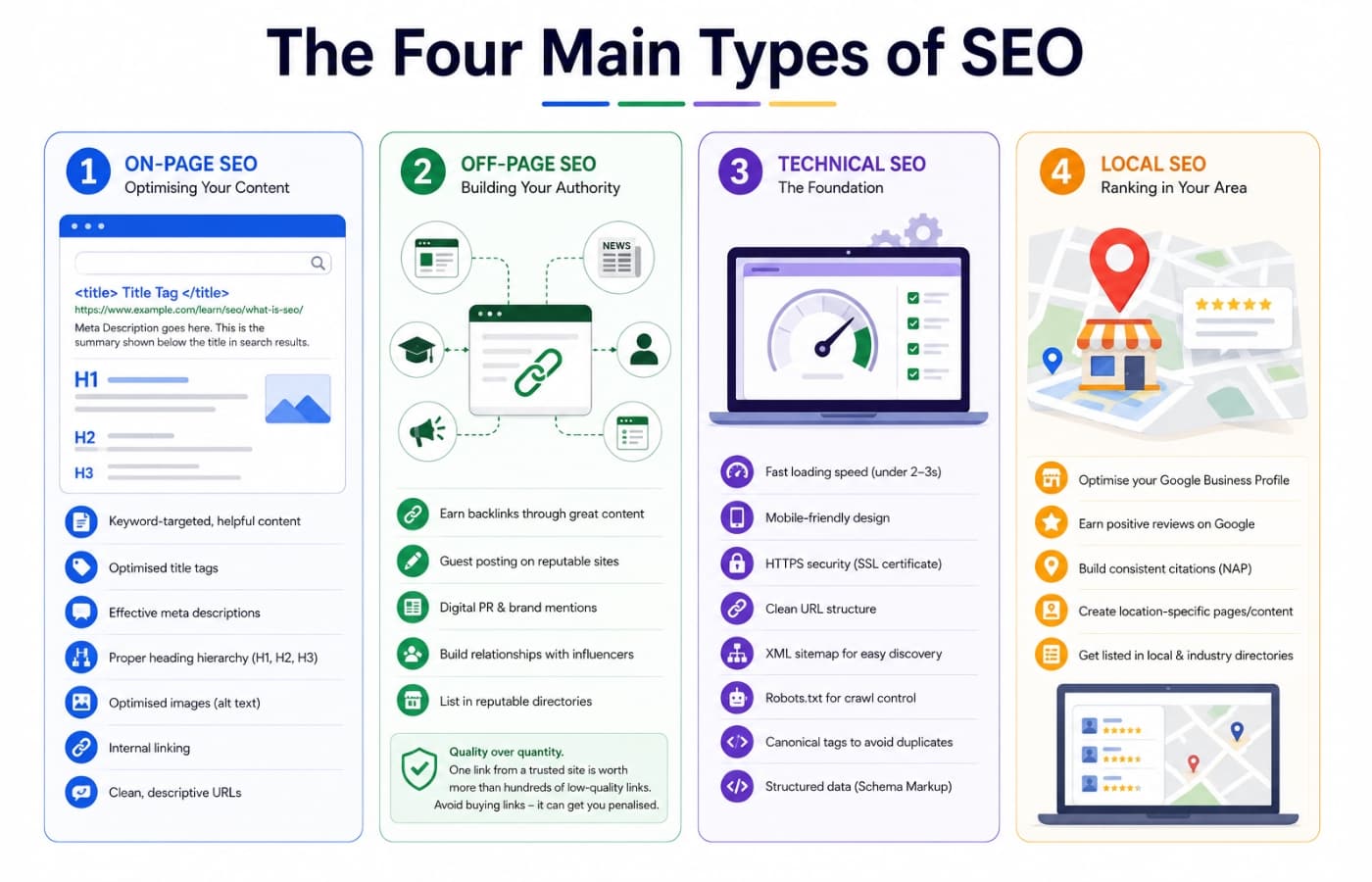
SEO is not a single activity. It is a discipline that spans several interconnected areas, each of which focuses on a different aspect of making your website discoverable and trustworthy. Here are the four main types of SEO every beginner should know:
1. On-Page SEO – Optimising Your Content
On-Page SEO refers to all the optimisations you make directly on your web pages. It is about making sure each page clearly communicates its topic to both users and search engines.
On-Page SEO covers:
- Writing keyword-targeted content that answers search queries thoroughly and helpfully
- Crafting compelling title tags that blue clickable headline shown in search results
- Writing effective meta descriptions the summary shown below the title in results
- Using a proper heading hierarchy (H1 for the main topic, H2 for subtopics, H3 for sub-subtopics)
- Optimising images with descriptive file names and alt text
- Adding internal links to other relevant pages on your website
- Ensuring your URL is clean and descriptive (e.g., /learn/seo/what-is-seo/ rather than /p?id=247)
If your content is thin, poorly structured, or does not actually answer what the user is searching for, no amount of other SEO work will compensate. On-page SEO is the foundation.
2. Off-Page SEO – Building Your Authority
Off-Page SEO covers everything you do outside your own website to improve how search engines perceive its authority and trustworthiness. The most important element of off-page SEO is link building.
When another website links to yours, it is essentially casting a vote of confidence. Google views these backlinks as endorsements. The more high-quality sites that link to you, the more authority Google assigns to your website.
Think of it like academic citations. A research paper cited by hundreds of respected journals is viewed as more authoritative than one cited by nobody. Similarly, a website linked to by major news outlets, universities, and industry leaders carries far more authority than one with no external links.
Off-Page SEO activities include:
- Earning backlinks through exceptional content that others want to reference
- Guest posting on reputable industry websites
- Digital PR is getting your brand mentioned in news articles and publications
- Building relationships with influencers and content creators in your niche
- Listing your business in reputable online directories
Important: Quality matters far more than quantity when it comes to backlinks. One link from a respected national newspaper carries more weight than 500 links from low-quality, irrelevant websites. Avoid any services that promise to “buy” you hundreds of links. This is a black-hat tactic that can result in Google penalising your site.
3. Technical SEO – The Foundation
Technical SEO focuses on the behind-the-scenes elements of your website that affect how easily search engines can crawl, index, and understand it. It is the infrastructure that all your content is built upon.
Even if you have excellent content and strong backlinks, technical issues can prevent your website from ranking well. Common technical SEO elements include:
- Website speed pages that load in under 2–3 seconds
- Mobile-friendliness your site working perfectly on smartphones
- HTTPS security has an SSL certificate, so your site loads with https://
- Clean URL structure, logical, readable web addresses
- An XML sitemap a file that lists all your pages for Google to discover
- Robots.txt a file that tells Google which pages it should and should not crawl
- Canonical tags telling Google which version of a page is the original, to avoid duplicate content confusion
- Structured data (Schema Markup) code that helps Google understand your content (e.g., product prices, review ratings)
As a beginner, you do not need to master all of these immediately. But you do need to be aware of them and address obvious issues as you build your website.
4. Local SEO – Ranking in Your Area
Local SEO is a specialised branch for businesses that serve a specific geographic area, such as a restaurant, a law firm, a dental clinic, a plumber, or a retail shop. It focuses on appearing in local search results and on Google Maps.
When someone searches “best dental clinic in Chennai” or “plumber near me,” Google shows a special local results section featuring a map and a list of three businesses called the Local Pack. Ranking in the Local Pack is one of the most valuable things a local business can achieve through SEO.
Local SEO activities include:
- Claiming and fully optimising your Google Business Profile
- Earning positive reviews on Google
- Building consistent citations mentions of your business name, address, and phone number across the web
- Creating location-specific pages and content on your website
- Getting listed in local and industry-specific directories
👉 Learn More: Explore All Types of SEO in Depth
What Are SERPs? Understanding Search Results Pages
Every time you type something into Google and press Enter, the page that appears is called a SERP, a Search Engine Results Page. Understanding what a SERP contains is essential for SEO because different types of results require different optimisation strategies.
Modern SERPs are rich and complex. They are no longer just a list of ten blue links. Here is what you might see:
Organic Results
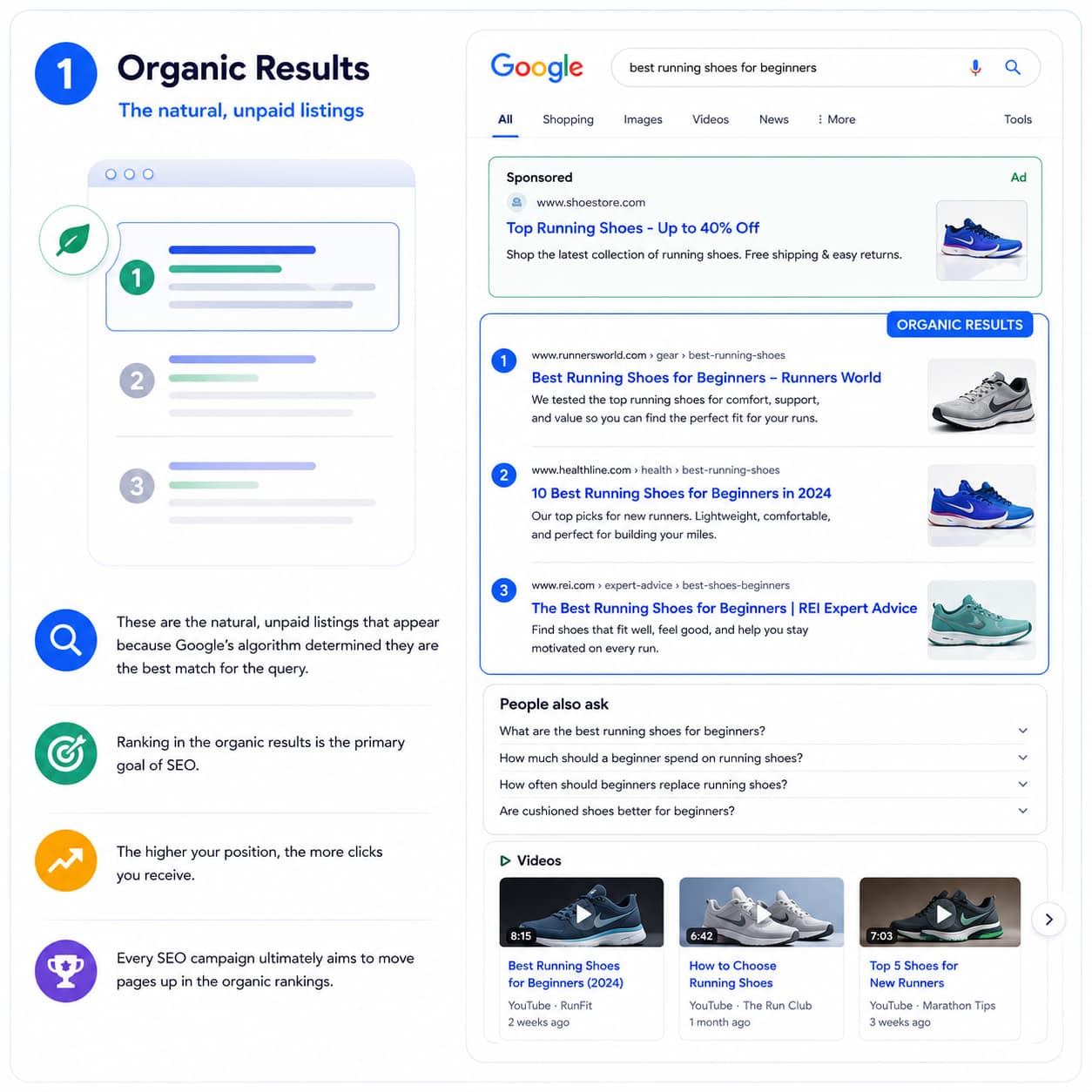
These are the natural, unpaid listings that appear because Google’s algorithm determined they are the best match for the query. Ranking in the organic results is the primary goal of SEO. The higher your position, the more clicks you receive, which is why every SEO campaign ultimately aims to move pages up in the organic rankings.
Paid Results (Advertisements)
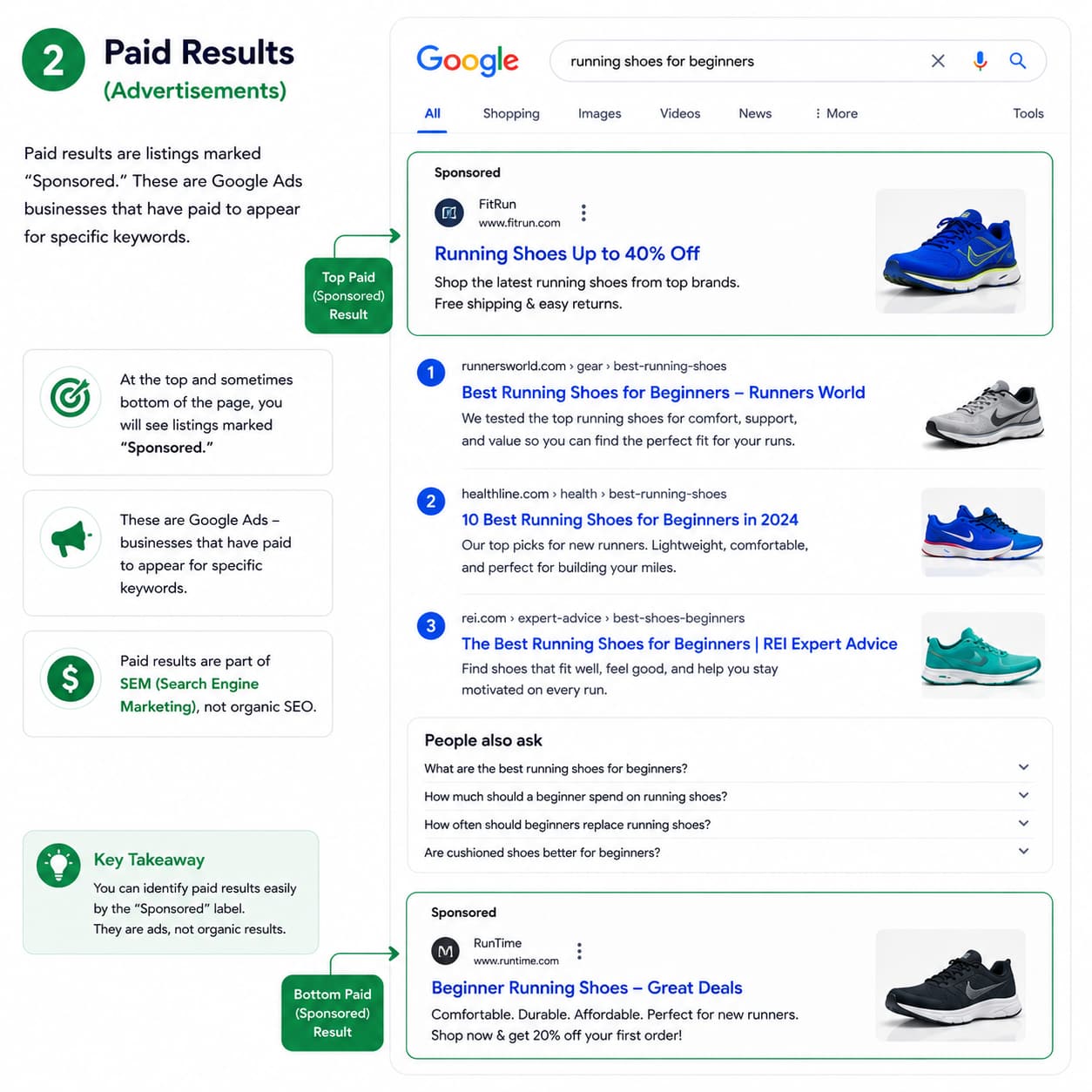
At the top and sometimes bottom of the page, you will see listings marked “Sponsored.” These are Google Ads businesses that have paid to appear there for specific keywords. Paid results are part of SEM (Search Engine Marketing), not organic SEO.
Featured Snippets
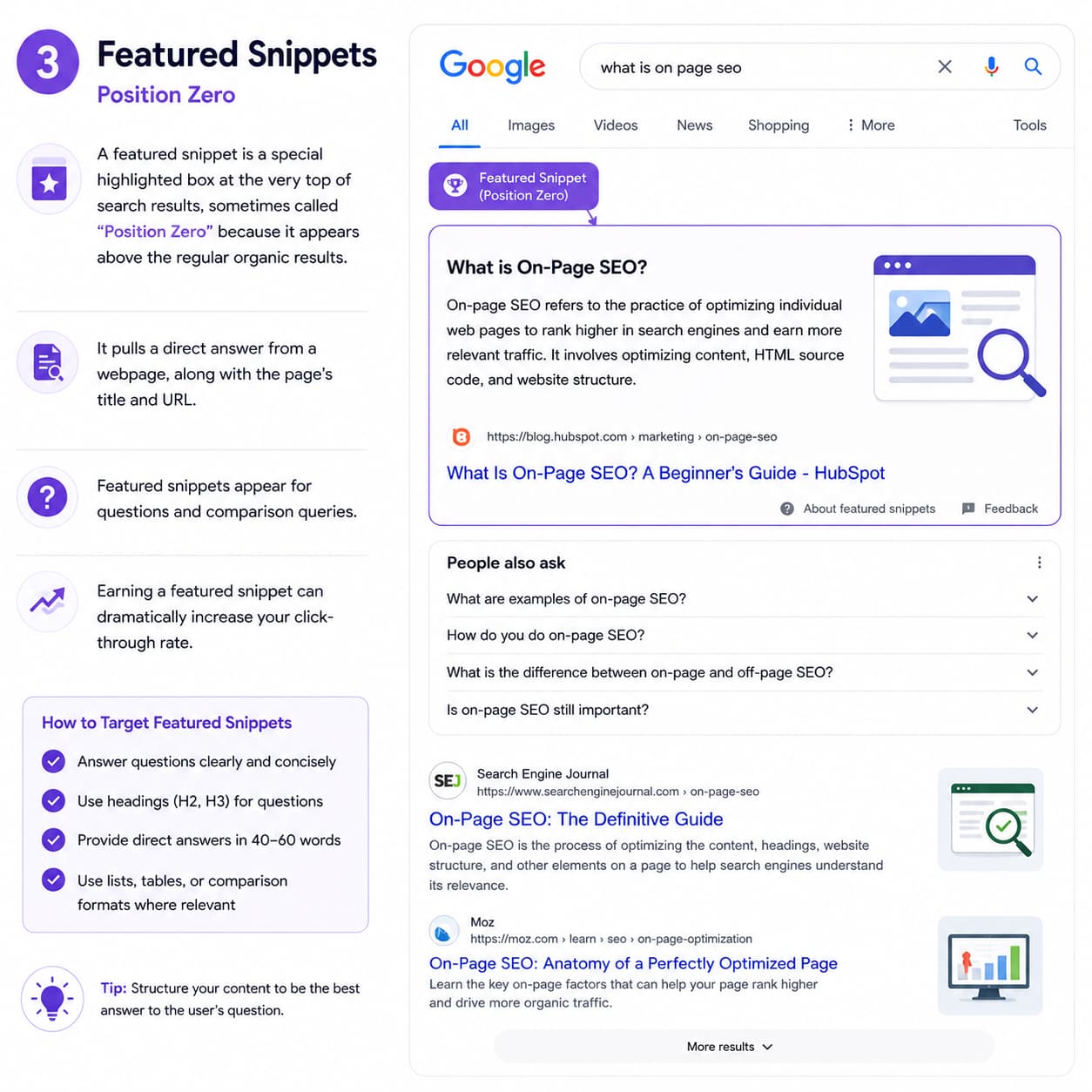
A featured snippet is a special highlighted box at the very top of search results, sometimes called “Position Zero” because it appears above the regular organic results. It pulls a direct answer from a webpage, along with the page’s title and URL.
Featured snippets appear for questions and comparison queries. Earning a featured snippet can dramatically increase your click-through rate. To target them, structure your content to answer specific questions clearly and concisely.
People Also Ask (PAA)
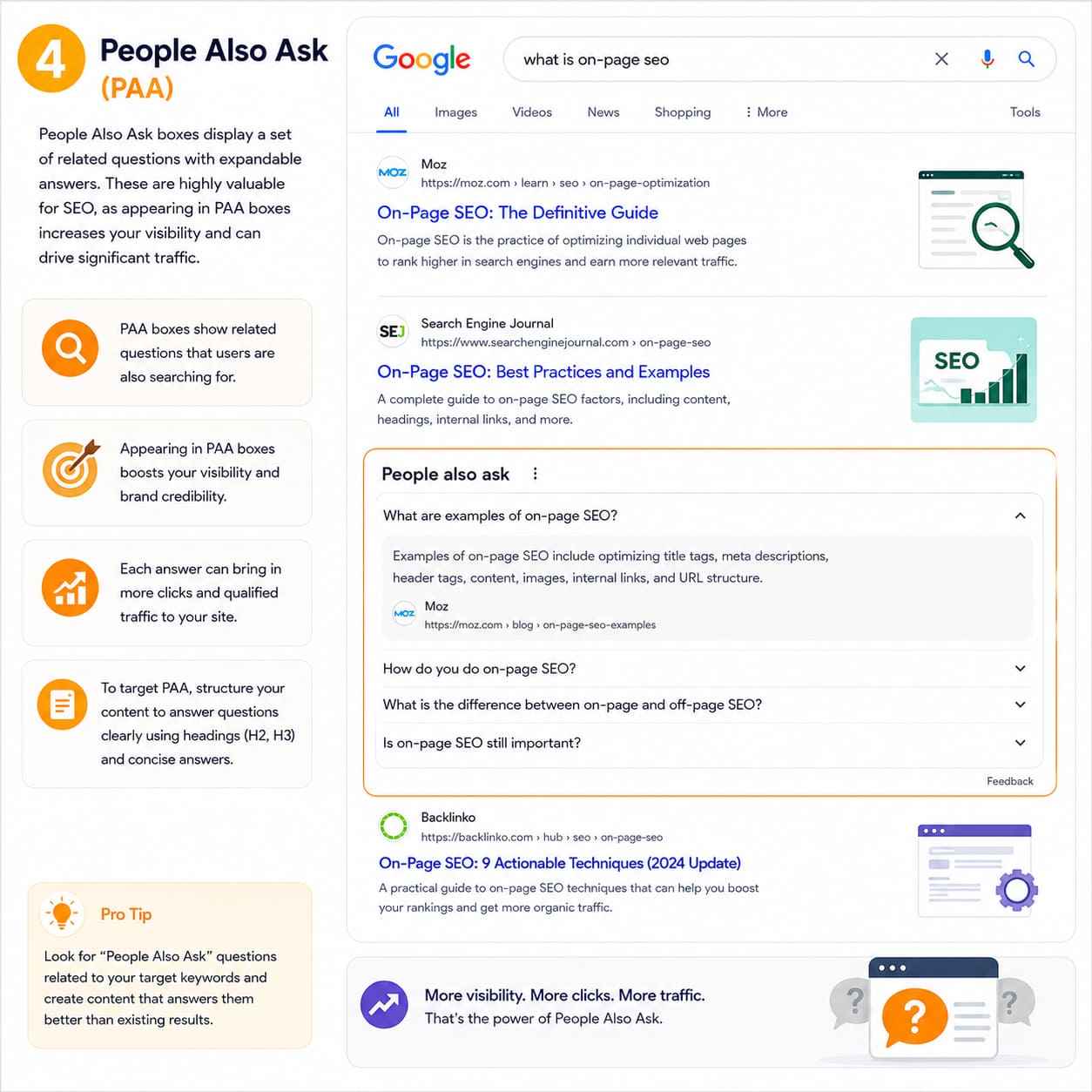
People Also Ask boxes display a set of related questions with expandable answers. These are highly valuable for SEO, as appearing in PAA boxes increases your visibility and can drive significant traffic. Structuring your content to answer specific questions (especially using H3 headings followed by direct answers) is the key tactic.
Knowledge Panels
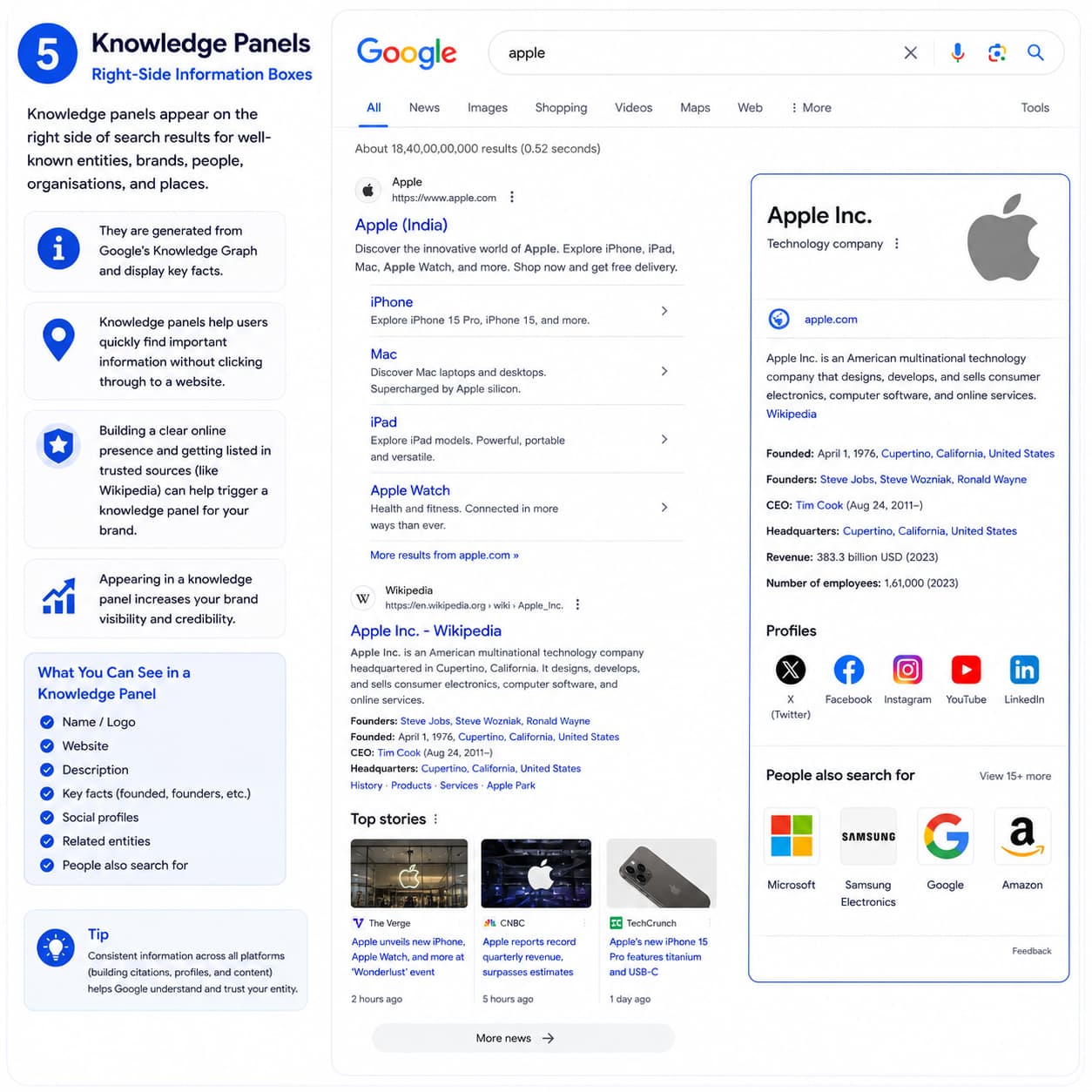
Knowledge panels appear on the right side of search results for well-known entities, brands, people, organisations, and places. They are generated from Google’s Knowledge Graph and display key facts. Building a clear online presence and getting listed in sources like Wikipedia can help trigger knowledge panels for your brand.
Local Pack
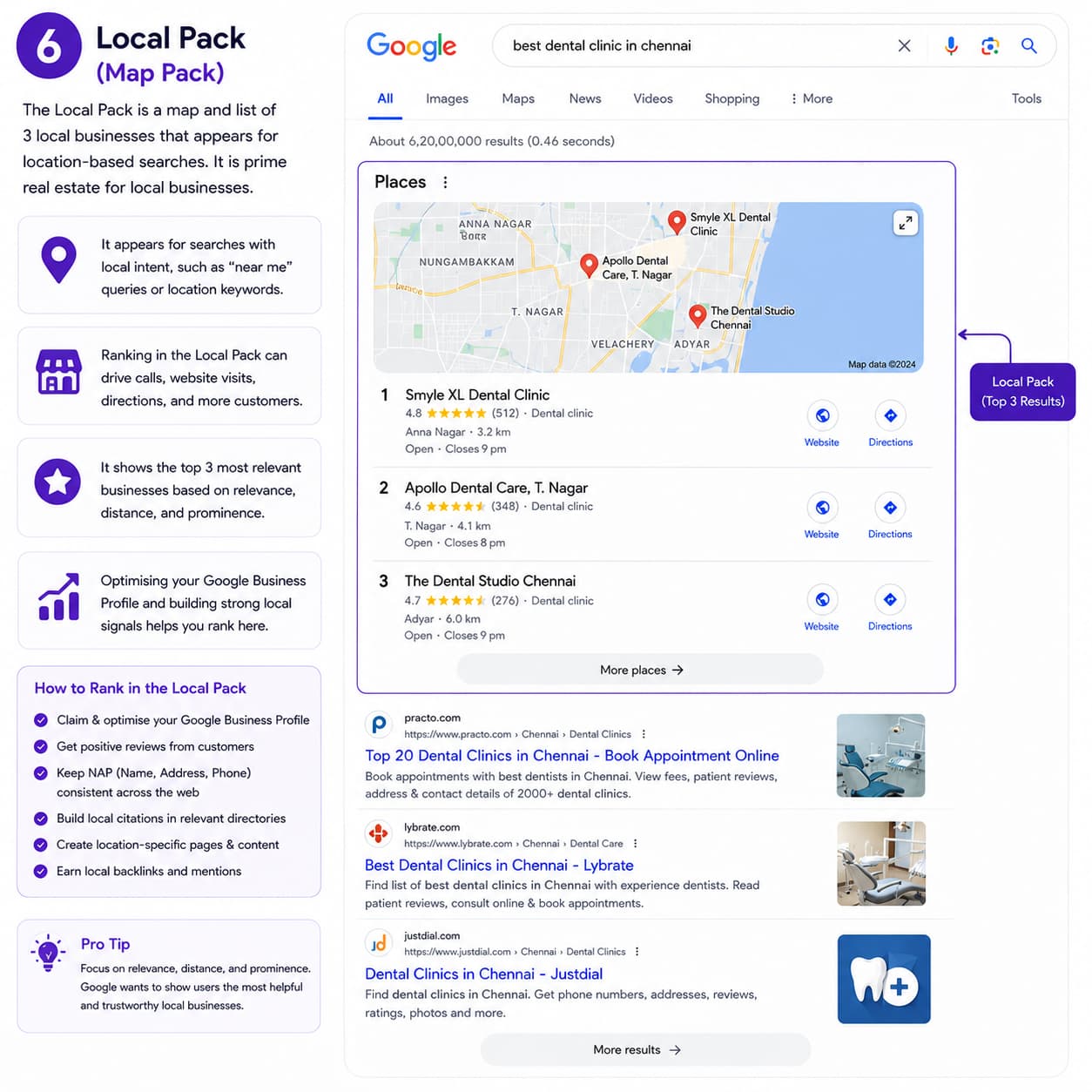
The Local Pack is a map combined with a list of three local businesses that appears for location-based searches. It is the prime real estate for local businesses. Ranking in the Local Pack requires a well-optimised Google Business Profile and strong local SEO signals.
Image Packs and Video Results
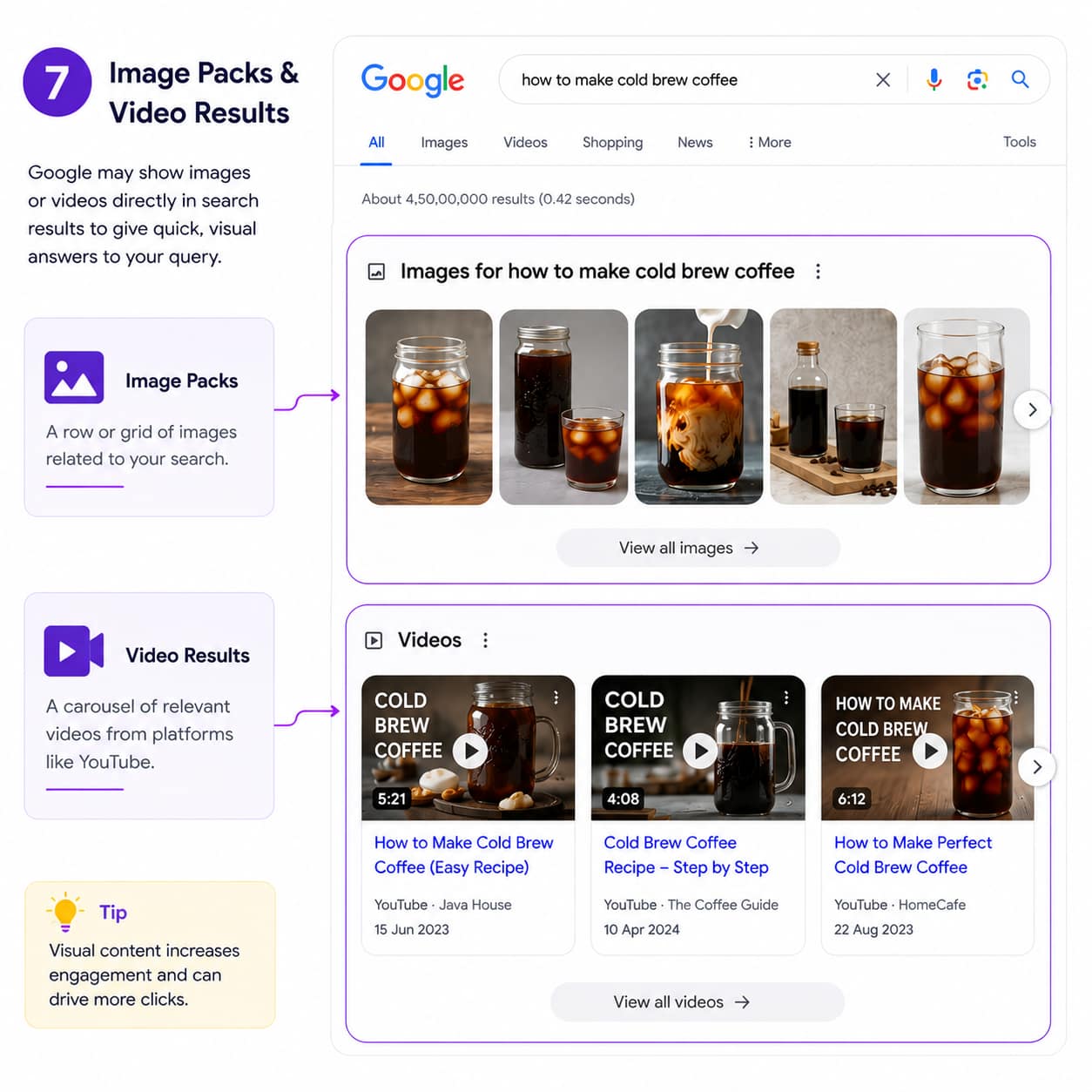
For visual queries, Google may show image packs (rows of images) or video carousels. Optimising images with descriptive file names and alt text, and creating video content, can help you appear in these features.
AI Overviews
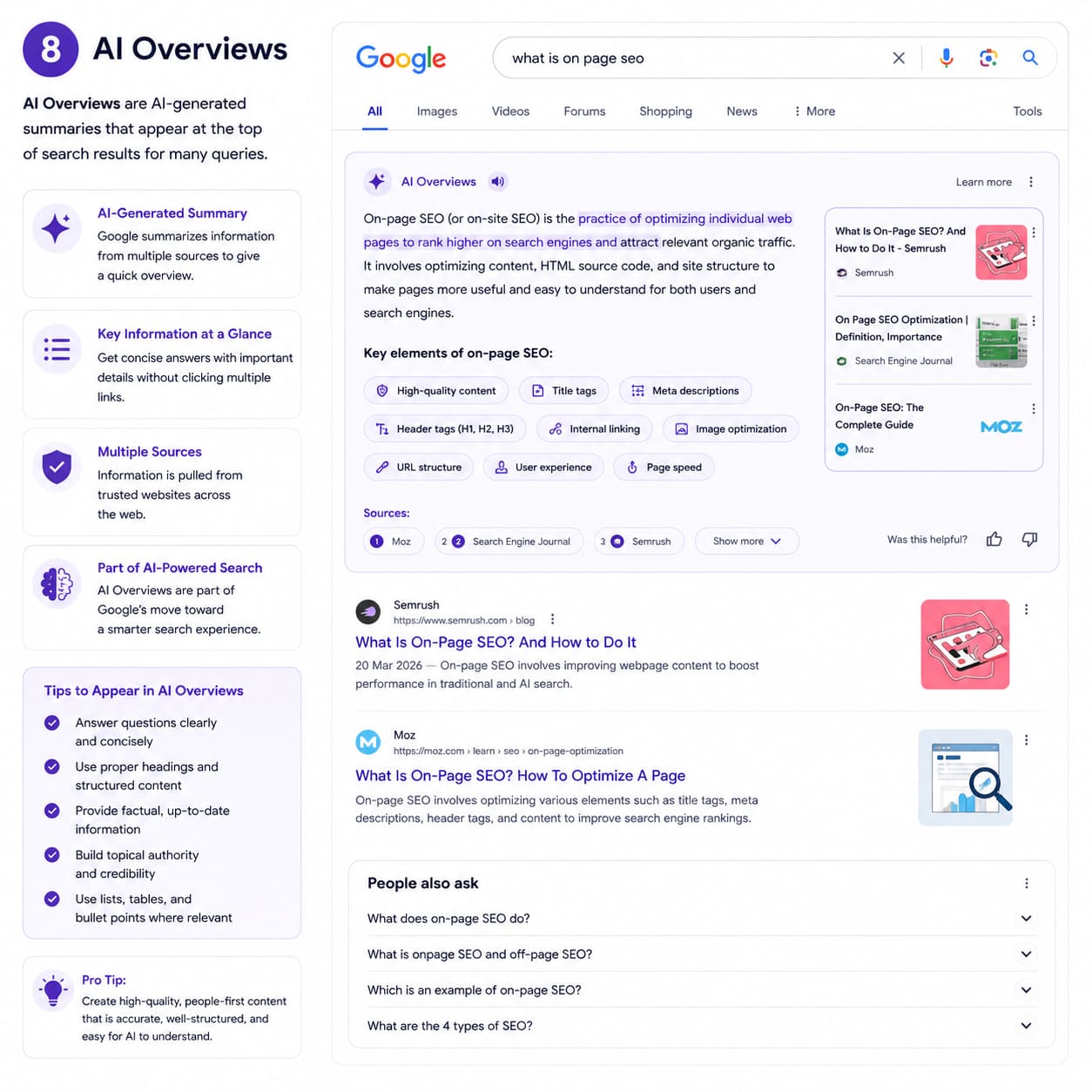
Google AI Overviews are AI-generated summaries that appear at the top of search results for many queries. Google synthesises information from multiple sources and presents a summary directly on the results page. This is part of Google’s broader move toward AI-powered search. Optimising for AI Overviews involves creating clear, authoritative, well-structured content that AI can extract and trust.
| 💡 Why SERP Features Matter for Your Strategy
Different queries trigger different SERP features. Before optimising any page, search your target keyword and analyse what Google is already showing. If a query triggers a Featured Snippet, structure your content to answer it directly. If local results dominate, focus on Local SEO rather than standard organic ranking. If the top results are all videos, consider creating video content alongside written content. |
👉 Learn More: What Are SERPs? A Full Beginner’s Guide
Search Engine Positioning: Why Your Rank Position Matters
It is one thing to rank on Google. It is another thing entirely to rank where people actually look.
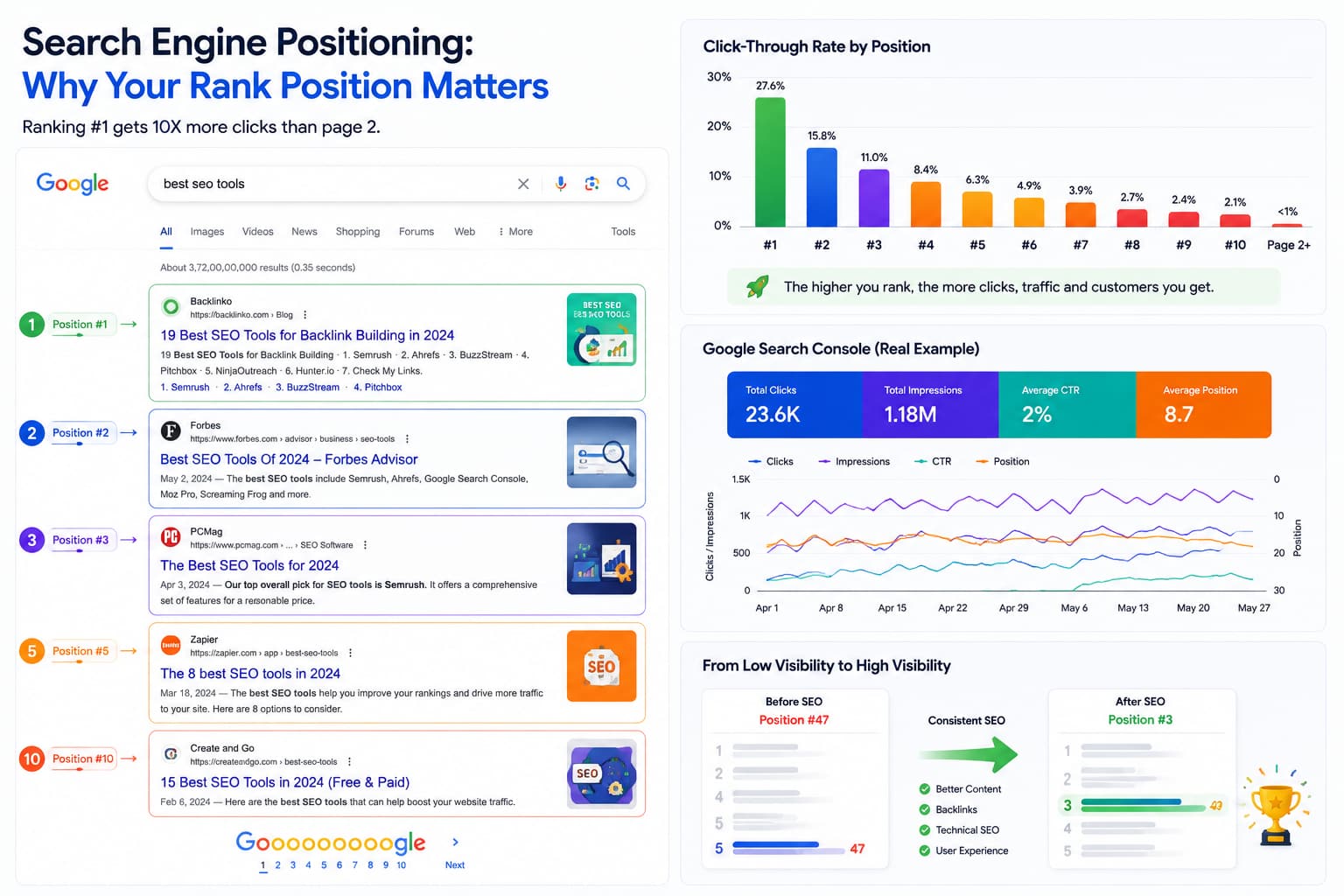
Search engine positioning refers to the specific position your web page occupies in the search results for a particular keyword. Position #1 means you are the first organic result. Position #10 means you are the last result on the first page. Position #11 means you are on page two, and for most searches, page two is effectively invisible.
How Dramatically Position Affects Traffic
The difference in click-through rates between positions is enormous. Here is what the research shows:
| Position | Avg. Click-Through Rate | What This Means |
| #1 | ~27.6% | Over 1 in 4 searchers click here |
| #2 | ~15.8% | Less than half of position #1 |
| #3 | ~11.0% | Drops sharply again |
| #4–#5 | ~6–8% | Still decent, but far behind the top 3 |
| #6–#10 | ~2–4% | Minimal traffic |
| Page 2+ | <1% | Almost no clicks |
This is why the difference between ranking #5 and ranking #2 for a popular keyword can mean thousands of additional visitors per month. SEO is not just about ranking, it is about ranking as high as possible.
The Difference Between Ranking and Positioning
These terms are related but distinct. When we say a page “ranks” for a keyword, we mean Google includes it in the results for that keyword. When we talk about “positioning,” we are referring to the specific spot, the exact number where it appears.
A page can rank for a keyword at position #47 (effectively invisible) and be considered to “rank” for it, but that ranking has negligible value. Moving a page from position #47 to position #12 to position #4 is the ongoing work of SEO.
How to Improve Your Positioning
Improving your position for a keyword generally involves:
- Improving content quality and depth, does your page comprehensively answer the query?
- Matching search intent, are you giving users exactly what they are looking for?
- Strengthening your page’s authority through internal links and backlinks
- Improving page experience signals speed, mobile-friendliness, and layout
- Updating content to keep it current and accurate
👉 Learn More: What Is Search Engine Positioning? Full Guide
SEO vs SEM: What Is the Difference?
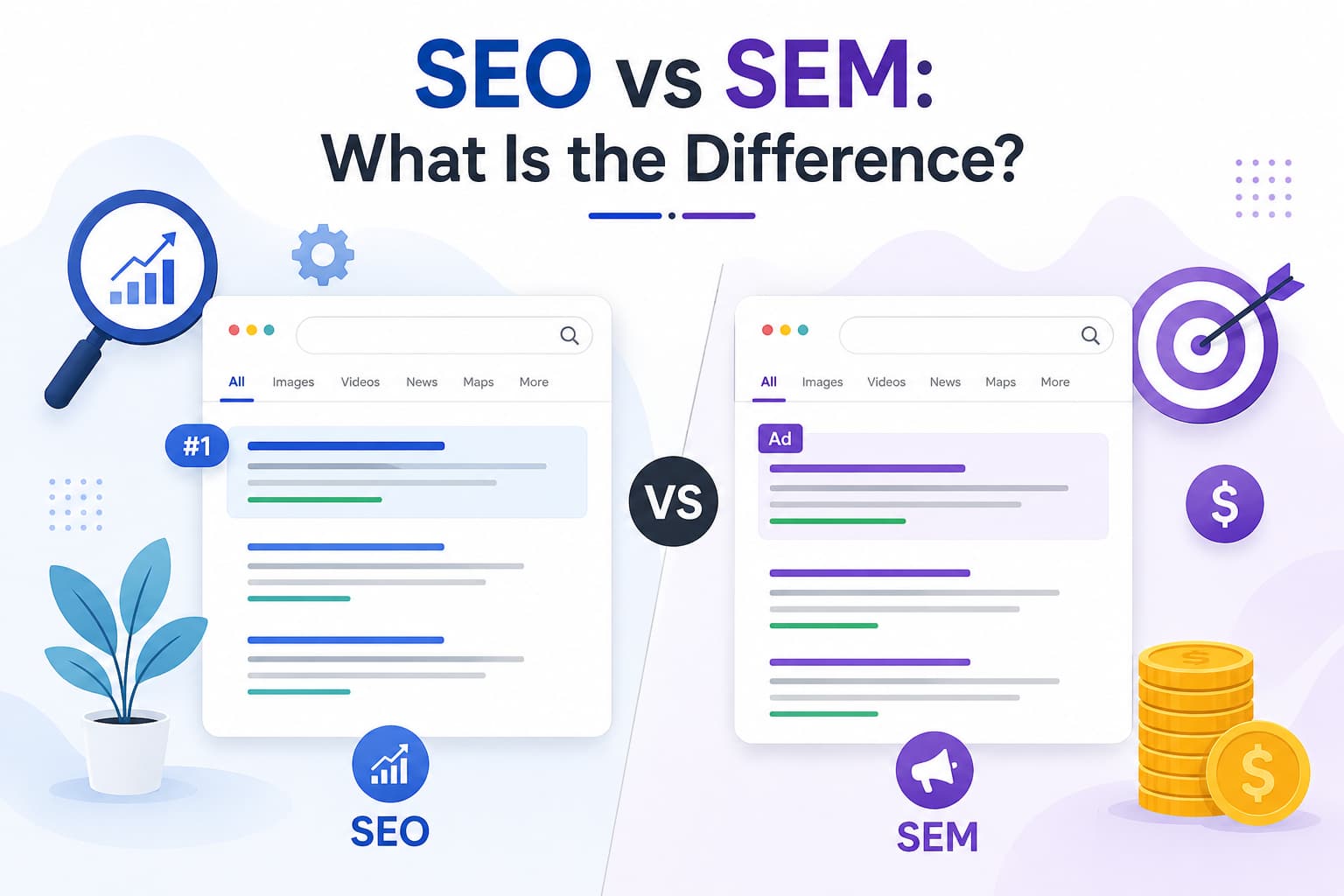
If you have spent any time exploring digital marketing, you have probably encountered both terms: SEO and SEM. They sound similar, are often confused, and are both related to search engines, but they are meaningfully different.
SEO (Search Engine Optimization) is the practice of earning organic, unpaid traffic from search engines by optimising your website and content to rank naturally in search results.
SEM (Search Engine Marketing) is a broader term that typically refers to paid search advertising running pay-per-click (PPC) campaigns on Google Ads to place your website at the top of search results for chosen keywords. You pay each time someone clicks your ad.
Put simply: SEO earns traffic. SEM buys traffic.
Both are valuable and serve different purposes. Here is a detailed comparison:
| Factor | SEO (Organic) | SEM (Paid Search) |
| Cost | No cost per click | Pay per click (PPC) |
| Time to Results | 3–6+ months | Near-instant |
| Longevity | Long-term persists after work stops | Stops when the budget ends |
| Trust & Credibility | High users trust organic results | Lower ads are clearly labelled |
| Traffic Volume | Grows over time | Immediate but budget-dependent |
| Click-Through Rate | Higher organic CTR for most queries | Lower CTR users skip ads |
| Scalability | Scales with authority built | Scales with budget |
| Best For | Long-term sustainable growth | Promotions, new launches, fast wins |
| Skill Required | Content, technical & link skills | Ad copywriting & bidding strategy |
Which Should You Use?
The honest answer is: ideally, both. But if you are just starting, SEO gives you a foundation that pays dividends indefinitely. Think of SEO as buying a house. The investment takes time, but the asset is yours. SEM is like renting immediate access, but it ends when payments stop.
A common beginner mistake is relying entirely on paid ads and neglecting SEO. This creates a fragile strategy where all traffic disappears the moment the ad budget runs out. SEO builds a resilient, lasting organic presence underneath.
👉 Learn More: SEO vs SEM: The Complete Comparison Guide
Search Engine Ranking Factors Explained
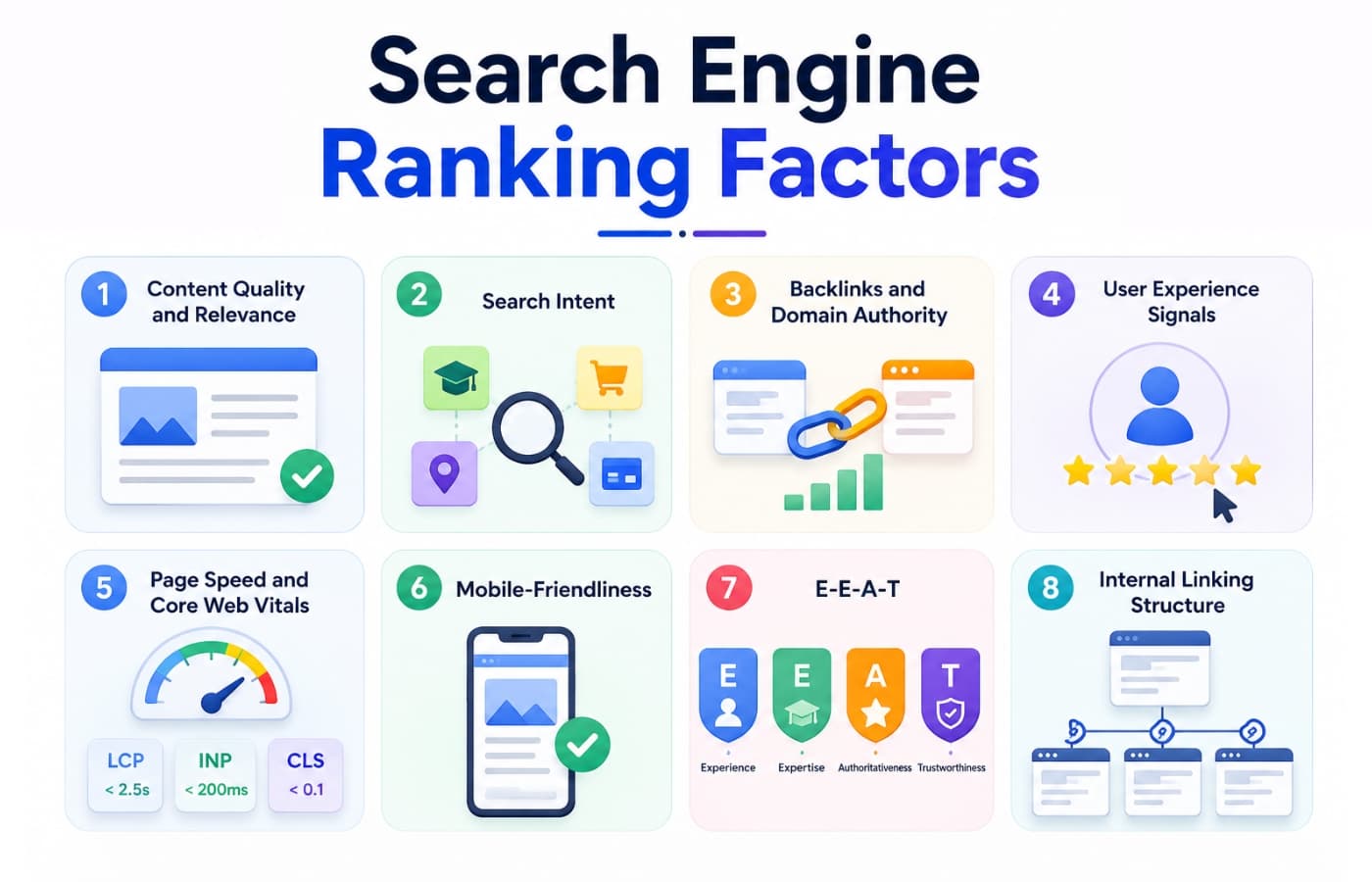
How does Google decide which of the millions of pages on a topic deserves position #1? It evaluates hundreds of signals known as ranking factors. Here is an introduction to the most important ones every beginner should understand:
1. Content Quality and Relevance
This is, without question, the most important ranking factor. Google wants to show the best answer to every query. Your content must be accurate, comprehensive, well-written, and genuinely useful. Thin content pages with barely any information almost never rank well.
Google also assesses relevance: does your content actually match the search query? A page about dog food should not be trying to rank for “graphic design software.” Relevance is basic, but it is the foundation of everything.
2. Search Intent
Search intent refers to the underlying reason someone performs a search. There are four main types:
- Informational: The user wants to learn something. Example: “How does SEO work?”
- Navigational: The user wants to find a specific website. Example: “Google Search Console login”
- Commercial: The user is researching before a purchase. Example: “best SEO tools 2026”
- Transactional: The user wants to buy or act. Example: “buy Ahrefs subscription”
Your content must match the intent behind the keyword. If someone searches an informational query and your page is a hard-sell product page, it will not rank, regardless of quality. Google is remarkably good at identifying intent and rewards pages that match it precisely.
3. Backlinks and Domain Authority
Backlinks are links from other websites pointing to yours. They act as votes of confidence. The more high-quality, relevant backlinks your website has, the more authority Google assigns to it and the more likely it is to rank for competitive keywords.
Not all backlinks are equal. A single link from a respected national newspaper is worth far more than 100 links from obscure, irrelevant websites. Quality, relevance, and diversity of your backlink profile all matter.
4. User Experience Signals
Google pays attention to how users interact with search results. If people click your result and immediately return to Google (a “pogo-stick” behaviour), it signals your page did not satisfy them. Pages that engage users, keeping them on-site, satisfying their questions, and prompting them to explore further send positive signals.
5. Page Speed and Core Web Vitals
Slow websites frustrate users and are penalised in rankings. Google’s Core Web Vitals are a set of specific page experience metrics that are official ranking signals:
- Largest Contentful Paint (LCP): How quickly the main content loads. Target: under 2.5 seconds.
- Interaction to Next Paint (INP): How quickly the page responds to user input. Target: under 200ms.
- Cumulative Layout Shift (CLS): How much the page layout jumps around as it loads. Target: under 0.1.
6. Mobile-Friendliness
More than 60% of searches globally now happen on mobile devices. Google uses mobile-first indexing, meaning it primarily evaluates the mobile version of your website for ranking purposes. A website that looks great on desktop but is broken or difficult on mobile will be penalised.
7. E-E-A-T
E-E-A-T stands for Experience, Expertise, Authoritativeness, and Trustworthiness. It is the framework Google’s quality raters use to evaluate content quality, particularly for topics that can impact people’s lives, such as health advice, financial guidance, and legal information.
- Experience: Does the author have real, first-hand experience with the topic?
- Expertise: Does the author have deep knowledge and skill in the subject area?
- Authoritativeness: Is the website and author recognised as a leading source on the topic?
- Trustworthiness: Is the website accurate, safe, transparent, and honest?
Improving E-E-A-T signals involves writing detailed author bios, citing credible sources, displaying credentials, earning press mentions, and demonstrating real expertise through the depth and accuracy of your content.
8. Internal Linking Structure
How you link pages within your own website helps Google understand the relationship between your content. Pages that receive more internal links are considered more important. A well-structured internal linking strategy helps Google discover all your pages, understand your site’s hierarchy, and distribute authority across your content.
👉 Learn More: All Search Engine Ranking Factors Explained
SEO Best Practices for Beginners
Knowing the theory is one thing. Knowing what to actually do is another. Here is a clear introduction to the key SEO best practices every beginner should implement:
1. Start With Keyword Research
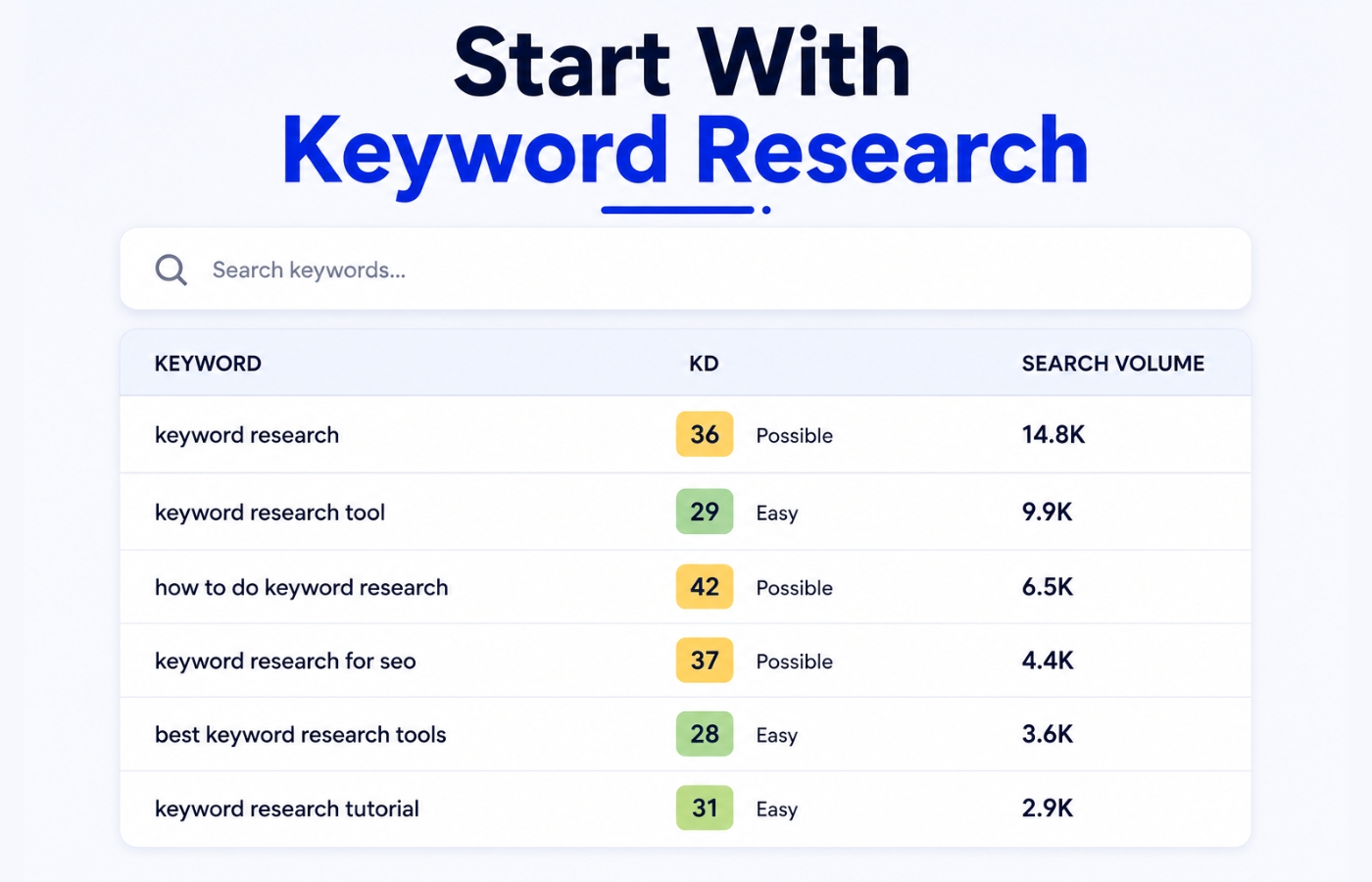
Before you write a single word, research what your audience is actually searching for. Keyword research reveals the exact phrases people type into Google and how many people search for them every month.
Good keyword research involves finding:
- Keywords with decent search volume, enough people are searching for them
- Keywords with manageable competition, you can realistically rank for them
- Keywords that match your audience’s intent they align with what you offer
Tools like Ahrefs, Semrush, and even Google’s free tools make keyword research straightforward. As a beginner, focus on “long-tail keywords”, longer, more specific phrases like “best SEO tools for small businesses” rather than just “SEO tools.” Long-tail keywords are easier to rank for and often convert better.
2. Create High-Quality, Helpful Content
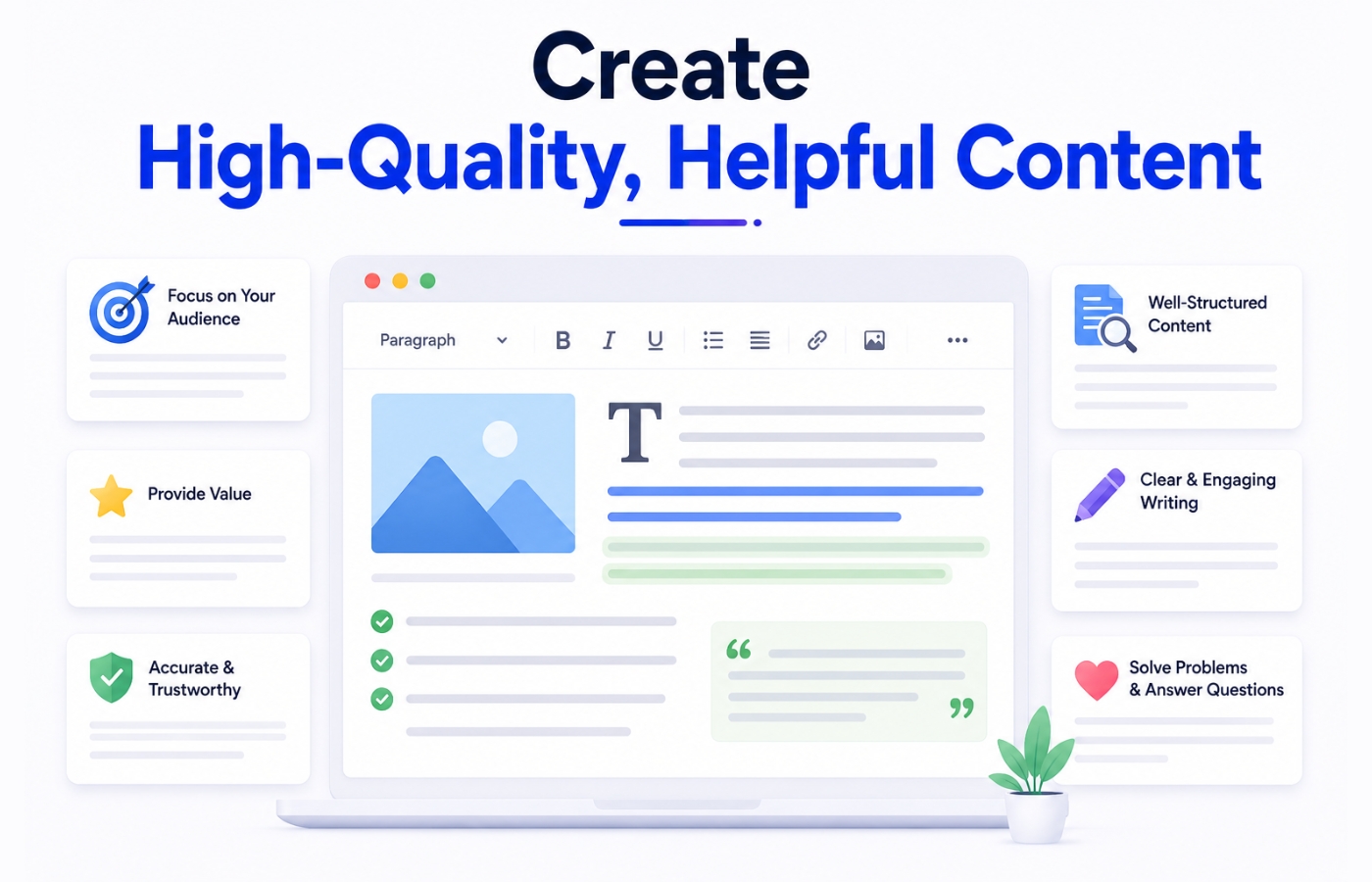
Content is the engine of SEO. Every page on your website should answer a specific question or serve a clear purpose. Ask yourself: “If a beginner searched this keyword and landed on my page, would they find everything they need?”
Good content is:
- Accurate and well-researched
- Written for humans first, search engines second
- Comprehensive it covers the topic thoroughly without being padded
- Easy to read short paragraphs, clear headings, minimal jargon
- Updated regularly to stay current
3. Optimise Your Title Tags and Meta Descriptions
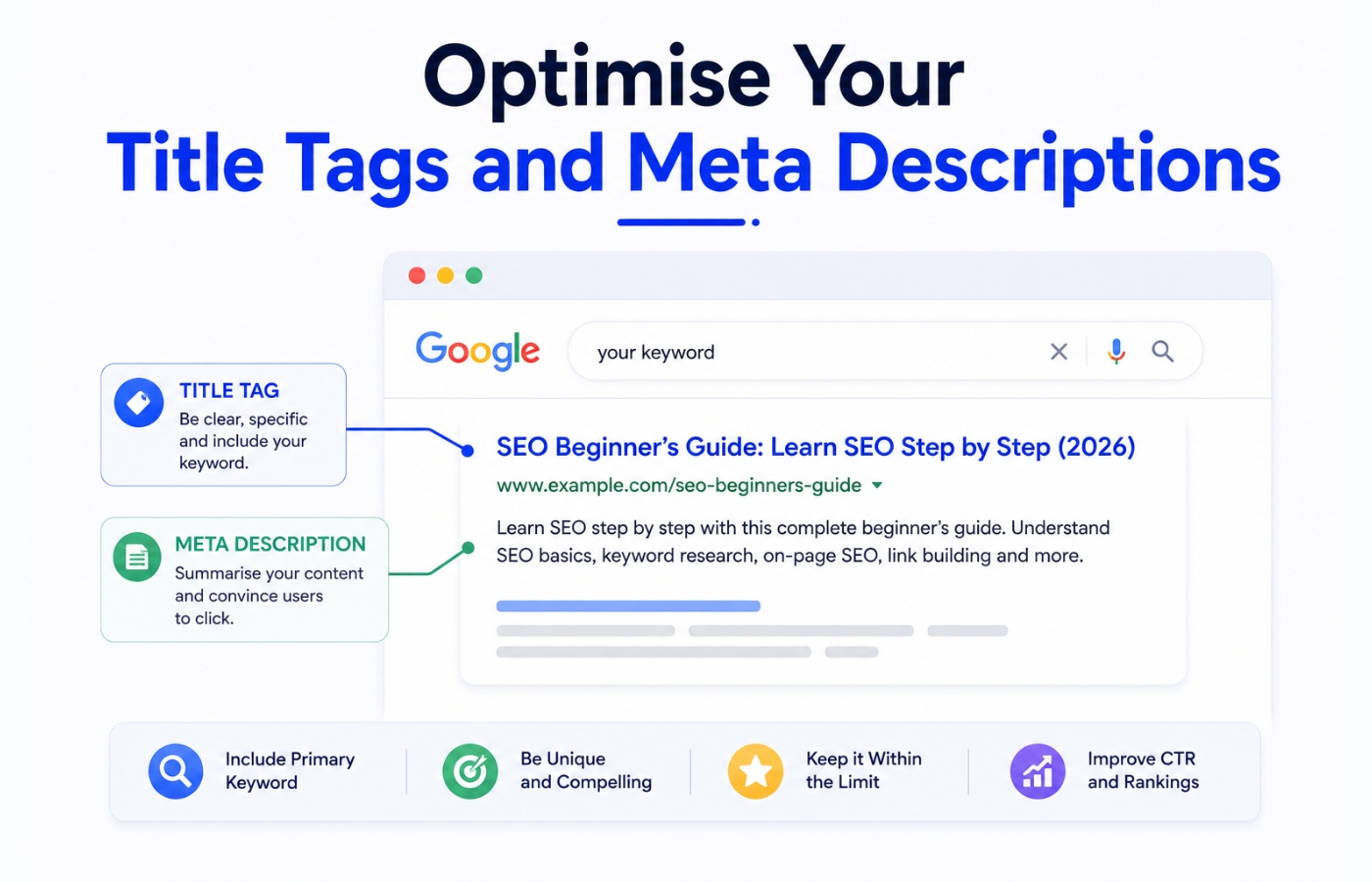
Your title tag is the blue headline that appears in search results. It is one of the strongest on-page ranking signals. Include your target keyword naturally in the title tag and keep it under 60 characters so it does not get cut off in results.
Your meta description is the short paragraph under the title. While it is not a direct ranking factor, a compelling meta description dramatically improves your click-through rate, which means more traffic from the same ranking position.
4. Build a Logical Internal Linking Structure
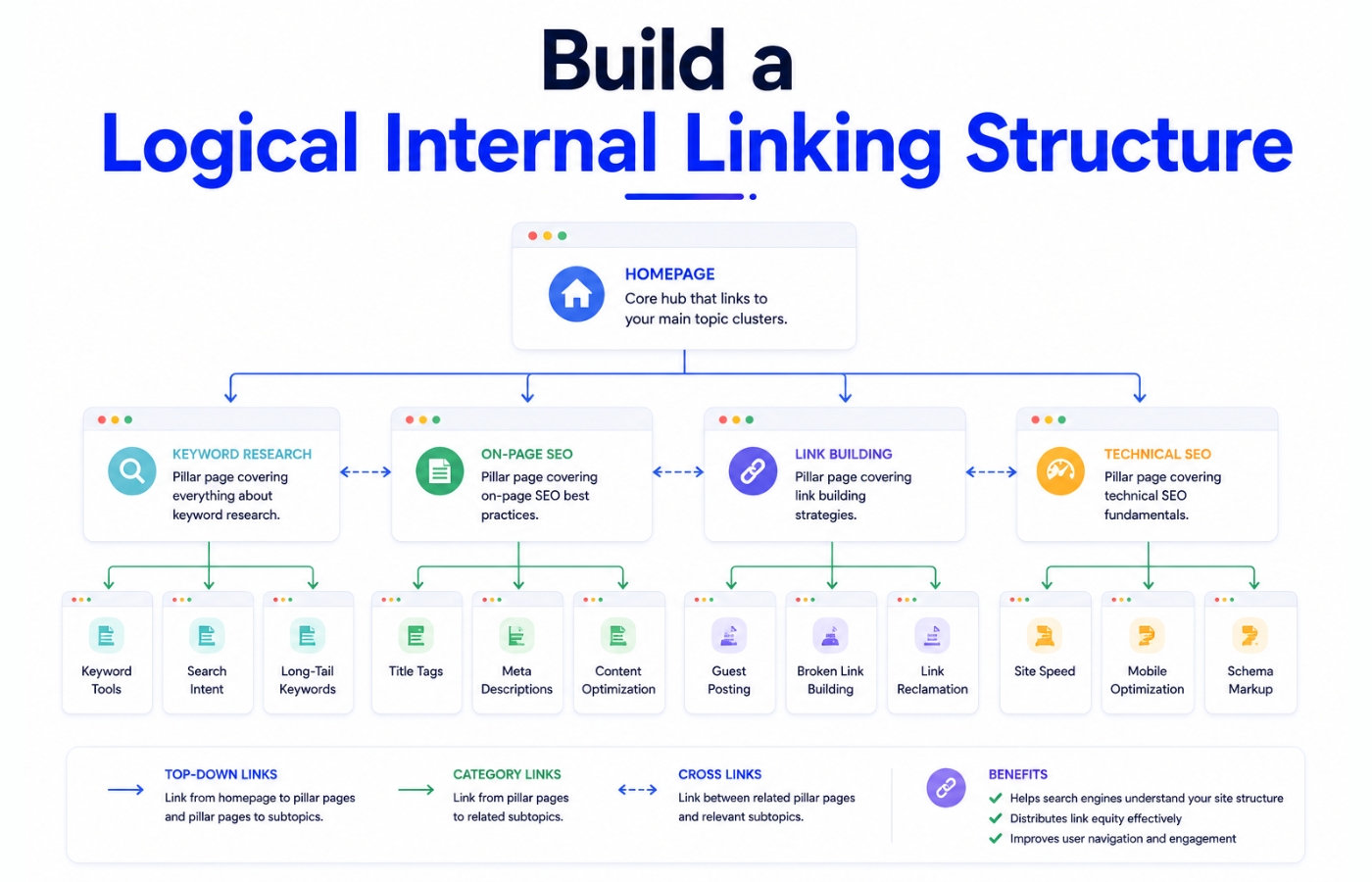
Internal links are links between pages within your own website. They serve two important purposes: they help users navigate to related content, and they help Google discover and understand the relationship between your pages.
A good rule of thumb: every important page on your website should have at least a few other pages linking to it. Avoid “orphan pages” pages with no internal links pointing to them.
5. Earn High-Quality Backlinks
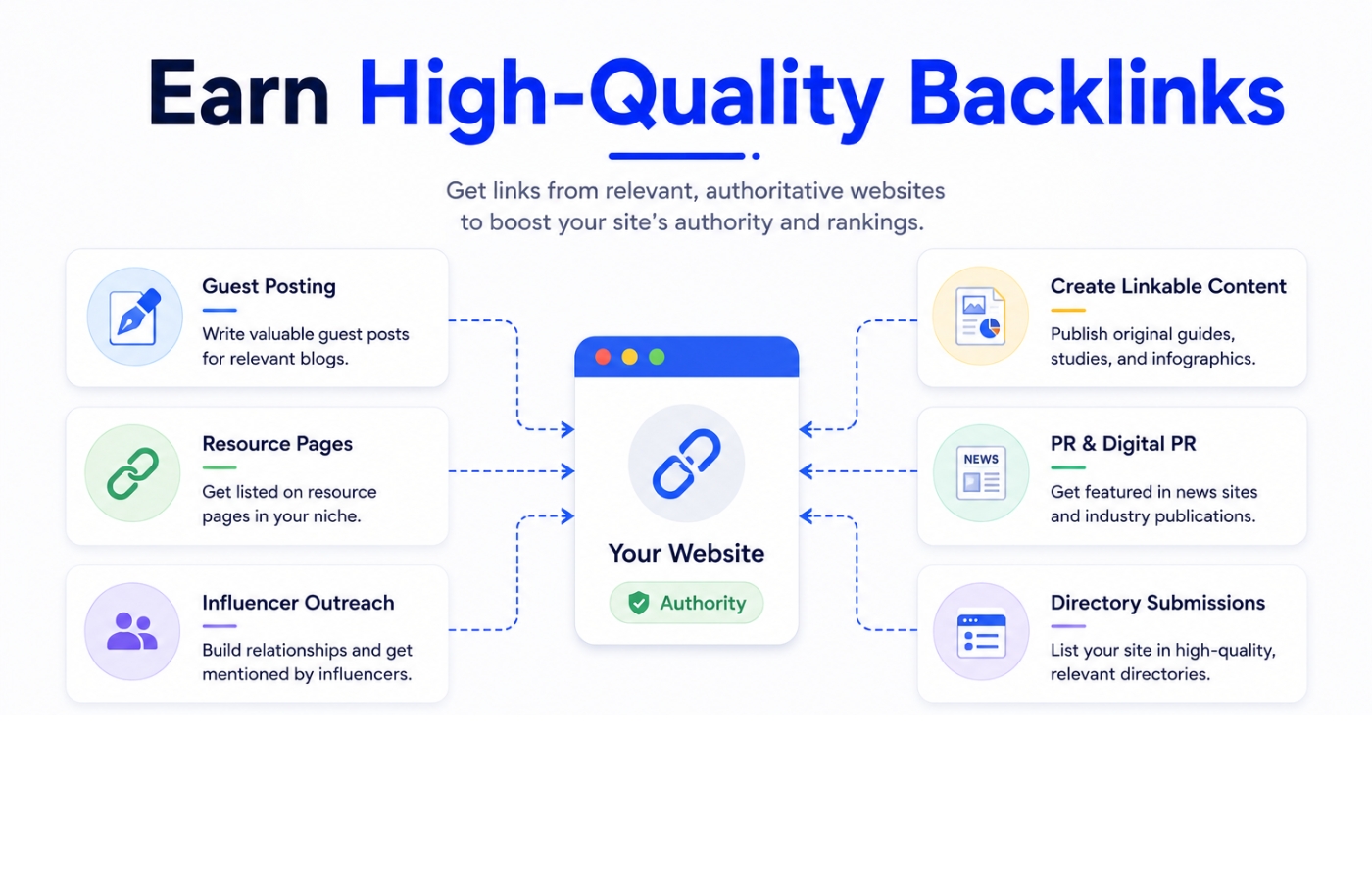
Building backlinks from reputable external websites is one of the most impactful and most challenging aspects of SEO. The most sustainable way to earn backlinks is to create content so useful, comprehensive, or data-driven that other websites naturally want to reference it.
Other legitimate link-building strategies include guest posting on industry blogs, creating free tools or resources, and digital PR campaigns.
6. Fix Technical SEO Issues
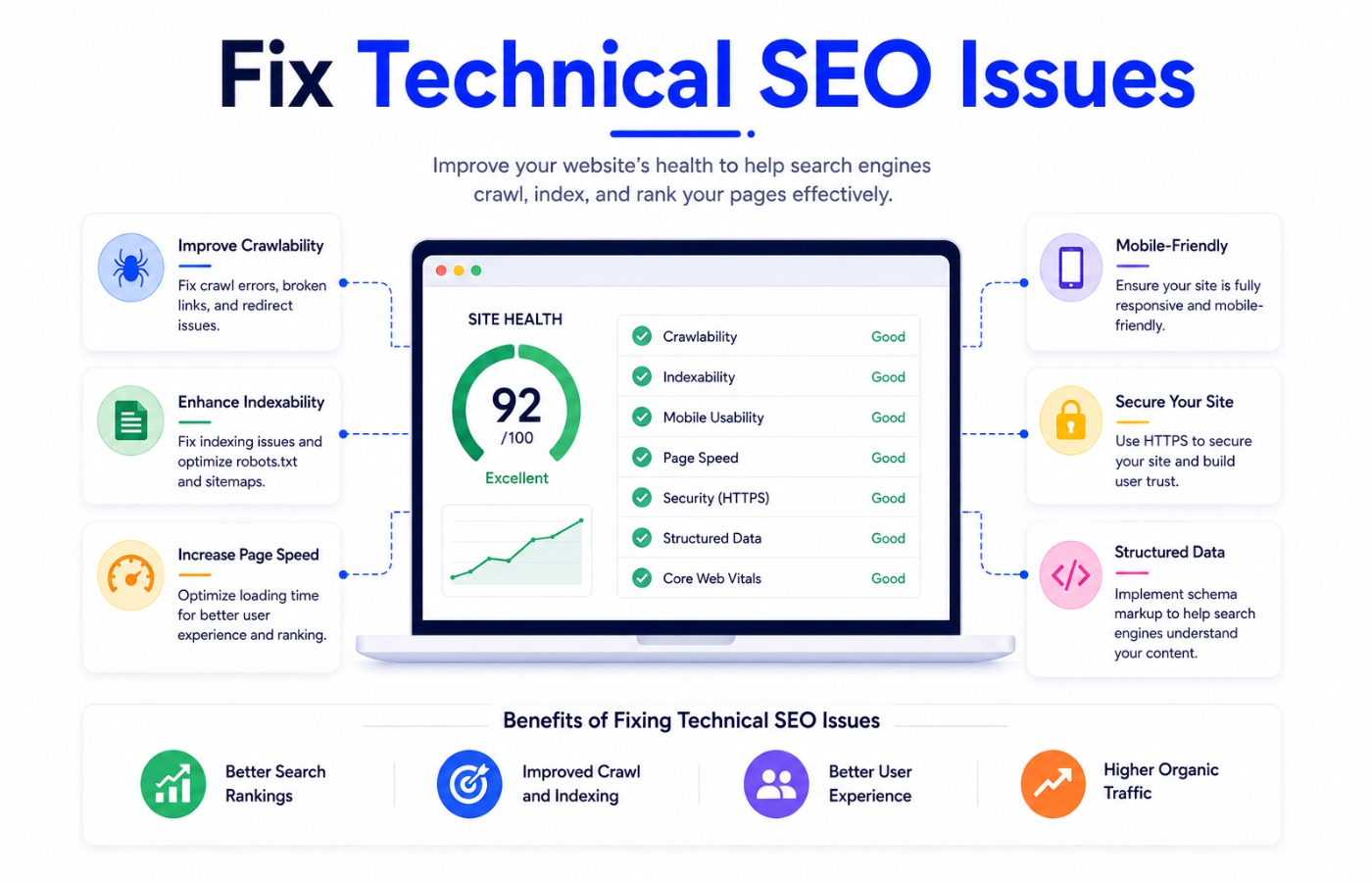
You do not need to be a developer to address basic technical SEO. Start by checking these fundamentals:
- Is your site accessible via HTTPS?
- Does it load quickly on mobile?
- Are there any broken links (404 errors)?
- Is there a sitemap submitted to Google Search Console?
- Are important pages indexed? (Check in Google Search Console)
👉 Learn More: Complete SEO Best Practices Guide for 2026
SEO-Friendly Web Design: Building on Solid Ground
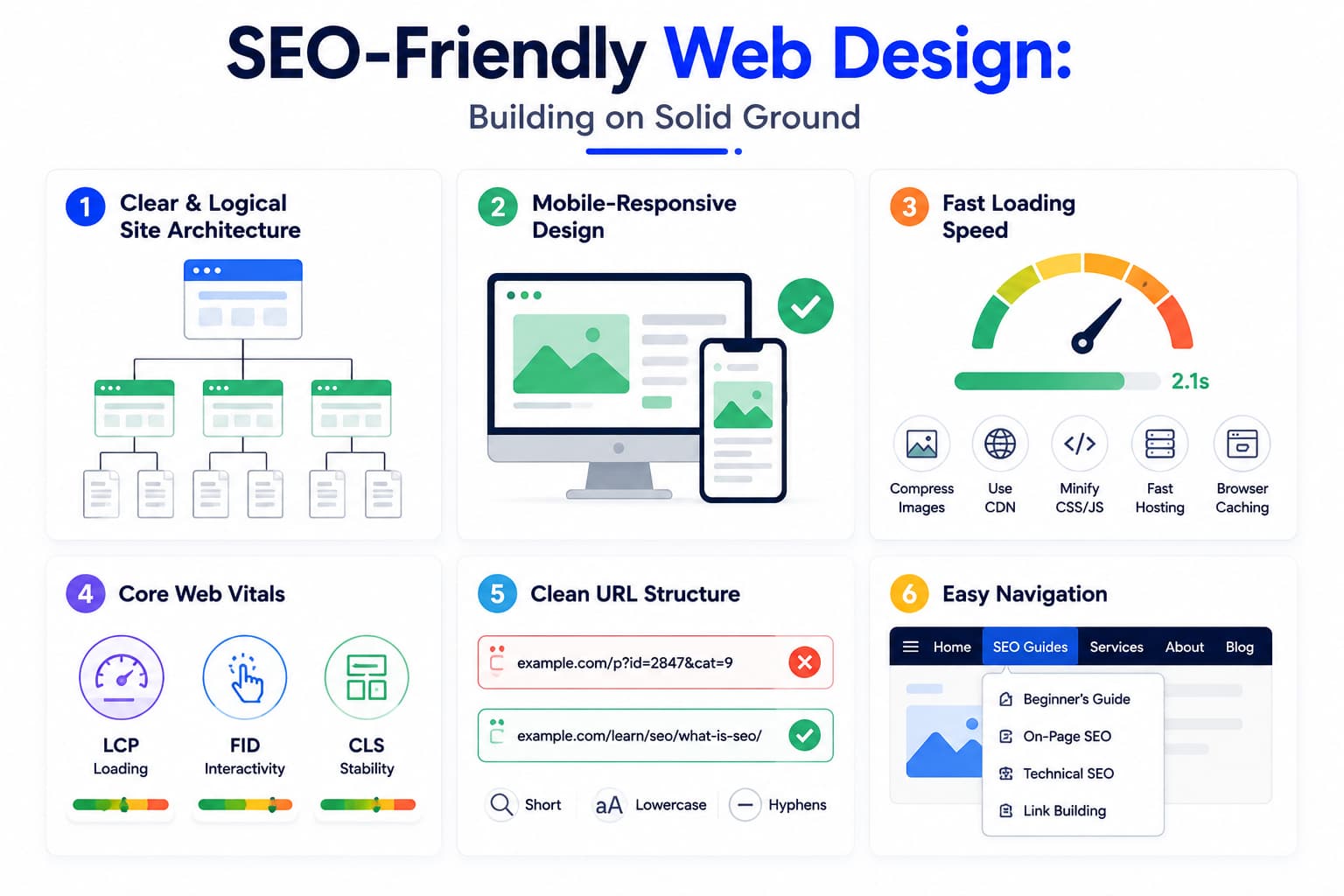
The design and structure of your website have a profound impact on both user experience and SEO. A beautiful-looking website that is slow to load, hard to navigate on mobile, or structurally confusing will struggle to rank regardless of content quality.
Here are the key web design principles that support strong SEO:
Clear and Logical Site Architecture
Site architecture refers to how your website’s pages are organised and connected. A clear hierarchy with your homepage at the top, followed by category pages, then individual content pages, helps both users and Google navigate your site efficiently.
A good rule of thumb: any page on your website should be reachable within three clicks from the homepage. Deep, buried pages that require many clicks to reach receive less crawl attention and less authority from internal links.
Mobile-Responsive Design
Your website must look and function perfectly on smartphones and tablets. Since Google uses mobile-first indexing, the mobile version of your site is what gets evaluated for rankings. Test your website on multiple device sizes. Use a mobile-responsive theme or framework as the foundation.
Fast Loading Speed
Users expect web pages to load in under 3 seconds. Any longer and they leave, increasing your bounce rate and sending negative signals to Google. Page speed improvements include:
- Compressing and properly sizing images
- Using a Content Delivery Network (CDN) to serve files from servers near the user
- Minimising unnecessary JavaScript and CSS files
- Using browser caching so returning visitors load pages faster
- Choosing a fast, reliable web hosting provider
Core Web Vitals
Google’s Core Web Vitals are measurable page experience signals. They assess how quickly your page loads, how quickly it responds to user interaction, and how stable the layout is. Tools like Google PageSpeed Insights and Search Console’s Core Web Vitals report show exactly where your pages need improvement.
Clean URL Structure
URLs should be human-readable and describe the page content. Compare these two URLs for the same page:
Bad URL: https://example.com/p?id=2847&cat=9
Good URL: https://example.com/learn/seo/what-is-seo/
The good URL tells both users and Google exactly what the page is about. Keep URLs short, lowercase, and use hyphens to separate words.
Easy Navigation
A clear navigation menu helps users find what they are looking for quickly and reduces frustration. It also helps Google understand your site structure. Use descriptive anchor text in navigation links “SEO Guides” is better than “Click Here.”
👉 Learn More: SEO-Friendly Web Design: A Complete Guide
SEO Metrics: What to Track and Why
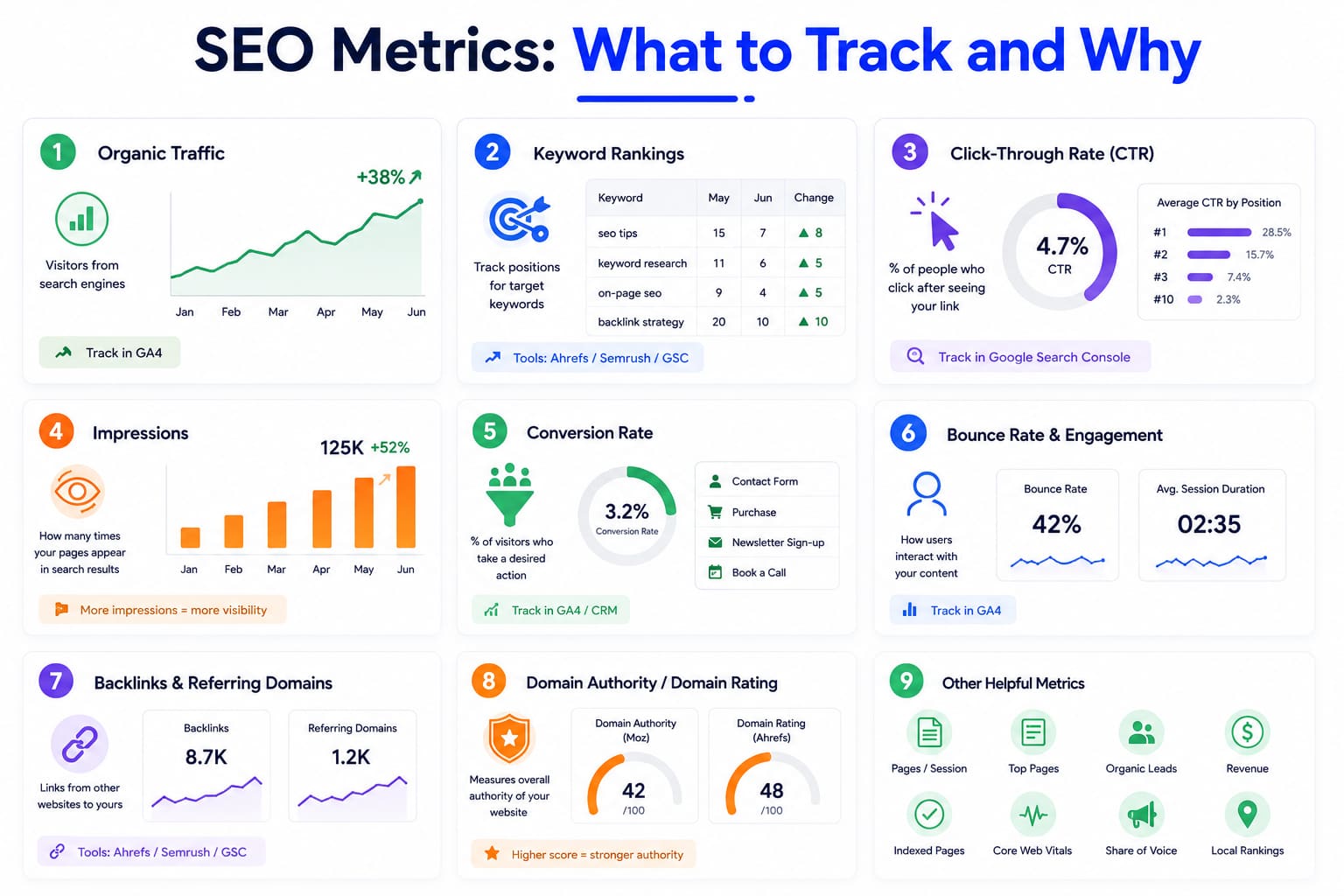
You cannot improve what you do not measure. Tracking the right SEO metrics shows you what is working, what is not, and where to focus your energy. Here are the key metrics every beginner should monitor:
Organic Traffic
Organic traffic is the number of visitors arriving at your website through unpaid search results. This is the headline metric for SEO, the most direct measure of whether your optimisation efforts are paying off. Track it in Google Analytics 4.
Look at organic traffic trends over time. Month-to-month fluctuations are normal. What matters is the overall direction: is it growing over 3, 6, and 12-month periods?
Keyword Rankings
Your keyword rankings show where your pages appear in Google’s search results for your target keywords. Track rankings for the keywords most important to your business. Ranking tools like Ahrefs, Semrush, or Google Search Console (for basic tracking) can monitor these positions over time.
A page moving from position #15 to position #7 is a positive sign, even if organic traffic has not yet increased dramatically. Position improvements often lead to traffic increases with a slight delay.
Click-Through Rate (CTR)
CTR measures the percentage of people who see your page in search results and actually click on it. A low CTR, say 1% for a page ranking in position #3, suggests your title tag and meta description are not compelling enough. Improving them can significantly increase traffic without changing your ranking.
Google Search Console shows your average CTR for all queries driving traffic to your site.
Impressions
Impressions count how many times your pages appeared in Google’s search results, whether or not anyone clicked. Growing impressions indicate that Google is showing your content to more searchers, which is a positive early indicator of SEO progress even before rankings fully improve.
Conversion Rate
Ultimately, SEO should drive business results. Conversion rate measures the percentage of organic traffic visitors who take a desired action, filling in a contact form, making a purchase, signing up for a newsletter, or booking a call. High organic traffic with poor conversion rates often indicates a mismatch between the searchers you are attracting and what your website offers.
Bounce Rate and Engagement
Bounce rate measures the percentage of visitors who leave your site after viewing only one page. While a high bounce rate is not always bad (a user might read your entire article and leave satisfied), a very high bounce rate combined with a short average session duration often signals that your content is not meeting user expectations.
Backlinks and Referring Domains
Track the number of external websites linking to yours (referring domains) and the total number of individual backlinks. Growing both metrics indicates your link-building efforts are working. Referring domains’ unique websites linking to you is generally a more meaningful metric than raw backlink count.
Domain Authority / Domain Rating
Tools like Moz (Domain Authority) and Ahrefs (Domain Rating) assign a score from 0 to 100 based on the strength of your website’s backlink profile. While not a direct Google metric, these proprietary scores give a useful relative measure of your site’s authority compared to competitors.
👉 Learn More: SEO Metrics: What to Track and Why
Essential SEO Tools Every Beginner Should Know
The right tools make SEO measurable, efficient, and far less guesswork. Here are the tools that every beginner should be familiar with:
1. Google Search Console (Free)
Google Search Console is Google’s own free tool for website owners. It is the most important free SEO tool available and should be the first thing you set up for any website. It shows you:
- Which keywords are bringing users to your site, and at what position
- How many impressions and clicks each page is receiving from Google
- Which pages Google has indexed (and which it has not)
- Any technical issues Google has found include crawl errors, mobile usability problems, and Core Web Vitals issues
- Manual penalties if Google has taken action against your site
Think of Google Search Console as your direct communication channel with Google. It is indispensable.
2. Google Analytics 4 (Free)

Google Analytics 4 (GA4) tracks user behaviour on your website. While Search Console focuses on how users find you through Google, GA4 shows you what they do once they arrive. Key features:
- Traffic sources where visitors come from (search, social, direct, referral)
- User behaviour, which pages they visit, how long they stay, and where they drop off
- Conversion tracking whether organic visitors are completing your desired actions
- Audience demographics: who your visitors are
Use Search Console and GA4 together for a complete picture of your SEO performance.
3. Ahrefs

Ahrefs is one of the most powerful and widely used professional SEO platforms. It is particularly known for its backlink database, one of the largest and most accurate available. Key capabilities:
- Keyword Explorer: Research keywords with volume, difficulty, and traffic potential data
- Site Explorer: Analyse any website’s organic traffic, top pages, and backlink profile
- Content Gap: Discover keywords your competitors rank for that you do not
- Site Audit: Crawl your website to find technical SEO issues
- Rank Tracker: Monitor your keyword positions over time
Ahrefs is a paid tool, but the investment is well worth it for businesses serious about SEO. Many agencies use it as their primary platform.
4. Semrush

Semrush is another industry-leading all-in-one SEO and digital marketing suite. It competes directly with Ahrefs and is preferred by many agencies and marketers, particularly for its:
- Keyword Magic Tool: One of the largest keyword databases available
- Position Tracking: Detailed keyword rank monitoring
- On-Page SEO Checker: Content optimisation recommendations for specific pages
- Competitor Intelligence: Deep analysis of what is working for competitors
- Local SEO Tools: Google Business Profile integration and local tracking
Semrush offers a limited free plan, making it accessible for beginners to get started without an upfront investment.
5. Screaming Frog SEO Spider
Screaming Frog is a desktop application that crawls your website just like Googlebot does and reports back on everything it finds. It is the go-to tool for technical SEO audits. It identifies:
- Broken links (404 errors)
- Redirect chains and loops
- Missing or duplicate title tags and meta descriptions
- Pages with thin content
- Images without alt text
The free version crawls up to 500 URLs, enough for most small to medium websites. The paid version unlocks unlimited crawling and advanced features.
| 🛠️ Beginner’s Tool Stack
Start here (free): Google Search Console + Google Analytics 4 When ready to invest: Semrush (broader toolset) or Ahrefs (best backlink data) For technical audits: Screaming Frog SEO Spider (free up to 500 pages) Bonus free tools: Google PageSpeed Insights, Answer the Public (keyword research) |
Common SEO Mistakes Beginners Make (And How to Avoid Them)
Understanding what NOT to do is just as important as knowing best practices. Here are the most common SEO mistakes beginners make, many of which can actively harm your rankings:
Mistake 1: Keyword Stuffing
Keyword stuffing is the practice of unnaturally repeating keywords throughout content in an attempt to rank for them. For example: “If you are looking for the best SEO services, our SEO services are the best SEO services available from our SEO services company.”
This makes content unreadable and is a tactic that Google actively penalises with algorithmic and manual penalties. Modern SEO is about writing naturally and comprehensively; if you cover a topic well, keywords will appear naturally. Write for your reader first.
Mistake 2: Ignoring Search Intent
Creating content that does not match what the searcher actually wants is one of the most common and costly beginner mistakes. If someone searches “how to make pasta”, they want a recipe with step-by-step instructions, not an essay on the history of Italian food.
Before writing any page, search the target keyword yourself. Look at the top-ranking results. What format are they using? What do they cover? What does the searcher actually want? Build your content to match.
Mistake 3: Neglecting Technical SEO
Many beginners focus exclusively on content while completely ignoring the technical health of their website. A website that loads slowly, has crawl errors, or is not indexed properly will struggle to rank, regardless of how excellent the content is. Run a basic technical audit early and fix fundamental issues before investing heavily in content.
Mistake 4: Buying Low-Quality Backlinks
The promise of “500 backlinks for $50” is tempting but dangerous. Links from spammy, irrelevant, or private blog networks (PBNs) can trigger Google penalties that tank your entire website’s rankings. Google’s Penguin algorithm specifically targets manipulative link schemes. Build backlinks organically or through legitimate outreach.
Mistake 5: Publishing Thin or Shallow Content
A 200-word page that superficially mentions a topic will rarely rank for competitive keywords. Google rewards comprehensive, genuinely helpful content. If your page does not fully satisfy the user’s query, giving them everything they need in one place, a competitor’s more complete page will outrank you.
This does not mean every page needs to be 5,000 words. It means every page should be as long as it needs to be to answer the question no more, no less fully.
Mistake 6: Ignoring Internal Linking
Many beginners publish great content in isolation without linking from other relevant pages or adding internal links to related content within the article. This hurts both user experience and SEO. Internal linking distributes authority across your site and helps Google understand which pages are most important. Make internal linking a habit from the very first post you publish.
Mistake 7: Expecting Instant Results
SEO takes time. Beginners often invest significant effort for a few weeks, see no dramatic results, and conclude that “SEO doesn’t work.” The reality is that SEO results typically begin to emerge after 3–6 months, and real momentum often builds over 12+ months. Patience and consistency are essential. Track progress in smaller indicators, impressions growing, more pages indexed, and keyword positions slowly improving before expecting traffic lifts.
Mistake 8: Duplicate Content
Having the same or very similar content appearing on multiple URLs of your website confuses Google and dilutes the authority of each page. Use canonical tags to tell Google which version of a page is the original. Avoid creating multiple pages for the same keyword; consolidate them into one comprehensive resource instead.
The Future of SEO: What Beginners Need to Know About 2026 and Beyond
SEO is not static. Search engines are evolving rapidly, particularly with the rise of artificial intelligence. Here is what is shaping the future of SEO and why it matters even for beginners:
AI Is Transforming Search
Google’s search results are increasingly shaped by AI. From the ranking algorithm (RankBrain and later MUM, Gemini) to the way results are displayed (AI Overviews), artificial intelligence is fundamentally changing how search works.
For SEO practitioners, this means the old approach of “optimise for keywords” is evolving into “demonstrate genuine expertise and comprehensively satisfy user intent.” AI-powered algorithms are better than ever at identifying genuinely helpful content versus content that merely looks optimised on the surface.
Google AI Overviews
AI Overviews (previously called Search Generative Experience or SGE) now appear at the top of many Google results. Google synthesises information from trusted sources and presents a direct answer, sometimes without users needing to click through to any website.
To appear in and benefit from AI Overviews, the strategy is essentially the same as for quality SEO: create authoritative, well-structured, accurate content. AI systems cite and reference sources they find credible. Building topical authority and E-E-A-T signals helps your content be selected as a source.
Topical Authority Over Single Keywords
The future of SEO belongs to websites that comprehensively cover entire topic areas, not those that optimise isolated pages for single keywords. Google increasingly rewards websites that demonstrate deep expertise across a subject.
This is the concept behind content hubs and pillar-cluster models: a central pillar page covering the broad topic (like this guide), surrounded by detailed cluster pages covering every subtopic in depth. Building topical authority in this way signals expertise and helps all pages in the cluster rank better.
E-E-A-T Is Only Growing in Importance
As AI-generated content floods the internet, Google is placing greater and greater emphasis on signals of genuine human expertise, real-world experience, and trustworthiness. Author credentials, first-hand experience demonstrated in content, transparent editorial standards, and a genuine brand presence will be increasingly important differentiators.
For beginners, this means: always show your expertise. Include author bios, cite your sources, demonstrate personal experience where relevant, and build a transparent, trustworthy online presence.
User Experience as a Core Ranking Signal
Page experience signals speed, mobile-friendliness, and Core Web Vitals are only becoming more important. Google’s ultimate goal is to send users to websites that they find fast, easy, and satisfying. Investing in user experience is investing in SEO.
Voice Search and Conversational Queries
With the growth of voice assistants and AI chatbots, more searches are phrased as natural, conversational questions: “What is the best way to learn SEO as a beginner?” rather than “best SEO course for beginners.” Structuring content around natural questions and direct answers, particularly using FAQ sections and clear headings, positions you well for this trend.
| 💡 The Timeless Principle of SEO
Despite all the changes in algorithms, AI, and search features, the core principle of SEO has never changed: Create genuinely excellent content for real people. Make it easy for search engines to find and understand. Build real authority and trust over time. Tactics evolve. Fundamentals endure. If you focus on truly helping your audience, you will always adapt successfully to whatever Google does next. |
Frequently Asked Questions About SEO
What is SEO in simple words?
SEO (Search Engine Optimization) is the practice of improving your website so that it appears higher in Google’s unpaid search results when people search for topics related to your business. Higher rankings bring more visitors for free.
How long does SEO take to show results?
SEO requires patience. Most websites start to see meaningful organic traffic improvements within 3 to 6 months of consistent effort. Competitive industries or brand-new websites may take 6 to 12 months or longer. The key is that once rankings are established, they tend to last and compound over time, unlike paid ads, which stop the moment the budget does.
Is SEO difficult to learn?
The core concepts of SEO are accessible to anyone; no technical background is required to get started. The fundamentals (keyword research, writing good content, getting other sites to link to you) are learnable within weeks. Advanced technical SEO, algorithm expertise, and competitive link building take much longer to master, but a solid beginner can start generating results with the basics alone.
Can I do SEO myself without a developer?
Absolutely. The vast majority of SEO activities, such as keyword research, writing and optimising content, internal linking, and building backlinks, require no coding or development skills. Some technical SEO tasks (like implementing structured data or fixing server configuration issues) may require developer help, but modern CMS platforms like WordPress have plugins (such as Yoast SEO or Rank Math) that handle many technical basics automatically.
What are SERPs?
SERP stands for Search Engine Results Page, the page Google shows after you perform a search. Modern SERPs contain many different features: organic results, paid ads, featured snippets, AI Overviews, People Also Ask boxes, image packs, video results, knowledge panels, and local map packs. Understanding which features appear for your target keywords helps you set the right SEO strategy.
What is organic traffic?
Organic traffic refers to visitors who arrive at your website by clicking on unpaid search results as opposed to paid ads, social media posts, or direct visits. Growing organic traffic is the primary goal of SEO, and it represents perhaps the highest-quality traffic available because those visitors are actively searching for what you offer.
Is SEO better than Google Ads?
They serve different purposes and work best together. SEO builds long-term, compounding, free organic traffic but takes months to gain momentum. Google Ads deliver immediate, targeted visibility but stop the moment your budget runs out and cost money for every click. For long-term growth, SEO is unmatched in ROI. For immediate results, promotions, or testing new offers, Google Ads excel. Most successful businesses invest in both.
What is a backlink?
A backlink is a link from another website that points to a page on your website. Backlinks are one of the most important ranking signals in SEO they act as votes of confidence. When respected, relevant websites link to yours, Google interprets it as a signal that your content is authoritative and trustworthy. The quality and relevance of backlinks matter far more than the quantity.
What is keyword research?
Keyword research is the process of discovering the exact words and phrases your target audience types into search engines. It is the foundation of an effective SEO strategy; it tells you what content to create, how to optimise it, and which terms are worth targeting based on search volume and competition. Tools like Ahrefs, Semrush, Google Keyword Planner, and Answer the Public are commonly used for keyword research.
Does social media help SEO?
Social media is not a direct Google ranking factor; links from Facebook or Instagram do not count as backlinks in the SEO sense. However, social media can indirectly support SEO by increasing the visibility of your content, driving traffic, and generating opportunities for other websites to discover and link to your content. A strong social media presence also supports brand awareness and credibility.
What is the difference between on-page and off-page SEO?
On-page SEO refers to optimisations made directly on your own web pages’ content, title tags, headings, internal links, and images. Off-page SEO refers to actions taken outside your website to improve its authority and rankings, primarily by building backlinks from other reputable websites. Both are necessary for strong SEO performance.
Do I need SEO if I already run Google Ads?
Yes, definitely. Google Ads and SEO serve complementary roles. Ads give you immediate paid visibility, but they stop the moment your budget is paused. SEO builds a long-term organic presence that exists independently of ad spend. Businesses that rely entirely on paid ads are in a precarious position; any increase in ad costs or budget cuts immediately eliminates their online visibility. SEO provides resilience and long-term value alongside paid channels.
How do I know if my SEO is working?
Track these indicators using Google Search Console and Google Analytics 4: growing organic impressions (Google is showing your content to more people), improving keyword positions (your pages are climbing in rankings), increasing organic traffic (more visitors arriving through search), and growing referring domains (more external websites linking to you). SEO progress is rarely a sudden jump; it is a gradual upward trend over months.
Start Your SEO Journey: Your Next Steps
You have just covered the full landscape of SEO as a beginner. Let us recap what you now understand:
- SEO is the practice of improving your website to rank higher in organic search results attracting free, targeted traffic.
- Search engines crawl, index, and rank pages based on hundreds of signals, including content quality, authority, and user experience.
- The four main types of SEO are On-Page, Off-Page, Technical, and Local SEO.
- SERPs contain many features beyond basic links; understanding them helps you target the right opportunities.
- Ranking factors like E-E-A-T, backlinks, search intent, and page speed determine where your pages appear.
- SEO is a long-term, compounding investment that outperforms paid ads in ROI over time.
- The future of SEO is shaped by AI, topical authority, and genuine expertise signals.
SEO is not a sprint. It is a marathon, and the runners who start earliest and stay consistent win. Every piece of high-quality content you publish, every backlink you earn, and every technical improvement you make is a step forward that compounds over time.
The Academy of Digital Marketing has created a complete library of SEO guides to take you from beginner to practitioner. Use the links throughout this guide to explore each topic in depth. Start with the areas most relevant to where you are right now.