


Every successful SEO campaign begins with the same activity: keyword research. Before writing a single word of content, before optimising a single page, before building a single backlink, you need to understand exactly what your audience types into search engines when they are looking for what you offer.
Keyword research is the process of discovering and analysing those search terms. It tells you what words and phrases your target audience uses, how many people search for them each month, how competitive they are, and what intent lies behind them. Done well, keyword research gives you a roadmap that aligns your content directly with real demand, ensuring that the effort you invest in creating content has a genuine audience waiting for it.
Done poorly or skipped entirely, keyword research means publishing content that nobody searches for, targeting terms you cannot realistically rank for, or attracting traffic that has no interest in what your business offers. All three outcomes waste enormous amounts of time and money.
This guide teaches keyword research from the ground up. Every step is explained in plain language with practical examples. You will learn what keyword research is, why it matters, every key concept and metric you need to understand, how to use free and paid tools, and a complete step-by-step process you can follow immediately regardless of whether you are optimising a new website, a blog, an e-commerce store, or a local business.
By the end, keyword research will feel not like a technical chore but like one of the most genuinely interesting parts of digital marketing because it is, at its heart, an exercise in deeply understanding how your audience thinks, what they need, and how they ask for it.
| 📘 What You Will Learn in This Guide
What keyword research is and why it is the foundation of all SEO Every key keyword metric explained: search volume, keyword difficulty, CPC, CTR, and more The four types of search intent and why matching intent is more important than volume Short-tail vs. long-tail keywords: the strategic difference that transforms results for beginners A complete 8-step keyword research process you can follow from scratch How to use free keyword research tools: Google Search Console, Google Suggest, People Also Ask How to use professional tools: Ahrefs, Semrush, and Google Keyword Planner How to analyse competitor keywords and find gaps in their strategy How to organise and prioritise your keyword list How to map keywords to content and avoid cannibalisation Keyword research for specific contexts: e-commerce, local SEO, B2B, and YouTube How keyword research is changing in the AI era Common beginner mistakes and how to avoid them Answers to the most common questions |
What Is Keyword Research and Why Does It Matter?
Keyword research is the practice of identifying, analysing, and selecting the specific words and phrases that people type into search engines and using those insights to guide your SEO and content strategy.
Think of it from the user’s perspective. When someone wants to learn how to bake sourdough bread, they do not type a random combination of words; they type something specific: ‘how to make sourdough bread at home’ or ‘sourdough bread recipe for beginners’ or ‘why does my sourdough not rise.’ Each of these is a keyword. Each represents a real person with a real need, actively reaching out to the internet for help.
Keyword research is how you find those people before they find you, or more precisely, how you make sure that when they search, your website is the one they find.
The Three Questions Keyword Research Answers
What are people searching for? The specific words, phrases, and questions your audience uses when they need what you offer. Not what you assume they search; what they actually search.
How many are searching for it? Search volume tells you the size of the opportunity. Some keywords are searched millions of times per month; others are searched ten times. Both can be valuable depending on your goals.
Can you realistically rank for it? Keyword difficulty tells you how competitive a keyword is and whether the pages currently ranking are so authoritative that ranking above them is realistic for your site at its current stage.
Without keyword research, you are essentially guessing, creating content based on what you think your audience wants rather than what the data shows they are actually searching for. Keyword research removes that guesswork and replaces it with evidence.
What Happens Without Keyword Research
Here are three of the most common and costly outcomes of skipping keyword research:
- Publishing content for keywords nobody searches: A beautifully written article targeting ‘synergistic customer journey touchpoints’ that is searched fewer than 10 times per month. Months of effort for essentially zero traffic.
- Targeting keywords you cannot realistically rank for: A new website with no domain authority trying to rank for ‘best laptop’ against Amazon, Flipkart, and major tech publications with years of authority. Zero traffic despite excellent content.
- Attracting irrelevant traffic: A B2B software company ranking for ‘free invoice template download’ attracting thousands of visitors who want a free template, not paid software. High traffic, near-zero conversions.
All three outcomes are avoided by good keyword research. It aligns your effort with real demand, realistic competition, and genuinely relevant audiences.
Key Keyword Metrics: What They Mean and Why They Matter
Before diving into the process, you need to understand the metrics that keyword research tools provide. Each metric tells you something different about a keyword’s value and viability. Understanding all of them, not just search volume, is what separates effective keyword research from superficial keyword collection.
1. Search Volume
Search volume is the estimated number of times a keyword is searched per month, averaged over a 12-month period. It is the most commonly cited keyword metric and the most commonly misunderstood.
Search volume tells you the size of the potential audience for a keyword. A keyword searched 10,000 times per month has 100x more potential traffic than one searched 100 times. But high volume alone does not make a keyword valuable. A keyword with 50,000 monthly searches but extreme competition (dominated by Google, Wikipedia, and Amazon) may be essentially worthless for a new website. A keyword with 300 monthly searches but low competition and strong commercial intent may be a goldmine.
Always evaluate search volume in context alongside difficulty, intent, and relevance.
| Monthly Search Volume | Traffic Potential | Typical Competition Level | Strategic Use |
| 100,000+ | Massive | Extremely high; major brands dominate | Brand awareness; achievable only for established, high-authority sites |
| 10,000–100,000 | Very high | High requires significant authority | Medium-term targets for growing sites; high-reward for established sites |
| 1,000–10,000 | Meaningful | Moderate competitive but achievable | Core target range for most content strategies |
| 100–1,000 | Modest | Lower; often achievable for newer sites | Long-tail focus for new sites; high-intent terms often in this range |
| Under 100 | Very niche | Usually low | Hyper-specific queries; still valuable if commercial intent is strong |
2. Keyword Difficulty (KD)
Keyword difficulty is a score typically 0 to 100 estimating how hard it would be to rank on the first page of Google for a given keyword. Higher scores mean more established, authoritative pages dominate the results and would be extremely difficult to displace. Lower scores indicate weaker competition where a well-optimised page from a less established website can realistically rank.
Keyword difficulty is calculated differently by different tools. Ahrefs’ KD score is based primarily on the number of backlinks the current top-ranking pages have. Semrush’s KD considers both backlinks and on-page signals. These are estimates, not guarantees; always verify by manually examining the SERP.
| KD Score | Difficulty Level | Who Can Rank | Strategy |
| 0–20 | Very easy | New websites; small blogs; local businesses | Ideal starting targets to build early rankings and traffic |
| 21–40 | Easy to moderate | Sites with some authority and quality content | Good targets for sites 6–18 months old with some backlinks |
| 41–60 | Moderate | Established sites with decent domain authority | Require strong content, on-page optimisation, and backlinks |
| 61–80 | Hard | Well-established sites with strong backlink profiles | Realistic only for sites with significant existing authority |
| 81–100 | Very hard / elite | Major brands, authoritative publishers only | Not practical targets for most sites; focus on lower-difficulty opportunities |
| 💡 The Realistic Difficulty Threshold for Beginners
If your website is new or has low domain authority (DR under 20 in Ahrefs): target keywords with KD under 20–25. If your website has moderate authority (DR 20–40): KD under 35–40 is realistic. If your website has strong authority (DR 40+): KD up to 50–60 becomes achievable with excellent content. Always manually check the SERP for your target keyword. A low KD score on a keyword dominated by Reddit, Quora, or Wikipedia often means those results are weaker than the score suggests, and a quality page can displace them. |
3. Cost Per Click (CPC)
CPC is the average amount advertisers pay per click when running Google Ads for a keyword. It is not directly relevant to organic SEO ranking, but it is a valuable proxy for commercial intent and business value.
Keywords with high CPCs attract high advertising bids because advertisers have calculated that clicks convert into revenue at a rate that justifies the cost. A keyword with a ₹500 CPC signals that businesses are willing to pay that much per click because the visitors have high commercial value; they are likely to buy something.
For SEO purposes, high-CPC keywords are often the most commercially valuable organic ranking opportunities. Ranking organically for a keyword with a ₹300+ CPC means capturing traffic that advertisers would pay hundreds of rupees per click for at zero ongoing cost to you.
4. Click-Through Rate (CTR) Potential
Not all searches result in a click to an organic result. Featured snippets, AI Overviews, Knowledge Panels, and other SERP features answer some queries directly on the results page, reducing the organic clicks available. A keyword with 5,000 monthly searches but a heavily featured SERP (AI Overview, instant answer, map pack) may generate far fewer organic clicks than a keyword with 2,000 searches and a cleaner SERP.
When evaluating a keyword, search it yourself in an incognito browser and note what the SERP looks like. How many SERP features are present? How much of the page is occupied by Google’s own answer boxes before organic results appear? This gives you a realistic sense of actual click potential beyond the raw search volume.
5. Search Intent
Search intent is the underlying goal behind a search query what the user actually wants to accomplish. It is arguably the most important keyword metric because mismatching intent means your content will not rank, regardless of its quality or the volume of the keyword.
There are four primary intent types:
Informational: The user wants to learn something. Example: ‘what is keyword research’, ‘how to bake sourdough bread’. Create educational content: guides, tutorials, explanations.
Navigational: The user wants to find a specific website or page. Example: ‘Ahrefs login’, ‘ADM education website’. Target with your brand pages; competing for others’ navigational terms is rarely worthwhile.
Commercial Investigation: The user is researching before a decision. Example: ‘best keyword research tools’, ‘Ahrefs vs Semrush’. Create comparison articles, reviews, and ‘best of’ roundups.
Transactional: The user wants to take action now. Example: ‘buy Ahrefs subscription’, ‘keyword research tool free trial’. Create product/service pages with strong CTAs.
Always search your target keyword in incognito mode before creating content. The type of content dominating the first page is Google’s clearest signal of the intent it has identified for that query. Match your content type to what Google is already rewarding.
6. Keyword Trend
Search volumes are not static; they change over time. A keyword trending upward represents a growing opportunity. A keyword trending downward may indicate declining relevance. Trend data helps you distinguish between stable evergreen keywords, seasonal keywords that spike annually, and rising or fading topics.
Google Trends (free) shows relative search interest over time for any keyword or topic. Ahrefs and Semrush show volume trends within their keyword data. For content strategy, prioritise keywords with stable or rising trend lines; these represent sustainable, compounding opportunities rather than fleeting spikes.
Short-Tail vs. Long-Tail Keywords: The Strategic Difference
One of the most important strategic distinctions in keyword research is the difference between short-tail and long-tail keywords. Understanding this difference and making the right choice for your situation is one of the factors that most dramatically separates effective keyword strategies from ineffective ones.
Short-Tail Keywords (Head Terms)
Short-tail keywords are broad, general search terms typically one to two words long. Examples: ‘SEO’, ‘running shoes’, ‘digital marketing’, ‘laptop’. They are characterised by:
- Very high search volume, often tens or hundreds of thousands of monthly searches
- Very high competition, dominated by major brands, Wikipedia, and authoritative publishers with years of backlink authority
- Broad, often ambiguous intent ‘laptop’ could mean someone wanting to buy one, compare models, repair one, or understand what a laptop is
- Very difficult to rank for, particularly for new or low-authority websites
Short-tail keywords are not worthless; they represent enormous traffic opportunities for established websites with the authority to compete for them. But for beginners and newer websites, targeting short-tail keywords exclusively is a strategy that produces frustration, wasted effort, and zero results.
Long-Tail Keywords
Long-tail keywords are more specific, longer search phrases, typically three or more words. Examples: ‘best running shoes for flat feet women’, ‘how to do keyword research for a new blog’, ‘budget laptop for college students under 40000’. They are characterised by:
- Lower individual search volume, often 100–2,000 monthly searches per keyword
- Lower competition, fewer authoritative pages targeting these specific terms
- Clear, specific intent a user searching ‘how to fix slow page speed in WordPress’ knows exactly what they need
- Higher conversion rates specific queries reflect specific needs that are closer to a decision point
- Achievable for newer websites quality content can rank for long-tail terms without years of authority building
The ‘long tail’ concept comes from the shape of the search demand curve. A small number of head terms (the short tail) capture a large share of searches. But the enormous number of long-tail queries collectively represents more total search volume than the short tail and each long-tail keyword is an opportunity with manageable competition.
| 📝 Long-Tail Strategy in Practice: A New Yoga Blog
Short-tail target: ‘yoga’ 1.2 million monthly searches. KD: 89. Competing with Yoga Journal, DoYouYoga, Wikipedia. Completely unrealistic for a new blog. Long-tail alternatives: • ‘yoga for beginners at home morning routine’ 2,400 searches/mo, KD: 18. Achievable. • ‘best yoga poses for lower back pain during pregnancy’ 880 searches/mo, KD: 12. Very achievable. • ‘how long does it take to get flexible with yoga’ 1,600 searches/mo, KD: 22. Achievable. • ‘yoga sequence for anxiety and stress relief’ 1,200 searches/mo, KD: 15. Achievable. Together, 10–20 long-tail articles like these generate thousands of monthly organic visitors within 3–6 months. Targeting ‘yoga’ alone generates zero visitors for at least 18–24 months, if ever. The long-tail strategy wins for every new website, every time. |
The Complete 8-Step Keyword Research Process
Now that you understand the core concepts, here is a complete, practical keyword research process you can follow from start to finish. This process works for any type of website: blog, e-commerce, service business, local business, or SaaS product.
Step 1: Define Your Goals and Audience
Effective keyword research begins before you open any tool. It begins with clarity about what your website is trying to achieve and who it is trying to reach. Vague goals produce vague keyword strategies.
Answer these questions before proceeding:
- What is the primary purpose of your website? (Sell products, generate leads, build an audience, establish thought leadership?)
- Who is your target audience? Be specific, not ‘people interested in fitness’ but ‘women aged 28–45 with limited time who want to exercise at home without equipment’.
- What problems does your product or content solve for them?
- What stage of the buyer journey are you primarily targeting? (Awareness, consideration, or purchase?)
- What geographic area are you targeting? (India-wide, specific cities, global?)
These answers directly shape which keywords are relevant. A local dental clinic in Chennai needs entirely different keywords than a national dental insurance comparison website, even though both operate in ‘dentistry’. Clarity about your goals and audience filters out irrelevant keyword opportunities before they waste your research time.
Step 2: Brainstorm Seed Keywords
Seed keywords are the broad, foundational terms that describe your core topics. They are your starting points, not necessarily what you will target directly, but the seeds from which you will grow a much more specific and actionable keyword list.
How to generate seed keywords:
- Think about your core topics: What are the main subjects your website covers? For an accounting software company: ‘accounting software’, ‘bookkeeping’, ‘invoicing’, ‘expense tracking’, ‘payroll’.
- Think like your customer: What words would a complete beginner use when searching for what you offer? Avoid industry jargon; your audience may not use the same terminology you do.
- List the problems you solve: ‘how to manage business finances’, ‘how to track expenses’, ‘how to create invoices’, ‘how to do payroll’.
- Look at your existing content: What topics do you already cover? What questions do customers frequently ask your sales or support team?
- Look at what you sell: For e-commerce, every product category is a potential seed keyword. For services, every service offering is a seed.
Aim for 10–20 seed keywords across your main topic areas. These are not your final targets; they are the inputs that tools will expand into hundreds of specific opportunities in the next steps.
Step 3: Expand With Keyword Research Tools
With your seed keywords in hand, use keyword research tools to discover the specific, measurable keyword opportunities you will actually target. This is where the process moves from brainstorming to data-driven decision-making.
Using Google’s Free Tools First
Before opening any paid tool, extract maximum value from Google’s own free data sources:
Google Search Suggest (Autocomplete): Type each seed keyword into Google search and pause before pressing Enter. Google will suggest the most commonly searched completions of your query; these are real, high-frequency searches drawn directly from Google’s database. Write down every suggestion relevant to your niche.
People Also Ask (PAA) boxes: Search your seed keywords and study the expandable question boxes that appear in the results. Each PAA question is a keyword opportunity. Click on each to expand it; this generates more related questions. Mine these extensively; they are a direct window into the questions your audience is asking Google.
Related Searches: Scroll to the bottom of any Google results page and note the 6–8 Related Searches Google suggests. These reveal adjacent keyword opportunities and show how Google groups related topics.
Google Search Console: If your website has existing traffic, the Search Console Performance report shows exactly which queries are already bringing visitors to your site, often including keywords you never explicitly targeted. Filter by queries with impressions but low clicks (positions 8–20); these are your fastest-win opportunities.
Using Google Keyword Planner
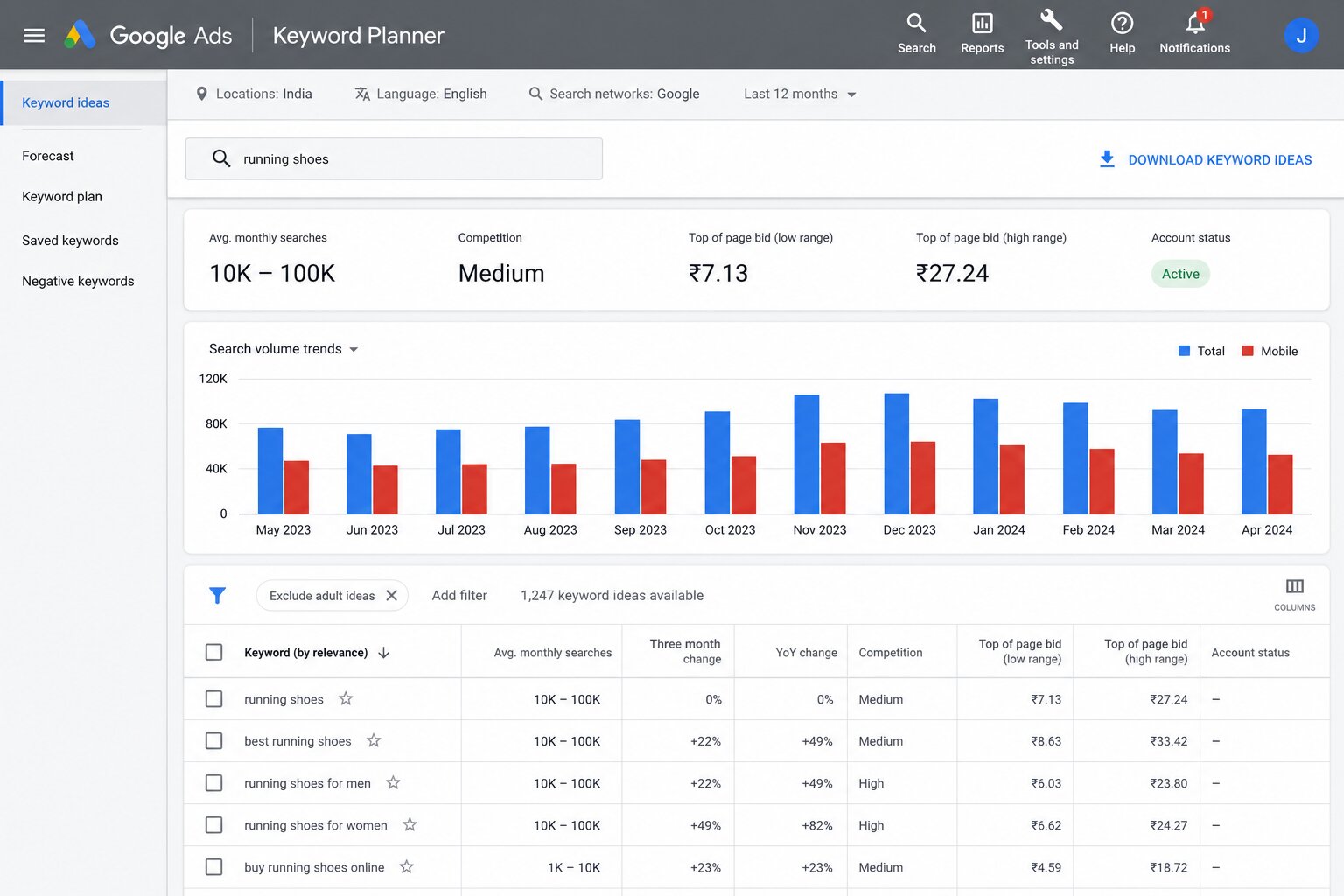
Google Keyword Planner is free (requires a Google Ads account) and provides search volume data directly from Google, the most accurate volume data available because it comes from the source. Enter your seed keywords, and it will show:
- Average monthly searches for each keyword
- Competition level (Low/Medium/High) for paid advertising
- Bid range estimates (useful as a CPC proxy for commercial value)
- Keyword ideas related terms Google identifies as semantically related to your inputs
Keyword Planner’s limitation: it shows search volumes in ranges rather than precise numbers (0–100, 100–1K, 1K–10K) unless you have active ad spend. It also does not show organic keyword difficulty. Use it to discover keywords and validate volume tiers, then verify with Ahrefs or Semrush for more precise data.
Using Ahrefs Keywords Explorer
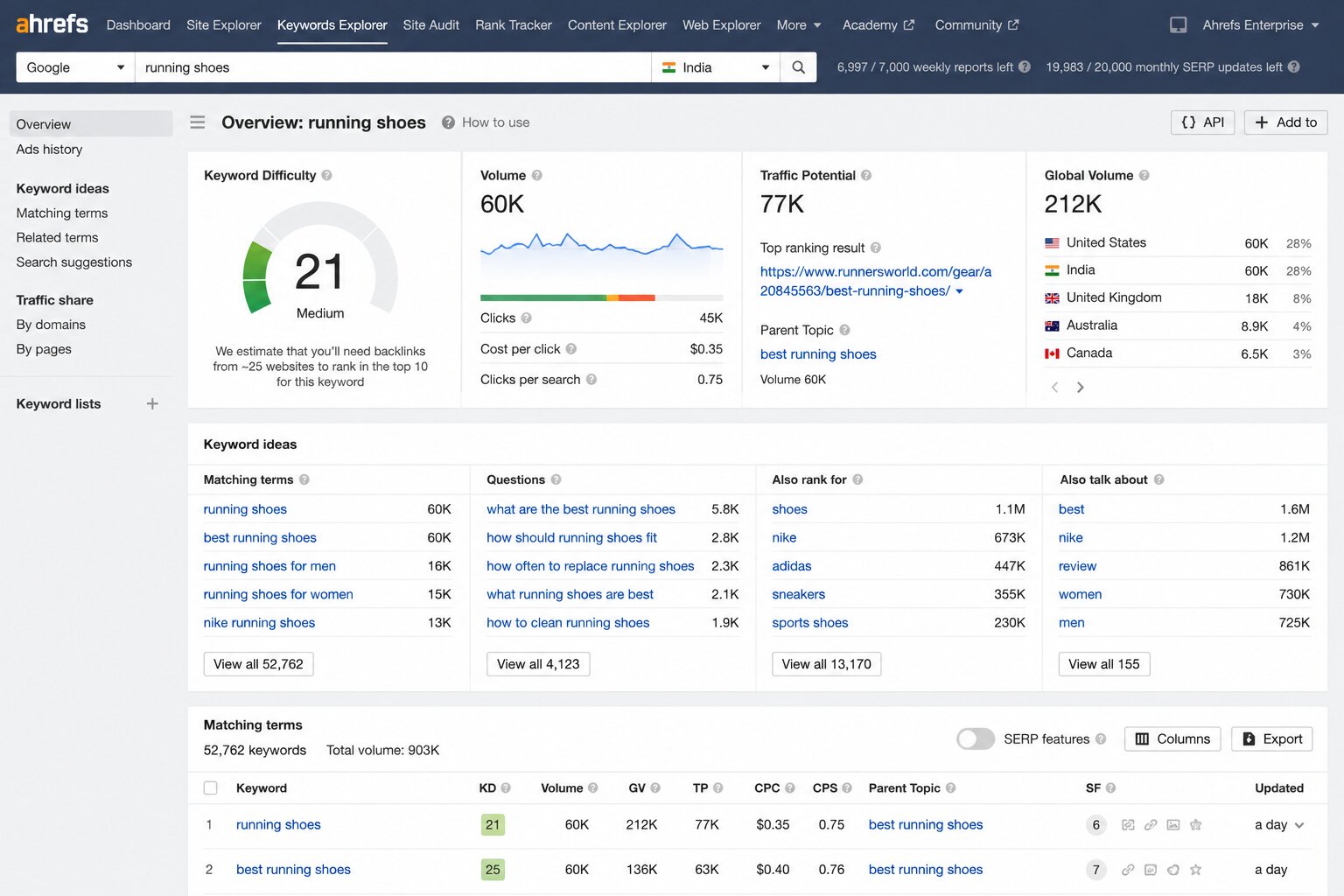
Ahrefs Keywords Explorer is the most powerful keyword research tool available for SEO practitioners. Enter any seed keyword, and it reveals:
- Precise monthly search volume with 12-month trend
- Keyword Difficulty (KD) score with an explanation of how many referring domains the top results have
- Traffic potential – estimated monthly organic clicks to the top-ranking page (more realistic than raw search volume)
- SERP overview – see all current top-10 ranking pages with their traffic, backlinks, and DR
- Keyword ideas – hundreds of related terms in five categories: Phrase match, Having same terms, Also rank for, Also talk about, Newly discovered
- Questions tab: all question-format variations of your keyword (ideal for featured snippets and PAA targeting)
The ‘Traffic Potential’ metric in Ahrefs is particularly valuable; it shows the estimated traffic the top-ranking page receives for all the keywords it ranks for, not just the main keyword. A keyword with 1,000 monthly searches whose top-ranking page gets 5,000 monthly visitors (because it ranks for dozens of related terms) is a much better opportunity than a keyword with 1,000 searches whose top page only gets 400 visitors.
Using Semrush Keyword Magic Tool
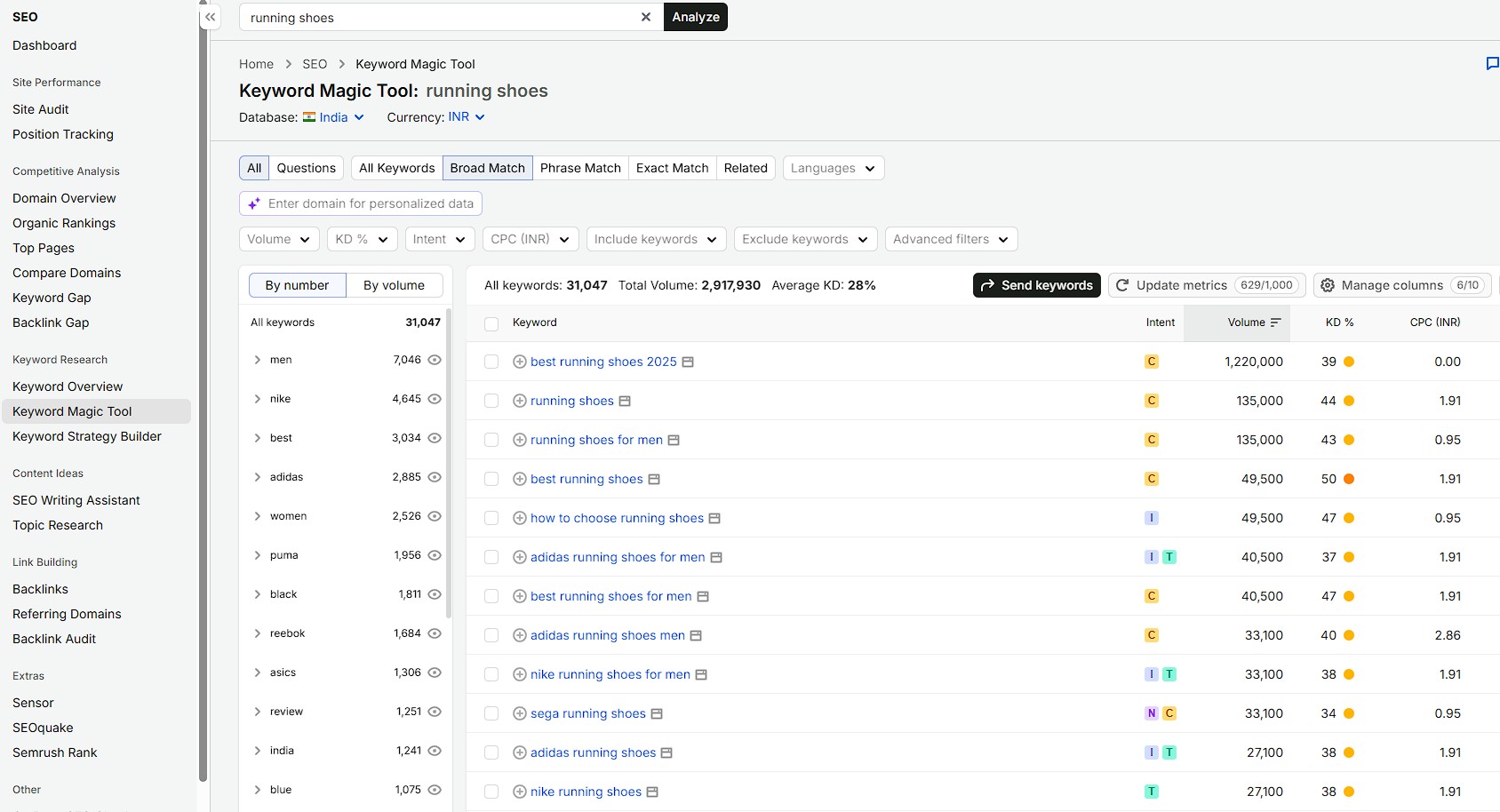
Semrush’s Keyword Magic Tool offers one of the largest keyword databases available. Enter a seed keyword, and it generates thousands of related keywords, filterable by:
- Intent type (Informational / Commercial / Transactional / Navigational)
- Keyword difficulty range
- Search volume range
- Word count (filter for long-tail terms of 3+ words)
- SERP features present (filter for keywords that trigger featured snippets, PAA boxes, etc.)
The Intent filter is particularly powerful; immediately filtering for ‘Transactional’ intent keywords shows you which search terms indicate purchase-ready audiences. Filtering for ‘Informational’ reveals content marketing opportunities. This alignment between intent and strategy starts at the keyword selection stage.
Step 4: Analyse Competitor Keywords
One of the fastest and most reliable keyword research shortcuts is studying what your competitors already rank for. If a competitor in your niche ranks for a keyword and generates traffic from it, that keyword is proven to be relevant to your shared audience; you do not need to verify demand the hard way.
How to conduct competitor keyword research in Ahrefs:
- Enter a competitor’s domain in Ahrefs Site Explorer.
- Go to the Organic Keywords report; this shows every keyword the competitor ranks for in the top 100.
- Filter by position (1–10) to see keywords where they are generating real traffic.
- Sort by Traffic to see which keywords drive the most visitors to their site.
- Filter out branded keywords (competitor’s own name/brand); these are not opportunities for you.
- Identify keywords you do not currently have a page targeting; these are your gap opportunities.
Run this analysis on your 3–5 closest organic competitors. The keywords that appear across multiple competitor sites keywords that two or three competitors all rank for are the highest-confidence opportunities in your niche.
Using the Content Gap Tool
Ahrefs’ Content Gap tool (and Semrush’s Keyword Gap tool) automates competitor gap analysis at scale. Enter your domain and up to 5 competitor domains, and the tool shows keywords that competitors rank for that your site does not, filtered by how many of your competitors rank for each term.
Keywords that three or more competitors rank for but you do not represent your strongest content gaps; these are topics your audience clearly searches for in your niche, and your absence represents a strategic weakness. Prioritise closing the gaps where competitor authority is weakest (lower DR competitors ranking for these terms means you can too).
Step 5: Evaluate and Filter Your Keyword List
By this point, you likely have hundreds, possibly thousands of potential keywords. The goal of this step is to filter that raw list down to a focused, prioritised set of genuinely viable targets that align with your goals, your site’s current authority level, and your content production capacity.
Evaluate each keyword against four criteria:
Relevance: Is this keyword genuinely relevant to what your website offers? Will the people searching it benefit from what you provide? Remove keywords that would attract traffic with no interest in your actual offering.
Search intent match: Does your website have a page that matches the intent behind this keyword, or can you create one? A transactional keyword requires a product/service page, not a blog post. If your site cannot match the intent, the keyword is not viable regardless of volume.
Realistic difficulty: Given your site’s current domain authority, is ranking for this keyword achievable within a reasonable timeframe (6–12 months)? Use KD scores as a guide, but always verify by examining the actual SERP.
Business value: If you ranked #1 for this keyword, would it produce meaningful business outcomes traffic that converts into leads, customers, or revenue? High-volume, low-relevance keywords are vanity; low-volume, high-relevance keywords can be goldmines.
| 💡 The SERP Manual Check: Never Skip This
Keyword difficulty scores are algorithmic estimates. Before finalising any keyword target, spend 60 seconds manually searching it in an incognito browser. Look at the top 10 results: Are they major brand domains (Amazon, Wikipedia, Forbes)? Or smaller, more specialist sites? If major brands dominate positions 1–7, the KD score is probably accurate; the difficulty is real. If the top results include Reddit threads, Quora answers, or small blogs with low perceived authority, the keyword may be easier than the score suggests. This manual check takes less than a minute and prevents wasted effort targeting keywords with artificially low or misleadingly high difficulty scores. |
Step 6: Understand and Match Search Intent
For every keyword you plan to target, you must confirm its search intent and plan content that matches it precisely. This is the single most important quality check in the entire keyword research process; no amount of technical optimisation will make a mismatched page rank for its target keyword.
To confirm intent, search the keyword in incognito mode and answer these questions:
- What type of content dominates the first page? (Articles, product pages, comparison tables, videos, local listings?)
- What format is that content? (Step-by-step tutorials, listicles, definition articles, product comparisons, maps?)
- What depth does the content go to? (Quick answers, comprehensive guides, short product pages, detailed specifications?)
- What is the angle or perspective of the top results? (Beginner-friendly, expert-level, budget-focused, premium-focused?)
Now ask yourself: can you create content that matches or exceeds what Google is already rewarding for this query? If the top results are all comprehensive, long-form guides and you are planning a 400-word post, adjust your content plan. If the results are all product pages and you were planning educational content, reconsider whether this keyword is right for your site.
Step 7: Organise Keywords Into Topic Clusters
Individual keywords should not be targeted in isolation. Group related keywords into topic clusters: groups of semantically related terms that collectively represent a subject area your audience cares about.
A topic cluster contains:
A pillar keyword: The broad head term for the topic. Example: ‘keyword research’. This will be targeted by your pillar page, a comprehensive guide covering the topic at the highest level.
Cluster keywords: More specific related terms that represent subtopics, specific questions, or particular angles on the pillar topic. Examples: ‘keyword research tools’, ‘how to find long-tail keywords’, ‘keyword difficulty explained’, ‘keyword research for beginners’, ‘free keyword research tools’. Each cluster keyword will be targeted by a dedicated cluster article that goes deep on that specific subtopic.
Clustering keywords serves two strategic purposes. First, it prevents cannibalisation: different pages target clearly differentiated keyword sets rather than multiple pages competing for the same terms. Second, it builds topical authority; Google increasingly rewards websites that demonstrate comprehensive coverage of entire topic areas, not just individual pages optimised for isolated keywords.
| 📝 Topic Cluster: Keyword Research
Pillar page: ‘How to Do Keyword Research’ (targets ‘keyword research’, ‘keyword research guide’, ‘how to do keyword research’) Cluster pages: • ‘Best Keyword Research Tools 2026‘ → targets ‘keyword research tools’, ‘best keyword research tools’ • ‘How to Find Long-Tail Keywords‘ → targets ‘long-tail keywords’, ‘how to find long-tail keywords’ • ‘Keyword Difficulty Explained’ → targets ‘keyword difficulty’, ‘what is keyword difficulty’ • ‘Free Keyword Research Tools’ → targets ‘free keyword research tools’, ‘keyword research without ahrefs’ • ‘Keyword Research for E-commerce’ → targets ‘ecommerce keyword research’, ‘product keyword research’ • ‘Local Keyword Research’ → targets ‘local SEO keywords’, ‘local keyword research’ All cluster pages link back to the pillar page. The pillar page links out to all cluster pages. Google sees comprehensive coverage. All pages in the cluster benefit from shared topical authority. |
Step 8: Prioritise and Create Your Content Roadmap
With your keyword clusters defined, you need to prioritise which keywords to target first. Not all opportunities are equally urgent or equally achievable. Use a prioritisation matrix based on two dimensions: potential impact (search volume × commercial relevance × conversion potential) and feasibility (achievable given current domain authority within 6 months).
| Priority Tier | Criteria | Action |
| Tier 1 Quick Wins | Currently ranking positions 8–20 (page 1–2); improving existing pages is more effective than creating new ones | Optimise existing pages first: update content, improve on-page SEO, add internal links |
| Tier 2 Core Targets | Strong intent match; KD achievable for your site’s authority; meaningful search volume; direct business relevance | Create new content systematically 1–2 per week depending on capacity |
| Tier 3 Long-Term Targets | High value but higher difficulty; requires authority building before targeting directly | Note for future; prioritise after site authority grows through Tier 1 and 2 success |
| Tier 4 Deprioritise | Very low volume AND low commercial intent; OR very high difficulty with no realistic path to ranking | Remove from active plan; revisit if authority grows or strategy shifts |
Build a 12-month content calendar from your prioritised keyword list. Assign each keyword to a specific month, assign a content type (new article, updated page, cluster page, pillar page), and establish clear ownership. A keyword list that never becomes a content calendar is just data it produces no results until it drives action.
Keyword Research for Specific Contexts
The core process above applies universally. But different website types have specific keyword research considerations worth addressing in depth.
Keyword Research for E-Commerce
E-commerce keyword research operates at multiple levels simultaneously:
Product keywords: The most specific level. The exact names and variations of products you sell. Example: ‘Nike Air Zoom Pegasus 41 men’s size 10’. Very low volume individually, but enormous long-tail traffic collectively for large catalogues. Optimise product pages for exact product names plus key attributes (brand, model, size, colour).
Category keywords: Broader terms for product categories. Example: ‘men’s running shoes’, ‘wireless noise-cancelling headphones under 5000’. Often the highest-value keywords in e-commerce have significant volume, commercial intent, and the page type (category page) that matches what Google wants to show for these queries.
Informational keywords: Research queries from pre-purchase users. Example: ‘how to choose running shoes for beginners’, ‘noise cancelling vs noise isolating headphones’. Target these with blog content that educates buyers and naturally leads toward product consideration.
E-commerce keyword research must also consider seasonal variation carefully. Products with strong seasonal demand (winter clothing, festive gifts, tax software) have dramatically different search volumes at different times of year. Plan content and promotional calendars around these seasonal patterns.
Keyword Research for Local Businesses
Local businesses need keywords with geographic modifier terms that signal location-specific intent. The structure is typically: [service] + [location modifier].
Types of local keywords to target:
- Service + city: ‘dentist in Chennai’, ‘digital marketing agency Mumbai’
- Service + neighbourhood: ‘yoga studio Bandra’, ‘plumber Koramangala Bangalore’
- Service + ‘near me’: ‘restaurant near me’, ‘gym near me’ (Google personalises these results by location)
- ‘Best’ + service + location: ‘best lawyer in Hyderabad’, ‘best coffee shop Connaught Place Delhi’
- Emergency/urgent services: ’emergency plumber Delhi’, ’24 hour electrician Pune’
For local businesses, keyword research must inform two separate strategies: organic website content (location pages, service pages, blog content) and Google Business Profile optimisation (categories, description, services listed). Both benefit from the same underlying keyword intelligence.
Keyword Research for B2B Businesses
B2B keyword research differs from B2C in several important ways:
- Lower search volumes: B2B audiences are smaller by definition; a keyword searched 200 times per month by CFOs considering accounting software is extremely valuable despite low volume
- Longer, more specific queries: B2B buyers do extensive research; their searches are more detailed and specific than typical consumer queries
- High commercial value even at low volume: B2B transactions are typically high-value; a keyword with 150 monthly searches that generates one enterprise sale per month may be the highest-value keyword in your entire strategy
- Strong informational/educational intent at the top of funnel: B2B buyers need to be educated before they are ready to evaluate vendors; invest heavily in thought leadership and educational content
- Industry-specific jargon B2B audiences often use technical terminology; research both the technical terms (used by experts) and plain-language equivalents (used by buyers newer to the category)
Keyword Research for YouTube
YouTube is the world’s second-largest search engine with keyword research dynamics that differ from Google in important ways:
- Search terms on YouTube tend to be shorter and more conversational than Google queries
- ‘How to’ and tutorial content dominates. YouTube users are often looking for demonstrations, not written explanations
- Keyword difficulty is lower than Google in most niches; fewer creators optimise their videos for SEO compared to websites optimising for Google
- Tools: TubeBuddy and VidIQ are specialised YouTube keyword research tools. Ahrefs also has a YouTube Keyword Explorer.
- Search intent on YouTube is almost always informational or educational. Optimise titles, descriptions, and chapters accordingly
Keyword Mapping: Assigning Keywords to Pages
Keyword research produces a list of targets. Keyword mapping turns that list into a structured plan, assigning each keyword to a specific page on your website (existing or planned) with a clear rationale for why that page is the right home for that term.
The One Primary Keyword Per Page Rule
Every page on your website should have one primary target keyword: the single most important term that page is designed to rank for. This primary keyword should appear in the page’s title tag, H1 heading, URL, and early body content.
A page can also target multiple secondary keywords related terms with similar intent that the content naturally covers alongside the primary focus. A page about ‘how to do keyword research’ might also naturally rank for ‘keyword research process’, ‘keyword research steps’, and ‘keyword research for beginners’ without those secondary terms requiring additional pages.
Avoiding Keyword Cannibalisation
Keyword cannibalisation occurs when multiple pages on your website target the same keyword, causing them to compete against each other in Google’s algorithm. Instead of one strong page consolidating all relevance signals, you have two or three weaker pages splitting them.
Common causes of cannibalisation:
- Publishing a new blog post about a topic you already have a page covering without redirecting or consolidating
- Multiple product pages, category pages, and blog posts all targeting the same commercial keyword
- Location pages for different cities all targeting nearly identical service + city combinations without sufficient unique content
Audit for cannibalisation by searching ‘site:yourdomain.com + target keyword’ in Google. If multiple pages from your site appear, investigate whether they are competing for the same keyword. Consolidate competing pages through 301 redirects to the strongest version, or clearly differentiate their keyword targets.
| Page Type | Primary Keyword Type | Example |
| Homepage | Broadest brand/category keyword | ‘digital marketing agency India’ or brand name |
| Service/Product Page | Specific service or product + intent | ‘SEO services for small businesses’ |
| Category Page (e-commerce) | Product category keyword | ‘men’s running shoes’ |
| Blog Post / Guide | Informational or commercial investigation keyword | ‘how to do keyword research’ |
| Location Page (local) | Service + location | ‘web design agency Pune’ |
| Comparison Page | Vs. / alternative comparison keyword | ‘Ahrefs vs Semrush comparison’ |
| FAQ/Definition Page | ‘What is’ / ‘definition’ queries | ‘what is keyword difficulty’ |
Keyword Research in the AI Era (2026)
The rise of AI in search: Google AI Overviews, ChatGPT, Perplexity, and other AI-native search platforms are changing keyword research in ways every practitioner needs to understand. The fundamentals remain intact, but several important adaptations are required.
AI Overviews Are Reducing Clicks for Simple Informational Queries
Google AI Overviews appear at the top of many informational search results and directly answer the query, sometimes making it unnecessary for users to click any organic result. This reduces the organic traffic value of simple, direct-answer informational keywords.
Adaptation: When evaluating informational keywords, search them in Google and check whether an AI Overview appears. If it does, assess whether the AI Overview fully answers the query or leaves meaningful value for users to get from clicking through to a comprehensive article. Complex, nuanced, or experience-dependent topics tend to retain more click-through value even with AI Overviews present.
Question-Based Keywords Are Growing
As search becomes more conversational, influenced by voice search, AI chat interfaces, and People Also Ask, question-format queries (‘how do I’, ‘what is the best way to’, ‘why does X happen’) are growing in importance. These queries often trigger featured snippets and PAA boxes, offering additional SERP visibility opportunities beyond standard organic rankings.
Integrate question-based keyword research into your process using:
- The ‘Questions’ filter in Ahrefs Keywords Explorer
- AnswerThePublic (free tool that visualises question variations around any topic)
- Mining PAA boxes for every target keyword
- Google Search Console queries report filtering for queries starting with ‘how’, ‘what’, ‘why’, ‘when’, ‘where’
Topical Authority Matters More Than Individual Keywords
Google’s AI-powered ranking systems increasingly evaluate whether a website comprehensively covers entire topic areas, not just whether individual pages are keyword-optimised. This makes the topic cluster approach to keyword research (Step 7 in the process above) more important than ever.
When planning your keyword strategy, think in terms of complete topic coverage: does your site address every question your audience has about this subject? The websites that dominate AI-era search are those with the deepest, most systematically comprehensive coverage of their topic areas.
Search Behaviour Is Diversifying
More and more searches, particularly for product discovery and inspiration, begin on platforms other than Google. TikTok, YouTube, Instagram, Pinterest, and Amazon all function as search engines for specific query types. A comprehensive keyword research strategy in 2026 includes platform-specific keyword research for whichever non-Google platforms your audience uses for discovery in your niche.
Common Keyword Research Mistakes Beginners Make
Mistake 1: Chasing Search Volume Without Considering Difficulty
The most common beginner mistake is selecting keywords purely based on high search volume without checking whether those keywords are realistically rankable. A keyword with 100,000 monthly searches that is dominated by Amazon, Wikipedia, and major publications with a DA 80+ is not an opportunity for a new website; it is a waste of time and content budget. Always evaluate volume alongside difficulty.
Mistake 2: Ignoring Search Intent
Creating an excellent long-form guide for a keyword whose SERP is dominated by product pages or publishing a product page for a keyword that demands an educational guide is an intent mismatch. Google will not rank content that does not match what its algorithm has determined searchers want, regardless of keyword presence or content quality. Always check the SERP before committing to a keyword and content format.
Mistake 3: Targeting Only High-Volume Keywords
High-volume keywords attract beginners because they promise massive traffic. But they are exactly the keywords where competition is fiercest, where established players are most entrenched, and where new sites have the least chance of ranking within a reasonable timeframe. Low-volume, low-difficulty, high-intent keywords consistently produce more actual traffic for new websites than ambitious high-volume targets that never rank.
Mistake 4: Not Updating Keyword Research
Keyword research is not a one-time exercise. Search volumes change. New competitor pages emerge. Google algorithm updates shift competitive landscapes. Trending topics create new keyword opportunities that did not exist six months ago. Review and refresh your keyword strategy at least every quarter, particularly for your highest-priority targets.
Mistake 5: Creating One Page for Every Keyword
Beginners often misunderstand keyword research as a directive to create a new page for every keyword they find. This creates two problems: keyword cannibalisation (multiple pages targeting the same or very similar terms) and content fragmentation (thin pages that each target one narrow term rather than comprehensive pages that naturally rank for many related terms). Group keywords into clusters and create one comprehensive page per cluster.
Mistake 6: Forgetting the Business Goal
Keyword research can become an abstract exercise in finding terms with good metrics disconnected from the actual business goal. A keyword is only valuable if ranking for it produces business outcomes: leads, sales, signups, or at minimum brand awareness with the right audience. Always filter your keyword list through the question: ‘If we rank #1 for this, does it actually help our business?’
Mistake 7: Relying on One Tool
Different keyword research tools have different databases and different algorithm methodologies. A keyword that shows a KD of 35 in Ahrefs might show 48 in Semrush. A keyword that shows 2,400 monthly searches in one tool might show 1,800 in another. Using a single tool and treating its data as absolute truth is a mistake; use two tools to cross-reference important decisions, and always verify with manual SERP analysis.
Your Keyword Research Toolkit: Quick Reference
| ✅ Free Tools
Google Search Suggest Type keywords into Google and study autocomplete suggestions People Also Ask boxes Mine question variations directly from Google SERPs Related Searches Bottom of every SERP; reveals adjacent keyword opportunities Google Search Console Real data on what queries your site already appears for; find quick-win opportunities Google Keyword Planner Volume ranges and keyword ideas; requires a free Google Ads account Google Trends Search volume trends over time; identify seasonal and rising keywords AnswerThePublic Visual map of questions and comparison variations around any keyword Ubersuggest Limited free tier; keyword ideas, volume, and difficulty estimates |
| ✅ Professional Paid Tools
Ahrefs Keywords Explorer: Best-in-class for comprehensive keyword data, traffic potential, and SERP analysis Semrush Keyword Magic Tool: Largest keyword database; excellent intent filtering and competitive gap analysis Moz Keyword Explorer: Good SERP analysis and SERP feature tracking; strong Domain Authority data alongside keywords Semrush Keyword Gap: Compare your keyword coverage against up to 5 competitors simultaneously Ahrefs Content Gap: Identify keywords your competitors rank for that you do not TubeBuddy / VidIQ: YouTube-specific keyword research for video SEO |
Conclusion
Keyword research is not the most glamorous part of SEO. It does not produce the satisfying visual of a published article or the dopamine hit of a first-page ranking. But it is the work that makes everything else productive the unseen foundation that determines whether your content strategy generates real results or spins its wheels indefinitely.
A website that publishes without keyword research is guessing. It might occasionally guess right. More often, it will create excellent content that nobody finds, because nobody was searching for it or nobody was searching for it in the way the content addresses it.
A website that publishes with keyword research is building deliberately. Every piece of content is aimed at a real audience with a real need, expressed in the real language they use, competing in a space where ranking is genuinely achievable. That deliberate alignment between content and demand is what compounds over months and years into a sustainable, growing organic presence.
Start with the 8-step process in this guide. Do not let imperfect tools or imperfect data stop you; even keyword research done with only Google’s free tools is infinitely better than no keyword research at all. Build the habit first. Refine the tools and techniques as you grow.
Frequently Asked Questions
What is keyword research in simple words?
Keyword research is the process of finding out exactly what words and phrases people type into search engines when they are looking for something related to your business. It tells you what topics to create content about, how many people are interested in those topics, and whether you can realistically rank in search results for them. It is the foundation of any SEO strategy because it ensures your content aligns with real, measurable demand.
How long does keyword research take?
Initial keyword research for a new website, building your first complete keyword list, organising it into clusters, and creating a 12-month content plan typically takes 4–8 hours depending on the complexity of your niche and how many tools you use. Ongoing keyword research, adding new opportunities as your site grows, updating for algorithm changes, and refreshing competitive analysis should be done quarterly and takes 1–2 hours per review once the initial framework is established.
Is keyword research still important with AI search?
Yes, keyword research remains as important as ever, though some aspects are evolving. Understanding what your audience searches for, how they phrase their needs, and what intent lies behind their queries is the foundation of any search marketing strategy regardless of whether the search happens on Google, YouTube, ChatGPT, or any other platform. What changes with AI search is the content strategy: more emphasis on comprehensive topical authority, more focus on complex and nuanced queries where AI Overviews do not fully satisfy the intent, and more integration of question-based keyword research.
What is the best free keyword research tool?
Google Search Console is the best free keyword research tool for websites that already have some traffic it shows exactly what queries are bringing users to your site and which keywords you are close to ranking for. For discovering new keyword opportunities, Google’s own autocomplete suggestions, People Also Ask boxes, and Related Searches provide high-quality data at zero cost. Google Keyword Planner (free with a Google Ads account) adds search volume data. For budget-conscious beginners who need more data than free tools provide, Semrush’s free tier (10 keyword searches per day) or Ubersuggest’s limited free access are reasonable starting points.
How do I know if a keyword is too competitive for my website?
Three checks: (1) Look at the KD score in Ahrefs or Semrush and compare it to your site’s Domain Rating/Authority. If KD is significantly higher than your DR, the keyword is likely too competitive for now. (2) Search the keyword manually and look at the domains occupying the top 10 results. If they are all major brands, Amazon, Wikipedia, or publishers with decades of authority, that keyword is effectively off-limits for a new or small site. (3) In Ahrefs, look at the referring domain count for the top-ranking pages; if they have 500+ referring domains and you have 20, the gap is too large to bridge quickly.
What is the difference between a keyword and a topic?
A keyword is a specific search phrase the exact words a user types. A topic is the broader subject area that a group of related keywords covers. ‘Keyword research’ is a topic. ‘How to do keyword research’, ‘keyword research tools’, ‘keyword difficulty explained’, and ‘long-tail keyword strategy’ are all keywords within that topic. Modern SEO thinks at the topic level, building comprehensive coverage of entire subject areas, while individual keywords serve as the specific entry points within each topic.
Should I target the same keyword on multiple pages?
No, each keyword should be assigned to exactly one page on your website. When multiple pages target the same keyword, they compete against each other (keyword cannibalisation), splitting their authority and weakening all of them. If you discover that two existing pages are targeting the same keyword, consolidate them into one stronger page through a 301 redirect, or clearly differentiate their keyword targets so they no longer compete.
How many keywords should I target on one page?
Each page should have one primary keyword, the most important term you want the page to rank for and can naturally target multiple secondary keywords with similar intent. A comprehensive guide on ‘how to do keyword research’ might naturally rank for ‘keyword research process’, ‘keyword research steps’, ‘keyword research guide for beginners’, and dozens of other related terms without needing each term explicitly inserted. Write for comprehensive coverage of the topic, and the secondary keywords will emerge naturally.
What is keyword stuffing and why should I avoid it?
Keyword stuffing is the practice of unnaturally repeating keywords throughout content in an attempt to manipulate rankings. Example: ‘Our SEO services are the best SEO services for businesses looking for SEO services from a top SEO services company.’ It makes content unreadable, and Google actively penalises it. Modern SEO requires natural, helpful writing. Google’s algorithms are sophisticated enough to understand topical relevance from natural language without forced repetition. Write for your reader; keywords will appear at appropriate frequencies naturally.
How do I find keywords my competitors are not targeting?
These are called keyword gap opportunities your competitors have missed. Find them using: (1) Ahrefs Content Gap or Semrush Keyword Gap tools filter for keywords where none of your tracked competitors rank, indicating potential blue-ocean opportunities; (2) Mine People Also Ask boxes that your competitors have not created content for; (3) Search your topic area from the perspective of a complete beginner what basic questions would a newcomer ask that your more established competitors (focused on advanced content) have overlooked? Beginner-friendly long-tail keywords are frequently underserved even in competitive niches.