

Look, if you’ve been running Google Ads for more than a few months, you already know the feeling. You log into your account on a Tuesday morning, coffee in hand, and your CPC has jumped 40 cents overnight for no reason you can point to. Nobody emailed you. Nothing changed in your campaign settings. Google just decided your clicks are worth more today than they were yesterday, and now your CPA math doesn’t work anymore.
That’s not a glitch. That’s just how the Google Ads auction behaves in 2026. Competition has gotten brutal in almost every category, AI-driven bidding has changed how advertisers compete for the same eyeballs, and a lot of businesses are throwing more budget at fewer, more expensive clicks because they don’t know what else to do. Cost per click, or CPC, has become the metric everyone complains about and almost nobody actually understands well enough to fix.
Here’s the thing though. CPC isn’t some random number Google assigns you out of spite. It’s the output of a system, and that system responds to specific inputs. Quality Score, keyword match type, ad relevance, landing page experience, bid strategy, audience targeting, even the time of day you’re running ads. Change the inputs, and the output changes. That’s the entire premise of this guide.
I also want to push back on something before we go further. A lower CPC is not automatically a win. I’ve seen accounts “successfully” cut CPC by 30% and watch their conversion rate collapse right alongside it, because cheaper clicks were coming from irrelevant search terms or a broader match type that pulled in tire-kickers instead of buyers. The real goal isn’t a lower number on a dashboard. It’s a lower cost per click that still converts at the same rate, or better. That distinction matters more than almost anything else in this guide, so keep it in your head as you read.
There’s also a myth going around that Smart Bidding alone will fix your CPC problem, or that switching to Performance Max is some magic escape hatch from rising costs. Neither is true on its own. Automation amplifies whatever signals you feed it. Feed it a messy account with weak Quality Scores and a slow landing page, and it will happily spend your budget on expensive clicks just as efficiently as a human would have.
What You Will Learn in This Guide
- Why your CPC is high in the first place, and how to actually diagnose the cause instead of guessing
- How Google’s Ad Rank and auction system decides what you pay for every single click
- 25 specific, practical methods to lower CPC without tanking your conversion volume
- How Quality Score works mechanically, not just in theory, and how to move it
- Which keyword match types and bidding strategies actually reduce cost in real accounts
- How to build negative keyword lists that stop wasted spend before it happens
- Real case study numbers from a local service business, a SaaS company, and an e-commerce store
- A weekly, monthly, and quarterly optimization workflow you can actually follow
- Answers to the questions people ask most often about lowering Google Ads CPC
What Is Cost Per Click (CPC)?
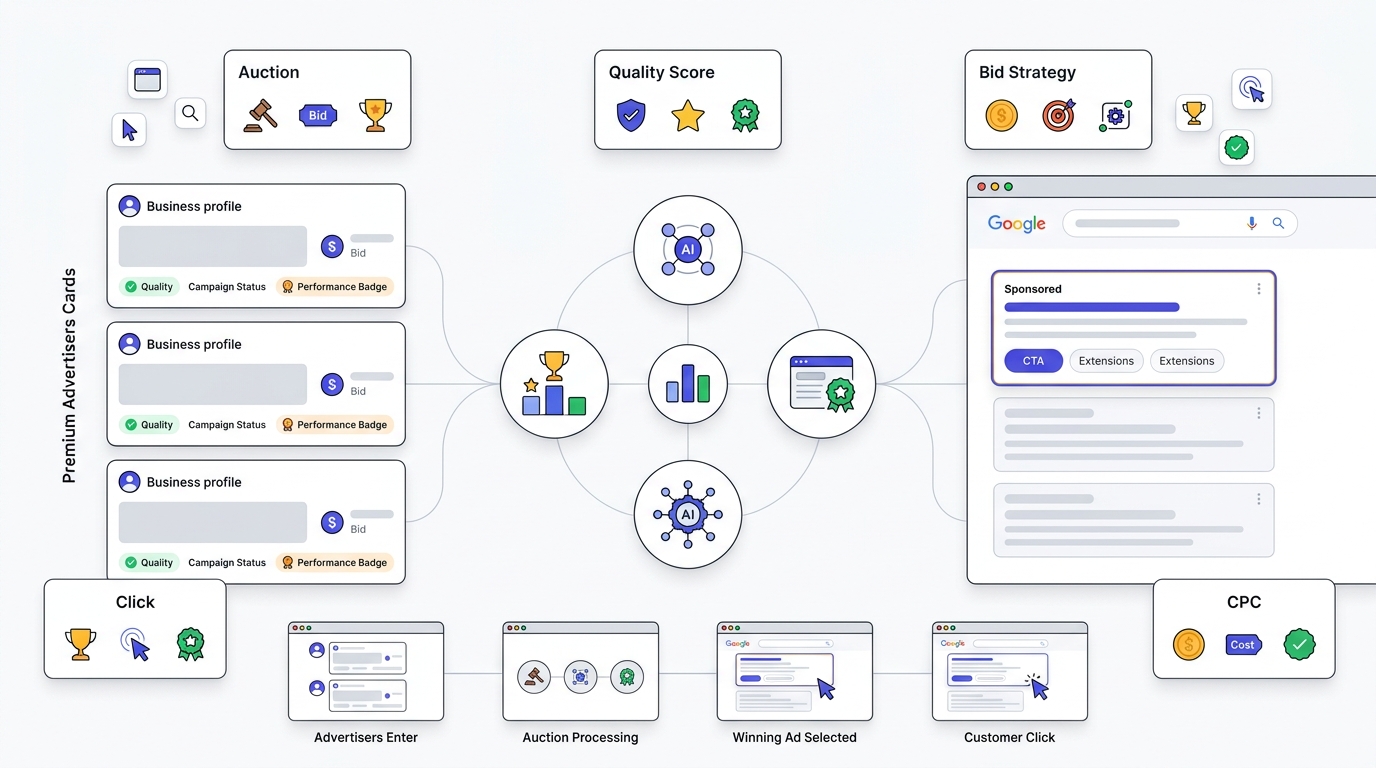
Cost per click is exactly what it sounds like: the amount you pay Google every time someone clicks your ad. But the way that number gets calculated trips up a lot of advertisers, because there isn’t just one CPC. There are several, and mixing them up leads to bad decisions.
How Google Calculates CPC
Google Ads runs what’s called a second-price auction. That means you don’t pay your maximum bid. You pay just enough to beat the advertiser ranked right below you. This is the part that surprises most beginners, and once you understand it, a lot of the “why is my CPC so weird” confusion goes away.
Actual CPC is what you actually pay for a specific click. The formula Google uses is:
Actual CPC = (Ad Rank of the competitor below you ÷ Your Quality Score) + $0.01
So if the advertiser below you has an Ad Rank of 800 and your Quality Score is 8, your actual CPC comes out to (800 ÷ 8) + 0.01, which is $100.01. That looks like a huge number because Ad Rank isn’t a dollar figure, it’s a composite score, but the relationship is what matters here. Notice that your own bid doesn’t even appear directly in that formula. Your Quality Score does. That’s the whole game.
Maximum CPC is the ceiling you set, either manually or through automated bid strategies. It’s the most you’re willing to pay, not what you will pay.
Average CPC is your total spend divided by total clicks over a given period. This is the number most people glance at in their dashboard, and it’s useful for trend-spotting but useless for diagnosing a specific keyword problem.
Expected CPC shows up in the Google Ads Keyword Planner and gives you a forecast before you even launch a campaign. Treat it as a rough estimate, not gospel. I’ve seen Expected CPC numbers be off by 50% once real auction dynamics kick in.
Types of CPC Bidding
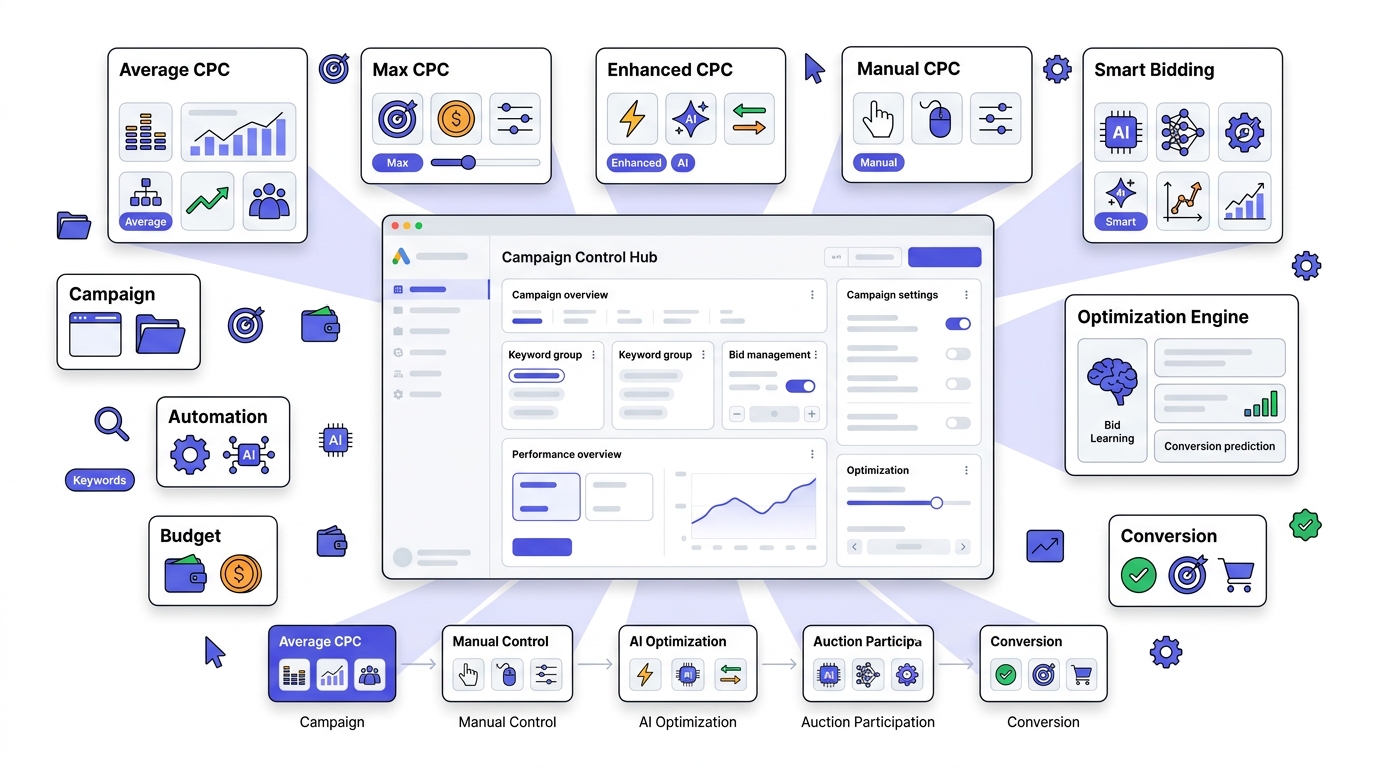
Average CPC targets a bid across your whole campaign rather than optimizing per auction.
Max CPC is the manual, keyword-level ceiling you set yourself. Old school, but still gives you the most control if you’re willing to babysit it.
Enhanced CPC takes your manual bids and nudges them up or down based on the likelihood of conversion. It’s a hybrid, half-manual and half-automated.
Manual CPC means you set every single bid by hand, keyword by keyword. Time-consuming, but for accounts with a small number of high-value keywords, this level of control still wins.
Smart CPC, which usually refers to Target CPA or Target ROAS bidding, hands the whole decision to Google’s machine learning based on your conversion data. This works well once you have enough conversion volume feeding it, generally 30 or more conversions in the last 30 days per campaign. Below that threshold, Smart Bidding is basically guessing.
How Google Ads Determines Your CPC
This is where most advertisers stay confused for years, and it’s not their fault. Google doesn’t exactly spell it out in plain language inside the interface.
Ad Rank and the Auction Process
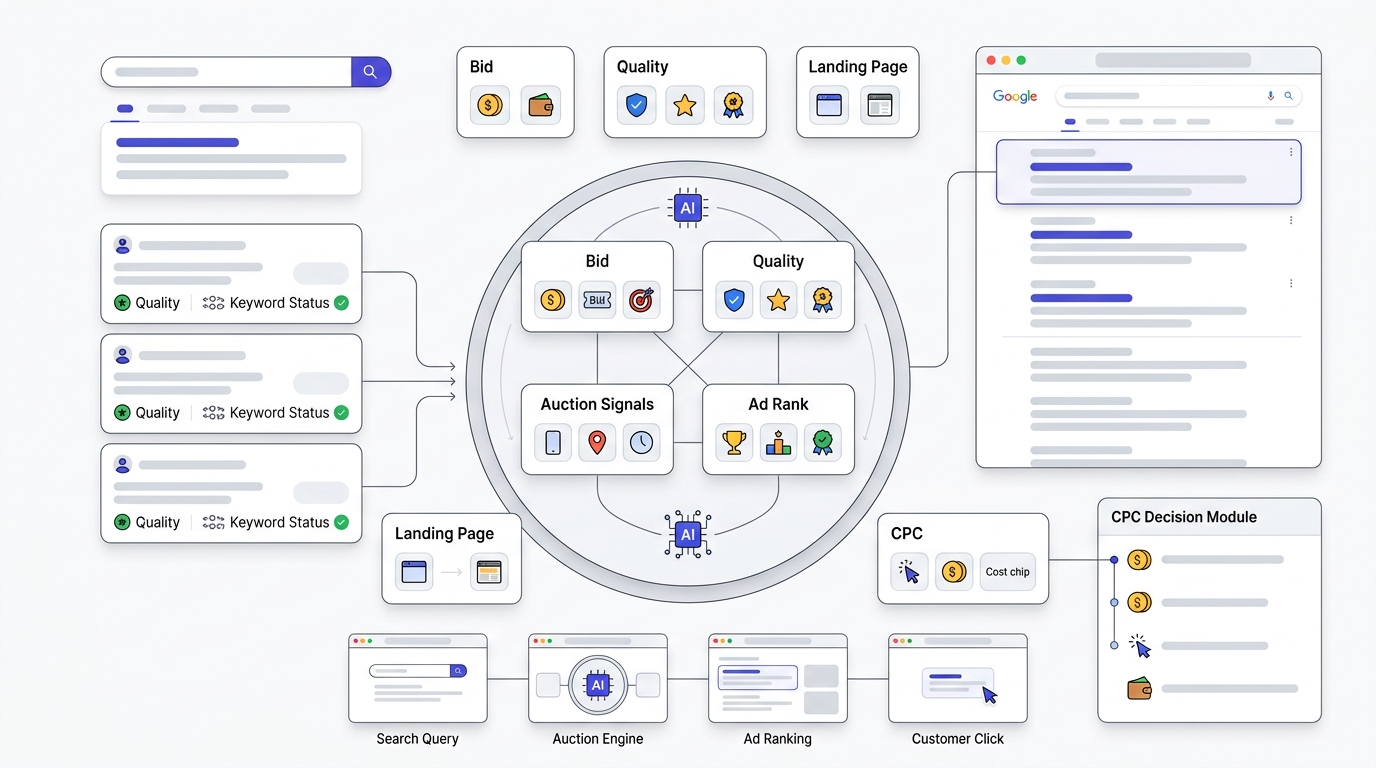
Every time someone searches, Google runs an auction among every advertiser bidding on that search term. Ad Rank determines who shows up and in what position, and it’s calculated using your bid, your Quality Score, the expected impact of your ad extensions and formats, and the context of the search itself, like device, location, and time.
Here’s the sequence that happens behind the scenes:
- A user types a search query.
- Google identifies every advertiser whose keywords are eligible to match that query.
- Each eligible advertiser gets an Ad Rank score based on bid times Quality Score, plus auction-time signals.
- Ads are ranked in order of Ad Rank, highest to lowest.
- The final CPC each advertiser pays is calculated using the second-price auction formula I mentioned above, based on the Ad Rank of the advertiser directly below them.
- Ads display in that ranked order, assuming they clear the minimum Ad Rank threshold to show at all.
The part people miss: two advertisers bidding the exact same maximum CPC can end up paying wildly different actual amounts, because their Quality Scores differ. A Quality Score of 9 versus a Quality Score of 4 on the same bid can mean paying less than half as much per click for the same ad position. That’s not a small optimization lever. That’s the biggest lever in the entire system.
Quality Score: The Core of Ad Rank
Quality Score is a 1 to 10 rating Google assigns to each keyword, built from three components: Expected CTR, Ad Relevance, and Landing Page Experience. It’s a diagnostic tool more than anything, and Google explicitly says it’s not directly used in the auction calculation, but the three components underneath it absolutely are. So functionally, improving your visible Quality Score and improving your actual CPC go hand in hand.
Expected CTR measures how likely people are to click your ad compared to other ads for the same keyword, adjusted for position. If your headlines are generic and your competitor’s headlines mention a specific price, guarantee, or benefit, guess whose Expected CTR wins.
Ad Relevance measures how closely your ad copy matches the intent behind the keyword. If someone searches “emergency plumber Chicago” and your ad talks about general plumbing services with no urgency or location mention, that’s a relevance mismatch, even if the keyword is technically in your ad group.
Landing Page Experience measures whether the page someone lands on is actually useful, relevant, fast, and easy to navigate on mobile. Sending someone from an ad about “affordable roof repair” to a generic homepage with no mention of pricing or roofing services tanks this score fast.
Why Is Your CPC So High?
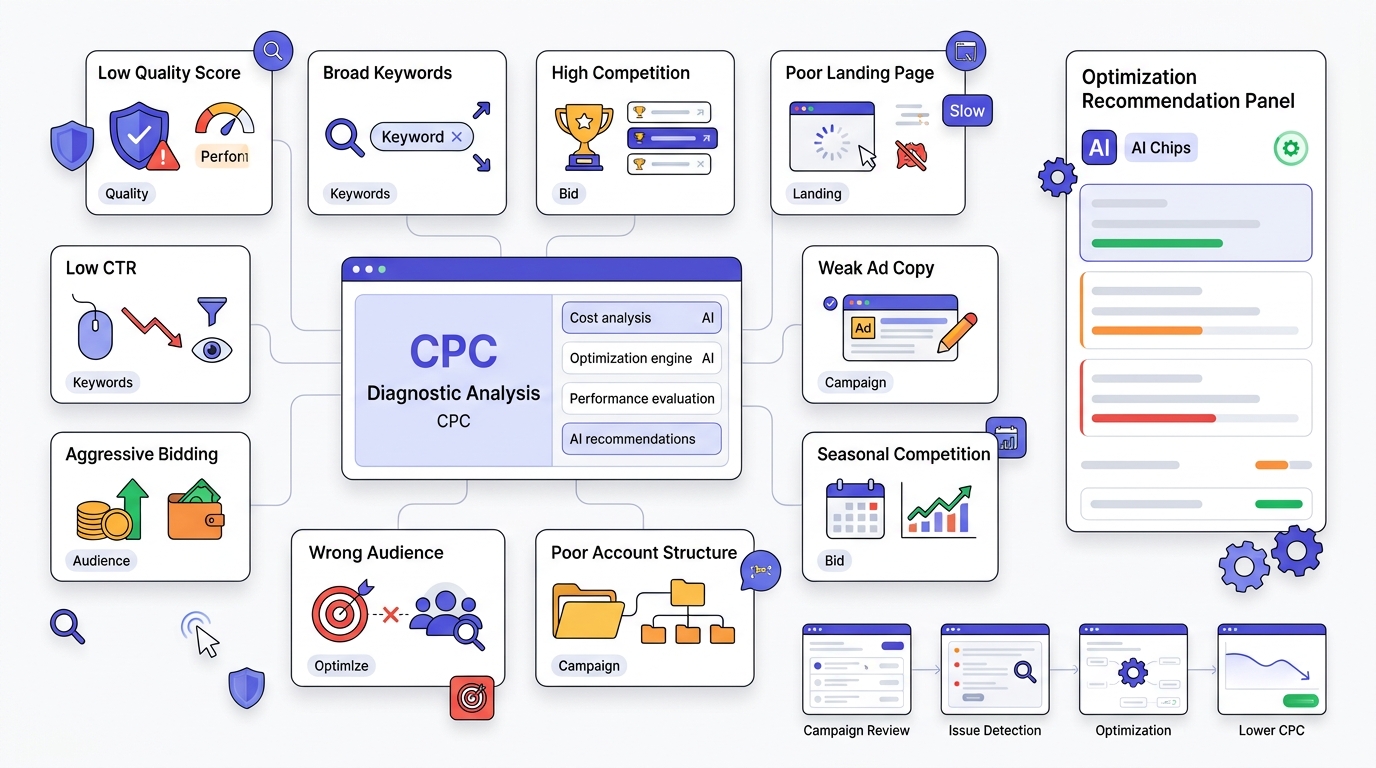
Before you touch a single setting, you need to know which of these is actually your problem, because the fix for a Quality Score issue looks nothing like the fix for a budget cap issue.
Low Quality Score is the most common root cause, and it usually stems from mismatched ad copy, weak landing pages, or overly broad keyword targeting that doesn’t match the actual search intent.
Broad keywords without tight negative keyword lists pull in irrelevant traffic, which tanks CTR, which tanks Quality Score, which raises CPC. It’s a chain reaction.
High competition in your niche is sometimes just the reality. Legal, insurance, and finance keywords are expensive because the lifetime value of a client justifies aggressive bidding from everyone in the space. You can’t optimize your way out of a genuinely competitive market, but you can optimize your way to paying less than your competitors for the same position.
Poor landing pages that load slowly, aren’t mobile-optimized, or don’t match the ad’s promise get penalized directly through the Landing Page Experience component.
Low CTR signals to Google that your ad isn’t resonating, and Google interprets that as your ad being less deserving of a cheap price for a good position.
Wrong match types, especially over-relying on Broad Match without Smart Bidding guardrails, means you’re bidding on searches with wildly different intent than what you actually targeted.
Poor ad copy that reads generic instead of specific kills CTR before anything else even gets a chance to work.
Bidding too aggressively, meaning setting Target CPA or Target ROAS goals that are unrealistic for your actual conversion rate, forces the algorithm to chase expensive, low-probability clicks to try and hit an impossible target.
Wrong audience targeting, or no audience layering at all, means you’re bidding the same amount for a first-time visitor as you are for someone who already added something to their cart and abandoned it.
Low ad relevance, weak account structure with bloated ad groups covering too many unrelated keywords, seasonal competition spikes around holidays or industry events, a limited budget that forces Smart Bidding into inefficient pacing, aggressive competitor activity from a new entrant in your space, and broader industry trends like rising CPCs across finance and insurance in 2026 due to increased ad spend from national brands. All of these stack on top of each other, and in most accounts I’ve dug into, it’s never just one cause. It’s three or four compounding at once.
Average Google Ads CPC by Industry
CPC varies enormously by vertical because it reflects customer lifetime value, not just competition for attention. Here’s roughly where things sit heading into the back half of 2026 based on aggregated industry benchmarking:
| Industry | Average CPC (Search) |
|---|---|
| Legal | $6.75 – $9.50 |
| Insurance | $5.50 – $8.00 |
| Finance | $4.50 – $7.25 |
| SaaS | $3.50 – $5.50 |
| Healthcare | $2.75 – $4.50 |
| Real Estate | $2.25 – $3.75 |
| Home Services | $2.50 – $4.25 |
| Education | $2.00 – $3.25 |
| Automotive | $1.75 – $2.75 |
| Travel | $1.50 – $2.50 |
| Marketing Agencies | $3.00 – $5.00 |
| Ecommerce | $0.75 – $1.75 |
Legal and insurance sit at the top because a single client can be worth thousands or tens of thousands of dollars, so advertisers are willing to bid aggressively even at a low conversion rate. E-commerce sits at the bottom because average order values are usually much smaller, so the whole account has to run on volume and tight margins instead of high per-click investment. If you’re in legal or insurance and expecting SaaS-level CPCs, you’re going to be disappointed. The benchmark for “good” has to be set relative to your own vertical, not some universal number you saw in a blog post.
25 Proven Ways to Reduce Cost Per Click in Google Ads
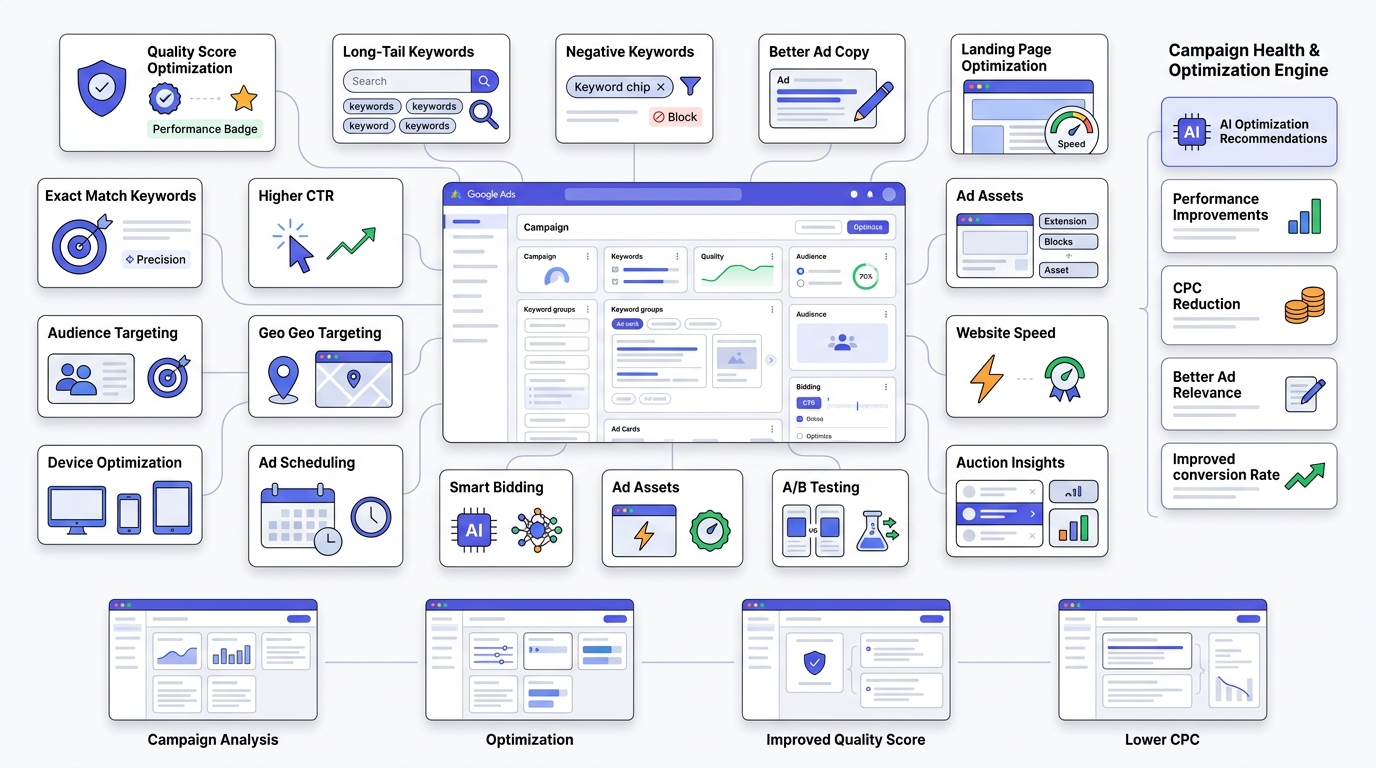
This is the meat of the guide. I’m not going to pad these out with fluff. Each one is something I’d actually tell a client to do this week.
Method 1: Improve Quality Score
This is the highest-leverage thing you can do, full stop. Since Quality Score’s three components directly influence Ad Rank, moving your score from a 4 to a 7 on your core keywords can cut your CPC by 30% or more on the exact same bid.
Checklist to actually move the needle:
- Rewrite ad headlines to include the exact keyword phrase, not a loose synonym
- Match your landing page headline to your ad headline word for word or close to it
- Split bloated ad groups into tighter, single-theme groups so each ad speaks to one specific intent
- Check page load speed on mobile using PageSpeed Insights and fix anything scoring below 70
Method 2: Use Long-Tail Keywords
Short, broad keywords like “insurance” or “shoes” are expensive because everyone bids on them. Long-tail keywords like “affordable renters insurance for apartments in Ohio” or “waterproof hiking boots for wide feet” have far less competition and much higher intent, because the person typing that phrase already knows exactly what they want.
Your keyword research workflow should start in Google Keyword Planner, but don’t stop there. Pull your own Search Terms Report weekly and look for the long-tail phrases that are already triggering your ads through broad or phrase match. Those are free keyword ideas, already validated by real search behavior, sitting in your account right now.
Method 3: Remove Expensive Keywords
Not every keyword deserves to stay. Pull a report sorted by cost, and look at anything spending significant budget with a conversion rate below your account average. Pause it, don’t delete it, because you might want the historical data later.
The exception: don’t pause a keyword just because it’s expensive if it’s also converting well above your target CPA. Expensive and inefficient are two different things, and confusing them is a common mistake.
Method 4: Add Negative Keywords
Negative keywords stop your ad from showing on searches that will never convert. There are three types: negative broad, negative phrase, and negative exact, and they behave differently in what they block.
If you sell premium custom furniture, adding “cheap,” “used,” and “free” as negative keywords stops you from paying for clicks from people who were never going to buy from you anyway. A solid starting negative keyword list for most B2C accounts includes: free, cheap, jobs, careers, DIY, how to make, and torrent. Build this list from your Search Terms Report every week, not just once at launch.
Method 5: Improve Click-Through Rate
CTR feeds directly into Expected CTR, one of the three Quality Score components. Rewrite headlines to lead with a number, a specific benefit, or an urgency trigger instead of a generic product description. Use every ad extension available to you: sitelinks, callouts, structured snippets. Extensions increase your ad’s real estate on the results page, which mechanically increases the odds someone clicks.
Method 6: Write Better Google Ads Copy
Generic copy is invisible. “Quality Products, Great Service” could be the headline for literally any business on earth, which means it does nothing to earn a click. Specific copy wins: “3-Day Shipping on Orders Over $50” or “Rated 4.9 Stars by 2,200+ Customers” gives someone an actual reason.
Lead with the benefit, not the feature. Use a clear call to action like “Get a Free Quote” instead of a vague “Learn More.” And test headlines against each other constantly, because what works in legal services rarely works the same way in e-commerce.
Method 7: Optimize Landing Pages
Your landing page is doing half the work your ad copy promised. If your ad says “Same-Day Roof Repair” and your landing page is a generic homepage with no mention of roofing or urgency, you’ve broken the promise, and Google notices through Landing Page Experience scoring, and so does the human who clicked.
Speed matters more than most people think. Google’s own data has consistently shown bounce rate climbing sharply as load time crosses the 3-second mark. Mobile optimization isn’t optional anymore either, since most search traffic in competitive verticals skews mobile-heavy. Trust signals like reviews, certifications, and clear contact information reduce hesitation at the exact moment someone’s deciding whether to convert.
Method 8: Use Exact Match Strategically
Broad match casts the widest net and, without Smart Bidding guardrails and a strong negative keyword list, wastes the most money. Phrase match sits in the middle. Exact match gives you the tightest control over exactly which searches trigger your ad.
The strategic move for most accounts: use exact match on your highest-intent, proven-converting keywords where you want maximum control over spend, and use broad match with Smart Bidding for discovery, feeding it into a campaign with a strict budget cap so it can’t run wild.
Method 9: Improve Ad Relevance
Group keywords by theme, not by product category alone. “Running shoes for flat feet” and “running shoes for wide feet” should probably live in separate ad groups with separate ad copy, because the searcher’s underlying concern is different even though the product category is the same. Keyword insertion, where your ad dynamically pulls in the exact search term, can help here too, but use it carefully so the resulting headline still reads naturally.
Method 10: Segment Campaigns Properly
Campaign, ad group, keyword, and landing page all need to align in a straight line. If your campaign is themed around “emergency HVAC repair” but your landing page talks about general HVAC maintenance plans, that misalignment shows up as a relevance penalty everywhere in the funnel, not just in one spot.
Method 11: Improve Conversion Rate
Here’s something people miss: a higher conversion rate lowers your effective cost per acquisition even if your CPC stays exactly the same, and under Smart Bidding strategies, a higher conversion rate actually pulls your CPC down too, because the algorithm learns it can bid more confidently on similar future searches while still hitting your target. Improving your form length, simplifying checkout, and adding trust badges near your CTA button are conversion levers that indirectly become CPC levers.
Method 12: Use Geo Targeting
Pull your location performance report and look for cities or regions burning budget with zero conversions. Exclude them. For areas that convert well, apply positive bid adjustments so you’re willing to pay slightly more where the money is clearly working.
Method 13: Optimize Device Targeting
Check your conversion rate by device. I’ve seen SaaS accounts where mobile CTR looked fantastic but mobile conversion rate was a fraction of desktop, because the sign-up form was clunky on a phone. In that case, applying a negative bid adjustment on mobile, or excluding it entirely until the mobile experience gets fixed, stops you from paying full price for traffic that was never going to convert on that device.
Method 14: Use Ad Scheduling
Pull your hour-of-day and day-of-week performance data. Most accounts have a clear pattern where certain hours convert well and others just burn budget on browsing behavior with no conversion intent. Apply negative bid adjustments during the dead hours and let more budget flow during your proven windows.
Method 15: Pause Low Performing Ads
Within each ad group, you should have at least two to three ad variations running. Look at CTR and conversion rate together, not CTR alone, since a high-CTR ad that doesn’t convert is arguably worse than a lower-CTR ad that does. Pause anything sitting meaningfully below the group average after it’s had enough impressions to be statistically meaningful, generally a few hundred at minimum.
Method 16: Improve Account Structure
SKAG, or Single Keyword Ad Groups, used to be the gold standard because it maximized relevance between keyword and ad copy. It still works, but it’s labor-intensive at scale. Modern structures lean toward STAG, Single Theme Ad Groups, with a handful of tightly related keywords per group, paired with responsive search ads that let Google test headline combinations automatically. For most mid-sized accounts, STAG gives 90% of the relevance benefit of SKAG with a fraction of the management overhead.
Method 17: Use Audience Targeting
In-market audiences target people actively researching a purchase in your category right now. Remarketing targets people who already visited your site, which almost always converts cheaper than cold traffic because the trust barrier is already partially cleared. Custom audiences let you build a segment based on specific URLs competitors’ customers might visit. Customer Match lets you upload your existing customer list to either target lookalikes or exclude existing customers from acquisition campaigns, saving budget you’d otherwise waste re-acquiring someone who already bought.
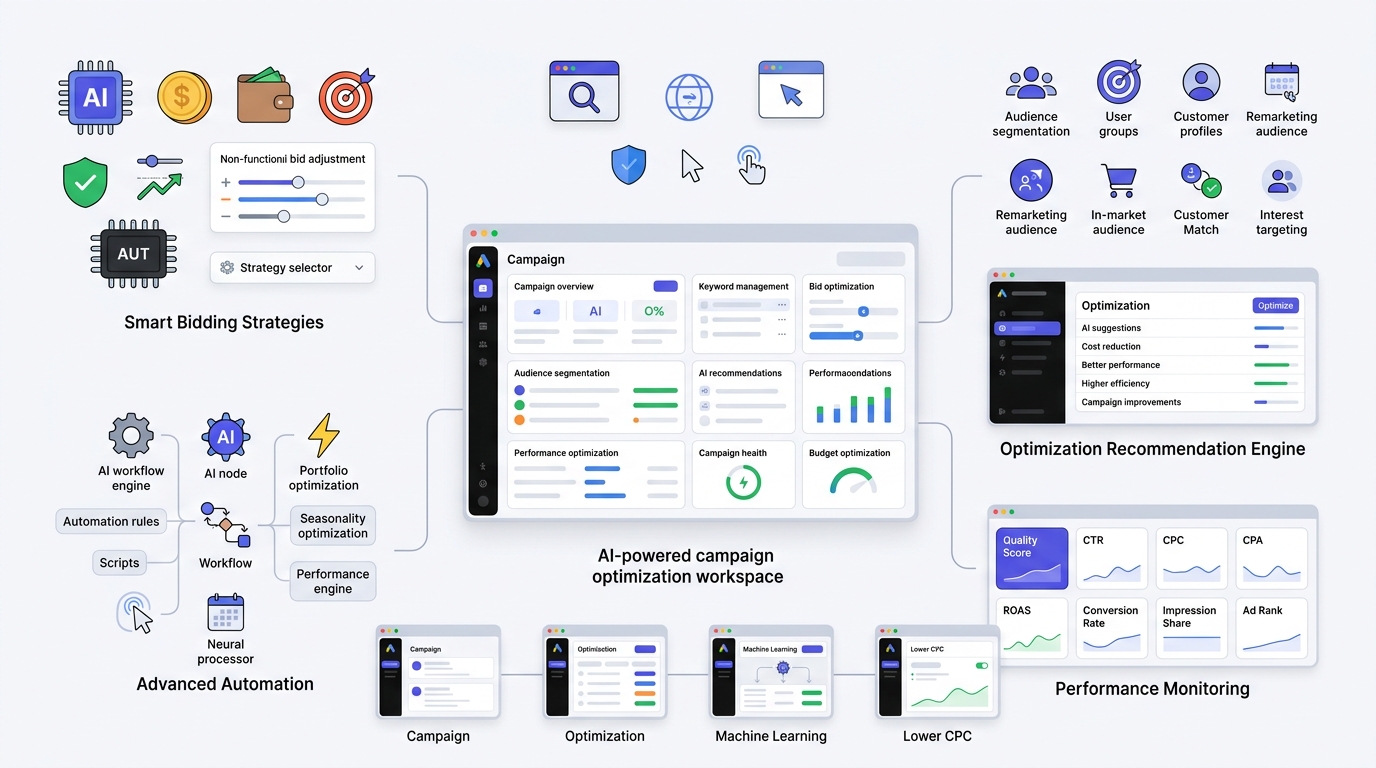
Method 18: Smart Bidding Optimization
Target CPA works well once you have consistent conversion volume and want Google to hold your cost per acquisition steady. Target ROAS is the e-commerce favorite, optimizing for revenue relative to spend rather than raw conversion count. Maximize Conversions pushes for volume without a strict cost ceiling, which is dangerous without a budget cap you’re comfortable with. Manual CPC and Enhanced CPC still make sense for smaller accounts without enough conversion data to feed the machine learning models properly, generally under 30 conversions per month per campaign.
Method 19: Improve Ad Extensions (Assets)
Sitelinks let you link to specific pages beyond your main landing page, like a pricing page or a testimonials page. Callouts add short trust phrases like “24/7 Support” or “Free Returns.” Structured snippets organize specific attributes like brands carried or service types offered. Call extensions matter enormously for local service businesses where a phone call converts better than a form fill. Price extensions, image assets, promotion assets, and lead form assets each add another surface for someone to engage without necessarily clicking through to your site, which can lower your effective cost per lead even when CPC on the click itself stays flat.
Method 20: A/B Test Everything
Test one variable at a time so you actually know what caused the change. Headlines, landing pages, CTAs, and descriptions all deserve their own isolated tests. Running five changes simultaneously and seeing CPC drop tells you almost nothing useful about which change actually worked.
Method 21: Improve Website Speed
Core Web Vitals, specifically Largest Contentful Paint and Cumulative Layout Shift, factor into how Google perceives your page experience. Run your landing pages through PageSpeed Insights and fix anything flagged red before touching your bids. A slow page is quietly taxing every single click you pay for.
Method 22: Increase Landing Page Trust
Testimonials with real names and photos, verified review counts, industry certifications, case studies with specific numbers, security badges near payment forms, and clear guarantees all reduce the hesitation that causes someone to bounce right after clicking, which you already paid for regardless of what they do next.
Method 23: Focus on High-Intent Keywords
Commercial and transactional keywords, things like “buy,” “price,” “near me,” and “best [product] for [use case],” convert at a much higher rate than purely informational searches. A higher conversion rate means your effective cost per acquisition drops even without touching CPC directly, and under automated bidding it often pulls raw CPC down too as the algorithm gains confidence in the traffic quality.
Method 24: Monitor Auction Insights
Auction Insights shows you Outranking Share, Top of Page Rate, and Absolute Top Impression Share relative to your specific competitors. If a competitor suddenly spikes their Outranking Share against you, that’s usually the first visible signal of a new aggressive bidder entering your space, and it explains a CPC jump before your CPA numbers even move.
Method 25: Regular Account Optimization
Weekly, monthly, and quarterly reviews catch problems before they compound. An account left untouched for two months will almost always show creeping CPC, because search behavior shifts, competitors change their strategy, and Quality Scores drift without anyone actively managing them.
How Quality Score Reduces CPC
Let’s go deeper on this because it’s genuinely the single biggest lever in the entire system. Say two advertisers are both bidding a max CPC of $5 on the same keyword. Advertiser A has a Quality Score of 3. Advertiser B has a Quality Score of 8. Using the actual CPC formula, Advertiser B will consistently pay significantly less than Advertiser A for the exact same ad position, sometimes less than half, purely because of that Quality Score gap.
Before optimization, a typical underperforming keyword might show Expected CTR as “Below Average,” Ad Relevance as “Average,” and Landing Page Experience as “Below Average,” landing at an overall Quality Score around 4. After rewriting ad copy to match search intent precisely, tightening the ad group theme, and fixing landing page load speed and mobile layout, that same keyword can climb to Expected CTR “Above Average,” Ad Relevance “Above Average,” and Landing Page Experience “Average,” pushing the overall score to 7 or 8. In real accounts I’ve watched, that kind of shift routinely cuts CPC by 25 to 40% on the affected keywords within four to six weeks.
Keyword Research Strategies That Lower CPC
Google Keyword Planner gives you starting volume and competition estimates, but it’s a starting point, not the finish line. Your own Search Terms Report is more valuable long-term because it shows you exactly what real people typed before clicking your ad, which is ground truth data Keyword Planner can’t give you.
Competitor analysis through tools like SpyFu or Semrush shows you which keywords competitors are actively bidding on and roughly what they’re paying, which helps you decide whether to compete head-on or find an adjacent angle they’ve missed. Long-tail and question-based keywords, things like “how much does a kitchen remodel cost in Denver,” carry lower competition and higher buying intent than their shorter parent keywords. Local keywords with city or neighborhood names attached almost always cost less than their national equivalents while converting at a higher rate for location-based businesses. Brand keywords, meaning your own company name, are usually cheap and should absolutely be captured so competitors can’t bid on your branded searches and intercept your own customers.
Match Types Explained
| Match Type | Example Keyword | Triggers On |
|---|---|---|
| Broad | running shoes | Any search Google deems related, including loose synonyms |
| Phrase | “running shoes” | Searches containing that phrase or a close variation |
| Exact | [running shoes] | Searches with the same meaning as the exact phrase |
Broad match reduces CPC per click on average, because competition thins out across the wider net, but it can raise your effective cost per conversion if the traffic doesn’t match your actual offer. Exact match usually costs more per click because it’s targeting exactly what converts, but delivers a lower cost per acquisition because there’s no wasted spend on irrelevant searches. If your goal is literally the lowest CPC number on a report, broad match with tight negatives wins. If your goal is the lowest cost per actual customer, exact match paired with Smart Bidding usually wins.
Negative Keywords Master Guide
Negative keywords matter because every irrelevant click you block is money that stays in your budget for a click that could actually convert. Find them by reviewing your Search Terms Report weekly, sorted by cost with zero conversions at the top. Types include negative broad, which blocks any search containing those words in any order, negative phrase, which blocks that exact phrase sequence, and negative exact, which blocks only that precise search.
An e-commerce store selling premium products should negative out “cheap,” “free,” “used,” and “wholesale.” A B2B SaaS company should negative out “jobs,” “careers,” “internship,” and “open source” if that’s not their model. A local service business should negative out “DIY,” “how to,” and city names outside their actual service area. Build a weekly process: pull the report, scan for zero-conversion high-cost terms, add them to your negative list at the campaign or account level depending on how broadly the term applies.
Landing Page Optimization for Lower CPC
Your headline needs to mirror your ad’s headline almost word for word, because that continuity is exactly what Landing Page Experience scoring rewards, and it’s also just good user experience. Body copy should lead with the specific benefit that matched the search intent, not a generic company description. Your CTA should be visible without scrolling on mobile and should use action language specific to the offer, like “Get My Free Estimate” instead of “Submit.”
Forms should ask for the minimum information needed to qualify a lead, since every additional field measurably drops completion rate. Images should be real, not generic stock photography that could belong to any competitor. Social proof, FAQs addressing the most common objection, fast load speed, and a clean mobile layout round out the rest. None of this is complicated. Most of it is just neglected because landing pages get built once at launch and never revisited.
Ad Copy Best Practices
Headlines should include the primary keyword or a close variant, a specific number or benefit, and ideally some urgency or social proof element. Descriptions should expand on the headline’s promise with a concrete detail, not a repeated vague statement. Emotional triggers work because people buy on emotion and justify with logic afterward, so a headline like “Stop Overpaying for Car Insurance” hits harder than “Great Rates on Auto Insurance.” Power words like “guaranteed,” “proven,” and “instant” work when they’re backed by something real behind them, and they backfire hard when they’re not. Urgency, specific numbers, and clear offers consistently outperform vague benefit statements in CTR testing across almost every vertical I’ve looked at.
Best Google Ads Bidding Strategies to Reduce CPC
| Strategy | Best For | Control Level |
|---|---|---|
| Manual CPC | Small accounts, low conversion volume | Full |
| Enhanced CPC | Mid-size accounts building conversion data | Partial |
| Maximize Clicks | New campaigns needing traffic and data fast | Low |
| Target CPA | Accounts with steady conversion volume | Automated |
| Target ROAS | E-commerce with revenue tracking set up | Automated |
| Maximize Conversions | Accounts prioritizing volume over strict cost control | Automated |
| Maximize Conversion Value | E-commerce prioritizing revenue over volume | Automated |
The decision usually comes down to conversion volume. Under roughly 15 to 30 conversions a month per campaign, automated bidding doesn’t have enough data to make good decisions, so manual or Enhanced CPC generally performs better. Above that threshold, Smart Bidding strategies typically outperform manual bidding within four to six weeks as the algorithm learns your account’s patterns.
Audience Optimization Techniques
Remarketing to site visitors who didn’t convert almost always delivers a lower CPC and higher conversion rate than cold prospecting, since the audience already has some trust built. Customer Match lets you exclude your existing customer base from acquisition campaigns, which prevents wasting budget re-targeting people who already bought. Affinity and In-Market audiences layer intent signals on top of your keyword targeting rather than replacing it. Demographic layers like household income and parental status help you avoid wasting spend on segments that historically don’t convert for your specific offer.
Advanced Google Ads Optimization Techniques
Google Ads scripts can automate routine tasks like pausing keywords that exceed a cost threshold without conversions, or adjusting bids based on weather data for weather-sensitive businesses. Automated rules inside the interface handle simpler versions of the same logic without needing to write code. Seasonality adjustments tell Smart Bidding to expect a temporary spike in conversion rate around a known event, like a Black Friday sale, so the algorithm doesn’t over-correct afterward. Portfolio bid strategies let you manage several campaigns toward one shared goal instead of optimizing each in isolation, which can smooth out CPC volatility across an account. Value-based bidding for e-commerce optimizes toward actual revenue rather than raw conversion count, which matters enormously when your average order value varies widely across products.
Google Ads Metrics You Should Monitor
Average CPC tells you the trend but not the cause. CTR tells you if your ad copy and targeting are relevant. Quality Score tells you exactly which of the three underlying components is dragging you down. CPA tells you whether your spend is actually generating affordable results. ROAS matters most for e-commerce and tells you revenue efficiency, not just cost efficiency. Conversion rate tells you whether your landing page and offer are working once someone arrives. Impression Share and Search Lost IS (budget) tell you how much potential traffic you’re missing due to budget constraints versus rank constraints, which are two completely different problems needing two completely different fixes. Top Impression Rate and Ad Rank trend data round out the full picture of where you stand competitively.
Step-by-Step Google Ads Optimization Workflow
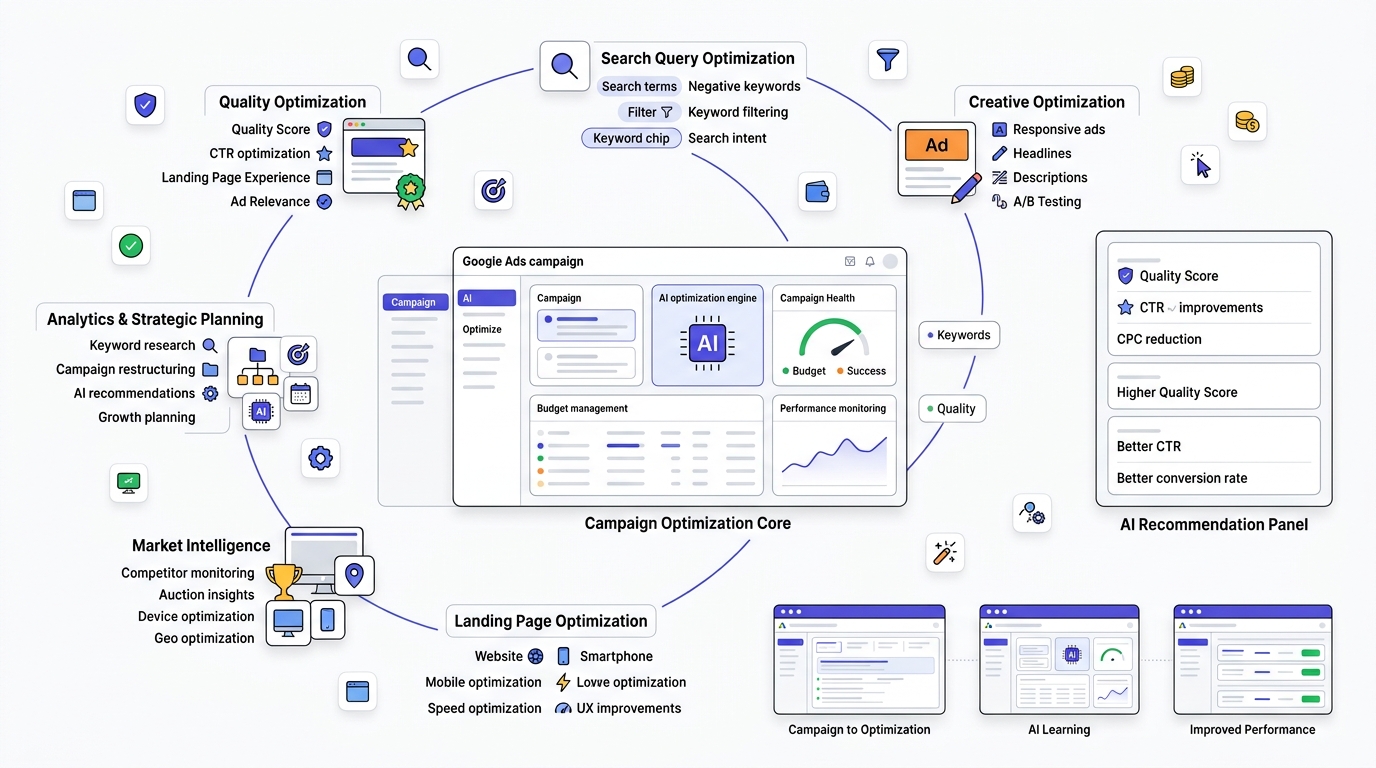
Most people treat Google Ads optimization like spring cleaning. They do a huge push once, feel good about it for a week, and then the account just sits there collecting dust until CPC creeps up enough to force another panic session. That’s backwards. The accounts that actually keep CPC under control aren’t the ones that do one massive overhaul. They’re the ones running small, consistent checks on a schedule, so nothing has time to compound into a real problem.
The reason this workflow is broken into weekly, monthly, quarterly, and annual buckets isn’t arbitrary. Different problems move at different speeds. A bad search term can waste $200 in three days. A stale account structure takes months to quietly become a mess. If you check both on the same schedule, you either waste time checking things that haven’t changed, or you miss things that already got expensive while you weren’t looking.
Week 1: Audit Quality Scores and Flag Anything Below 5
Start here because Quality Score is the thing that touches everything else. Go into your account, add the Quality Score column (and while you’re at it, add the three sub-metrics: Expected CTR, Ad Relevance, Landing Page Experience) to your keyword view. Sort low to high.
Anything sitting at 5 or below is actively costing you money on every single click, not just in theory. Remember the auction formula: your actual CPC depends on the competitor’s Ad Rank divided by your Quality Score. A keyword sitting at a 3 is paying way more than a keyword at an 8 for the exact same position.
But don’t just flag it and move on. Look at which of the three sub-scores is dragging the keyword down, because that tells you what to actually fix. If Expected CTR is “Below Average,” that’s an ad copy and relevance problem, your headlines aren’t earning clicks. If Ad Relevance is weak, your ad group is probably too broad, mixing keywords that don’t share the same intent. If Landing Page Experience is the culprit, that’s not even a Google Ads problem anymore, that’s a page speed or content-match problem you need to fix on your site. Knowing which lever to pull matters more than just knowing the number is low.
Week 2: Search Terms Report and Negative Keywords
This is where you find out what people actually typed before your ad showed up, which is different from what keyword you targeted. Broad and phrase match especially will surprise you here. You’ll see searches that technically relate to your keyword but have zero business converting, stuff like “free,” “DIY,” “jobs at,” or completely unrelated intent that Google’s matching loosely decided was close enough.
Sort by cost, descending, and look at anything with spend and zero conversions. That’s wasted budget sitting in plain sight. Add those terms as negatives, either at the ad group level if it’s specific to one theme, or account level if it’s the kind of junk that’ll show up everywhere (like “free” or “cheap” for a premium brand).
The reason this is a weekly task and not a one-time setup: new junk search terms show up constantly as Google’s matching algorithm evolves and as seasonal search behavior shifts. A negative keyword list built once at launch goes stale fast.
Week 3: Test New Ad Copy Against Your Best Performer
By now you know which keywords have weak Quality Scores and which search terms are wasting money. Week 3 is where you start actively improving the ads themselves instead of just cleaning up around them.
Take your current best-performing ad in a given ad group, the control, and write a genuine alternative, not a minor tweak. Change the headline angle, not just a word or two. If your control leads with a discount, try leading with urgency or social proof instead. Let both run long enough to get a real sample size before you call a winner, guessing after 50 impressions tells you nothing.
The reason this happens after Week 1 and Week 2, not before, is that testing ad copy on a messy ad group full of irrelevant traffic gives you garbage data. Clean the input first, then test.
Week 4: Landing Page Speed and Mobile Experience for Your Top 5 Keywords by Spend
Sort keywords by spend, take your top five, and actually go look at where that traffic lands. Not just glance at it, really check it: run each landing page through PageSpeed Insights, and manually load it on your own phone with throttled connection if you can.
Why only the top five and not every keyword? Because your top spenders are where a speed or mobile problem costs you the most money the fastest. If keyword number 47 has a slow landing page, fine, fix it eventually. If keyword number 2 by spend has a landing page that takes 5 seconds to load on mobile, you’re bleeding budget on that one page every single day.
Monthly: Auction Insights and Device/Location Performance
Auction Insights shows you where you actually stand against specific named competitors, not just abstract “the market.” Look at Outranking Share and Top of Page Rate over the trailing month. If a competitor’s Outranking Share against you jumped sharply, that’s usually your first real clue that someone new started bidding aggressively in your space, which explains a CPC creep before it even shows up clearly in your own cost reports.
Pair that with a device and location breakdown. This is monthly rather than weekly because these patterns need more data to be reliable, a week of location data can be noisy, a month gives you something trustworthy enough to act on, like cutting a city that’s burned budget with zero conversions for 30 days straight, or adding a positive bid adjustment somewhere that’s quietly outperforming.
Quarterly: Full Account Structure Review
This is the step people skip most, and it’s usually the one that matters most for accounts that have been running a while. Your product line changes. Your services change. What made sense as an ad group six months ago might now be lumping together two things that shouldn’t share the same ad copy or landing page anymore.
Quarterly, step back and ask honestly: does this structure still reflect how the business actually works today? If you launched three new service lines since the last review and they’re all crammed into one old ad group, that’s exactly the kind of relevance drag that quietly raises CPC over time without any single obvious trigger.
Annual: Full Keyword Research Refresh
Search behavior shifts more over a year than most people expect. New competitors enter, phrasing trends change, voice search and conversational queries evolve, and keywords that were cheap and effective two years ago might now be crowded and expensive, while new long-tail opportunities have opened up that didn’t exist before.
Once a year, go back to square one: fresh Keyword Planner research, fresh competitor analysis through something like Semrush or SpyFu, and an honest look at whether your current keyword list still matches how your actual customers search today. Treat it like a reset, not just an addition to the existing list.
The whole point of stacking these cadences together is that CPC rarely spikes for one reason. It’s usually a slow accumulation: a Quality Score that drifted down, a few new junk search terms that never got caught, an ad that went stale, a competitor that got aggressive, an ad group that no longer matches the business. Catching each of those on its own natural timeline is what keeps CPC from creeping up unnoticed for months.
Tools That Help Reduce CPC
| Tool | Best For | Free/Paid |
|---|---|---|
| Google Keyword Planner | Initial keyword research and CPC estimates | Free |
| Google Ads Editor | Bulk campaign edits and offline management | Free |
| Google Analytics 4 | Post-click behavior and conversion path analysis | Free |
| Google Search Console | Organic query overlap and content gap ideas | Free |
| Semrush | Competitor CPC and keyword gap analysis | Paid |
| Ahrefs | Keyword research and competitor ad history | Paid |
| SpyFu | Competitor PPC keyword and spend tracking | Paid |
| Optmyzr | Automated bid management and rule building | Paid |
| Adalysis | Ad copy testing and Quality Score diagnostics | Paid |
| Unbounce | Landing page building and A/B testing | Paid |
| Hotjar | Landing page heatmaps and session recordings | Paid |
| PageSpeed Insights | Core Web Vitals and load speed diagnostics | Free |
| Looker Studio | Custom reporting and dashboard building | Free |
Google Ads Optimization Checklist
Daily: Check for budget-limited campaigns and unusual spend spikes.
Weekly: Review Search Terms Report and update negative keywords, check ad performance for underperformers to pause.
Monthly: Full Quality Score audit, Auction Insights review, device and location performance check, landing page speed check.
Quarterly: Account structure review, audience segmentation review, ad asset refresh, budget reallocation based on quarter-over-quarter trends.
Conclusion
Reducing your Google Ads CPC isn’t about finding one secret setting buried in the interface. It’s about fixing the things that make Google’s algorithm see your ad as worth showing cheaply: relevant keywords, tight ad groups, ad copy that matches intent, landing pages that deliver on the promise, and a bidding strategy that fits your actual conversion volume. Every method in this guide connects back to those same fundamentals in one way or another.
Go audit your own account this week. Pull your Search Terms Report, check your Quality Scores, and pick two or three methods from this guide that map to whatever’s actually broken in your account, not just whatever sounds easiest. Then watch your CPC, your conversion rate, and your ROAS together over the next month, because that combination, not CPC alone, is what actually tells you if things are working.
Frequently Asked Questions
What is a good CPC in Google Ads?
There’s no universal good CPC because it depends entirely on your industry and average customer value. A $6 CPC is excellent for a legal services firm but would be alarming for a low-margin e-commerce store. The better question is whether your CPC allows you to hit a profitable cost per acquisition given your typical order value or customer lifetime value.
How can I reduce CPC without lowering traffic?
Focus on Quality Score improvements first, since a higher Quality Score lowers your CPC for the same ad position without requiring you to narrow your targeting. Improving ad relevance and landing page speed both fall into this category, letting you pay less per click while keeping the same volume of eligible searches.
Does Quality Score really reduce CPC?
Yes, directly and mathematically. The three components underlying Quality Score, Expected CTR, Ad Relevance, and Landing Page Experience, feed into the auction formula that determines your actual cost per click. Raising Quality Score from a 4 to a 7 or 8 commonly cuts CPC by 25 to 40% on the same keyword and bid.
Are long-tail keywords cheaper?
Generally yes, because fewer advertisers compete for specific, longer search phrases compared to short, broad ones. Long-tail keywords also tend to convert at a higher rate since the searcher’s intent is more clearly defined, which improves your effective cost per acquisition even beyond the raw CPC savings.
Should I use Smart Bidding or Manual CPC?
It depends on your conversion volume. Below roughly 15 to 30 conversions a month per campaign, Smart Bidding doesn’t have enough data to make good decisions, so Manual or Enhanced CPC usually performs better. Above that threshold, Smart Bidding strategies like Target CPA or Target ROAS typically start outperforming manual bidding within four to six weeks.
How often should I optimize campaigns?
Weekly for negative keywords and performance checks, monthly for Quality Score and Auction Insights review, and quarterly for a full account structure audit. Making major changes more frequently than weekly can actually hurt performance, since automated bidding strategies need stable signals to learn from.
Can landing pages lower CPC?
Yes. Landing Page Experience is one of three components that make up Quality Score, and a fast, mobile-friendly, relevant landing page directly improves that score, which lowers your actual cost per click through the auction formula.
Do ad assets affect CPC?
Ad assets like sitelinks, callouts, and structured snippets contribute to Ad Rank calculations and can improve your ad’s overall competitiveness in the auction, which indirectly supports a lower effective CPC for the same position. They also increase your ad’s visual footprint on the results page, which tends to lift CTR.
Why did my CPC suddenly increase?
Sudden CPC spikes usually come from increased competitor activity, a Quality Score drop from a recent ad or landing page change, a seasonal demand spike in your industry, or a budget change that shifted your bid strategy’s pacing behavior. Checking Auction Insights first is the fastest way to see if a new competitor entered your space.
How many negative keywords should I add?
There’s no fixed number. The right approach is reviewing your Search Terms Report weekly and adding any term generating cost with zero conversions after a reasonable sample size, generally once a term has accumulated enough clicks to judge fairly rather than after just one or two.
Does CTR influence CPC?
Yes, directly through Expected CTR, one of the three Quality Score components. A higher CTR signals to Google that your ad is relevant and worth showing, which improves your Quality Score and lowers your actual cost per click for the same auction position.
How do I find expensive keywords?
Pull a keyword performance report sorted by cost, then cross-reference against conversion rate and CPA. A keyword can be expensive and still efficient if it converts well, so don’t pause based on cost alone. Look specifically for high spend paired with low or zero conversions.
Can Performance Max campaigns reduce CPC?
Performance Max can improve overall account efficiency by finding conversions across Google’s full inventory, but it doesn’t guarantee a lower CPC on its own. Feed quality, conversion tracking accuracy, and asset group relevance all still determine whether Performance Max delivers efficient or wasteful spend.
What industries have the highest CPC?
Legal, insurance, and finance consistently top the list because a single converted customer can be worth thousands of dollars, which justifies aggressive bidding even at a relatively low conversion rate. E-commerce and travel generally sit at the lower end because average order values are smaller.
Is lowering CPC always the right goal?
No. A lower CPC that comes from broader, less relevant targeting can actually raise your cost per acquisition if conversion rate drops enough to offset the per-click savings. The real goal should always be a lower cost per qualified conversion, not a lower number on the CPC line alone.