


Here’s something nobody tells you when you start building an email list: most of your subscribers make up their mind about you in the first 48 hours. Not the first month. Not after your third newsletter. The first two days.
And here’s the part that stings a little — most businesses waste that window. Somebody signs up, gets a generic “Thanks for subscribing!” email, and then… nothing. Or worse, they get thrown straight into a sales pitch before they even know what you sell. No wonder open rates for regular newsletters hover around 20-25% while welcome emails routinely hit 50-60%. People are paying attention right after they sign up. That attention doesn’t last. If you don’t use it, you lose it.
That’s the whole idea behind a welcome sequence. It’s not a fancy marketing term for “say hi.” It’s a deliberate, automated set of emails that fires the moment someone joins your list, and it does the heavy lifting of turning a stranger into someone who actually trusts you enough to buy something, book a call, or stick around for the long haul.
Look at what actually happens without one. A person finds your lead magnet, downloads your free PDF or checklist, and then silence. Days pass. They forget who you are. When your next email does land in their inbox — maybe a sales email three weeks later — they don’t recognize your name, mark it as spam, or just delete it without opening. You paid for that lead. Ad spend, content creation, SEO time, whatever it took to get them onto your list. And you let it evaporate because nobody was there to say “hey, glad you’re here, here’s what to expect.”
The revenue math backs this up too. Businesses that automate welcome emails see meaningfully higher revenue per email compared to one-off broadcast campaigns, because the messages are timed to when interest is highest and relevant to why someone signed up in the first place. That’s not a coincidence. It’s timing plus relevance, which is basically the whole game in email marketing.
So what is email automation, really, and how does it differ from just… sending a newsletter? A newsletter is you talking to everyone on your list at the same time, regardless of when they joined or what they care about. Automation is different. It’s a system that watches for a trigger — someone signs up, buys something, abandons a cart, clicks a link — and then sends pre-written emails on a schedule you control, without you lifting a finger after the first setup. You build it once. It runs for years.
What You Will Learn in This Guide
This is a long one, so here’s the roadmap:
- How welcome sequences actually work behind the scenes, not just the theory
- A step-by-step process for planning and building your own from scratch
- The best practices that separate a sequence that converts from one that gets ignored
- Common mistakes that quietly kill open rates and click rates
- Real examples and templates you can adapt for SaaS, ecommerce, coaching, agencies, and more
- A rundown of the tools people are actually using in 2026, with honest pros and cons
- Advanced strategies once your basic sequence is working
- How to measure whether any of this is actually working
Grab a coffee. Let’s get into it.
What Is Email Automation?
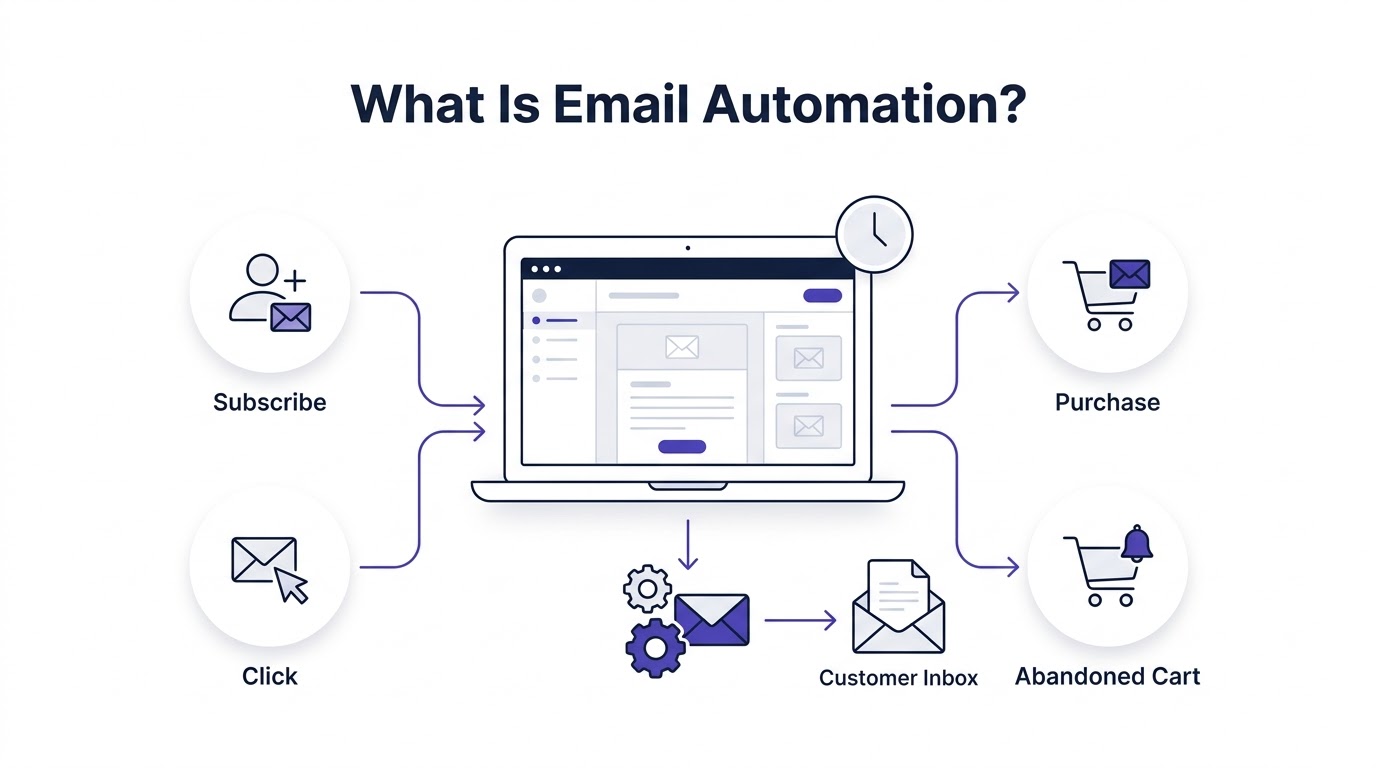
Email automation is the practice of sending emails based on triggers and rules instead of manually hitting send every time. Someone takes an action — subscribes, buys, clicks, abandons a cart — and your email platform reacts automatically, sending the right message at the right moment without a human sitting there deciding when to send it.
How Email Automation Works
Under the hood, it’s simpler than people think. Your email platform sits there listening for events. A form gets submitted. A purchase goes through. A link gets clicked. When that event happens, it checks against rules you’ve set — “if this person just subscribed, send Email 1, wait a day, send Email 2” — and then executes automatically. You’re essentially writing an if-this-then-that script, except the “script” is a sequence of emails instead of code. Once it’s live, it just runs, forever, for every new person who triggers it.
Manual Email vs Automated Email
| Manual Email | Automated Email |
|---|---|
| Sent individually | Triggered automatically |
| Time-consuming | Saves time |
| Inconsistent | Consistent |
| Limited personalization | Highly personalized |
Manual email is fine when you’ve got 50 subscribers and you know half of them by name. It falls apart fast once you’re at 5,000 or 50,000. Nobody’s manually emailing every new subscriber a personal welcome note at scale — automation is what lets a small team behave like they have a much bigger one.
Components of Email Automation
Triggers. The event that kicks everything off. Signing up for a list, making a purchase, downloading a lead magnet, abandoning a cart. Without a trigger, nothing happens — this is the starting gun.
Conditions. The “if this, then that” logic layered on top of triggers. If someone clicked a specific link, send them down one path. If they didn’t, send them down another. Conditions are what make automation feel personal instead of generic.
Delays. The waiting periods between emails. Send immediately, then wait a day, then wait two more days. Delays control pacing so you’re not dumping five emails into someone’s inbox in one afternoon, which, honestly, nobody wants.
Actions. What the automation actually does — send an email, add a tag, move someone to a different list, notify your sales team. Actions are the actual output of the automation, the stuff that makes it useful rather than just theoretical.
Goals. The endpoint you’re automating toward, usually a purchase, a booked call, or a completed onboarding step. Every well-built sequence has a goal it’s steering toward, even if that goal is just “get them to open the next email.”
Segmentation. Splitting subscribers into groups based on behavior, interest, or demographics so different people get different content. A person who downloaded your ecommerce discount guide shouldn’t get the same emails as someone who downloaded your B2B pricing guide.
Personalization. Inserting dynamic details — first name, last purchase, browsing behavior — into emails so they feel written for one person instead of blasted to ten thousand.
What Is a Welcome Email Sequence?
A welcome email sequence is a series of automated emails sent to a new subscriber over a set period, usually spanning anywhere from a few days to a few weeks, designed to introduce your brand, build trust, and move that person toward a specific action like a purchase or a booked call.
Why It Exists
Because a single “thanks for subscribing” email just doesn’t do enough work. One email can say hello. It can’t tell your story, prove you’re credible, show social proof, and make an offer, all without feeling like a wall of text nobody wants to read. Spreading that across multiple emails lets each one do one job well instead of cramming everything into one overstuffed message that gets skimmed and forgotten.
How It Fits Into Customer Journey
A welcome sequence sits right at the top of the funnel, bridging the gap between “stranger who just signed up” and “customer who trusts you enough to pay.” Here’s roughly how that path looks:
Website Visitor
      ↓
Signup Form
      ↓
Welcome Email
      ↓
Value Email
      ↓
Trust Building
      ↓
Offer
      ↓
Purchase
Notice the offer doesn’t come first. It comes after value and trust. That order matters more than almost anything else in this whole guide — pitch too early and you’ll torch the relationship before it starts.
Why Email Automation Matters for Welcome Sequences
You get one shot at a first impression, and in email, that first impression is your welcome email. If it’s generic, badly formatted, or shows up three days late, you’ve already told the subscriber something about how much you care about the relationship. Not great, and hard to undo later.
Highest Open Rates
Welcome emails consistently pull the highest open rates of any email type you’ll send, often double or triple a regular newsletter. That’s because the subscriber just interacted with you. Interest is at its peak. Waiting even a day lets that interest cool off.
Builds Trust Quickly
Trust isn’t built in one email, but a good sequence builds it fast, layer by layer. You show up when you said you would. You deliver what you promised. You sound like a real person. Small things, but they stack.
Educates New Subscribers
New subscribers usually don’t fully understand what you offer, even if they filled out a form for it. A welcome sequence gives you room to explain, without cramming a full sales page into your first message.
Increases Sales
Sequences with a clear offer baked in — a discount, a free consultation, a demo — routinely outperform businesses that never make an ask during onboarding. People are more receptive in the first week than they’ll ever be again.
Improves Customer Retention
Subscribers who get a solid welcome experience stick around longer. They know what to expect from your emails, so future messages don’t feel random or spammy.
Reduces Unsubscribes
A welcome sequence sets expectations. “You’ll hear from us twice a week with tips on X.” When people know what’s coming, they’re less likely to bail the first time you email them something they didn’t expect.
Creates Brand Loyalty
Done right, a sequence doesn’t just sell — it makes people feel like they know you. That’s the stuff that turns a one-time buyer into someone who tells their friends about you.
Pro Tip: Track your welcome sequence open rates separately from your regular campaigns. If Email 1 isn’t hitting at least 40-50% opens, something’s off before you even get to the sales-focused emails later in the sequence.
How Welcome Email Automation Works (Step-by-Step Workflow)
Here’s what’s actually happening behind the curtain when someone joins your list:
User visits website
      ↓
Lead Magnet
      ↓
Signup Form
      ↓
Email Platform
      ↓
Trigger
      ↓
Automation Starts
      ↓
Email 1
      ↓
Wait 1 Day
      ↓
Email 2
      ↓
Wait 2 Days
      ↓
Email 3
      ↓
Purchase?
      ↓
YES → Customer Automation
NO → Nurture Campaign
Lead Magnet and Signup Form
This is where it all starts. Someone lands on your site, sees something worth trading their email for — a checklist, a discount code, a free chapter — and fills out a form. The quality of your lead magnet directly affects how engaged that subscriber will be later, so don’t skimp here.
Trigger Fires
The moment that form submits, your email platform catches the event and fires the trigger. This has to be set up correctly on the platform side, or your automation just never starts, which happens more often than you’d think when people are new to this stuff.
Automation Begins
Email 1 sends, usually within minutes. Then the platform waits based on the delay you set — a day, two days, whatever you’ve configured — before firing the next email.
Branching Logic
This is where the “Purchase? YES/NO” branch comes in. If someone buys partway through your sequence, you don’t want them still getting emails pitching the thing they already bought. Good automation reroutes them into a “customer” track instead, while people who didn’t buy keep moving through nurture content.
Benefits of Email Automation
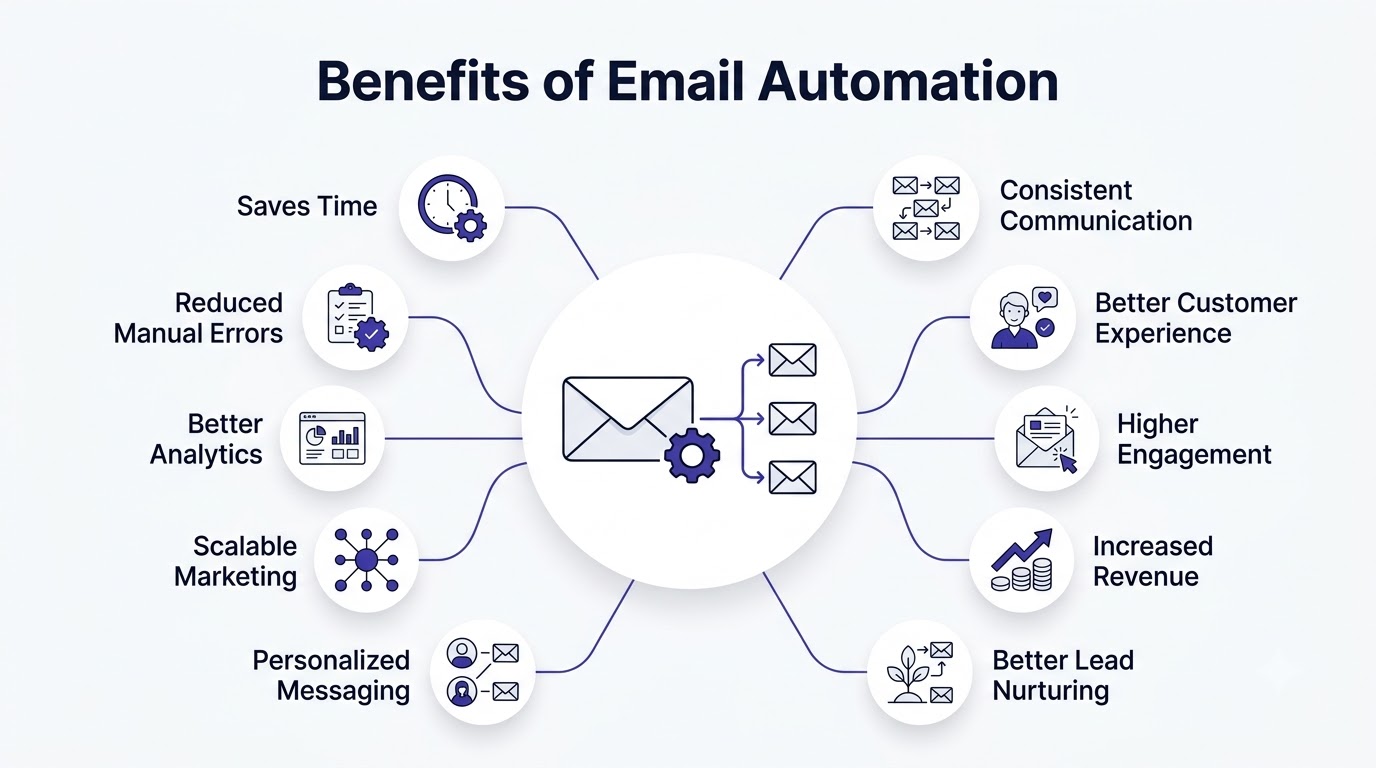
Saves Time
You write the sequence once. It runs for every new subscriber after that, whether it’s 10 people a month or 10,000. That’s time you’re not spending manually emailing each new signup.
Consistent Communication
Every subscriber gets the same quality experience, not a rushed version because you were busy that week. Consistency is underrated — it’s what makes a brand feel trustworthy over time.
Better Customer Experience
Timely, relevant emails feel like a business that’s paying attention. Late, random, or irrelevant emails feel like the opposite. Automation, done well, tilts things toward the former.
Higher Engagement
Because emails are triggered by real behavior and timed for relevance, people open and click more than they would with a generic blast sent to everyone at once regardless of where they are in the journey.
Increased Revenue
More opens and clicks, timed when interest is highest, means more conversions. This isn’t theoretical — it shows up directly in revenue-per-subscriber numbers once a sequence is live.
Better Lead Nurturing
Not everyone buys on day one. Automation lets you keep showing up with value over days and weeks without you having to remember to do it manually.
Personalized Messaging
Dynamic fields and segmentation let you send different content to different people automatically, which is basically impossible to do manually once your list crosses a few hundred subscribers.
Scalable Marketing
Whether your list doubles or grows tenfold, the sequence doesn’t need to be rebuilt. It just keeps running at whatever scale you’re at.
Better Analytics
Automated sequences give you clean, comparable data — same emails, same order, same timing — so you can actually tell what’s working instead of comparing apples to oranges across random one-off sends.
Reduced Manual Errors
No forgetting to send an email. No sending the wrong message to the wrong list. Once it’s built and tested, it just runs the way it’s supposed to.
Types of Welcome Email Sequences
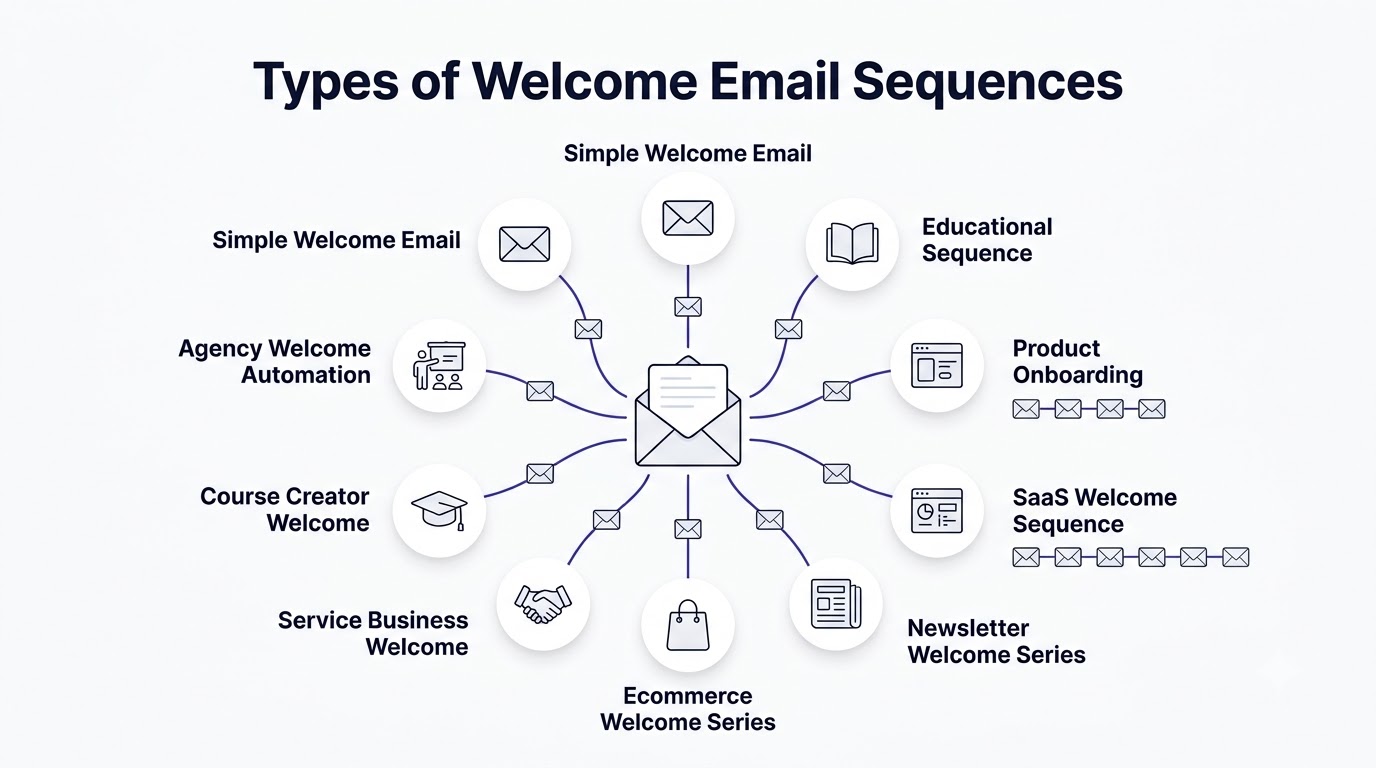
Different businesses need different structures. Here’s a rundown of the common types.
Simple Welcome Email
Best use cases: Small blogs, personal brands, low-frequency senders.
Ideal number of emails: 1-2.
Goal: Confirm the subscription and set expectations.
Sample structure: One email thanking them for joining, briefly explaining what they’ll get and how often, with a soft CTA to follow you on social or check out your best content.
Educational Sequence
Best use cases: Content creators, coaches, niche experts.
Ideal number of emails: 4-6.
Goal: Build authority through useful, free information before ever pitching anything.
Sample structure: Each email tackles one specific problem your audience has, with practical advice they can use immediately, gradually building the case that you know what you’re talking about.
Product Onboarding
Best use cases: Apps, software, digital products where the “aha moment” needs guiding.
Ideal number of emails: 5-8.
Goal: Get the user to actually use the product and hit a key milestone.
Sample structure: Walk through core features step by step, celebrate small wins, and nudge toward the feature that correlates most with long-term retention.
SaaS Welcome Sequence
Best use cases: Software companies with free trials or freemium models.
Ideal number of emails: 6-10.
Goal: Convert trial users into paying customers before the trial expires.
Sample structure: Setup guidance in email one, feature highlights spaced across the trial period, social proof mid-sequence, and a clear urgency-driven push near the trial’s end date.
Ecommerce Welcome Series
Best use cases: Online stores, DTC brands.
Ideal number of emails: 3-5.
Goal: Convert the first purchase, often with a discount code.
Sample structure: Welcome plus discount code in email one, bestsellers or brand story in email two, urgency reminder about the discount expiring in email three.
Newsletter Welcome Series
Best use cases: Publications, independent writers, media brands.
Ideal number of emails: 2-3.
Goal: Set reading habits and highlight best past content.
Sample structure: Welcome and expectation-setting, followed by a “start here” roundup of your most popular pieces.
Service Business Welcome
Best use cases: Consultants, agencies, local service providers.
Ideal number of emails: 3-5.
Goal: Build enough trust to book a call or request a quote.
Sample structure: Introduce who you help and how, share a case study or testimonial, then make a low-pressure invitation to talk.
Course Creator Welcome
Best use cases: Online course sellers, cohort-based programs.
Ideal number of emails: 5-7.
Goal: Warm up cold leads into course buyers.
Sample structure: Free value tied to the course topic, a student success story, an FAQ-busting email, then a time-limited enrollment offer.
Agency Welcome Automation
Best use cases: Marketing, design, or dev agencies capturing leads.
Ideal number of emails: 4-6.
Goal: Qualify the lead and get a discovery call booked.
Sample structure: Portfolio highlights, process explanation, client results, then a direct booking link.
When Should a Welcome Email Be Sent?
Timing is one of the most important factors in the success of a welcome email sequence. The first email should be sent immediately after someone subscribes, creates an account, downloads a resource, or makes a purchase. At this moment, your brand is fresh in the subscriber’s mind, making them far more likely to open and engage with your message. Research consistently shows that welcome emails receive significantly higher open and click-through rates than standard marketing emails because they arrive when user interest is at its peak.
The timing of subsequent emails depends on your business model and customer journey. For ecommerce brands, a series spread across the first week often works best because shoppers are still evaluating products and considering future purchases. For SaaS businesses, the sequence should guide users through onboarding over several days, helping them experience the product’s value before interest fades. Educational platforms may spread onboarding across one or two weeks, introducing lessons, community resources, and learning milestones.
Avoid overwhelming subscribers by sending too many emails in a short period. While consistency is important, every email should provide genuine value. Monitor engagement metrics such as opens, clicks, and conversions to determine whether your timing supports your audience’s behavior.
Immediately
The first email should go out within minutes of signup. This is non-negotiable. That subscriber just took action, and their inbox expectation is instant confirmation. Wait too long and they’ll forget they even signed up.
After 1 Hour
Some sequences space Email 2 an hour after Email 1 if the first email was purely transactional (a lead magnet delivery, say) and the second is where the real content begins. This keeps momentum without overwhelming.
After 24 Hours
A full day gap is the most common pacing for the second or third email. It gives the subscriber time to actually read and process email one before you show up again, without letting the relationship go cold.
After 2 Days
By the middle of the sequence, spacing out to two-day gaps feels natural. You’re no longer in “just signed up” territory, so daily emails start to feel like too much for most audiences.
After 5 Days
Later emails, especially ones with an offer or a final CTA, often land around day five to seven. This gives enough runway for the earlier trust-building emails to actually land before you ask for something.
The psychology here is simple: frequency should match urgency of relevance. Early on, interest is high and you can email more often. As days pass, interest naturally cools, so spacing out respects that instead of fighting it.
How to Plan Your Welcome Sequence
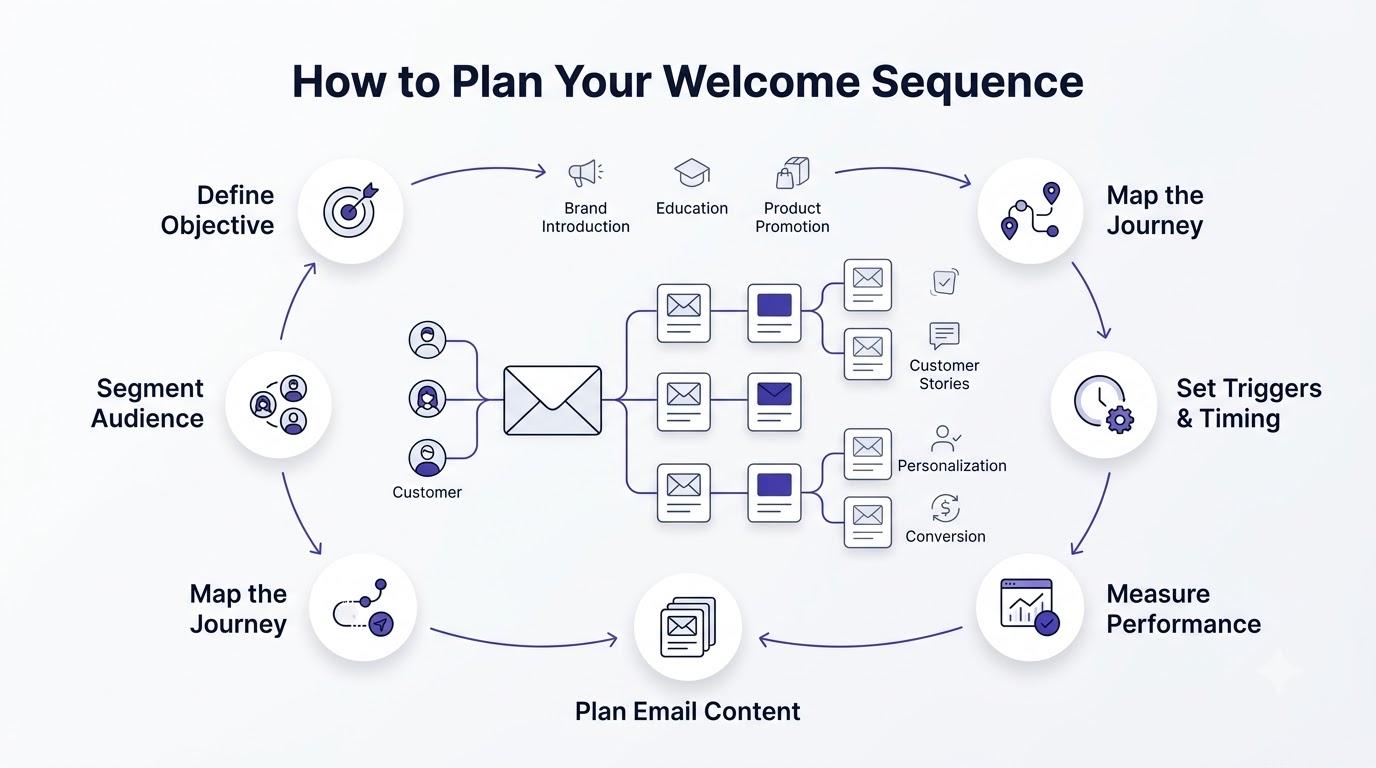
Before writing a single email, you need a clear plan that aligns with your business goals and customer journey. A welcome sequence is not just a collection of emails—it is a structured onboarding experience designed to build trust, educate subscribers, and move them toward a desired action.
Start by identifying the objective of your sequence. Are you introducing your company? Encouraging a first purchase? Helping new users activate their account? Promoting premium features? Different goals require different messaging.
Next, define your audience segments. Someone downloading a free guide has different expectations than someone who just purchased a product. Segmenting subscribers allows you to send more relevant emails, improving engagement and reducing unsubscribe rates.
Create a journey map outlining what each email should accomplish. Instead of repeating promotional messages, each email should have a unique purpose such as introducing your brand story, showcasing products, answering common questions, or sharing customer success stories.
Planning also includes deciding the frequency, triggers, personalization strategy, automation platform, and performance metrics you’ll use to evaluate success.
Define Goal
Before writing a single word, decide what this sequence needs to accomplish. A first purchase? A booked call? Getting someone to actually use your app? Every email in the sequence should point toward that one goal, not five different ones.
Know Your Audience
Write for the actual person who signed up, not a vague “everyone.” What problem brought them to you? What do they already know, and what do they need explained? Skipping this step is why so many welcome sequences read like they were written for nobody in particular.
Map Customer Journey
Sketch out where this subscriber is right now and where you want them to end up. That map becomes your email-by-email outline — each message moves them one step closer.
Identify Pain Points
List the specific problems your product or service solves. Your emails should speak directly to those pain points instead of vague benefits like “save time” or “grow your business,” which honestly could apply to almost anything.
Decide Offer
Figure out what you’re actually going to offer, and when. A discount? A free trial extension? A consultation? Decide this early so the earlier emails can build toward it naturally instead of feeling like a bait and switch.
Create CTA Strategy
Plan out what action you want at the end of each email — reply, click, buy, book. Not every email needs a hard sell CTA. Some just need “read this next” or “hit reply and tell me about yourself.”
Build Email Calendar
Lay out the full sequence on a simple calendar: which email, which day, which goal. This turns an abstract plan into something you can actually build.
How to Build Your Welcome Sequence Step-by-Step
Creating an effective welcome sequence involves more than writing emails. It requires strategic planning, automation setup, and continuous optimization.
Step 1: Create Signup Form
Best Practices: Keep it short. Every extra field you add drops your conversion rate. Ask only for what you truly need at this stage — email address, maybe a first name.
Placement: Put your form somewhere visible without being obnoxious — a homepage banner, a blog post opt-in, an exit-intent popup. Don’t hide it three clicks deep.
Form Fields: Email is mandatory. First name is optional but helps personalization. Anything beyond that (phone number, company size) should have a clear reason for being there.
Mobile Optimization: More than half your signups will likely come from mobile. Test your form on an actual phone, not just by shrinking your browser window, because rendering issues show up differently.
Step 2: Choose Trigger
Common triggers include form submission, a completed purchase, a lead magnet download, a newsletter signup, or starting a free trial. Pick the trigger that matches the actual moment someone becomes “new” to your business — that’s the moment the sequence should fire.
Step 3: Segment Subscribers
Split subscribers based on location, interests, industry, customer type, purchase history, or website behavior. Even basic segmentation, like “downloaded lead magnet A” versus “downloaded lead magnet B,” lets you send more relevant emails than a one-size-fits-all sequence ever could.
Step 4: Create Email Workflow
This is where delays, conditions, branches, and goals come together into an actual flowchart. Map it out visually before building it in your platform — most automation tools have a visual builder, and having your plan on paper first saves a lot of rework.
Step 5: Write Welcome Emails
Write with one person in mind, not a crowd. Keep sentences short. Lead with something useful in the first line, not a corporate greeting. This is the step most businesses rush, and it shows.
Step 6: Test Automation
Checklist: Send yourself a test signup and check every email arrives on schedule. Check links work. Check personalization fields populate correctly instead of showing “Hi {first_name}” literally in the email. Check mobile rendering.
Step 7: Launch
Turn it on. Watch the first batch of real subscribers move through it closely for the first week or two, because that’s when you’ll spot issues test sends didn’t catch.
Step 8: Optimize
Once you’ve got real data — opens, clicks, conversions — start adjusting. Maybe Email 3 has a weirdly low open rate. Maybe your CTA in Email 5 isn’t converting. Nothing about this is “set it and forget it” forever, even though it runs on its own day to day.
The Ideal Welcome Email Sequence (7-Email Framework)
A structured welcome sequence gradually builds trust instead of trying to sell immediately.
Email 1: Welcome
Purpose: Confirm the subscription, deliver anything promised, and set expectations for what’s coming.
CTA: Usually soft — “check out our most popular post” or “follow us on social.”
Example: “Hey, thanks for joining! Here’s the guide you asked for. Over the next week I’ll send you a few emails that’ll help you get the most out of it — no fluff, promise.”
Email 2: Brand Story
Purpose: This is where you explain who you are and why you do what you do. People buy from businesses they feel some connection to, and a story does that far better than a features list.
Email 3: Educational Content
Purpose: Deliver real, standalone value. Teach something useful related to your product or service, something the reader could act on even if they never buy from you.
Email 4: Success Stories
Testimonials, Case Studies: Show proof that what you do actually works. Specific numbers and names beat vague praise every time — “increased signups by 34% in six weeks” lands harder than “loved working with them.”
Email 5: Best Resources
Purpose: Round up your best content, tools, or guides so subscribers who are still warming up have plenty to dig into before you make an ask.
Email 6: Offer
Discount, Consultation, Demo: This is the direct ask. By now trust has been built across five prior emails, so the offer doesn’t feel like a cold pitch — it feels like a natural next step.
Email 7: Final Follow-up
Next Steps: Wrap the sequence with a clear next step, whether that’s a reminder about an expiring offer or simply a “here’s what to expect going forward” message that transitions them into your regular newsletter rhythm.
What Should Every Welcome Email Include?
Subject Line: Specific and honest, not clickbait. It should tell the reader exactly what’s inside, since misleading subject lines tank trust fast.
Preview Text: The snippet next to the subject line in most inboxes. Don’t waste it repeating the subject — use it to add a second hook.
Personal Greeting: Use the subscriber’s name where you have it. Even a simple “Hey Sarah” outperforms “Dear Subscriber.”
Introduction: A short opening line that gets straight to the point instead of three sentences of throat-clearing.
Story: Weave in a bit of narrative where it fits, especially in early emails. People remember stories far better than bullet points.
Value: Every email needs to give the reader something — information, entertainment, a discount — not just ask for something.
Images: Used sparingly and only where they add something. Text-heavy emails often outperform image-heavy ones because they load faster and feel more personal.
CTA: One clear action per email. Multiple competing CTAs confuse readers and tank click rates.
Contact Information: A real way to reach you, even if it’s just “hit reply.” This matters for trust and for deliverability.
Social Proof: Testimonials, review counts, logos of companies you’ve worked with — anything that shows other real people trust you.
Footer: Unsubscribe link, physical address if required, and any legal boilerplate your region requires.
Compliance Elements: Consent confirmation, unsubscribe mechanism, and sender identification, all of which are legally required in most places.
How to Write High-Converting Welcome Emails
Successful welcome emails focus on the subscriber rather than the business. Start with a compelling subject line that creates curiosity while clearly communicating the email’s purpose. Keep the preview text equally engaging to improve open rates.
Open with a warm greeting and immediately acknowledge the subscriber’s action. Express appreciation before introducing your brand or offering additional resources.
Write conversationally and focus on benefits rather than features. Instead of describing what your product does, explain how it helps solve real customer problems.
Maintain a clean structure with short paragraphs, headings, bullet points where appropriate, and plenty of white space. Include one primary call-to-action rather than multiple competing buttons.
Optimize every email for mobile devices since many subscribers read emails on smartphones. Finally, test subject lines, CTAs, email length, images, and sending times to improve performance over time.
Subject Lines
Keep it under 50 characters where possible, specific rather than vague, and tied to something the reader actually cares about. “Your guide is here” beats “Welcome!!!” every time.
Opening Hook
The first line has to earn the second line. Skip “I hope this email finds you well” — nobody talks like that, and it wastes the most valuable real estate in the whole email.
Personalization
Beyond just first names, reference what they signed up for specifically. “Since you grabbed our SEO checklist…” feels far more relevant than a generic opener.
Storytelling
Short anecdotes about how you started, a mistake you made, or a customer’s journey stick with readers far longer than a list of features ever will.
Benefits vs Features
Features describe what something does. Benefits describe what that means for the reader. “24/7 support” is a feature. “Never wait until Monday to fix a problem” is a benefit. Lead with benefits.
Emotional Triggers
Curiosity, urgency, relief, ambition — tap into what your reader actually feels about their problem, not just the logical case for your solution.
CTA Writing
Make it specific and low-friction. “Grab your discount” beats “Click here.” Tell the reader exactly what happens when they click.
Mobile Formatting
Short paragraphs, single-column layouts, and buttons big enough to tap with a thumb. Most opens happen on mobile now, so design for that screen first, not last.
Readability
Short sentences. Short paragraphs. White space. Nobody’s reading a wall of text on their phone during a coffee break.
Tone of Voice
Write like a person talking to another person. Drop the corporate stiffness. If you wouldn’t say it out loud to a friend, don’t put it in the email.
Welcome Email Templates
Below are simplified templates you can adapt. Each includes subject line, body copy direction, and CTA.
SaaS
Subject: “You’re in — here’s how to get started”
Body: Confirm signup, point to the single most important first action inside the app, and set expectations for the trial period.
CTA: “Complete your first setup step”
Ecommerce
Subject: “Welcome! Here’s 15% off your first order”
Body: Thank them for joining, deliver the code clearly, mention it expires soon.
CTA: “Shop now and save”
Consultant
Subject: “Thanks for reaching out — here’s what’s next”
Body: Introduce your process briefly, share a relevant result you’ve gotten for a past client.
CTA: “Book a free 15-minute call”
Agency
Subject: “Good to have you here”
Body: Quick intro to your team and approach, link to a case study relevant to their industry.
CTA: “See our recent work”
Coach
Subject: “Welcome — let’s fix [specific problem]”
Body: Speak directly to the pain point that got them to sign up, share a quick win they can apply today.
CTA: “Reply and tell me your biggest challenge”
Blogger
Subject: “You’re on the list — start here”
Body: Point new readers toward your three most popular posts.
CTA: “Read the most popular post”
Healthcare
Subject: “Welcome to [practice name]”
Body: Set expectations around appointment booking and what to expect at a first visit.
CTA: “Book your appointment”
Education
Subject: “You’re enrolled — here’s your first lesson”
Body: Deliver the first piece of content immediately, explain the pacing of the course.
CTA: “Start Lesson 1”
B2B
Subject: “Thanks for downloading [resource]”
Body: Connect the resource to a bigger problem you solve, offer a relevant case study.
CTA: “See how we helped [similar company]”
Nonprofit
Subject: “Thank you for joining our mission”
Body: Share the impact of recent work, invite them into a specific next action.
CTA: “See where your support goes”
Personalization in Email Automation
Personalization goes far beyond inserting a subscriber’s first name into an email. Modern email automation uses customer data to create highly relevant experiences that improve engagement and conversions.
Personalize based on signup source, purchase history, browsing behavior, geographic location, industry, company size, engagement level, or product interest. For example, subscribers who downloaded an SEO guide should receive SEO-related resources instead of generic marketing content.
Behavioral personalization can automatically trigger emails when users abandon carts, revisit pricing pages, complete onboarding milestones, or remain inactive for a certain period.
Dynamic content blocks further enhance personalization by displaying different products, offers, articles, or CTAs based on subscriber data.
Effective personalization makes emails feel helpful and relevant rather than automated, increasing trust while strengthening customer relationships.
Dynamic Fields
Inserting a subscriber’s name, location, or last purchase automatically into an email. Simple, but it consistently improves open and click rates compared to fully generic copy.
Behavior-Based Emails
Emails triggered by what someone actually does — clicking a specific link, browsing a certain product category — rather than a fixed schedule everyone gets regardless of interest.
Purchase-Based Automation
Once someone buys, the automation shifts. Post-purchase sequences focus on onboarding, cross-sells, or review requests instead of the pre-purchase persuasion content.
Website Activity
Tracking page visits and using that data to trigger relevant follow-ups — someone who viewed pricing three times probably needs a different email than someone who only read one blog post.
CRM Integration
Connecting your email platform to your CRM means sales and marketing data flow together, so automated emails can reflect real customer status instead of guessing.
AI Personalization
Newer platforms use AI to predict send times, suggest subject lines, or even generate dynamic content blocks based on subscriber behavior patterns. Useful, but worth double-checking output before it goes out — AI still gets tone wrong sometimes.
Email Segmentation Strategies
Demographic: Age, gender, job title, income bracket where relevant to your offer.
Behavioral: What people click, open, or ignore, used to tailor future sends.
Lifecycle: New subscriber, active customer, lapsed customer — each needs different messaging.
Geographic: Location-based offers, timezone-adjusted send times, regional relevance.
Interest-Based: Segmenting by which lead magnet or content category someone engaged with.
Purchase History: What someone bought before shapes what they’re likely to buy next.
Engagement-Based: Highly engaged subscribers versus those going cold need very different treatment — reward one group, try to re-engage the other.
VIP Customers: Your highest spenders or most loyal subscribers deserve their own track with earlier access or extra perks.
Best Email Automation Tools
| Tool | Best For | Free Plan | Automation | Pricing | Pros | Cons |
|---|---|---|---|---|---|---|
| Mailchimp | Beginners, small lists | Yes, limited | Basic-Advanced | Free tier, paid scales with list size | Easy to start, well known | Gets pricey fast as list grows |
| Brevo | Budget-conscious teams | Yes | Solid | Affordable paid tiers | Good automation on lower tiers | Interface feels dated to some |
| Kit (formerly ConvertKit) | Creators, bloggers | Limited | Strong for creators | Mid-range | Great for creator-focused workflows | Less ideal for complex ecommerce |
| ActiveCampaign | Advanced automation needs | No | Very strong | Mid-to-high | Powerful conditional logic | Steeper learning curve |
| Klaviyo | Ecommerce | Limited | Strong ecommerce integrations | Scales with contacts | Deep Shopify/ecommerce integration | Can get expensive at scale |
| HubSpot | B2B, CRM-heavy teams | Yes, limited | Strong with CRM tie-in | Free to enterprise | All-in-one CRM plus email | Overkill for simple needs |
| MailerLite | Small businesses | Yes | Good | Affordable | Clean interface, good value | Fewer advanced features |
| GetResponse | Webinar-focused businesses | Yes, limited | Good | Mid-range | Built-in webinar tools | Automation builder less intuitive |
| Omnisend | Ecommerce, SMS+email | Yes, limited | Strong | Mid-range | Good multi-channel support | Best features behind paywall |
| Drip | DTC ecommerce brands | No | Strong | Mid-to-high | Deep ecommerce behavior tracking | Pricier for small lists |
Which tool suits beginners: Mailchimp or MailerLite — both keep things simple without hiding basic automation behind a steep learning curve.
Best for ecommerce: Klaviyo or Omnisend, thanks to native store integrations and purchase-based triggers.
Best for SaaS: ActiveCampaign or HubSpot, especially once you need conditional logic tied to product usage data.
Best for creators: Kit, built specifically around the needs of bloggers, newsletter writers, and course creators.
Best budget option: Brevo, which offers surprisingly solid automation even on its lower-priced tiers.
Advanced Welcome Automation Strategies
As your email marketing matures, you can implement advanced automation techniques that deliver more personalized customer experiences.
Behavior-based automation changes the sequence according to subscriber actions. If someone purchases after the second email, they can automatically exit the sales sequence and enter a customer onboarding workflow.
Conditional branching allows subscribers to follow different paths depending on clicks, purchases, engagement levels, or survey responses.
Lead scoring helps identify highly engaged subscribers by assigning points to actions like opening emails, clicking links, visiting pricing pages, or downloading resources. High-scoring leads can be automatically passed to the sales team.
Integrating your email platform with CRM systems, ecommerce platforms, analytics tools, and customer support software creates a unified customer journey where every interaction influences future automation.
Artificial intelligence can further optimize send times, recommend products, personalize subject lines, and predict customer behavior for even better campaign performance.
Behavioral Automation
Instead of a fixed schedule, emails fire based on what a subscriber actually does — opening certain emails, clicking specific links, browsing particular pages. This makes the sequence adapt to the person rather than forcing everyone through an identical path.
Conditional Logic
“If/then” branches inside your automation. If someone clicks the pricing link, send them pricing-focused follow-ups. If they don’t, keep nurturing with educational content instead. This is what separates a basic sequence from a genuinely smart one.
Lead Scoring
Assigning points to subscriber actions — opens, clicks, page visits — and triggering different emails or sales alerts once someone crosses a score threshold. Useful for B2B businesses where sales needs to know exactly when a lead is warm enough to call.
AI-Powered Emails
Using AI tools to draft subject line variations, predict optimal send times, or generate personalized content blocks at scale. Speeds things up considerably, though it’s still worth a human pass before anything goes out the door.
Dynamic Content
Email blocks that change based on subscriber data — different product recommendations, different images, different offers — all within a single email template rather than building ten separate emails.
Cross-Sell Automation
After a purchase, automatically suggesting complementary products based on what was bought. A customer who bought running shoes might get an email about socks or insoles a week later.
Upsell Automation
Triggering an offer for a higher tier product or service once usage patterns suggest someone’s ready — hitting a usage limit on a free plan, for instance.
CRM Integration
Syncing automation platforms with your CRM so sales reps see the same behavioral data marketing does, and so automated emails reflect real-time deal status instead of working off stale information.
Multi-Channel Automation
Extending automation beyond email into other channels — retargeting ads, push notifications — triggered by the same behavioral data, so your messaging stays consistent across every touchpoint.
SMS + Email Workflows
Combining SMS and email in a single automation, using SMS for time-sensitive nudges (a cart about to expire) and email for the heavier lifting like storytelling and education.
How to Measure Success
Open Rate: Percentage of recipients who open an email. Reflects subject line strength and sender reputation.
Click Rate: Percentage who click a link inside the email. Reflects how compelling the content and CTA actually are.
Conversion Rate: Percentage who complete the desired action — purchase, booking, signup. This is the metric that ties directly to revenue.
Revenue Per Subscriber: Total revenue generated by the sequence divided by number of subscribers who entered it. Useful for comparing sequence performance over time.
Unsubscribe Rate: How many people opt out after a given email. Spikes here usually point to a specific email that missed the mark.
Bounce Rate: Emails that failed to deliver. High bounce rates hurt sender reputation and deliverability across your whole list.
Spam Complaints: How often recipients mark your email as spam. Even a small percentage can hurt deliverability significantly.
Reply Rate: How many people actually respond to your email. A strong signal of engagement, especially for service businesses.
Engagement Score: A composite metric some platforms calculate combining opens, clicks, and replies to gauge overall subscriber interest.
Time to Purchase: How long, on average, it takes a subscriber to convert after entering the sequence. Useful for figuring out if your sequence is too long or too short.
Benchmarks and improvement: Welcome email open rates in the 45-60% range are generally considered strong, with click rates commonly landing between 8-15%. If you’re consistently below that, start with subject lines and send timing before touching anything else — those two levers usually move the needle fastest.
A/B Testing Your Welcome Sequence
Subject lines: Test length, tone, personalization, and specificity to see what actually gets opens from your specific audience.
Email length: Some audiences want detail, others want brevity. Testing length tells you which your subscribers actually prefer.
CTA: Wording, placement, and button color or design can all shift click rates more than people expect.
Timing: Test sending Email 2 after one day versus two days, and let the data decide instead of guessing.
Images: Test image-heavy versus text-heavy versions to see which performs better for your specific list.
Personalization: Test how much personalization actually moves the needle versus how much is just extra setup work for marginal gain.
Buttons: Button copy, size, and placement all affect click-through in ways that aren’t always intuitive.
Offers: Test discount percentage versus dollar amount, or a free consultation versus a free resource, to see what converts better.
Testing Methodology
Change one variable at a time. Testing subject line and send time simultaneously means you won’t know which change actually caused the result. Run each test long enough to gather a meaningful sample size — a handful of opens isn’t enough to draw conclusions from. For statistical significance, most platforms have built-in calculators, but as a rough rule, don’t call a test until you’ve got at least a few hundred sends per variant.
Compliance and Privacy Best Practices
Email automation must comply with privacy regulations while respecting subscriber preferences. Obtain clear consent before sending marketing emails and always explain what subscribers are signing up for.
Use double opt-in whenever appropriate to verify email ownership and improve list quality. Make unsubscribing simple by including visible unsubscribe links in every email.
Store subscriber data securely and collect only the information necessary for personalization and communication. Follow applicable regulations such as GDPR, CAN-SPAM, CASL, and other regional privacy laws depending on your audience.
Regularly clean your email list by removing inactive or invalid addresses to improve deliverability and sender reputation. Avoid purchasing email lists, as they often result in spam complaints, poor engagement, and compliance risks.
Transparency, consent, and data security build long-term trust while protecting your brand from legal and reputational issues.
Consent and Opt-In
Only email people who’ve actually agreed to receive messages from you. Buying email lists or scraping addresses isn’t just a bad practice, it’s often outright illegal depending on your region, and it tanks your sender reputation fast.
Double Opt-In
Requiring subscribers to confirm their email address via a follow-up link before entering your sequence. Slightly lowers list size but significantly improves list quality and deliverability.
Unsubscribe Mechanism
Every email needs a clear, working unsubscribe link. Hiding it or making it hard to find isn’t just bad form, it violates regulations in most places.
GDPR Considerations
If you have subscribers in the EU, you need clear consent records, the ability to delete someone’s data on request, and transparency about what data you collect and why.
CAN-SPAM Requirements
In the US, this means accurate sender information, no misleading subject lines, a physical mailing address in the footer, and honoring unsubscribe requests within 10 business days.
Data Privacy
Store subscriber data securely, and only collect what you actually need. The fewer fields you require, the smaller your data liability footprint.
Sender Reputation
Your sending domain builds a reputation with inbox providers over time. Poor practices — high bounce rates, spam complaints — tank that reputation and land future emails in spam folders, even for subscribers who want to hear from you.
Authentication (SPF, DKIM, DMARC)
These are technical records that verify your emails are legitimately coming from you and not a spoofed sender. Setting these up correctly is one of the most overlooked steps that directly affects whether your emails land in the inbox or the spam folder.
Industry-Specific Welcome Sequence Examples
Ecommerce
Goals: Drive first purchase.
Recommended flow: Welcome plus discount, bestseller highlights, urgency reminder.
Messaging tips: Keep it visual, product-focused, and tied to a clear deadline.
Common CTAs: “Shop now,” “Redeem your discount.”
SaaS
Goals: Trial-to-paid conversion.
Recommended flow: Setup guidance, feature highlights, social proof, urgency near trial end.
Messaging tips: Focus on the “aha moment” feature that correlates with retention.
Common CTAs: “Complete setup,” “Upgrade now.”
Healthcare
Goals: Get patients booked and informed.
Recommended flow: Welcome, what to expect, booking reminder.
Messaging tips: Keep tone reassuring and clear, avoid jargon.
Common CTAs: “Book your visit,” “Complete your intake form.”
Real Estate
Goals: Build trust with buyers or sellers before the first call.
Recommended flow: Welcome, market insights, client success story, invitation to connect.
Messaging tips: Local specificity matters a lot here — generic advice falls flat.
Common CTAs: “Schedule a consultation.”
Agencies
Goals: Qualify leads and book discovery calls.
Recommended flow: Portfolio, process, results, direct booking link.
Messaging tips: Lead with results, not process — clients care about outcomes first.
Common CTAs: “Book a discovery call.”
Coaches
Goals: Convert leads into paying clients.
Recommended flow: Pain-point email, quick win, testimonial, offer.
Messaging tips: Speak directly to the specific transformation you help people achieve.
Common CTAs: “Book a free session,” “Reply and tell me your goal.”
Online Courses
Goals: Convert free content consumers into paying students.
Recommended flow: Free lesson, student success story, FAQ email, enrollment offer.
Messaging tips: Address common objections directly in the FAQ email before the offer lands.
Common CTAs: “Enroll now,” “Join the waitlist.”
B2B Services
Goals: Nurture longer sales cycles toward a booked call.
Recommended flow: Resource delivery, case study, ROI-focused email, direct ask.
Messaging tips: Lean on data and specific results over emotional appeals.
Common CTAs: “Schedule a call,” “See the case study.”
Local Businesses
Goals: Drive foot traffic or bookings.
Recommended flow: Welcome plus offer, community story, reminder.
Messaging tips: Keep it personal and local — mention neighborhood specifics where relevant.
Common CTAs: “Visit us,” “Book your appointment.”
Future Trends in Email Automation
AI-Generated Email Content
AI tools are increasingly drafting subject lines, body copy, and even full sequences based on a brief. Expect this to get more common, though human review is still worth keeping in the loop for tone and accuracy.
Predictive Send Time
Instead of a fixed delay, platforms are starting to predict the exact time each individual subscriber is most likely to open an email, and sending accordingly rather than blasting everyone at once.
Hyper-Personalization
Beyond first names, expect emails that adapt content blocks based on browsing history, purchase patterns, and even weather or location in real time.
Interactive Emails
Emails with embedded surveys, quizzes, or even mini shopping carts that let subscribers take action without leaving their inbox.
Zero-Party Data
Data subscribers voluntarily share — preferences, interests — as privacy regulations tighten around tracked behavioral data. Expect more welcome sequences to include a quick preference survey up front.
Omnichannel Customer Journeys
Automation that spans email, SMS, push notifications, and ads together, triggered by the same underlying behavioral data instead of siloed separately.
Privacy-First Marketing
As third-party cookies fade out, expect more emphasis on first-party data collected directly from subscribers, with transparent consent front and center.
Machine Learning Optimization
Platforms increasingly using machine learning to automatically adjust send times, content, and segmentation without manual A/B testing required for every variable.
Conclusion
A welcome sequence isn’t some optional extra you get to eventually. It’s the single highest-leverage piece of email marketing most businesses have sitting right in front of them, unbuilt, while new subscribers slip away without ever hearing from them again. The gap between a business with a solid welcome sequence and one without is often the difference between subscribers who convert and subscribers who forget you exist within a week.
Building one doesn’t require a huge team or a massive budget. It requires defining a clear goal, actually understanding who’s signing up and why, mapping out a handful of emails that build trust before making an ask, and testing along the way instead of assuming you got it perfect on the first try. Start simple if you have to. A three-email sequence that actually runs beats a ten-email masterpiece sitting half-finished in your drafts folder.
Once it’s live, don’t just let it sit there forever untouched. Check the numbers every so often. Notice where people drop off. Tweak a subject line here, adjust timing there. The businesses getting the most out of email automation aren’t the ones with the fanciest setup — they’re the ones who built something simple, launched it, and kept refining it based on what actually happened once real subscribers started moving through it.
That’s really the whole game. Show up when you said you would. Deliver something useful before you ask for anything. Make the ask clear when the moment’s right. Do that consistently, automatically, for every single person who joins your list, and the rest tends to take care of itself.
Frequently Asked Questions
What is a welcome email sequence?
It’s a series of automated emails sent to new subscribers over days or weeks, designed to introduce your brand, build trust, and guide them toward a specific action like a purchase or booked call.
How many emails should a welcome sequence have?
Most sequences work well with 3-7 emails, though the ideal number depends on your business type — simple blogs might need just one or two, while SaaS onboarding often needs six or more.
When should the first welcome email be sent?
Immediately, ideally within minutes of signup, while interest and intent are at their peak.
What is the best email automation tool?
It depends on your business. Mailchimp and MailerLite suit beginners, Klaviyo and Omnisend suit ecommerce, and ActiveCampaign or HubSpot suit businesses needing more advanced conditional logic.
How long should a welcome email be?
Short. Aim for something a reader can scan in under a minute, generally 100-200 words for early emails, with a bit more room for storytelling or educational content later in the sequence.
Can small businesses use email automation?
Absolutely. Most platforms offer free or low-cost tiers specifically designed for small lists, and automation actually helps small teams punch above their weight by handling repetitive work automatically.
What are common welcome email mistakes?
Sending too many emails too fast, writing overly long copy, skipping personalization, pitching too early, and not testing links or formatting before launch.
How do I personalize welcome emails?
Start with dynamic fields like first name, then layer in behavior-based segmentation based on what lead magnet someone downloaded or what page they visited before signing up.
How do I measure welcome sequence success?
Track open rate, click rate, conversion rate, and unsubscribe rate for each individual email in the sequence, not just the sequence as a whole, so you can pinpoint exactly where drop-off happens.
What metrics matter most?
Conversion rate and revenue per subscriber matter most for tying the sequence to actual business results, though open and click rates are useful diagnostic metrics along the way.
Should I use discounts in welcome emails?
For ecommerce, yes, discounts in the welcome sequence routinely boost first-purchase conversion. For service businesses, a free consultation or resource often works better than a straight discount.
How often should I update my automation?
Review performance quarterly at minimum, and update sooner if you notice a specific email underperforming or if your offer or product lineup changes.
Can AI improve email automation?
Yes, particularly for drafting subject line variations and predicting optimal send times, though it’s worth reviewing AI-generated copy before sending to make sure the tone actually matches your brand.
Is double opt-in necessary?
It’s not legally required everywhere, but it improves list quality and deliverability significantly, which usually outweighs the small drop in initial signups.
What industries benefit most from welcome sequences?
Ecommerce and SaaS see some of the clearest revenue impact, but honestly, any business collecting email addresses benefits from a structured welcome experience instead of leaving new subscribers to figure things out on their own.