

Most “intuitive” LMS platforms still bury teams in submenu clicks and pricey add-ons. We reviewed dozens and narrowed the field to nine learning management systems that keep day-to-day training—employee onboarding, compliance, and customer or partner education—fast and clear. Our scorecard zeroes in on the three experiences that matter: learners who want a single, bold Continue button; administrators who need guided setup and instant reports; and experts who’d rather drag blocks than wrangle code. Read on to see which option fits your timeline and budget.
What makes an LMS easy to navigate
Ease shows up the moment someone logs in.
Learners should land on a dashboard with a single Continue button, a progress bar, any deadlines, and a search box, so there’s no scavenger hunt.
Administrators count clicks: creating an account, bulk-importing a CSV of 200 hires, or exporting an audit-ready completion report should each take fewer than five. Menus labeled People, Courses, and Reports mirror real workflows, while inline tips and live chat beat a 100-page PDF.
Authors need a drag-and-drop canvas that ingests a PowerPoint, splits headings into sections, and suggests quiz questions, turning a static deck into a mobile-ready course before lunch. Version previews and side-by-side phone views answer “What will this look like in the field?” without extra tools.
Accessibility ties every role together. Platforms that demonstrate WCAG 2.2 AA conformance, support keyboard navigation, provide screen-reader labels, and allow 200 percent zoom keep all users on the same path instead of creating hidden detours.
Pricing clarity matters just as much. Per-active-user tiers with no hidden implementation fees feel intuitive because you can explain them to finance in one sentence; an invoice that reads like a 1990s phone bill erases any UI goodwill.
Combine clear dashboards, task-based admin flows, authoring that feels like editing, not engineering, solid accessibility proof, and straightforward billing, and you get simplicity that lasts long after the honeymoon period.
At a glance: the top nine, side by side
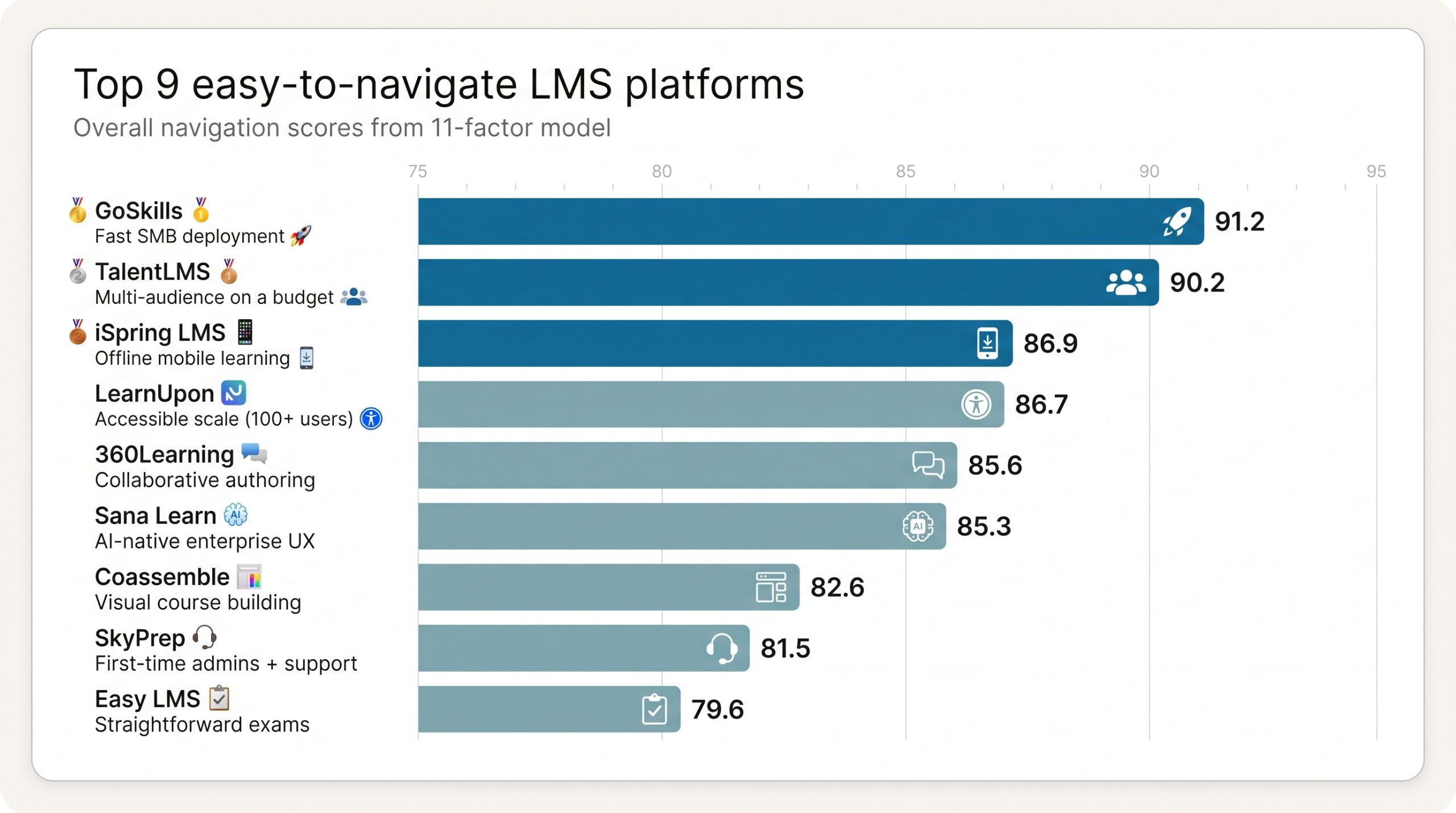
Keep this table handy during demos; it shows who each platform serves, what it costs to start, and the one drawback you should probe on calls.
| Rank | Platform | Best for | Overall nav score* | Starter price (USD)** | Free tier / trial | Latest UX update | WCAG evidence | Notable AI feature | Key drawback |
| 1 | GoSkills | Fast SMB deployment | 91.2 | $9.71 per user / month (annual) | Free tier | Admin assistant Aug 2025 | No public VPAT | Learner + admin agents | Limited quiz bulk-upload |
| 2 | TalentLMS | Multi-audience on a budget | 90.2 | $119 for 40 users / month (annual) | Forever-free 5-user plan | TalentLMS 7.0 May 2026 | Partial WCAG 2.2 | AI coach + role-play | Advanced reports sit on higher tiers |
| 3 | iSpring LMS | Offline mobile learning | 86.9 | $3.58 per active user*** | 30-day trial | AI course gen May 2026 | No public VPAT | Doc-to-course builder | Limited report customisation |
| 4 | LearnUpon | Accessible scale (100+ users) | 86.7 | Quote | Contact sales | Create+ Mar 2026 | WCAG 2.2 AA Jun 2026 | Agentic learning platform | Pricing by quote only |
| 5 | 360Learning | Collaborative authoring | 85.6 | $8 per user / month | Free trial | Continuous | Evidence thin | AI question helper | Admin learning curve |
| 6 | Sana Learn | AI-native enterprise UX | 85.3 | $8 per user† (300-seat min) | Free trial | Admin agent Jun 2026 | No public VPAT | Semantic search + admin agent | High seat minimum |
| 7 | Coassemble | Visual course building | 82.6 | ≈$100 per month | Free tier | AI quiz gen 2026 | No public VPAT | AI quiz generator | Limited governance depth |
| 8 | SkyPrep | First-time admins + support | 81.5 | Quote | Verify trial | AI image gen 2026 | No public VPAT | AI image generator | Price transparency |
| 9 | Easy LMS | Straightforward exams | 79.6 | Public plans, see current page | Free trial | Incremental | No public VPAT | — | Enterprise-scale limits |
- Composite score from the 11-factor model.
** Prices checked August 4, 2026; minimum seats and currency shifts can change totals.
*** Dollar figure from Capterra; vendor page lists active-user billing without current rates.
† G2 lists $8 per user; vendor requires a 300-seat commitment.
GoSkills: best overall for fast, low-friction team training
Sign up, invite five teammates (paid plans start at five seats, while the free tier allows unlimited learners), and assign your first course within 15 to 60 minutes – a window echoed in GoSkills’ user friendly LMS guide, which notes that most organizations wrap up setup in roughly an hour.
Quick verdict
Sign up, invite five teammates (paid plans start at five seats, while the free tier allows unlimited learners), and assign your first course within 15 to 60 minutes, according to the vendor’s setup guide. Finance will appreciate the entry price: $9.71 per user per month when billed annually.
Learners see one progress bar and a bold Continue button. Administrators follow a guided “Setup complete” checklist, and authors drag blocks into place or let Genie, the AI course builder, generate a first draft.
As of August 4, 2026, G2 records a 4.9 / 5 ease-of-use score from more than 300 reviews, the highest in this roundup.
Bottom line: if you need an LMS running today, not next quarter, GoSkills remains the fastest path from sign-up to rollout.
TalentLMS: best for transparent pricing and multiple training audiences
Quick verdict
TalentLMS removes budget guesswork. A forever-free sandbox for five users and ten courses lets teams test workflows without a credit card, while the first paid tier costs $119 per month for up to 40 users when billed annually (checked August 4, 2026).
Inside, separate branches give employees, customers, and partners their own branded portals without multiplying admin work. Learners see one progress column; supervisors get color-coded reports; authors drag content blocks into place.
Release 7.0 (May 28, 2026) introduced an AI Coach that turns static examples into voice or chat role-plays and opened a Learning Playground where frontline staff can rehearse conversations on demand.
Usability shows up in support, too: context-sensitive tooltips replace PDF manuals, and live chat typically answers within minutes. G2 lists a 4.6 / 5 ease-of-use score from more than 790 reviews (August 2026).
One caution: advanced analytics and custom assessments sit behind higher tiers, so confirm that the Core plan’s reporting meets your audit needs before committing.
iSpring LMS: best for easy course authoring and offline mobile learning
Quick verdict
If your trainers already build in PowerPoint, iSpring lets them import a deck, auto-chunk slides into lessons, and accept AI-suggested quiz questions. In May 2026, the generator gained the power to draft a full course from a single document, cutting production from days to minutes.
Learners follow a linear, distraction-free path on desktop or the native mobile app. They can download modules over Wi-Fi, finish them offline, and sync results when back online. That feature is ideal for staff on airplanes or factory floors.
Pricing follows a pay-for-activity model. As of August 4, 2026, Capterra lists iSpring at $3.58 per active user per month, and the directory records a 4.6 / 5 ease-of-use and 4.8 / 5 support score from more than 190 reviews.
Trade-offs: reporting layouts feel rigid compared with enterprise suites, and the vendor has yet to publish a WCAG or VPAT statement. If accessibility evidence is critical, keep iSpring on the bench; otherwise, it remains the quickest bridge between existing content and phone-ready learning.
LearnUpon: best for accessible multi-audience training at scale
Quick verdict
LearnUpon’s multi-portal setup lets employees, customers, and partners learn in branded lanes while L&D sees everything from one dashboard, avoiding permission snarls.
Accessibility is a headline strength. The vendor states that the learner experience conforms to WCAG 2.2 AA as of June 8, 2026, giving screen-reader and keyboard users the same friction-free path as everyone else.
Admins feel the polish through contextual “help tags,” and Create+ (March 26, 2026) adds quick video and document conversion on top of SCORM support, so authors rarely leave the browser.
Evidence backs the ease claims. Capterra lists a 4.7 / 5 overall score and 4.9 / 5 support rating from more than 140 reviews (checked August 4, 2026), while TrustRadius shows a smaller sample at 6.7 / 10.
Pricing is the speed bump. LearnUpon works on a custom quote and is not a fit for fewer than 100 users. If you clear that bar, the support team’s high marks and transparent audit trail can outweigh the quote-only step.
360Learning: best for collaborative course creation
Quick verdict
360Learning turns internal expertise into shareable training fast. Subject-matter experts open a Google-Doc-like editor, draft a lesson, and peers leave comments or emoji reactions, so updates publish in minutes instead of full release cycles.
That agility shows in the numbers: G2 lists an 8.9 / 10 ease-of-use score and a 4.6 / 5 overall rating from more than 590 reviews (checked August 4, 2026). Pricing starts at $8 per user per month and includes a free trial.
The trade-off is administration depth. Setting up groups, learning paths, and advanced reports may take an afternoon rather than a coffee break, so schedule a guided trial if your governance needs are complex.
Choose 360Learning when collaboration speed outweighs maximum feature breadth.
Sana Learn: best AI-native enterprise experience
Quick verdict
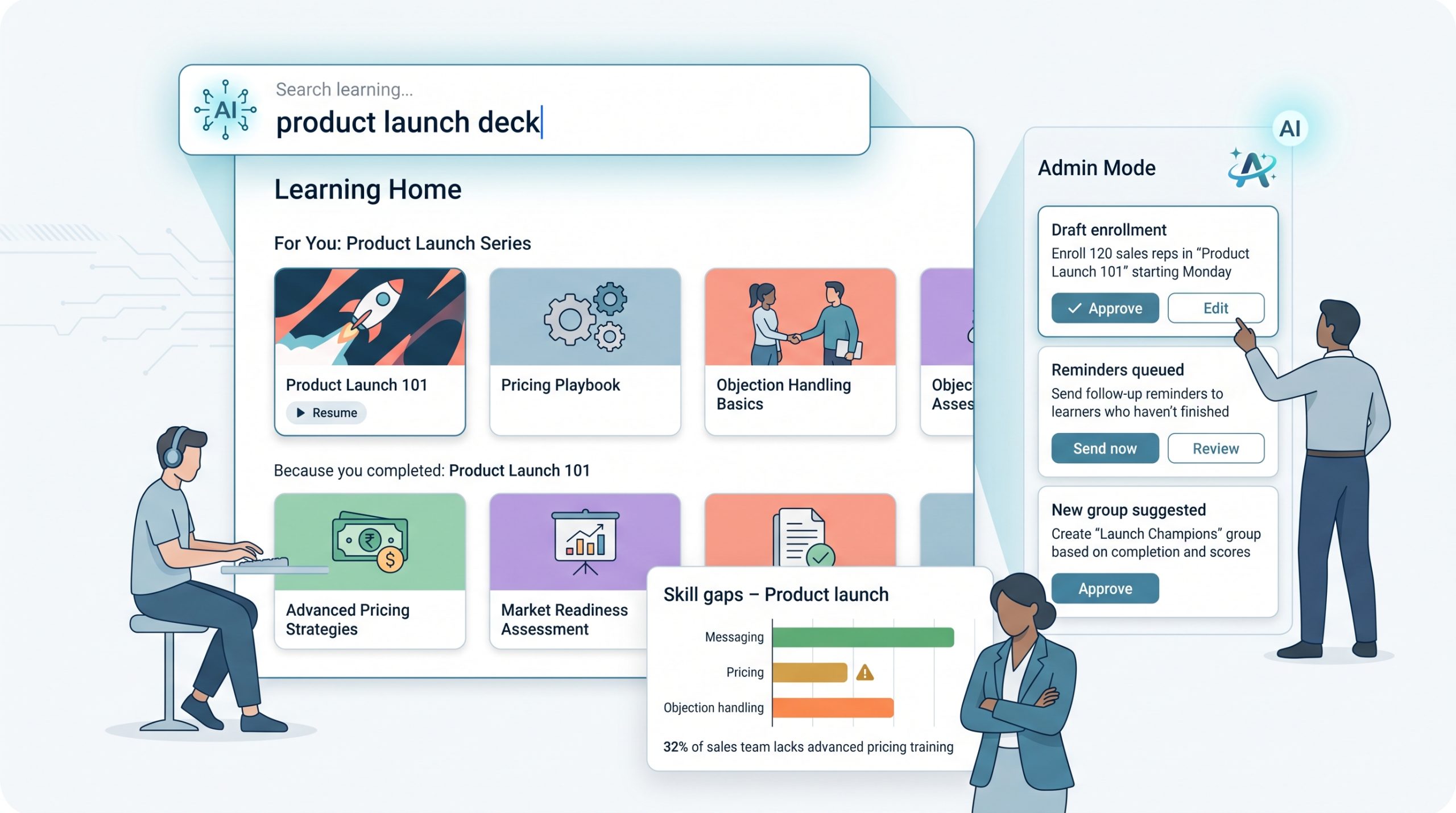
Sana behaves more like a learning concierge than a standard LMS. Type “product launch deck” and its LLM-powered search surfaces the exact course, slide, or snippet you need, then refines suggestions based on what you finish. Admin Mode (June 22, 2026) can draft enrolments, groups, or reminders that you approve with one tap, cutting routine clicks to near zero.
The learner view resembles a streaming app, with bold thumbnails, one-click resume, and bite-size cards, while managers see real-time skill gaps without exporting reports.
Price is the brake: G2 lists Sana at $8 per user with a 300-seat minimum, translating to about $28,800 per year before tax (price checked August 4, 2026). G2 also shows a 4.8 / 5 ease-of-use rating from more than 100 reviews, confirming the smooth UX.
Drawbacks: no public VPAT or WCAG statement. Regulated industries should ask how AI outputs are grounded, logged, and redacted.
Choose Sana when time-to-insight matters more than time-to-launch, and your roster meets the 300-seat threshold.
Coassemble: best visual course-building interface
Quick verdict
Coassemble feels more like a design app than a traditional LMS. You drag brand colours, images, and interactive blocks onto a canvas, watch the live preview update, then hit Publish, a flow suited to small teams that want polished micro-courses without code.
Speed is the hook. Upload a PDF or doc, and the platform slices headings into sections, pulls key bullets into flashcards, and lets its 2026 AI quiz generator draft questions. Tasks that once filled a full day finish before lunch, already optimised for mobile.
Learner navigation mirrors the creator canvas, with bold cards, large buttons, and a progress meter that never hides below the fold. Reports cover the essentials (completions, scores, overdue lists) so first-time admins spend time nudging learners, not exporting CSV files.
Pricing starts at about $100 per month for the Pro plan and includes a free tier for experimentation (price verified in Forbes Advisor’s August 2026 roundup). G2 lists a 4.6 / 5 overall rating and 4.7 / 5 ease-of-use score from more than 500 reviews.
Limits: governance is lighter than enterprise suites, and the vendor has yet to publish a WCAG or VPAT statement. If visual speed matters more than deep compliance, Coassemble deserves a spot on your shortlist.
SkyPrep: best for first-time administrators who value responsive support
Quick verdict
SkyPrep pairs a friendly interface with customer support that Capterra users rate 4.9 / 5. The overall score stands at 4.8 / 5 from 167 reviews (updated June 30, 2026). New administrators can import users, build a slide-plus-quiz course, and schedule reminders without opening a manual. When they hit a snag, a human rep answers in plain English instead of pasting links.
Navigation centers on three top menus (Courses, Users, Reports), so you rarely wonder where to click. Build a course by dragging files, setting completion rules, and adding an AI-generated image for a striking cover. Reports default to overdue learners and pass rates, covering most first audits.
Pricing sits behind a custom quote, and Capterra lists “Contact vendor” with no free-trial details. Ask sales for a VPAT and confirm whether trial access includes reporting before you sign. If everything aligns, SkyPrep delivers an LMS that feels like an onboarding partner, not a software project.
Easy LMS: best for straightforward external training and exams
Quick verdict
Easy LMS sticks to the essentials: courses, exams, certificates, and an “Academy” mini-portal for each client or cohort. The dashboard feels more like Google Forms than a full corporate suite, so you can launch material fast and prove who passed.
Create a course by dragging in a PDF or video, adding multiple-choice questions, and setting a pass mark. The exam engine supports timed tests, randomised question banks, and instant certificates, turning compliance refreshers into simple rinse-and-repeat work.
Pricing is public and month-to-month. As of August 4, 2026, the Basic plan costs €70 per month (about $76) and the Advanced plan €200 per month, with a seven-day free trial and no credit card. Capterra lists a 4.6 / 5 overall rating from 179 reviews (updated June 3, 2026), confirming ease for first-time admins.
Limits: enterprise governance, deep integrations, and accessibility statements are light, so regulated industries should verify requirements before rollout. For everyone else, Easy LMS offers a clear path to teach, test, and track without a quote call.
Which LMS wins for your specific scenario
Every organisation cares about “easy,” but the flavour of easy changes with context. Use the table below to jump straight to the platform that solves your current headache.
| Scenario | Pick this LMS | Why it shines |
| Need something running before the quarter closes | GoSkills | Same-day setup, vendor cites 15–60 min to first assignment |
| Want a no-risk free tier | TalentLMS | Forever-free sandbox (5 users / 10 courses) proves workflows without a credit card |
| Training a field team with spotty connectivity | iSpring LMS | Native mobile app allows true offline learning with auto-sync |
| Must show concrete accessibility evidence | LearnUpon | Public WCAG 2.2 AA learner conformance dated 8 Jun 2026 |
| Enabling internal experts to create content | 360Learning | Google-Doc-style editor plus peer comments keep courses fresh |
| Seeking an AI-first experience at scale | Sana Learn | LLM search and Admin Mode draft enrolments; $28.8k annual floor (300 seats) |
| Designing visually rich micro-courses fast | Coassemble | Drag-and-drop canvas and AI quiz builder publish in under 1 hour |
| Prioritising responsive human support | SkyPrep | Capterra support score 4.9 / 5 (June 2026) with live human chat |
| Delivering simple exams to external audiences | Easy LMS | Course-exam-certificate flow, public pricing from €70 per month |
Keep this list open during demos so you can focus questions on the workflows that matter, not every extra feature on the slide.
Buyer checklist: test ease before you buy
- Name your main user.
Write “field tech,” “regional manager,” or “subject-matter expert” on a sticky note. If any demo step adds extra clicks for that person, ask the vendor for a faster path. - Calculate effective cost.
Add subscription, minimum seats, SSO or library add-ons, and one-time fees. Divide the total by monthly active learners, not headcount. This simple fraction often reveals “cheap” plans that balloon in real use. - Run a real trial, not a tour.
- Import 20 test users
- Build a three-page course with five quiz questions
- Assign a due date and send a reminder
- Pull an overdue report
- Repeat the flow on a phone with spotty reception
Time each step and note click counts; aim for under 30 minutes total as a sanity benchmark.
- Test support.
Submit a ticket during the trial. Record response time and whether you receive a scripted answer or a human fix. - Verify accessibility.
Request the latest VPAT or audit and confirm the audit date, WCAG level, roles tested, excluded features, and who owns uploaded-content compliance.
Follow these five steps and hidden friction will surface long before you sign a contract. Keep the stopwatch and your sticky note visible during every demo.
Emerging trends that will redefine “easy”
- AI moves from helper to doer.
GoSkills (Admin Assistant Aug 2025), Sana (Admin Mode Jun 22, 2026), and LearnUpon (Agentic Platform Jul 2026) now let an agent queue enrolments or tweak settings you approve with one click. When labour drops from “few clicks” to “no clicks,” the definition of easy shifts accordingly. - Practice replaces passive playback.
TalentLMS 7.0 (May 28, 2026) added AI role-play and branching simulations, while CYPHER’s 2026 release offers the same for its user base. Learners rehearse tough conversations instead of watching slides, closing the gap between content and competence. - Accessibility proof gets concrete.
Learner interfaces at LearnUpon (WCAG 2.2 AA, Jun 8, 2026) and TalentLMS (partial WCAG 2.2, 2025 audit) publish audit scopes up front. Expect RFPs to demand a VPAT before trial access. - Mobile parity becomes table stakes.
iSpring’s offline-syncing app shows that progress tracking must work without coverage. Future RFPs will treat offline completion and certificate delivery as baseline features, not optional extras. - Pricing scrutiny sharpens.
Active-user tiers beat registered-user licences when external audiences fluctuate. Vendors that surface total annual commitment (minimum seats × price per seat) will win trust over those who advertise a low sticker and hide the math.
Track these five shifts during demos; they signal whether a platform will still feel “easy” two years after go-live.
Frequently asked questions
What is the easiest LMS to use?
GoSkills is the easiest option for teams of about 500 learners or fewer, scoring 4.9 / 5 for ease of use on G2 (August 2026). At enterprise scale, LearnUpon delivers similar smoothness. Its learner interface is WCAG 2.2 AA certified (8 Jun 2026) and support scores 4.9 / 5 on Capterra.
Is there a free, easy-to-use LMS?
Yes. TalentLMS keeps a forever-free sandbox for five users and ten courses, and GoSkills maintains a free tier for unlimited learners (both confirmed August 2026).
Which LMS works offline?
The iSpring mobile app lets learners download modules, study offline, and sync results when back online (Google Play v2.6.5, updated May 2026).
Do simple LMS platforms support SCORM?
All nine import SCORM. GoSkills, iSpring, and LearnUpon also export packages. Upload a sample file during trial to confirm that quiz data flows correctly.
Will choosing an easy LMS limit future growth?
No, provided you choose the right match. GoSkills scales to thousands of seats, TalentLMS adds new branches as audiences grow, and LearnUpon supports multi-portal governance. Check minimum-seat thresholds and API limits before signing.
How much does an easy LMS cost per learner?
Public pricing (Aug 4 2026, USD equivalent):
- iSpring active-user model ≈ $3.60
- GoSkills annual plan — $9.71 per seat
- 360Learning and Sana — $8 per seat (360Learning monthly; Sana 300-seat minimum)
Quote-only tools often land at $10–$15 once fees are included. Use the effective-cost formula in the buyer checklist to find your real number.
Conclusion
Still deciding? Shortlist two platforms, run the timed trial script, and let the stopwatch—not the sales deck—decide which one feels easy.