


Somebody on the marketing team pulls up the dashboard, sees a 19% open rate, and immediately panics. Is that bad? Is that fine? Nobody actually knows, because the number floats there with no context, no comparison, nothing to measure it against except a vague memory of a LinkedIn post that said “good open rates are above 25%.” That post was probably talking about a completely different industry, a completely different list, sent through a completely different kind of email entirely.
Open rate gets treated like a single universal scoreboard when it’s really more like a fingerprint. Every list is different. Every industry is different. And honestly, the way open rates get tracked has gotten messier in the last few years, not cleaner. This post walks through what actually counts as good, why the number itself has gotten harder to trust, and what genuinely moves it, not the recycled “write better subject lines” advice that shows up everywhere.
What Is an Email Open Rate? (And How It’s Actually Measured)
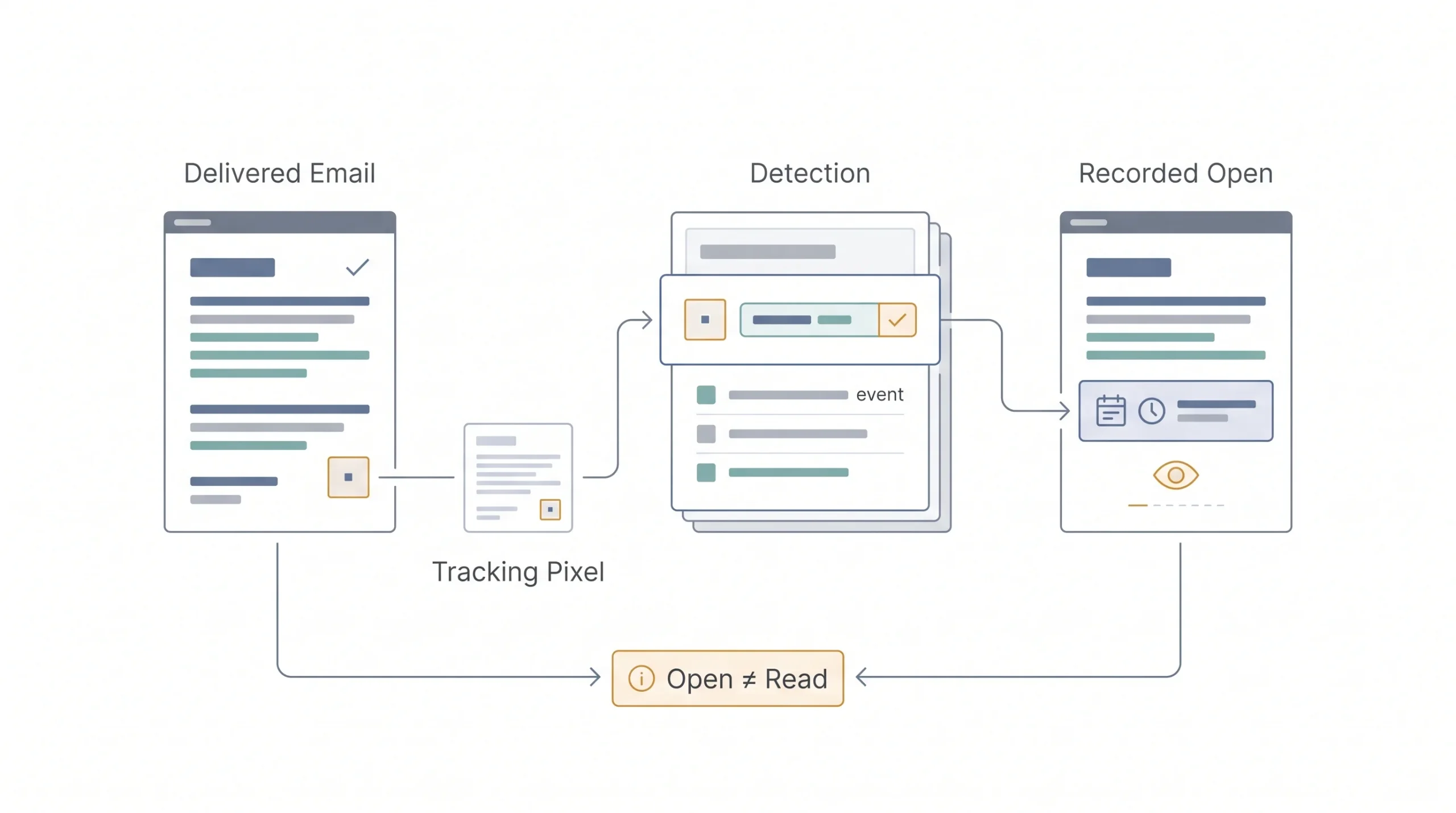
An open rate is the percentage of delivered emails that get opened. That’s the whole definition. The formula looks simple on paper: unique opens divided by emails delivered, multiplied by 100. Delivered, not sent, because bounced emails never had a chance to get opened in the first place and shouldn’t count against you.
| Term | Formula | What it excludes |
|---|---|---|
| Open rate | Unique opens ÷ emails delivered × 100 | Bounced emails |
| Gross open rate | Total opens (including repeats) ÷ delivered × 100 | Still counts bounces out |
Here’s the part most people never think about. How does an email service even know someone opened an email? There’s no button anyone clicks that says “I read this.” What actually happens is a tiny, invisible tracking pixel, a 1×1 image sitting somewhere in the email, loads when the email client displays the message. That pixel load gets logged as an open. No pixel load, no recorded open.
Which means, technically, open rate was never measuring “did a human read this email carefully.” It was measuring “did this image load.” Those two things sound close but they’re not the same thing at all. Someone previewing an email in a list view without fully opening it, someone with images blocked by default, someone whose email client pre-loads content for security scanning, all of these mess with the number in ways that have nothing to do with actual interest.
Tip: Open rate was never a perfect metric, even before anything changed with privacy settings, because it was always measuring an image loading, not genuine reading.
What’s a Good Email Open Rate in 2026?
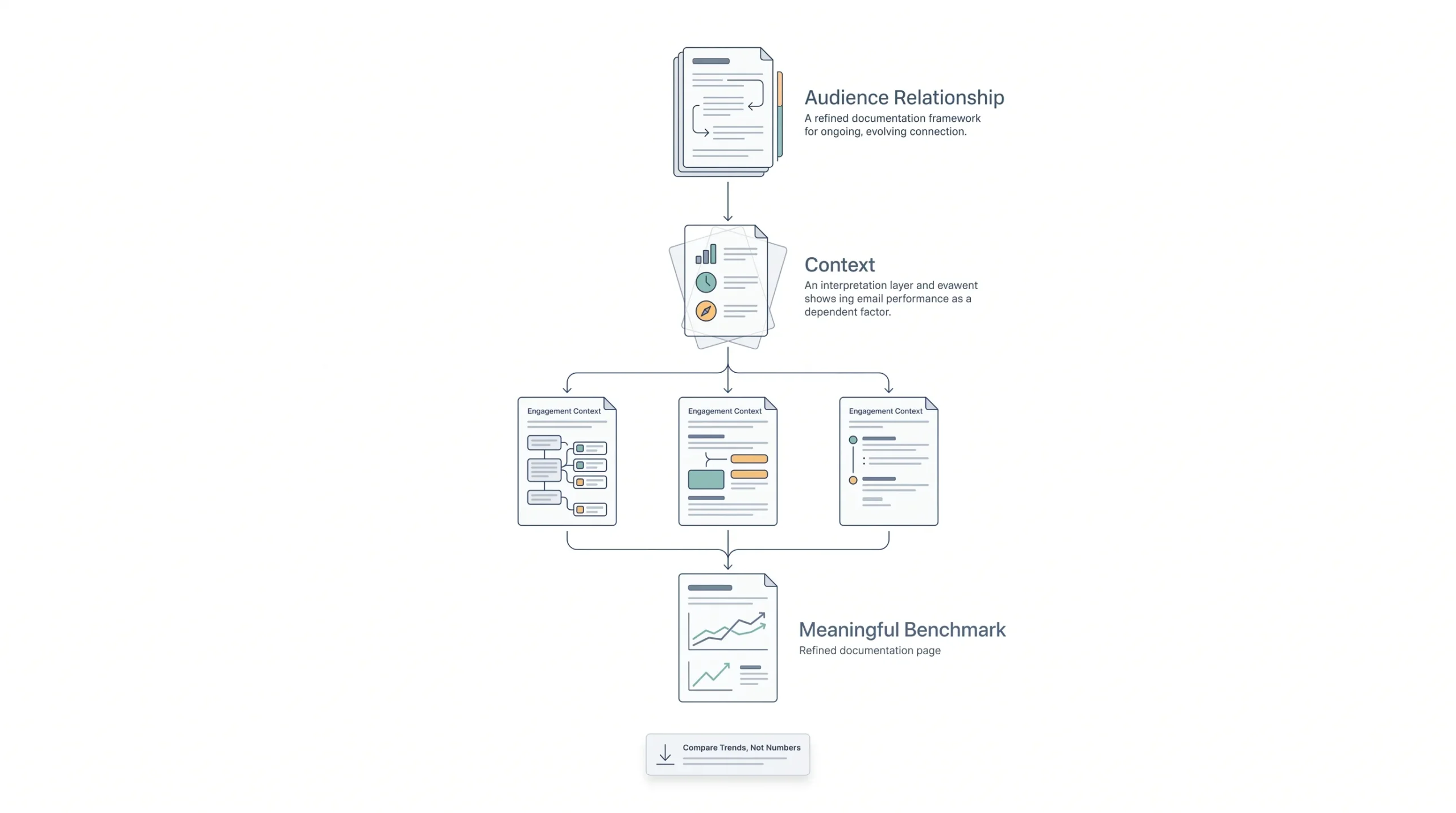
Straight answer first: most healthy email lists land somewhere between 15% and 30%, depending heavily on industry, list size, and what kind of email is going out. Anyone promising one exact number that applies to every business is either oversimplifying or selling something.
The range is this wide because open rate is really a proxy for relationship strength. A nonprofit emailing donors about where their money went is talking to people who already care deeply. A retail brand blasting a Tuesday sale to 80,000 people who signed up for a 10% discount code two years ago is talking to a much colder crowd. Same metric, completely different relationship behind it.
| Industry | Typical open rate range |
|---|---|
| Nonprofits | 25–40% |
| Government/education | 23–30% |
| Health & wellness | 28–48% |
| B2B / SaaS | 15–30% |
| Retail/ecommerce | 16–20% |
| Travel & hospitality | 19–26% |
| Marketing & advertising | 17–19% |
The type of email matters just as much as the industry, sometimes more.
| Email type | Typical open rate |
|---|---|
| Transactional (receipts, password resets) | 40%+ |
| Welcome emails | 50%+ |
| Newsletter/promotional | 15–25% |
| Cold outreach | 10–20% |
Notice the pattern there. Transactional emails and welcome emails sit way higher because someone’s actively expecting them. They just signed up. They just bought something. There’s built-in curiosity that no subject line trick can manufacture on a random Tuesday promotional blast.
Strategy: Comparing a SaaS product’s monthly newsletter open rate to a nonprofit’s mission-update email isn’t comparing two competitors doing the same job. It’s comparing two completely different relationships that happen to both use email.
So instead of chasing an industry number pulled from a report about a business that isn’t yours, the more useful move is comparing this month against last month, and last quarter against the one before it. That trend line tells a far more honest story than any benchmark chart ever will.
Why Open Rate Isn’t as Reliable as It Used to Be (Apple MPP Explained)
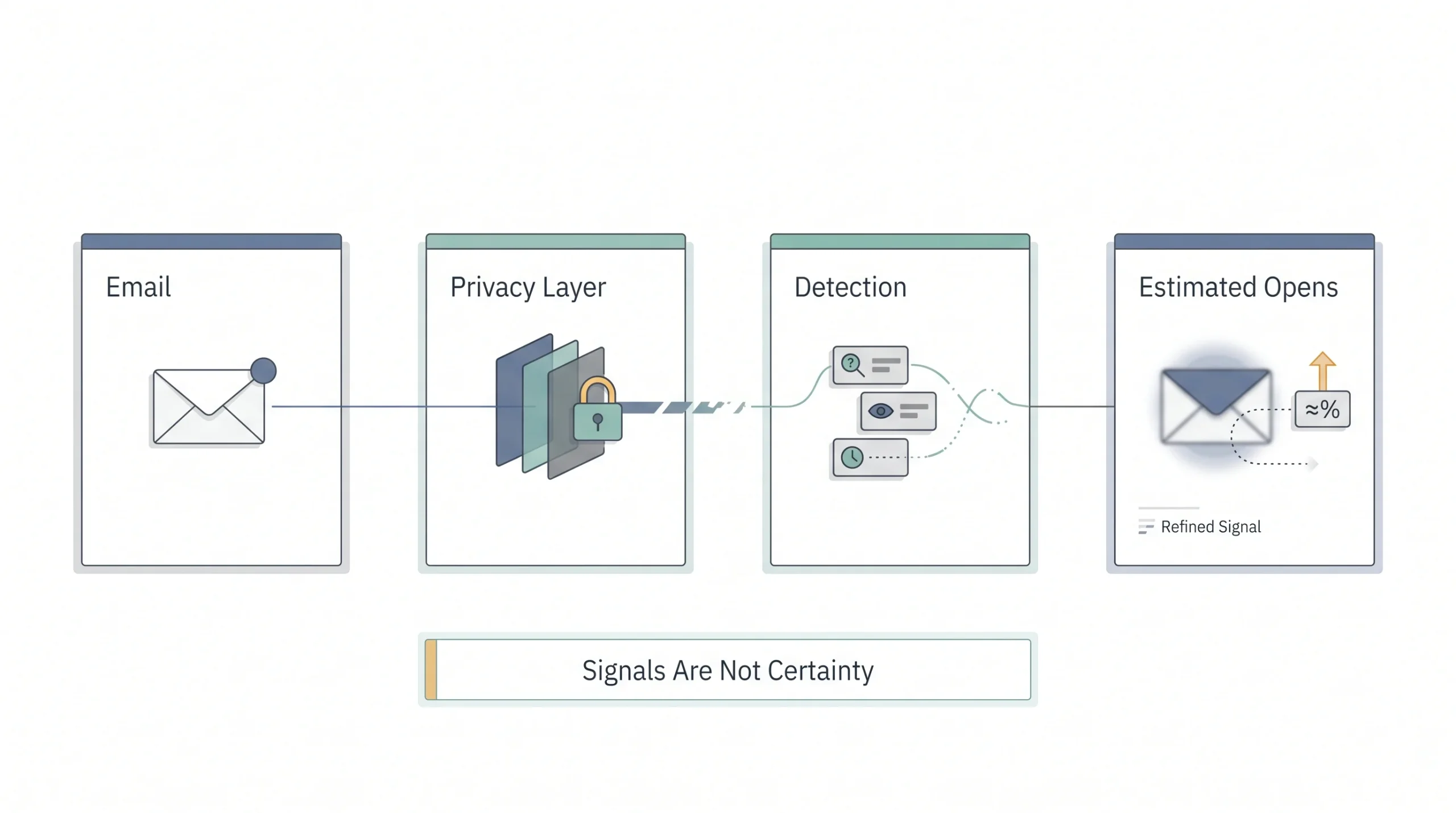
This is the part almost nobody explains properly, and it matters more than most subject line advice combined. In 2021, Apple rolled out something called Mail Privacy Protection, MPP for short, built into Apple Mail across iPhones, iPads, and Macs. It quietly broke open rate tracking for a huge chunk of the internet, and most marketers are still reading their dashboards like nothing changed.
Here’s what actually happens now. Before MPP, that tracking pixel only loaded when a real human opened the email and their client displayed the images. After MPP, Apple’s own servers pre-load every image in every email automatically, for every Apple Mail user who has the feature turned on, whether the person ever opens the email or not. The pixel fires. The open gets logged. Nobody actually read anything.
| Before MPP | After MPP | |
|---|---|---|
| Open tracking | Pixel loads only when a human opens | Apple pre-loads the pixel for all Apple Mail users |
| Result | Fairly accurate opens | Inflated, sometimes unreliable opens |
| Who’s affected | N/A | Anyone using Apple Mail, which is a large chunk of most inboxes |
So a business could send an email that nobody genuinely reads and still see a healthy-looking open rate, because Apple’s servers already triggered the pixel in the background. This isn’t a small edge case either. Apple Mail makes up a serious portion of inboxes for a lot of consumer-facing lists, which means the open rate number on the dashboard might be padded more than anyone realizes.
Tip: Click-to-open rate held up a lot better through this change than open rate did, because a click still requires an actual human doing something on purpose. Nobody’s servers fake that.
None of this means open rate is useless now. It’s just not the precise instrument it used to be. Treat it as a directional signal, not a certainty. A rate that climbs or drops sharply still tells you something real happened. A rate that sits flat at 45% forever, especially on a list heavy with Apple Mail users, deserves a healthy dose of suspicion before anyone celebrates.
The Real Factors Behind Your Open Rate
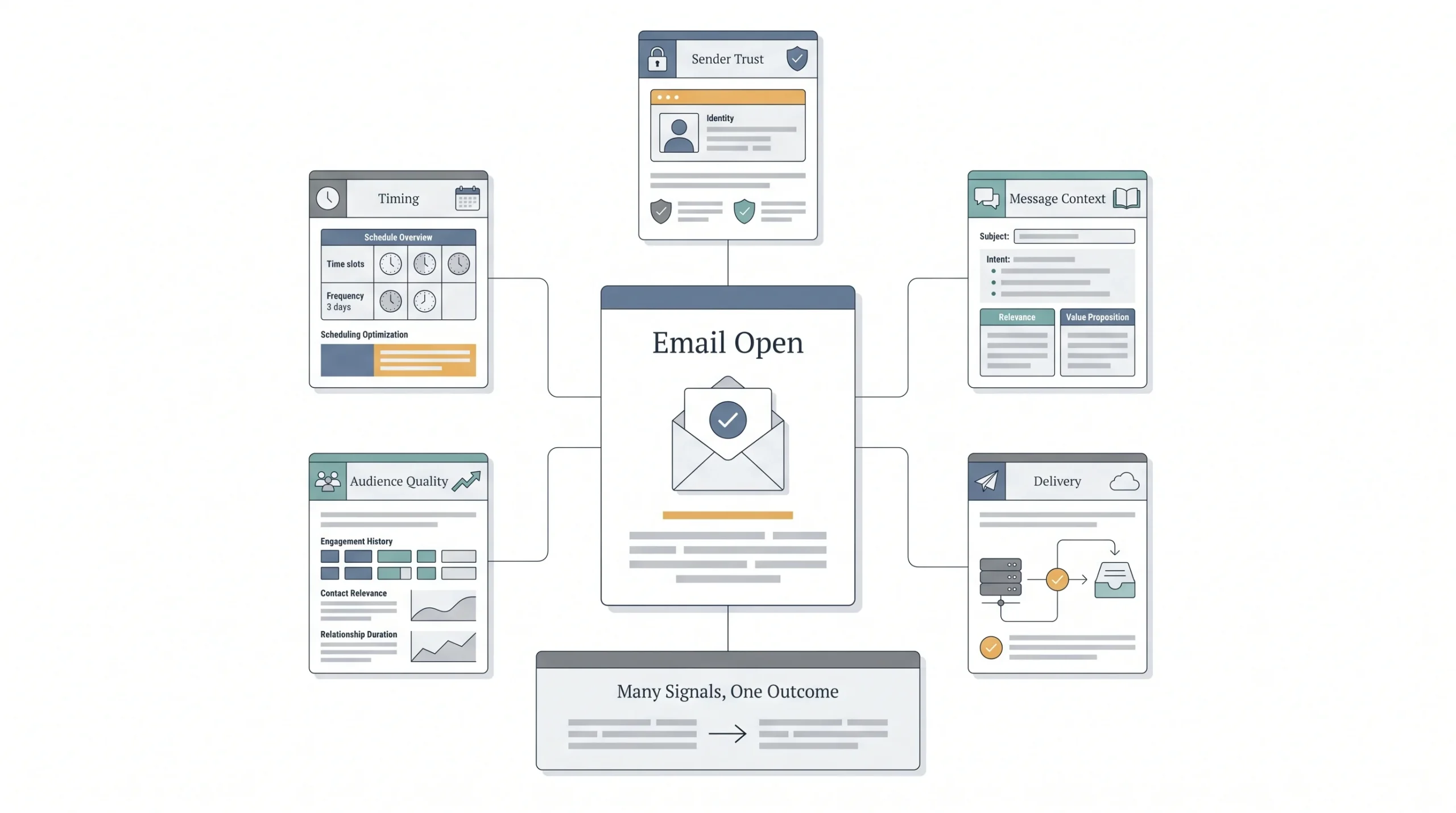
Subject lines get all the attention in most advice on this topic, but they’re one factor among several, and honestly not always the biggest one.
Sender Name and Sender Reputation
People decide whether to open an email based on who it’s from before they even register what the subject line says. A recognizable sender name beats a clever subject line every single time. And sender reputation, the trust score inboxes assign to a sending domain based on past behavior, decides whether the email even gets a fair shot at landing in the inbox at all.
Subject Line and Preview Text
Still matters, obviously. But it only gets a chance to matter once the email has already made it past deliverability and past sender recognition. A brilliant subject line sitting in a spam folder gets exactly zero opens.
Send Time and Day
Real, but smaller than most people assume. Testing send times helps at the margins. It won’t rescue a fundamentally broken list or a deliverability problem.
List Quality and Engagement History
A list full of people who haven’t opened anything in eight months drags the whole average down and can actively hurt how inboxes treat future sends. Quality beats size here, consistently.
Deliverability
Whether the email lands in the primary inbox, the promotions tab, or spam, before any of the other factors even get a chance to play out.
Email Type and Relevance
A password reset email will always beat a monthly newsletter on open rate, because relevance and timing are baked into the reason it was sent in the first place.
| Factor | How much it typically moves the needle |
|---|---|
| Sender name recognition | High |
| Subject line | High |
| Deliverability/inbox placement | Very high, nothing else matters if it doesn’t land |
| Send time | Moderate |
| List hygiene | Moderate to high over time |
How to Improve Your Email Open Rate: Step-by-Step
This is where the actual work happens. Go in order. Skipping straight to subject line tricks while ignoring deliverability is like repainting a house with a cracked foundation, it’ll look fine for about a week.
1. Fix Deliverability First
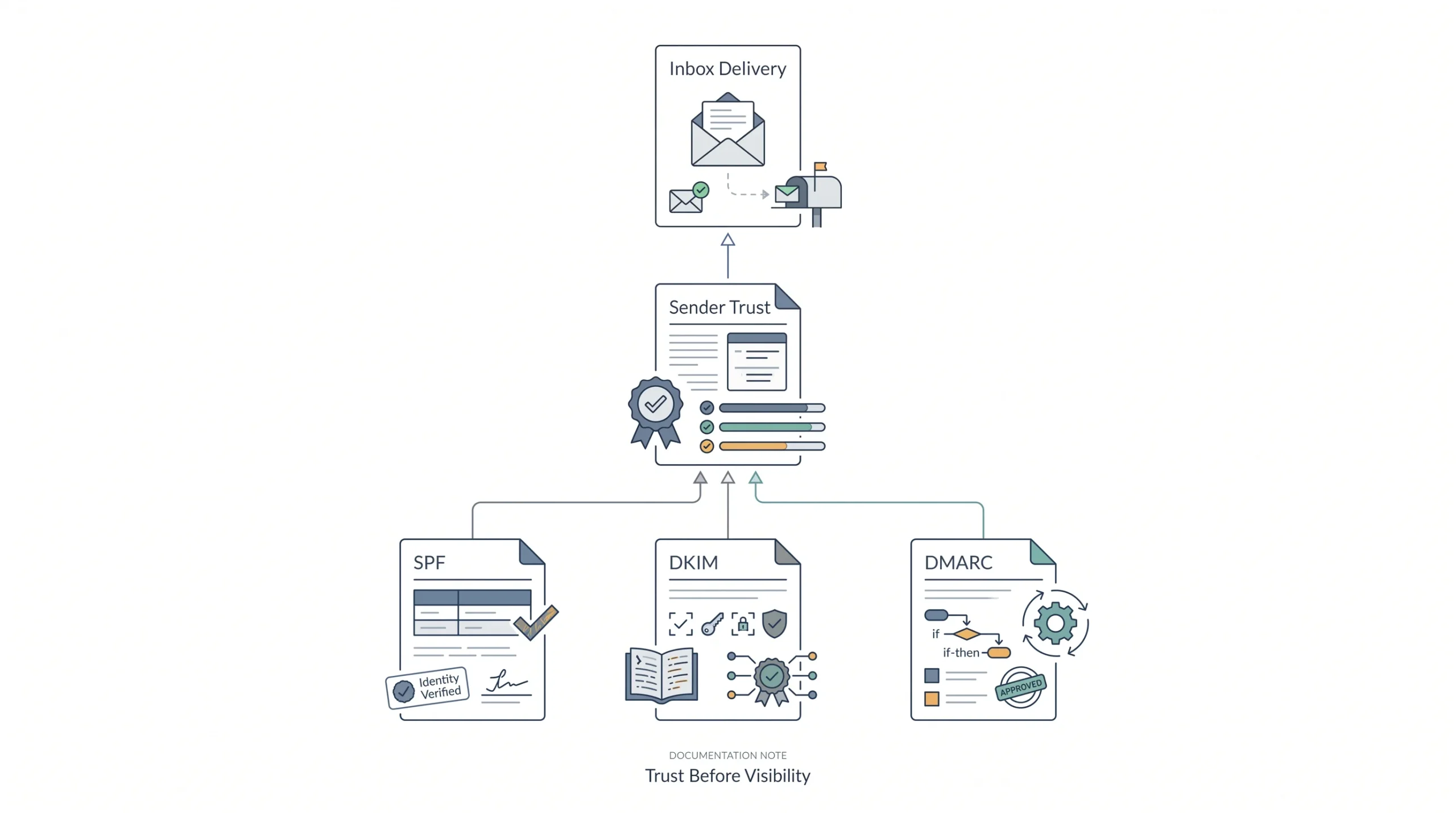
Nothing else on this list matters if emails are landing in spam. Set up SPF, DKIM, and DMARC on the sending domain. These are authentication records that prove an email genuinely came from who it claims to be from, and inboxes lean on them heavily when deciding where to route a message.
SPF tells receiving servers which mail servers are allowed to send on behalf of a domain. DKIM adds a digital signature so the receiving server can confirm the message wasn’t tampered with along the way. DMARC sits on top of both and tells inboxes what to actually do if a message fails those checks, reject it, quarantine it, or let it through with a warning flag. Skipping any one of these three is like locking the front door and leaving the back one wide open.
There’s also sender reputation to think about, which is separate from authentication but connected to it. Every sending domain builds a trust score over time based on bounce rates, spam complaints, and engagement history. A brand new domain with no sending history gets treated with suspicion by default, which is why warming up a domain gradually, starting with small, highly engaged sends before scaling up to the full list, matters so much for anyone setting up a new sending address.
| Check | Why it matters |
|---|---|
| SPF record set up | Proves the domain sent the email |
| DKIM configured | Confirms the email wasn’t altered in transit |
| DMARC policy in place | Tells inboxes what to do with failed checks |
| Warmed-up sending domain | New domains get flagged more easily |
| Clean bounce/complaint rate | High bounces hurt sender reputation fast |
2. Clean the List Before Optimizing Anything Else
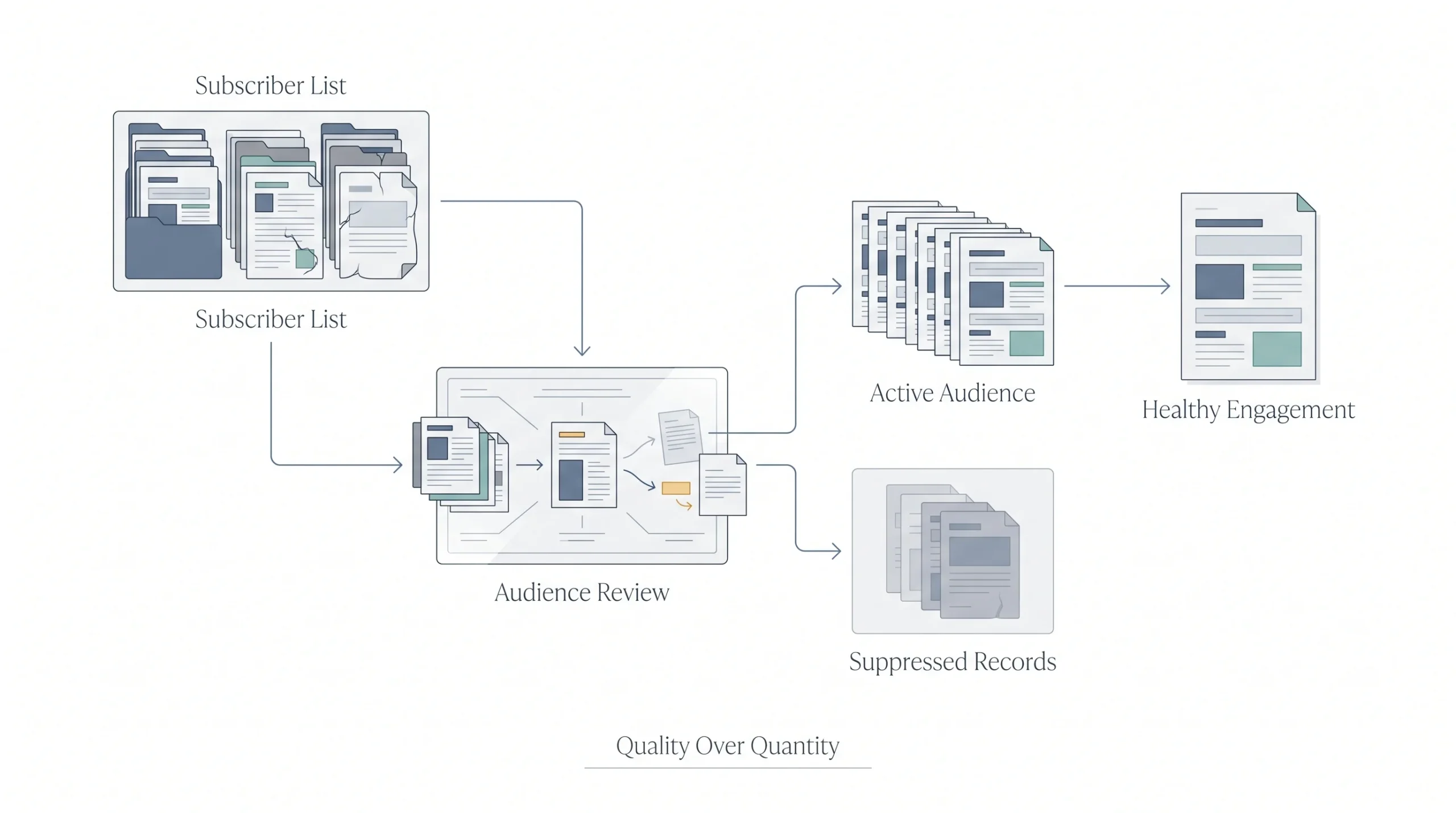
Sounds counterintuitive, removing people to improve a percentage, but it works because open rate is a ratio, not a headcount. A thousand engaged subscribers will always outperform ten thousand where nine thousand haven’t opened anything in a year. Those dead weight subscribers drag the average down and can hurt how mailbox providers view every future send.
The practical way to do this: pull a report of everyone who hasn’t opened or clicked anything in the last six to twelve months, depending on how often sends usually go out. That group gets one more shot through a re-engagement sequence, not an immediate deletion. Anyone who still doesn’t respond after that fair chance gets removed or suppressed from regular sends. It feels wasteful watching the subscriber count drop, but a smaller, more responsive list consistently outperforms a bloated, half-dead one, both in open rate and in actual revenue generated per send.
Also worth checking regularly: role-based addresses like info@ or admin@, typo domains, and obviously fake signups from bot traffic or contest entries. These inflate the list size without ever contributing a single real open, and they quietly poison the average every time a campaign goes out.
3. Write Subject Lines People Actually Want to Open
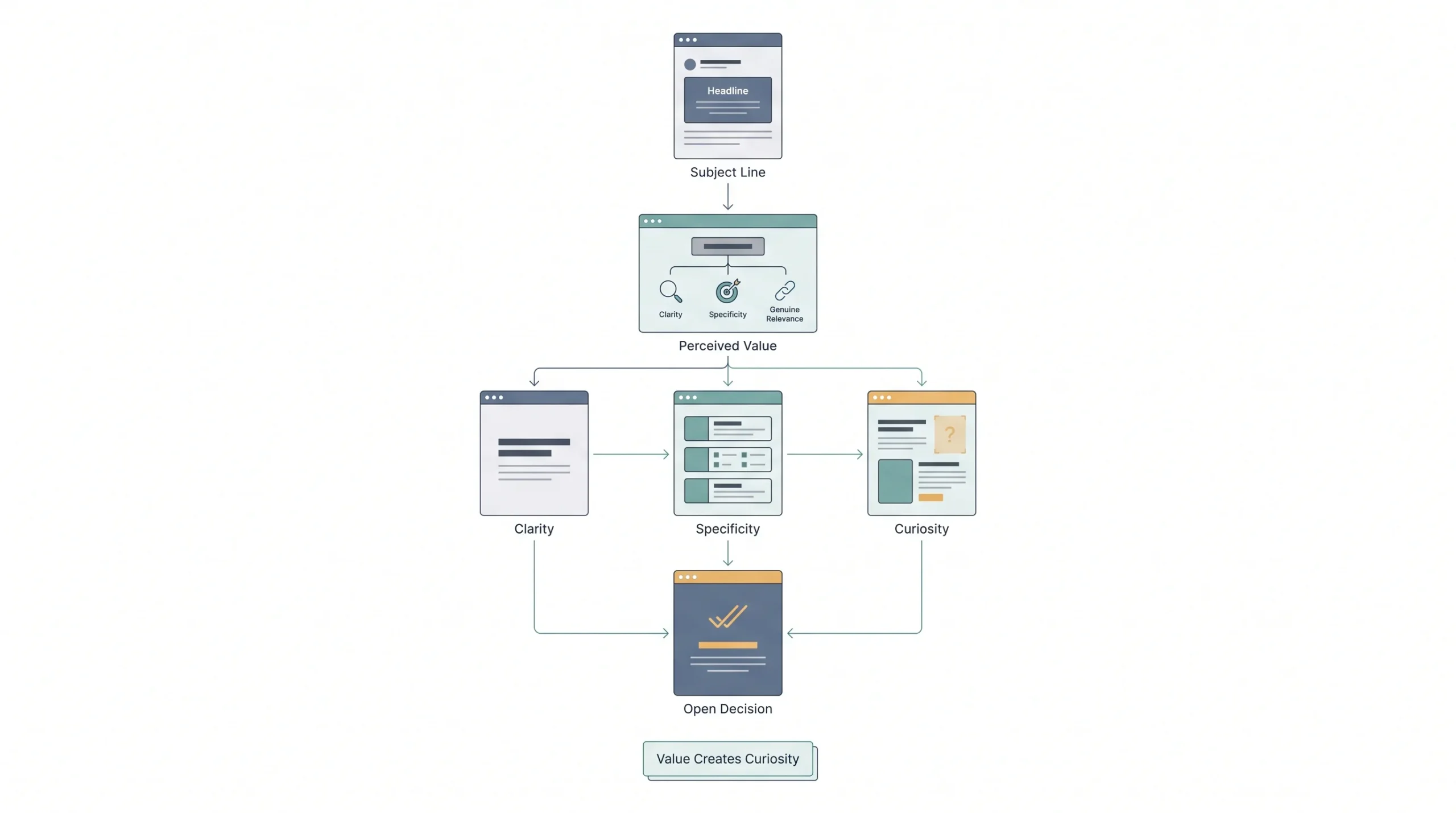
Clear beats clever almost every time, especially with a cold or lukewarm audience. Curiosity works. Vague mystery doesn’t. There’s a real difference between “you won’t believe this” and “the pricing mistake that cost us 40 customers.”
The subject line’s only job is earning the open, not summarizing the whole email or trying to sell the entire offer in eight words. Specificity does more work than most people expect. A number, a name, a concrete detail, all of these make a subject line feel like it came from an actual event or observation rather than a template. Compare “Improve your email marketing today” against “The Tuesday send that outperformed every other day this month.” One sounds like it was generated. The other sounds like someone actually looked at real data.
Length is worth testing but shouldn’t be obsessed over. Mobile inboxes typically cut off subject lines somewhere around 40 to 60 characters, so front-loading the most important part of the line matters more than hitting an exact character count. If the interesting part of the subject line only shows up at character 70, most mobile readers never see it at all.
4. Don’t Ignore Preview Text
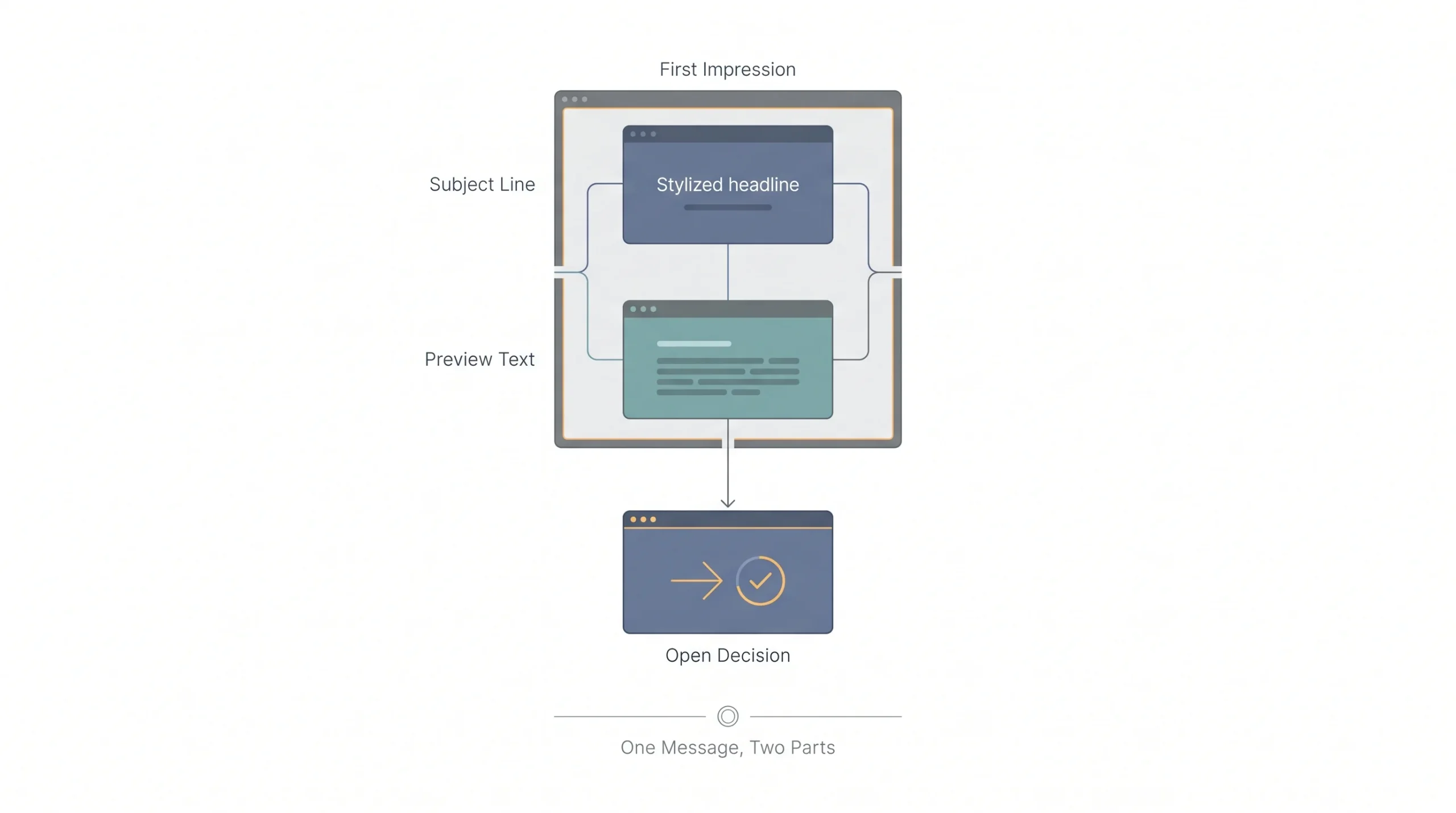
The line sitting right next to the subject in most inboxes. Left blank, it usually pulls in some junk line from the email footer, something like “view this email in your browser,” which wastes one of the few chances to earn attention before the open even happens.
Written on purpose, preview text extends the hook the subject line already started instead of repeating it. If the subject line asks a question, the preview text can hint at the answer without fully giving it away. If the subject line names a problem, the preview text can point at the fix. Treat the subject line and preview text as one connected sentence split into two visible parts, not two separate, disconnected pieces of copy.
5. Get the Sender Name Right
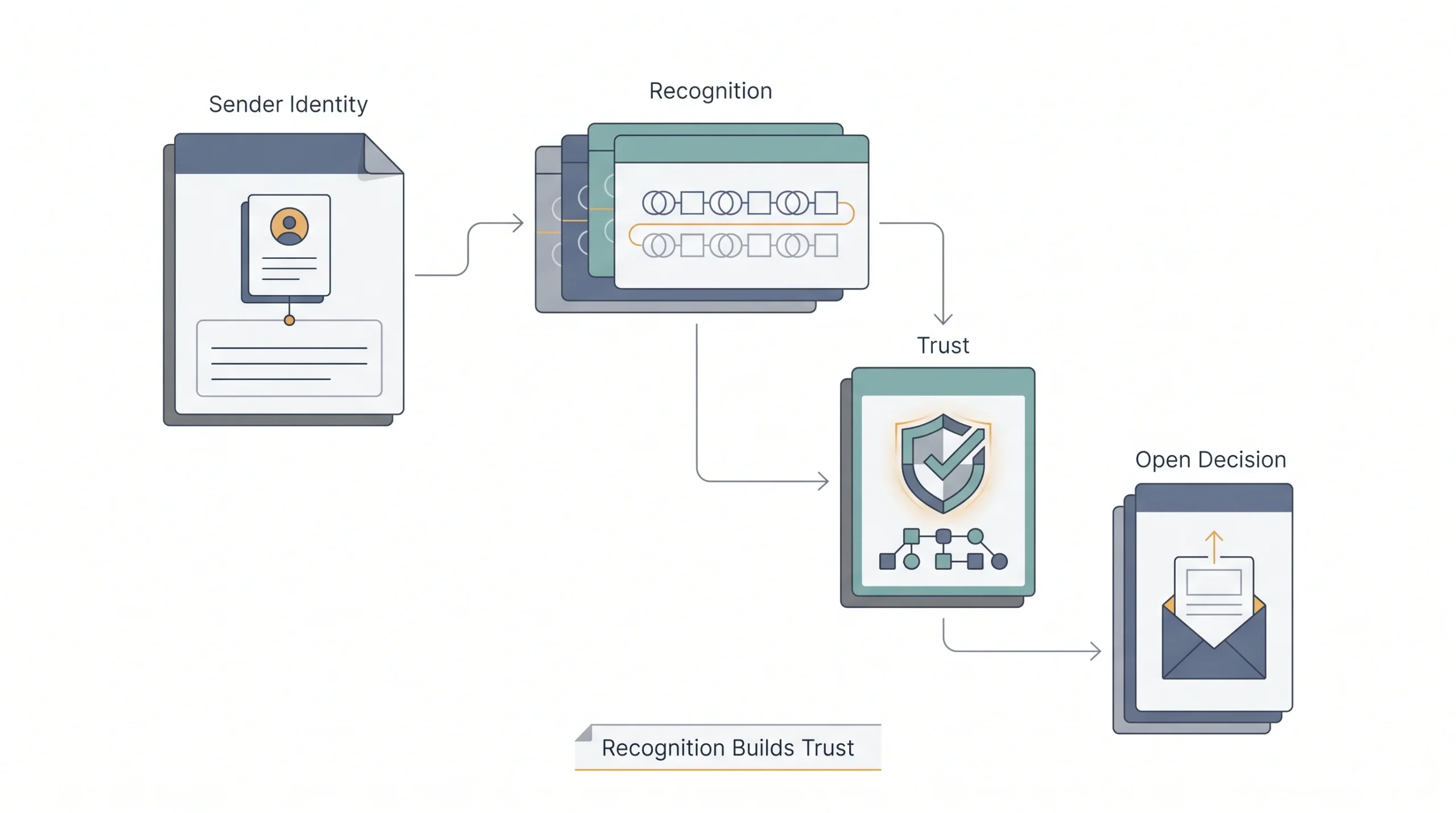
“Newsletter Team” is forgettable. A real person’s name, or a recognizable brand name paired with a person, tends to earn more trust and more opens. Something like “Priya from [Brand]” often outperforms a generic department name, because it reads like an actual person is on the other end instead of a faceless system.
Consistency matters here too. Switching sender names from campaign to campaign confuses recognition and can even trigger spam filters that get suspicious of sudden sender changes. Pick a sender identity and stick with it long enough for the audience to start recognizing it on sight, the same way someone recognizes a contact’s name in their phone without needing to read the full number.
6. Segment Before Sending
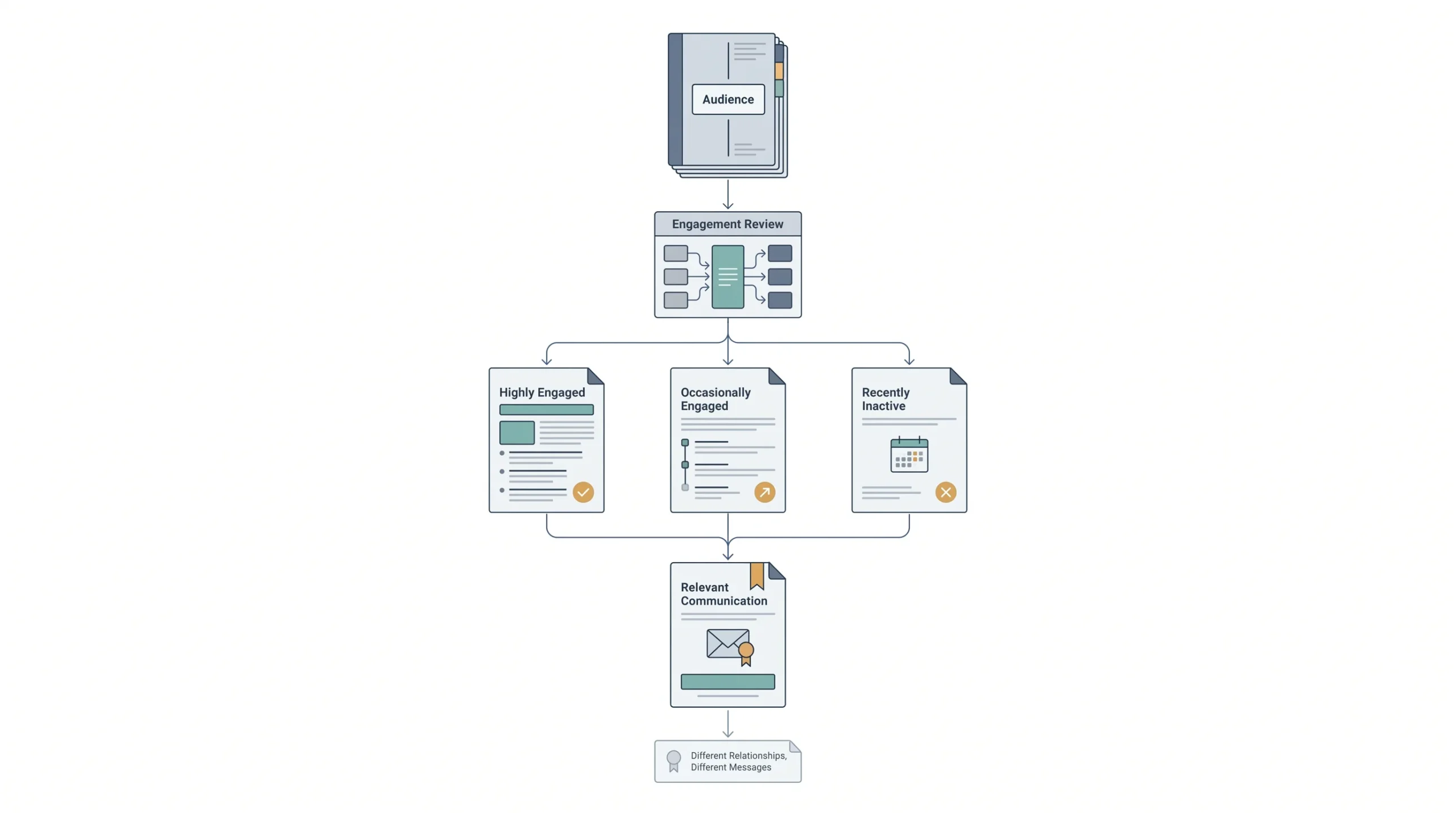
Sending the same email to an engaged customer and someone who signed up eight months ago and never opened anything is treating two completely different relationships identically. Segmentation by engagement level alone can move the number meaningfully, sometimes more than any subject line change ever could.
A simple starting segmentation splits the list into three buckets: highly engaged, opens some emails but not all, and hasn’t opened anything recently. Each bucket can get a different cadence and even a slightly different tone. Highly engaged subscribers can handle more frequent sends without fatigue. The quiet group probably needs fewer, more carefully chosen emails instead of the same volume as everyone else.
7. Test Send Times, Don’t Guess
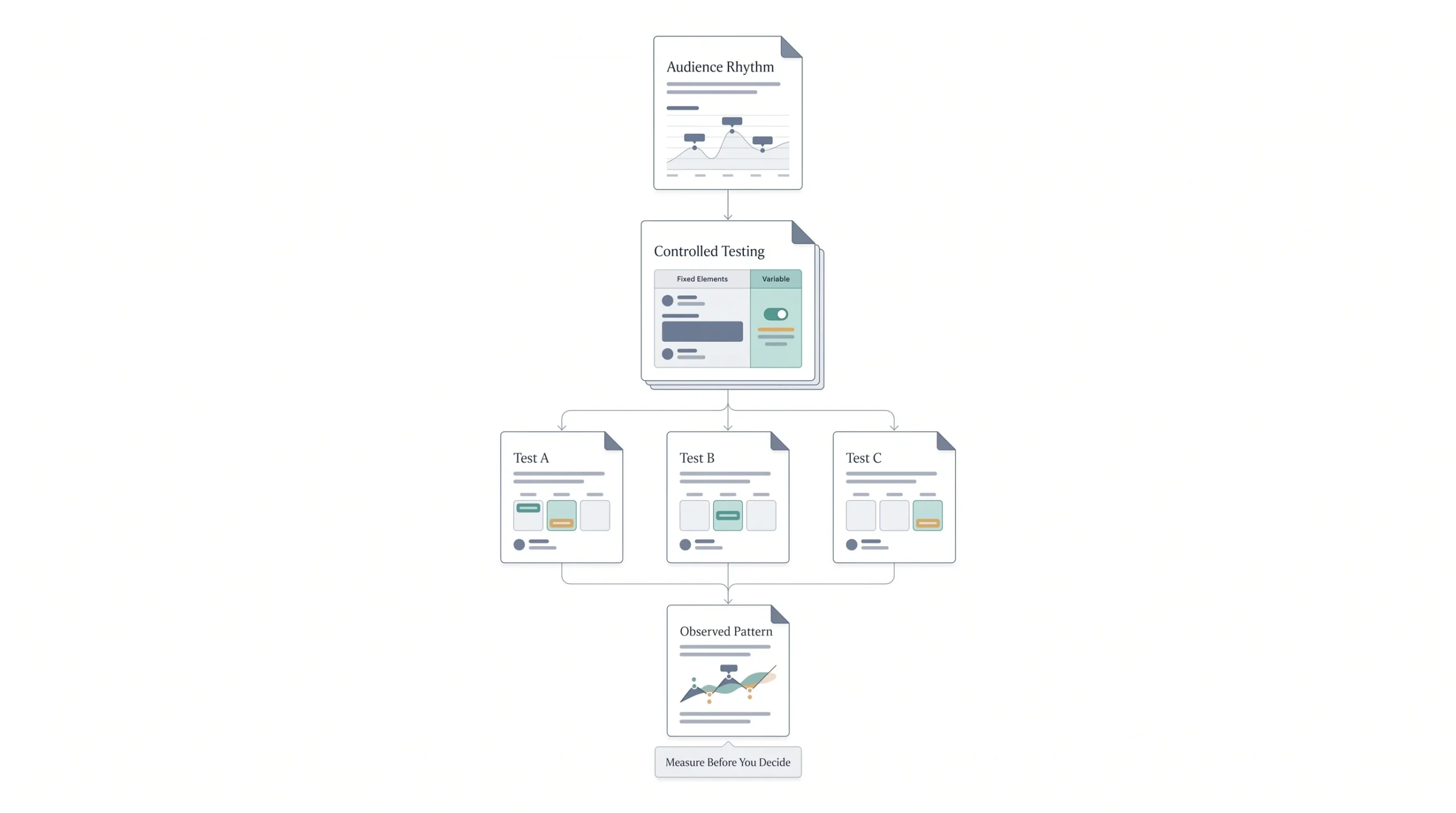
Every list has a rhythm. B2B lists often respond better on weekday mornings when people are checking email before diving into meetings. Consumer lists sometimes do better in the evening when people have actual downtime to browse. The only way to know for a specific list is to actually test it instead of copying a generic “best time to send emails” chart from a blog post about a different audience entirely.
Running this test properly means holding everything else constant, same subject line style, same segment, only the send time changing, across a few different attempts before drawing any real conclusion. One good send on a Thursday afternoon doesn’t prove Thursday afternoon is the answer, it might just mean that particular email happened to be a good one.
8. Re-engage or Remove Inactive Subscribers
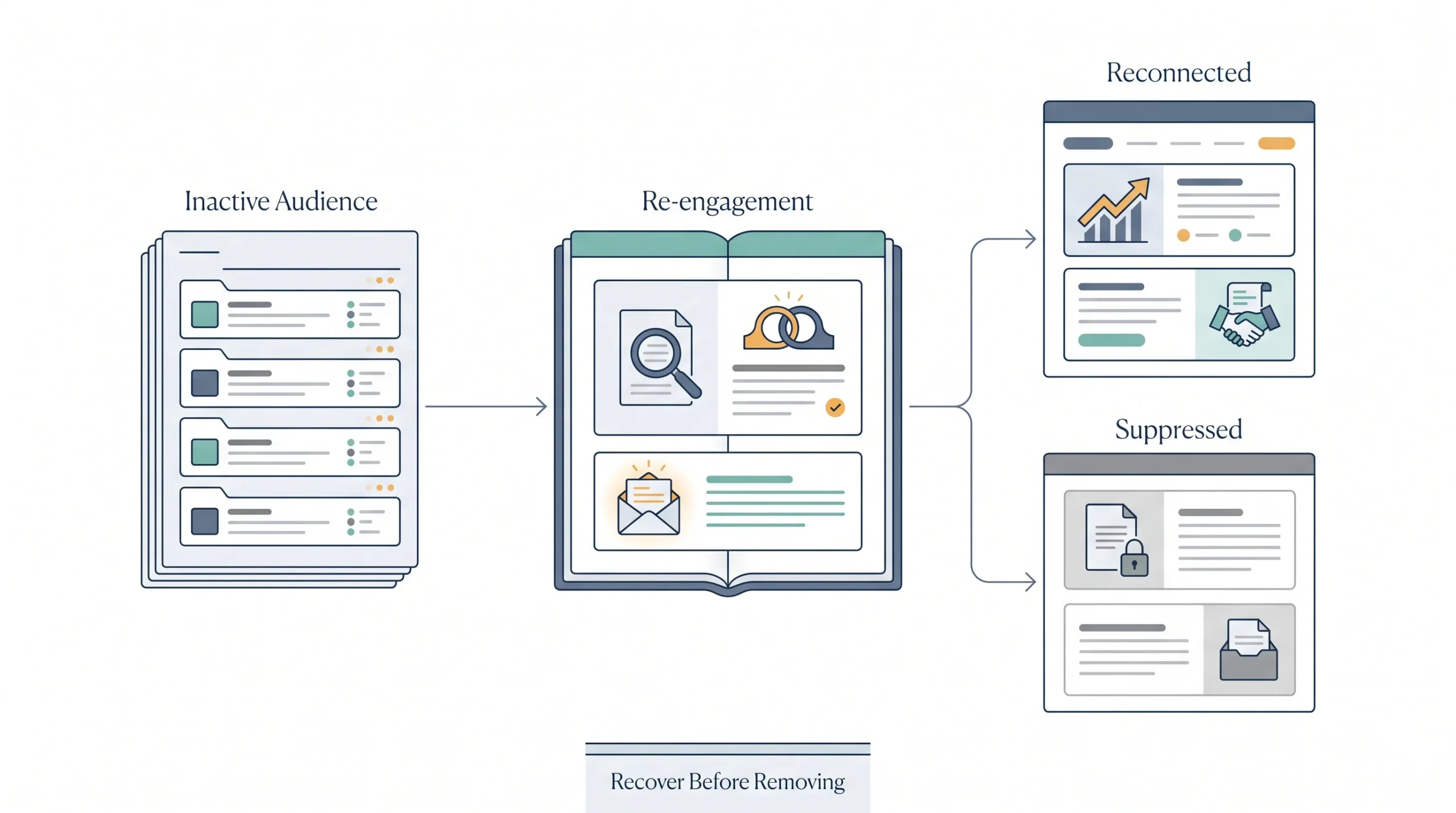
Before deleting anyone, give them one real shot to come back. A short win-back sequence, honest and direct, “still want to hear from us?” does more good than either ignoring inactive subscribers indefinitely or cutting them without any warning at all.
A basic win-back sequence might run two or three emails over a couple of weeks. The first can simply ask if they still want to hear from the business, sometimes phrased as a genuine question rather than a marketing pitch. The second can offer something of clear value, a discount, a resource, a reason to come back that’s worth their attention again. If there’s still no response after that, it’s fair to suppress or remove them, the list is healthier without silent, disengaged names sitting in it.
9. A/B Test One Variable at a Time
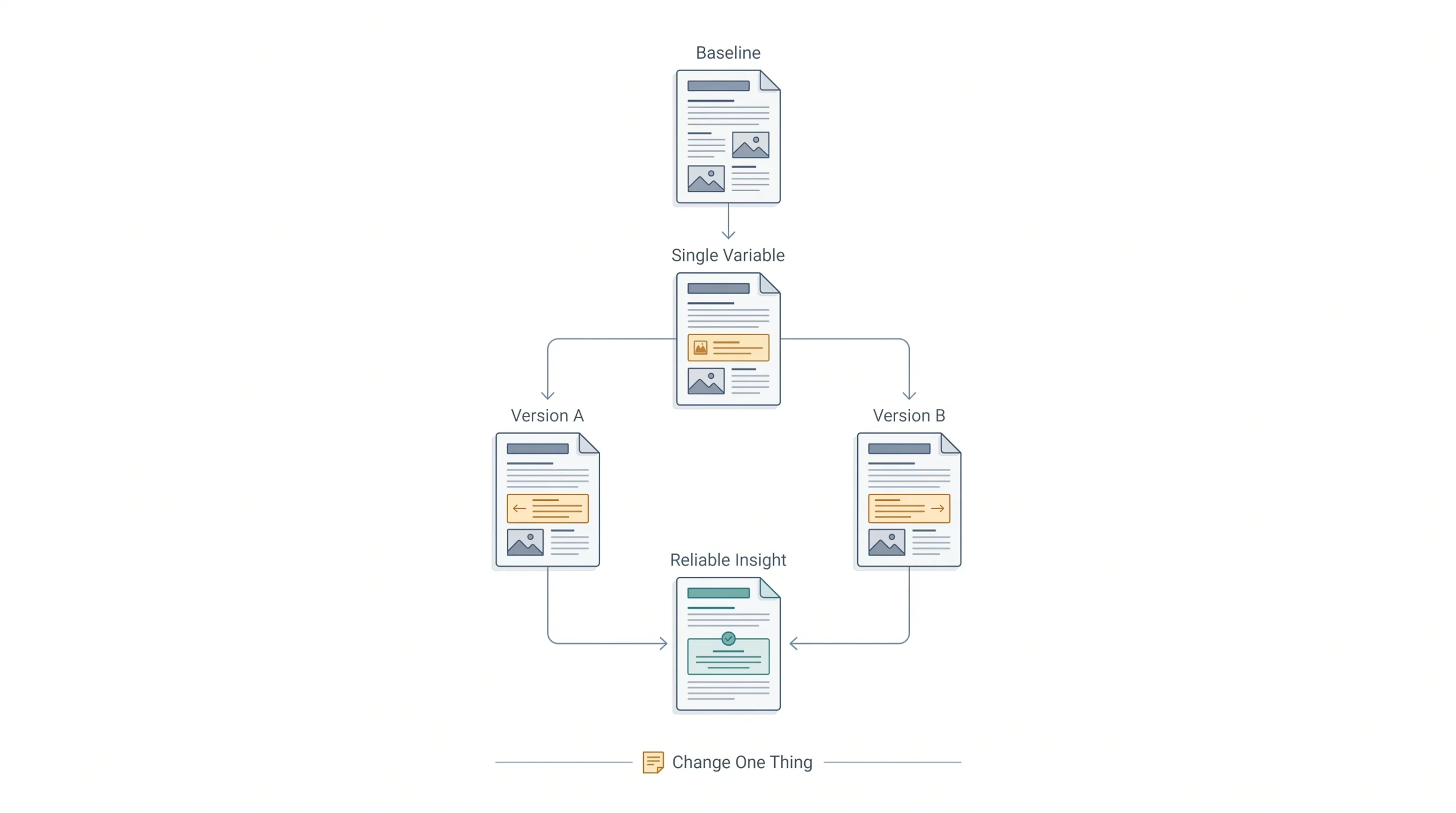
Testing subject line and send time and sender name all in the same experiment means nobody can tell which change actually caused the difference. Isolate one variable, run it long enough to get a real sample, then move to the next one.
A common mistake here is calling a test finished after sending to a tiny fraction of the list with barely any statistical weight behind the result. A test split of a few hundred people might show a difference that’s really just noise. The larger and more consistent the sample, the more that A/B test result actually means something worth acting on going forward.
10. Track Click-to-Open Rate Alongside Open Rate
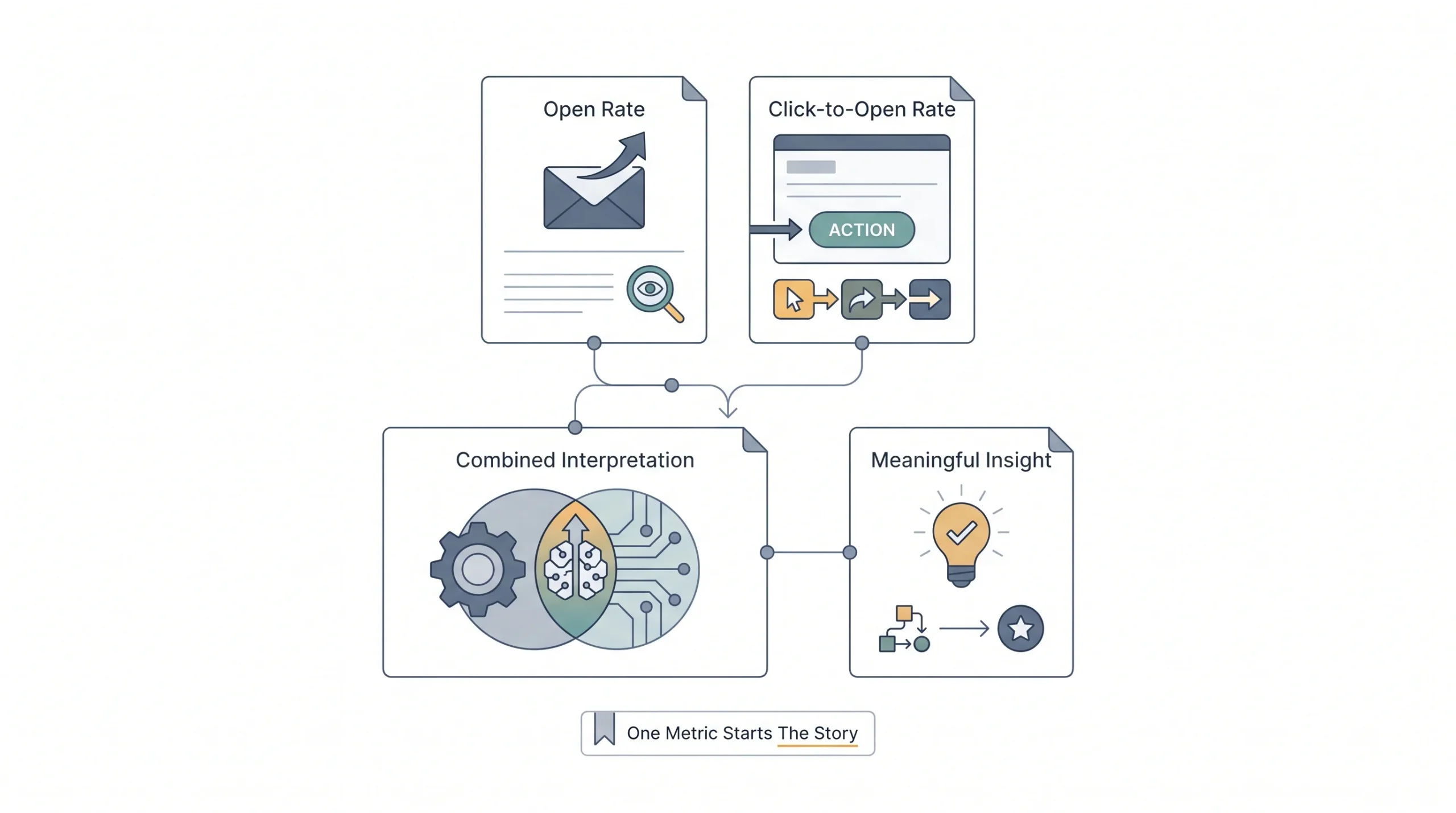
Given everything covered about Apple’s Mail Privacy Protection, open rate alone isn’t the full picture anymore. Click-to-open rate, the percentage of openers who then clicked something, tells a story open rate can’t tell on its own, because a click still requires a real person doing something on purpose.
Watching both numbers side by side over time reveals patterns open rate alone would hide completely. If open rate stays flat but click-to-open rate climbs, the content and offer inside the email are genuinely improving, even if the subject line isn’t changing much. If open rate climbs but click-to-open rate drops, that’s often a sign the subject line is overpromising something the email itself doesn’t deliver on.
Tip: No subject line trick fixes a deliverability problem. A great subject line sitting in a spam folder still gets zero opens, no matter how good it is.
Subject Line Strategies That Actually Move Open Rates
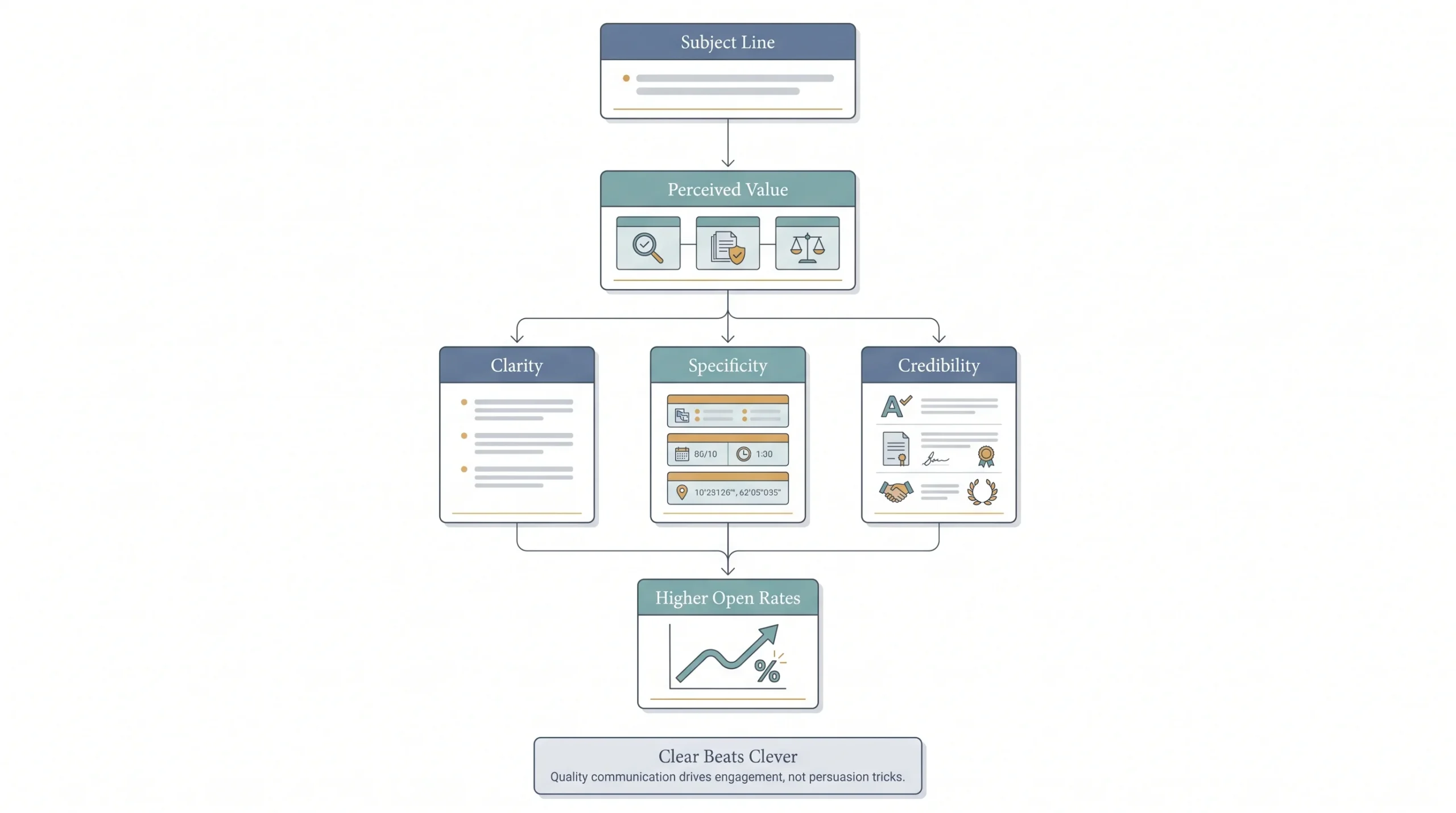
Urgency and emojis get recommended constantly, and sure, they can work in small doses. But the deeper skill here is choosing clarity over cleverness for cold or lukewarm readers, and saving personality for people who already know and trust the sender.
Length matters less than most people assume, but specificity matters a lot. A vague subject line blends into every other vague subject line sitting in the same inbox. A specific one stands out simply by being different from the noise around it.
| Weak | Stronger | Why |
|---|---|---|
| “Newsletter #47” | “The one metric everyone’s tracking wrong” | Curiosity beats a label |
| “Big Sale This Week!!!” | “Your cart discount expires Friday” | Specific beats loud |
| “Monthly Update” | “3 things that changed since last month” | Numbers set expectations |
Also worth avoiding: subject lines packed with spam-trigger words and excessive punctuation. “FREE!!! ACT NOW!!!” doesn’t just look desperate, it can genuinely tip filtering systems toward routing the email straight to spam before a human ever sees it.
How to Troubleshoot a Low Open Rate (A Diagnostic Framework)
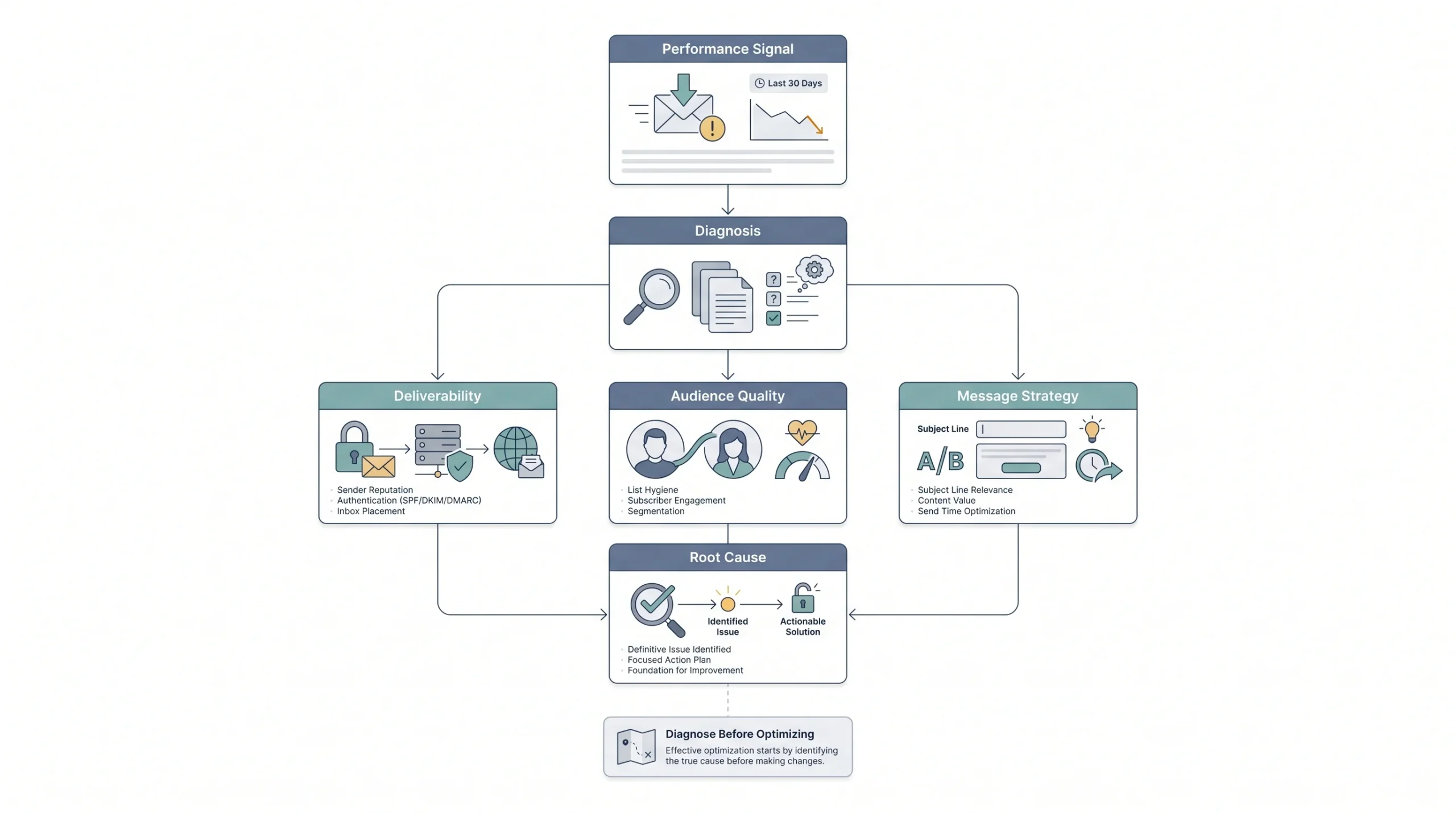
When the open rate looks bad, the instinct is usually to rewrite the subject line immediately. That’s often the wrong first move, because a low open rate can come from several completely different root causes, and treating the wrong one wastes time while the real problem stays untouched.
Start with deliverability. If open rate suddenly dropped off a cliff, that’s rarely a subject line issue, subject lines don’t usually cause a sharp overnight collapse. Check spam complaint rates and authentication records first.
If the open rate has always been low and never really moves no matter what gets tested, that points toward a list quality problem instead. A high percentage of inactive subscribers sitting on the list will flatten the average no matter how good any individual email is.
If performance is inconsistent, some emails do great, others flop, and there’s no clear pattern, that’s usually a subject line or send time issue worth actually testing instead of guessing at.
| Symptom | Likely cause | Where to look first |
|---|---|---|
| Open rate suddenly dropped | Deliverability issue | Spam complaint rate, authentication records |
| Open rate always low, never changes | List quality problem | Inactive subscriber percentage |
| Some emails do great, others don’t | Subject line or send time issue | A/B test results |
Beyond Open Rate: What to Track Alongside It
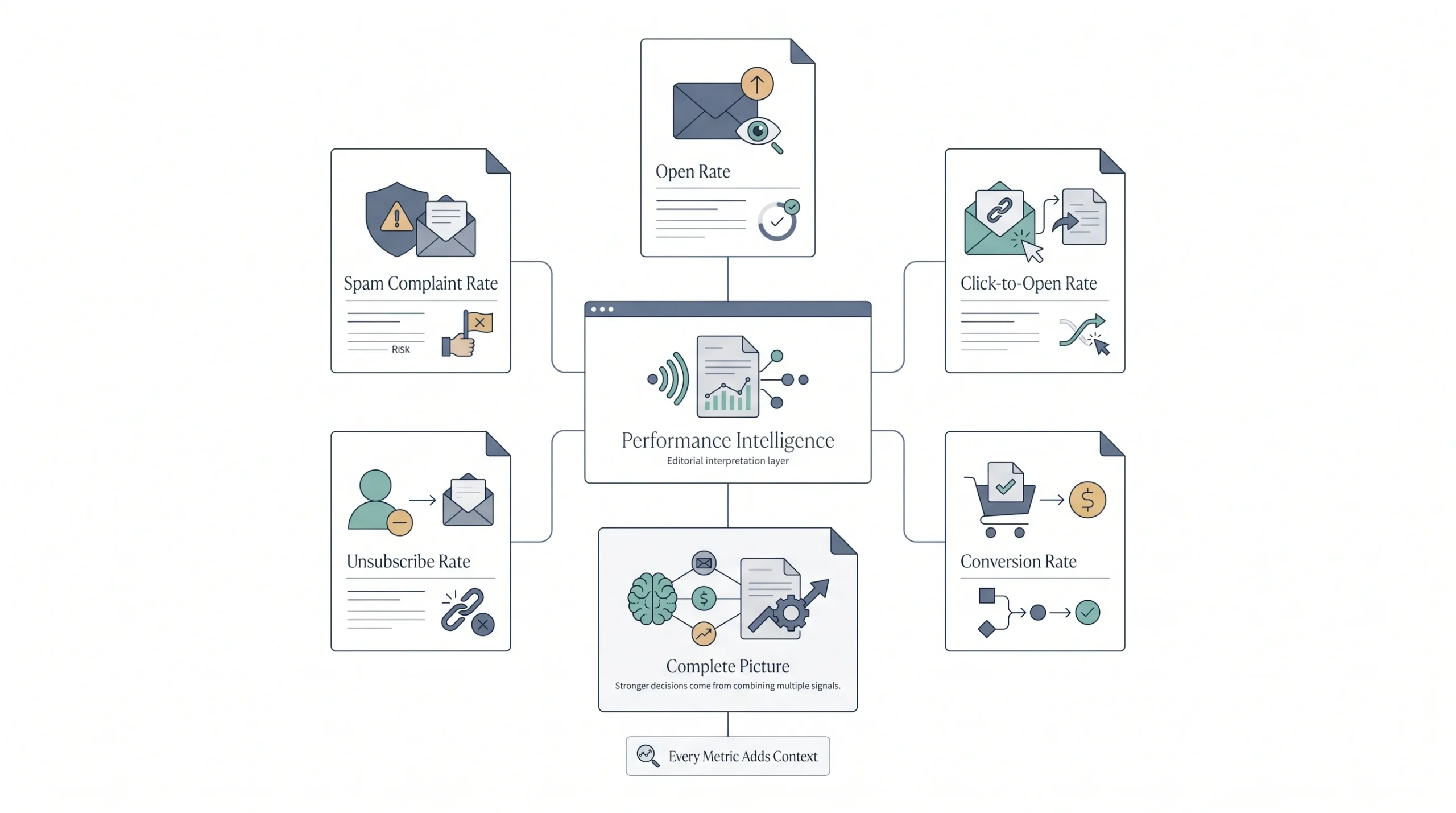
Open rate tells one part of a bigger story, and leaning on it alone, especially post-Apple MPP, means missing most of that story entirely.
Click rate shows how many people actually engaged with something inside the email, not just whether an image quietly loaded in the background. Click-to-open rate narrows that further, showing what percentage of the people who opened it actually found something worth clicking. Conversion rate ties everything back to whatever the actual business goal was, a purchase, a signup, a reply. Unsubscribe rate and spam complaint rate act as early warning signs that content or frequency has drifted off from what the audience actually wants.
| Metric | What it tells you |
|---|---|
| Open rate | Subject line and sender appeal, with caveats |
| Click-to-open rate | Whether the email content delivers once opened |
| Conversion rate | Whether the email drove the actual goal |
| Unsubscribe rate | Whether content or frequency is off |
| Spam complaint rate | Deliverability risk signal |
Looking at all five together gives a far more honest read than staring at one number in isolation and trying to decide, based on that alone, whether the whole email strategy is working.
Conclusion
Open rate isn’t a scoreboard, and it was never built to be one. It’s a signal, a useful one, but a signal that’s gotten noisier since Apple started pre-loading tracking pixels for its own users. The businesses that actually improve their numbers aren’t the ones chasing some industry average pulled from a report about a completely different list. They’re the ones fixing deliverability first, keeping the list honest, writing subject lines that respect the reader’s time, and watching their own trend line month over month instead of comparing themselves to a stranger’s spreadsheet. Start with the foundation. The rest gets a lot easier once that’s solid.
FAQs
Is a 20% open rate good or bad?
Depends entirely on the industry, list size, and email type, but broadly, 20% sits within a healthy range for most newsletter and promotional sends. For a welcome email or transactional email, 20% would actually be low, since those types typically run much higher.
Why did the open rate suddenly jump without changing anything?
Often points toward Apple’s Mail Privacy Protection inflating the number through automatic pixel pre-loading, rather than a genuine spike in engagement. Worth checking click-to-open rate alongside it to see if real engagement actually moved too.
Should inactive subscribers be removed from the list?
Generally yes, after giving them a fair chance through a re-engagement sequence first. Keeping thousands of people who never open anything drags the average down and can hurt how mailbox providers treat future sends to everyone else on the list.
Does sending more often hurt open rates?
It can, but not automatically. What usually hurts open rates is sending more often without adjusting relevance or segmentation. A highly engaged, well-segmented list can often handle frequent sends just fine.
Is open rate still worth tracking at all given the Apple privacy changes?
Yes, as a directional signal, not as an exact measurement. A rate that trends up or down over time still says something real. Just don’t treat any single snapshot number as gospel.
What’s a good click-to-open rate compared to open rate?
Click-to-open rate is naturally lower than open rate, since it only counts people who both opened and then clicked something. A healthy CTOR generally sits in the mid to high single digits for most industries, though this varies by niche.
How long should a re-engagement campaign run before removing someone?
There’s no universal number, but a short sequence, a few emails over one to two weeks, gives inactive subscribers a fair shot to come back without dragging the process out indefinitely.
Can a small list have a higher open rate than a big one?
Often, yes. Smaller lists tend to be more niche and more engaged, since they usually grew through more intentional means rather than broad, generic signup campaigns. Size and engagement don’t automatically move together.
Does the day of the week actually matter for open rates?
It can shift the number a little, but it’s rarely the deciding factor most people treat it as. A weak subject line sent on the “best” day will still underperform a strong one sent on an average day. Worth testing for a specific list, not worth obsessing over based on a generic chart.
Can changing the “from” email address hurt open rates?
Yes, and it’s an easy mistake to make without realizing it. Switching from a familiar sending address to a new one resets some of the recognition and trust built up over time, and it can also trigger extra scrutiny from spam filters that flag sudden changes in sending patterns.
Should personalization tokens like a first name in the subject line always be used?
Not always. It helps in some cases, especially in more personal or B2B contexts, but overusing it or using it awkwardly, like a mismatched name from bad data, can feel more like a mail-merge mistake than genuine personalization. Test it rather than assuming it’s automatically better.
Is it possible to have a great open rate and still get no sales?
Very possible, and it happens more often than people expect. A great open rate just means the subject line and sender did their job. What happens after the open, the actual content, offer, and call to action, is a completely separate skill, which is exactly why click-to-open rate and conversion rate matter just as much as the open itself.