

Let’s be honest about something first: most blog posts never rank. Ahrefs pulled data a while back showing that something like 90% of pages get zero organic traffic from Google. Zero. Not “a little.” Zero. And it’s not because the writers are bad at their jobs. It’s because they wrote for themselves, not for the person typing a question into a search bar at 11 PM trying to solve a real problem.
That gap between “content that exists” and “content that ranks” is what this guide is about. Let’s discuss to write SEO-optimized blog post isn’t some mystical skill reserved for agencies charging five figures a month. It’s a repeatable process. You research what people actually want, you structure the page so both humans and search engines can understand it fast, and you write it well enough that people actually finish reading it and maybe even link to it.
Here’s the thing nobody tells beginners: Google doesn’t reward “good writing” in the way an English teacher would grade it. It rewards content that matches search intent, answers the question completely, and gets read, shared, and linked to by real people. You could write a technically perfect paragraph and still get buried on page 4 because you missed what the searcher actually wanted. Meanwhile, a slightly rougher post that nails the intent and structure will often outrank it.
Search itself has changed a lot too. It’s not 2015 anymore where you could stuff a keyword fifteen times and watch the rankings climb. Google’s algorithms, especially since the Helpful Content updates, actively demote pages that feel like they were written for a crawler instead of a person. And now there’s a second audience to write for: AI systems like Google’s AI Overviews, ChatGPT, and Perplexity, which pull answers directly from web pages and show them before anyone even clicks through. If your content isn’t structured to be quoted, you’re losing visibility you don’t even realize you’re losing.
None of this means SEO is dead or that keywords don’t matter. It means the game got more layered. You need content that satisfies a human reader, signals relevance to Google’s ranking systems, and is easy for an AI engine to lift a clean answer from. Do all three and you’ve got a page that can realistically pull organic traffic for years, not weeks.
What You Will Learn in This Guide
By the end of this guide, you’ll know exactly how to plan, write, and optimize a blog post that has a real shot at ranking, not just a post that looks nice. You’ll learn how to pick a primary keyword without guessing, how to structure a post so it satisfies search intent instead of fighting it, and how to write sections that actually hold attention instead of losing readers three paragraphs in.
You’ll also get the technical side: title tags, meta descriptions, URL structure, internal linking, schema markup, and how to set a page up for featured snippets and AI Overviews. There’s a full walkthrough at the end where a real keyword gets taken from research to a finished, optimized post, so you can see the whole process applied instead of just described. And there’s a checklist you can actually use before you hit publish, because half of ranking is just not forgetting the basics.
What Is an SEO-Optimized Blog Post?
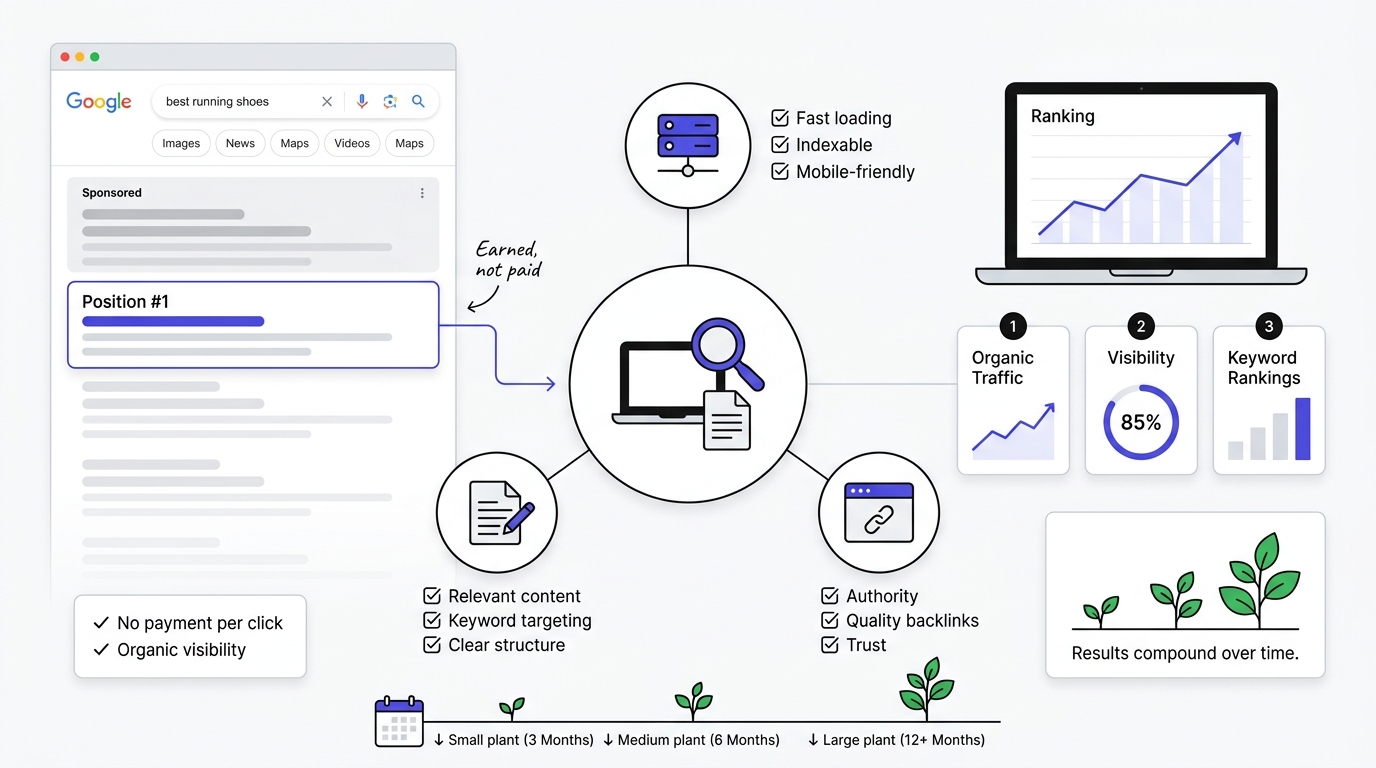
An SEO-optimized blog post is content built to satisfy two audiences at once: a human reader who wants their question answered, and a search engine that needs clear signals about what the page covers and how well it answers that question. It’s not writing that sounds robotic or keyword-stuffed. Done right, it reads completely naturally. The optimization lives in the structure, the depth, and the technical setup underneath it, not in awkward phrasing forced around a keyword.
Here’s where people get confused: a “regular” blog post and an SEO blog post can look identical to a casual reader. The difference shows up in what happened before the writing started and what’s baked into the structure.
| Regular Blog Post | SEO-Optimized Blog Post |
|---|---|
| Written purely from the writer’s own idea of what to say | Written around what people are actually searching for |
| No keyword strategy, topic picked on instinct | Primary keyword and supporting keywords chosen from real search data |
| Headings added wherever they feel natural | Headings structured to match how people scan and how Google parses hierarchy |
| Optimization is an afterthought, if it happens at all | Title, meta description, URL, and internal links are planned before writing starts |
| Hard to predict if it’ll ever get found | Built with a specific ranking outcome in mind |
The practical difference: a regular post might get read by whoever happens to see it on social media the day it publishes, then it disappears. An SEO-optimized post can sit there for two years pulling in visitors every single day because it keeps answering the same question over and over for new searchers.
Why SEO Blog Posts Matter
Organic traffic from search is one of the only marketing channels that compounds instead of resetting to zero every time you stop paying for it. Run a Google Ads campaign and traffic stops the second you stop paying. Publish a well-optimized blog post that ranks on page one, and it can keep bringing in visitors for years off a single piece of work.
Beyond raw traffic, ranked blog content does a few other things that matter for a business. It generates leads passively, because someone searching “best CRM for small business” is already in a buying mindset, not someone you had to interrupt with an ad. It builds brand authority, because ranking on page one for competitive terms signals to readers (and to Google) that you know what you’re talking about. And the ROI math is just better over time. A blog post that costs a few hundred dollars to produce and ranks for two years is a completely different economic proposition than an ad that costs money every single day it runs.
How Search Engines Actually Understand Blog Content
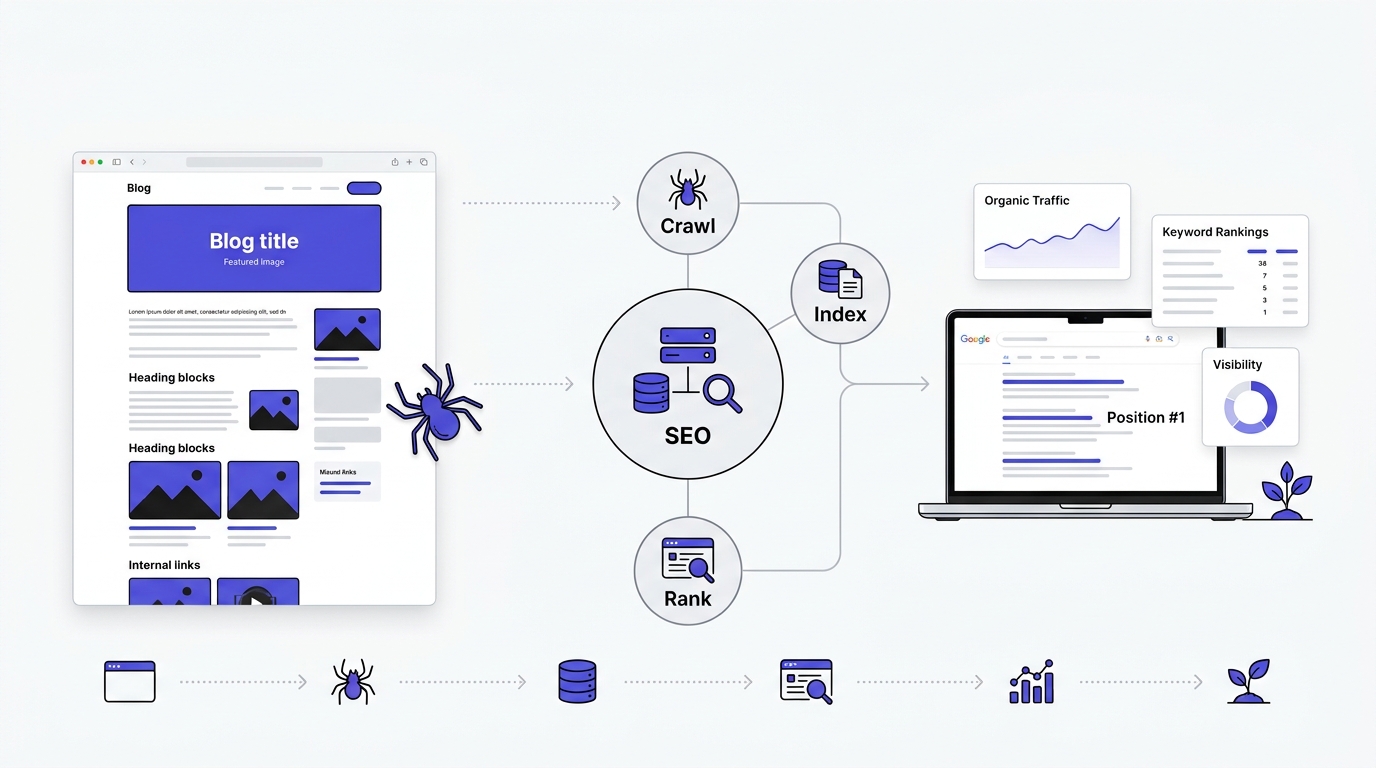
Google finds, evaluates, and ranks your blog post through three distinct stages: crawling, indexing, and ranking. Miss any one of these and your content, no matter how good, effectively doesn’t exist to searchers.
Crawling is Googlebot physically visiting your page and reading the HTML. If your site has broken navigation, blocked crawler access in robots.txt, or an unfindable URL, Google can’t even get to step one. Indexing is Google storing and categorizing what it found, deciding what the page is about and where it might fit in search results. Ranking is the ongoing, constantly recalculated process of deciding where that page sits for relevant queries, based on hundreds of signals including relevance, content quality, page experience, backlinks, and increasingly, whether the content actually satisfies the person who searched.
Understanding Search Intent
Search intent is the real reason someone typed a query into Google, and it matters more for ranking today than keyword density ever did. There are four broad types, and getting the type wrong is one of the fastest ways to write a post that never ranks no matter how well it’s optimized on paper.
Informational intent is someone trying to learn something, like “how does compound interest work.” Commercial investigation is someone comparing options before buying, like “best project management software for freelancers.” Navigational intent is someone searching for a specific site or brand, like “Ahrefs login.” Transactional intent is someone ready to act right now, like “buy Nike Air Max size 10.”
Here’s why this actually matters in practice. If you write a 2,000-word educational essay for a query that has transactional intent, you will not rank, no matter how well-researched it is. Google has already figured out, from years of click and engagement data, that people searching that phrase want a product page, not an article. Before writing a single word, check what’s currently ranking for your target keyword. If the top 10 results are all comparison listicles, don’t write a single-product review. If they’re all how-to guides, don’t write a product page. Google is telling you exactly what format wins, you just have to look.
Step 1: Understand Your Target Audience
You can’t write content that satisfies search intent if you don’t know who’s actually searching. This step gets skipped constantly because it feels like a “marketing” exercise disconnected from the actual writing, but skipping it is why so many posts read like they’re talking to nobody in particular.
Create Reader Personas
Build a simple picture of who’s reading before you write a word. You need their goal (what outcome are they trying to reach), their current problem (what’s blocking them right now), the specific questions they’d type into Google, their skill level (complete beginner or someone who already knows the basics and wants advanced tactics), and where they are in the buying stage if this is commercial content.
Example persona: A small business owner who just launched a website six months ago and is getting almost no traffic. She’s not technical, doesn’t know what a meta description is, and doesn’t have budget for an agency. Her question isn’t “explain SEO theory,” it’s “what do I actually do this week to get more visitors.” Write for her and the content naturally becomes practical instead of academic. Skip this step and you end up writing for an imaginary expert who already knows everything, which helps nobody and satisfies no search intent.
Step 2: Perform Keyword Research Properly
Keyword research is the single highest-leverage step in this whole process, and it’s the one most people rush through. Get this step wrong and no amount of good writing saves the post, because you’re either targeting something nobody searches for or something you have zero realistic chance of ranking for.
Why Keyword Research Matters
Keyword research tells you two things before you write a single sentence: whether people are actually searching for this topic, and what specific angle or phrasing they’re using to search for it. Write without this and you’re guessing. You might write a fantastic article about “content marketing strategy” when the actual search volume and intent is clustered around “how to start a blog for a small business,” a completely different angle with different competition.
Find One Primary Keyword
Every blog post needs exactly one primary keyword that the entire piece is built around. This is the phrase your title, first paragraph, at least one H2, URL, and meta description all revolve around.
Example: For this exact guide, the primary keyword is “how to write SEO-optimized blog posts.” It’s specific enough to have clear intent (someone wants a process, not a definition) and broad enough to have real search volume.
Find Supporting Keywords
Around that primary keyword, you build a cluster of secondary keywords that reinforce the same topic and let you naturally cover more ground without keyword stuffing the primary term.
| Keyword | Intent |
|---|---|
| SEO blog writing | Informational |
| SEO content writing | Informational |
| Blog SEO checklist | Informational |
| SEO writing tips | Informational |
| On-page SEO for blogs | Informational |
| Keyword research for blogs | Informational |
These don’t need forced insertion. They show up naturally in H2s, H3s, and body copy because they’re genuinely part of the same topic. That’s the test, honestly: if a keyword only fits by forcing an awkward sentence, it doesn’t belong in this post.
Analyze Search Intent, Check Keyword Difficulty, Check Search Volume
For every keyword candidate, run three checks. First, what’s actually ranking right now for it (that tells you the real intent, not the intent you assume). Second, how hard is it to break into page one given your site’s current authority (a brand new blog going after a term with Forbes and Investopedia on page one is wasting months). Third, is there enough search volume to justify the effort (a keyword with 10 searches a month isn’t worth a 2,000-word article unless it’s part of a much larger cluster strategy).
Study Competitor Pages
Before writing, pull up the top five ranking pages for your primary keyword and actually study them, not just skim them. Look at their heading structure (how many H2s, what order do they cover topics in), their word count (are they thin at 800 words or exhaustive at 4,000), how deep they actually go on each subtopic versus how much is filler, what topics they completely miss that searchers would still want answered, how they use internal links, and whether they have an FAQ section.
This isn’t about copying them. It’s about finding the gap. If every top-ranking page skips a genuinely useful subtopic, that’s your opening to write something more complete than what currently exists, which is exactly the kind of content Google’s systems are built to reward.
Best Keyword Research Tools
You don’t need an expensive tool stack to start. Google Search itself, particularly the “People Also Ask” boxes and related searches at the bottom of the results page, gives you real query data for free. Google Keyword Planner (built for ads but usable for organic research) gives volume ranges. Google Search Console shows you what queries your existing site already gets impressions for, which is often the fastest path to quick wins. Google Trends shows you if interest in a topic is rising or falling over time. For paid options, Ahrefs and Semrush give you keyword difficulty scores, competitor gap analysis, and full search volume data, while Ubersuggest is a cheaper entry point if you’re just starting out.
Step 3: Build a Winning Blog Structure
Structure is where a lot of otherwise decent content falls apart. A well-researched post with a messy structure loses readers fast, and Google’s systems read structural signals (heading hierarchy, paragraph length, scannability) as part of how they judge content quality.
Create an SEO-Friendly Title
Your title has to do two jobs at once: contain the primary keyword close to the front, and make a real human want to click it over the nine other results on the page.
Bad: “Blog Writing” (too vague, no keyword targeting, tells you nothing)
Good: “How to Write SEO-Optimized Blog Posts (With Examples)” (keyword up front, promises a concrete deliverable, specific enough to signal exactly what’s inside)
Keep titles under roughly 60 characters so Google doesn’t truncate them in search results, and lead with the keyword or the core benefit rather than burying it at the end.
Write an Introduction That Hooks Readers
Two classic copywriting frameworks work well here because they’re built around psychology that hasn’t changed just because we’re online now. PAS stands for Problem, Agitate, Solution: state the reader’s problem, make them feel how real and frustrating it is, then position your content as the fix. AIDA stands for Attention, Interest, Desire, Action: open with something that grabs attention (a stat, a bold claim), build interest by expanding on it, create desire by showing what they’ll get, then push toward the next action, which is reading on.
You don’t need to mechanically follow either one line by line. Just know that a good intro creates a reason to keep reading in the first two sentences, not the fifth paragraph.
Use Proper Heading Hierarchy
Heading structure isn’t decoration, it’s how both readers and Google parse the logical structure of your page. There’s exactly one H1 per page (usually the title itself). H2s mark your main sections, the big topic shifts. H3s break an H2 into sub-points when a section gets complex enough to need it. H4s are rare on blog content, mostly reserved for breaking down a particularly dense H3.
A clean structure might look like: H1 (title), then H2 “Step 1: Keyword Research,” with H3s underneath for “Finding Your Primary Keyword” and “Analyzing Search Intent.” Skip levels (going straight from H2 to H4) and you confuse both readers scanning the page and Google trying to understand your content hierarchy.
Step 4: Write High-Quality SEO Content
This is where most guides get vague and say “write good content,” which is useless advice. Here’s what actually makes content good enough to rank and hold rankings.
Write for Humans First, Then Structure for Search Engines
Write every sentence like you’re explaining it to one specific person, not broadcasting to an algorithm. If a sentence would sound weird said out loud to a friend, rewrite it. The optimization happens in headings, structure, and keyword placement, not in how naturally each individual sentence reads. This single mindset shift fixes most of what makes content feel like AI slop or corporate filler.
Cover the Topic Completely
Shallow content is one of the fastest ways to get outranked. If you write 600 words on a topic that genuinely needs 2,000 to be useful, you’ll rank behind whoever actually answered every angle of the question. That doesn’t mean padding with fluff to hit a word count, it means genuinely not leaving obvious follow-up questions unanswered.
Demonstrate Real Experience and Add Original Insight
Anyone can summarize what other articles already say. What actually differentiates a post is something only you could add: a specific number from something you tried, a mistake you watched happen, an opinion you’re willing to state plainly instead of hedging. If ten other articles say “keyword research is important,” you’re not adding anything by repeating it. Say something more specific, like which tool actually gave you usable data versus which one was a waste of a subscription.
Use Statistics, Examples, Tables, Lists, and Comparisons
Concrete elements break up walls of text and give both readers and Google’s AI Overview systems something specific and quotable to pull from. A statement backed by a real number (“Ahrefs found that roughly 90% of pages get zero organic traffic”) is more useful and more citable than “most pages don’t get much traffic.” Tables work especially well for comparisons because they’re easy to scan and often get pulled directly into featured snippets.
Answer Reader Questions Naturally Throughout
Don’t save every answer for the FAQ section at the bottom. If a reasonable follow-up question would occur to someone mid-paragraph, answer it right there. This is part of what makes content feel complete instead of like it’s holding something back to pad out a separate FAQ later.
Step 5: Optimize On-Page SEO Elements
Great content that’s technically unoptimized still underperforms. This is the unglamorous mechanical layer that a lot of beginners skip, and it’s where a lot of easy ranking gains sit unclaimed.
SEO Title
Your SEO title (the blue clickable link in search results) doesn’t have to match your on-page H1 exactly, though it usually should be close. Keep it under 60 characters, front-load the primary keyword, and make sure it’s different enough from every other result that someone scanning the page would actually click yours.
Meta Description
The meta description is the short summary text under your title in search results. It’s not a direct ranking factor, but it directly affects click-through rate, which absolutely does influence rankings over time. Keep it between 150 and 160 characters, include the primary keyword naturally, and write it like ad copy: a clear promise of what the reader gets if they click.
Example: “Learn how to write SEO-optimized blog posts that actually rank, with real examples covering keyword research, structure, and on-page SEO.”
URL Structure
Keep URLs short, lowercase, hyphenated, and focused on the primary keyword.
Good: yoursite.com/seo-optimized-blog-posts
Bad: yoursite.com/blog/post-id-4471829/how-to-write-blogs-that-rank-in-2026-a-complete-guide
Long, date-stamped, ID-cluttered URLs are harder to read, harder to remember, and give Google a weaker relevance signal than a clean keyword-focused slug.
Keyword Placement
Place your primary keyword in the title, the first 100 words of your intro, the URL, the meta description, at least one H2, ideally one H3, image alt text, and once naturally in the conclusion. That’s it. Beyond that, stop actively inserting it and let secondary keywords and natural language carry the rest of the page. Keyword stuffing (unnaturally repeating the exact phrase over and over) is a fast way to trigger quality filters and make the writing unreadable.
Image Optimization
Every image should have a descriptive file name (seo-keyword-research-example.png, not IMG_4471.png), be compressed so it doesn’t slow down page load, and have alt text that describes what’s actually in the image while working in relevant keywords where it fits naturally. Modern formats like WebP load faster than PNG or JPEG without a visible quality loss, which helps both user experience and Core Web Vitals scores.
Internal Linking
Internal links (links from one page on your site to another) do two jobs: they help Google understand your site’s topic clusters and hierarchy, and they keep readers moving deeper into your site instead of bouncing after one page. Link out to related, genuinely relevant pages using descriptive anchor text (“read our full keyword research guide,” not “click here”), and aim for at least three to five internal links in a substantial post.
External Linking
Link out to authoritative external sources when you cite a stat or claim you didn’t originate. This isn’t a weakness, it’s a trust signal. Linking to something like an official Google Search Central document or a well-known industry study shows both readers and search engines that your claims are grounded in something real.
Table of Contents and Schema Markup
A table of contents near the top of long posts helps readers jump to what they need and gives Google jump-link opportunities in search results, which increases real estate on the results page. Schema markup (structured data added to your page’s code) helps search engines understand specific content types. Article schema tells Google this is a blog post with an author and publish date. FAQ schema can get your Q&A section displayed directly in search results as expandable dropdowns. Breadcrumb schema shows your site hierarchy in the search snippet. None of these are visible to readers, but they’re read directly by search engines and can noticeably improve how your listing appears.
Step 6: Optimize Readability
A brilliant, well-researched post that’s exhausting to read on a phone screen loses readers before it converts any of that research into value. Readability isn’t dumbing down content, it’s respecting how people actually consume it.
Keep paragraphs short, two to four lines on mobile is a good target, because giant text blocks feel like work before a reader even starts. Use white space generously. Break up long explanations with bullet lists and tables wherever a sequence or comparison is being described. Use images and screenshots to break up long text-heavy sections. Bold or highlight genuinely important phrases, but sparingly, because if everything’s bolded nothing stands out. Aim for a reading grade level that a general audience can follow, not academic phrasing that requires re-reading sentences. Write mostly in active voice, since it’s more direct and easier to follow than passive constructions.
Before: “It is recommended by SEO professionals that keyword research should be conducted prior to the commencement of the writing process.”
After: “Do your keyword research before you start writing.”
Same information. One version respects the reader’s time, the other doesn’t.
Step 7: Add E-E-A-T Signals
E-E-A-T stands for Experience, Expertise, Authoritativeness, and Trustworthiness. It’s the framework Google’s quality raters use to evaluate whether content should be trusted, and it’s become especially important since Google started actively demoting content that reads like it was mass-produced with no real human behind it.
Experience means showing you’ve actually done the thing you’re writing about, not just researched it secondhand. Expertise means the depth and accuracy of the information itself holds up under scrutiny. Authoritativeness is built through things like author bios, credentials, and other sites linking to or citing your content. Trustworthiness comes from accurate information, clear sourcing, transparent authorship, and a site that doesn’t feel sketchy or manipulative.
In practice, this means adding a real author bio with actual credentials, citing real data sources instead of vague claims, including original examples or case studies instead of only referencing what other sites already said, using original images or screenshots instead of only stock photos, and linking out to credible references when you make factual claims. None of this is a one-time checkbox. It’s baked into how the content gets written from the first sentence.
Step 8: Optimize for Featured Snippets
Featured snippets are the highlighted answer boxes that appear at the very top of Google’s results, above the normal listings. Ranking there, sometimes called “position zero,” can pull significant traffic even if your normal ranking is second or third.
Paragraph snippets answer “what is” style questions in a tight 40 to 60 word block placed right after the relevant heading. List snippets work for step-by-step processes or ranked items, formatted as an actual numbered or bulleted list in your HTML, not just described in prose. Table snippets work for comparison data, like pricing or feature comparisons, formatted as a real table. FAQ snippets come from a clearly structured question-and-answer section, ideally marked up with FAQ schema.
The pattern across all four: format matches function. If you’re answering a definition question, write a tight standalone paragraph. If you’re listing steps, use an actual list element. Google’s systems are looking for structural matches to the query type, not just relevant words somewhere on the page.
Step 9: Optimize for AI Search and Answer Engines
Search behavior has shifted. A growing share of queries now get answered directly inside Google’s AI Overviews, or through tools like ChatGPT and Perplexity that summarize web content instead of just listing links. This is why AEO (Answer Engine Optimization) and GEO (Generative Engine Optimization) matter now, not just traditional SEO.
The core difference: traditional SEO optimizes to get a click. AI search optimization is partly about getting your content correctly cited and summarized, sometimes without a click happening at all. That sounds like a threat to traffic, and in some ways it is, but ranking well in AI Overviews still drives real traffic for anyone whose answer is compelling enough that a reader wants the full detail behind it.
To structure content for AI extraction, write clear, self-contained definitions early in each section instead of building up to the answer slowly. Use entity-rich language, meaning name actual tools, frameworks, and specific terms rather than vague references. Build topic clusters where related articles interlink, since this helps AI systems understand your site’s depth on a subject. Use semantic keywords, meaning related terms and synonyms, not just the one exact phrase repeated. Keep tables and FAQs cleanly formatted, since these are exactly the structures AI systems pull from most easily.
Step 10: Write an SEO-Friendly Conclusion
A conclusion isn’t just a formality tacked on because the post needs an ending. It’s your last chance to reinforce the core value and push the reader toward an action.
Summarize the single biggest takeaway, not a bullet-by-bullet recap of every section (the reader just read those, they don’t need them repeated). Restate the primary keyword naturally, once. End with a specific call to action: download something, read a related guide, leave a comment, try the process on their own next post.
Example: “Writing SEO-optimized blog posts comes down to matching real search intent, structuring content so it’s easy to scan, and backing every claim with something specific. Start with one post, run it through the checklist below, and see how it performs before scaling the process across your whole site.”
Complete Guide to Write SEO-Optimized Blog Checklist
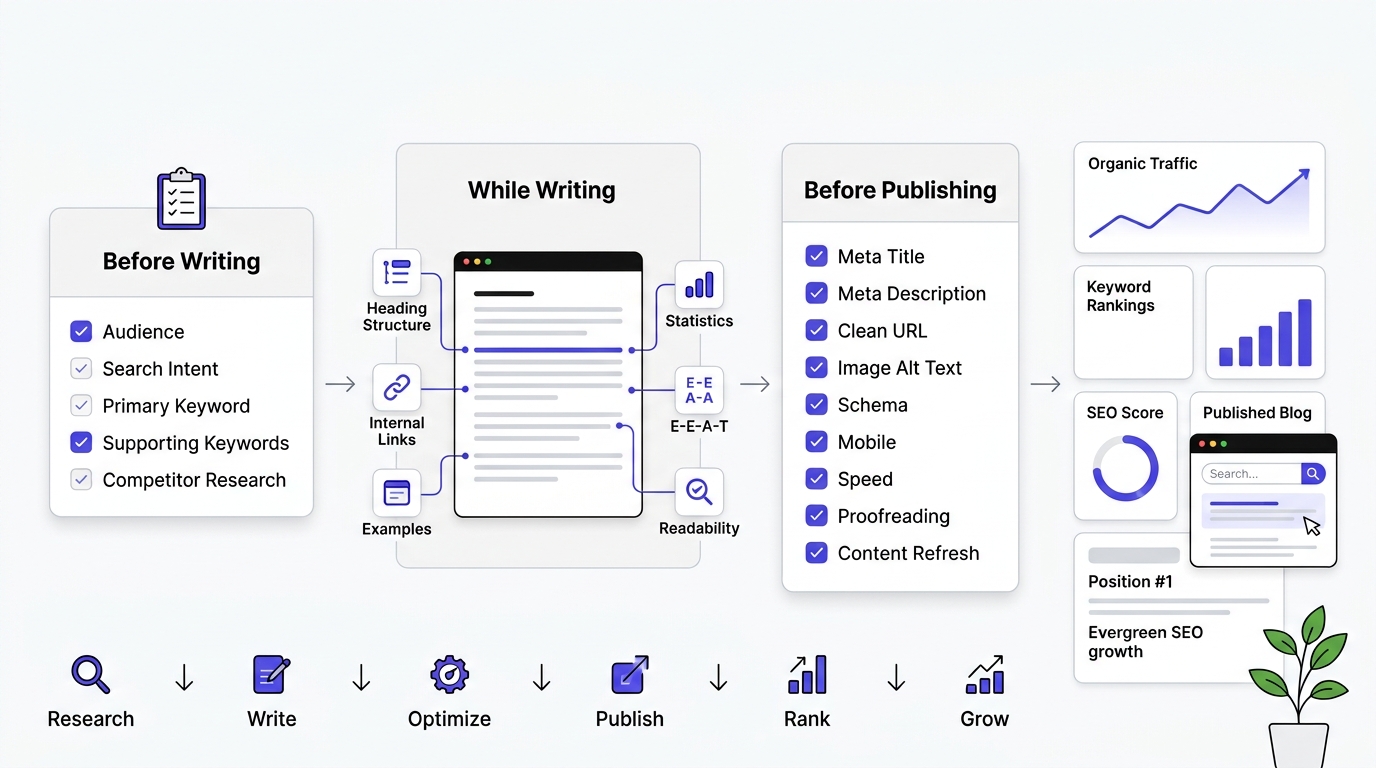
Run through this before you consider any post finished.
Before Writing
1. Confirm your audience and their real intent Know exactly who you’re writing for and why they’re searching. Search intent generally falls into four buckets: informational (“what is…”), navigational (“brand name login”), commercial investigation (“best X for Y”), and transactional (“buy X”). Google the keyword yourself and look at what’s actually ranking — if it’s all product pages, a blog post won’t outrank them; if it’s all listicles, a listicle is expected. Mismatched intent is the single most common reason a well-written post never ranks.
2. Lock in one primary keyword Pick one main keyword per post and build the whole piece around it — title, H1, URL, opening paragraph. Trying to rank one page for two unrelated head terms usually means it ranks well for neither. Check search volume and difficulty, but weigh those against how well the keyword actually matches your audience and their intent — a lower-volume keyword you can realistically win beats a big one you can’t.
3. Build your supporting keyword list Gather secondary and semantically related terms (LSI-style keywords, questions from “People Also Ask,” synonyms, related entities) using tools like Ahrefs, SEMrush, Google Search Console, or even Google’s autocomplete and “related searches.” These get worked into subheadings and body copy naturally — not stuffed — to signal topical depth to search engines.
4. Study the current top five ranking pages for gaps Read what’s already ranking. Note the average length, the subtopics they all cover, the format (list, guide, comparison), and — most importantly — what they’re missing: outdated data, no examples, thin explanations, no visuals. Your post needs a reason to outrank them, usually by being more current, more specific, or more useful, not just longer.
While Writing
5. Follow a clean, logical heading structure One H1 (usually the title), then H2s for main sections, H3s for subsections within them. Headings should read as a coherent outline on their own and should incorporate keywords where it’s natural, not forced. This helps both readers skimming the page and search engines parsing its structure.
6. Add internal links to relevant existing content Link to other pages on your own site where it’s genuinely useful to the reader — related guides, product pages, glossary terms. This spreads link equity, keeps people on your site longer, and helps search engines understand how your content is connected. Use descriptive anchor text, not “click here.”
7. Include real examples, not generic filler Concrete, specific examples (a real scenario, a real number, a real before/after) build trust and differentiate your content from AI-generated filler that says a lot without saying anything. If you can’t find a real example, a clearly-labeled hypothetical is better than a vague generality.
8. Back claims with statistics or named sources Any claim that sounds like a fact should have a source behind it — a study, an industry report, an expert quote. Link to the original source, not an aggregator, and check the data isn’t stale before you cite it.
9. Weave in E-E-A-T signals naturally E-E-A-T stands for Experience, Expertise, Authoritativeness, and Trustworthiness — the framework Google’s quality raters use. In practice: mention firsthand experience where relevant, credit an author with real credentials, cite reputable sources, and keep the content accurate and current. This matters most for YMYL topics (health, finance, legal) but helps everywhere.
10. Keep paragraphs short and scannable Most web readers scan before they read. Aim for 2–4 sentences per paragraph, use bullet points and numbered lists where they clarify, and bold key phrases sparingly. Break up long sections with subheadings so someone skimming can still get the gist.
Before Publishing
11. Write and check your meta title length Keep it to roughly 50–60 characters (Google truncates around 600px, which varies by character width) so it doesn’t get cut off in search results. Lead with the primary keyword where it reads naturally.
12. Write and check your meta description length Aim for about 150–160 characters. It doesn’t directly affect rankings, but it’s your pitch for the click — make it specific and benefit-driven, not a vague restatement of the title.
13. Confirm your URL is clean and keyword-focused Short, lowercase, hyphen-separated, and free of stop words and tracking clutter — e.g. /site/seo-blog-checklist rather than /site/post?id=4821&ref=xyz. Avoid changing URLs after publishing, since that breaks existing backlinks and requires a redirect.
14. Add alt text to every image Alt text should describe the image accurately for accessibility (screen readers depend on it) and can include a keyword if it fits naturally — never stuff it. Every image needs one, including decorative ones (a short empty alt="" is fine for purely decorative images).
15. Add schema markup where relevant Structured data (Article, FAQ, HowTo, Review, Breadcrumb schema, etc.) helps search engines understand your content and can unlock rich results like star ratings or FAQ dropdowns in search. Use Google’s Rich Results Test to validate it before publishing.
16. Check mobile rendering Google indexes mobile-first, so if the mobile version looks broken, cramped, or has intrusive pop-ups, it affects rankings directly, not just usability. Check it on an actual phone, not just a resized browser window.
17. Check page load speed Run the URL through Google PageSpeed Insights or a similar tool. Compress images, lazy-load anything below the fold, and avoid heavy scripts that block rendering. Slow pages lose readers before they finish loading, let alone before they read.
18. Proofread the entire post out loud, not just silently Reading aloud catches awkward phrasing, run-on sentences, and errors that silent reading skips over because your brain autocorrects them. This is also a good moment to check tone consistency and cut any leftover filler or repetition.
19. Reread it in six months and update anything that’s gone stale Content decay is real — statistics age, product details change, screenshots go out of date, and competitors publish fresher pages. Set a calendar reminder to revisit and refresh top-performing posts; updating a “last modified” date on genuinely refreshed content also gives Google a reason to recrawl and re-evaluate it.
Real Example: Optimizing a Blog Post from Start to Finish
Let’s walk through this with an actual keyword: “best CRM software for small businesses.”
Keyword research: A quick check shows this has solid search volume with clear commercial investigation intent, meaning searchers are comparing options, not looking for a definition of what a CRM is. Supporting keywords would include things like “CRM for small business pricing,” “free CRM tools,” and “easy to use CRM software.”
Search intent check: Pull up the current top 10 results. If they’re dominated by comparison listicles with pricing tables and pros/cons, that confirms the format Google wants: a structured comparison, not a single-product review and not a theoretical explainer on what CRMs do.
Title creation: Something like “10 Best CRM Software for Small Businesses (Free & Paid)” front-loads the keyword and signals a concrete list with a clear scope.
Outline: Intro explaining what to look for in a small business CRM, a quick comparison table of top picks, individual sections for each tool covering pricing, standout features, and who it’s best for, then a buyer’s guide section on how to choose, then FAQs.
Introduction: Open with the actual pain point: most CRMs are built for enterprise sales teams with ten different modules a five-person company will never touch, and small business owners end up paying for complexity they don’t need.
Heading structure: H2 for each tool reviewed, with H3s for pricing and key features under each. One H2 dedicated to “How to Choose the Best CRM Software for Your Small Business,” which naturally lands the primary keyword.
Internal linking: Link out to a related post on sales pipeline management or email marketing tools, since someone comparing CRMs is very likely also researching those adjacent topics.
Meta title and description: Title under 60 characters leading with “Best CRM Software for Small Businesses.” Description around 155 characters promising a specific number of tools compared with pricing included.
Image optimization: Real screenshots of each tool’s dashboard, named descriptively (hubspot-crm-dashboard.png), with alt text describing what’s shown.
Schema selection: Article schema at minimum, FAQ schema if the post ends with a genuine FAQ section, and potentially product schema if pricing is being explicitly compared.
Before: A generic 600-word post that says “CRMs help you manage customers” with three tools mentioned in passing and no pricing detail. After: A 2,500-word comparison with a scannable table up top, ten tools covered individually with real pricing and feature specifics, a clear buyer’s guide, and an FAQ section addressing “is there a truly free CRM” and “what’s the difference between a CRM and an email tool.” That’s the difference between content that exists and content built to actually win the click and hold the ranking.
SEO Blog Writing Mistakes
Keyword stuffing. Repeating the exact keyword phrase unnaturally throughout the text. Fix: use it in the required spots (title, intro, one H2, meta, conclusion) and let synonyms and related phrasing carry the rest.
Ignoring search intent. Writing an informational essay for a transactional or commercial query. Fix: always check what’s currently ranking before deciding your format.
Thin content. Covering a topic in 500 words when it genuinely needs 2,000 to be useful. Fix: go through every subtopic a reader would reasonably want and make sure none are skipped.
Duplicate content. Publishing near-identical content across multiple pages, or lifting sections from other sites. Fix: every post should say something distinct, even on a well-covered topic.
Weak introductions. Opening with generic filler like “In today’s fast-paced digital world.” Fix: open with a real stat, problem, or contrarian point that earns the next sentence.
Missing internal links. Publishing a post as an island with no connection to the rest of the site. Fix: build internal links into your outline before you even start writing.
Poor heading structure. Skipping heading levels or using headings that don’t reflect the actual content beneath them. Fix: outline your headings first, then write to match them.
No calls to action. Ending a post with nothing telling the reader what to do next. Fix: always close with one specific, clear next step.
Large, unoptimized images. Uploading full-resolution camera images straight from a phone with no compression. Fix: compress and use modern formats like WebP before uploading.
Outdated information. Publishing stats, tool names, or pricing that go stale within months and never revisiting them. Fix: schedule periodic content audits, especially for pages that were once high performers.
Publishing without proofreading. Typos and broken sentences erode trust fast, even if the information underneath is solid. Fix: read the whole thing out loud before publishing, it catches things silent reading misses.
Forgetting to update older content. Treating publish day as the finish line instead of the starting point. Fix: revisit your best-performing posts every six to twelve months and refresh anything that’s aged.
Conclusion
Writing SEO-optimized blog posts really comes down to four things working together: knowing exactly what someone is searching for, structuring content so both readers and search engines can parse it fast, going deep enough that nothing important is left unanswered, and handling the technical details that make a page actually findable in the first place. None of these on their own is complicated. Skip any one of them and even great writing underperforms.
There’s no shortcut that replaces doing the research and actually understanding the person on the other end of the search bar. Treat every post you publish as a long-term asset, not a one-time piece of content that either performs on day one or gets forgotten. Take the checklist from this guide, run it against your next post before you hit publish, and watch what changes over the following few months.
Frequently Asked Questions
What is an SEO-optimized blog post?
An SEO-optimized blog post is content written and structured to satisfy both a human reader’s search intent and a search engine’s ranking criteria. It combines real keyword research, clear heading structure, complete answers to the reader’s underlying question, and technical elements like meta descriptions and internal links.
How many keywords should a blog post target?
One primary keyword should anchor the whole post, supported by five to ten related secondary or LSI keywords woven in naturally. Trying to rank one page for many unrelated primary keywords usually dilutes relevance and hurts rankings for all of them instead of helping any single one.
What is the ideal blog length for SEO?
There’s no fixed ideal length. The right length is whatever fully answers the search intent without padding. Simple informational queries might only need 800 to 1,200 words, while comprehensive guides on competitive topics often run 2,000 to 4,000 words or more because that’s what it takes to cover the topic as completely as top-ranking competitors do.
How often should I use my primary keyword?
Place it in the title, the first 100 words, at least one H2 heading, the meta description, and once in the conclusion. Beyond those required spots, prioritize natural language and related terms over forcing repeated exact-match usage, since unnatural repetition reads poorly and can trigger quality filters.
Can AI-generated content rank on Google?
Yes, Google has confirmed it doesn’t penalize content simply for being AI-assisted, but it does penalize content that’s low quality, generic, or clearly created to manipulate rankings regardless of how it was produced. AI-assisted content that’s genuinely researched, fact-checked, and edited for depth and accuracy can rank fine.
How many internal links should a blog contain?
There’s no strict number, but three to five relevant internal links is a reasonable baseline for a typical post, more for longer or pillar-style content. What matters more than the count is relevance: every internal link should point somewhere the reader would genuinely want to go next.
How long does it take for an SEO blog to rank?
Most new blog posts take somewhere between three and six months to reach their initial ranking potential, and competitive topics can take longer, especially on newer sites with less established authority. Rankings typically improve gradually as Google gathers more engagement data and as the page earns backlinks over time.
How often should I update blog content?
Review your best-performing and most time-sensitive posts every six to twelve months. Update anything with outdated stats, discontinued tools, or pricing changes, and add new subtopics that have emerged since the original publish date. Regularly updated content tends to hold or regain rankings better than content left untouched for years.
What tools are best for SEO blog writing?
Google Search Console and Google Keyword Planner are strong free starting points for real search data. Ahrefs and Semrush offer the most complete paid toolsets for keyword research, competitor analysis, and rank tracking. Beyond keyword tools, a simple readability checker and a plagiarism checker round out a solid basic toolkit.
Is SEO writing different from copywriting?
Yes, though they overlap. Copywriting is primarily built to persuade and drive a specific action, often in a short format like an ad or landing page. SEO writing is built to satisfy search intent and rank in organic search, which usually means more depth, more structure for scanning, and content designed to be found through search rather than through paid placement or direct persuasion alone.
Do I need a table of contents on every blog post?
Not on short posts, but any piece over roughly 1,500 words benefits from one, since it helps readers jump straight to the section they need and can generate jump links in Google’s search results, giving your listing more visual space.