


Here’s a scene that plays out on thousands of websites every single day. Someone publishes their 200th blog post. They’ve been at this for two years. They’ve got decent content, a few backlinks, maybe some social shares. And their traffic still looks like a flat line with a slight upward tilt that anyone with a straight face would call “growth.”
So they ask around. Someone tells them to publish more. Someone else says get more backlinks. A third person mentions “topical authority” like it’s some kind of secret handshake you either know or you don’t. Meanwhile the actual problem is sitting right there in their own website, and nobody’s talking about it because it’s not exciting. It’s internal linking.
Yeah, I know. Internal linking sounds like the most boring topic in SEO. It doesn’t have the drama of a Google algorithm update or the hustle-culture appeal of “10x your backlinks.” But here’s the thing — most sites that struggle to rank aren’t struggling because Google hates them. They’re struggling because Google can’t figure out what they’re actually about, and internal linking is the single biggest lever for fixing that.
Think about how Google actually works. It doesn’t read your site the way a human does, scrolling top to bottom, understanding context from design and flow. It crawls. It follows links from page to page, building a map of what connects to what. If your pages sit there isolated, with no links pointing to them or from them, Google treats them like isolated islands. Good content on an island doesn’t rank. Good content in a network of related, well-linked pages ranks like crazy.
That’s the whole game here. Internal linking isn’t decoration. It’s not something you sprinkle on top after the “real” SEO work is done. It’s structural. It’s the skeleton that holds your topical authority together. Without it, you can publish 500 articles and still look like a beginner to Google. With it, even a smaller site with 40-50 well-connected articles can outrank a competitor with three times the content.
This guide is long, and honestly, it needs to be. Internal linking touches everything — crawlability, link equity, content clusters, anchor text, user experience, even conversion rates. We’re going to go through all of it, in the order that actually makes sense if you’re building this from scratch or fixing a site that’s been neglected for years.
What You Will Learn in This Guide
- What internal links actually are and the different types you’ll use across a real site
- How Google crawls, indexes, and interprets your site through the lens of internal linking
- What topical authority means and why it matters more now than it did five years ago
- How pillar pages and topic clusters work together, with a real example laid out
- The exact anatomy of a working internal linking strategy, step by step
- Best practices that actually hold up, not just theory
- How many internal links a page should realistically have
- Anchor text optimization without falling into keyword-stuffing traps
- How link equity moves through a site and how to direct it on purpose
- A 10-step process for building an internal linking strategy from zero
- Strategy differences across blogs, SaaS, eCommerce, and other site types
- Real internal linking examples across different niches
- Common mistakes that quietly wreck rankings
- How to audit your current internal links
- The tools worth using (and the ones you can skip)
- How to measure whether any of this is actually working
- A case study showing before-and-after results
- Advanced techniques for when you’ve got the basics down
- A practical checklist and a full FAQ section
Let’s get into it.
What Is Internal Linking Strategy?
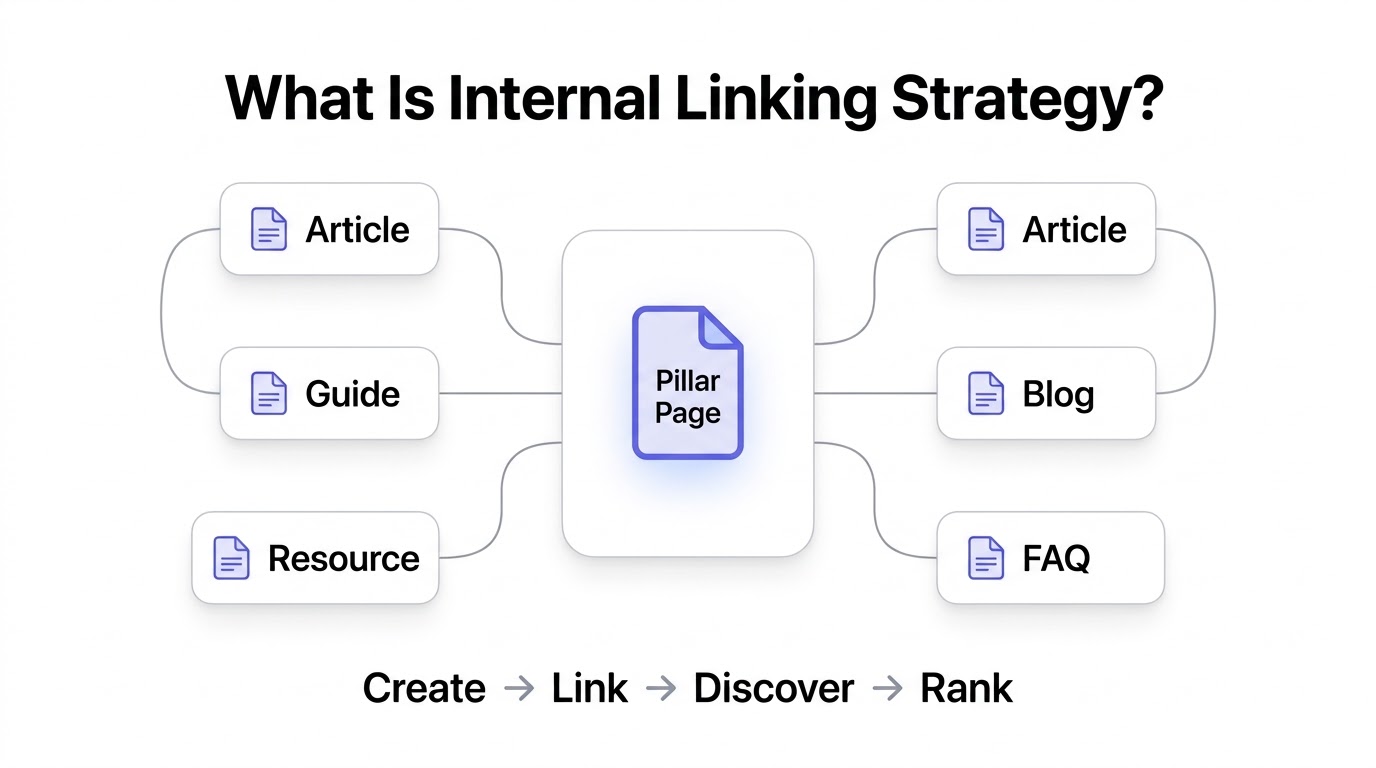
An internal linking strategy is the deliberate plan behind how pages on your own website connect to each other. Not random links thrown in because a sentence needed one. A plan — where pillar content connects to supporting articles, where supporting articles link back and sideways to each other, and where every page has a clear path both to and from it.
Most site owners have internal links. Almost nobody has an internal linking strategy. There’s a difference. If you’re linking because “this word reminded me of that other post,” that’s not a strategy, that’s a coincidence. A real internal linking strategy means you know, before you hit publish, exactly which pages this new content should support, which pillar it belongs under, and which existing articles need updating with a link to it.
Definition of Internal Links
An internal link is any link that takes a visitor from one page to another page on the same domain. That’s it. It doesn’t matter if it’s in the navigation menu, buried in a paragraph, or sitting in your footer. If both pages live under the same root domain, it’s internal.
Internal Links vs External Links
External links point to other domains — a backlink from someone else’s site pointing to yours, or a link on your site pointing out to a source you’re citing. Internal links stay within your own house. The distinction matters because Google treats them completely differently. External links are treated as votes of confidence from other sites. Internal links are treated as your own map of your own content — you’re literally telling Google “this page relates to that page, and here’s how.”
Types of Internal Links
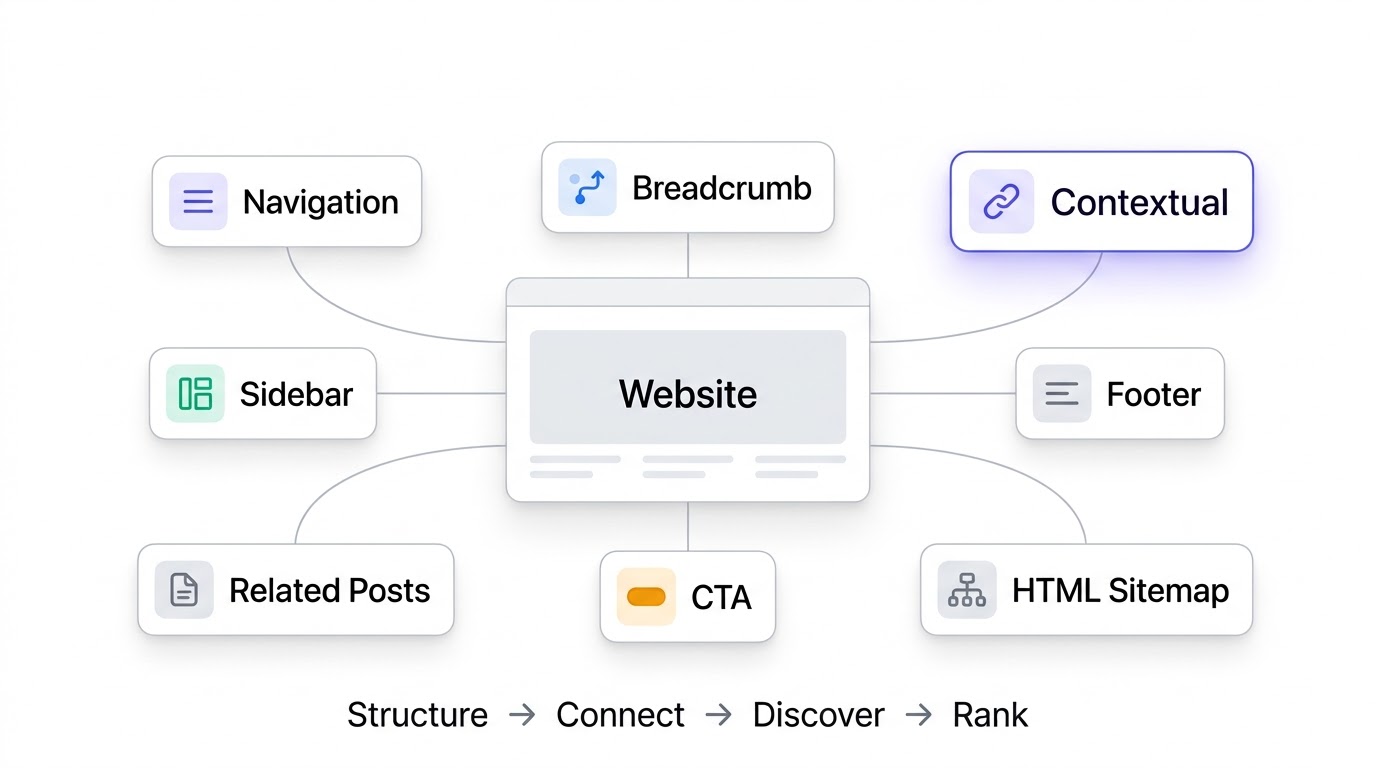
Not every internal link works the same way or carries the same weight. Here’s a breakdown that actually matters when you’re planning a strategy:
| Type | Where It Lives | Primary Job |
|---|---|---|
| Navigation links | Header menu | Site-wide access to core pages |
| Breadcrumb links | Top of page, below header | Show hierarchy and location |
| Contextual links | Inside body content | Pass topical relevance and equity |
| Sidebar links | Side column | Surface related or popular content |
| Footer links | Bottom of page | Catch-all access to key pages sitewide |
| Related posts | End of articles | Keep users reading, reduce bounce |
| CTA links | Anywhere, styled as buttons | Drive conversions or next steps |
| HTML sitemap links | Dedicated sitemap page | Backup crawl path for deep pages |
Contextual links are the ones that do the heaviest lifting for topical authority. They sit inside your actual writing, surrounded by relevant text, which gives Google the clearest possible signal about what the linked page is about.
Why Internal Links Matter
Look, without internal links, your site is basically a pile of disconnected documents. Google’s crawler moves from link to link. No links, no discovery. Beyond that, internal links spread authority around — a page that gets backlinks from other sites can pass some of that strength to your other pages through internal links. And for actual humans reading your site, internal links keep them clicking instead of bouncing back to the search results after one article.
How Google Uses Internal Links
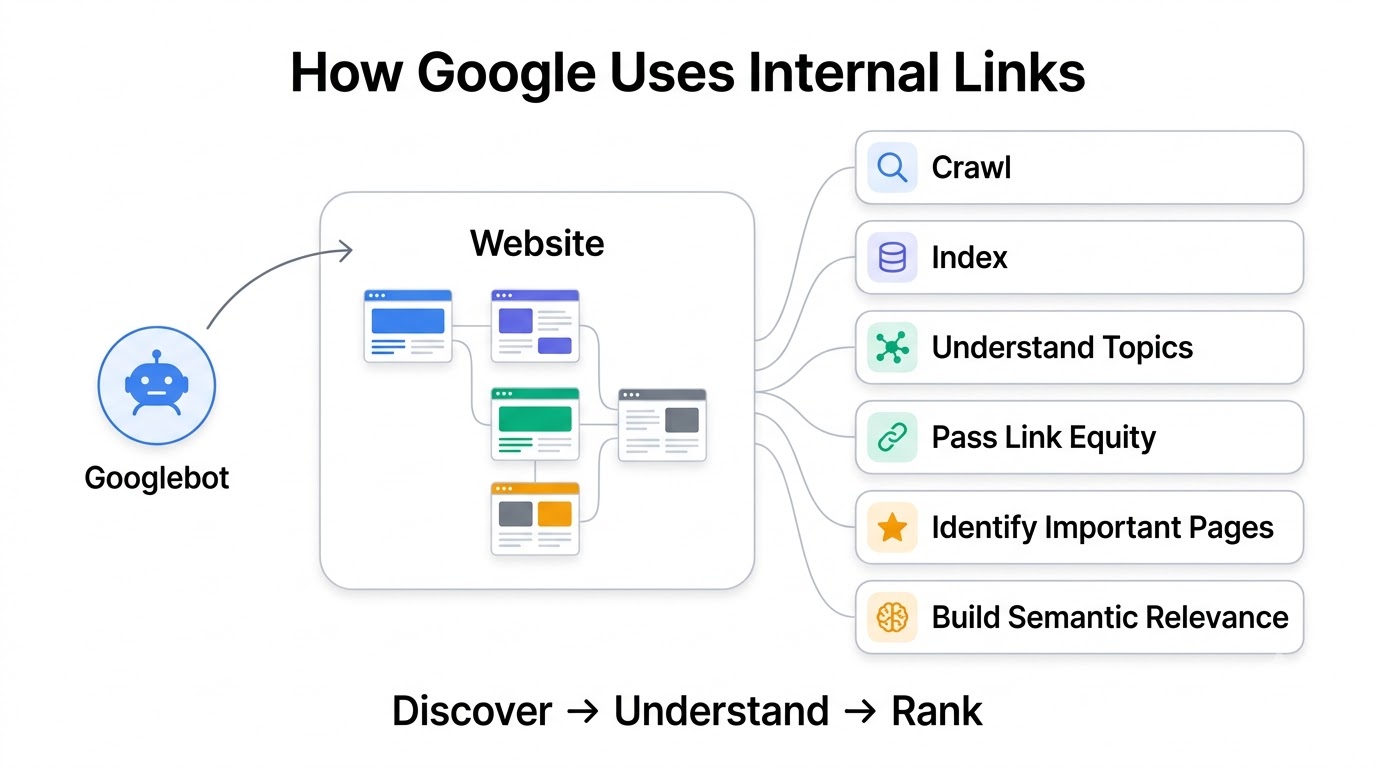
This is where people usually skip ahead because they think they already know it. Don’t. Understanding exactly what Google does with your internal links changes how you build them.
Crawling
Google’s crawler, Googlebot, discovers new pages primarily by following links. If a page has zero internal links pointing to it, Googlebot might never find it unless it’s submitted directly through Search Console or exists in your XML sitemap. Even then, a page discovered only through a sitemap and never linked internally gets treated as low priority. It sits there, technically indexed, practically invisible.
Indexing
Once a page is crawled, Google decides whether it’s worth indexing. Pages that are well-linked from relevant, already-trusted pages tend to get indexed faster and treated as more legitimate. Orphan pages — the ones nobody links to — often get skipped entirely or indexed with low confidence.
Understanding Content Relationships
This one’s underrated. When Page A links to Page B using the phrase “internal linking best practices,” Google reads that as a relationship signal. It’s not just “these pages exist,” it’s “these pages are about connected ideas.” Do this consistently across dozens of pages and Google builds an actual model of your site’s topic structure.
Passing Link Equity
Link equity (some people still call it “link juice,” and yeah, it’s a silly term but it stuck) is the authority value that flows through links. A page with lots of backlinks has a lot of equity to give. When that page links internally to other pages on your site, some of that equity flows along too. This is how a single strong page can lift the rankings of ten other pages it links to.
Identifying Important Pages
Pages that receive lots of internal links, especially from other important pages, get treated as more significant by Google. This is basically how your homepage usually ranks for competitive terms even when it has thin content — it sits at the top of the link structure, receiving links from everywhere.
Building Semantic Relevance
Google isn’t just counting links anymore, it’s reading the words around them. A contextual link surrounded by topically relevant language builds semantic relevance far more than a “click here” link ever could.
Supporting Helpful Content
Since the Helpful Content updates rolled out, Google has been paying more attention to whether a site actually serves its topic comprehensively. Internal linking is one of the clearest signals of comprehensiveness — a site that connects its content into clusters looks like it was built by someone who actually knows the topic, versus a site that reads like 200 unrelated articles thrown together for traffic.
What Is Topical Authority?
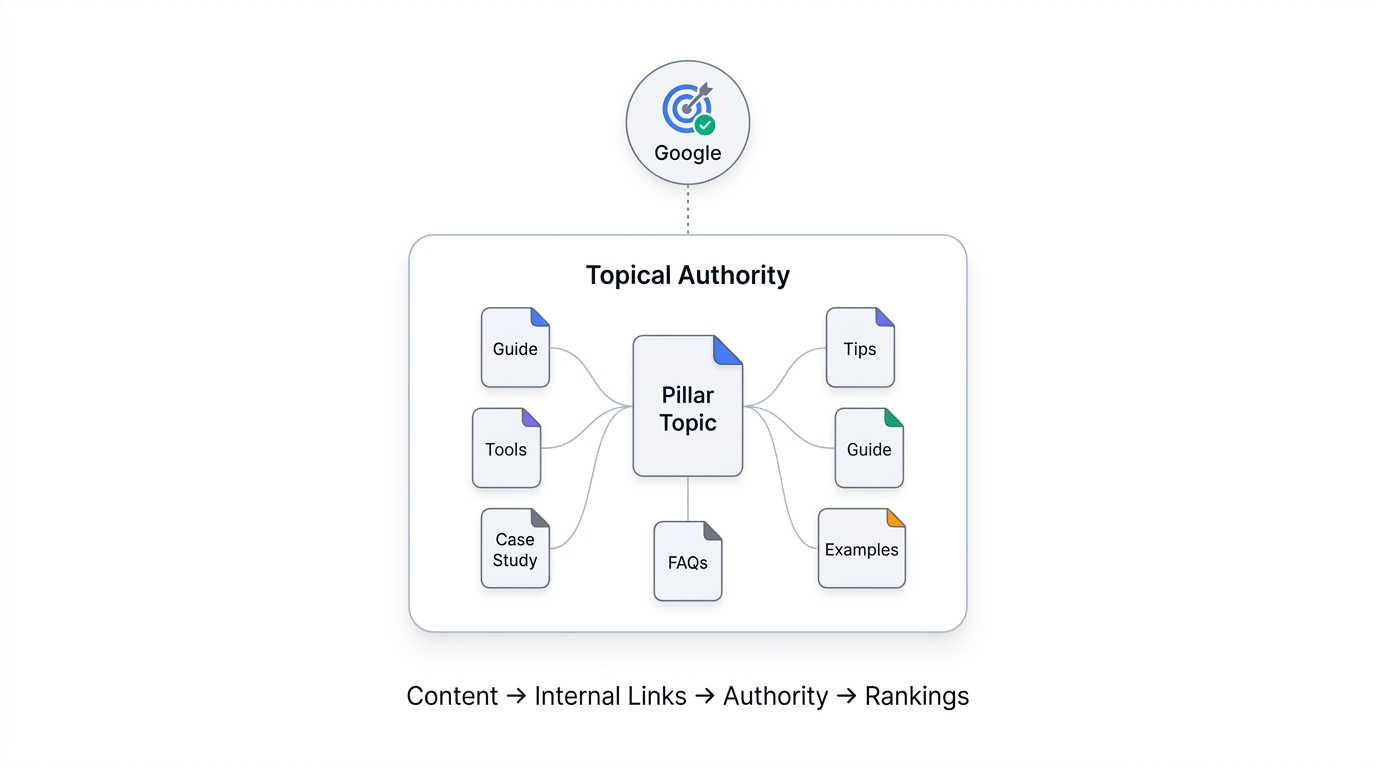
Topical authority is basically Google’s confidence that your site is a genuine, comprehensive source on a specific subject. It’s not about one great article. It’s about dozens of interconnected pieces that, together, cover a topic from every reasonable angle a searcher might need.
Why Topical Authority Matters More Than Ever
Five years ago, you could rank a single well-optimized page on sheer backlink strength, even with a thin site around it. That’s mostly dead now. Google’s gotten much better at recognizing sites that specialize versus sites that dabble. A site with 15 articles covering “keto diet” from every angle will often beat a general health site with 300 articles covering everything from cardio to skincare to keto, purely because the smaller site demonstrates deeper expertise on that one thing.
Topical Authority vs Domain Authority
Domain authority (or whatever metric tool you use — DR, DA, whatever) measures overall site strength, mostly based on backlinks. Topical authority measures depth on a specific subject. A site can have low domain authority and still rank incredibly well within a narrow topic if it’s built the internal structure right. Conversely, a high domain authority site with scattered, disconnected content can lose to a smaller, tighter competitor.
Topical Authority vs Page Authority
Page authority is about one URL. Topical authority is about the network of pages around a subject. A single page can have decent authority from backlinks but still underperform if it’s isolated — no supporting content, no internal links reinforcing the topic. Topical authority is what happens when individual page authority gets multiplied by a well-connected content cluster.
How Google Measures Topic Expertise
Nobody outside Google knows the exact mechanics, but based on patterns across ranking changes, it comes down to a mix of: how comprehensively a site covers subtopics, how consistently internal links connect related content, how content depth compares across competing sites, and whether user engagement signals (time on page, return visits, low bounce) support the idea that the content is genuinely useful.
Examples of High Topical Authority Websites
Sites like Healthline for health topics, Investopedia for finance terms, or NerdWallet for personal finance products didn’t get there by publishing randomly. They built dense internal structures — hundreds of interlinked articles that all point back and forth to each other, reinforcing that yes, this domain genuinely knows this subject inside and out.
How Internal Linking Helps Build Topical Authority
Every internal link is a thread. String enough threads together and you get a web, not a scatter of dots. That web is literally what topical authority looks like structurally.
Reinforces Topic Relationships
When ten articles about “email marketing” all link to each other using natural, varied anchor text, Google doesn’t just see ten pages. It sees a cluster that reinforces the same core subject from multiple directions.
Distributes Authority
If one article in your cluster gets a bunch of backlinks (this happens more often than you’d think — some random guide becomes the “linkable” one), internal linking lets you spread that authority to the rest of the cluster instead of letting it sit on one page.
Improves User Experience
Readers who click from one relevant article to the next stay on your site longer, read more, and are more likely to convert or subscribe. That’s not just nice to have — it directly feeds the engagement signals Google’s watching.
Helps Google Understand Content Clusters
Without internal links, Google has to guess how your content relates using page content alone. With clear internal linking, you’re doing the work for it. That reduces ambiguity and speeds up how quickly your site gets recognized as an authority.
Reduces Orphan Pages
Orphan pages — pages with zero internal links pointing to them — are basically invisible to your own site’s authority flow. Fixing internal linking naturally eliminates most orphan pages because you’re forced to think about where every piece of content fits.
Improves Content Discoverability
Both for users and for Google’s crawler, a well-linked site means nothing gets buried three years deep with no path to reach it.
Supports Long-Term SEO Growth
This is the compounding part people miss. Every new article you publish that links into your existing clusters strengthens the whole structure, not just the new page. Over time, that compounding effect is what separates sites that plateau from sites that keep climbing.
Understanding Topic Clusters and Pillar Pages
A pillar page is a broad, comprehensive page covering a wide topic — think “Content Marketing” as a whole, not “how to write a blog title.” It’s meant to rank for a competitive, high-volume keyword and serve as the hub that all your supporting content links back to.
What Is Cluster Content?
Cluster content (sometimes called supporting content) covers specific subtopics under the pillar. If the pillar is “Content Marketing,” cluster articles might cover “blog title formulas,” “content calendars,” “repurposing content,” and so on. Each cluster article links up to the pillar and often sideways to other relevant cluster pieces.
Hub-and-Spoke Model Explained
Picture a bicycle wheel. The pillar page is the hub in the center. Cluster articles are the spokes radiating outward, each connected back to the hub. That’s the hub-and-spoke model, and honestly it’s the cleanest way to visualize why this structure ranks better than a flat pile of unconnected posts.
Example of an SEO Topic Cluster
Pillar: “Internal Linking Strategy” (this very article, actually)
Cluster pieces: “Anchor Text Best Practices,” “How to Find Orphan Pages,” “Pillar Page vs Cluster Content Explained,” “Internal Link Building Tools Compared,” “How Many Internal Links Per Page.” Each of those links up to the pillar, and several link to each other where it makes sense.
Visual Structure of Topic Clusters
                [ PILLAR PAGE ]
              /       |        \
     [Cluster 1] [Cluster 2] [Cluster 3]
         |            |            |
   [Cluster 1a]  [Cluster 2a]  [Cluster 3a]
Even without fancy diagrams, this is the shape you’re building toward. Hub in the middle, spokes out, and cross-links where two spokes genuinely relate.
Anatomy of a Perfect Internal Linking Strategy
Before you touch links, you need content that’s actually organized around a topic in the first place. Random articles with no thematic connection can’t be linked into a meaningful structure no matter how hard you try.
Organize Content into Silos
A silo is basically the practical version of the hub-and-spoke idea — grouping content by topic in your site architecture (categories, URL structure, navigation) so the internal linking mirrors the actual organization of your site.
Link Supporting Articles to Pillar Pages
Every cluster article should link to its pillar, ideally within the first few paragraphs, using natural language, not forced keyword anchors.
Link Pillar Pages Back to Supporting Articles
The pillar page itself should link out to every major cluster article, usually within the body text as it discusses each subtopic, not just in a dumped list at the bottom (though that helps too).
Cross-Link Related Supporting Articles
If “Anchor Text Best Practices” and “Internal Link Building Tools” are both cluster pieces under the same pillar, they should link to each other where relevant. This is what actually separates a real cluster from a bunch of separately pillar-linked articles.
Use Hierarchical Linking
Think in layers — pillar at the top, cluster content in the middle, supporting deep-dive pieces underneath those. Links should generally flow both up and down this hierarchy, not just flat across everything.
Prioritize High-Value Pages
Not every page deserves equal link weight. Pages that drive revenue or rank for your most valuable keywords should get more internal links pointing at them, on purpose, not by accident.
Maintain Logical Site Structure
If your URL structure, navigation, and internal linking all tell different stories about how your content is organized, that’s a mess Google has to untangle. Keep them aligned.
Types of Internal Links Every Website Should Use
Contextual Links: These live inside your actual content and are, frankly, the most valuable type for topical authority. They’re surrounded by relevant text that reinforces meaning.
Navigation Links: Your main menu. These should reflect your most important content categories, not just be an afterthought.
Breadcrumb Links: Small but effective — they show users and Google exactly where a page sits in your hierarchy (Home > Blog > SEO > Internal Linking).
Related Articles: Usually auto-generated or manually curated at the end of a post, keeping readers moving through your cluster.
Sidebar Links: Good for surfacing popular or high-priority content, but don’t overload sidebars — they can dilute link equity if every single page links to the same handful of “popular posts.”
Footer Links: Useful for site-wide access to evergreen or critical pages (privacy policy, contact, top category pages) but shouldn’t be stuffed with dozens of keyword-targeted links — that looks manipulative.
Author Pages: Linking to author bio pages helps build E-E-A-T signals (experience, expertise, authority, trust), especially for YMYL topics like health or finance.
Category Pages: Category and tag archive pages act as mini-hubs, collecting related content and passing link equity between pieces in the same group.
Tag Pages: Use these carefully — over-tagging creates thin, near-duplicate pages that dilute rather than help.
Resource Pages: A dedicated “resources” or “guides” page that links out to your best cluster content can act almost like a secondary pillar, especially useful for larger sites.
Internal Linking Best Practices
Link Naturally
If a link feels forced when you read the sentence out loud, it probably is. The best internal links read like a natural next thought, not a wedged-in keyword.
Use Descriptive Anchor Text
“Learn more about anchor text optimization” tells Google and the reader exactly what’s on the other end. “Click here” tells nobody anything.
Avoid Generic Anchor Text
Phrases like “click here,” “read more,” or “this article” waste an opportunity to reinforce topical relevance. Every link is a chance to tell Google what the destination page is about — don’t waste it.
Link to Relevant Pages
Obvious, but people mess this up constantly under pressure to “add more internal links.” A link to a barely-related page does more harm than good.
Keep User Intent in Mind
Ask yourself: would someone reading this sentence actually want to click this link right now? If the answer’s no, it doesn’t belong there.
Use Deep Links
Don’t just link to your homepage or category pages over and over. Link deep into specific, relevant articles. Deep links are what actually spread authority to the pages that need it.
Add Links High on the Page
Links near the top of an article tend to get more clicks and, based on how crawlers weight position, may carry slightly more perceived importance than links buried at the very bottom.
Avoid Overlinking
If every third word in your paragraph is a link, it’s exhausting to read and dilutes the value of each individual link. There’s no magic number, but if a 1,000-word article has 40 links, something’s wrong.
Keep Links Updated
Old articles pointing to deleted or outdated pages quietly bleed value. Revisit old content periodically and refresh the links.
Link From High-Authority Pages
If you’ve got a page that ranks well and gets solid traffic, use it. Add links from that page to newer or underperforming content to give it a boost.
Fix Broken Internal Links
A broken internal link is a dead end for both users and crawlers. Run audits regularly and fix them fast.
Remove Redirect Chains
Linking to a page that redirects to another page that redirects again wastes crawl budget and slows everything down. Link directly to the final destination URL.
Use Follow Links
Internal links should almost always be dofollow. There’s rarely a good reason to nofollow your own internal links — doing so blocks the flow of link equity you’re trying to build in the first place.
How Many Internal Links Should a Page Have?
Is There an Ideal Number?
Nope, and anyone who gives you an exact number is guessing. What matters is relevance and usefulness, not hitting a quota. That said, there are reasonable ranges that tend to work well in practice.
Quality vs Quantity
Ten highly relevant, well-placed internal links beat forty random ones every time. If you’re adding links just to hit a number, stop — you’re doing more harm than good.
Long-Form Content Recommendations
For a long guide like this one (6,000+ words), somewhere between 15 and 30 internal links tends to work well, assuming you’ve actually got that many genuinely relevant pages to link to.
Homepage Linking
Homepages typically link to top-level categories and your most important pages — usually somewhere between 10 and 50 links depending on site size, though bigger isn’t automatically better.
Blog Post Linking
A standard 1,500 to 2,500 word blog post usually does well with 5 to 15 internal links, scattered naturally through the content rather than clustered in one spot.
Landing Page Linking
Landing pages built for conversion should generally have fewer internal links — you don’t want to distract someone right before they convert. A handful of supporting links is usually plenty.
Anchor Text Optimization for Internal Links
Exact Match Anchors
Using the exact target keyword as anchor text (“internal linking strategy” linking to this exact article). Effective in moderation, but overused, it starts to look manipulative to both Google and readers.
Partial Match Anchors
Anchor text that includes a variation of the keyword rather than the exact phrase (“building an internal linking approach” instead of the exact match). This tends to look more natural and is usually the safer default.
Branded Anchors
Using your brand name as the anchor (“check out [BrandName]’s guide on this”). Useful occasionally, especially for homepage or about-page links.
Natural Language Anchors
Anchors that read like actual sentences (“we covered this in detail in our guide to topic clusters”). These are the least risky and often the most effective for user experience.
Semantic Anchor Text
Anchors that use related terms rather than the exact keyword, which helps Google understand topical breadth rather than just keyword repetition.
Anchor Text Mistakes to Avoid
Using the exact same anchor text for every link to a page (looks manipulative), stuffing keywords into anchors awkwardly, and using vague anchors like “this page” or “here” that waste the opportunity entirely.
Link Equity Explained
What Is Link Equity?
Link equity is the value or authority passed from one page to another through a link. Think of it like water flowing through pipes — pages with strong backlink profiles have more “water pressure” to share with pages they link to.
How Internal Links Pass Authority
When a high-authority page links internally to a weaker page, some of that authority flows to the weaker page, helping it rank better than it would on its own.
Which Pages Should Receive More Authority?
Your most commercially important pages, your best-converting content, and pages targeting your highest-priority keywords should generally receive more internal links from your strongest existing pages.
Link Equity Distribution Strategy
Map out which of your pages already have strong backlinks or high authority, then intentionally add internal links from those pages to the content you most want to boost.
Common Link Equity Mistakes
Linking heavily to low-priority pages (like a generic “about us” page) while neglecting revenue-driving or ranking-priority pages is the classic mistake. Equity should flow toward what actually matters for your goals.
How to Build an Internal Linking Strategy from Scratch
Step 1: Audit Existing Content — Before adding a single new link, know what you’ve already got. Pull a full list of URLs, note which ones have backlinks, which ones rank, and which ones are orphaned.
Step 2: Group Articles by Topic — Sort your existing content into logical topic buckets. This becomes the skeleton for your clusters.
Step 3: Create Pillar Pages — For each major topic bucket, either identify an existing comprehensive article to serve as the pillar or create a new one.
Step 4: Create Supporting Articles — Fill gaps in each cluster with new content covering subtopics the pillar doesn’t go deep on.
Step 5: Map Internal Links — Literally draw or spreadsheet out which pages should link to which. Don’t wing this from memory.
Step 6: Optimize Anchor Text — Go through existing links and update generic anchors to descriptive, natural ones.
Step 7: Add Contextual Links — Go back through older content and add relevant links to newer articles that didn’t exist yet when the old content was published.
Step 8: Remove Orphan Pages — Either link to them from relevant existing content or consider whether they should exist at all.
Step 9: Monitor Rankings — Track how rankings shift for pages you’ve linked into more heavily over the following weeks and months.
Step 10: Update Links Regularly — This isn’t a one-time project. Revisit your linking structure every time you publish something new, and periodically audit the whole site.
Internal Linking Examples
Example 1: SEO Website — A pillar on “Keyword Research” links out to cluster articles on “Long-Tail Keywords,” “Keyword Difficulty,” and “Search Intent,” each of which links back and to each other where relevant.
Example 2: Digital Marketing Agency — Service pages (“PPC Management,” “SEO Services”) link to relevant blog content that demonstrates expertise, and that blog content links back to the service pages at natural points.
Example 3: eCommerce Website — A “Running Shoes” category page links to individual product pages, a buying guide, and a size-comparison chart, all of which link back to the category page.
Example 4: Health Blog — A pillar on “Managing Type 2 Diabetes” links to cluster content on diet, exercise, medication, and monitoring, reinforcing E-E-A-T through author bio links as well.
Example 5: Travel Website — A destination pillar (“Visiting Bali”) links to sub-guides on neighborhoods, budgeting, best months to visit, and specific itineraries.
Example 6: Real Estate Website — Location pages link to relevant listings, neighborhood guides, and mortgage calculator tools, creating a dense local cluster.
How to Audit Your Internal Links
An internal link audit is the process of systematically reviewing how the pages on your own website connect to each other — not links coming in from other sites (that’s backlink analysis), but the links you control entirely within your own domain: navigation menus, in-content links, footer links, related-post sections, and so on.
The reason this matters comes down to how search engines and users actually move through a website. Google doesn’t understand your site’s structure by looking at a sitemap alone — it primarily discovers and evaluates pages by following links, the same way a person clicking through your site would. Every internal link does two jobs at once: it helps search engines find and crawl a page, and it passes a portion of “link equity” (ranking authority) from the linking page to the linked page. So a website’s internal linking structure essentially determines which pages Google considers important, how easily both bots and humans can find your content, and how well topical authority flows between related pages.
Over time, even well-built websites develop internal linking problems without anyone noticing — a redesign quietly orphans a whole category of pages, an important product page ends up buried five clicks deep in navigation, old blog posts link to URLs that were deleted years ago, or a site’s most profitable pages get far fewer internal links than a random blog post that happened to go viral. None of these problems are visible just by browsing the site normally; they only surface when you deliberately audit the link structure.
That’s the purpose of the audit as a whole: to find where the internal linking is broken, unbalanced, or inefficient, and to fix it so that authority and visibility are flowing toward the pages that actually matter to your site’s goals — whether that’s rankings, traffic, or conversions.
Want me to go through the step-by-step process (crawling, finding orphan pages, checking link depth, etc.) again, or keep it at this overview level?
Crawl Your Website
This is the starting point because you can’t fix what you can’t see. A crawler tool (like Screaming Frog, Sitebulb, or Ahrefs’ Site Audit) simulates how Googlebot moves through your site, following every internal link it encounters and building a complete map of your site’s link structure. Without this step, everything else in the audit is guesswork — you’d be relying on memory or your site’s navigation menu, which almost never reflects the full, messy reality of how pages actually link to each other. This crawl becomes the raw data set that every later step in the audit draws from.
Identify Orphan Pages
An orphan page is a page that exists on your site — it has a URL, it might even be indexed — but literally nothing on your site links to it. You find these by cross-referencing your full list of URLs (pulled from your sitemap, CMS, or Search Console) against the crawl data from step one. Any URL that shows up in your full list but never appears as a link destination in the crawl is orphaned. This matters because orphan pages are effectively invisible to both users and search engines through normal navigation — Google may have indexed them at some point, but with zero internal links pointing to them, they receive no internal authority and are much harder to rediscover or rank. It’s often surprising how many pages end up orphaned simply because a menu got redesigned or an old blog category got removed without anyone rerouting the links.
Check Internal Link Depth
Link depth measures how many clicks it takes to get from your homepage to any given page. The homepage is depth 0, pages linked directly from it are depth 1, and so on. The reason anything past four clicks deep is flagged as a problem is twofold: first, Google tends to crawl and prioritize pages that are closer to the homepage more frequently, treating depth as a rough proxy for importance, so deeply buried pages get crawled less often and can fall behind on freshness. Second, from a pure usability standpoint, if a real visitor has to click through four or more layers of navigation to find something, that page is essentially undiscoverable through normal browsing. Deep pages often end up being your most neglected content simply because they’re structurally hard to reach.
Find Broken Links
This step scans your internal link structure specifically for 404s and other broken destinations — links pointing to pages that have been deleted, moved without a redirect, or mistyped. Broken internal links are worse than they might seem at first glance because they waste the crawl budget search engines allocate to your site (bots spend time hitting dead ends instead of discovering real content), they create dead-end experiences for users that increase bounce rates, and they signal a poorly maintained site, which subtly undermines trust signals. This is usually one of the more mechanical parts of the audit, but also one of the highest-value fixes since broken links are quick to identify and quick to repair.
Analyze Anchor Text
Anchor text is the clickable, visible text of a link — and its wording actually matters to Google as a relevance signal. This step involves reviewing the anchor text pointing to your most important pages and checking two things: variety (are you using the same exact phrase every single time, which can look manipulative and also fails to capture related keyword variations) and relevance (does the anchor text actually describe what the destination page is about, rather than generic phrases like “click here” or “read more” that tell search engines nothing). Well-written, varied, descriptive anchor text helps Google understand what a linked page is about and reinforces its relevance for the topics it should rank for.
Measure Internal Link Distribution
This is about looking at the bigger picture of how “link equity” (the ranking value passed through links) is spread across your entire site. Every internal link passes a small amount of authority from the linking page to the linked page, and over time, sites tend to develop uneven patterns — often your homepage and a few popular blog posts accumulate tons of internal links, while the pages that actually drive revenue or conversions (your “money pages,” like product pages, service pages, or high-intent landing pages) get comparatively few. This step means specifically checking whether your most commercially or strategically important pages are receiving a proportionate share of internal links, or whether they’re being starved while less important pages hoard all the link equity.
Prioritize Important Pages
The final step ties the whole audit together into action. Once you’ve surfaced orphan pages, depth issues, broken links, weak anchor text, and uneven distribution, you won’t have the time or resources to fix everything simultaneously. This step is about triage — looking at which pages matter most to your business goals (the highest-value, highest-priority content, whether that’s ranking potential, conversion value, or strategic importance) and fixing their internal linking issues first. This ensures your limited time goes toward the fixes that will move the needle most, rather than spreading effort evenly across pages that don’t matter equally.
Best Tools for Internal Linking
| Tool | Best For |
|---|---|
| Google Search Console | Seeing which pages Google has indexed and how they’re linked |
| Google Analytics 4 | Understanding user click paths and engagement |
| Screaming Frog SEO Spider | Full site crawls, finding orphan pages and broken links |
| Ahrefs Site Audit | Internal link opportunities and link equity analysis |
| Semrush Site Audit | Similar to Ahrefs, good for larger sites |
| Sitebulb | Visual crawl maps, great for spotting structural issues |
| Link Whisper | WordPress plugin for suggesting and adding internal links quickly |
| Yoast SEO | Basic internal linking suggestions within WordPress |
| Rank Math | Similar to Yoast, with link counting and suggestions built in |
Honestly, you don’t need all of these. Screaming Frog plus Search Console covers 80% of what most sites need. Add Link Whisper if you’re on WordPress and want to speed up the manual linking process.
Case Study: Building Topical Authority Using Internal Linking
Website Background: A mid-sized personal finance blog, around 180 articles, publishing for roughly three years, with decent but stagnant traffic.
Initial SEO Problems: Over 60 orphan pages. Zero clear content clusters — articles existed on related topics but never linked to each other. Anchor text across the site was almost entirely “click here” or “read more.”
Strategy Implemented: The team grouped existing content into 8 core clusters (budgeting, investing, credit, debt, retirement, taxes, insurance, side income). They built or designated a pillar page for each cluster and rewrote internal links across the entire archive to connect cluster content properly.
Internal Linking Map: Each pillar received links from 12-20 supporting articles. Supporting articles cross-linked to 2-4 other pieces within the same cluster. Old orphan pages were folded into the nearest relevant cluster or linked from category pages.
Results After 3 Months: Organic traffic up around 22%. Average crawl depth dropped noticeably. Several previously unindexed pages got indexed.
Results After 6 Months: Organic traffic up 61% from the original baseline. Multiple pillar pages moved from page 2 to top 5 positions for their target keywords. Time on page increased across the board.
Lessons Learned: The traffic gains weren’t from new content at all — almost entirely from restructuring links between content that already existed. That’s honestly the part people find hardest to believe until they see it happen on their own site.
Advanced Internal Linking Strategies
Reverse Silo Linking
Instead of only linking cluster content up to the pillar, deliberately link the pillar down into deeper, more specific supporting content early in its lifecycle to help those newer pages get crawled and indexed faster.
Content Hubs
A step beyond simple clusters — a dedicated hub page that aggregates and links to everything within a broad theme, often used by larger publishers to organize dozens of related articles.
Semantic Linking
Linking based on conceptual relationships rather than exact keyword matches, using related terms and entities to reinforce topical depth.
Entity-Based Internal Linking
Structuring links around real-world entities (people, places, products, concepts) rather than just keywords, which aligns better with how modern search engines actually interpret meaning.
Hub-and-Spoke Architecture
Scaling the basic pillar-cluster model across an entire site, with multiple hubs each representing a major site section, all loosely cross-linked where topics overlap.
Programmatic Internal Linking
For large sites (think thousands of pages), using scripts or plugins to automatically insert relevant internal links based on shared tags, categories, or keyword matches.
Internal Link Automation
Tools like Link Whisper can suggest and even bulk-insert links automatically, useful for large archives but still needs human review to avoid irrelevant matches.
Freshness Linking Strategy
Prioritizing internal links from your newest, most-crawled pages to older content that needs a crawl frequency boost.
Seasonal Internal Linking
Temporarily boosting internal links to seasonal content (holiday gift guides, tax season articles) in the weeks leading up to peak search demand.
Revenue Page Boosting
Deliberately funneling more internal links toward pages that drive actual revenue, even if those pages aren’t your most “content-rich” pieces.
Internal Linking Checklist
- Audit existing internal links across the entire site
- Remove or reintegrate orphan pages
- Fix all broken internal links
- Optimize anchor text away from generic phrases
- Create or strengthen topic clusters
- Link every new article into its relevant cluster before publishing
- Update old posts with links to newer, relevant content
- Strengthen pillar pages with links from and to supporting content
- Review and reduce crawl depth for buried pages
- Monitor rankings and traffic monthly to catch issues early
Conclusion
Look, if there’s one thing to take from all this, it’s that topical authority doesn’t come from publishing volume alone. It comes from organization. From connecting content in a way that mirrors how someone who actually understands a subject would explain it to a friend — not randomly, but building from broad ideas down into specifics, and tying everything back together.
Internal linking is the mechanism that makes that organization visible to Google. You can have the best content in your niche, and if it’s sitting there disconnected, orphaned, linked with “click here” fifteen times a page, it’s going to underperform against a competitor with weaker writing but a tighter structure. That’s just how it goes.
So audit what you’ve got. Build the clusters. Strengthen the pillars. Fix the broken links and the orphan pages you probably didn’t even know existed. And don’t treat this as a one-time project — every new piece of content is a chance to either strengthen your existing structure or, if you ignore it, let that structure quietly decay.
Go implement this. Check your crawl data in a month. Watch what happens to rankings, to time on page, to how deep Google’s actually willing to go into your site. The sites that win long-term aren’t the ones that publish the most. They’re the ones that connect what they publish.
Frequently Asked Questions
What is an internal linking strategy?
It’s a deliberate, planned approach to how pages on your own site link to each other, built around topic clusters and pillar pages rather than random, one-off links added after the fact.
Why are internal links important for SEO?
They help Google crawl and understand your site, pass authority between pages, reduce orphan pages, and keep users engaged longer, all of which feed into better rankings.
How many internal links should I use?
There’s no fixed number. For a standard blog post, 5-15 relevant links is typical. For long-form guides, 15-30 is reasonable, as long as every link is genuinely useful.
Can too many internal links hurt SEO?
Yes. Overloading a page with links dilutes the value passed to each one and creates a messy, hard-to-read experience for users, which can hurt engagement metrics too.
What is topical authority?
It’s how much Google trusts your site as a genuine, comprehensive source on a specific subject, built through depth of content and how well that content connects internally.
How do pillar pages help SEO?
Pillar pages act as central hubs that organize and link to detailed supporting content, making it easier for both users and Google to understand the full scope of a topic on your site.
Should every blog post link to a pillar page?
If the post genuinely relates to that pillar’s topic, yes. Forcing a link where there’s no real connection does more harm than good, though.
How often should I audit internal links?
Every 3-6 months for most sites, or immediately after any major site restructuring, redesign, or content migration.
Which tools are best for internal linking?
Screaming Frog and Google Search Console cover most needs. Ahrefs or Semrush add deeper link equity analysis, and Link Whisper speeds up the process for WordPress sites.
How long does it take to see results from internal linking?
Usually 4-8 weeks for initial ranking movement on already-decent content, though full topical authority gains often build over 3-6 months, as the case study above showed.
Do internal links affect page load speed?
Not directly, no — links themselves are lightweight. But excessive scripts tied to link-suggestion plugins can add minor overhead, so keep an eye on performance if you’re automating heavily.
Should I use nofollow on any internal links?
Rarely. There’s almost never a good reason to nofollow your own internal links since you want link equity to flow freely through your site.
What’s the difference between a pillar page and a cluster article?
A pillar page covers a broad topic comprehensively and targets a high-volume keyword. Cluster articles go deep on specific subtopics and link back to the pillar.