

So you’ve decided to learn SEO. Good. Also, brace yourself, because most beginners quit around week two — not because SEO is impossible, but because they start following five different YouTube tutorials at once, get contradictory advice, and end up more confused than when they started.
Here’s the thing nobody tells you upfront: SEO isn’t hard to understand. It’s hard to do consistently. The concepts themselves — keywords, backlinks, on-page optimization — aren’t rocket science. What trips people up is the noise. Everyone’s got an opinion, half the “gurus” are selling courses, and Google keeps changing the rules just enough to make last year’s advice feel outdated.
That’s why a structured roadmap matters more than random tutorials. When you follow a plan, day by day, you’re not guessing what to do next. You’re not jumping from “keyword research” to “backlinks” to “Core Web Vitals” without understanding how they connect. You build the foundation first, then layer on the technical stuff, then content, then authority. In that order. Because that’s actually how search engines evaluate your site.
By the end of this 30-day plan, you won’t be an SEO expert. Nobody becomes an expert in a month. But you’ll understand how search engines work, you’ll have your tools set up, you’ll know how to research keywords properly, and you’ll have published content that’s actually built to rank — not just written and prayed over.
This guide is for a lot of different people. Maybe you’re a blogger trying to get your first 1,000 monthly visitors. Maybe you run a small business and you’re tired of paying for ads that stop working the moment you stop paying. Maybe you’re a freelancer who wants to add “SEO” to your service list without faking it. Students, ecommerce store owners, digital marketers switching specialties — this roadmap works for all of you because the fundamentals don’t change based on your industry. What changes is how you apply them.
Look, SEO isn’t glamorous. It’s not going to blow up overnight like a viral TikTok. But it compounds. A well-optimized page you publish today can bring in traffic for years. Try getting that from a paid ad campaign.
What You Will Learn in This Guide
- How search engines actually crawl, index, and rank pages
- The different types of SEO and why you need to understand all of them
- How to set up Google Search Console and Google Analytics 4 properly
- How to do keyword research without expensive tools
- How to structure a website so both users and Google can navigate it
- On-page SEO techniques that actually move the needle
- Technical SEO basics — speed, mobile-friendliness, schema markup
- How to plan and publish content that ranks
- Beginner-friendly link building strategies
- How to measure whether your SEO efforts are working
- A long-term strategy so you’re not starting from scratch every month
What is SEO? (Complete Beginner Explanation)
SEO stands for Search Engine Optimization. In plain language: it’s the process of making your website easier for search engines to understand and rank higher in results pages, so more people find you without you paying for ads.
That’s it. No mystery formula. You’re just making your site clearer, faster, and more useful — both for search engines and for actual humans reading it.
A lot of beginners think SEO means “tricking Google.” Nope. That mindset gets you penalized. Real SEO for beginners is about removing friction — friction for crawlers trying to understand your content, and friction for users trying to get value from it.
How Search Engines Work
Before you touch a single keyword tool, you need to understand three things: crawling, indexing, and ranking.
Crawling is when Google sends out bots (called Googlebot) that follow links around the internet, discovering pages. If your page isn’t linked from anywhere, or if it’s blocked, Googlebot might never find it.
Indexing happens after crawling. Google stores the content of your page in its massive database — the index. Being indexed doesn’t mean you’ll rank. It just means you’re eligible to show up in search results at all.
Ranking is the final step, where Google decides, out of everything in its index, which pages deserve to appear for a specific search query, and in what order. This is where hundreds of factors come into play — content quality, relevance, site speed, backlinks, user experience, and more.
Why Google Doesn’t Instantly Rank New Websites
Here’s something that frustrates every beginner: you publish a page, and… nothing. No traffic. No rankings. Days go by. Sometimes weeks.
This isn’t a bug. Google needs time to crawl your site, index your pages, and gather enough signals (like user behavior and backlinks) to trust your content enough to rank it. New sites especially go through what a lot of SEOs call a “sandbox” period — not officially confirmed by Google, but widely observed. So if you’re expecting page-one rankings in your first week, readjust that expectation now. Save yourself the disappointment.
Types of SEO
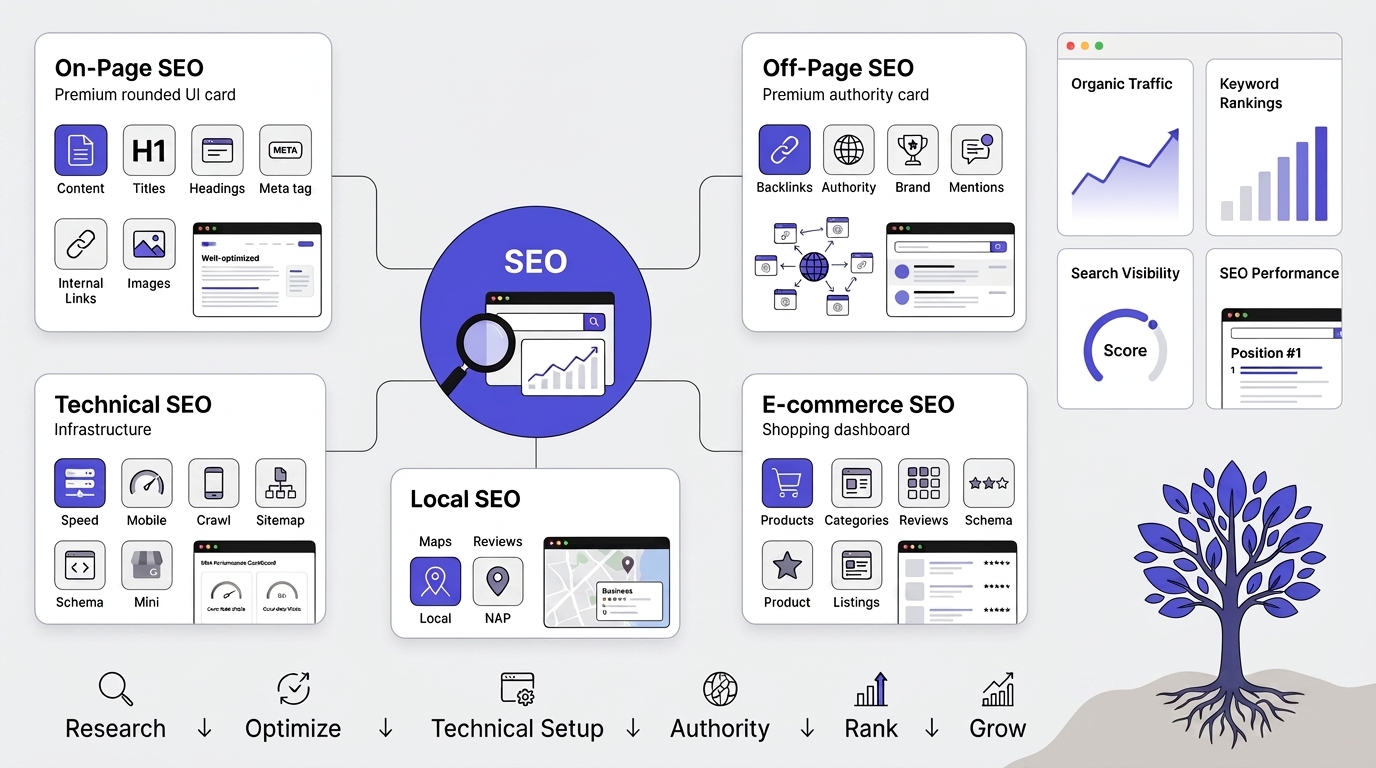
These are the five main categories SEO work typically breaks into. Here’s what each actually covers in practice:
On-Page SEO
Everything happening on the page itself that you have full control over.
- Title tags — the clickable headline in search results; needs the target keyword and needs to make someone want to click.
- Headers (H1, H2, H3…) — structure the content logically, help both readers skim and Google understand topic hierarchy.
- Content — the actual writing: does it match search intent, cover the topic thoroughly, use relevant keywords naturally.
- Internal links — links from one page on your site to another; spreads authority around, helps Google discover and understand page relationships, keeps users browsing longer.
- Images — alt text (for accessibility and image search), compressed file sizes (affects load speed), descriptive file names.
This is the category most beginners start with because it’s entirely within your control — no outside cooperation needed.
Off-Page SEO
Signals that live outside your own website, functioning as third-party votes of confidence.
- Backlinks — other websites linking to yours. Still one of the strongest ranking factors; a link from a respected site in your niche counts more than ten links from random low-quality sites.
- Brand mentions — even without a link, being talked about (“as X explained…”) builds authority signals Google can pick up on.
- Also includes things like guest posting, PR, influencer collaborations, and social signals — anything that gets other corners of the internet vouching for you.
The hard part about off-page SEO: you can’t just “do” it on your own page — it requires earning attention/trust from others, which is slower and less directly controllable.
Technical SEO
The infrastructure layer — not about content quality, but about whether Google (and users) can access and load your site properly.
- Site speed — slow pages get penalized and users bounce.
- Mobile-friendliness — since Google uses mobile-first indexing, if your site is broken on mobile, that’s the version Google judges.
- Crawlability — making sure Googlebot can actually find and read your pages (proper sitemaps, no accidental blocks in robots.txt, no broken internal linking).
- Structured data (schema markup) — code that tells Google explicitly what a piece of content is (a recipe, a review, an FAQ, a product) so it can show rich results like star ratings or FAQ dropdowns in search.
Think of this as “removing the obstacles” between your content and Google’s ability to fully understand and serve it.
Local SEO
A specialized branch aimed at people searching with location intent (“plumber near me,” “coffee shop in [city]”).
- Centers heavily around Google Business Profile optimization, NAP consistency (Name, Address, Phone number matching everywhere online), local citations/directories, and localized reviews.
- Critical for any business with a physical location or a defined service area — a dentist, a restaurant, a contractor — because these searches have high commercial intent and happen constantly.
E-commerce SEO
Not really a separate category so much as a specialized application of the four above, tuned to online stores.
- Product pages — unique descriptions (not manufacturer copy-paste, which creates duplicate content issues), reviews, structured data for pricing/availability/star ratings.
- Category structure — how products are organized affects both user navigation and how Google understands your site’s topical hierarchy.
- Shopping-specific intent — someone searching “best running shoes for flat feet” (research intent) needs different content than someone searching “buy Nike Pegasus 41” (transactional intent), and ecommerce SEO means designing pages around which intent you’re targeting at each stage.
How they interact: none of these work in isolation. A page can have perfect on-page SEO but rank nowhere if the site has zero backlinks (off-page) or if it takes eight seconds to load (technical). Most real SEO strategy is about diagnosing which of these five is your weakest link and fixing that first, rather than treating them as a checklist to do equally.
Why SEO Takes Time
SEO for beginners is a patience game before it’s a skill game. Google’s own John Mueller has said publicly that it can take four months to a year to see meaningful results from SEO efforts, and honestly, that lines up with what most practitioners experience. There’s no shortcut here. Anyone promising rankings in a week is selling you something that doesn’t work long-term.
Before You Start SEO: Things You Must Understand
Search Engine Optimization (SEO) is one of the most effective ways to increase your website’s visibility, attract qualified visitors, and generate long-term business growth. However, many beginners jump straight into keyword research, content creation, or backlink building without understanding the fundamentals. This often leads to wasted time, poor rankings, and unrealistic expectations.
Before you start implementing SEO strategies, it’s important to understand how search engines work, what SEO can realistically achieve, and the principles that guide long-term success. Having this foundation will help you make better decisions and avoid common mistakes
SEO is a Long-Term Investment
Think of SEO like fitness. You don’t do one workout and get abs. You show up consistently, and the results build over months. Same with SEO. One optimized blog post won’t change your business. Fifty of them, published consistently over six months, will.
SEO is Not Just Keywords
Old-school SEO was about stuffing keywords into content until it read like a robot wrote it. That doesn’t work anymore — hasn’t for years, honestly. Modern SEO cares about whether your content actually answers the question someone typed into Google. Keywords matter for discovery. Quality matters for rankings.
Google Wants Helpful Content
Google’s Helpful Content system (rolled into their core ranking systems now) is built around one question: is this content made primarily for people, or was it made to game search rankings? If you’re writing for the algorithm instead of the reader, it shows. And Google’s gotten pretty good at detecting it.
Understanding Search Intent
Every search query has intent behind it. Get this wrong, and nothing else you do matters.
Informational intent — someone wants to learn something. “What is SEO” or “how do backlinks work.”
Commercial intent — someone’s researching before buying. “Best SEO tools 2026” or “Ahrefs vs Semrush.”
Transactional intent — someone’s ready to buy. “Buy Yoast SEO premium” or “SEO consultant near me.”
Navigational intent — someone’s looking for a specific site or brand. “Google Search Console login.”
Match your content to the right intent. Writing a sales page for an informational query is a waste of your time and Google’s patience.
The Importance of E-E-A-T
E-E-A-T stands for Experience, Expertise, Authoritativeness, and Trustworthiness. It’s part of Google’s Search Quality Rater Guidelines, and while it’s not a direct ranking factor in the algorithmic sense, it shapes how Google’s systems are trained to evaluate quality.
Experience — have you actually done the thing you’re writing about?
Expertise — do you know the subject deeply?
Authoritativeness — do others in your space recognize you as credible?
Trustworthiness — is your site secure, transparent, and accurate?
For beginners, this means: don’t write about topics you know nothing about just because they’re “high volume” keywords. Write about what you actually understand, and build authority from there.
Your First 30 Days of SEO (Complete Roadmap)
Alright, let’s get into the actual plan. This is broken into weekly phases, each building on the last.
Day 1–3: Build a Strong SEO Foundation
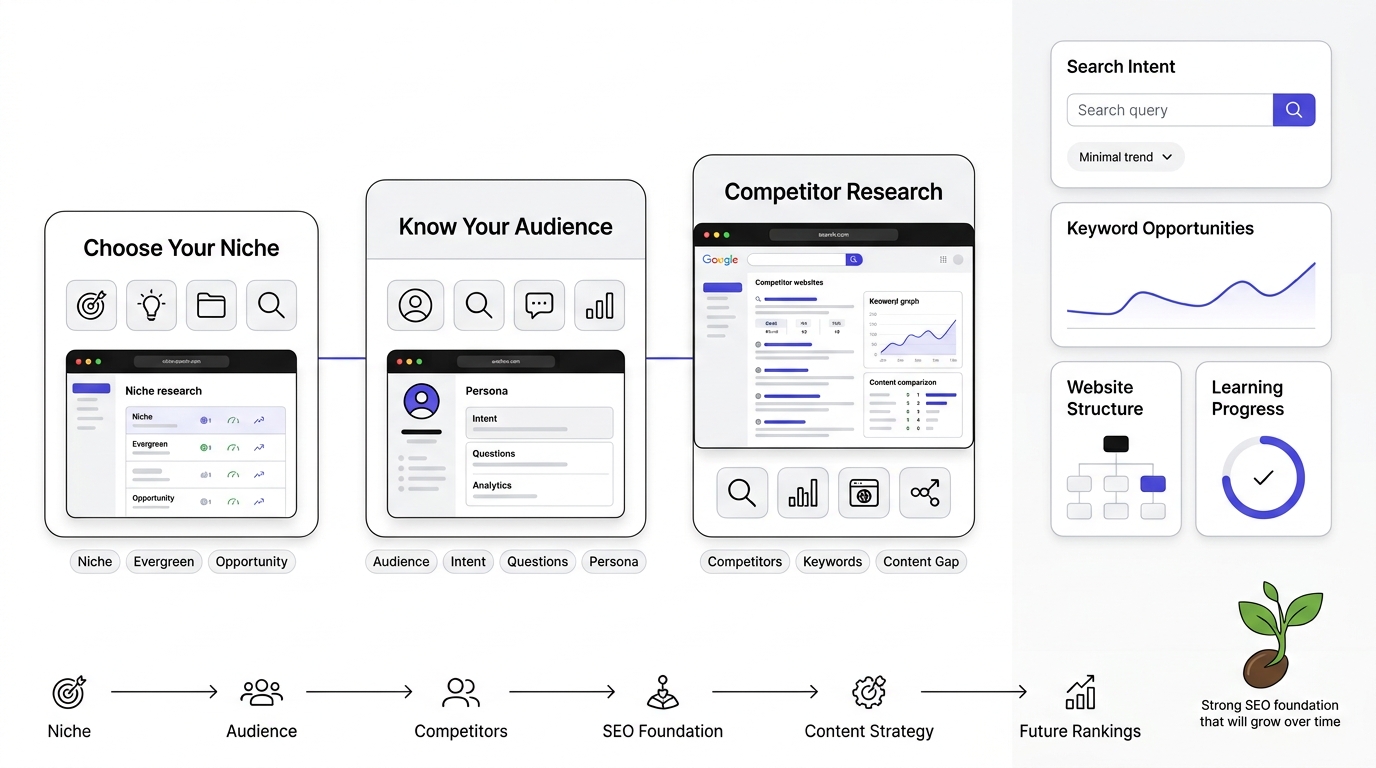
Before you optimize your website, you need to understand how SEO works. During the first few days, focus on learning the basics, including how search engines crawl, index, and rank web pages. Familiarize yourself with Google’s ranking factors, search intent, and the difference between on-page, off-page, and technical SEO. Building a strong foundation makes every future SEO task easier and more effective.
1. Choose the Right Niche
If you’re starting a new site, your niche decision affects everything downstream — your keywords, your content strategy, even how long it takes to rank.
Broad vs Narrow Niches: Broad niches (“health,” “finance”) are brutally competitive. Narrow niches (“home workouts for people with bad knees”) are easier to rank in but have a smaller ceiling. For beginners, narrow almost always wins. You can expand later.
Evergreen Niches: Topics people search for year-round — personal finance, fitness, cooking, productivity. These give you steady, predictable traffic.
Seasonal Niches: Think tax software or holiday gift guides. These spike hard, then go quiet. Fine as a secondary strategy, risky as your only one.
Niche Validation Tips: Search your topic on Google. If you see forums, established blogs, and product pages all ranking, there’s demand. If you see nothing, that’s not always a good sign either — sometimes it means nobody’s searching for it.
2. Understand Your Target Audience
Identify Customer Pain Points: What keeps your audience up at night? What are they Googling at 11 PM out of frustration? That’s your content goldmine.
Audience Research Methods: Reddit threads, Facebook groups, Amazon reviews on related products, Quora questions. Real people, real language, real problems.
Creating Buyer Personas: Doesn’t need to be fancy. Just write down who you’re talking to — their level of knowledge, their goals, their objections.
Search Intent Mapping: Match your audience’s questions to the four intent types we covered earlier. This tells you what kind of content to create for each stage of their journey.
3. Analyze Your Competitors
Find Top Competitors: Search your main keywords. Whoever’s on page one is your competition, whether you like it or not.
Study Their Content: What format are they using? Listicles? Long-form guides? Videos embedded in text?
Analyze Their Keywords: Free tools like Ubersuggest or Ahrefs’ free keyword generator will give you a rough idea of what’s driving their traffic.
Identify Content Gaps: What are they NOT covering? That gap is your opportunity.
Learn from Their SEO Strategy: Look at their site structure, their internal linking, their content depth. You’re not copying — you’re learning what’s already working.
Day 4–6: Set Up Essential SEO Tools
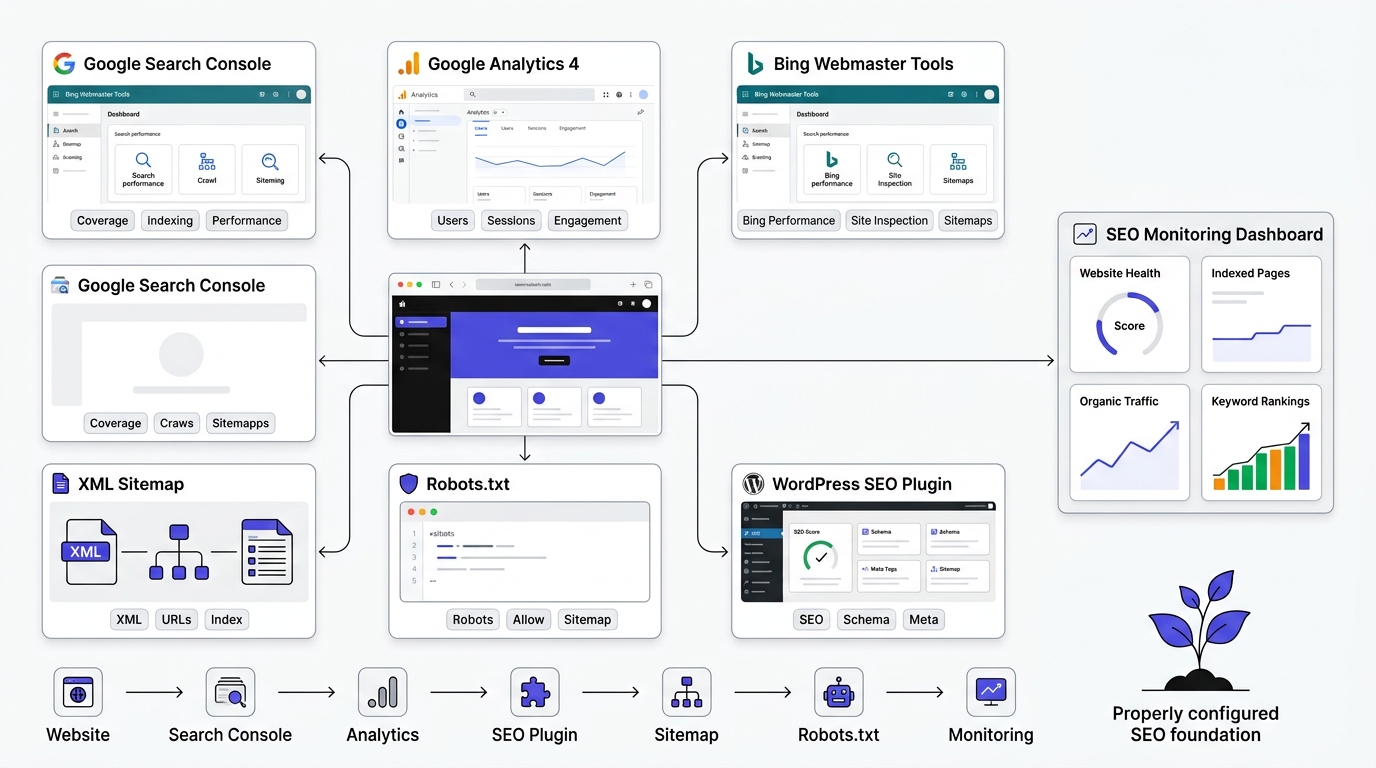
SEO is data-driven, and the right tools help you monitor your website’s performance and identify opportunities for improvement. Set up essential tools like Google Search Console, Google Analytics 4, Bing Webmaster Tools, and keyword research platforms. These tools provide valuable insights into traffic, indexing, keyword rankings, user behavior, and technical issues.
4. Install Google Search Console
Why GSC Matters: This is Google talking directly to you. It shows you which queries bring people to your site, which pages have errors, and how Google is actually crawling your content.
Verification Methods: HTML file upload, DNS record, or through Google Analytics if you’ve already got that connected.
Submit Sitemap: Once verified, go to Sitemaps in the sidebar and submit your XML sitemap URL (usually yoursite.com/sitemap.xml). This speeds up discovery.
Understand Coverage Reports: This shows you which pages are indexed and which ones have issues — like being blocked by robots.txt or returning errors.
Performance Reports: This is where you’ll spend most of your time. Clicks, impressions, average position, CTR — all broken down by query and page.
URL Inspection Tool: Paste any URL from your site and see exactly how Google sees it, including whether it’s indexed and when it was last crawled.
5. Install Google Analytics 4
Why GA4 Matters: GSC tells you how people find you. GA4 tells you what they do once they arrive.
Key Metrics:
- Users — how many unique visitors hit your site
- Sessions — total visits, including repeat ones
- Engagement Rate — percentage of sessions that count as “engaged” (lasted 10+ seconds, had a conversion, or had 2+ pageviews)
- Average Engagement Time — how long people stick around
- Conversions — whatever action matters to you: sign-ups, purchases, form fills
Linking GA4 with Search Console: Go to Admin > Product Links in GA4, and link your Search Console property. This lets you see search query data right inside your analytics reports.
6. Install SEO Plugins (WordPress)
If you’re on WordPress, an SEO plugin makes life a lot easier.
Rank Math — generous free tier, built-in schema markup, solid for beginners.
Yoast SEO — the most well-known option, reliable readability and SEO scoring, though some features are locked behind premium.
AIOSEO — decent all-rounder, particularly good if you’re also doing local SEO.
Which Plugin Should Beginners Choose? Honestly, Rank Math’s free version gives you more out of the box. But Yoast has been around longer and has more tutorials floating around online if you get stuck. Either works fine — don’t overthink this one.
7. Create XML Sitemap
Why It Matters: A sitemap is basically a map you hand to Google, listing every important page on your site. Without it, Google has to discover pages purely through links, which is slower and less reliable.
Submit Sitemap to Google: Do this through Google Search Console, in the Sitemaps section we mentioned earlier. Most SEO plugins auto-generate this for you.
8. Configure Robots.txt
What It Does: This file tells search engine crawlers which parts of your site they can and can’t access. Get it wrong, and you could accidentally block your entire site from being indexed. It happens more than you’d think.
Beginner-Friendly Robots.txt Example:
User-agent: *
Disallow: /wp-admin/
Allow: /wp-admin/admin-ajax.php
Sitemap: https://yoursite.com/sitemap.xml
Keep it simple. Don’t block anything unless you have a specific reason to.
Day 7–10: Learn Keyword Research
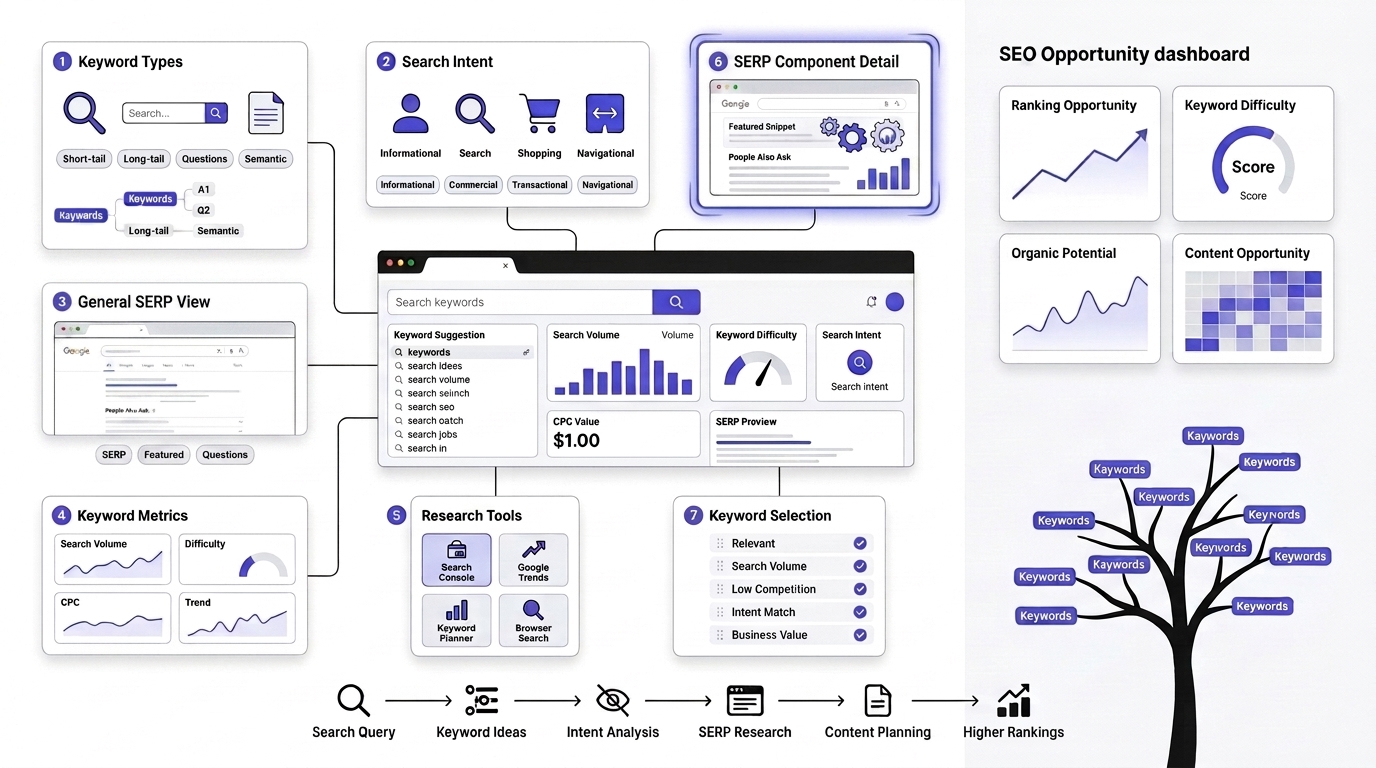
Keyword research is the process of discovering what your target audience searches for online. Learn how to identify high-value keywords, understand search intent, analyze competition, and choose terms that match your business goals. A solid keyword strategy ensures your content reaches the right audience and has a better chance of ranking in search results.
9. Understand Keywords
Short-Tail Keywords: One or two words, huge search volume, brutal competition. “SEO.” “Marketing.” Good luck ranking for these as a beginner.
Long-Tail Keywords: Three or more words, lower volume, way less competition, higher intent. “SEO for beginners checklist 2026” is a long-tail keyword, and it’s exactly the kind of thing you should be targeting early on.
LSI Keywords: Latent Semantic Indexing keywords — related terms that give context to your main topic. If you’re writing about “SEO,” related terms like “Google ranking,” “keyword research,” and “backlinks” naturally support your content.
Semantic Keywords: Similar to LSI but broader — words and phrases that are conceptually connected to your topic, helping Google understand the full scope of what you’re covering.
Question Keywords: “How does SEO work,” “what is a backlink,” “why is my site not ranking.” These are gold for beginners because they often have lower competition and match informational intent perfectly.
10. Learn Keyword Intent
We covered this earlier, but it’s worth repeating in the context of keyword research specifically: informational, commercial, transactional, and navigational intent should guide which keywords you target for which pages. Don’t try to sell something on a page targeting an informational keyword. It won’t convert, and honestly, it might hurt your rankings too since it doesn’t match what the searcher wanted.
Best Free Keyword Research Tools
- Google Keyword Planner — technically built for ads, but gives decent volume estimates for free
- Google Search Suggestions — type a query, see what autocomplete suggests. Real data, real searches.
- People Also Ask — that expandable box in Google results. Goldmine for subtopics and FAQs.
- Google Trends — see if interest in a topic is rising, falling, or seasonal
- Search Console — once your site has some traffic, this shows you what you’re already ranking for, sometimes on page two or three, which is low-hanging fruit
- Ahrefs Free Keyword Generator — limited but useful for quick volume checks
- Ubersuggest — Neil Patel’s tool, decent free tier for beginners
Keyword Selection Checklist
- Search Volume — is anyone actually searching this?
- Keyword Difficulty — can you realistically compete for it right now?
- CPC — higher cost-per-click often signals commercial value, even if you’re not running ads
- Search Intent — does it match what you’re offering?
- Relevance — does it fit your niche and expertise?
Day 11–15: Create SEO-Friendly Website Structure
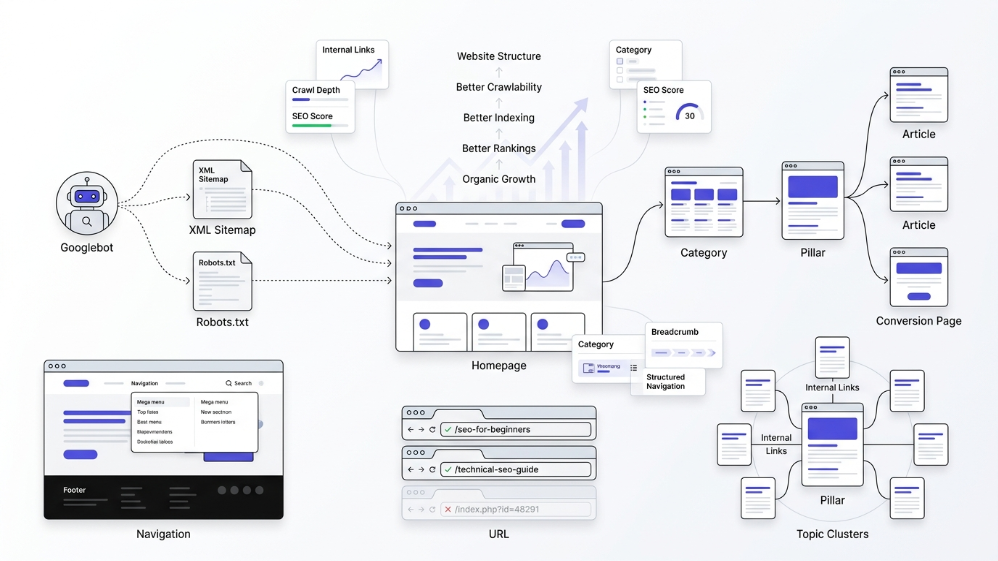
A well-organized website helps both users and search engines navigate your content easily. Focus on creating a logical site hierarchy, SEO-friendly URLs, clear navigation menus, optimized internal linking, and properly structured categories. A strong website structure improves crawlability, user experience, and overall search visibility.
Website Architecture
Flat Site Structure: Every page is just a few clicks from the homepage. Good for smaller sites.
SILO Structure: Content organized into themed clusters, with pillar pages linking down to supporting articles. Better for larger sites with lots of content, because it helps Google understand topical relationships.
Internal Linking
Internal links do two things: they help users navigate your site, and they help Google understand which pages are most important (pages with more internal links pointing to them tend to be seen as more authoritative within your site).
Navigation Best Practices
Keep your main menu simple. Nobody wants to hunt through seven dropdown levels to find your pricing page. If a new visitor can’t find what they need in three clicks, your structure needs work.
URL Structure
Good URL Examples: yoursite.com/seo-for-beginners
Bad URL Examples: yoursite.com/index.php?id=48291&cat=3
Keep URLs short, descriptive, and keyword-relevant. Skip the dates, skip the random numbers.
Categories and Tags
Best Practices: Use categories for broad topic groupings, tags for more specific cross-references. Don’t create a new category for every single post — that defeats the purpose.
Common Mistakes: Beginners often create dozens of categories with one post each. That’s not organization, that’s chaos with extra steps.
Breadcrumb Navigation
Those little “Home > Blog > SEO for Beginners” trails at the top of pages. They help users understand where they are, and they help Google understand your site hierarchy. Most SEO plugins add these automatically with schema markup baked in.
Day 16–20: Learn On-Page SEO
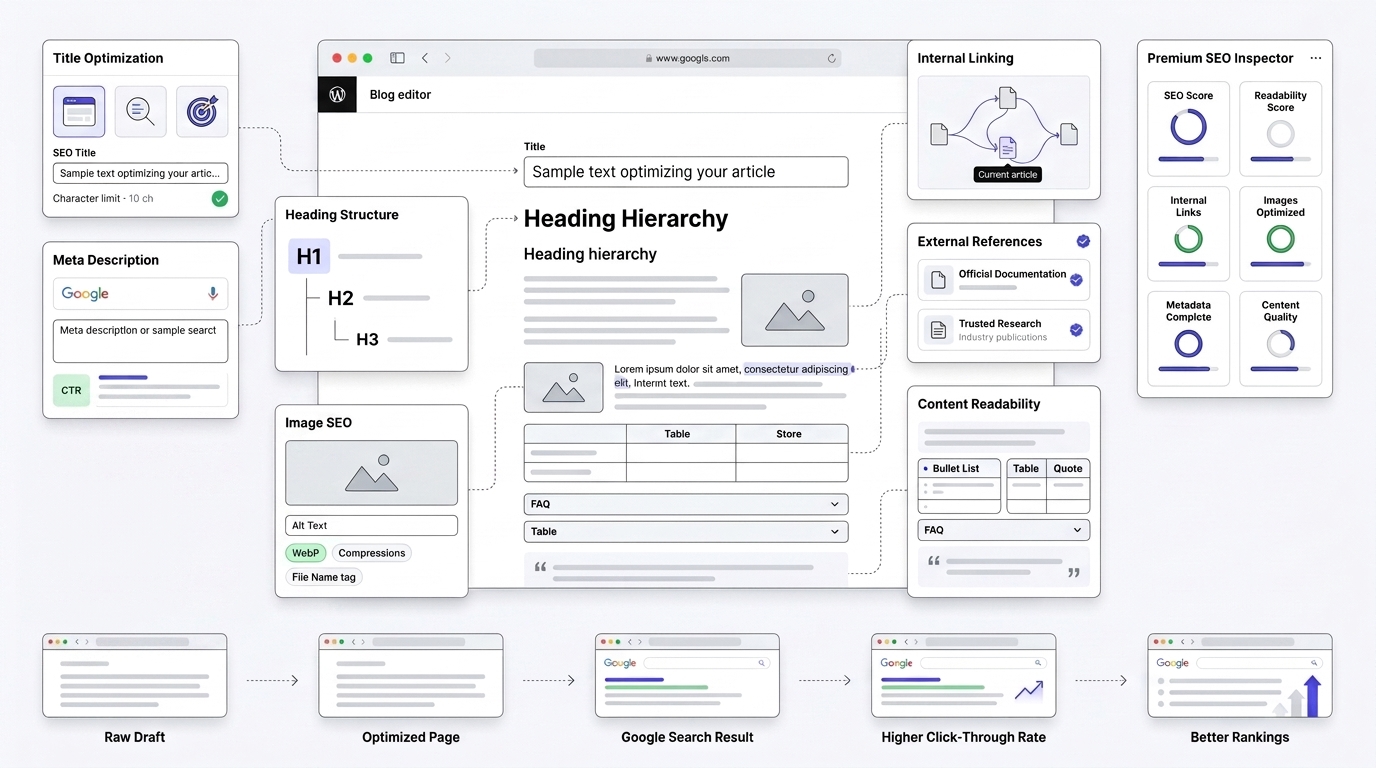
This is where a lot of beginners spend most of their energy, and honestly, that’s fair — on-page SEO is the part you have the most direct control over.
Title Tags
Best Practices: Put your primary keyword near the front. Make it compelling enough that someone actually wants to click it.
Character Limits: Stay under roughly 60 characters, or your title gets cut off in search results with that awkward “…”
Keyword Placement: Front-load it when it reads naturally. “SEO for Beginners: 10 Things to Do in Your First 30 Days” — see how the keyword sits right at the start? That’s not an accident.
Meta Descriptions
Writing High CTR Descriptions: You’ve got about 150-160 characters to convince someone to click your result instead of the nine others on the page. Speak directly to the pain point. Include a reason to click, not just a summary.
Header Tags
H1: One per page. Your main title. This is your big signal to Google about what the page is about.
H2: Major sections. This is also where you want to naturally include your target keyword and related terms.
H3: Sub-sections within your H2s.
H4: Rarely needed for blog content, but useful for deeply nested technical documentation.
Image SEO
Alt Text: Describe the image for people who can’t see it (screen readers) and for search engines that can’t “see” images the way humans do. “Screenshot of Google Search Console performance report” beats “image1.png” every time.
Image Compression: Big, uncompressed images slow your site down. Use tools like TinyPNG or built-in WordPress compression before uploading.
File Names: Rename before uploading. “seo-checklist-2026.jpg” tells Google (and you) more than “IMG_4821.jpg.”
Image Formats: WebP is smaller and faster than JPEG or PNG for most use cases, and most modern browsers support it fine now.
Internal Links
Why Internal Links Matter: They keep visitors on your site longer, and they distribute ranking authority across your pages.
Anchor Text Best Practices: Use descriptive text, not “click here.” “Read our keyword research guide” tells Google (and readers) exactly what to expect on the other end.
External Links
When to Use Them: Linking to authoritative sources (like Google’s own documentation) actually builds trust with readers and search engines. Don’t be afraid of this — it’s not “leaking” authority the way old-school SEOs believed.
Authority Sources: Government sites, well-established industry publications, official documentation. Not random blogs with questionable credibility.
Content Formatting
Paragraph Length: Keep most paragraphs to 2-4 sentences. Big walls of text scare readers off, especially on mobile.
Bullet Lists: Break up dense information. Easier to scan, easier to read.
Tables: Great for comparisons — pricing, features, specs.
Quotes: Use blockquotes sparingly, mostly for expert statements or key takeaways you want to emphasize.
FAQs: We’ll dig into these later, but structuring FAQs properly can also get you featured in Google’s rich results.
Day 21–23: Learn Technical SEO Basics
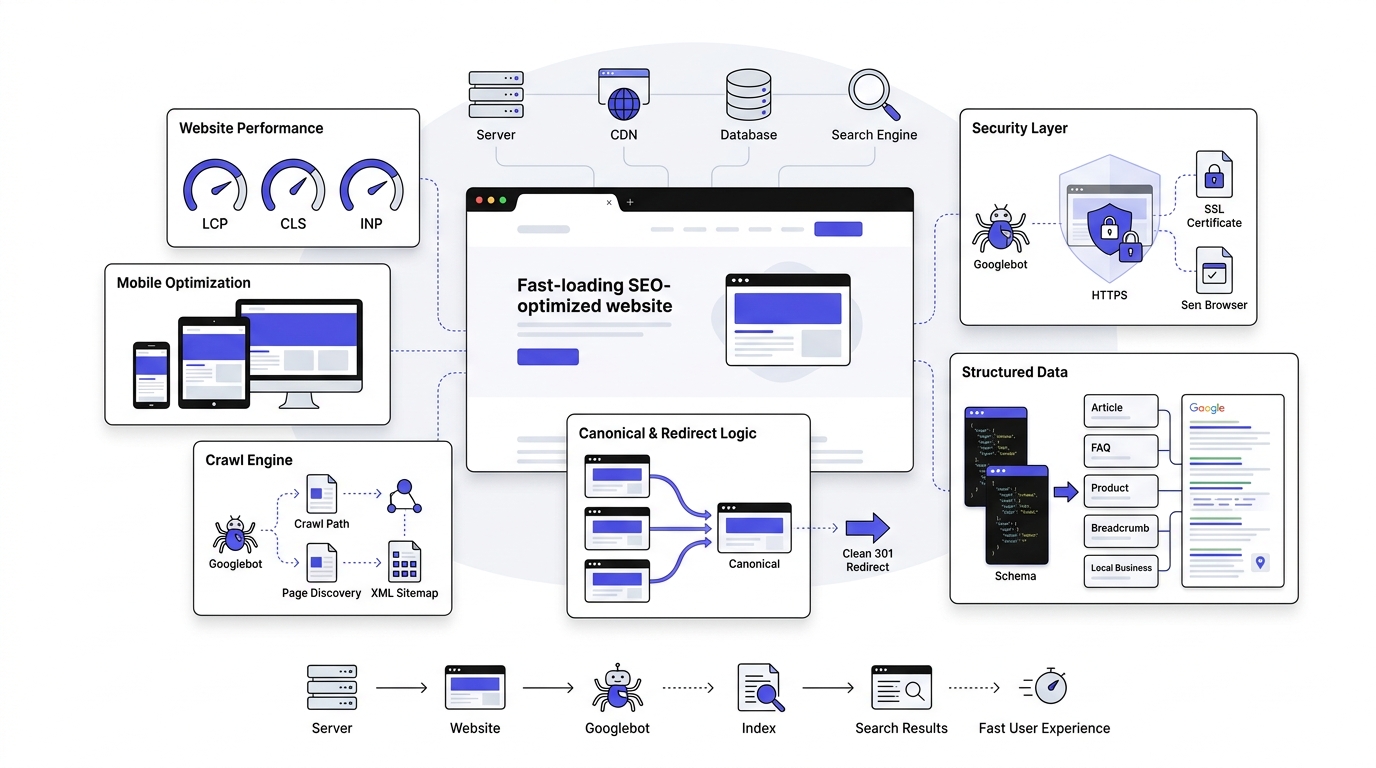
Technical SEO ensures your website is accessible, fast, and easy for search engines to crawl and index. Learn the fundamentals of website speed optimization, mobile friendliness, XML sitemaps, robots.txt, canonical tags, HTTPS, and fixing common crawl errors. A technically optimized website provides a solid foundation for higher rankings.
Website Speed
Slow sites lose visitors and rankings, full stop. Google’s own research has shown that as page load time goes from one to three seconds, the probability of a bounce increases significantly. People don’t wait around anymore.
Core Web Vitals: A set of specific metrics Google uses to measure real-world user experience.
Largest Contentful Paint (LCP): How long it takes for the biggest visible element on your page to load. Aim for under 2.5 seconds.
Cumulative Layout Shift (CLS): Measures visual stability — does stuff jump around while the page loads? Annoying for users, bad for your score. Keep it under 0.1.
Interaction to Next Paint (INP): Measures how responsive your page is when someone actually interacts with it — clicking a button, tapping a menu. This replaced First Input Delay as an official Core Web Vital.
Mobile Friendliness
Responsive Design: Your site needs to look and function properly across phone, tablet, and desktop screens. Google uses mobile-first indexing now, meaning it primarily looks at your mobile version when deciding how to rank you.
Mobile UX: Buttons big enough to tap without zooming in. Text readable without pinching. Forms that don’t make people want to throw their phone.
HTTPS
Why SSL Matters: Beyond just security, HTTPS has been a confirmed (if lightweight) ranking signal since 2014. Plus, browsers now flag non-HTTPS sites as “Not Secure,” which tanks trust instantly.
Crawlability
Broken Links: Dead links hurt user experience and waste crawl budget. Run a free tool like Screaming Frog periodically to catch these.
Redirects: Use 301 redirects for permanently moved pages. Avoid chains of multiple redirects — they slow things down and can confuse crawlers.
Canonical Tags: Tell Google which version of a page is the “main” one when you have similar or duplicate content. Prevents self-competition in search results.
Schema Markup
What is Schema?: Structured data that helps search engines understand your content more precisely, often unlocking rich results like star ratings, FAQ dropdowns, or recipe cards directly in search.
Common Types:
- Article — for blog posts and news content
- FAQ — for question-and-answer sections (can generate those expandable snippets in search)
- Organization — business info like name, logo, contact details
- Local Business — address, hours, phone number for local SEO
- Breadcrumb — matches your navigation trail
- Product — pricing, availability, reviews for ecommerce pages
Day 24–26: Publish SEO-Friendly Content
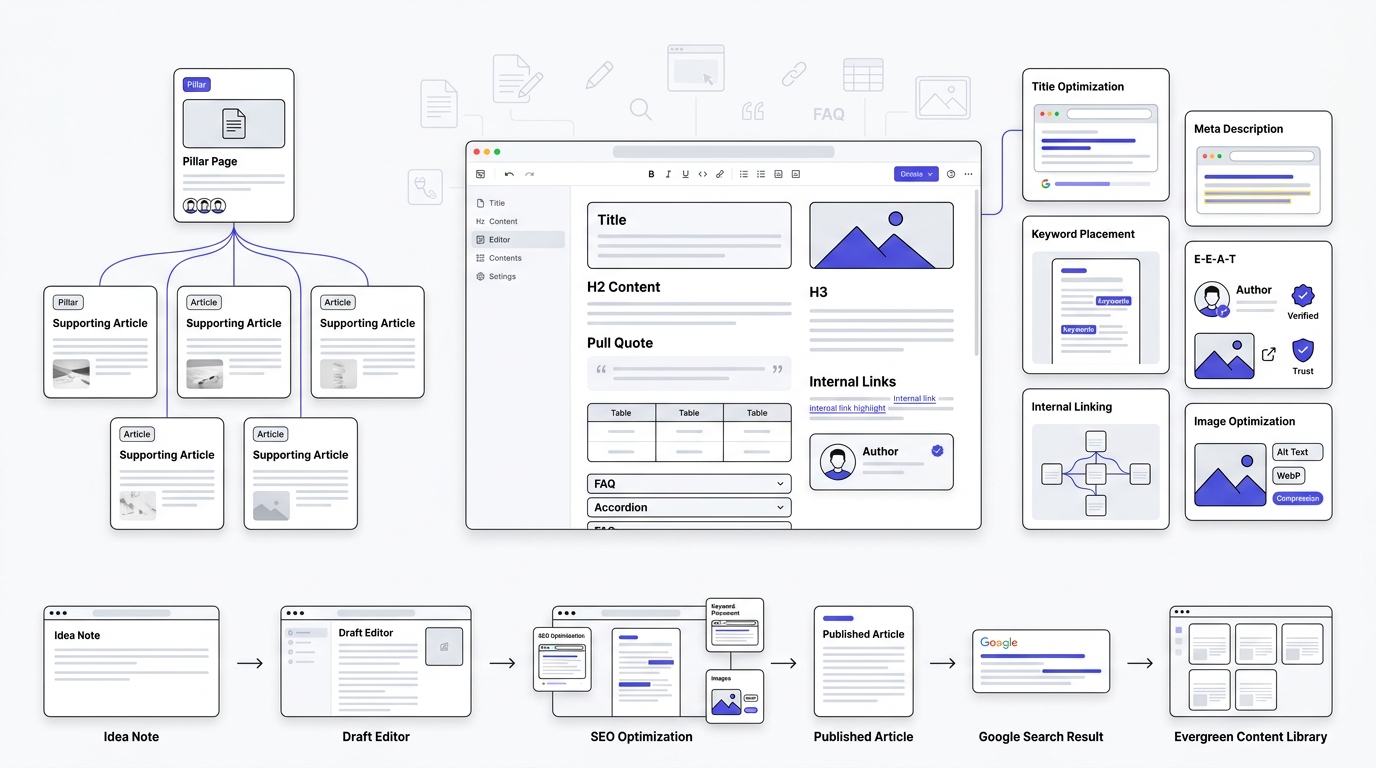
Content is one of the most important ranking factors in SEO. Learn how to create valuable, well-structured content that satisfies user intent while naturally incorporating target keywords. Optimize titles, headings, meta descriptions, images, and internal links to make your content more useful for both readers and search engines.
How to Plan Content
Topic Clusters: Groups of related content built around a central theme.
Pillar Pages: The main, comprehensive guide on a broad topic (like this one).
Supporting Articles: More specific pieces that link back to the pillar page, covering subtopics in depth.
Content Writing Checklist
Keyword Placement: Naturally worked into your title, first paragraph, a couple of headers, and throughout the body. Don’t force it.
Search Intent: Does your content actually deliver what the searcher wanted?
Readability: Short sentences mixed with longer ones. Simple language over jargon. Read it out loud — if it sounds stiff, rewrite it.
E-E-A-T Signals: Author bios, real examples, cited sources, honest opinions based on actual experience.
Originality: Don’t just rehash what’s already ranking. Add something — a new angle, a specific example, a stronger explanation.
Helpful Examples: Abstract advice doesn’t stick. Specific examples do.
Content Length
Does Word Count Matter?: Not directly, no. But longer content often ranks better simply because it tends to cover a topic more thoroughly, which is what Google actually rewards. Write to the length the topic deserves, not to hit an arbitrary number.
How Often Should Beginners Publish?: Consistency beats frequency. One well-researched post a week beats five rushed ones. That said, more quality content generally means more chances to rank, so don’t publish once a month and expect results either.
Day 27–28: Build Website Authority
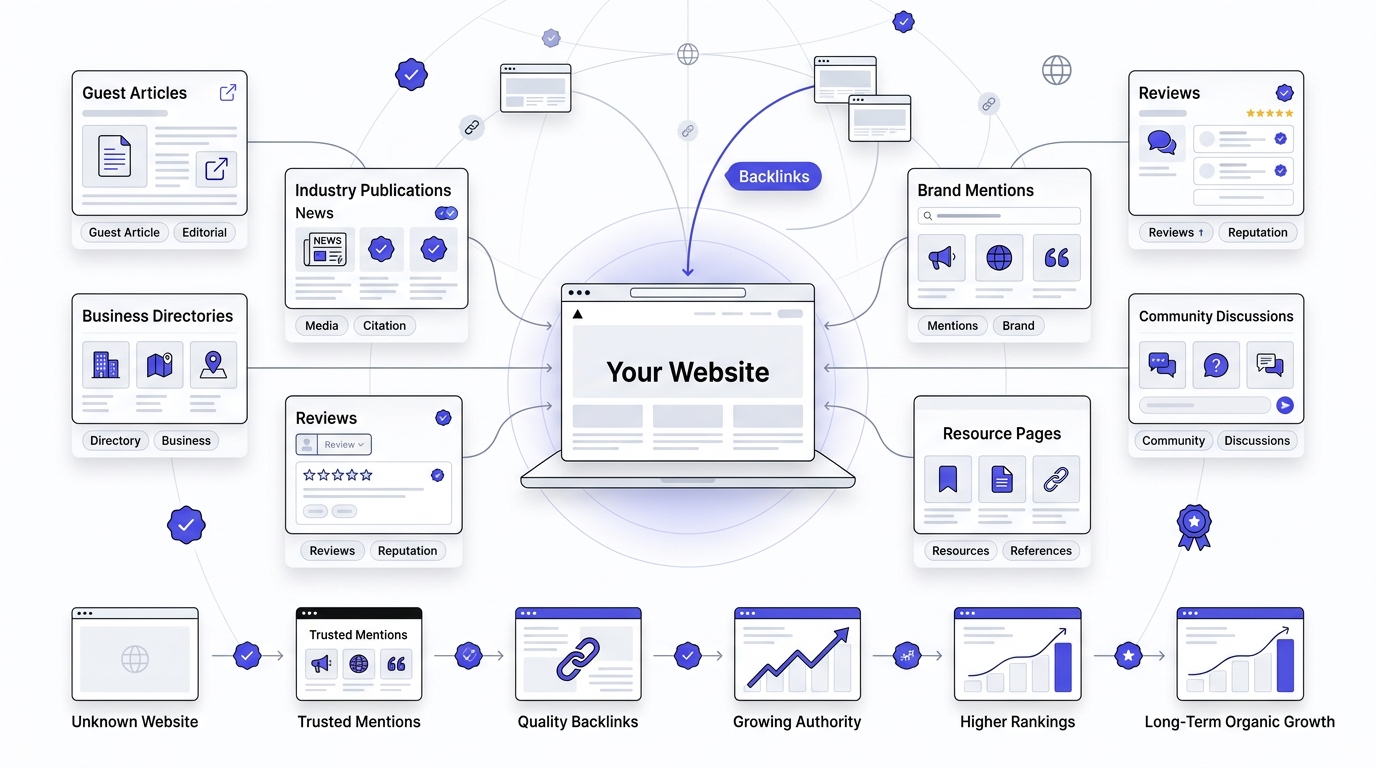
Search engines trust websites that demonstrate credibility and authority. Focus on earning high-quality backlinks, improving your online reputation, strengthening your internal linking strategy, and increasing brand mentions. Building authority helps improve your website’s trustworthiness and long-term ranking potential.
What is Off-Page SEO?
Everything that happens away from your website that still affects your rankings — mostly backlinks, but also brand mentions, social signals, and reviews.
Beginner Link Building Strategies
Guest Posting: Write content for other sites in your niche in exchange for a backlink. Still works, though quality matters way more than quantity here.
HARO Alternatives: HARO (Help a Reporter Out) shut down its free tier a while back, but similar platforms like Qwoted, Featured, and SourceBottle offer comparable opportunities to get quoted by journalists in exchange for a link.
Broken Link Building: Find broken links on other sites in your niche, then suggest your content as a replacement. Tedious but effective.
Resource Pages: Many sites maintain curated lists of helpful resources. If your content fits, reach out and ask to be included.
Local Citations: For local SEO specifically, get listed in directories like Yelp, Google Business Profile, and industry-specific directories.
Social Signals: Not a direct ranking factor, but social shares increase visibility, which can indirectly lead to more natural backlinks.
Business Directories: General directories like Yellow Pages or niche-specific ones add credibility and occasional referral traffic.
Community Participation: Answering questions on Reddit, Quora, or niche forums (without spamming links) builds reputation, and sometimes that turns into organic backlinks over time.
Link Building Mistakes
Buying backlinks in bulk. Using the same anchor text over and over. Getting links from completely unrelated, low-quality sites. All of these can trigger manual penalties or algorithmic distrust. It’s not worth the risk, especially for a new site that hasn’t built up any authority buffer yet.
Day 29: Measure SEO Performance
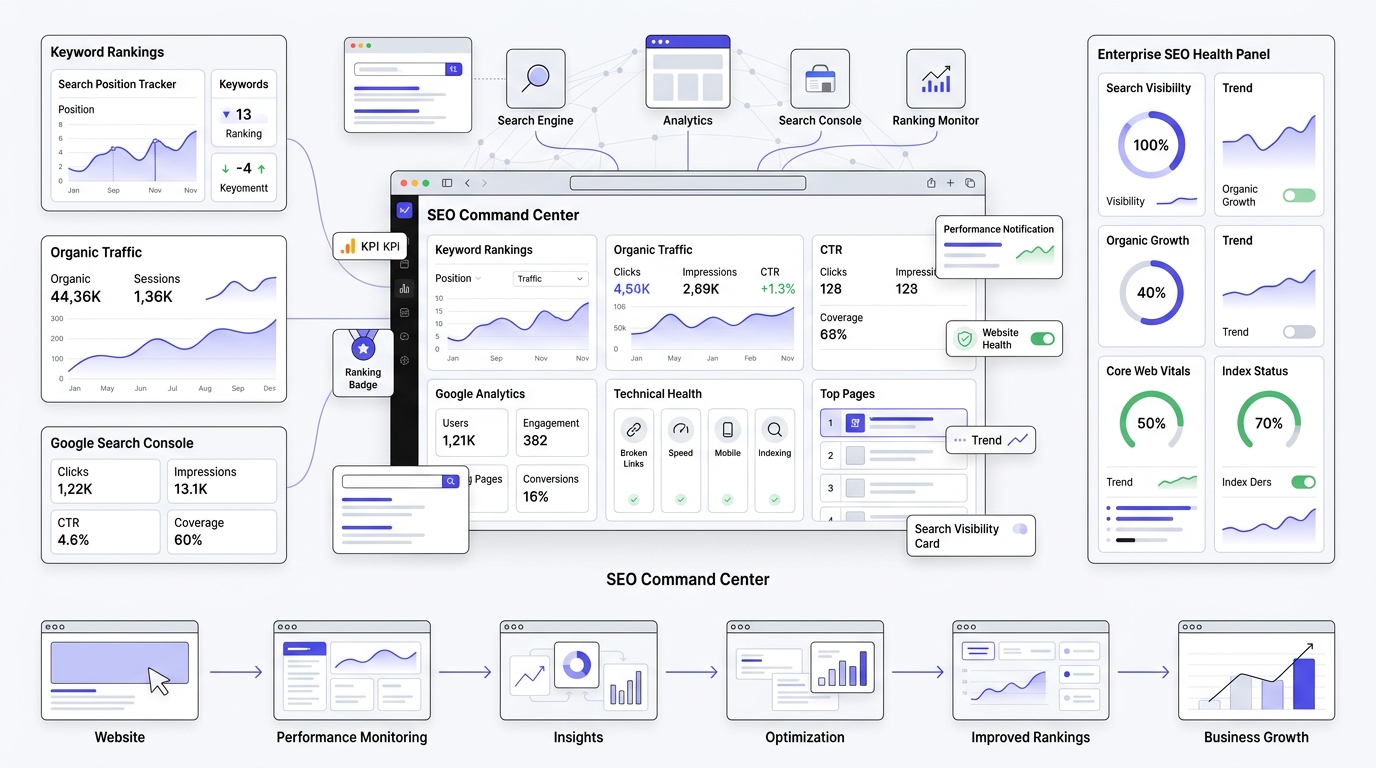
SEO is an ongoing process, and measuring results helps you understand what’s working and what needs improvement. Learn how to track keyword rankings, organic traffic, click-through rates, conversions, page performance, and user engagement using SEO analytics tools. Regular monitoring enables data-driven optimization.
Track Keyword Rankings
Free Tools: Google Search Console shows average position for your queries, though it’s not real-time and can be a bit noisy.
Paid Tools: Ahrefs, Semrush, or Mangools give more precise, daily rank tracking if you’re ready to invest.
Monitor Search Console Reports
Check weekly, not daily. Rankings fluctuate constantly — that’s normal. Obsessing over daily changes will just stress you out for no reason.
Analyze Google Analytics
Look for trends over weeks and months, not single days. Are engaged sessions climbing? Is your bounce rate dropping? That tells you more than any single day’s numbers.
Monthly SEO Audit Checklist
- Index Coverage — any new errors or pages dropped from the index?
- Clicks — total organic clicks, month over month
- Impressions — how often your pages show up in search, even without a click
- CTR — click-through rate; low CTR with high impressions often means your titles or meta descriptions need work
- Average Position — is it trending up or down?
- Top Landing Pages — which pages are pulling their weight, and which ones need attention?
- Technical Errors — broken links, slow pages, mobile usability issues
Day 30: Create a Long-Term SEO Strategy
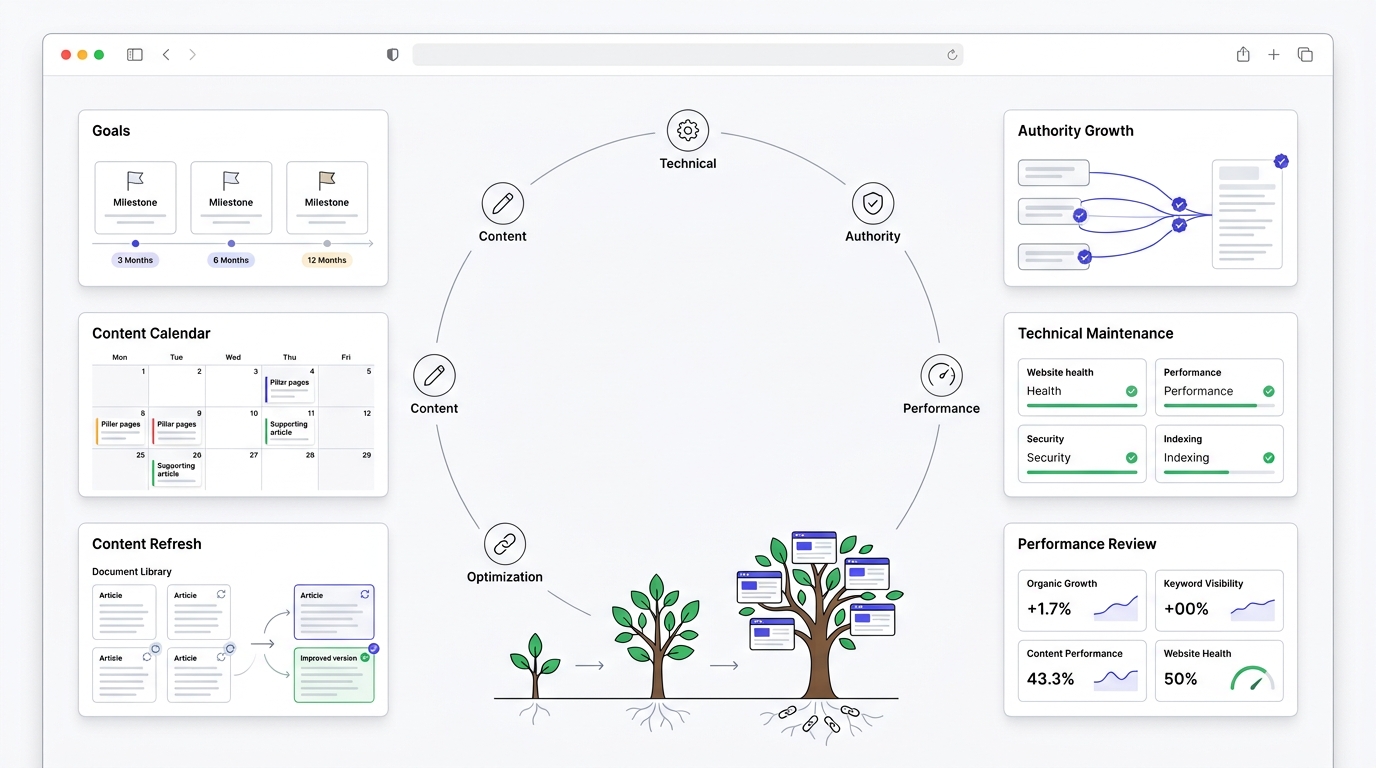
SEO success doesn’t happen in 30 days it requires consistent effort and continuous improvement. Use everything you’ve learned to build a long-term SEO plan that includes regular content creation, technical audits, keyword updates, backlink building, and performance tracking. A sustainable strategy ensures your website continues to grow and maintain its search rankings over time.
Set Realistic SEO Goals
3-Month Goals: Get indexed properly, publish a consistent base of content, fix any glaring technical issues.
6-Month Goals: Start seeing keyword rankings improve, particularly for long-tail terms. Build your first meaningful batch of backlinks.
12-Month Goals: Meaningful organic traffic growth, ranking for some competitive terms, established topical authority in your niche.
Create a Publishing Calendar
Plan content at least a month ahead. Mix pillar content with supporting articles. Leave room for timely, reactive content too — sometimes the best-performing posts are the ones responding to something happening right now in your industry.
Content Updating Strategy
Old content decays. Rankings drop, information goes stale. Revisit your top-performing posts every six months or so, update statistics, add new sections, refresh anything outdated. This often works better than publishing something brand new.
Link Building Plan
Set a modest, sustainable pace — a few quality backlinks a month beats a burst of fifty low-quality ones. Diversify your sources: guest posts, HARO-style opportunities, resource page mentions, natural mentions from good content.
Monthly SEO Routine
Audit your site. Check rankings. Update old content. Publish new content. Build a few links. Repeat. That’s genuinely most of what ongoing SEO looks like once the foundational thirty days are done.
Free SEO Tools Every Beginner Should Use
- Google Search Console — non-negotiable, install this on day one
- Google Analytics 4 — pairs with Search Console for the full picture
- Google Trends — spot rising and seasonal topics
- Google Keyword Planner — decent free volume data
- Google PageSpeed Insights — check your Core Web Vitals scores
- Google Rich Results Test — verify your schema markup is working
- Bing Webmaster Tools — often overlooked, but Bing still drives meaningful traffic for a lot of sites
- Ahrefs Webmaster Tools — free for verified site owners, gives a limited but useful version of Ahrefs’ data
- Screaming Frog (Free Version) — crawls up to 500 URLs for free, great for catching technical issues
- Ubersuggest — decent all-in-one option for beginners not ready to pay for Ahrefs or Semrush
Beginner SEO Checklist (30-Day Action Plan)
Week 1 Checklist
- Choose your niche and validate demand
- Research your target audience
- Analyze your top three to five competitors
- Set up Google Search Console
- Set up Google Analytics 4
Week 2 Checklist
- Install and configure your SEO plugin
- Create and submit your XML sitemap
- Configure robots.txt properly
- Complete initial keyword research
- Build your keyword selection shortlist
Week 3 Checklist
- Fix your site’s URL structure and navigation
- Organize categories and tags
- Optimize title tags and meta descriptions on existing pages
- Add proper header structure to your content
- Compress and optimize all images
Week 4 Checklist
- Run a Core Web Vitals check and fix major issues
- Confirm mobile-friendliness across your site
- Add schema markup where relevant
- Publish at least two to three pieces of SEO-optimized content
- Start your first round of beginner link building
- Complete your first monthly SEO audit
SEO Myths Beginners Should Ignore
SEO is Dead: People have said this every year since roughly 2010. It’s not dead. It’s changed, sure, but organic search still drives a massive share of website traffic across pretty much every industry.
AI Will Replace SEO: AI is changing how people search, no argument there. But it’s also changing SEO tactics, not eliminating the need for them. Someone still has to make sure content is discoverable, structured, and trustworthy — for AI systems and traditional search alike.
More Keywords Mean Better Rankings: Stuffing more keywords into a page doesn’t help once you’ve naturally covered the topic. Relevance and depth matter more than repetition.
You Need Thousands of Backlinks: A handful of high-quality, relevant backlinks will outperform thousands of spammy ones every time.
Word Count Alone Improves Rankings: Long content ranks well often because it’s thorough, not because it’s long. Padding a 1,000-word topic to 3,000 words just to hit a number wastes everyone’s time.
SEO is a One-Time Task: Search engines change. Competitors publish new content. Your site needs regular attention, not a “set it and forget it” approach.
Conclusion
Thirty days from now, you won’t have “mastered” SEO. Nobody does that in a month, and honestly, anyone who claims otherwise is lying to you or to themselves. What you will have is a real foundation — tools set up correctly, keyword research skills that actually work, a website structure that makes sense, content that’s built to rank instead of just built to exist, and a plan for what comes next.
That’s more than most beginners ever get, because most beginners never follow a structured path in the first place. They bounce between tutorials, get overwhelmed, and give up before the compounding effects of SEO even have a chance to kick in.
Here’s the honest truth: SEO rewards consistency, not perfection. You don’t need to nail every single tactic in this guide flawlessly. You need to keep showing up — publishing, optimizing, measuring, adjusting — month after month. That’s the whole game.
So take what you’ve learned here and put it to work. Go download a printable version of this checklist if that helps you stay on track. Keep exploring the related guides linked throughout this post — keyword research, on-page SEO, technical SEO, they all deserve a deeper look once you’re ready. And most importantly, start today. Not next Monday. Today.
Frequently Asked Questions
Can I learn SEO in 30 days?
You can learn the fundamentals in 30 days, yeah — that’s exactly what this roadmap is built for. But mastering SEO takes longer, honestly more like a year or two of hands-on practice. Thirty days gets you moving in the right direction instead of flailing around randomly.
How long does SEO take to work?
Most sites start seeing meaningful movement somewhere between four and twelve months, depending on competition, niche, and how consistently you’re publishing. Some long-tail keywords can rank faster, within weeks even, but competitive terms take longer no matter what anyone tells you.
Is SEO free?
The core work — keyword research, on-page optimization, content creation — can absolutely be done for free using tools like Google Search Console, Google Analytics, and free versions of keyword tools. Paid tools like Ahrefs or Semrush speed things up and give deeper data, but they’re not required to get started.
What are the three pillars of SEO?
Most people break it down into technical SEO, on-page SEO, and off-page SEO. Some add content as a fourth pillar, since content quality touches all three of the others.
Do I need coding knowledge for SEO?
Nope, not for the basics. Plugins like Rank Math or Yoast handle most of the technical implementation. That said, understanding basic HTML helps, especially when you’re troubleshooting schema markup or site structure issues.
Which SEO tool should beginners use?
Start with Google Search Console and Google Analytics 4 — both free, both essential. Once you’re ready to invest, Ahrefs or Semrush are the industry standards, though Ubersuggest is a solid budget-friendly middle ground.
How many blog posts should beginners publish?
There’s no magic number, but aim for consistency over volume. One solid, well-researched post a week is a sustainable pace for most beginners juggling this alongside other responsibilities.
How many keywords should I target per page?
Generally one primary keyword per page, supported by a handful of related secondary keywords that naturally fit the topic. Trying to target unrelated keywords on the same page usually backfires and confuses both readers and search engines.
Is WordPress best for SEO?
WordPress is popular for SEO mainly because of its plugin ecosystem and flexibility, not because it has some built-in ranking advantage. Platforms like Shopify, Wix, or Webflow can rank just fine too, as long as you’re following the same core SEO principles.
Can AI help with SEO?
Yeah, for research, outlining, and speeding up production. But content written entirely by AI without human review, editing, or added expertise tends to feel generic, and Google’s quality systems are increasingly good at spotting that. Use AI as a tool, not a replacement for actual knowledge and effort.
What is the easiest SEO strategy for beginners?
Long-tail keyword targeting combined with genuinely helpful, well-structured content. It’s not flashy, but it’s the most reliable path to your first real rankings.
How do I know if my SEO is working?
Check Google Search Console monthly. Look for climbing impressions and clicks, improving average position, and growing organic traffic in Google Analytics. If those numbers are trending up over a few months, your SEO is working, even if it doesn’t feel dramatic day to day.