

Every time you type something into Google and press Enter, a page full of results appears almost instantly. You have seen this page thousands of times. You probably scroll through it every single day. But have you ever stopped and really looked at it?
That results page has a name: it is called a SERP, a Search Engine Results Page. And understanding it in detail is one of the most important things you can do as a beginner in digital marketing, SEO, or online business.
Why? Because the SERP is where your audience makes decisions. When someone searches for a product, a service, an answer, or a solution, and they see a list of results, the way those results are displayed, positioned, and labelled determines whether they click on your website or a competitor’s. The SERP is the battleground for organic traffic.
Most beginners think of SERPs as simply a list of ten blue links. But today’s Google search results pages are far more sophisticated. They are dynamic, personalised, feature-rich environments that include paid ads, AI-generated summaries, expandable question boxes, map listings, video carousels, featured answer boxes, and much more, often all on the same page.
This guide will give you a complete, beginner-friendly understanding of what SERPs are, what every element means, how different features work, and most importantly, how to use your knowledge of SERPs to build a smarter SEO strategy.
| 📘 What You Will Learn in This Guide
What SERP stands for and what it is A complete breakdown of every SERP feature: organic results, ads, featured snippets, AI Overviews, People Also Ask, knowledge panels, local packs, image packs, video carousels, and more Why do different searches produce completely different SERPs How to analyse a SERP before optimising any page What SERP click-through rates look like and why position matters so much How to target different SERP features for more visibility How AI is changing the appearance and behaviour of SERPs in 2026 Common beginner mistakes when reading SERPs Answers to the most common beginner questions about SERPs |
What Is a SERP?
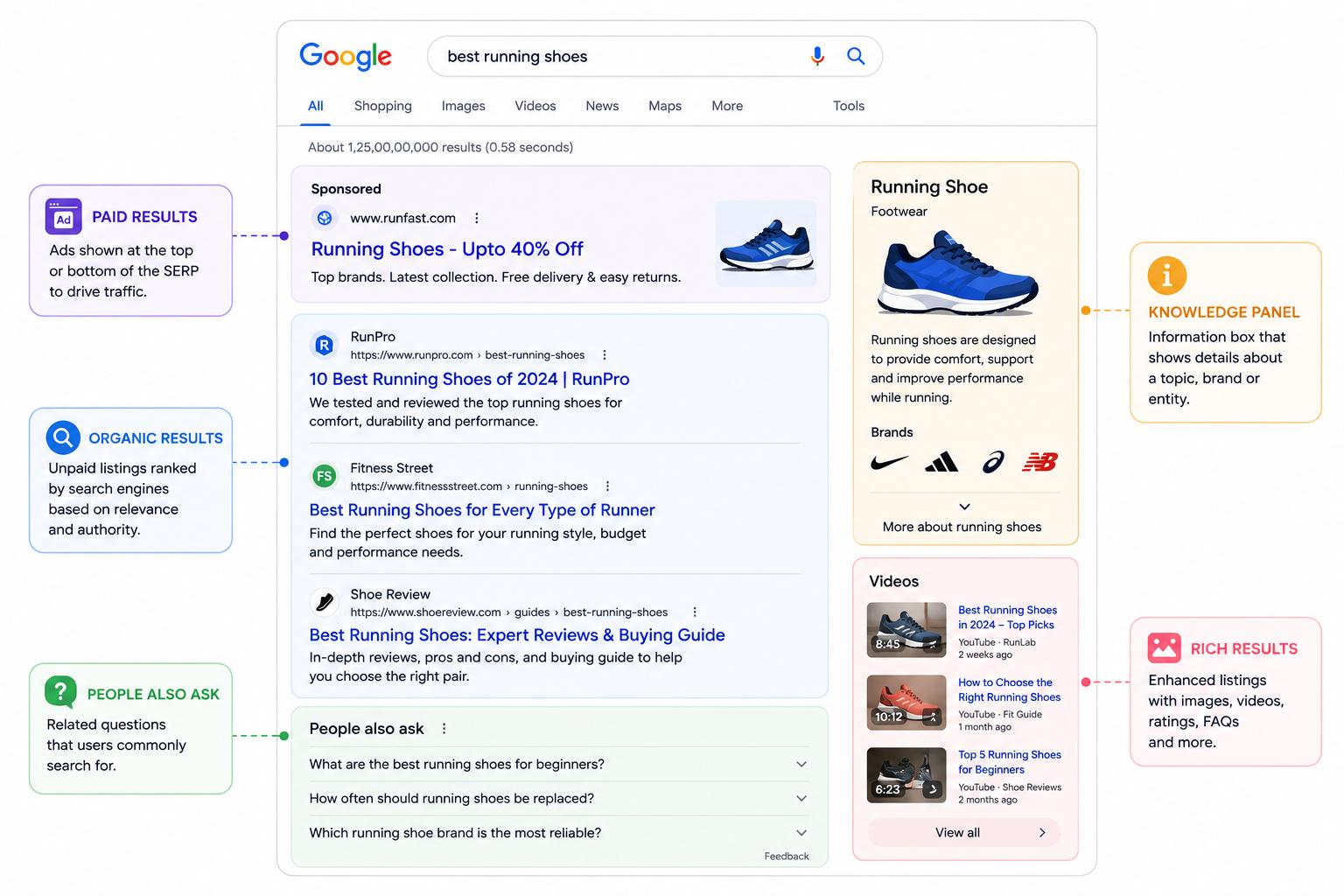
SERP stands for Search Engine Results Page. It is the page that a search engine, such as Google, Bing, Yahoo, DuckDuckGo, or any other, displays after a user submits a search query.
In the simplest terms, you search, Google thinks, and a SERP appears.
But the SERP is not just a passive display of results. It is Google’s best attempt to give you the most relevant, helpful, and trustworthy answers to your query in the most useful format. Google has invested decades of engineering and research into making SERPs as useful as possible, and the result is a page that can look dramatically different depending on what you searched for.
A Brief History of SERPs
In the early days of Google (late 1990s), SERPs were simple: a list of ten blue links, each with a title and a short description. That was it. The page was clean, fast, and purely functional.
Over the years, Google gradually added new features: paid advertisements, image results, news stories, shopping listings, video results, knowledge panels, featured snippets, local maps, and more. Each addition was designed to answer more queries faster, sometimes without the user even needing to click on a website.
In 2024 and 2025, the most significant change in SERP history arrived: Google began showing AI-generated summaries at the top of results for many queries called AI Overviews. This fundamentally changed how searchers interact with results and what it means to rank on Google.
Today, a SERP can contain a dozen different result types all on the same page, making it more important than ever to understand what each element is and how to appear in it.
Why Every SERP Is Different
No two SERPs are exactly alike. Google personalises and adapts results based on many factors:
- The search query itself is the words you use and your apparent intent
- Your location: search for “best coffee shop” in Mumbai shows different results than in London
- Your search history and Google account personalisation based on past behaviour
- Your device’s mobile and desktop SERPs can look different
- The time of day, news, and trending topics shift SERP composition
- The competitiveness of the topic varies across some niches, which have very different SERP landscapes
This is why SEO practitioners never assume what a SERP looks like; they always search the keyword themselves and analyse what Google is actually showing before they start optimising.
The Complete Anatomy of a Google SERP
Let us walk through every major element you might encounter on a modern Google SERP. Understanding what each one is, why it appears, and who it is relevant to is the foundation of SERP-aware SEO.
1. Organic Results
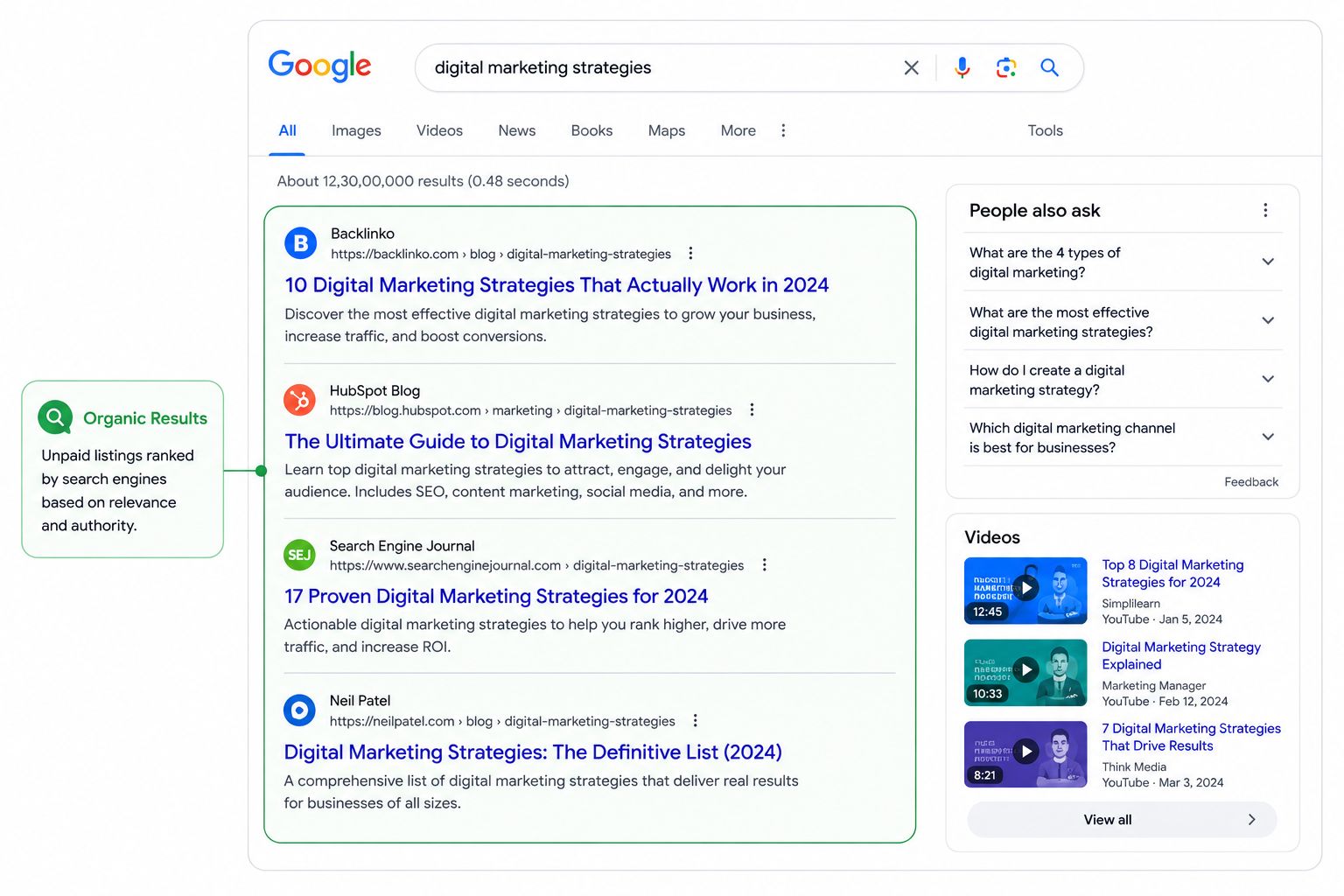
Organic results are the core of any SERP. These are the standard webpage listings that Google has chosen to display based entirely on the quality and relevance of the page, not because anyone paid for placement. Appearing here is the primary goal of SEO.
Each organic result typically contains:
- The page title (blue, clickable text) was pulled from the title tag of the webpage
- The URL of the page is often displayed as a breadcrumb trail (e.g., admeducation.com › learn › seo)
- The meta description a summary of the page content, usually 155–160 characters
- Sometimes, sitelinks include additional links to other pages on the same website, displayed below the main result
Traditionally, there are up to 10 organic results per page. However, with the addition of so many SERP features, modern result pages often display fewer than 10 organic listings, sometimes as few as 4 or 5, because features like AI Overviews, shopping carousels, and maps take up significant space.
| 📝 What an Organic Result Looks Like
Title: What Is SEO? The Complete Beginner’s Guide (2026) URL: admeducation.com › learn › seo › what-is-seo Description: Learn what SEO means, how search engines work, and how to rank higher on Google. A complete, beginner-friendly guide covering all SEO fundamentals. The title tag and meta description are the two elements you control through on-page SEO. Making them compelling increases your click-through rate even if your ranking position stays the same. |
| 💡 SEO Tip: Organic CTR by Position
Position #1 earns an average click-through rate of around 27–28%. Position #3 earns around 10–11%. Position #10 earns less than 3%. This is why ranking higher, not just ranking, is the real goal of SEO. |
2. Paid Results (Google Ads / Sponsored Listings)
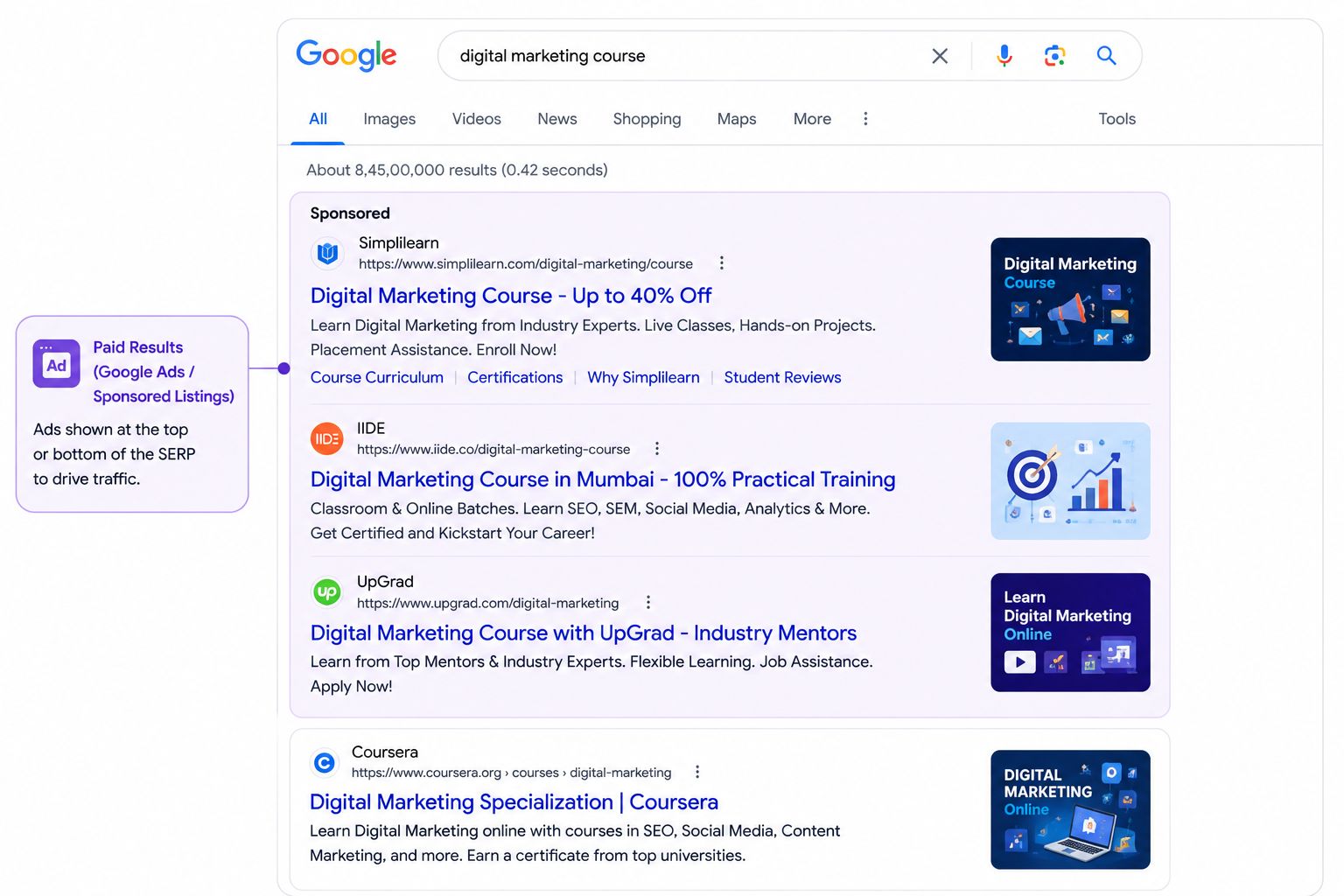
Paid results are advertisements purchased through Google Ads (formerly known as Google AdWords). They look similar to organic results they have a title, URL, and description but they are labelled with a small “Sponsored” tag to indicate they are paid placements.
Paid results typically appear:
- At the very top of the SERP, above all organic results (usually 1–4 ads)
- At the bottom of the SERP, below the organic results (less common)
Advertisers bid on specific keywords. When someone searches that keyword, Google runs an instant auction to determine which ads to show and in what order. The advertiser pays a certain amount each time someone clicks their ad this is called Pay-Per-Click (PPC) advertising, which is part of SEM (Search Engine Marketing) rather than SEO.
Key distinction for beginners: Organic SEO earns free placement through website quality and relevance. Paid ads buy placement for a cost per click. Both appear on the same SERP, and both are important tools in a digital marketing strategy.
| 📝 Organic vs Paid: A Quick Test
Next time you search on Google, look at the results carefully. Any result with a small ‘Sponsored’ label above the title is a paid ad. Everything below without that label is organic. Notice how paid ads often appear first, but many users scroll past them to organic results. This is one reason why organic SEO can be more valuable long-term despite taking longer to achieve. |
3. AI Overviews
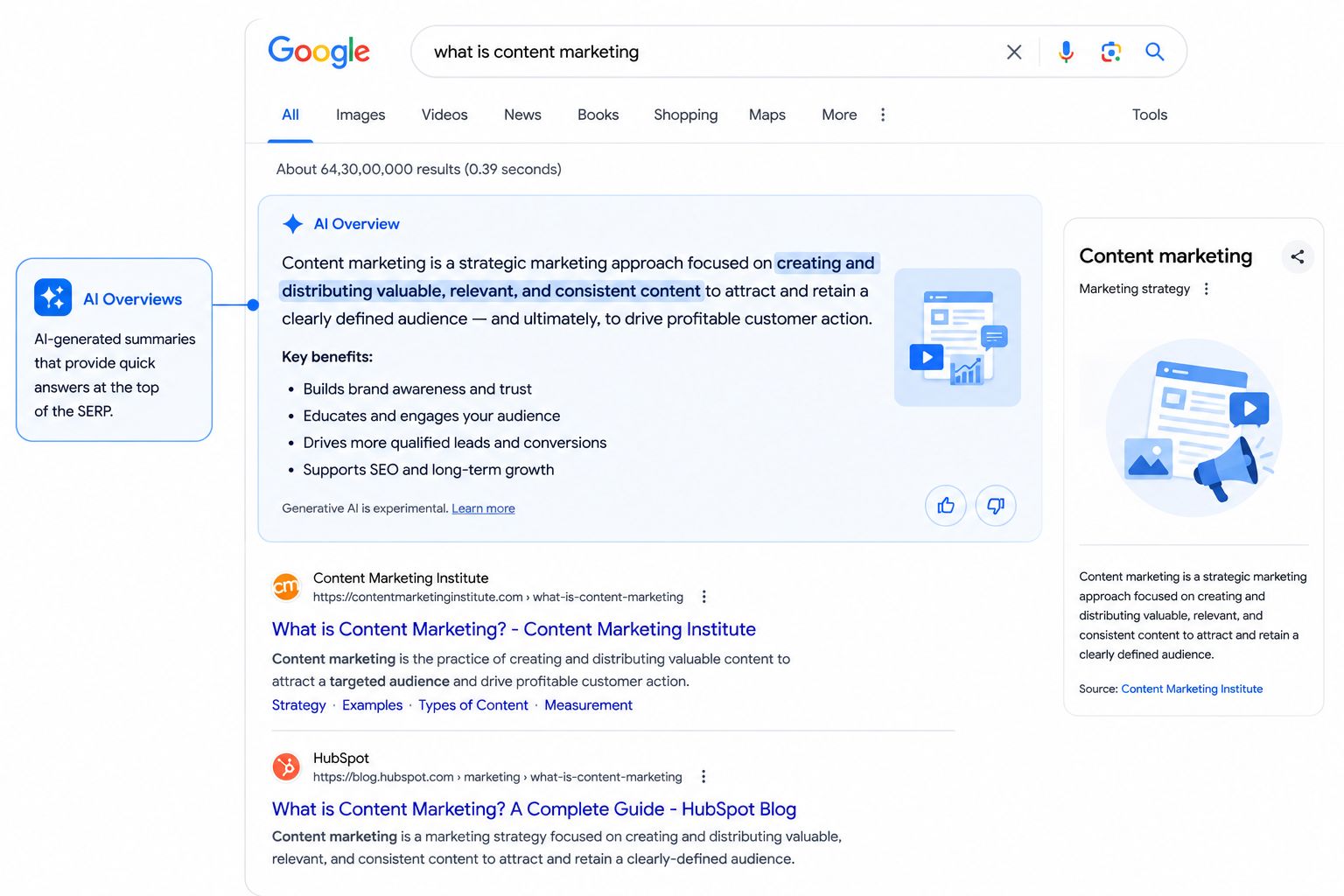
AI Overviews are one of the most significant changes to SERPs in recent years. Introduced by Google as part of its Search Generative Experience (SGE) and now broadly rolled out, AI Overviews appear as a shaded box at the very top of the results page above both ads and organic results and display an AI-generated summary in response to the search query.
Instead of just listing pages that might answer your question, Google now often attempts to answer the question directly using AI, synthesising information from multiple trusted sources across the web.
An AI Overview typically contains:
- A conversational, synthesised answer to the query written by Google’s AI in real time
- Source citations small links to the web pages the AI drew information from
- Sometimes, follow-up questions or related topics the user might want to explore
AI Overviews appear most commonly for informational queries, how-to searches, comparisons, and definitions. They are less common for transactional queries (where users clearly want to buy something) and navigational queries (where users want to find a specific website).
| 🤖 What AI Overviews Mean for SEO in 2026
AI Overviews can reduce click-through rates for some queries if Google answers the question fully; some users never scroll down. However, for complex or nuanced topics, users still click through to read the full source. Appearing as a cited source inside an AI Overview can significantly boost your brand visibility and authority. The best strategy: create comprehensive, authoritative, well-structured content that Google’s AI trusts enough to cite. Focus on depth, accuracy, and clear writing, exactly what great SEO content looks like anyway. |
4. Featured Snippets (Position Zero)
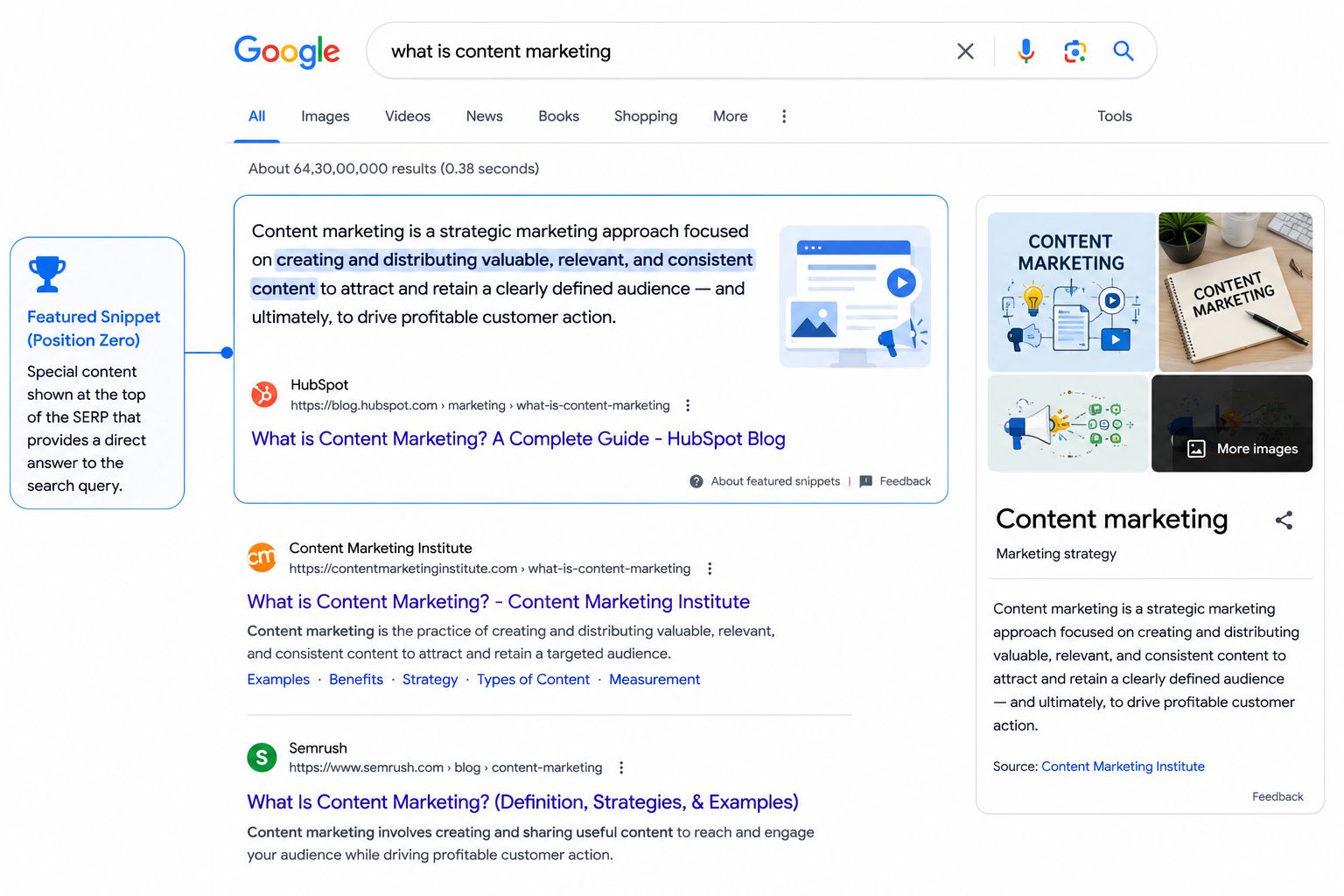
A featured snippet is a special highlighted box that appears at the top of organic search results, sometimes called “Position Zero” because it sits above the regular #1 organic result. It pulls a direct answer to a question from a specific webpage and displays it on the SERP, along with the page title and URL.
Featured snippets typically appear for question-based or comparison queries such as:
- “What is a featured snippet?”
- “How long does SEO take?”
- “Difference between on-page and off-page SEO”
There are three main formats of featured snippets:
Paragraph snippet: A short paragraph of text answering the query. Most common for definitions and explanations.
List snippet: A numbered or bulleted list, often for step-by-step instructions or ranked items.
Table snippet: A table pulled from the page, common for comparison queries and data-heavy answers.
Earning a featured snippet can dramatically increase your click-through rate and brand visibility. Notably, the source of the featured snippet does NOT have to be the #1 ranking page; pages ranking #2 through #5 often earn featured snippets, effectively leapfrogging above higher-ranked competitors.
| 💡 How to Target Featured Snippets
Identify questions your audience searches for (look at People Also Ask boxes for ideas). Write a clear, concise answer to the question early in your content, ideally in 40–60 words. Use an H2 or H3 heading that mirrors the question (e.g., ‘What Is a Featured Snippet?’). For list-format snippets, use numbered or bulleted lists. For table snippets, format your data as an HTML table. Your page must already rank on page one. Google only pulls featured snippets from pages it already ranks highly. |
5. People Also Ask (PAA)
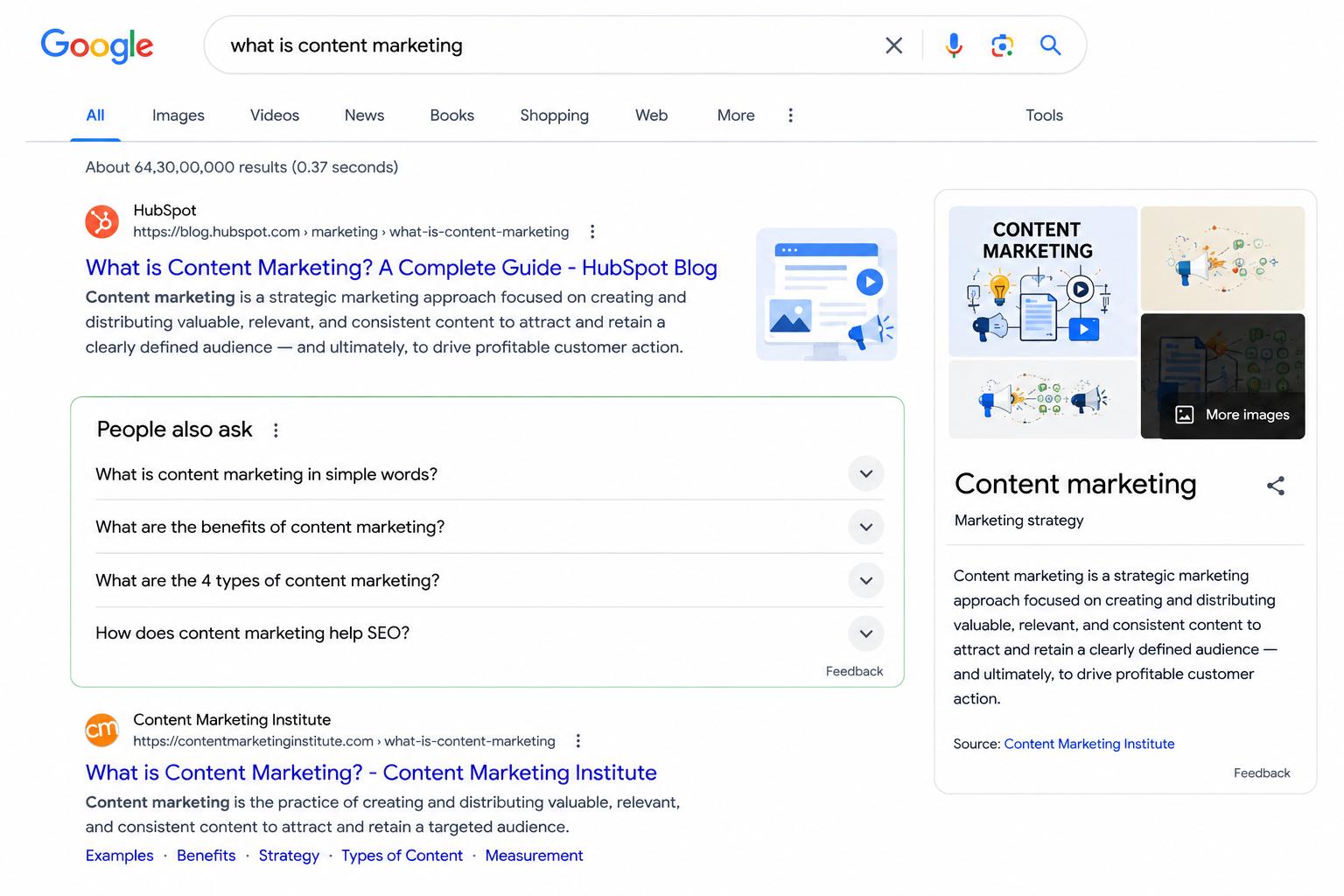
People Also Ask boxes, commonly abbreviated as PAA, are expandable question-and-answer sections that appear in the middle of many SERPs. They display a list of related questions that other users have searched for, along with brief answers pulled from web pages.
When you click on a PAA question to expand it, Google shows a short answer pulled from a webpage (very similar to a featured snippet) along with a link to the source page. Interestingly, expanding one PAA box often causes more questions to load below it, creating a seemingly endless series of related questions.
PAA boxes are highly dynamic. They can appear after the first organic result, halfway down the page, or multiple times on the same SERP. Their placement depends on the query and Google’s assessment of what users are most likely to want next.
| 📝 Why PAA Boxes Matter for Your SEO Strategy
Imagine you search ‘what is keyword research’. A PAA box might include questions like: • ‘Why is keyword research important?’ • ‘How do I do keyword research for free?’ • ‘What tools are used for keyword research?’ Each of these is a content opportunity. If you write a comprehensive article that answers these questions well, Google may pull your answers into the PAA boxes, driving traffic even when you do not rank #1 for the primary keyword. PAA boxes also reveal exactly what your audience wants to know, making them a goldmine for content planning and FAQ writing. |
| 💡 PAA Strategy for Beginners
Search your target keyword and write down every PAA question that appears. Use these questions as H3 subheadings or FAQ sections in your content. Write direct, concise answers (50–80 words) immediately after each question heading. This structure makes it easy for Google to pull your content into both PAA boxes and featured snippets. |
6. Knowledge Panels
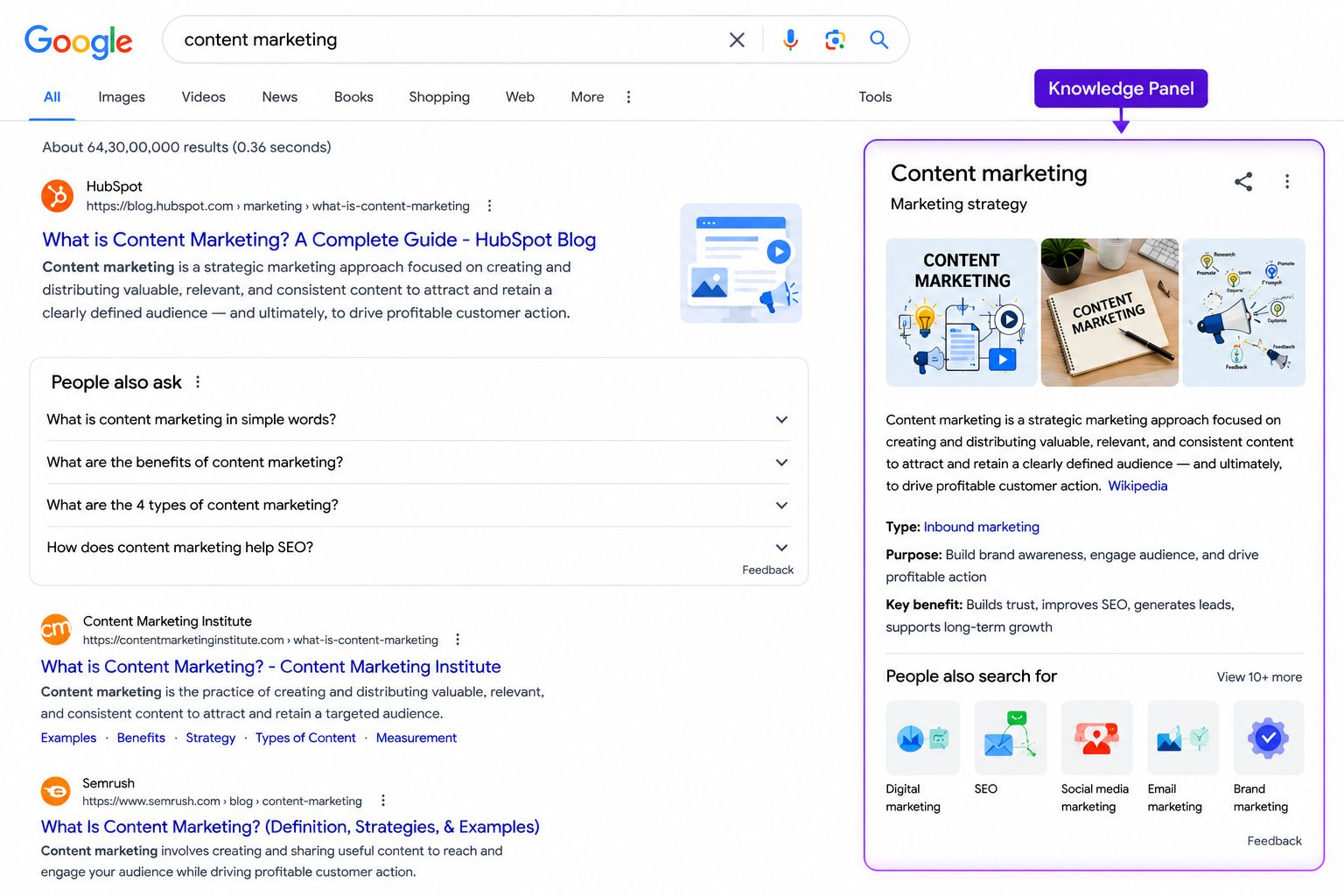
A knowledge panel is the information box that appears on the right side of desktop search results (or near the top on mobile) for well-known entities, brands, organisations, public figures, places, films, books, products, and more.
Knowledge panels are generated from Google’s Knowledge Graph, a massive database of facts and relationships between entities that Google has built by processing information from sources like Wikipedia, Wikidata, official websites, and verified business profiles.
A typical knowledge panel for a business or organisation might include:
- The entity’s name and logo or photo
- A brief description (often pulled from Wikipedia)
- Key facts: founding date, headquarters, CEO, social media profiles, website
- Reviews and ratings (for local businesses)
- Related entities or people
Why it matters: A knowledge panel is a powerful trust signal. When users search your brand name and see a knowledge panel, it conveys authority and legitimacy. It also takes up significant visual space on the SERP, reducing the chance that competitors’ results are seen.
How to work towards a knowledge panel: Claim and verify your Google Business Profile, get listed on Wikipedia or Wikidata (if applicable), ensure consistent information about your brand across the web (your website, social media, directories), and use structured data (Schema Markup) on your website to help Google understand who you are.
7. The Local Pack (Map Pack)
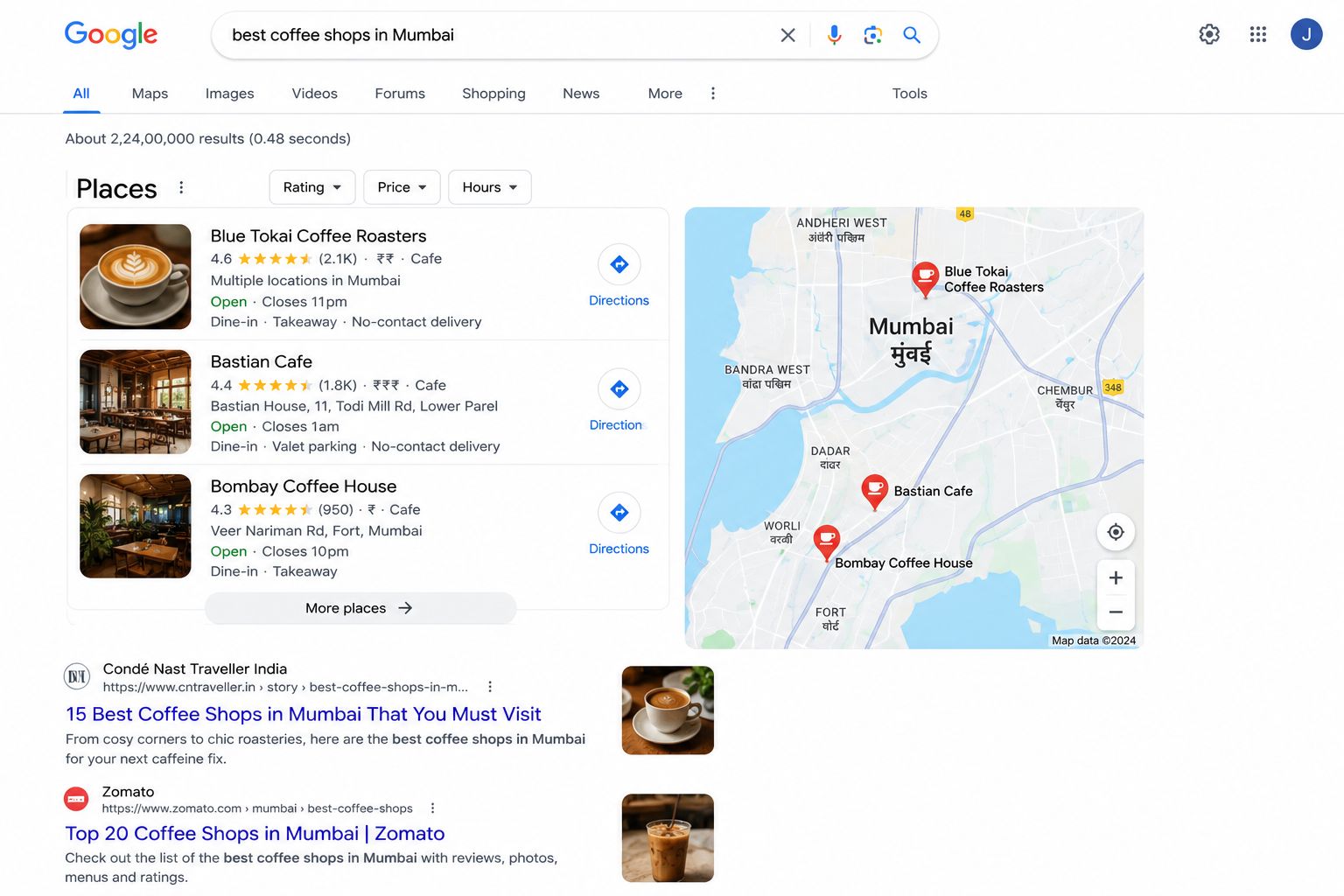
The Local Pack, also called the Map Pack or Google 3-Pack, is a special SERP feature that appears for location-based searches. It displays a Google Map alongside a list of three local businesses relevant to the search query, showing their name, rating, address, phone number, and sometimes hours.
The Local Pack appears prominently at the top of results (often just below ads) for searches like:
- “best dentist in Chennai”
- “pizza near me”
- “digital marketing agency Mumbai”
- “gym Bangalore”
Ranking in the Local Pack is arguably the single most valuable goal for any local business. Research shows that Local Pack results receive the most clicks for location-based searches, often more than the #1 organic result on the same page.
The Local Pack is driven by Local SEO signals, particularly your Google Business Profile optimisation, proximity to the searcher, review quality and quantity, and local citation consistency. It is an entirely separate ranking system from organic results.
| 📝 A Tale of Two Plumbers
Plumber A has a professional website with excellent SEO. They rank #3 in organic results for ‘plumber Chennai’. But they have not set up their Google Business Profile. Plumber B has a simpler website but a fully optimised Google Business Profile with 80 reviews averaging 4.8 stars. They appear in the Local Pack. When a homeowner searches ‘plumber Chennai’ on their phone, they see the Local Pack first. They call Plumber B immediately, never scrolling down to the organic results. This illustrates why Local SEO and the Local Pack are critical for service-area businesses even if their organic SEO is not yet strong. |
8. Shopping Results (Google Shopping Carousel)
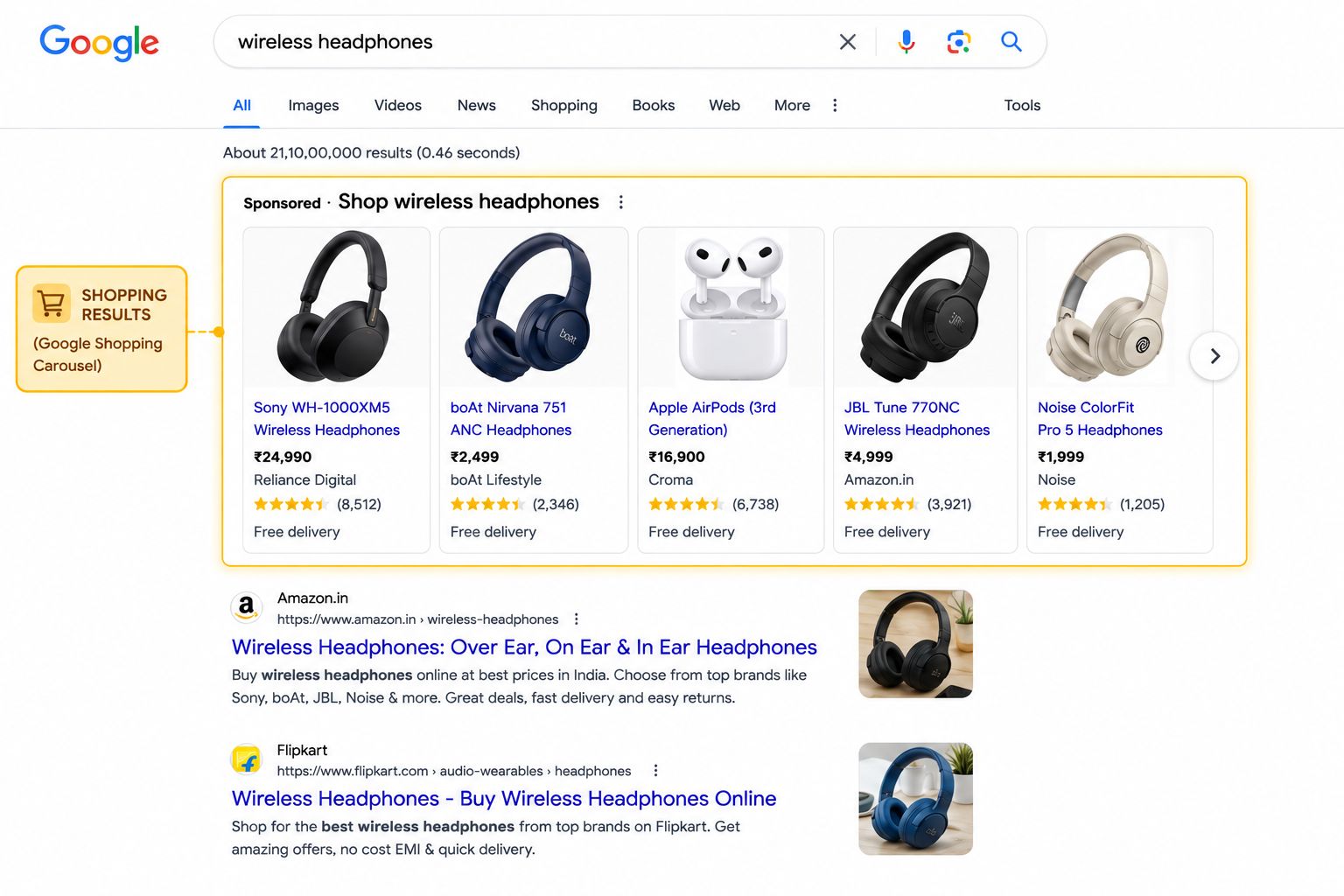
For product-related searches, especially when a user appears ready to buy, Google often displays a horizontal carousel of products at the top of the SERP. Each product card shows a product image, name, price, retailer name, and sometimes a rating.
Shopping results are powered by Google Shopping (part of Google Merchant Centre) and can be both paid (Google Shopping Ads) and organic (free listings). Retailers and e-commerce businesses can list their products in Google Merchant Centre to appear in shopping results.
If your business sells physical products online, appearing in Google Shopping results is a significant traffic opportunity, especially as shopping results often appear above all other result types for product searches.
9. Image Pack
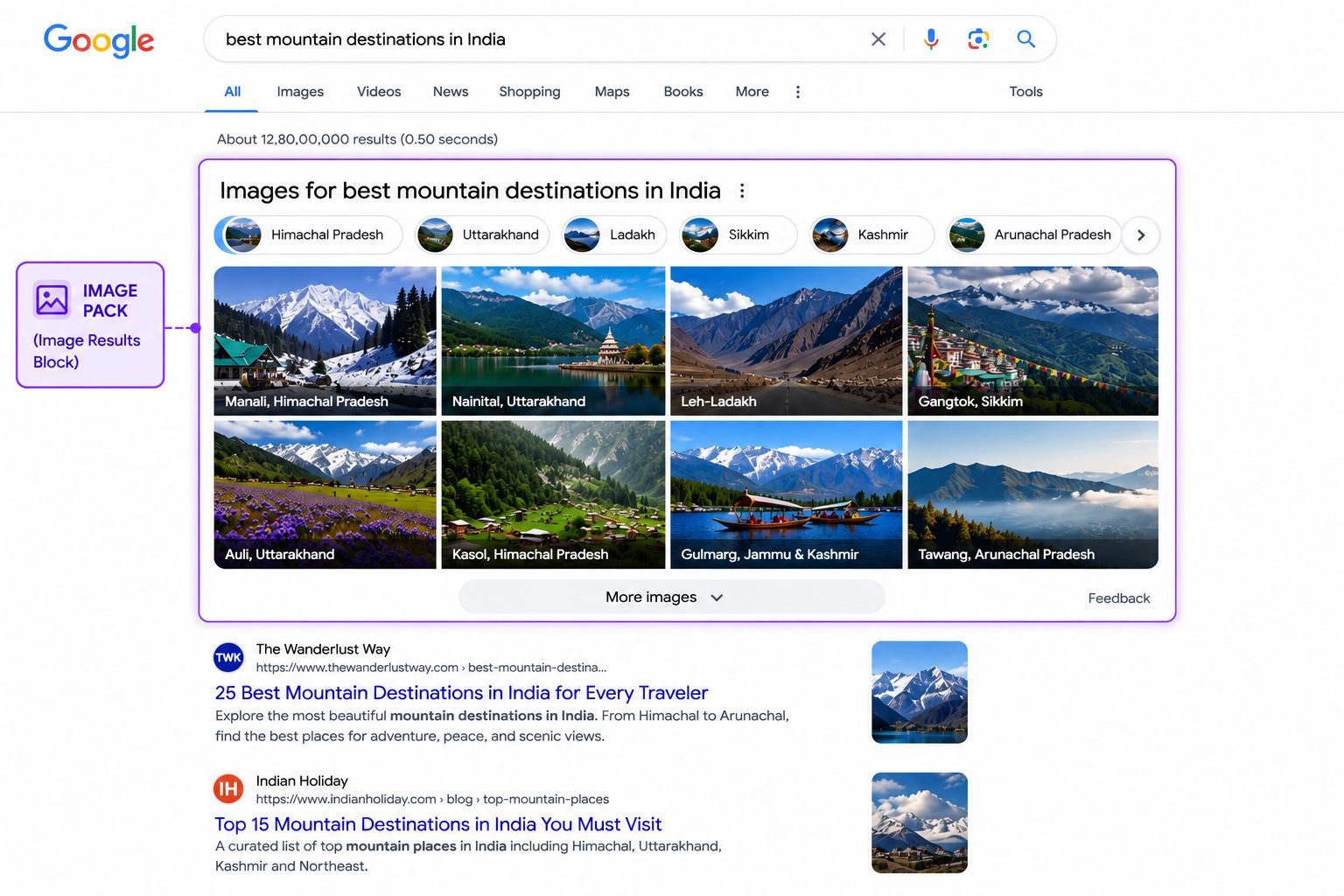
An image pack is a horizontal row of images that appears within the standard text results for visually-oriented queries. For example, searching “minimalist living room interior design” or “German Shepherd puppy” will almost always trigger an image pack.
Image packs typically link to Google Images rather than directly to the source website. However, clicking through to view the full image often takes the user to the originating website, giving image-optimised pages an additional traffic source.
How to appear in image packs: Use descriptive, keyword-relevant file names for your images (e.g., ‘minimalist-living-room-grey-sofa.jpg’ rather than ‘IMG_3847.jpg’). Write detailed alt text describing the image. Use high-quality, original images. Ensure pages load quickly. Implement image structured data where relevant.
10. Video Carousel
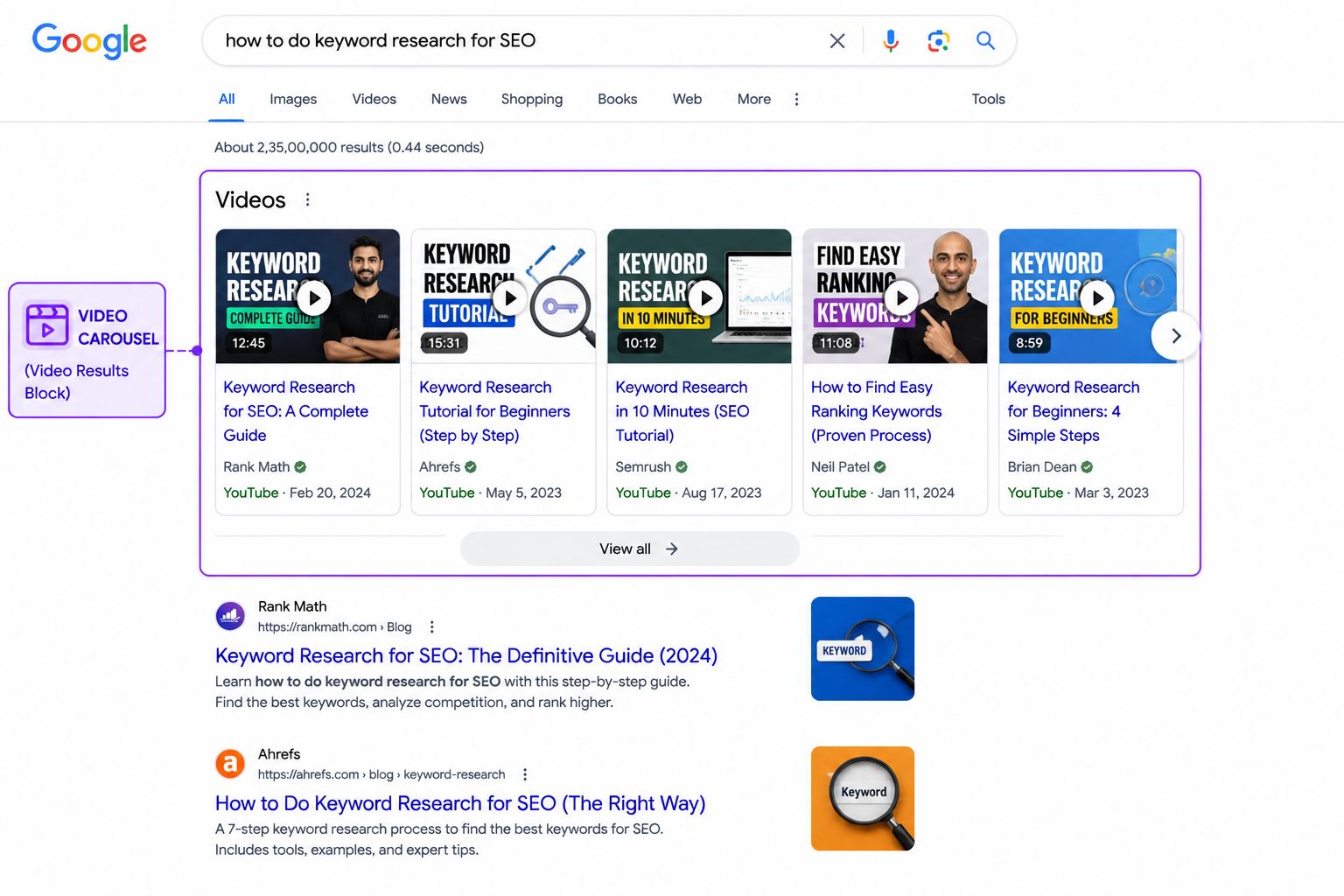
Video carousels appear on SERPs for queries where video content provides a particularly good answer, tutorial searches, “how to” queries, entertainment content, news events, and product reviews.
Video results are predominantly from YouTube (which is owned by Google), though other video platforms can appear. Each result shows a video thumbnail, title, channel name, duration, and publication date.
For businesses that create video content, appearing in video carousels provides a meaningful additional source of SERP visibility, especially for tutorial and educational content where video is the preferred format. Optimising YouTube videos with strong titles, descriptions, and tags is the primary strategy for appearing here.
11. Top Stories (News Results)
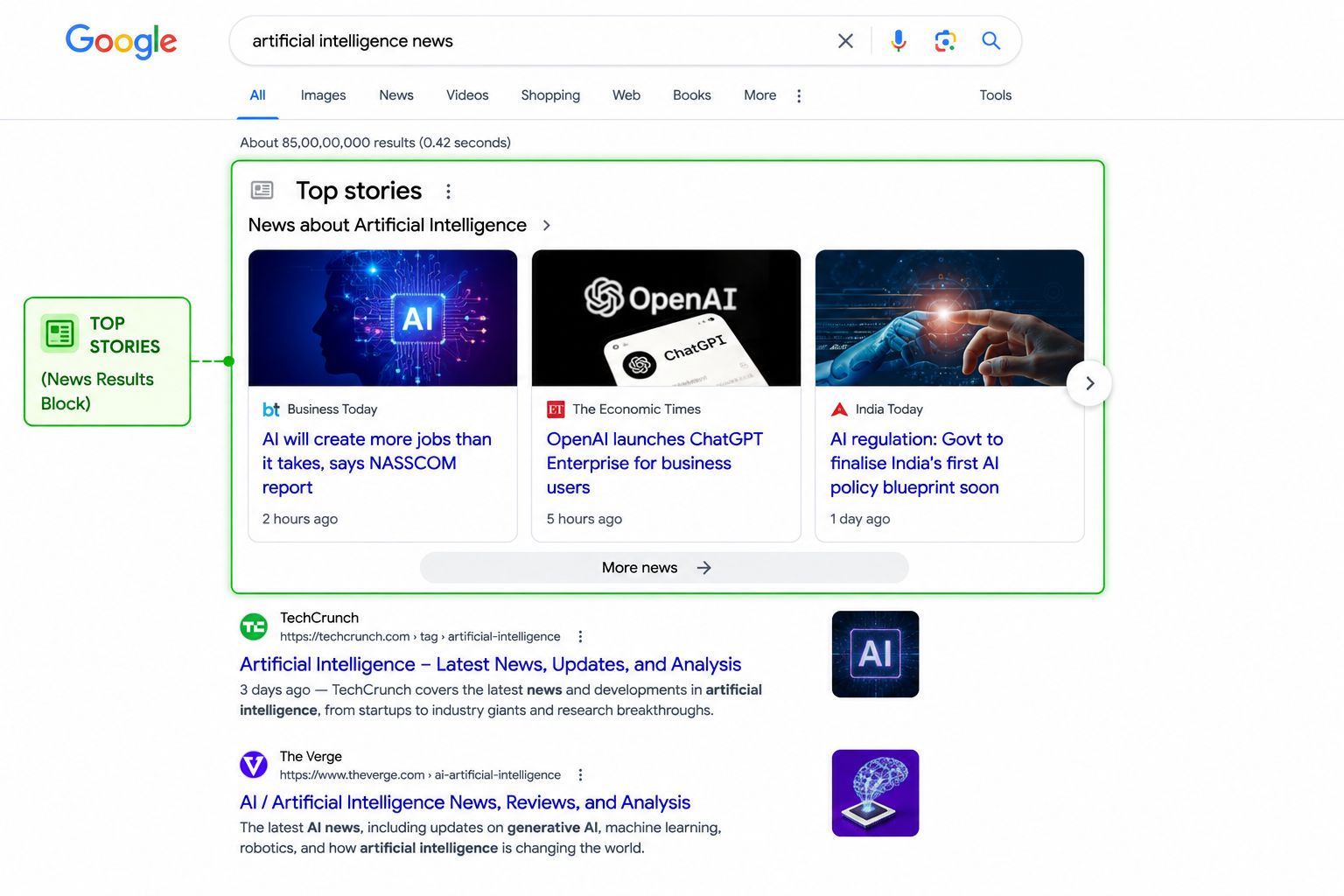
For queries related to current events, breaking news, or trending topics, Google displays a “Top Stories” carousel or section featuring recent news articles from reputable publishers. These results prioritise recency; a story published an hour ago can easily outrank a well-established article published a year ago.
News results typically come from Google News publishers and major journalistic outlets. For most small businesses and content creators, this feature is less directly relevant unless you run a news or current affairs website. However, for time-sensitive topics in your industry, publishing timely content can occasionally earn a Top Stories placement.
12. Sitelinks
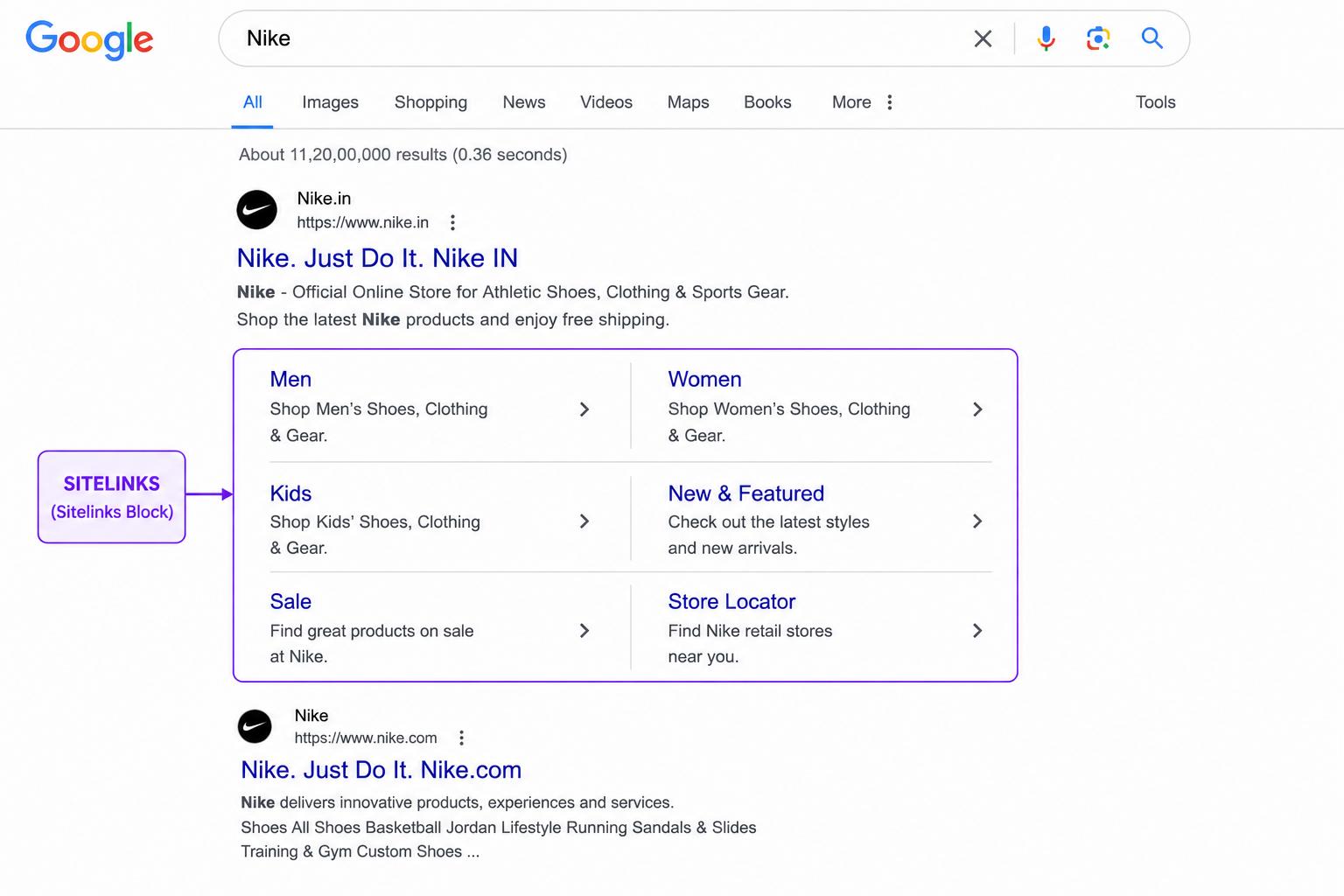
Sitelinks are additional links that appear beneath the main result of a website when it is the clear most relevant result for a query. They most commonly appear when someone searches directly for a brand name.
For example, searching “Anthropic” might show the main Anthropic.com homepage result, with six additional sub-links underneath leading directly to their Research page, About page, Careers, and other key sections.
Sitelinks are automatically generated by Google; you cannot force them to appear. However, having a clear, well-structured website with logical navigation and internal linking makes Google more likely to display it. They take up substantial SERP real estate and dramatically increase click-through rates for branded searches.
13. Related Searches
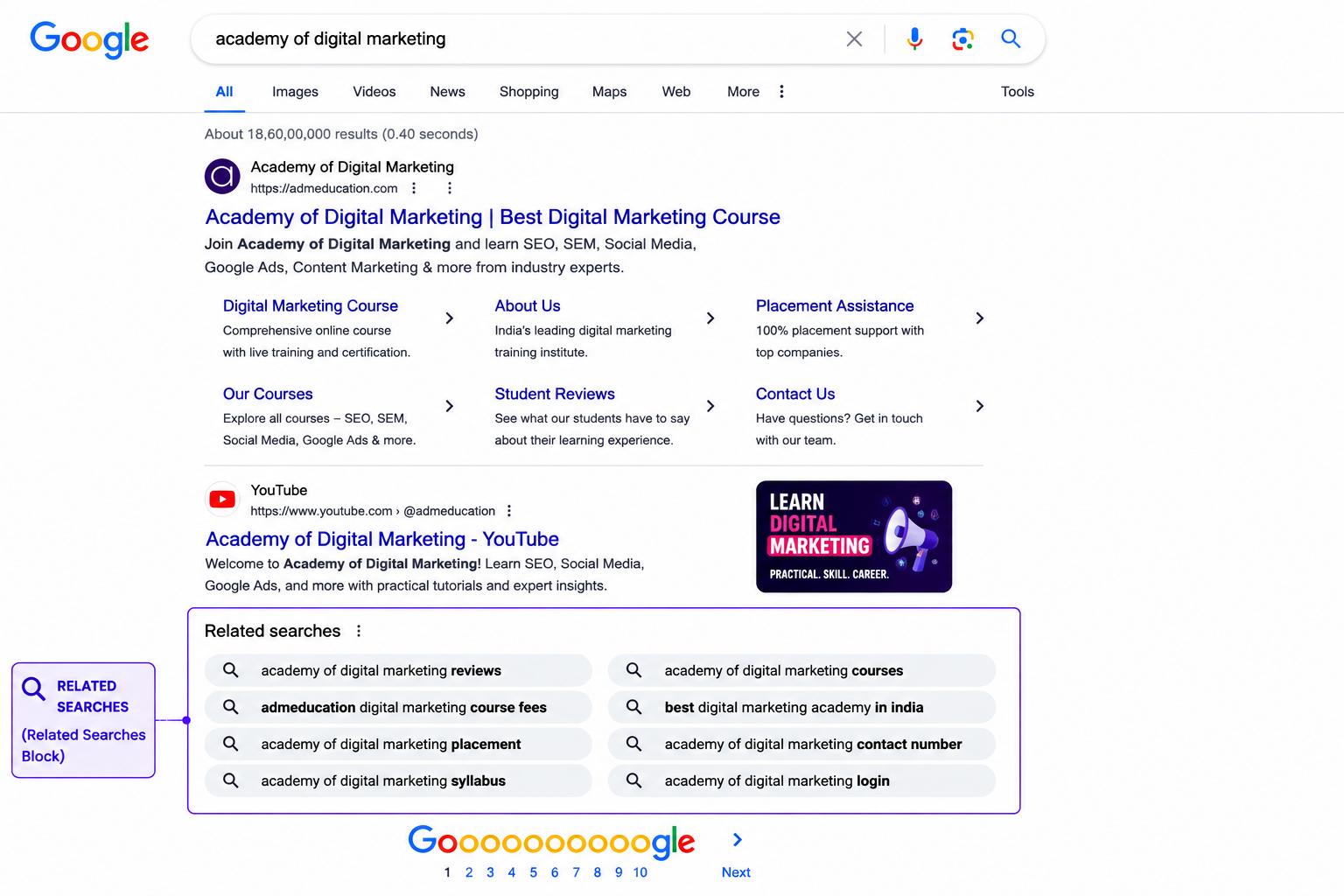
At the bottom of most SERPs, Google displays a section called “Related Searches” a list of 6–8 alternative search queries related to the original search. These represent what other users searched for after their initial query or common follow-up searches.
Related Searches are a goldmine for SEO keyword research. They reveal:
- Adjacent topics your audience is interested in
- Long-tail keyword variations you might not have considered
- The natural next question users have after their initial search
Incorporating these related terms naturally into your content helps you cover a topic comprehensively and increases your chances of ranking for multiple related queries with a single page.
How Different Search Queries Produce Different SERPs
One of the most important concepts for any SEO practitioner to grasp is that different types of search queries produce fundamentally different SERPs. The SERP is not a one-size-fits-all page; it adapts to what Google thinks the searcher wants to accomplish.
This is why SERP analysis, actually searching your target keyword and studying what Google shows, must always precede content creation. Here is how query type shapes the SERP:
Informational Queries
Informational queries are searches where the user wants to learn something. They are characterised by question words or general topic searches.
Examples: “What is SEO?”, “How does photosynthesis work?”, “Best time to visit Japan”
What their SERPs typically contain: AI Overviews (very common for questions), Featured Snippets, People Also Ask boxes, organic article results, video carousels (especially for tutorials), and Related Searches. Very few or no ads.
SEO implication: Informational queries reward long-form, comprehensive educational content. Structure your content with clear headings and direct answers to questions. Aim for featured snippets and PAA placements.
Navigational Queries
Navigational queries occur when a user is trying to find a specific website or page. They already know where they want to go; they are just using Google as a faster shortcut than typing a full URL.
Examples: “Facebook login”, “YouTube homepage”, “ADM education website”
What their SERPs typically contain: The target website’s result as #1 (almost always), sitelinks, and sometimes a knowledge panel for the brand. Very little else.
SEO implication: For your own brand name, ensure your website ranks #1 and displays sitelinks. For competitors’ brand names, organic ranking is extremely difficult and largely unnecessary, since the searcher already knows where they want to go.
Commercial Investigation Queries
Commercial queries are searches by users who are researching before making a purchase decision. They are comparing options, reading reviews, and evaluating alternatives.
Examples: “best laptop under 50000 rupees”, “Ahrefs vs Semrush”, “Zoho CRM reviews”
What their SERPs typically contain: Organic comparison articles and review sites (often from established review platforms), sometimes shopping results, sometimes ads. Featured snippets for comparison tables are common.
SEO implication: For commercial queries, create genuine, balanced comparison content that helps users make informed decisions. Comparison articles, review posts, and ‘best of’ guides tend to rank well for these queries.
Transactional Queries
Transactional queries signal high purchase intent. The user is ready to buy or take action right now.
Examples: “buy Semrush subscription”, “order pizza online”, “book hotel Chennai”
What their SERPs typically contain: A heavy dose of paid ads (Google Ads and Shopping ads), shopping carousels, organic results from e-commerce sites, and sometimes a local pack (for local purchase intent).
SEO implication: Transactional queries are dominated by paid advertising and large e-commerce platforms. As an SEO goal, ranking organically for pure transactional terms is challenging but valuable. Product pages with strong on-page SEO and Schema Markup (price, availability, reviews) perform best.
Local Queries
Local queries indicate the user wants results near a specific geographic location, either stated or implied.
Examples: “coffee shop near me”, “accountant in Coimbatore”, “best hospital in Chennai”
What their SERPs typically contain: A prominent Local Pack (map + 3 businesses) at the top, organic results from local business websites and directories below, sometimes paid ads.
SEO implication: For local businesses, the Local Pack is the priority. Invest in Local SEO: optimise your Google Business Profile, earn reviews, and build local citations.
| 📋 SERP Analysis Checklist: Do This Before Writing Any Page
Step 1: Search your exact target keyword in an incognito/private browser window. Step 2: Note what type of results dominate: articles, products, videos, local pack, and AI Overview. Step 3: What is the search intent? Informational, transactional, navigational, local? Step 4: Are there featured snippets? In what format, paragraph, list, or table? Step 5: What questions appear in the People Also Ask boxes? Step 6: What is the format and length of the top-ranking organic pages? Step 7: How many ads appear? Are they above the organic results? Step 8: Based on your analysis, what type of content does Google clearly want here? |
SERP Click-Through Rates: Why Position Matters Enormously
Once you understand what a SERP is, the next critical question is: how much does it matter where on the SERP your result appears?
The answer is: enormously. The difference in traffic between position #1 and position #5 is not 20%; it is often 400% or more. And the difference between page one and page two is so dramatic that many SEO professionals say, only half jokingly, “the best place to hide a dead body is page two of Google.”
Here is a detailed breakdown of average organic click-through rates by position based on aggregated research:
| SERP Position | Avg. Click-Through Rate | Traffic Implication |
| #1 | ~27–28% | Roughly 1 in 4 searchers click here |
| #2 | ~15–16% | About half the clicks of position #1 |
| #3 | ~11% | Another sharp drop from #2 |
| #4 | ~8% | Entering low-visibility territory |
| #5 | ~6.3% | Less than 1 in 16 searchers click |
| #6–#7 | ~3–5% | Very limited visibility |
| #8–#10 | ~1–3% | Minimal organic traffic |
| Page 2 (#11+) | <1% | Effectively invisible |
These numbers illustrate why climbing from position #6 to position #2 for a popular keyword can result in a 10x increase in traffic from that single keyword. The SERP is highly winner-takes-most, particularly at the very top.
How SERP Features Affect CTR
Traditional position-based CTR data becomes more complex when SERP features are involved:
- AI Overviews can reduce overall CTR for some informational queries, as users get their answer without clicking.
- Featured Snippets can dramatically increase CTR for the featured page. Research suggests that snippets can earn 20–30% of all clicks for a query.
- Ads push organic results down the page, reducing CTR for the top organic spots, particularly on mobile.
- A Local Pack appearing above organic results can divert the majority of clicks away from organic listings for local searches.
- Rich results (star ratings, prices, FAQ entries) can increase CTR even at lower positions. A #4 result with 5-star reviews may outperform a #2 result without them.
This is why modern SEO is not just about ranking at a position; it is about optimising how your result appears on the SERP. A compelling title and meta description, rich results, and schema-powered enhancements all contribute to a higher CTR regardless of your exact ranking position.
Rich Results: Making Your Listing Stand Out
Rich results are enhanced organic listings that display additional information beyond the standard title, URL, and description. They are powered by structured data, also called Schema Markup, which you add to your website’s HTML to tell Google more about your content.
Rich results make your listings visually distinctive in the SERP, which typically improves click-through rates significantly. Here are the most common types:
Star Ratings and Reviews
One of the most impactful rich results. A listing showing a gold star rating (e.g., ★★★★☆ 4.3 | 217 reviews) alongside the page title immediately catches the eye and builds trust. Relevant for product pages, recipe pages, course listings, local businesses, and any page that aggregates user reviews. Implemented using Review or AggregateRating Schema Markup.
FAQ Rich Results
FAQ rich results expand your organic listing to show expandable question-and-answer sections directly in the SERP. This significantly increases the physical space your result occupies on the page, sometimes pushing competitor results below the fold. Implemented using FAQPage Schema Markup on pages with FAQ sections. Note: Google has reduced the prevalence of FAQ rich results in recent years, showing them primarily for authoritative government and health websites.
Breadcrumb Trails
Instead of showing the full URL, breadcrumb rich results display a clean, hierarchical path (e.g., admeducation.com › Learn › SEO › What Are SERPs). This improves the readability and clickability of your listing and helps users understand where the page sits within your site structure.
Sitelink Searchbox
For branded searches, a sitelink searchbox can appear within your search result, allowing users to search your website directly from the Google SERP. This is particularly valuable for large websites with substantial content libraries.
Article / Recipe / Event / Product Rich Results
Different types of content have their own schema types that unlock specific rich result formats. Recipe pages can show cooking time, calorie counts, and star ratings. Event pages can show dates, locations, and ticket links. Product pages can show price, availability, and reviews. Each type of schema markup enables a different rich result format.
| 💡 How to Implement Structured Data
Use Google’s Structured Data Markup Helper tool to generate Schema Markup code for your pages. Add the generated JSON-LD code to the <head> or <body> of your HTML. Use Google’s Rich Results Test tool to verify your structured data is implemented correctly. Monitor your rich results performance in Google Search Console under the ‘Enhancements’ section. Remember: structured data does not guarantee rich results. Google decides whether to show them based on content quality and relevance. |
AI Is Transforming SERPs: What Beginners Need to Know
The Google SERP of 2026 looks fundamentally different from the SERP of 2020, and the pace of change is only accelerating. Artificial intelligence is reshaping search results in ways that every SEO practitioner needs to understand.
Google AI Overviews Are Changing How Users Interact with Search
As discussed earlier, AI Overviews now appear at the top of many SERPs for informational queries. Google’s AI reads content from multiple trusted web pages and generates a synthesised answer, sometimes making it unnecessary for users to click any organic result at all.
This phenomenon, where users get answers without visiting websites, is sometimes called “zero-click search.” It is a growing reality that SEO practitioners must adapt to.
However, the picture is nuanced. Research shows that:
- AI Overviews appear more frequently for simple, factual questions with clear answers.
- For complex, nuanced, or opinion-based topics, users still click through to read full articles.
- Being cited as a source within an AI Overview is extremely valuable it drives brand recognition and selective high-quality clicks.
- AI Overviews have increased the total number of searches, as users ask more follow-up questions.
How to Optimise for AI Overviews
The strategy for appearing as a cited source in AI Overviews is not dramatically different from traditional SEO; it just emphasises certain qualities even more strongly:
- Be authoritative: Build genuine expertise and trustworthiness (E-E-A-T) in your topic area.
- Be comprehensive: Cover topics thoroughly. AI systems prefer sources that provide complete, accurate answers.
- Be clear: Use simple, direct language. AI systems find it easier to extract and use well-structured content.
- Use Schema Markup: Structured data helps Google understand your content more precisely.
- Build topical authority: Websites that comprehensively cover entire topic areas are more likely to be trusted as sources.
Personalisation and Localisation
Google’s SERP is increasingly personalised to the individual user. Your search history, location, device, language preferences, and even the time of day influence which results you see and in what order. This is why two people searching the same keyword in different locations or on different devices may see significantly different SERPs.
For SEO, this means: always analyse SERPs in an incognito browser window (to minimise personalisation effects) and consider geographic variations in your targeting strategy.
Voice Search and Conversational Queries
With the growth of smart speakers and voice assistants, a growing share of searches is now spoken rather than typed. Voice searches tend to be longer, more conversational, and phrased as natural questions: “What is the best free SEO tool for beginners?” rather than “best free SEO tool beginner.”
Voice search results are typically pulled directly from featured snippets and AI Overviews, meaning that earning those features becomes even more valuable as voice search grows. Structuring content around natural conversational questions is the key optimisation strategy.
How to Analyse a SERP Like a Pro (Even as a Beginner)
SERP analysis is one of the most important and most underrated skills in SEO. Before writing a single word of content, you should thoroughly analyse the SERP for your target keyword. Here is a step-by-step framework for doing this well:
Step 1: Search in Incognito Mode
Open a private/incognito browser window before searching. This minimises the personalisation effect of your search history and gives you a more “neutral” view of the SERP, closer to what an average user in your target location would see.
Step 2: Identify the Dominant Result Type
Look at the overall composition of the SERP. Is it dominated by long-form articles? Product pages? Videos? Local business listings? The dominant format tells you what Google believes users want from this query and what type of content you need to create to compete.
Example: If you search ‘how to make sourdough bread starter’ and the top results are all step-by-step guide articles with photos, not recipe cards or videos, Google is telling you that users want detailed written instructions. Producing a 15-second Instagram video will not rank here.
Step 3: Identify the Search Intent
Based on what you see, classify the query’s intent: informational (users want to learn), commercial (users are researching a purchase), transactional (users want to buy now), or local (users want a nearby business). Your content must match this intent precisely.
Step 4: Note All SERP Features Present
Record which features appear on the SERP: AI Overview, featured snippet, PAA boxes, local pack, shopping carousel, image pack, video carousel, news results, knowledge panel. Each feature present represents a potential opportunity or a threat to organic click-through rates.
Step 5: Read the Top-Ranking Pages
Open the top 3–5 organic results and read them. Ask yourself:
- How long are these articles? How comprehensive?
- What topics and subtopics do they cover?
- What questions do they answer?
- What is the format: long prose, bullet lists, step-by-step instructions, tables?
- What is missing? What could you cover better or more thoroughly?
The goal is not to copy what the top results do; it is to understand the benchmark and then create something definitely better.
Step 6: Mine the People Also Ask Section
Every question in the PAA box is a content opportunity. Write them all down. These are the follow-up questions your audience has after their initial search, and they can become subheadings, FAQ entries, or even the topics of entire separate articles.
Step 7: Check the Related Searches
Scroll to the bottom of the SERP and note the Related Searches. These reveal adjacent keyword opportunities and help you understand the broader topic landscape around your target keyword.
Step 8: Assess the Competition
Look at the domains ranking on page one. Are they large, authoritative publishers (Forbes, Wikipedia, major news outlets) or smaller, more specialist websites? This gives you a realistic sense of how competitive the keyword is and whether it is realistically achievable for a newer or smaller website.
| 📝 SERP Analysis in Practice: ‘What Are SERPs’
Query: ‘What are SERPs’ Intent: Informational users want a clear explanation of the term. SERP features: AI Overview present, Featured Snippet (paragraph format), PAA boxes, organic results (mostly educational/blog content from SEO tool companies and marketing blogs). PAA questions: ‘What does SERP stand for?’, ‘What is the difference between SEO and SERP?’, ‘What are SERP features?’, ‘How do you rank on a SERP?’ Top-ranking content: Comprehensive guide articles, 1,500–4,000 words, with clear definitions and breakdowns of SERP features. Conclusion: To compete for this keyword, you need a comprehensive educational article that clearly defines SERPs, explains every major SERP feature, and answers the PAA questions directly. This exact guide does exactly that. |
Common Beginner Mistakes When Thinking About SERPs
Mistake 1: Never Actually Looking at the SERP
Many beginners jump straight into writing content without ever searching their target keyword and studying the SERP. This leads to creating the wrong type of content for the query, for example, writing a long educational article for a keyword whose SERP is dominated by product pages. Always start with SERP analysis.
Mistake 2: Ignoring SERP Features
Focusing only on organic position #1 while ignoring featured snippets, PAA boxes, and AI Overviews is leaving significant traffic opportunities on the table. A page ranking at position #5 but appearing in two PAA boxes and a featured snippet will likely receive more total clicks than a competitor at position #2 with none of these features.
Mistake 3: Treating All Keywords the Same
Different queries have completely different SERP compositions, competition levels, and user intents. A single SEO strategy will not work equally across all keywords. Each target keyword deserves its own SERP analysis and content strategy.
Mistake 4: Ignoring Paid Results in Your Analysis
Looking at a SERP without noting the paid ads gives you an incomplete picture. Heavy paid ad presence for a keyword often indicates high commercial value, but it also means organic results are pushed further down the page, reducing organic CTR. Adjust your expectations and strategy accordingly.
Mistake 5: Not Considering Mobile SERPs
Desktop and mobile SERPs can look quite different, and since most searches now happen on mobile, the mobile SERP is the more important one. Always check how a SERP looks on mobile, particularly for local queries where the Local Pack dominates the entire visible screen.
Mistake 6: Neglecting Title Tags and Meta Descriptions
Many beginners focus entirely on ranking position and ignore the appearance of their listing on the SERP. A compelling, well-written title and meta description can dramatically increase click-through rates from the same position. Always treat your title and meta description as your advertisement in the organic results.
| ⚠️ Avoid These Title Tag Mistakes
Too long: Titles over 60 characters get cut off with ‘…’ in search results. Missing the keyword: Your target keyword should appear naturally in the title. Boring or generic: ‘Home Page’ or ‘Article About SEO’ will get fewer clicks than specific, compelling titles. Clickbait without substance: Misleading titles increase bounce rate and damage long-term rankings. Duplicate titles: Every page on your website should have a unique, descriptive title tag. |
Tools for SERP Research and Tracking
Manually searching keywords and studying SERPs is valuable, but professional SEO tools make the process faster, more scalable, and far more data-rich. Here are the key tools for SERP research:
Google Search Console
Google’s free tool shows exactly which queries are bringing impressions and clicks to your website, along with your average position for each query. It is the most direct data available on how you appear in SERPs. The Performance report is your primary source of SERP-level data for your own website.
Ahrefs
Ahrefs’ Keywords Explorer shows the SERP history for any keyword, how rankings have shifted over time, which SERP features are present, keyword difficulty, and which pages currently rank. The SERP Overview section shows all top-ranking pages at a glance, including their traffic, domain authority, and number of backlinks.
Semrush
Semrush’s Keyword Overview and SERP Features filter allows you to see which SERP features appear for any keyword and filter keyword lists to find only keywords that trigger specific features (e.g., “show me all keywords where a featured snippet appears”). This is invaluable for targeted snippet optimisation strategies.
Moz Keyword Explorer
Moz provides keyword data including SERP Analysis showing the top-ranking pages for any keyword with their Page Authority and Domain Authority scores, making it easy to assess how competitive a keyword is before committing to targeting it.
Google’s Free Tools
Beyond Search Console, several free Google tools help with SERP research:
- Google Keyword Planner: Shows search volume estimates for keywords (requires a Google Ads account)
- Google Trends: Shows relative search popularity over time and by geography
- Google’s Rich Results Test: Checks whether your structured data is eligible for rich results
- Manual SERP inspection: Simply searching your keywords in an incognito window remains one of the most valuable and completely free research methods
Conclusion
Understanding SERPs is not just academic knowledge; it is one of the most practical skills in all of digital marketing. Every SERP tells you something invaluable: what Google thinks users want, who your competition is, what format of content works best, and what specific opportunities exist for your website to earn visibility.
The biggest shift in thinking for most beginners is this: stop thinking about SERPs as a passive list you hope to appear on, and start thinking about them as a dynamic landscape you actively study and strategically navigate.
Before creating any content, analyse the SERP. Understand the intent. Identify the features. Study the competition. Then create something genuinely better than what is already there.
Here is a quick summary of what you now know:
- SERPs are the results pages search engines display, and they are far more complex than a list of ten links.
- Modern SERPs contain many features: organic results, ads, AI Overviews, featured snippets, PAA boxes, local packs, shopping carousels, image packs, video results, knowledge panels, and more.
- Different query types (informational, commercial, transactional, local, navigational) produce different SERPs.
- Position matters enormously; the top 3 results receive the vast majority of clicks.
- Rich results, structured data, and compelling title tags improve click-through rates regardless of position.
- AI Overviews are reshaping how users interact with SERPs, with being cited as a source being the new goal alongside ranking.
- Always analyse the SERP before writing any content targeting a keyword.
Frequently Asked Questions About SERPs
What does SERP stand for?
SERP stands for Search Engine Results Page, the page that Google or another search engine displays after a user enters a search query. It contains a mix of organic results, paid ads, and various SERP features depending on the query.
How many results are on a SERP?
Traditionally, Google shows 10 organic results per page. However, with the increasing presence of SERP features like AI Overviews, shopping carousels, local packs, video results, and featured snippets, modern SERPs often show fewer than 10 organic text results, sometimes as few as 4 or 5 on a feature-rich page.
What is the difference between organic results and paid results?
Organic results are earned through SEO Google ranks your page because it deems it the most relevant and high-quality result for a query. No money changes hands per click. Paid results (marked ‘Sponsored’) are Google Ads placements that advertisers pay for each time someone clicks their ad. Both appear on the same SERP, but they are fundamentally different in cost, method, and long-term value.
What is a featured snippet, and how do I get one?
A featured snippet is a highlighted box at the top of search results showing a direct answer to a question, pulled from a specific web page. To earn one, your page must already rank on page one for the query, and your content must directly answer the question in a clear, concise format, ideally in 40–60 words for paragraph snippets, or as a well-structured list or table. Using schema markup and structuring content with question-based headings improves your chances.
What is Position Zero?
Position Zero refers to a featured snippet that appears above the first organic result. It is called Position Zero because it sits above the traditionally numbered positions. Pages appearing in Position Zero receive a very high click-through rate and significantly increased brand visibility.
What is the Local Pack?
The Local Pack (also called the Map Pack or Google 3-Pack) is a SERP feature that appears for location-based searches. It shows a Google Map and three local business listings with ratings, addresses, and contact information. Ranking in the Local Pack is driven by Local SEO signals, particularly Google Business Profile optimisation, and is one of the most valuable goals for any local business.
What are AI Overviews, and how do they affect SEO?
Google AI Overviews are AI-generated summaries that appear at the top of SERPs for many informational queries. Google synthesises information from trusted web sources and presents a direct answer. They can reduce click-through rates for simple queries but increase visibility for cited sources. The strategy for being cited is the same as for good SEO: create comprehensive, authoritative, well-structured content.
What are rich results in SEO?
Rich results are enhanced organic SERP listings that display additional information beyond the standard title and description, such as star ratings, prices, availability, recipe details, event dates, or FAQ entries. They are powered by structured data (Schema Markup) added to your website’s HTML. Rich results typically improve click-through rates by making your listing more visually distinctive and informative.
Why do different people see different SERPs for the same keyword?
Google personalises search results based on multiple factors: the user’s location, past search history, device type, language settings, and the time of day. This is why two people searching the same keyword can see different results. For accurate SERP analysis, always search in incognito mode to minimise personalisation effects.
How do I track my SERP rankings over time?
The best tools for tracking keyword rankings over time are: Google Search Console (free, shows your average position for all queries driving traffic to your site), Ahrefs Rank Tracker, Semrush Position Tracking, or Moz Rank Tracker. All of these allow you to monitor specific keywords and see how your positions change week by week.
What is zero-click search?
Zero-click search refers to searches where the user finds their answer directly on the SERP through an AI Overview, featured snippet, knowledge panel, or similar feature without clicking through to any website. Zero-click searches are growing as SERPs become more answer-rich. For SEO, this reinforces the importance of appearing in SERP features (not just organic rankings) and building brand recognition through SERP visibility even when clicks do not occur.
How does SERP analysis help with keyword research?
SERP analysis reveals crucial context for any keyword: the content format Google favours, the search intent behind the query, the competition level you face, the SERP features present (each a potential opportunity), and the specific questions your audience has (via PAA boxes and Related Searches). All of this context is essential for creating content that has a realistic chance of ranking and genuinely satisfying user intent.