

Picture two shops on the same street selling the same product at the same price. The first shop has a clear signboard, neatly organised shelves, helpful labels on every product, and a friendly assistant who knows exactly what you are looking for. The second shop has a faded signboard, randomly stacked shelves, no labels, and staff who cannot answer your questions. Which shop would you walk into and which would you return to?
This is precisely the difference between a page that practises On-Page SEO and one that ignores it. On-Page SEO is the art and science of making every individual page on your website as clear, relevant, and useful as possible for both human visitors and search engine algorithms. It is everything you do on the page itself to help Google understand what the page is about and why it deserves to rank at the top of search results.
Here is the exciting truth: On-Page SEO is largely within your control. You do not need to wait for other websites to link to you (that is Off-Page SEO). You do not need a developer to fix your server configuration (that is Technical SEO). On-Page SEO is what you write, how you structure it, and how you present it, and you can start improving it today, on any page, with nothing more than access to your website’s editor.
Whether you are a student learning digital marketing, a business owner trying to get your website found, a blogger looking to grow your audience, or a marketer managing a client’s site, mastering On-Page SEO will give you one of the highest returns of any SEO activity. This guide will teach you everything you need to know, from the very basics to advanced techniques, with a comprehensive checklist you can apply to every page you publish.
By the end of this guide, you will have a clear, practical, step-by-step understanding of every On-Page SEO element and a checklist you can bookmark and use every single time you write a new page or optimise an existing one.
| 📘 What You Will Learn in This Guide
• What On-Page SEO is and how it fits into the broader SEO picture • Why On-Page SEO matters more in 2026 than ever before • How to do keyword research and select the right target keyword for each page • How to write title tags that rank and get clicked • How to craft meta descriptions that drive click-through rates • How to use heading tags (H1–H6) correctly for structure and SEO • How to write high-quality, SEO-optimised body content • How to optimise images for both search engines and page speed • How to build a powerful internal linking structure • What URL structure best practices look like • How to use schema markup for rich results • How to measure and track your On-Page SEO performance • The complete On-Page SEO checklist: every element in one place • Common On-Page SEO mistakes and how to avoid them |
What Is On-Page SEO?
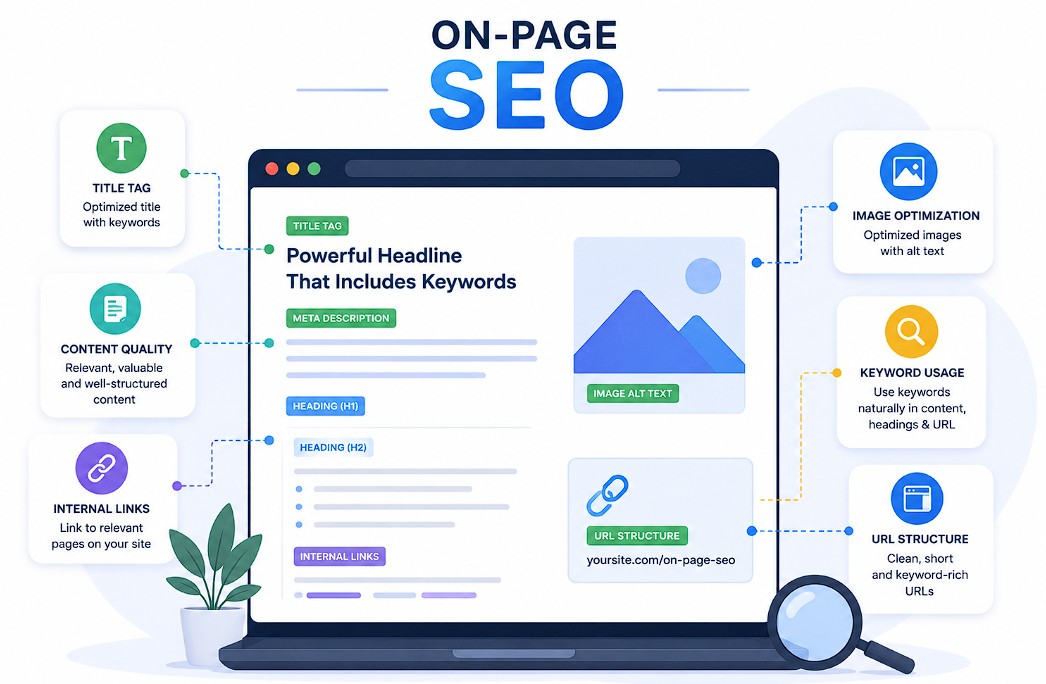
On-Page SEO (also called On-Site SEO) refers to all the optimisation work done directly on a web page to improve its position in search engine rankings and attract more relevant organic traffic. It covers everything visible to the reader your content, headings, images and everything in the page’s code that search engines read, like title tags, meta descriptions, and structured data.
The word ‘on-page’ is the key distinction. Unlike Off-Page SEO (which involves getting other websites to link to yours) or Technical SEO (which involves fixing the infrastructure of your site), On-Page SEO is entirely within your own hands. Every decision you make while writing and publishing a page is an On-Page SEO decision.
Think of a search engine as an incredibly intelligent but literal-minded librarian. When someone asks this librarian for information on ‘how to start a bakery in Bengaluru,’ the librarian scans millions of pages and picks the ones that most clearly, thoroughly, and credibly answer that question. On-Page SEO is how you communicate to that librarian: ‘This page is the most relevant, most useful, most trustworthy answer to this specific question.’
On-Page SEO vs. Off-Page SEO vs. Technical SEO
These three pillars of SEO work together, but each does a different job. Understanding the distinction helps you focus your efforts at the right time and in the right place. The table below shows the clear divisions:
| SEO Pillar | What It Covers | Who Controls It | Examples |
| On-Page SEO | Content, structure & code on the page itself | You directly in your CMS or editor | Title tags, headings, content quality, image alt text, internal links |
| Off-Page SEO | Authority signals from other websites | You indirectly, through outreach & PR | Backlinks, brand mentions, guest posts, social signals |
| Technical SEO | Website infrastructure & server settings | Developer or via hosting/CMS settings | Page speed, HTTPS, XML sitemap, crawlability, Core Web Vitals |
All three pillars must work in harmony for maximum rankings. However, On-Page SEO is typically the best starting point, especially for newer websites because it gives you the most direct control and because Google cannot rank a page it cannot understand, no matter how many backlinks it has.
How Google Evaluates On-Page SEO in 2026
Google’s approach to evaluating pages has evolved dramatically. In the early days of SEO, simply stuffing a keyword into a page as many times as possible would push it to the top of results. Those days are long gone. Google now uses sophisticated natural language understanding, machine learning models, and a framework called E-E-A-T to assess the quality of on-page content.
E-E-A-T stands for Experience, Expertise, Authoritativeness, and Trustworthiness. It is not a direct ranking signal in the traditional sense, but it is the framework Google’s quality raters use to evaluate pages, and it informs how Google’s algorithm assesses content quality. A page that genuinely demonstrates first-hand experience, domain expertise, credibility, and accuracy will outperform a page that is merely ‘keyword-optimised.’
| ⭐ The Golden Rule of On-Page SEO in 2026
Write for humans first. Optimise for search engines second. Google’s algorithms have become extraordinarily good at identifying content that genuinely helps readers. The pages that rank best in 2026 are not the ones that game the algorithm they are the ones that most completely, clearly, and credibly answer the reader’s question. Every On-Page SEO technique in this guide serves that goal. |
| 👉 Learn More: What Is SEO? The Complete Beginner’s Guide |
Why On-Page SEO Matters: The Business Case
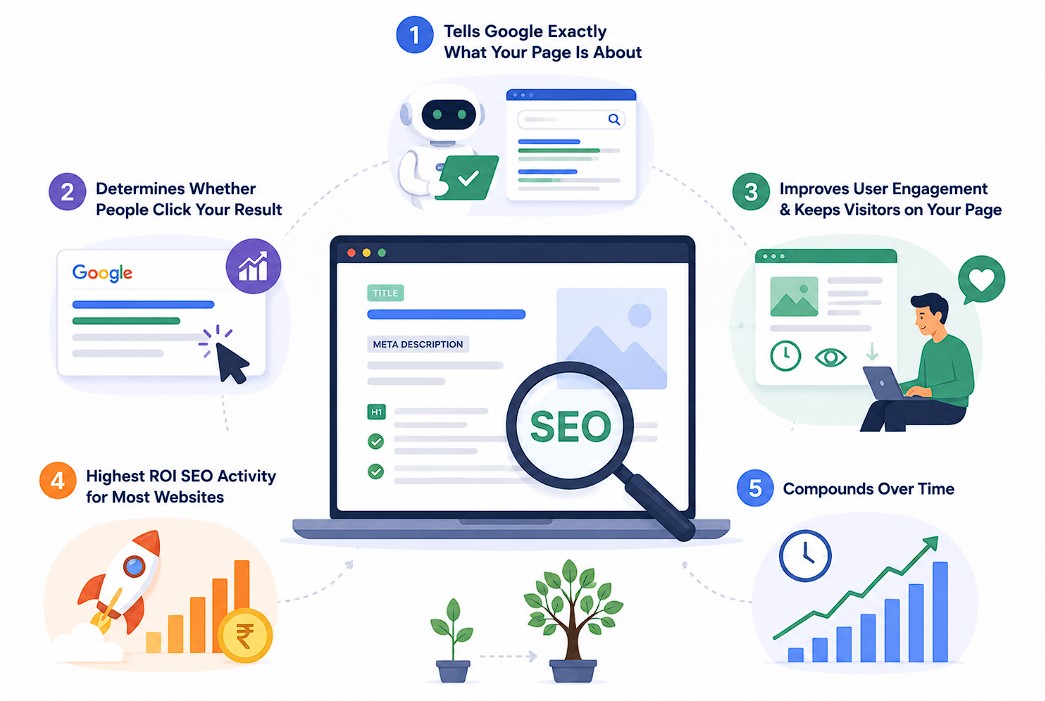
Some website owners treat On-Page SEO as an afterthought something to think about after the content is written. This is a costly mistake. On-Page SEO is not a layer you apply on top of content; it is woven into every decision about how you create, structure, and present your content. Here is why getting it right matters so much.
Reason 1: It Tells Google Exactly What Your Page Is About
Google cannot watch a video of you explaining your page. It cannot call you on the phone and ask what you meant. It reads your page the words, the structure, the code and infers meaning from what it finds. On-Page SEO is your way of communicating clearly and unambiguously: ‘This page is about X, it is for people who want to know Y, and it comprehensively covers Z.’
Without clear On-Page SEO signals, Google has to guess. And when Google guesses, it might rank your page for the wrong keyword, show the wrong title in search results, or choose a completely different page from your site to rank instead. Clear On-Page SEO eliminates the guesswork.
Reason 2: It Determines Whether People Click on Your Result
Your title tag and meta description are what appear in Google’s search results. They are your advertisement in the world’s most visited directory. Even if your page ranks in position three, a compelling, well-crafted title and description can earn more clicks than the results above you. Studies consistently show that click-through rate (CTR) varies enormously based on how well the title and description match what the searcher is looking for.
In India’s increasingly competitive digital market, where more businesses than ever are investing in SEO, the pages that stand out in the SERPs are the ones with sharp, benefit-driven titles and clear, compelling meta descriptions. On-Page SEO is how you craft those.
Reason 3: It Directly Affects User Engagement Metrics
Google pays attention to how users interact with your page after clicking on it from search results. If users click your result, immediately go back to Google, and click a different result that is a signal that your page did not deliver what was promised. This behaviour is sometimes called ‘pogo-sticking,’ and it can negatively affect your rankings over time.
Good On-Page SEO means your content matches the searcher’s intent, is easy to read and navigate, and keeps readers engaged. When readers stay on your page, scroll through the content, and find what they need, those engagement signals reinforce Google’s confidence in your page’s quality.
Reason 4: It Is the Highest ROI SEO Activity for Most Websites
Link building (Off-Page SEO) takes months of outreach, relationship-building, and effort, and there are no guarantees. Technical SEO often requires developer involvement and complex fixes. On-Page SEO, by contrast, can be implemented immediately, by anyone, using nothing more than a text editor and knowledge of the principles in this guide.
For a new website with no backlinks and modest technical resources, On-Page SEO is where the biggest, fastest gains come from. Getting every page properly optimised for its target keyword, with a clean structure, good content, and correct meta tags, can move pages from page three to page one without a single new backlink.
Reason 5: It Compounds Over Time
Every page you properly optimise is an asset that keeps working for you. A well-optimised blog post written today can drive organic traffic for years. Each new optimised page you publish adds to the cumulative authority of your website. Unlike paid advertising, which stops the moment you stop paying, On-Page SEO investments compound a well-structured, high-quality page continues ranking and attracting traffic long after you have moved on to creating new content.
| 📊 On-Page SEO by the Numbers
• Pages on the first page of Google results have an average of 1,890 words (Backlinko) • The #1 result on Google gets approximately 27.6% of all clicks for that query • Changing a title tag alone can increase organic CTR by 20–30% (Search Engine Journal) • Pages with properly optimised images rank higher; image search drives 22.6% of all web searches (SparkToro) • Content with at least one image gets 94% more views than text-only content • Updating and re-optimising existing content can increase organic traffic by up to 111% (HubSpot) |
| 👉 Learn More: SEO Ranking Factors: What Google Really Uses to Rank Pages |
Keyword Research: The Foundation of Every Optimised Page
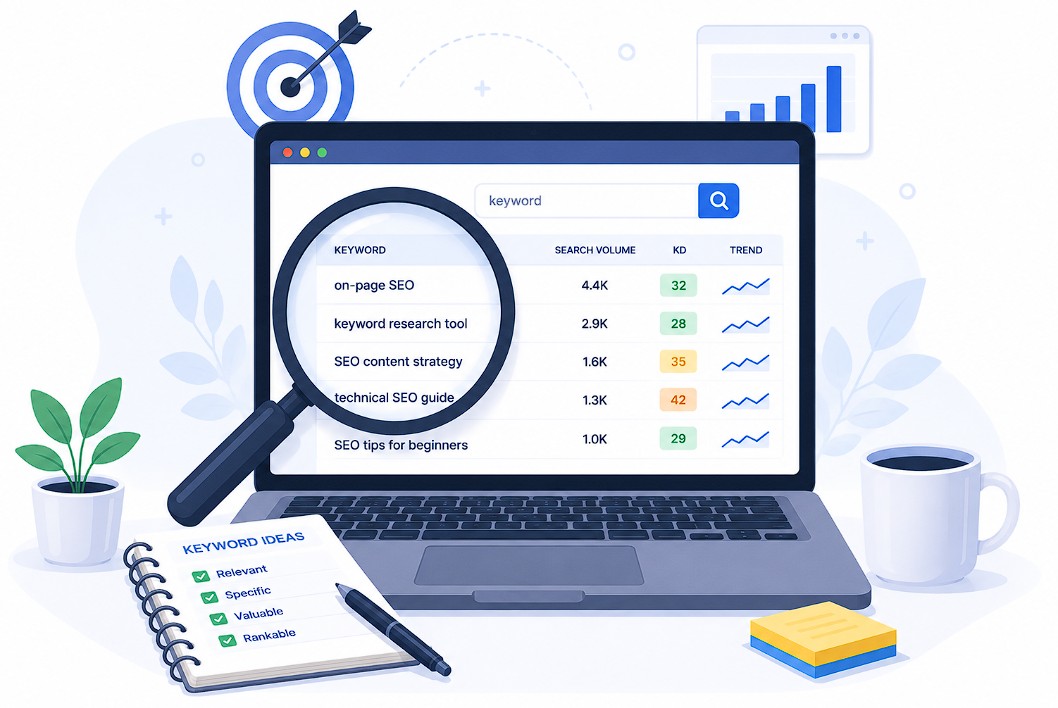
Every successful On-Page SEO strategy begins with keyword research. A keyword is simply a word or phrase that people type into a search engine when looking for information, products, or services. Keyword research is the process of identifying which keywords your target audience uses, how often they search for them, and how difficult it would be for your page to rank for them.
Think of it this way: you could write the most beautifully crafted article about ‘digital marketing courses in Pune,’ but if nobody searches for that exact phrase and everyone searches for ‘digital marketing classes Pune’ instead, your article, no matter how good, will receive very little organic traffic. Keyword research ensures you are creating content for phrases people actually search for.
Understanding Keyword Intent
Not all keywords are created equal. The single most important aspect of keyword research for On-Page SEO is understanding search intent what the person searching for this keyword actually wants. Google has become extremely good at matching results to intent, which means your page needs to match the intent behind your target keyword, not just contain the keyword itself.
There are four main types of search intent. Informational intent is when someone wants to learn something (‘what is on-page SEO’, ‘how to bake a cake’). Navigational intent is when someone wants to find a specific website or page (‘ADM education login’, ‘Zomato careers’). Commercial intent is when someone is researching before making a decision (‘best SEO tools 2026’, ‘Yoast SEO vs Rank Math’). Transactional intent is when someone is ready to act or buy (‘buy digital marketing course online’, ‘hire SEO consultant Bengaluru’).
| Intent Type | What the Searcher Wants | Best Content Format | Example Keyword |
| Informational | To learn or understand something | Blog posts, guides, tutorials, videos | what is keyword research |
| Navigational | To find a specific site or page | Brand pages, login pages, contact pages | ADM education website |
| Commercial | To research options before deciding | Comparison articles, reviews, listicles | best digital marketing courses India 2026 |
| Transactional | To take an action or make a purchase | Product pages, landing pages, sign-up pages | enrol digital marketing course online |
How to Find the Right Keywords for Each Page
Effective keyword research does not require expensive tools. You can find excellent keyword ideas using a combination of free resources. Here is a practical process for finding the right keyword for any page you plan to create:
- Start with Google’s auto-suggest – Type your topic into Google’s search bar and observe the suggestions that appear. These are real searches that real people are making.
- Check ‘People Also Ask’ and ‘Related Searches’ – After searching your main keyword, scroll to see the People Also Ask box and the Related Searches at the bottom of the page. These reveal related queries and variations.
- Use Google Keyword Planner (free) – Sign into Google Ads, go to Keyword Planner, and search for ideas. It shows monthly search volumes and competition levels for keywords.
- Use Ubersuggest or Ahrefs Free Keyword Generator – Enter your seed keyword and get keyword ideas with search volume, keyword difficulty, and related terms.
- Analyse top-ranking pages – Search your target keyword and study what types of pages rank at the top. Their headings and subheadings reveal the subtopics your page needs to cover.
- Check your existing Google Search Console data – If your site already has traffic, GSC’s Performance report shows which queries you are already ranking for often revealing keyword opportunities you had not considered.
Choosing Your Primary and Secondary Keywords
Each page should target one primary keyword, the main topic or query the page is built around. This is the keyword you will use in your title tag, H1, URL, and most prominently throughout the content. Trying to target multiple primary keywords on a single page dilutes your focus and confuses Google about what the page is really about.
However, alongside your primary keyword, you should also target secondary keywords, related terms, synonyms, and long-tail variations that naturally fit the content. These help you capture additional search traffic without creating separate pages for every variation. For example, a page targeting ‘on-page SEO’ as its primary keyword might also naturally include secondary keywords like ‘on-page optimisation,’ ‘on-page SEO checklist,’ ‘on-page SEO techniques,’ and ‘on-page SEO factors.’
| 💡 Keyword Selection Criteria
Before choosing a primary keyword for a page, verify it meets these criteria: • Search Volume: Is there meaningful demand? (Aim for at least 100–1,000 monthly searches for most topics) • Keyword Difficulty: Can your site realistically rank for it? (Start with lower-difficulty keywords if your site is new) • Intent Match: Does the keyword’s intent match what your page delivers? (Informational keyword = informational content) • Business Relevance: Does ranking for this keyword bring the right audience to your site? • Cannibalism Check: Do you already have another page targeting this same keyword? (Avoid this it creates internal competition) |
| 👉 Learn More: Keyword Research: The Complete Beginner’s Guide |
Title Tags: Your Page’s Most Important On-Page SEO Element
If you could only optimise one thing on every page, it would be the title tag. The title tag is the HTML element that specifies the title of a web page. It appears in three critical places: as the clickable blue headline in Google’s search results, as the text on the browser tab when someone is viewing your page, and as the default text when someone shares your page on social media.
Google uses the title tag as one of the strongest signals for understanding what a page is about. If your title tag contains your target keyword, Google knows immediately that your page is relevant to searches for that keyword. If your title tag is generic, vague, or missing entirely, you are giving up one of your most powerful On-Page SEO opportunities.
Title Tag Best Practices
Writing a great title tag is a balance between SEO optimisation and human psychology. You need it to contain the right keyword signal for Google while also being compelling enough that a real person, scanning a list of search results, will want to click on yours. These two goals are not in conflict; the best title tags achieve both simultaneously.
- Include your primary keyword – Ideally place it near the beginning of the title. Google gives more weight to words at the start of the title.
- Keep it 50–60 characters long – Google typically displays the first 50–60 characters of a title tag. Longer titles get cut off with an ellipsis (…) in search results, losing your message.
- Make it compelling and click-worthy – Use power words, numbers, and benefit-driven language. ‘7 Proven On-Page SEO Techniques’ is more compelling than ‘On-Page SEO Techniques.’
- Match the search intent – If someone searches an informational keyword, your title should signal information, not a sales pitch.
- Include the year for evergreen guides – Adding ‘(2026)’ signals to searchers that the content is fresh and current.
- Add your brand name – Especially at the end, separated by a pipe or dash: ‘On-Page SEO Checklist (2026) | ADM’
- Every page must have a unique title – Duplicate titles across pages confuse Google and dilute your SEO signal.
| Title Tag Example | Character Count | Assessment |
| On-Page SEO: The Complete Checklist (2026) | ADM | 49 chars | Excellent keyword first, year included, branded, within limit |
| On-Page SEO | 11 chars | Too short missed opportunity; not compelling; no differentiation |
| The Complete and Comprehensive Guide to On-Page Search Engine Optimisation Techniques for Beginners and Advanced Marketers in 2026 | 130 chars | Too long will be cut off in SERPs; dilutes focus; keyword buried |
| Home | ADM Education | 20 chars | No keyword signal; not descriptive of page content |
| On-Page SEO Checklist: 47 Factors to Rank Higher in 2026 | 57 chars | Strong specific number, clear benefit, keyword included, good length |
| ⚠️ Common Title Tag Mistakes
• Keyword stuffing: ‘SEO On-Page SEO On-Page Optimisation SEO Tips 2026’ this looks spammy, and Google may rewrite it • Using the same title on multiple pages: Google may choose one to rank and ignore the rest • Leaving the CMS default title (e.g. ‘Home | WordPress Site’ or ‘Untitled’) immediately signals low quality • Making the title too promotional: ‘Best SEO Course Sign Up Now!’ on an informational page mismatches intent • Google rewrites title tags it considers misleading or non-representative if your title changes in SERPs, review whether it truly represents the page content |
Meta Descriptions: Crafting the Click-Through Rate Booster
The meta description is the short paragraph of text that appears beneath your title tag in Google’s search results. While meta descriptions are not a direct ranking factor Google has confirmed they do not directly influence where you rank; they are one of the most powerful influences on your click-through rate. A well-written meta description can be the difference between a searcher clicking your result or clicking the one above or below you.
Think of your meta description as the 30-second pitch for your page. It needs to tell the reader exactly what they will find if they click, why they should click your result over all the others, and do all of this in under 160 characters. That is roughly the length of a tweet: short, precise, and purposeful.
How to Write a High-Converting Meta Description
The ideal meta description accomplishes three things: it confirms relevance (yes, this page answers your question), it communicates value (here is specifically what you will get), and it includes a subtle call to action (inviting the user to click). Every word counts.
- Keep it between 150–160 characters – Longer descriptions get truncated in mobile and desktop SERPs. Use a character counter while writing.
- Include your primary keyword naturally – Google bolds the keyword in the description when it matches the search query, making your result stand out visually.
- Match the page’s content and intent – Do not promise something the page does not deliver. Misleading descriptions increase bounce rates.
- Include a clear call to action – Phrases like ‘Learn how to…’, ‘Discover…’, ‘Get the complete guide…’, or ‘Find out…’ invite clicks.
- Make it unique for every page – Duplicate meta descriptions across pages tell Google (and readers) that these pages contain the same information.
- Write in active voice – Active sentences are more engaging and direct than passive constructions.
- Highlight what makes your page different – Do you have a checklist? A free template? India-specific examples? Say so.
| 📝 Meta Description: Before and After
BEFORE (weak): ‘This page is about on-page SEO. We cover many topics related to on-page SEO and how to do it.’ → Generic, no keyword bolding appeal, no value proposition, no call to action. AFTER (strong): ‘Master every On-Page SEO factor in 2026 with our complete, beginner-friendly checklist. From title tags to schema markup, learn what to fix and how to fix it.’ → Contains keyword naturally, communicates specific value (checklist, beginner-friendly), implies thoroughness, has an implicit CTA. Character count of ‘AFTER’: 171 chars; slightly trim to: ‘Master every On-Page SEO factor with our complete 2026 checklist. From title tags to schema, learn exactly what to fix and how.’ (130 chars, good length with room for branding.) |
| 💡 Meta Description Pro Tip
Google sometimes ignores your meta description and auto-generates one from your page content, especially if it judges that a passage within your content is a better answer to the query. You cannot prevent this, but you can reduce its frequency by ensuring your opening paragraphs are crisp, relevant, and clearly answer the page’s primary keyword question. A strong introduction often becomes the auto-generated description anyway. |
Heading Tags (H1–H6) Structuring Your Page for Humans and Google
Heading tags are HTML elements that define the hierarchy of headings on a page. They range from H1 (the most important, top-level heading) to H6 (the least important, deepest subheading). Together, they create the outline structure of your page the table of contents that Google reads to understand how your content is organised and what topics it covers.
Think of heading tags like the chapter structure of a textbook. The book title is the H1. Part One, Part Two, Part Three are the H2s. The chapters within each part are the H3s. The sections within chapters are the H4s. This hierarchy creates a clear map of the content, making it easy for readers to navigate and easy for search engines to understand the relationships between topics.
The H1 Tag: One Per Page, Every Time
The H1 tag is the single most important heading on your page. It should appear exactly once at the very top of your content, and it should clearly state the main topic of the page. It is the first signal Google reads after the title tag to confirm what the page is about. In most cases, your H1 should include your primary keyword and should closely match (or be identical to) your title tag, though they do not need to be the same.
A common mistake is having multiple H1 tags on a page. Some CMS themes accidentally place the site name, the page title, and the article headline all as H1s. Run a quick crawl with Screaming Frog or check the page’s source code to verify that only one H1 exists. Multiple H1s dilute the heading signal and can confuse Google about the primary topic.
H2 and H3 Tags: Organising Your Content
H2 tags are the main section headings within your article. Each H2 represents a major sub-topic of the page’s primary subject. For a page about ‘On-Page SEO,’ the major sections Title Tags, Meta Descriptions, Heading Tags, Content Writing would each be H2 headings. Include secondary keywords and related terms in your H2s where natural this reinforces to Google the full range of topics your page covers.
H3 tags are subsections within each H2 section. They add further depth and granularity to your content structure. Using H3s under each H2 is a sign of thorough, well-organised content which Google rewards. You do not need to use H4, H5, or H6 tags unless your content is genuinely complex enough to require that level of nesting. Forcing deeper heading levels just for SEO is not recommended.
| ✅ Heading Tag Best Practices Checklist
✓ Use exactly one H1 per page; it contains your primary keyword ✓ H1 should appear at the very top of the page content ✓ Use H2 for major sections; include secondary keywords naturally ✓ Use H3 for subsections within H2 sections ✓ Never skip heading levels (e.g. H1 directly to H4) maintain hierarchy ✓ Keep headings descriptive and specific; avoid vague headings like ‘Introduction’ or ‘Section 1’ ✓ Do not use heading tags purely for visual styling; use CSS instead ✓ Include keywords in headings naturally; do not force them in unnaturally ✓ Each heading should accurately describe the content that follows it |
Content Quality: Writing Pages That Rank and Convert
All the title tags and meta descriptions in the world cannot save a page with poor content. Content quality is the bedrock of On-Page SEO. Google’s entire mission is to ‘organise the world’s information and make it universally accessible and useful’, and the pages that best serve that mission are the ones Google promotes to the top of its results.
In 2022, Google introduced the ‘Helpful Content’ system, an algorithm update specifically designed to reward content that is genuinely helpful to real humans and to demote content created primarily to rank in search engines. This update, and subsequent refinements in 2023 and 2024, have fundamentally shifted what it means to write ‘SEO content.’ The era of formula-driven, keyword-stuffed content is over. The era of genuinely useful, expertly written content is here.
Understanding Search Intent and Content Format
Before writing a single word of content, you need to understand what format and structure your target keyword demands. The format of top-ranking pages for a keyword reveals what Google believes users searching for that keyword want to see. This is called content format alignment.
Search for your target keyword before writing and study what kinds of pages rank at the top. Are they long-form guides? Listicles? How-to tutorials? Product pages? Videos? Comparison articles? The dominant format of the top results tells you what Google has determined best satisfies that search intent. Matching that format is one of the most impactful On-Page SEO decisions you can make.
| Keyword Type | Likely Top Format | Content Strategy |
| ‘What is [topic]’ | Comprehensive definition + guide | Define clearly, explain why it matters, show examples |
| ‘How to [do something]’ | Step-by-step tutorial | Numbered steps, clear instructions, screenshots if possible |
| ‘Best [product/tool] for [use case]’ | Listicle or comparison | Compare options, include pros/cons, clear recommendations |
| ‘[Topic] checklist’ | Checklist article | Teal boxes, numbered or bulleted items, printable format |
| ‘[Topic] vs [topic]’ | Comparison table + analysis | Side-by-side table, clear verdict, use cases for each |
| ‘[Product/service] near me / in [city]’ | Local landing page | NAP details, maps, local reviews, service area info |
Content Depth and Comprehensiveness
Thin content pages with too little information to genuinely help the reader are one of the most common and damaging On-Page SEO problems. A 200-word page cannot compete with a 2,000-word guide for an informational keyword. That said, content length should be driven by the complexity of the topic, not by chasing an arbitrary word count.
The right question is not ‘how many words should I write?’ but ‘have I covered this topic so thoroughly that the reader has no reason to search for anything else?’ A page that answers the main question and also proactively answers the most likely follow-up questions, common misconceptions, and related subtopics is what Google calls ‘comprehensive.’ Comprehensive content ranks higher, earns more links, and stays relevant longer.
Using Keywords Naturally Throughout Content
Your primary keyword should appear naturally in the opening paragraph, ideally within the first 100 words. This signals to Google from the very beginning of the content what the page is about. After that, use it naturally throughout the content as it fits. There is no magic density to aim for; write naturally, and the keyword will appear the right number of times.
Beyond the primary keyword, use Latent Semantic Indexing (LSI) keywords, related terms and synonyms that Google associates with your topic. For a page about ‘on-page SEO,’ related terms include ‘on-page optimisation,’ ‘meta tags,’ ‘title tags,’ ‘content optimisation,’ ‘keyword density,’ and ‘search intent.’ Including these terms helps Google build a richer understanding of your page’s topic coverage.
| ⚠️ Keyword Stuffing What NOT to Do
Keyword stuffing is the practice of overloading a page with keywords in an unnatural way to try to manipulate rankings. It was effective in the early 2000s. In 2026, it is a direct path to penalties. Example of keyword stuffing: ‘Our on-page SEO services provide the best on-page SEO for businesses. Our on-page SEO experts do on-page SEO for all on-page SEO needs.’ This reads unnaturally, damages your credibility with readers, and is flagged as spam by Google. Write for humans. Use keywords where they fit naturally. If it reads awkwardly, rephrase it. |
E-E-A-T: Experience, Expertise, Authoritativeness, Trustworthiness
Google’s E-E-A-T framework describes the qualities that make content genuinely trustworthy and valuable. While E-E-A-T is not a direct algorithmic ranking signal, it informs how Google’s quality evaluation systems assess pages, particularly for topics that can significantly impact people’s lives (health, finance, legal, safety), which Google categorises as ‘Your Money or Your Life’ (YMYL) topics.
Experience refers to first-hand, lived experience with the topic: have you actually done this thing you are writing about? Expertise refers to formal or demonstrated knowledge in the field. Authoritativeness is about reputation: do authoritative sources in your industry cite or reference you? Trustworthiness is about accuracy, transparency, and honesty. Building E-E-A-T into your On-Page SEO means adding author bios, citing credible sources, showing your own experience and credentials, and keeping content accurate and up to date.
Content Readability and Formatting
Even brilliant content fails if it is presented in a wall of unbroken text. Readability how easy it is for someone to read and absorb your content is a critical On-Page SEO factor because it directly affects how long users stay on your page and whether they find what they need. Google measures engagement signals (though indirectly), and a page that keeps readers engaged signals quality.
- Short paragraphs – Keep paragraphs to 3–5 sentences maximum. Long blocks of text are intimidating on screen, especially on mobile.
- Subheadings every 200–300 words – Help scanners navigate to the part most relevant to them. Most readers scan before they read.
- Bold key terms and phrases – Draw the eye to the most important information. Use sparingly for maximum effect.
- Bullet and numbered lists – Break down multi-item information into scannable, digestible points.
- White space – Do not try to fill every inch. Ample spacing between paragraphs, headings, and sections makes reading comfortable.
- Tables for comparisons – Structured data is much easier to absorb in a table than in prose.
- Visuals and examples – Images, diagrams, and real-world examples dramatically improve comprehension and engagement.
| 👉 Learn More: SEO Best Practices: What Actually Works in 2026 |
URL Optimisation: Simple Signals That Matter
A URL (Uniform Resource Locator) is the web address of your page. It seems like a small detail, but URL structure is an On-Page SEO signal that affects both search engine understanding and user trust. A URL that clearly describes the page’s content is more likely to be clicked when it appears in search results, more likely to be shared on social media, and more useful as a ranking signal than an opaque URL full of random characters.
Consider the difference between these two URLs: ‘admeducation.com/learn/seo/on-page-seo/’ versus ‘admeducation.com/?p=4827&cat=12&session=abc123.’ The first URL tells you instantly what the page is about and where it sits in the site’s structure. The second tells you nothing. Google prefers the first for the same reason users do clarity and relevance.
URL Best Practices
The key principles of SEO-friendly URL structure are simplicity, descriptiveness, and consistency. Every URL on your site should adhere to the same set of rules, creating a predictable and logical structure throughout.
- Use lowercase letters only – URLs are case-sensitive on many servers. ‘/On-Page-SEO/’ and ‘/on-page-seo/’ can be treated as different pages, creating duplicate content issues.
- Use hyphens to separate words, not underscores – Google treats hyphens as word separators. ‘on-page-seo’ is read as three separate words; ‘on_page_seo’ is read as one string.
- Include your primary keyword – The URL is one of many places Google looks for keyword signals. ‘admeducation.com/on-page-seo/’ clearly signals the topic.
- Keep URLs short and clean – Remove stop words (a, the, of, in, for) where possible. ‘/learn/seo/on-page-seo-complete-guide/’ is cleaner than ‘/learn/seo/a-complete-guide-to-the-practice-of-on-page-seo/’
- Maintain a logical folder structure – Organise URLs in a hierarchy that mirrors your site’s information architecture.
- Avoid date-based URLs for evergreen content – ‘/2026/01/15/on-page-seo/’ will look outdated in 2028. Use ‘/learn/seo/on-page-seo/’ instead; timeless and clean.
- Never change URLs on established pages without setting up a 301 redirect – Changing a URL loses its accumulated link equity unless properly redirected.
Image Optimisation: Ranking in Search and Speeding Up Your Site
Images are one of the most neglected areas of On-Page SEO. Most website owners upload images without a second thought wrong file name, no alt text, uncompressed file size. This is a missed opportunity on multiple fronts. Properly optimised images contribute to your page’s keyword relevance (through alt text and file names), improve page speed (through compression and correct formats), and can generate additional traffic through Google Image Search.
Google Image Search accounts for over 22% of all web searches according to research by SparkToro. If your images are not optimised, you are invisible in a channel that drives nearly a quarter of all search traffic. And if your images are large and uncompressed, they are slowing down your page and hurting your Core Web Vitals scores damaging your rankings in regular web search as well.
Alt Text: The Most Important Image SEO Element
Alt text (alternative text) is a description of an image written in the HTML code. It serves three important purposes: it tells Google what the image shows (since Google cannot ‘see’ images the way humans do), it provides context for screen readers used by visually impaired users (making your site more accessible), and it appears in place of the image if the image fails to load.
Alt text should be descriptive, specific, and natural. Describe what the image actually shows, and include your keyword where it fits genuinely not as a forced addition. A photo of a person reviewing a website audit report might have alt text like: ‘SEO manager reviewing a website audit report on laptop screen.’ Not: ‘SEO on-page SEO website SEO audit.’
| Image Scenario | Poor Alt Text | Good Alt Text |
| Photo of title tag in Google search results | image1.jpg | Example of a well-optimised title tag in Google search results |
| Graph showing organic traffic growth | graph | Line graph showing 150% increase in organic traffic over 6 months after on-page SEO optimisation |
| Screenshot of Google Search Console | screenshot | Google Search Console Performance report showing impressions and clicks data |
| Decorative divider line | (alt text required) | Leave alt text empty for purely decorative images: alt=”” |
File Names, Formats, and Compression
Before uploading any image, rename the file to something descriptive and keyword-relevant. ‘IMG_4827.jpg’ tells Google nothing. ‘on-page-seo-title-tag-example.jpg’ is a clear keyword signal. Use hyphens to separate words in file names, just as you do in URLs.
For image format, use WebP where possible; it is a modern format supported by all major browsers that delivers the same visual quality as JPEG or PNG at roughly 25–35% smaller file sizes. If WebP is not supported by your workflow, JPEG is best for photographs and PNG for images that require transparency. Always compress images before uploading using tools like Squoosh, TinyPNG, or ShortPixel.
| 💡 Image Optimisation Quick Wins
• Rename all images with descriptive, keyword-relevant file names before uploading • Always fill in the alt text field; never leave it blank for content images • Use WebP format to reduce file size by up to 35% vs JPEG • Define width and height attributes on all img tags to prevent Cumulative Layout Shift (CLS) • Use lazy loading for images below the fold: loading=’lazy’ attribute • Consider adding images to your XML sitemap (or a separate image sitemap) for better Google Image Search indexation • Use descriptive captions under important images. Google reads captions as additional content signal |
Internal Linking: Building Your Website’s SEO Power Grid
Internal links are links from one page on your website to another page on your website. They are one of the most underrated and underused On-Page SEO tools available to content creators. A strategic internal linking structure can dramatically boost the rankings of your most important pages, help Google discover new content, and keep visitors on your site longer all without requiring any third-party cooperation.
Think of your website’s link structure as a city’s power grid. Your homepage is the main power station; it receives the most external links and has the most authority. Through internal links, it distributes that authority (called ‘link equity’ or ‘PageRank’) to other pages on the site. Pages that receive more internal links are seen as more important by Google and are more likely to rank well. Pages with no internal links are like houses disconnected from the grid, technically on the site but receiving no power.
How to Build an Effective Internal Linking Strategy
An effective internal linking strategy is deliberate, not random. Every internal link you place should serve a purpose, either to help the reader find related information, or to strategically pass link equity to a page you want to rank higher. These two goals are usually aligned.
- Identify your most important pages – These are the pages you most want to rank. They might be your product pages, your service pages, your best lead-generating guides, or your highest-revenue content.
- Link to these pages from your high-authority pages – Your homepage, your most popular blog posts, and your hub pages should contain internal links pointing to these priority pages.
- Use descriptive anchor text – The clickable text of an internal link tells Google what the destination page is about. ‘Click here’ wastes this opportunity. ‘On-Page SEO checklist’ is a clear, keyword-rich signal.
- Link contextually within content – The most valuable internal links are those embedded naturally within your body text, where they are most relevant to the reader’s journey.
- Update old content with internal links – When you publish a new page, go back to older, related pages and add an internal link to the new page. This helps Google find new content faster.
- Audit for orphan pages – These are pages with no internal links pointing to them. They are hard for Google to find and receive no link equity. Connect them to the rest of your site through relevant internal links.
| 📝 Internal Linking in Practice ADM Example
ADM publishes a new pillar article: ‘On-Page SEO: The Complete Checklist (2026)’ Smart internal linking actions: 1. Add a link from the existing ‘What Is SEO?’ article to this new guide, using anchor text: ‘on-page SEO checklist’ 2. Add a link from the ‘Keyword Research’ guide to this article, using anchor text: ‘on-page optimisation techniques’ 3. Add a link from the ‘Technical SEO Guide’ to this article, using anchor text: ‘on-page SEO factors’ 4. Add a link from the homepage’s ‘SEO Learning Hub’ section Result: The new guide is connected to the power grid. Google finds it quickly, understands it is a priority page (multiple links from authoritative pages), and has clear keyword signals from the anchor text. |
| 👉 Learn More: SEO-Friendly Web Design: Build Sites That Google Loves |
Schema Markup: Standing Out in Search Results
Schema markup (also called structured data) is a vocabulary of code you add to your pages to help search engines understand specific types of information on your page. It does not change what the page looks like to visitors. But it gives Google the ability to display your content as enhanced ‘rich results’ in the SERP results with extra visual elements like star ratings, FAQs, prices, or event details.
Rich results take up more space in the SERP, are visually distinct from standard blue-link results, and consistently achieve higher click-through rates. Adding schema markup to your most important pages is one of the highest-leverage On-Page SEO improvements you can make for your organic CTR.
Most Impactful Schema Types for Content Pages
Different types of pages call for different schema types. The following are the most commonly used and most impactful schema types for content-heavy websites like blogs, course providers, and informational sites:
- FAQPage schema – For pages with a Q&A section. Adds dropdown FAQ boxes directly in the SERP, dramatically increasing your result’s size and visibility.
- Article / BlogPosting schema – For blog posts and news articles. Signals to Google that this is editorial content and may enable rich snippets showing publish date and author.
- HowTo schema – For step-by-step tutorial content. Can display numbered steps directly in the SERP rich result.
- Course schema – For online education providers. Displays course name, provider, and description in search results.
- BreadcrumbList schema – Shows the navigation path in the SERP result (e.g. Home > Learn > SEO > On-Page SEO), helping users understand site structure at a glance.
- Product schema – For e-commerce product pages. Shows price, availability, and star ratings in search results.
| 💡 How to Add Schema Without Coding
You do not need to write JSON-LD schema by hand. These free tools generate the code for you: • Merkle Schema Markup Generator (technicalseo.com) Generates JSON-LD for 20+ schema types • Google’s Structured Data Markup Helper Highlights content on your page to tag; generates the schema • Yoast SEO / Rank Math (WordPress) Automatically adds Article, Breadcrumb, and Organisation schema to all pages • Google’s Rich Results Test Test any URL to see what schema is detected and whether rich results are eligible |
Measuring and Tracking Your On-Page SEO Performance
Optimising a page is not the end of the process; it is the beginning. After publishing or updating an optimised page, you need to track its performance to understand whether your changes are working, where further improvements are needed, and how the page is trending over time. What gets measured gets improved.
Fortunately, the most important On-Page SEO data is available for free through Google Search Console and Google Analytics. You do not need expensive tools to measure the impact of your optimisations, though they do add value as you become more sophisticated.
Key Metrics to Track in Google Search Console
Google Search Console is your primary tool for measuring On-Page SEO performance. It shows you exactly how Google sees and ranks your pages, giving you data that no third-party tool can fully replicate because it comes directly from Google’s own systems.
- Impressions – How many times your page appeared in Google’s search results. A rising impression count means Google is increasingly indexing and showing your page for relevant queries.
- Clicks – How many times searchers clicked on your result. Comparing clicks to impressions gives you your click-through rate (CTR).
- Click-Through Rate (CTR) – The percentage of impressions that result in a click. Low CTR (compared to your ranking position) often signals that your title tag or meta description needs improvement.
- Average Position – Your average ranking position for a given keyword. A drop in average position over time means your page is losing ground; investigate whether competitors have published stronger content.
- Top Queries – Which search queries your page is appearing for. These often reveal secondary keywords you could better optimise for, or intent mismatches between what people search for and what your page covers.
Key Metrics to Track in Google Analytics
While Google Search Console shows you pre-click data (impressions, ranking, CTR), Google Analytics (GA4) shows you what happens after the click and how users behave on your page. This post-click behaviour is a strong signal of content quality and On-Page SEO effectiveness.
- Engagement Rate – In GA4, this replaces Bounce Rate. It measures the percentage of sessions where users engaged meaningfully with the page (scrolled, clicked, spent time). Low engagement rate on a page getting organic traffic often means content is not matching intent.
- Average Engagement Time – How long users spend actively engaged with your page. Longer is generally better for informational content; it suggests readers are consuming the content thoroughly.
- Scroll Depth – How far down the page users scroll. If most users leave before reading 30% of the content, the opening section may not be engaging enough to keep them reading.
- Conversion Rate – For pages with a conversion goal (sign-up, download, purchase), track how many organic visitors complete the goal. This measures whether your On-Page SEO is attracting the right audience.
| 👉 Learn More: SEO Metrics: How to Measure and Track Your SEO Performance |
Common On-Page SEO Mistakes And How to Fix Them
Even experienced marketers make On-Page SEO mistakes. The following are the most common errors, along with a clear explanation of why each one damages your rankings and exactly what to do to fix it.
Mistake 1: Targeting the Wrong Keyword
One of the most common On-Page SEO mistakes is creating a page without first verifying that the target keyword has meaningful search volume and that your page can realistically rank for it. Spending weeks writing a 3,000-word guide for a keyword that only 10 people search per month is an enormous waste of resources.
The fix is simple: always do keyword research before writing. Use free tools like Google Keyword Planner, Ubersuggest, or Ahrefs’ free keyword generator to verify search volume and competition level before committing to a keyword. Also check whether the keyword’s intent matches what you plan to write.
Mistake 2: Ignoring Search Intent
You can write a perfect 5,000-word article, and it will still fail to rank if it does not match the search intent behind the keyword. If everyone searching for your keyword wants a quick list (’10 best tools for X’), but you wrote a philosophical essay, Google will rank the lists, not your essay. Intent mismatch is one of the most common reasons well-written content underperforms.
Before writing, analyse the SERP for your target keyword. Look at the top 5 results. What format are they? How long are they? What subtopics do they cover? Match the dominant format, depth, and angle, then make your version more comprehensive and better written.
Mistake 3: Duplicate or Missing Title Tags
Pages with missing title tags get a generic, auto-generated title from Google, usually just the domain name or a snippet of content, which is rarely optimal. Pages with duplicate title tags compete with each other for the same keyword and send conflicting signals to Google. Both situations are easy to fix and have an immediate positive impact.
Run a free Screaming Frog crawl of your website and filter by ‘Missing Title’ and ‘Duplicate Title’ to see all offending pages at once. Fix them one by one, or batch-fix them using your CMS’s bulk edit features.
Mistake 4: Keyword Cannibalisation
Keyword cannibalisation occurs when multiple pages on your website target the same keyword. Instead of one strong page ranking at the top, you have two or three weak pages competing with each other and confusing Google about which one to rank. Google often ends up ranking neither, or rotating between them, resulting in inconsistent and lower-than-expected rankings.
To fix cannibalisation, decide which page should be the primary ranking page for that keyword. Consolidate the content into one comprehensive page, redirect the weaker pages to the primary page (301 redirect), and update all internal links to point to the primary page. This consolidation almost always results in a ranking improvement.
Mistake 5: Thin or Shallow Content
A 300-word page competing for a keyword where every top-ranking page is 2,000+ words will rarely rank. Thin content that provides little value, depth, or unique information is penalised by Google’s Helpful Content system. It signals low quality and provides a poor experience for users who click through expecting comprehensive information.
The solution is not simply to add words for the sake of word count. It is to genuinely make the content more useful, comprehensive, and valuable. Answer the main question. Then answer the most likely follow-up questions. Include examples, data, visuals, and actionable steps. Make your page the most thorough and helpful resource on the topic.
Mistake 6: Neglecting Image Alt Text
Many website owners upload images and never fill in the alt text field. This is a missed On-Page SEO opportunity and an accessibility failure. Every content image should have descriptive alt text that includes relevant keywords where appropriate. Running a Screaming Frog crawl will identify all images with missing alt text across your entire site.
Mistake 7: Over-Optimising Anchor Text
Using the exact-match keyword as the anchor text for every internal link to a page can look unnatural to Google and raise spam signals. If every internal link to your ‘on-page SEO’ page uses the anchor text ‘on-page SEO,’ it looks manipulated. Vary your anchor text naturally use the exact keyword sometimes, use related phrases other times, use natural language like ‘this guide’ or ‘learn more about the topic’ occasionally.
Mistake 8: Not Updating Old Content
Publishing an article and never returning to it is leaving rankings on the table. Content decays over time; statistics become outdated, screenshots become old, competitors publish stronger content, and search trends shift. Regularly auditing and refreshing your existing content is one of the highest-ROI activities in On-Page SEO.
Set a quarterly content audit calendar. Review your top-20 organic traffic pages and your most important conversion pages every three months. Update outdated information, add new sections to cover subtopics that have become relevant, refresh examples, and re-promote the updated content. HubSpot famously grew its organic traffic by over 106% in one year largely through refreshing existing content.
Conclusion
Of all the disciplines within SEO, On-Page SEO is the one most entirely within your own hands. You do not need to wait for other websites to link to you. You do not need a developer to reconfigure your server. You need knowledge, a checklist, and the discipline to apply both every time you publish a page.
The 47-element checklist in this guide covers every major On-Page SEO factor from keyword research and title tags to image optimisation and schema markup. Work through it for every page you create, and you will consistently produce pages that are not just optimised for search engines, but genuinely helpful and compelling for the human readers who land on them.
Remember the core principle that runs through every element in this guide: On-Page SEO is about communicating clearly. Clearly to Google so it understands exactly what your page is about and why it deserves to rank. Clearly to your reader so they immediately know they are in the right place and that what they need is just a scroll away.
SEO rewards consistency over time. Every page you properly optimise is an asset that compounds in value. The blog post you optimise today may be ranking and driving traffic for years. Start with the pages that matter most to your business, apply the checklist, track the results, and build from there. The rankings will follow.
Frequently Asked Questions
Here are thorough answers to the questions beginners most commonly ask about On-Page SEO. These questions come up repeatedly because the answers are genuinely nuanced, not black and white.
Q1: How many keywords should I target on a single page?
Each page should have one primary keyword, the main topic the page is built around. This primary keyword should appear in your title tag, H1, URL, and naturally throughout the content. In addition to the primary keyword, you should naturally incorporate secondary keywords and semantically related terms that fit the content.
The mistake to avoid is trying to rank one page for multiple unrelated or competing keywords. If two keywords have significantly different search intents, they likely warrant two separate pages. For example, ‘on-page SEO checklist’ and ‘on-page SEO tools’ are related, but different enough that separate pages might serve searchers better than one combined page.
Q2: Does keyword density still matter?
Keyword density, the percentage of times your keyword appears relative to total word count, is an outdated metric that no longer has a meaningful role in modern SEO. There is no magic keyword density percentage to aim for. Google’s natural language processing has advanced far beyond counting keyword occurrences.
What matters is that your keyword appears naturally and frequently enough that the topic is clear, but not so frequently that it reads unnaturally. Write for humans. Use the keyword where it fits. Google will understand. If you write a comprehensive, high-quality article about ‘on-page SEO,’ the keyword will naturally appear many times simply because it is the subject of the article.
Q3: How long should my content be for good On-Page SEO?
Content length should be driven by the topic’s complexity and what is needed to comprehensively answer the searcher’s question, not by a target word count. For a simple, specific question (‘what is a title tag’), 500 well-written words might be sufficient. For a complex, comprehensive topic (‘on-page SEO’), 5,000–10,000 words is appropriate because the topic genuinely requires that depth.
The most reliable way to calibrate content length is to look at what is ranking at the top of Google for your target keyword. If the top three results are all 2,000+ words, you likely need at least that to compete. If they are 600-word list posts, a 3,000-word guide may be overkill for that particular keyword.
Q4: How often should I update my pages for On-Page SEO?
There is no universal schedule, but a practical approach is to review your most important pages every 3–6 months. Key triggers for an update include: rankings or traffic for a page have noticeably dropped, statistics or data in the content are more than 12–18 months old, competitors have published significantly stronger content for the same keyword, or you have new information or examples to add that would improve the content.
Even small updates correcting a statistic, adding a new example, or expanding a thin section can signal freshness to Google and lead to ranking improvements. For fast-moving topics (technology, digital marketing, finance), more frequent updates are beneficial. For evergreen topics that change slowly, updates every 6–12 months may suffice.
Q5: Is the meta description a ranking factor?
No, the meta description is not a direct ranking factor. Google has confirmed this multiple times. However, the meta description is one of the most important elements influencing your click-through rate (CTR), and a higher CTR can indirectly signal to Google that your result is what searchers are looking for, which can positively affect rankings over time.
There is also a practical reason to write good meta descriptions: Google will rewrite them if it considers them unsatisfactory. A well-written meta description that accurately represents the page content is more likely to be used as-is by Google, giving you control over your search result presentation. A missing or poor meta description will almost certainly be auto-generated from your page content.
Q6: What is the difference between On-Page SEO and content marketing?
Content marketing is a broader strategy focused on creating and distributing valuable content to attract and retain a target audience. On-Page SEO is a set of specific optimisation techniques applied to individual pages to help them rank in search engines. The two are deeply complementary: content marketing provides the content; On-Page SEO ensures that content is found through organic search.
The distinction matters because you can have excellent On-Page SEO on thin, low-value content (which will still struggle to rank) and excellent content marketing with poor On-Page SEO (which will also underperform in search). The ideal approach integrates both: create genuinely valuable content and optimise it properly for search engines. That combination is what drives sustained organic growth.
Q7: How do I know if my On-Page SEO is working?
Track these indicators in Google Search Console: impressions (are more searchers seeing your page?), average position (is your ranking improving over time?), and CTR (are more searchers clicking your result?). In Google Analytics, track organic traffic to specific pages, engagement rate, and goal conversions from organic traffic.
After making On-Page SEO changes to a page, wait at least 4–8 weeks before evaluating the impact. Google needs time to recrawl, reindex, and re-evaluate the page. Be patient, but be systematic. Track your changes (what you changed and when) so you can correlate specific optimisations with specific ranking movements. This data becomes invaluable for refining your On-Page SEO strategy over time.
Q8: Should I optimise every page on my site?
Ideally, yes, but prioritise strategically. Start with the pages that have the highest potential impact: your most important conversion pages (services, products, landing pages), your highest-traffic existing pages (to protect and improve existing rankings), and your newest content targeting competitive keywords (where good On-Page SEO from the start matters most).
For very large websites, prioritise pages that currently rank on page two or three of Google (positions 11–30); these are closest to page one and can often be moved up with targeted On-Page SEO improvements. Improving a page from position 15 to position 5 can increase its traffic by 500% or more, making it one of the highest-ROI activities in your SEO programme.
Q9: Does social media sharing affect On-Page SEO rankings?
Social media shares are not a direct ranking factor. Google has confirmed that social signals (likes, shares, followers) are not part of its ranking algorithm. However, social sharing indirectly benefits On-Page SEO in several ways. Content that is shared widely is seen by more people, some of whom may link to it from their own websites, and backlinks are a strong ranking signal. Social sharing also drives referral traffic, which increases the visibility and credibility of your content over time.
Additionally, when you share content on social media, make sure your Open Graph (OG) tags are set correctly. These meta tags control what title, description, and image appear when your page is shared on Facebook, LinkedIn, Twitter, and WhatsApp. Well-crafted OG tags make your shared content look professional and click-worthy, increasing the chance that people will click through from social media to your page.
Q10: What is the most important On-Page SEO factor?
Content quality and search intent alignment are, collectively, the most important On-Page SEO factor. A page that genuinely and comprehensively answers the question behind its target keyword, in a format that matches what searchers expect, will outperform a technically perfect page with mediocre content every time.
That said, all On-Page SEO elements work together, and neglecting any one of them leaves opportunities on the table. A perfect title tag on mediocre content helps little. Exceptional content with a missing or misleading title tag struggles to get clicked. Treat On-Page SEO as a holistic system; every element in the checklist serves the same goal: making your page the most relevant, useful, and clearly communicated answer to your target keyword.