

Most blog posts never rank. Not “rank low.” Never rank. They sit on page seven of Google forever, getting maybe two visitors a month, both of whom probably clicked by accident. And the frustrating part is that a lot of these posts aren’t badly written. Some of them are genuinely good, well-researched, well-structured pieces that just never show up when someone searches for the exact topic they’re about.
Here’s the myth that gets bloggers into trouble: the idea that good writing alone gets traffic. It doesn’t. Google isn’t grading your prose for elegance. It’s trying to figure out, in a fraction of a second, whether your page actually answers what someone typed into that search box. You can write like Hemingway and still get buried under ten mediocre articles that happen to understand what the searcher wanted.
That’s why SEO writing is a different skill from regular writing, even though the two overlap a lot. Traditional writing asks “how do I express this idea well.” SEO writing asks “what is this person actually trying to find, and how do I prove, structurally and clearly, that my page is the best answer to that.” Both questions matter. Ignore either one and you’ll struggle.
Google’s evolution over the last decade backs this up. It used to be mostly keyword matching, stuff your page with “best running shoes” enough times and you had a shot. That game died years ago. Now Google leans heavily on search intent, meaning it tries to understand the actual goal behind a query, not just the words in it. Quality, helpfulness, and user experience carry more weight than keyword density ever did, and Google has said this directly through its helpful content guidance.
So writing for people and writing for search engines aren’t opposing goals anymore, they’re the same goal approached from two directions. You need both. A page that reads beautifully but ignores structure, headings, and search intent won’t rank. A page that’s technically optimized but reads like a keyword-stuffed mess won’t hold anyone’s attention long enough to matter, and Google notices that too through engagement signals.
What You Will Learn in This Guide
- How Google actually decides which blog posts rank, from crawling to indexing to the ranking factors that matter most in 2026.
- Why search intent determines whether your content has any shot at ranking, regardless of how well it’s written.
- A real, usable keyword research process that finds ranking opportunities instead of just vanity metrics.
- How to structure a blog post so both readers and Google understand exactly what it covers.
- How to write headlines and introductions that pull people in and keep them reading.
- The on-page SEO checklist every blog post needs before it goes live.
- Why EEAT (Experience, Expertise, Authoritativeness, Trustworthiness) has become one of the biggest ranking factors, and how to actually demonstrate it.
- How to optimize for featured snippets and AI Overviews, not just the traditional blue links.
- What to do after you hit publish, because promotion and monitoring matter just as much as the writing itself.
- The most common mistakes that quietly kill rankings, and a printable checklist to catch them before they cost you traffic.
How Google Decides Which Blog Posts Rank
Before writing a single word aimed at ranking on Google, it helps to actually understand what happens behind the scenes when someone hits search. It’s not magic, and it’s not random. There’s a process, and knowing it changes how you write.
What Happens When You Search on Google
Crawling is the first step, where Google’s bots (Googlebot, specifically) discover pages by following links across the web. If your page isn’t linked from anywhere and isn’t submitted through Search Console, it might never get crawled at all, which means it can’t rank no matter how good it is. Indexing comes next, where Google stores and organizes the crawled page’s content so it can be pulled up later for relevant searches. Ranking is the final step, where Google’s algorithm evaluates every indexed page relevant to a query and orders them based on hundreds of signals, deciding who gets position one and who gets buried on page four.
Google’s Ranking Factors
Relevance is the baseline, whether your content actually matches what the query is about, and without it nothing else matters. Search intent goes a layer deeper than relevance, checking whether your content matches not just the topic but the type of answer someone wants, informational, transactional, or otherwise. Content quality covers depth, accuracy, and whether the page actually delivers value instead of skimming the surface of a topic.
Topical authority reflects whether your site has demonstrated real depth on a subject through multiple interconnected pieces of content, not just one lucky article. Backlinks still matter, acting as a vote of confidence from other sites that your content is worth referencing. User experience factors in how people behave once they land on your page, whether they stay and read or bounce back to the results immediately.
Page speed affects both rankings and user patience, since slow-loading pages lose visitors before they even see your content. Mobile friendliness matters because most searches now happen on phones, and Google indexes the mobile version of your site first. Helpful content signals reward pages built for actual readers over pages built purely to game search rankings. Freshness matters for topics that change over time, where an outdated post loses ground to a more current competitor.
Google’s Helpful Content System
Google’s helpful content system prioritizes people-first content, meaning content created primarily to help a specific audience rather than content stitched together mainly to rank. Original insights matter here too; Google wants information, perspective, or analysis that isn’t just a rehash of what’s already ranking on page one. Experience means showing you’ve actually done the thing you’re writing about, not just researched it secondhand. Expertise means demonstrating real knowledge of the subject, backed by accuracy and depth rather than surface-level generalities.
Understand Search Intent Before Writing How to Write a Blog Post That Ranks on Google
Search intent is honestly the single most overlooked reason blog posts fail to rank. You can nail every technical SEO box and still get nowhere if you write the wrong type of content for what people actually want when they type a specific query.
What is Search Intent?
Search intent is the actual goal behind a search query, the reason someone typed those words in the first place. Someone searching “how to write a blog post that ranks on Google” wants a full walkthrough, not a product page selling SEO software. Matching intent means your content format and depth align with what the searcher expects to find, not just what your keyword tool told you to target.
Types of Intent
Informational intent means the searcher wants to learn something, like “what is search intent” or “how does Google ranking work.” Navigational intent means they’re looking for a specific site or brand, like someone typing “Ahrefs login” because they already know exactly where they’re headed. Commercial investigation means they’re comparing options before deciding, like “best SEO tools for bloggers,” still researching but leaning toward a purchase soon. Transactional intent means they’re ready to act right now, like “buy Ahrefs subscription,” and content built for browsing rather than converting will lose them fast.
How to Match Search Intent
Check the SERP itself before writing anything, since Google’s current results are the clearest signal of what it thinks searchers want for that query. Look at featured snippets to see whether Google is pulling definitions, lists, or tables, which tells you the preferred content format. Scan “People Also Ask” boxes for the related questions Google associates with the query, often revealing subtopics your article needs to cover. Check whether videos dominate the results, since that suggests visual or tutorial-style content might outperform a text-only post. Browse forums like Reddit and Quora tied to the topic too, since they often reveal the specific angle or frustration people have that a generic article misses entirely.
Why Search Intent Matters More Than Keywords
Plenty of posts target the right keyword but the wrong intent, and they never recover no matter how much they optimize other elements. A “best running shoes” article written as a long personal story instead of a scannable comparison list will lose to competitors that match the commercial investigation intent Google expects for that query. That’s the failure mode nobody talks about enough: technically correct keyword targeting paired with completely wrong content format, and Google just quietly ranks something else instead.
Keyword Research That Actually Finds Ranking Opportunities
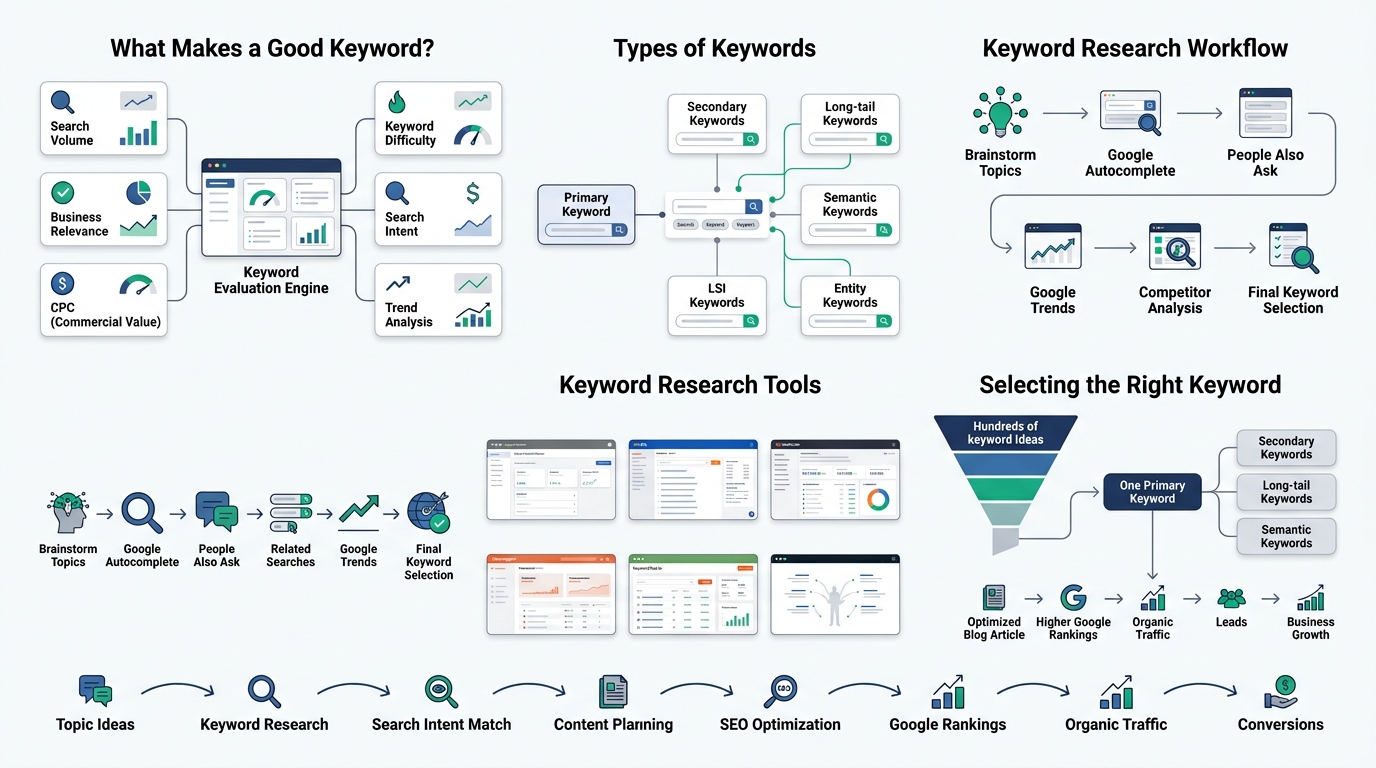
Keyword research isn’t about finding the highest search volume term and slapping it into a title. It’s about finding the specific overlap between what people search for, what you can realistically rank for, and what actually matters to your business or blog.
What Makes a Good Keyword?
Search volume tells you how many people search a term monthly, but chasing volume alone leads newer sites straight into keywords they have no shot at ranking for. Keyword difficulty estimates how hard it’ll be to outrank existing pages, and ignoring this number is how bloggers waste months writing for terms dominated by sites with a decade of authority behind them. Business relevance matters too, since a keyword with huge volume but zero connection to what you actually offer brings traffic that never converts into anything useful.
Intent, covered in the last chapter, determines whether the keyword even matches the content format you’re planning to build. CPC (cost per click) is a useful proxy for commercial value, since advertisers paying more for a click usually signals real buying intent behind that search. Trend data shows whether a keyword’s interest is rising, falling, or steady, which matters for deciding whether to invest heavily in a topic right now or wait.
Types of Keywords
Primary keywords are the main term your article is built around, appearing in the title and throughout the piece naturally. Secondary keywords are closely related terms that support the primary one, often variations or subtopics covered within the same article. Long-tail keywords are longer, more specific phrases with lower volume but often higher conversion rates and less competition. Semantic keywords are conceptually related terms Google associates with your topic, helping establish topical depth beyond exact keyword matches. LSI keywords (latent semantic indexing terms) work similarly, covering related vocabulary that naturally appears alongside your topic. Entity keywords reference specific named things, brands, tools, people, or places tied to your subject, which helps Google understand exactly what your content is about.
Keyword Research Process
Start by brainstorming broad topics related to your niche before narrowing down to specific keywords. Use Google Autocomplete by typing your seed term and noting the suggestions that appear, since those reflect real, current search behavior. Check “People Also Ask” boxes for related questions worth targeting as subheadings or standalone articles. Scroll to “Related Searches” at the bottom of results pages for adjacent terms you might have missed. Run your seed keyword through Google Trends to check whether interest is climbing or declining over time. Finally, analyze what competitors are already ranking for around the same topic, since their existing content reveals both proven demand and content gaps you can fill better.
Keyword Research Tools
Google Keyword Planner is free and gives a rough sense of search volume, best used alongside other tools rather than alone since its data skews toward advertisers. Ahrefs and Semrush are the industry standards for serious keyword research, offering difficulty scores, SERP analysis, and content gap reports. Ubersuggest offers a lighter, more affordable option with similar core functionality for bloggers not ready for the bigger platforms. KeywordTool.io pulls autocomplete suggestions across multiple platforms, not just Google, which is useful if your audience searches on YouTube or Amazon too. LowFruits specializes in finding low-competition keyword opportunities, particularly useful for newer sites without much authority yet. AnswerThePublic visualizes question-based searches around a keyword, which is genuinely useful for finding content angles you wouldn’t think of on your own.
How to Select One Primary Keyword
Pick a keyword with search volume that justifies the effort, difficulty that matches your site’s current authority level, and intent that aligns with the content format you’re planning to write. Check that the keyword connects directly to your business or blog’s actual purpose, not just something adjacent that happens to have decent volume. Confirm you can realistically cover the topic with more depth or a better angle than what’s currently ranking, because matching existing content rarely beats it.
How Many Keywords Should One Blog Target?
One blog post should target one primary keyword and a handful of closely related secondary keywords that naturally fit within the same topic. Trying to rank one article for five unrelated keywords usually backfires, diluting relevance for all of them instead of ranking strongly for any single one. If a topic genuinely needs to cover multiple distinct keyword clusters, that’s usually a sign it should be split into multiple articles instead.
How to Build the Perfect Blog Structure Before Writing
Outlining feels like a step people skip when they’re eager to start writing, but skipping it is one of the fastest ways to end up with a disorganized post that neither readers nor Google can make sense of.
Why Outlining Improves Rankings
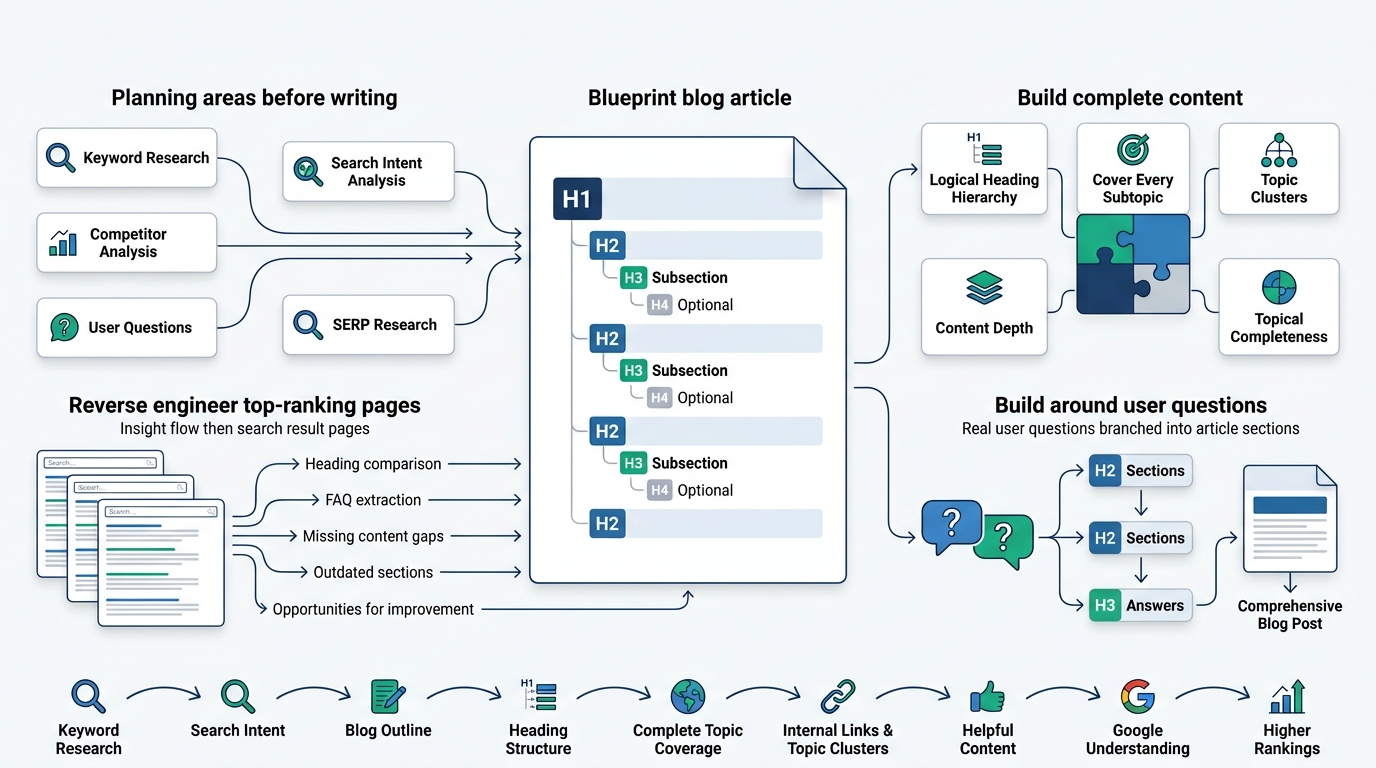
A clear outline forces you to think through what the article needs to cover before you’re mid-sentence trying to figure it out. It also helps you spot missing subtopics early, before you’ve already written three thousand words around an incomplete structure. Google’s crawlers rely heavily on heading structure to understand what a page covers, so a messy, unplanned structure genuinely hurts how well your content gets understood and indexed.
Create a Logical Hierarchy
The H1 should be your main title, used exactly once per page and containing your primary keyword. H2s break the article into major sections, each covering one distinct subtopic tied to the overall theme. H3s sit beneath H2s, breaking a section into more specific points without straying from the parent heading’s focus. H4s go even deeper when a subtopic genuinely needs further breakdown, though most blog posts won’t need to go past H3.
Cover Every Subtopic
A ranking blog post typically needs to cover every reasonable subtopic a searcher would expect, not just the narrow angle you personally find interesting. Missing an obvious subtopic is often the exact reason a competitor’s more complete article outranks yours, even if your writing quality is technically better sentence by sentence.
Explain Topic Clusters
Topic clusters organize content around a central pillar topic with supporting articles linking back to it, building depth across an entire subject instead of one isolated post. This structure signals topical authority to Google, showing that your site has genuine expertise across a topic rather than a single lucky article that happened to rank.
Content Depth
Content depth means actually covering a topic thoroughly, addressing the follow-up questions a reader would naturally have instead of stopping at the surface level. Shallow content, even if well-written, tends to lose to competitors willing to go deeper on the exact same topic.
Topical Completeness
Topical completeness means your article, taken as a whole, leaves a reader with nothing left to look up elsewhere. That’s the actual bar Google’s helpful content guidelines are pointing at: does this page fully satisfy the search, or does the reader have to bounce back and check three other sites to get the full picture.
Reverse Engineer Top Ranking Pages
Study the headings used by pages currently ranking on page one for your target keyword, since that reveals what Google already considers relevant structure for that query. Check their FAQ sections for questions they’re addressing that you might have missed. Look for missing information they didn’t cover, since gaps in top-ranking content are opportunities for you to build something more complete. Note any obvious opportunities where their content feels outdated, thin, or poorly explained, since that’s exactly where a stronger article can win the position instead.
Build Content Around User Questions
Structuring headings as actual questions, or at least themes tied directly to real questions people ask, tends to align naturally with both search intent and featured snippet opportunities. It also makes your outline easier to build, since you’re organizing around what people genuinely want to know rather than an arbitrary structure.
Write Headlines That Increase Rankings and CTR
The best article in the world does nothing if nobody clicks on it. Headlines carry more weight than most bloggers give them credit for, both for search rankings and for actual click-through behavior once you’re showing up in results.
Why Titles Matter
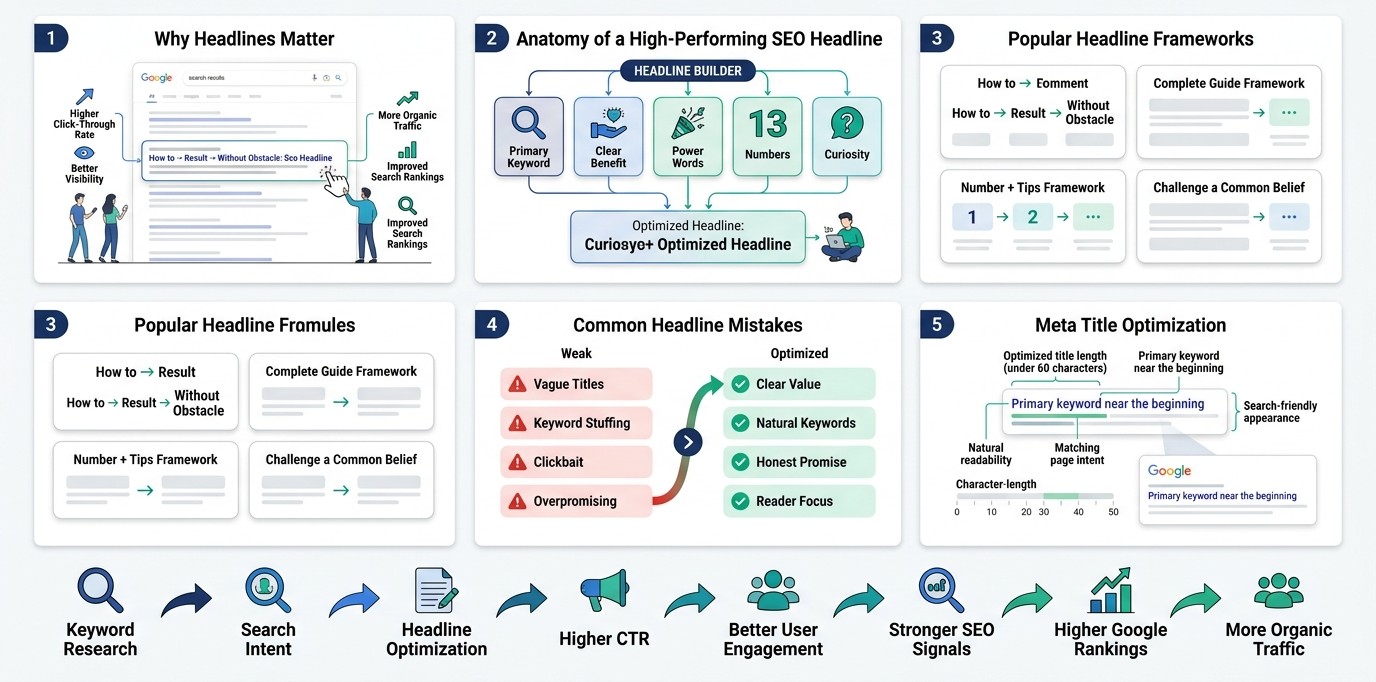
Your title is the first, and sometimes only, thing a searcher sees before deciding whether to click your result or scroll past it. Google also uses the title as a strong relevance signal, meaning a weak or vague title can hurt your ranking even before anyone reads a word of your content.
Anatomy of a Great SEO Title
A strong title includes the primary keyword, ideally near the beginning where it carries slightly more weight. It communicates a clear benefit, telling the searcher exactly what they’ll gain by clicking. Power words add emotional pull without sounding gimmicky, words like “proven,” “complete,” or “step-by-step” that signal substance. Numbers work well because they set a concrete expectation, like “10 Ways” or “2026 Guide,” giving the reader a sense of scope before clicking. A touch of curiosity, without veering into clickbait territory, gives people a reason to click now instead of bookmarking for later and forgetting.
Best Headline Formulas
“How to [Achieve Result] Without [Common Obstacle]” works well for problem-solving content, like “How to Rank on Google Without Buying Backlinks.” “The Complete Guide to [Topic]” signals comprehensiveness for pillar content aiming to be the definitive resource. “[Number] [Topic] Tips That Actually Work” combines the specificity of a number with a promise of practical value. “Why [Common Belief] Is Wrong (And What to Do Instead)” works for contrarian, opinion-driven pieces that challenge conventional wisdom.
Common Mistakes
Vague titles that could apply to any article on the topic fail to differentiate your content from a dozen competitors covering the same subject. Keyword-stuffed titles that read awkwardly to a human reader hurt CTR even if they technically include every target term. Titles that overpromise and underdeliver tank engagement metrics fast, since readers who feel misled bounce immediately, and Google notices that pattern over time.
Meta Title Best Practices
Keep meta titles under roughly 60 characters so they don’t get cut off in search results. Include the primary keyword naturally, ideally in the first half of the title where it’s most visible. Make sure the meta title matches what the reader will actually find on the page, since mismatched expectations hurt both rankings and trust.
Write an Introduction That Keeps Readers Reading
If someone clicks your result and bounces within ten seconds, that’s a bad signal Google picks up on. The introduction is where you either earn the next thirty seconds of someone’s attention or lose them entirely.
Why Bounce Rate Matters
High bounce rates, especially quick ones, suggest to Google that your page didn’t satisfy the search that brought someone there in the first place. That’s part of why introductions matter so much for SEO, not just readability. A weak opening loses the reader before they even reach the good content further down the page.
Four-Part Introduction Formula
Start with the problem, naming the exact frustration or question the reader showed up with. Agitate it slightly, showing you understand why this problem is more annoying or costly than it first appears. Introduce the solution, making clear that this article is going to actually solve it, not just talk around it. Close with a promise, telling the reader specifically what they’ll walk away knowing or able to do by the end of the piece.
Include Primary Keyword Naturally
Your primary keyword should appear somewhere in the first hundred words, ideally in a way that reads naturally rather than forced. This reinforces relevance for both the reader confirming they’re in the right place and for Google’s crawlers scanning the opening content.
Examples
A weak introduction might open with “In today’s digital world, SEO is very important for businesses.” That’s filler, and it tells the reader nothing specific. A strong introduction instead opens with something like the actual problem this guide opened with: most blog posts never rank at all, and good writing alone doesn’t fix that. Specific beats vague every single time.
Write SEO-Friendly Content That Readers Love
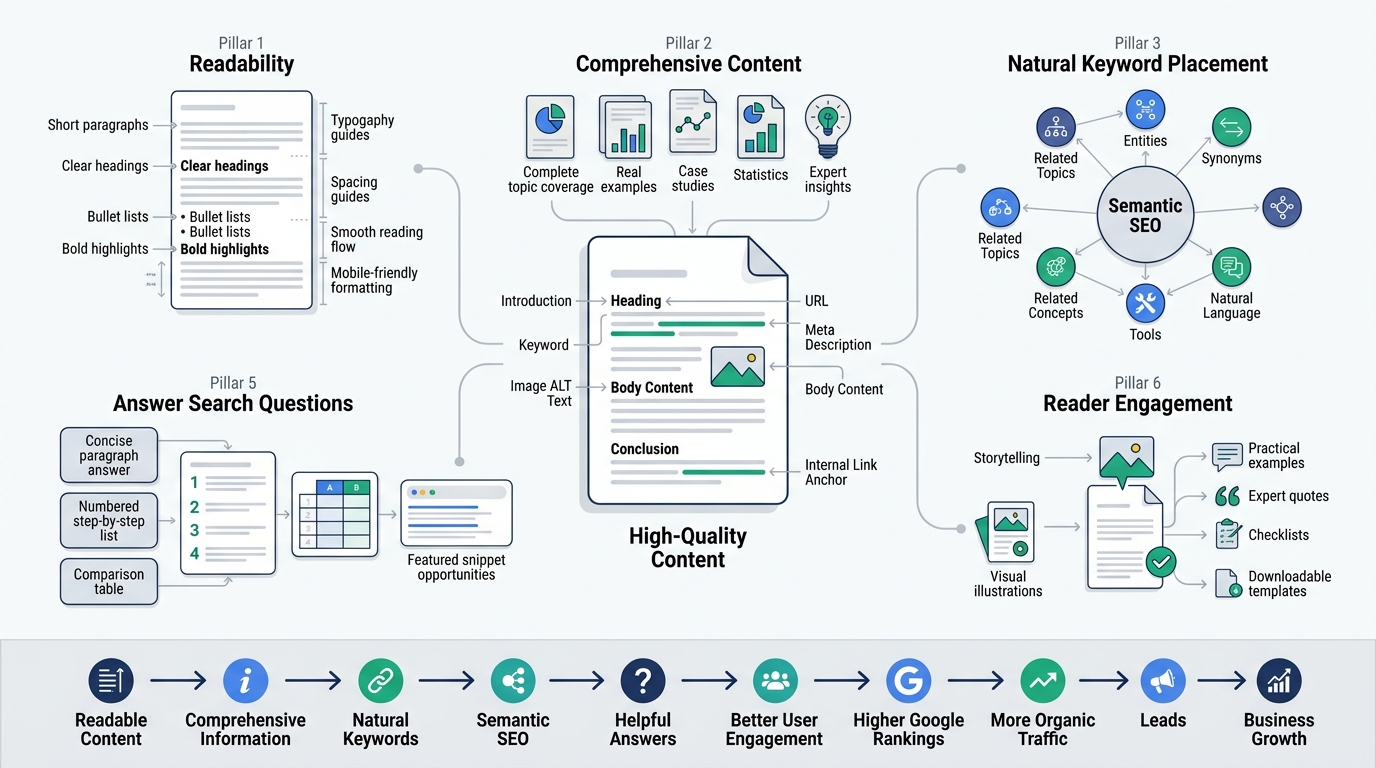
This is where most of the actual writing work happens, and it’s also where most SEO advice gets either too technical or too vague to actually apply.
Focus on Readability
Short paragraphs, two to four sentences at most, make content easier to scan, especially on mobile screens where long blocks of text feel overwhelming. Simple language beats jargon almost every time; if a twelve-year-old couldn’t follow your sentence, it probably needs simplifying. Transitions between ideas keep the piece flowing instead of feeling like a disconnected list of facts. Formatting, bullet points, bold text for key phrases, and clear headings, makes content easier to skim without losing the core message.
Write Comprehensive Content
Topical depth means covering a subject thoroughly enough that a reader doesn’t need to search elsewhere for basic follow-up information. Real examples ground abstract advice in something concrete a reader can actually picture or apply. Case studies with real numbers build credibility that generic claims never can. Statistics, when sourced accurately, add weight and specificity to claims that would otherwise feel like opinion. Expert insights, whether your own experience or a quoted source, add a layer of authority that thin, generic content is missing.
Use Keywords Naturally
Your primary keyword belongs in the introduction, at least one H2 heading, the URL, the meta description, at least one image ALT tag, the conclusion, and ideally in some internal anchor text pointing to the article from elsewhere on your site. The goal is natural placement that reads like normal writing, never forced insertion that disrupts the sentence’s flow just to hit a keyword count.
Use Semantic SEO
Semantic SEO means writing around the broader concept, not just the exact keyword phrase. Including related entities, like specific tool names, platforms, or concepts tied to your topic, helps Google understand the full scope of what you’re covering. Related phrases and natural language variations of your keyword reinforce topical relevance without repeating the exact same phrase over and over, which reads awkwardly anyway.
Answer Questions Clearly
Featured snippet optimization means structuring at least part of your content specifically to answer a question directly and concisely, right after the heading that poses it. Paragraph snippets work best for definitional or “what is” style questions answered in two to three clear sentences. List snippets suit step-by-step or ranked content, formatted as an actual numbered or bulleted list Google can pull directly. Table snippets work well for comparison data, like pricing or feature breakdowns, formatted in an actual HTML table rather than plain text.
Write Original Content
Avoid AI fluff, meaning generic filler sentences that sound fine but say nothing specific or useful. Avoid duplication, both from other sites and from your own previously published content, since Google penalizes thin, repetitive material. Add real experience wherever possible, since firsthand knowledge is exactly what separates content that ranks from content that just repeats what’s already out there. Original examples, ones you actually thought through rather than lifted from a competitor’s article, make your content genuinely harder to replicate.
Improve Engagement
Stories pull readers in emotionally in a way pure information rarely does on its own. Visuals break up text and help explain concepts that are harder to grasp through words alone. Concrete examples anchor abstract advice in something a reader can picture and apply immediately. Quotes from real people or sources add credibility and a change of voice within the piece. Checklists and templates give readers something actionable to walk away with, increasing the odds they bookmark or return to the page later.
On-Page SEO Checklist for Every Blog Post
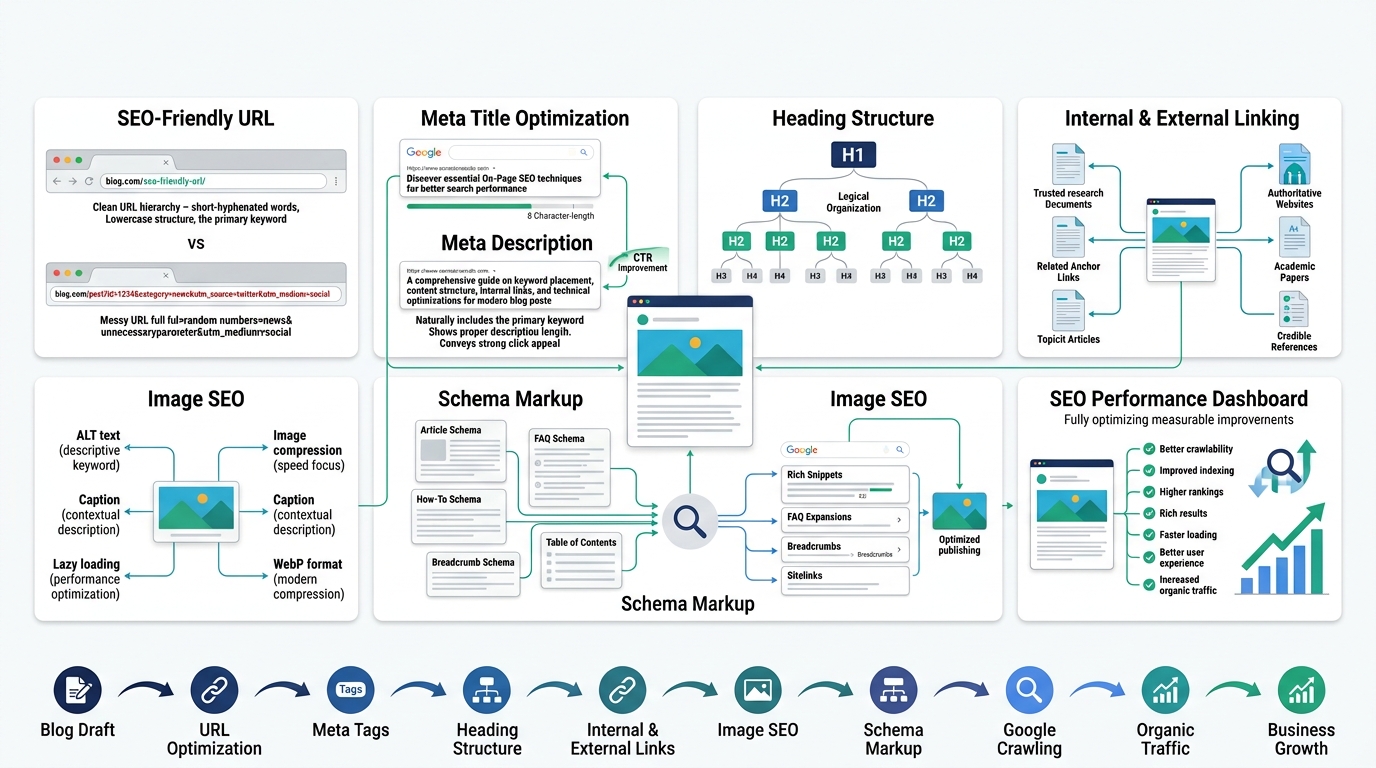
On-page SEO is the technical layer that supports everything you’ve written, and skipping it means even great content underperforms simply because Google can’t fully understand or trust the page.
Optimize URL
Keep URLs short, lowercase, and hyphenated, including the primary keyword without unnecessary extra words. A URL like “/how-to-write-blog-post-ranks-google” is far cleaner and more crawlable than a long, auto-generated string full of numbers and symbols.
Optimize Meta Title
The meta title should include the primary keyword, stay under roughly 60 characters, and clearly represent what the page actually covers without misleading the searcher.
Optimize Meta Description
Meta descriptions don’t directly boost rankings, but they heavily influence click-through rate, which indirectly affects performance over time. Keep it under about 160 characters, include the primary keyword, and make the value proposition clear enough that someone wants to click over a competing result.
Heading Optimization
Use one H1 per page, structure H2s and H3s logically, and include keyword variations naturally throughout the heading hierarchy rather than cramming the same exact phrase into every single one.
Internal Linking
Link to other relevant articles on your site using descriptive anchor text rather than generic phrases like “click here.” Internal links tied to topic clusters help Google understand relationships between your content and pass authority between related pages. Best practice is linking naturally within the content where it genuinely helps the reader, not stuffing links in just to hit a quota.
External Linking
Link out to authoritative sources when citing statistics, studies, or claims that need backing beyond your own word. Linking to credible sites signals to Google that you’re referencing accurate information, and it builds trust with readers who can verify claims themselves.
Image SEO
Use descriptive file names instead of generic ones like “IMG_2934.jpg.” Compress images so they don’t slow down page load times, which directly affects both user experience and Core Web Vitals scores. Write ALT text that accurately describes the image while including relevant keywords where natural, since ALT text also helps with accessibility for screen readers. Add captions where they add context, and use lazy loading so images below the fold don’t slow initial page load. WebP format tends to compress better than JPEG or PNG without sacrificing visible quality.
Schema Markup
Article schema helps Google understand basic metadata about your post, like author, publish date, and headline. FAQ schema can earn expanded rich results directly in search, showing your questions and answers right on the results page. How-To schema works similarly for step-by-step content, sometimes displaying steps directly in search results. Breadcrumb schema shows the site hierarchy in search results, improving both click appeal and site structure clarity. Table of contents markup, often paired with jump links, helps both users and Google navigate longer pieces more easily, and it can trigger sitelinks within a single search result.
Improve User Experience for Better Rankings
Google increasingly ties rankings to how people actually experience a page, not just what’s written on it. This chapter covers the technical and design side of that equation.
Readability
Readability covers sentence length, word choice, and overall clarity, all of which affect how long someone stays engaged with your content. Dense, complicated sentences lose readers fast, especially on a screen where skimming is the default behavior.
Typography
Font size, line height, and font choice all affect how comfortable your content is to read for extended periods. Text that’s too small or cramped together drives people away regardless of how good the actual writing is underneath it.
White Space
Generous white space around paragraphs, headings, and images makes a page feel less overwhelming and easier to scan, especially compared to dense walls of text that discourage reading altogether.
Mobile Optimization
Since most searches happen on mobile devices, your blog needs to render cleanly on smaller screens, with tap targets large enough to use comfortably and text that doesn’t require zooming to read.
Core Web Vitals
LCP (Largest Contentful Paint) measures how quickly the main content of a page loads, and slow LCP scores hurt both user experience and rankings. CLS (Cumulative Layout Shift) measures visual stability, penalizing pages where elements jump around unexpectedly as they load. INP (Interaction to Next Paint) measures how responsive a page feels when someone actually clicks or taps something, replacing the older FID metric.
Navigation
Clear, intuitive navigation helps both users and search engines understand how your site is structured, and it keeps visitors exploring more of your content instead of leaving after one page.
Accessibility
Accessible design, proper ALT text, readable color contrast, keyboard navigation, benefits users with disabilities directly, and it often overlaps with practices Google already rewards for general usability.
EEAT, The Secret Behind High-Ranking Content
EEAT has become one of the more talked-about ranking concepts in recent years, and for good reason. It’s Google’s way of trying to separate genuinely trustworthy content from content that just looks the part on the surface.
Experience
Experience means showing you’ve actually done the thing you’re writing about, not just researched it from a distance. A blog post about running a marathon written by someone who’s actually run one carries a different weight than one written purely from secondhand research, and Google’s guidelines explicitly call this out as a signal worth demonstrating.
Expertise
Expertise reflects genuine knowledge of a subject, built through study, work, or direct involvement in the field. Demonstrating expertise means going beyond surface-level explanations into the kind of detail only someone who actually understands the topic would think to include.
Authoritativeness
Authoritativeness is about reputation, whether other credible sources, sites, or people recognize you or your site as a legitimate voice on the topic. This builds over time through consistent, accurate content and through other sites linking to or citing your work.
Trustworthiness
Trustworthiness covers accuracy, transparency, and honesty, whether your content can be relied on and whether your site is safe and legitimate to interact with. Clear sourcing, honest claims, and secure site practices (like HTTPS) all feed into this.
Build Credibility
Author bios that clearly state relevant credentials or experience help readers and Google both understand who’s actually behind the content. Citing sources for claims and statistics shows you’re not just making things up. References and case studies add concrete, verifiable weight to your arguments. Testimonials, when relevant, add social proof that reinforces trust from real people who’ve engaged with your work or product.
Optimize for Featured Snippets and AI Search
Search results look different than they did even a couple years ago, and content that ignores this shift is leaving visibility on the table.
What Are Featured Snippets?
Featured snippets are the highlighted answer boxes that appear above the standard search results, pulling content directly from a ranking page to answer a query immediately. Ranking in the featured snippet position often drives significant traffic even from a lower overall ranking position, since it sits above position one.
Types
Paragraph snippets pull a short, direct block of text answering a definitional or explanatory question. List snippets pull numbered or bulleted content, ideal for step-by-step or ranked information. Table snippets pull structured data, best suited for comparisons or numeric breakdowns. Video snippets pull relevant video content, often timestamped to the exact moment that answers the query.
AI Overviews
AI Overviews, Google’s AI-generated summary results, pull information from multiple ranking pages to construct a synthesized answer at the top of the results page. How AI uses content matters here: clear, factually dense, well-structured writing gets cited more often than vague or hedge-heavy content, since AI systems favor information they can extract cleanly and confidently.
Structure for AI
Clear, direct definitions near the top of a section make content easier for AI systems to extract accurately. Bullet points and numbered lists translate well into AI-generated summaries since the structure is already broken into digestible pieces. Tables work similarly well for comparison-heavy content. FAQ sections, with complete, standalone answers, are particularly well-suited to both AI Overviews and voice search results.
Publish Your Blog Correctly
Writing the article is only part of the job. A handful of technical publishing steps make sure Google can actually find, understand, and properly index your content once it’s live.
URL
Set a clean, keyword-relevant URL before publishing, since changing it later can cause ranking disruptions and broken backlinks if other sites have already linked to the original address.
Categories
Assign your post to a relevant category that fits your site’s structure, helping both readers and search engines understand where this content sits within your broader site.
Tags
Use tags sparingly and relevantly, since overly broad or excessive tagging can create thin, low-value archive pages that dilute your site’s overall quality signals.
Canonical URL
Set a canonical URL to avoid duplicate content issues, especially if the same content is accessible through multiple URL variations, which can confuse search engines about which version to rank.
XML Sitemap
Make sure your new post is automatically included in your site’s XML sitemap, since this helps Google discover and crawl the page faster than waiting for organic discovery through links alone.
Indexing
Request indexing manually through Google Search Console right after publishing, which can speed up the time it takes for your new post to actually appear in search results instead of waiting passively.
Promote Your Blog After Publishing
Publishing isn’t the finish line. Content that never gets shared or linked to struggles to build the momentum, backlinks, and early traffic that help it rank in the first place.
Why Promotion Matters
Early traffic and engagement signals can influence how quickly Google trusts and ranks a new piece of content. Backlinks earned through promotion also directly strengthen a page’s authority over time, something that rarely happens if a post just sits quietly on your site hoping to be discovered organically.
Share on Multiple Channels
LinkedIn works well for business and professional topics, especially when paired with a personal take rather than just a link drop. Facebook and Twitter/X reach broader audiences and can drive quick initial traffic if your following is engaged. Pinterest works particularly well for visual, list-based, or how-to content with strong imagery. Medium can extend reach to a new audience if you republish a modified version with a canonical link back to your original. Quora and Reddit work well for driving relevant traffic when you genuinely answer a question and link to your post as additional depth, not as a spammy drop. Email newsletters reach an audience that’s already opted in and engaged, often converting better than cold social traffic. Niche communities and forums tied to your topic can drive highly targeted traffic if you participate genuinely instead of just dropping links.
Repurpose Content
Turning a blog post into a short video extends its reach to platforms like YouTube or TikTok where written content doesn’t naturally live. Carousels work well on LinkedIn and Instagram, breaking key points into a swipeable, visual format. Infographics summarize data-heavy content visually, often earning backlinks when other sites embed them. Threads on X or similar platforms break a post’s core argument into a digestible, shareable sequence. A newsletter recap keeps your existing audience engaged with new content without requiring a full rewrite. Turning a post into a podcast episode reaches an entirely different audience segment that prefers audio over reading.
Monitor Rankings and Improve Performance
Publishing and promoting a post isn’t the end of the process. Tracking how it actually performs over time tells you whether your strategy is working and where it needs adjustment.
Track Rankings
Google Search Console shows exactly which queries your post ranks for, along with impressions, clicks, and average position data straight from Google itself. Google Analytics 4 tracks user behavior once they land on your page, including engagement time and conversion actions. Ahrefs and Semrush both offer more detailed rank tracking and competitor comparison than Search Console alone provides.
Important Metrics
Organic traffic shows overall visibility and growth over time for a given post. CTR reveals whether your title and meta description are compelling enough relative to your ranking position. Average position tracks where you’re actually sitting in search results for target keywords, showing movement up or down over time. Bounce rate flags whether people are leaving immediately, often a sign of mismatched intent or a weak introduction. Engagement time shows whether readers are actually consuming the content or clicking away almost instantly. Conversions, when applicable, measure whether the post is driving real business outcomes beyond just traffic numbers.
Update Old Content
Update content when rankings start slipping, when the information becomes outdated, or when a competitor’s fresher post starts outranking yours. How you update matters too: add new information, remove outdated claims, refresh statistics, and improve structure based on what’s currently ranking well for the same keyword. Frequency depends on the topic; fast-moving industries might need quarterly updates, while more evergreen topics can go a year or more between refreshes.
Content Refresh Checklist
Check whether the target keyword and search intent still match current search behavior. Update statistics, examples, and any outdated tool or platform references. Add missing subtopics competitors now cover that weren’t addressed originally. Improve internal linking to newer, related content published since the original post went live. Re-optimize the title and meta description if CTR has been underperforming relative to ranking position.
Blog Writing Mistakes That Kill Rankings
A handful of recurring mistakes quietly sabotage blog posts that otherwise had a real shot at ranking well.
Keyword stuffing, cramming the target phrase in unnaturally often, reads poorly and can trigger Google’s spam-related quality signals rather than helping relevance. Thin content that skims the surface of a topic loses to competitors willing to go deeper, even if the writing quality is technically fine. Ignoring search intent, covered earlier, means writing content that’s technically about the right topic but the wrong format entirely.
Duplicate content, whether copied from elsewhere or repeated across your own site, confuses Google about which version deserves to rank and can suppress both. No internal links isolates a post from the rest of your site’s authority and makes it harder for both users and Google to discover related content. Weak headlines fail to earn the click even when the underlying content is genuinely strong.
Poor formatting, dense paragraphs, no headings, no visual breaks, drives readers away regardless of content quality. A slow website frustrates visitors and directly hurts Core Web Vitals scores, which factor into rankings. Ignoring mobile users creates a broken experience for the majority of searchers who are browsing on a phone. Not updating old posts lets once-strong rankings quietly decay as competitors publish fresher, more current content on the same topics.
Complete Blog Writing Workflow
Having a repeatable workflow turns SEO writing from a guessing game into a process you can run consistently on every new post.
Step one is keyword research, identifying a primary keyword backed by real search volume and matched to your site’s authority level. Step two is intent analysis, confirming the content format you plan to build actually matches what Google and searchers expect for that query. Step three is competitor research, studying what’s currently ranking to spot gaps and opportunities you can cover better.
Step four is building the outline, structuring headings around every subtopic the article needs to cover comprehensively. Step five is writing the draft, focusing on clear, specific, genuinely helpful content rather than padding for length. Step six is on-page SEO, applying the full checklist covered in Chapter 8 before considering the post finished.
Step seven is proofreading, catching errors and tightening language that might otherwise undermine the credibility of otherwise solid content. Step eight is publishing, making sure the technical steps from Chapter 12 are handled correctly. Step nine is promotion, actively sharing the post across relevant channels rather than hoping it gets discovered passively. Step ten is tracking and updating, monitoring performance over time and refreshing the content as needed to maintain or improve its ranking.
Blog SEO Checklist (Printable)
Print this out, tape it above your desk, whatever works. This is the exact sequence to run through on every post before you consider it actually done. Skipping steps here is how “good” posts quietly underperform for months without anyone noticing why.
Phase 1: Before Writing
Primary keyword selected
Pick one keyword backed by real search volume, difficulty that matches your site’s current authority, and intent that fits the content you’re planning to write. Don’t just grab the highest-volume term and hope. If your site’s new, a keyword with 200 searches a month and low competition beats one with 5,000 searches and ten established competitors sitting on page one.
Search intent identified
Look at the actual SERP for your keyword before writing a word. Is Google showing listicles, how-to guides, product pages, or comparison charts? That tells you exactly what format to build. Writing a personal story for a keyword where Google’s showing step-by-step guides is how you write 2,000 good words that never rank.
Competitors analyzed
Open the top five ranking pages for your keyword and actually read them. Note their headings, what they cover, what they miss, and how deep they go. You’re not copying them, you’re finding the gap, the outdated stat, the missing subtopic, the confusing explanation you can do better.
Full outline prepared
Build the heading structure before you write a single paragraph. List every subtopic a reader would reasonably expect covered, based on what you found in competitor research and “People Also Ask.” An outline built after research takes fifteen minutes and saves you from a messy rewrite later.
Phase 2: While Writing
Primary keyword used naturally
It should show up in your intro, at least one H2, and your conclusion, but it needs to read like normal writing, not a checklist you’re satisfying. If a sentence sounds weird because you forced the keyword in, rewrite the sentence, not the reader’s patience.
Secondary keywords included
Weave in the related terms and phrases that came up during keyword research, the natural variations and closely connected subtopics. This helps Google understand the full scope of what you’re covering, not just the one exact phrase you’re chasing.
Internal links added
Link out to two or three genuinely related articles already on your site, using descriptive anchor text instead of “click here.” This helps readers go deeper into your content and helps Google understand how your pages connect to each other around a topic.
External links to credible sources
Anywhere you cite a stat, a study, or a claim that needs backing, link to the actual source. This isn’t just about giving credit, it’s a trust signal, both for readers who want to verify something and for Google evaluating whether your content is accurate.
Images optimized
Rename image files with descriptive text instead of “IMG_4821.jpg,” compress them so they don’t slow the page down, and write ALT text that actually describes what’s in the image. This covers accessibility and page speed at the same time.
FAQ section included
Add 8 to 15 questions people actually search for around this topic, answered directly and completely enough to stand alone. This is one of the easiest ways to capture featured snippets and get pulled into AI Overviews, since both formats favor clean, self-contained answers.
Phase 3: Before Publishing
Meta title optimized
Keep it under 60 characters, include your primary keyword near the front, and make sure it actually matches what’s on the page. A misleading title gets the click and loses the reader in five seconds flat, which hurts you more than not ranking at all.
Meta description optimized
Under 160 characters, include the keyword, and give a clear reason to click over the nine other results on the page. This doesn’t directly boost rankings, but it drives your click-through rate, which absolutely does influence how you perform over time.
URL optimized
Short, lowercase, hyphenated, keyword-included, no random numbers or leftover draft text. Set this before you publish. Changing it later breaks any links that already point to it and can tank rankings you’d already built up.
Schema markup added
Add Article schema at minimum, and FAQ or How-To schema if your post fits either format. This is what earns those expanded rich results in search, the star ratings, the FAQ dropdowns, the stuff that makes your listing stand out from the plain blue links around it.
Mobile checked
Open the post on an actual phone, not just a browser resized smaller. Check that text isn’t cramped, images aren’t overflowing, and nothing requires horizontal scrolling. Most of your traffic is coming from mobile whether you planned for that or not.
Page speed tested
Run the page through a speed testing tool and fix anything flagged as a major issue, especially image size and unnecessary scripts. Slow pages lose visitors before they read a word, and speed factors directly into Google’s Core Web Vitals scoring.
Phase 4: After Publishing
Submitted to Google Search Console
Manually request indexing for the new URL instead of waiting for Google to find it on its own. This can shave days, sometimes weeks, off how long it takes for your post to actually show up in search results.
Shared on social channels
Post it wherever your audience actually spends time, LinkedIn, X, Pinterest, relevant communities, wherever fits the topic. Early traffic and engagement can help a new post build momentum faster than sitting quietly hoping someone stumbles onto it organically.
Backlink building started
Reach out where relevant, pitch it as a resource, get it in front of people who might reference or link to it. Backlinks remain one of the strongest trust signals Google uses, and they rarely happen by accident.
Rankings monitored
Check Search Console or a rank tracker regularly, not obsessively, but enough to catch whether the post is climbing, stuck, or slipping. This tells you whether your targeting and content actually worked or need adjusting.
Quarterly review scheduled
Put a reminder on the calendar to revisit this post in three months. Update stats, fix anything outdated, add missing subtopics competitors have since covered, and re-check whether the title and meta description still deserve their click-through rate. Content that never gets revisited quietly loses ground to whoever’s willing to keep it fresh.
Conclusion
Ranking on Google isn’t about tricking an algorithm or stuffing keywords until something sticks. It’s a process, start with real keyword research backed by actual search demand, understand exactly what searchers want before writing a single word, and build a genuinely comprehensive outline that covers the topic the way a knowledgeable person actually would.
From there, write content that’s genuinely helpful and people-first, optimize every on-page element without overdoing it, and strengthen EEAT through real experience, credible sourcing, and honest expertise. Handle the technical publishing steps correctly, promote the post across the channels where your audience actually spends time, and keep monitoring performance so you can update the content before it quietly loses ground to a fresher competitor.
Pick one existing post on your blog right now and run it through the checklist in Chapter 17. Fix whatever’s missing, then apply this same framework to your next article from the very first line. That’s the real difference between a blog post that gets written and one that actually ranks.
Frequently Asked Questions
How long should a blog post be for SEO?
There’s no fixed word count that guarantees ranking, but comprehensive topics competing for competitive keywords typically need well beyond 1,500 words to cover the subject fully. Length should be driven by how thoroughly the topic needs to be covered, not an arbitrary target, since padding a post just to hit a word count usually hurts more than it helps.
How many keywords should a blog target?
A single blog post should target one primary keyword along with a handful of closely related secondary keywords that fit naturally within the same topic. Trying to rank one article for too many unrelated keywords usually dilutes relevance instead of strengthening it.
How often should I publish blog posts?
Publishing frequency matters less than consistency and quality; two well-researched, fully optimized posts a week will outperform five rushed ones almost every time. What matters most is maintaining a sustainable schedule you can actually keep up with long-term.
Can AI-written blog posts rank on Google?
AI-assisted content can rank if it’s genuinely helpful, accurate, and edited with real expertise and original insight added, since Google evaluates content quality rather than how it was produced. Purely AI-generated content with no human editing, fact-checking, or added expertise tends to underperform, especially for competitive topics where depth and originality matter.
Is keyword density still important?
Keyword density as a strict percentage isn’t a major ranking factor anymore, and chasing a specific density often leads to awkward, forced writing. Natural keyword usage that reads well to a human, covering the topic and its related terms thoroughly, matters far more than hitting an exact repetition count.
What is the best blog structure for SEO?
A strong SEO structure includes one clear H1, logically organized H2s covering major subtopics, and H3s breaking those sections down further where needed. The structure should mirror how a knowledgeable person would naturally explain the topic step by step, not an arbitrary template forced onto the content.
How many internal links should a blog have?
There’s no strict number, but most well-optimized posts include somewhere between three and ten internal links, depending on length, pointing to genuinely relevant related content. The goal is helping readers navigate to more useful information, not hitting an artificial quota.
Should I update old blog posts?
Yes, regularly updating older posts, especially ones that have slipped in rankings or cover a topic that changes over time, is one of the most reliable ways to maintain or recover organic traffic. A content refresh often costs far less effort than writing an entirely new post from scratch and can produce faster results.
How do I optimize images for SEO?
Use descriptive file names, compress images to reduce load time, write accurate ALT text that includes relevant keywords naturally, and consider using WebP format for better compression without losing visible quality. These steps improve both page speed and accessibility, both of which tie into overall SEO performance.
How many headings should a blog contain?
The number of headings should match the complexity of the topic rather than a fixed count, but most comprehensive blog posts include somewhere between five and fifteen H2 and H3 headings combined. What matters more than the exact number is whether each heading represents a genuinely distinct, necessary subtopic.
What are semantic keywords?
Semantic keywords are terms and phrases conceptually related to your main topic, helping search engines understand the broader context of your content beyond exact keyword matches. Including them naturally throughout your writing helps establish topical depth and relevance without repeating the same exact phrase over and over.
How long does it take for a blog post to rank?
Ranking timelines vary widely depending on competition, site authority, and content quality, but most posts take anywhere from a few weeks to several months to reach a stable position in search results. Highly competitive keywords on newer sites can take significantly longer, sometimes six months to a year or more.
What is topical authority?
Topical authority is the reputation a site builds with search engines by publishing multiple interconnected, high-quality pieces of content around a specific subject over time. Sites with strong topical authority tend to outrank sites with a single standalone article on the same topic, even if that single article is well-written.
How can beginners write SEO-friendly blog posts?
Beginners should start by picking one clear keyword backed by real search volume, researching what’s currently ranking for that term, and structuring content around genuinely answering the searcher’s question as completely as possible. Focusing on clarity, comprehensive coverage, and basic on-page optimization matters far more early on than chasing advanced technical tactics.
How do I know if my blog is optimized?
Run through the full checklist from Chapter 17 covering pre-writing, writing, pre-publishing, and post-publishing steps, and confirm each item has actually been completed rather than assumed. Checking performance in Google Search Console a few weeks after publishing also reveals whether the post is being indexed properly and how it’s performing for its target keywords.