

You wrote a great email. The subject line took you twenty minutes. The offer is genuinely good. You hit send, you check the numbers three hours later, and the open rate is sitting at 4%. Not because people don’t want what you’re selling. Because half your list never saw the email in the first place. It went straight to spam, or worse, it got quietly filed into the Gmail Promotions tab where nobody ever looks.
This happens to businesses spending real money on email marketing every single day, and almost nobody talks about the actual cause. They blame the subject line. They blame the send time. They rewrite the copy for the fifth time. Meanwhile the real problem is sitting underneath all of it, and it has nothing to do with what the email says. It’s whether Gmail, Outlook, and Yahoo trust the sender enough to put it in front of a human being at all.
That’s email deliverability. It’s the unglamorous, technical, unsexy layer of email marketing that decides whether your work even gets a chance to be read. You can write the best email in your industry and it won’t matter if your domain has a bad reputation with Microsoft’s filters. You can have a beautifully designed template and it still lands in spam if your SPF record is broken. Deliverability isn’t a nice-to-have skill for email marketers. It’s the floor everything else stands on.
This guide walks through what deliverability actually is, how spam filters decide what to do with your email, the metrics that actually matter versus the ones that used to matter, every major reason emails end up in spam, and the exact fixes for each one. Authentication, list hygiene, sending behavior, content triggers, tools you can use to monitor your reputation, all of it. By the end you’ll know exactly why your emails have been landing in spam and what to change this week to stop it.
What You Will Learn in This Guide
- What email deliverability actually means and how it’s different from delivery and inbox placement
- How spam filters at Gmail, Outlook, and Yahoo evaluate every email you send
- The metrics worth tracking now that open rate is no longer reliable
- Every major reason emails land in spam, explained with fixes
- How SPF, DKIM, DMARC, and BIMI work together to build sender trust
- The difference between domain reputation and IP reputation, and which one matters more today
- A practical, step-by-step process to clean your list and rebuild sender trust
- The tools worth paying for versus the ones you can skip
- A working checklist you can run before every campaign
What Is Email Deliverability?
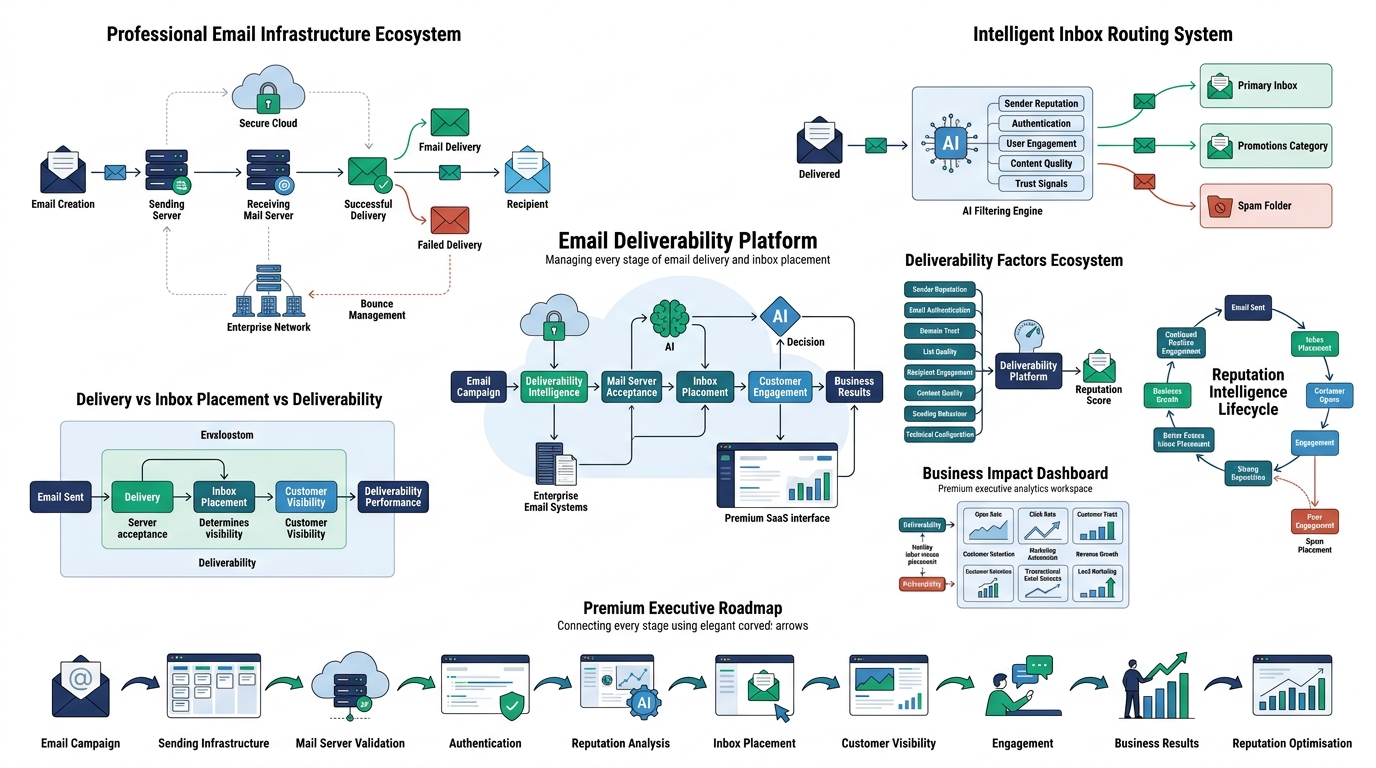
Email deliverability is the measure of whether your emails actually reach the inbox, not just whether the receiving server accepted them. That distinction matters more than almost anything else in this guide, because most people conflate “sent successfully” with “arrived in front of a human,” and those are two completely different things.
Here’s the confusion most marketers run into. Your email service provider shows a “delivered” status on 990 out of 1,000 emails you sent, and that feels like a win. But delivered just means the receiving mail server (Gmail’s, Outlook’s, whoever’s) accepted the email onto its servers. It says nothing about where that email ended up once it landed there. It could be sitting in the primary inbox. It could be buried in Promotions. It could be sitting in spam, never to be opened.
Delivery vs Inbox Placement vs Deliverability
These three terms get used interchangeably and they shouldn’t be, because each one measures something different.
Delivery is binary. Either the receiving server accepted your email or it bounced. That’s it. A 99% delivery rate sounds impressive on a dashboard and tells you almost nothing about whether your campaign worked.
Inbox placement is where the email physically ends up once delivery happens. Primary inbox, Promotions tab, Spam folder. This is the number that actually correlates with opens, clicks, and revenue, and it’s also the hardest number to get because your ESP can’t see inside someone else’s Gmail account. Tools like GlockApps and Validity Everest exist specifically to estimate this using seed lists, which we’ll get into later.
Deliverability is the broader discipline. It’s everything that influences whether an email gets delivered and where it lands once it does. Sender reputation, authentication, engagement history, content, list quality. Deliverability is the umbrella. Delivery and inbox placement are the outcomes you’re trying to control.
Picture 1,000 emails sent from a mid-sized ecommerce brand. 990 get delivered (10 bounce because of dead addresses). Of those 990, maybe 650 land in the primary inbox, 290 get filtered into Promotions, and 50 land in spam. The delivery rate looks great at 99%. But only 65% of your list actually had a real shot at seeing the email in a place they check regularly. That’s the gap almost nobody measures, and it’s the gap that explains why a “successful” send campaign still underperforms.
Why Deliverability Matters More Than Most Marketers Think
A dead inbox placement rate doesn’t just hurt one campaign. It compounds. Every email that lands in spam and goes unopened tells Gmail and Outlook that your future emails are probably not wanted either. That drags down your sender reputation, which drags down inbox placement for your next campaign, which drags down engagement again. It’s a downward spiral that’s brutal to reverse once it starts.
The business impact shows up in places people don’t immediately connect back to deliverability. Revenue drops because promotional emails aren’t seen. Customer trust erodes because transactional emails (order confirmations, password resets, shipping updates) get delayed or lost, and those are the emails people actually expect to arrive instantly. Email marketing automation sequences built around trigger emails stop working because the trigger emails themselves never reach anyone. Lead nurturing campaigns quietly fail for months before anyone notices the open rates have been sitting near zero. Deliverability isn’t a side metric. It’s the thing that determines whether every other email marketing effort has a chance to work at all.
How Email Deliverability and Spam Filters Actually Work
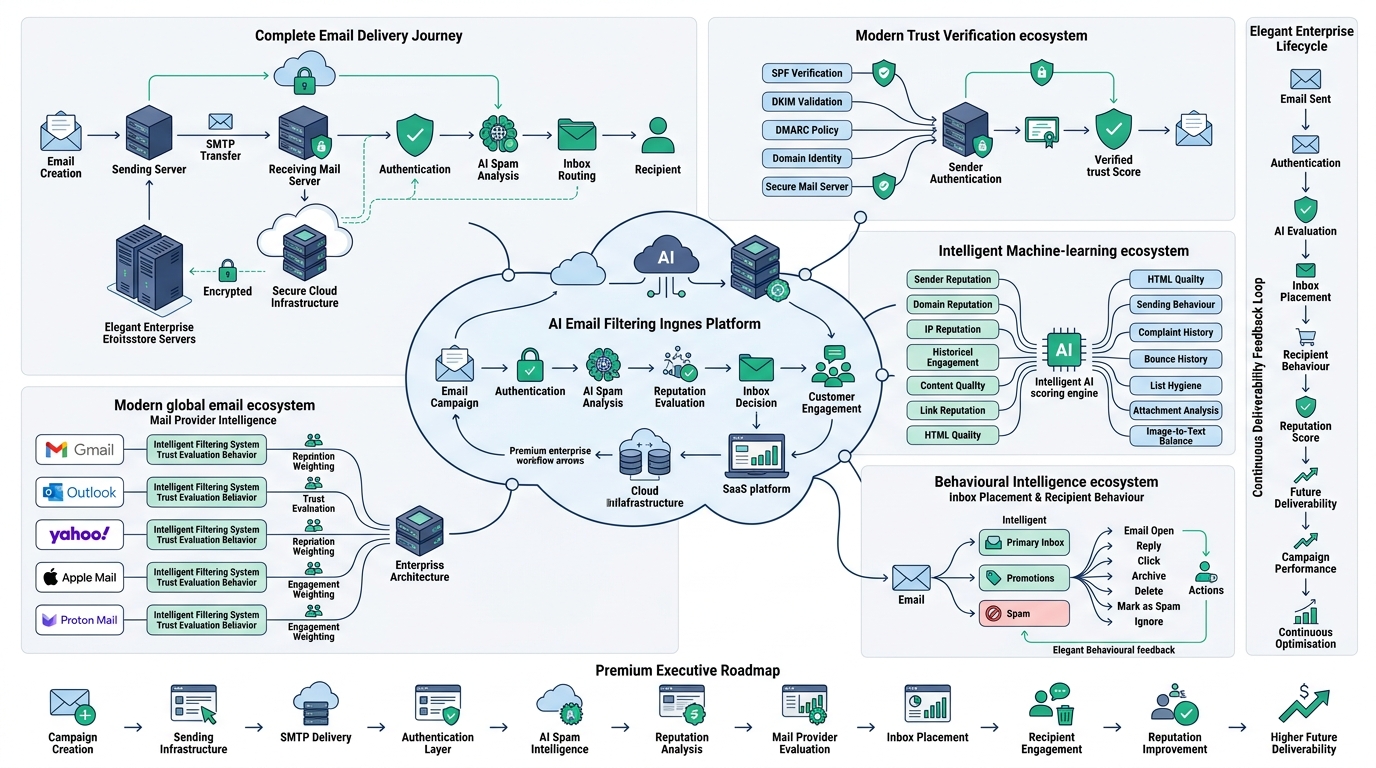
Spam filtering used to be simple. Early filters in the late 90s and early 2000s worked off basic keyword matching, so avoiding words like “free” or “buy now” would genuinely keep you out of spam. That approach is completely dead now. Modern spam filters at Gmail, Microsoft, and Yahoo run on machine learning models trained on billions of data points about sender behavior, recipient interaction, and content patterns, and they update constantly without any public changelog. Understanding email deliverability today means understanding that the filter isn’t reading your email like a human would. It’s scoring dozens of behavioral and technical signals before your subject line ever gets evaluated.
The Journey of an Email From Send to Inbox
Every email you send goes through a chain of checkpoints before it lands anywhere, and a failure at any single checkpoint can tank the whole thing.
It starts at your sender’s server, which could be your ESP (Klaviyo, Mailchimp, SendGrid) or your own SMTP server. That server hands the email off through SMTP to the receiving mail server, which is Gmail’s, Outlook’s, or whichever provider your recipient uses. The receiving server runs authentication checks first: does this email actually come from who it claims to come from, based on SPF, DKIM, and DMARC records. If authentication fails outright, a lot of providers will reject the email before it even reaches spam analysis.
If authentication passes, the email moves into spam analysis, where the receiving server evaluates sender reputation, content, links, formatting, and historical engagement from that sender to that recipient specifically. Based on the combined score from all of that, the email gets routed to inbox, Promotions, or spam. The whole process happens in milliseconds, but each step is a place where a poorly configured sender gets filtered out.
How Gmail, Outlook, Yahoo, Apple Mail, and Proton Mail Differ
Not every mailbox provider filters the same way, and treating them identically is a mistake a lot of marketers make.
Gmail relies heavily on engagement signals and machine learning. It tracks how individual recipients interact with your emails over time (opens, replies, deletes without opening, marking as spam) and personalizes filtering per recipient, not just per sender. Gmail’s Postmaster Tools gives you a rare window into how Google actually sees your domain, and it’s one of the few free tools that shows real reputation data instead of an estimate.
Outlook (Microsoft 365 and Outlook.com) leans harder on sender reputation and complaint rate through its Smart Network Data Services (SNDS) program. Microsoft has historically been stricter and slower to forgive a damaged reputation compared to Gmail, and getting removed from Microsoft’s block lists can take weeks even after you fix the underlying issue.
Yahoo filters similarly to Gmail in that it weighs engagement heavily, but it’s historically been more aggressive with spam trap deployment, meaning old, purchased, or scraped lists get punished faster on Yahoo than almost anywhere else.
Apple Mail introduced Mail Privacy Protection in 2021, which pre-loads images and effectively fakes an “open” for every email regardless of whether the recipient looked at it. This alone broke open rate as a trustworthy metric for a huge chunk of any list with iPhone users, and it’s a big part of why click rate has become the more honest engagement signal.
Proton Mail has a smaller market share but a privacy-focused user base that tends to mark unwanted marketing email as spam more readily than the average Gmail user, which makes Proton complaints disproportionately damaging relative to their volume.
What Spam Filters Actually Analyse in Every Email
This is the part worth sitting with, because it’s longer and more granular than most people expect. Spam filters aren’t checking one or two things. They’re running a composite score across a dozen-plus factors simultaneously.
They check sender reputation (the track record of the sending domain and IP across every recipient, not just this one), domain reputation and IP reputation separately (more on the difference shortly), and full authentication status across SPF, DKIM, and DMARC. They look at user engagement, meaning opens, clicks, replies, and how quickly recipients interact after receiving the email. They analyze email content itself, scanning for spam trigger phrases, excessive punctuation, and formatting patterns associated with low-quality senders. The image-to-text ratio matters because spam campaigns historically stuffed content into a single image to dodge keyword filters, so an email that’s 90% image and 10% text still raises flags today.
Filters also track bounce history and complaint rate (how often people hit “mark as spam”), your sending behavior (consistent volume versus sudden spikes), whether there are attachments (which are rare in legitimate marketing email and treated with suspicion), the quality and reputation of links in the email, the cleanliness of your HTML code, the overall hygiene of your list, and the history of previous interactions between this specific sender and this specific recipient. That last one is why the same email can land in one person’s inbox and another person’s spam folder on the exact same send.
Email Deliverability Metrics You Must Track
You can’t fix what you’re not measuring, and the metrics that mattered five years ago aren’t the ones that matter now. Open rate used to be the north star. After Apple’s privacy changes inflated open rates artificially across the board, that number stopped being trustworthy for a huge slice of most lists. Here’s what actually deserves your attention.
Delivery Rate
Delivery rate is the percentage of emails accepted by the receiving server out of total emails sent. The formula is straightforward: (emails delivered ÷ emails sent) x 100. A healthy delivery rate sits above 95%, and most well-maintained lists should be closer to 98-99%. If you’re consistently below 95%, you’ve got a list quality or authentication problem worth investigating immediately, not a copywriting problem.
Inbox Placement Rate
This is the number that actually matters and the hardest one to get directly. Inbox placement rate tells you what percentage of delivered emails landed in the primary inbox versus Promotions or spam. Your ESP won’t show you this natively in most cases, which is why tools like GlockApps and Validity Everest exist. They send test emails to seed accounts across Gmail, Outlook, and Yahoo, then report back exactly where each one landed.
Bounce Rate
Bounces come in two flavors and treating them the same is a mistake. Hard bounces happen when an email address doesn’t exist at all, the domain is dead, or the server permanently rejects the message. These should be removed from your list immediately and never retried. Soft bounces are temporary: a full inbox, a server that’s briefly down, a message too large. These can be retried a few times before you give up.
Acceptable hard bounce rate sits under 2%. Anywhere above 5% and mailbox providers start treating your entire domain as suspicious, because a high bounce rate is one of the strongest signals of a purchased or scraped list.
Spam Complaint Rate
This is the one metric that can tank your entire domain fastest. Spam complaint rate is the percentage of recipients who hit “mark as spam” instead of unsubscribing or ignoring the email. Google’s own bulk sender guidelines set the threshold at 0.3%, and staying under 0.1% is a genuinely safe target. Cross 0.3% consistently and Gmail will start routing a growing share of your mail directly to spam regardless of content quality.
Open Rate (and Why It’s Less Reliable Now)
Open rate used to be the primary engagement signal every marketer optimized for. Apple’s Mail Privacy Protection changed that by pre-fetching images on delivery for any recipient using Apple Mail with the feature enabled, which registers as an “open” whether or not a human actually looked at the email. On lists with a meaningful percentage of Apple Mail users, and that’s most consumer lists, open rate is now inflated and unreliable as a standalone metric. It’s still worth glancing at for trend direction, but don’t build your deliverability strategy around it anymore.
Click Rate and Click-to-Open Rate
Click rate has become the more trustworthy engagement signal precisely because a click can’t be faked by a privacy feature the way an open can. Click-to-Open Rate (CTOR) takes it a step further by isolating engagement quality: (unique clicks ÷ unique opens) x 100. A high CTOR means the people who did open your email actually found it relevant enough to act on. A low CTOR on a healthy open rate usually points to a content or offer mismatch, not a deliverability problem.
Unsubscribe Rate
A healthy unsubscribe rate sits between 0.2% and 0.5%. This one is actually good for deliverability when it happens, because someone unsubscribing is a far better outcome for your sender reputation than someone marking you as spam. If your unsubscribe rate is near zero, it’s often a sign your unsubscribe link is hard to find, which pushes frustrated recipients toward hitting the spam button instead.
Domain Reputation Score
Domain reputation is a composite trust score that mailbox providers calculate for your sending domain based on the sum of everything above: engagement, complaints, bounces, authentication, and sending consistency over time. Google Postmaster Tools shows you this directly on a scale from Bad to Low to Medium to High. It’s the single closest thing to a report card for your deliverability that exists, and it’s free to check.
Top Reasons Emails Go to Spam
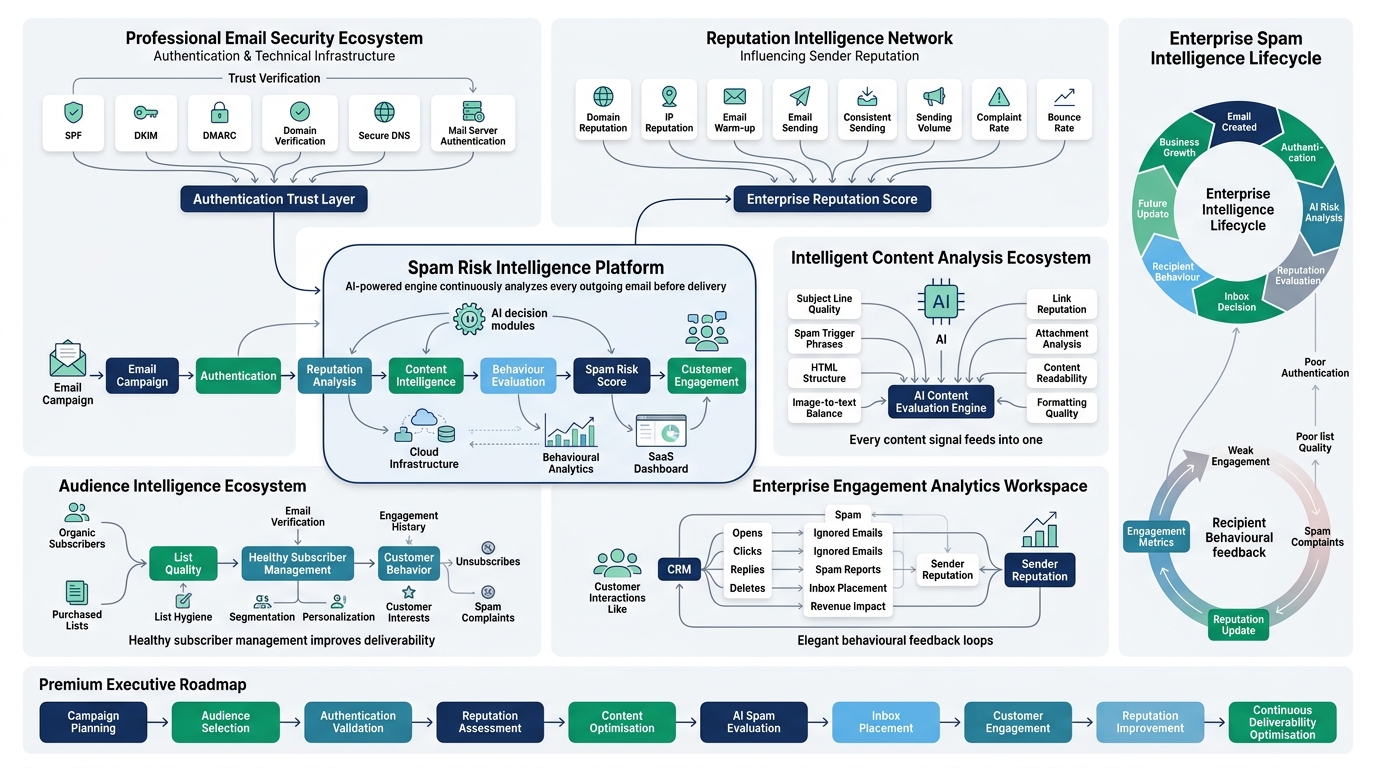
This is the section worth bookmarking, because almost every deliverability problem traces back to one or more of these causes.
Poor Sender Reputation
Sender reputation is the cumulative trust score mailbox providers assign to your domain and IP based on historical behavior. It develops slowly over months of consistent sending, engagement, and clean list hygiene, and it can collapse in a single bad campaign if you blast a purchased list or spike your volume without warming up. Rebuilding it takes consistent, small steps: send only to engaged recipients for a stretch, keep complaint rates near zero, and let the reputation climb back up gradually. There’s no shortcut here. Mailbox providers deliberately make reputation slow to rebuild so that bad actors can’t game it.
No SPF Record
SPF (Sender Policy Framework) is a DNS record that lists exactly which mail servers are authorized to send email on behalf of your domain. Without it, a receiving server has no way to verify that an email claiming to be from yourdomain.com actually came from a server you control, which makes it trivial for spammers to spoof your domain and makes your legitimate emails look suspicious by association. Setting it up means adding a TXT record to your domain’s DNS that looks something like v=spf1 include:_spf.google.com ~all, listing every service that sends on your behalf (your ESP, your CRM, your helpdesk). The most common mistake is forgetting to add a new sending tool to the SPF record after switching platforms, which silently breaks authentication for that tool’s emails.
Missing DKIM
DKIM (DomainKeys Identified Mail) attaches a digital signature to every outgoing email using a private key, and the receiving server checks that signature against a public key published in your DNS. If the content was altered in transit, or if the domain doesn’t match, the signature fails and the email’s authenticity comes into question. Most ESPs generate the DKIM keys for you and just need you to publish a CNAME or TXT record, but a surprising number of businesses skip this step entirely because it feels optional compared to SPF. It isn’t. Gmail and Yahoo’s 2024 bulk sender requirements made DKIM effectively mandatory for anyone sending more than 5,000 emails a day to Gmail addresses.
Missing DMARC
DMARC (Domain-based Message Authentication, Reporting and Conformance) sits on top of SPF and DKIM and tells receiving servers what to do when an email fails either check: quarantine it, reject it outright, or do nothing and just monitor. Without DMARC, even a domain with SPF and DKIM configured is still vulnerable to spoofing, because there’s no enforcement policy telling receivers how strict to be. A DMARC record also gives you aggregate reports showing exactly who is sending email using your domain, which is often the first place businesses discover they’re being spoofed by phishing campaigns they didn’t know about.
Sending Too Many Emails Too Quickly
New domains and new IPs have zero sending history, and mailbox providers treat that as a red flag by default because it’s exactly the pattern spammers exhibit: a brand new domain suddenly blasting thousands of emails. Email warm-up solves this by gradually scaling volume over 2 to 4 weeks, starting with small batches (a few hundred emails a day) to your most engaged contacts and slowly increasing volume as engagement stays healthy. Skip warm-up on a new domain and you’ll almost certainly see a chunk of your very first campaign land straight in spam, regardless of how good the content is.
Purchased Email Lists
Buying a list feels like a shortcut and it’s actually one of the fastest ways to destroy a domain’s reputation permanently. Purchased lists are full of people who never opted in, never heard of your brand, and will mark you as spam at a rate far above any organic list. Worse, purchased lists are riddled with spam traps, which are email addresses maintained by mailbox providers and blacklist organizations specifically to catch senders using bad data. Hit even a handful of spam traps and you can get your domain or IP blacklisted within a single send.
Low Engagement
Mailbox providers watch how individual recipients interact with your emails over time, and a growing pile of unopened, unclicked emails signals that your content isn’t wanted, even if nobody actively marks it as spam. This is why segmenting out disengaged subscribers matters so much: continuing to email people who haven’t opened anything in six months drags your overall engagement metrics down and tells Gmail your emails, in general, aren’t worth showing to anyone.
High Bounce Rate
A high bounce rate almost always traces back to a stale or poorly sourced list: addresses that no longer exist, typos never caught at signup, or role-based addresses like info@ or admin@ that get created and abandoned constantly. The fix is straightforward but requires discipline: verify new addresses at the point of collection, run periodic list cleaning through a verification service, and remove hard bounces immediately rather than retrying them.
Spam Trigger Words
Certain words and phrases still get flagged by content filters, even though keyword filtering alone doesn’t determine outcomes the way it used to. Phrases like “act now,” “100% free,” “guaranteed,” “risk-free,” “click here,” and excessive use of “$$$” or ALL CAPS still contribute negatively to a content score. Safer alternatives exist for almost every one of these: “available today” instead of “act now,” “no cost” instead of “100% free,” a clear call to action instead of “click here” repeated three times in one email.
Poor HTML Coding
Marketing emails built with bloated, inconsistent, or broken HTML (leftover Word document formatting, unclosed tags, excessive inline styles) render poorly across email clients and can trigger spam filters that associate messy code with low-effort spam campaigns. The common mistakes are pasting content directly from Word or Google Docs without cleaning the markup, using tables improperly, and failing to test rendering across Gmail, Outlook, and Apple Mail before sending.
Too Many Images
An email that’s mostly image with minimal actual text is a classic spam pattern, because it used to be a way to dodge keyword-based filters entirely. Modern filters catch this specifically now. Keep a healthy balance where the majority of your email is real, readable text, and never send an email that’s a single large image with no text content behind it at all.
Suspicious Links
Shortened URLs (bit.ly, tinyurl) get flagged more aggressively because they’re commonly used to mask malicious destinations, and spam filters can’t see where a shortened link actually leads without following it. Excessive tracking parameters on links, mismatched display text versus actual URL, and broken links that 404 all contribute negatively too. Use your own domain for tracking links where possible, and always verify every link works before sending.
Large Attachments
Legitimate marketing emails almost never include attachments, so an email with a PDF or image file attached gets treated with elevated suspicion by default, since that’s a common malware delivery pattern. If you need to share a document, link to a hosted version instead of attaching the file directly.
Lack of Personalisation
Generic, one-size-fits-all emails generate lower engagement, and lower engagement drags reputation down over time. Personalization beyond just inserting a first name (segmenting by behavior, purchase history, or engagement level) produces measurably higher open and click rates, which directly feeds back into a healthier sender reputation.
Sending Irrelevant Emails
Blasting your entire list with every single email regardless of relevance is one of the fastest ways to inflate complaint rates. Segmentation exists specifically to prevent this: a customer who bought hiking boots doesn’t need your swimwear promotion, and sending it anyway is a near-guaranteed unsubscribe or spam complaint.
Sending at Random Times
Inconsistent sending patterns, going quiet for six weeks and then sending five emails in three days, look erratic to both recipients and mailbox providers. Consistency in both timing and frequency builds a predictable pattern that filters learn to trust, while erratic bursts of activity resemble the sending pattern of a compromised account or a spam campaign.
Email Authentication Explained
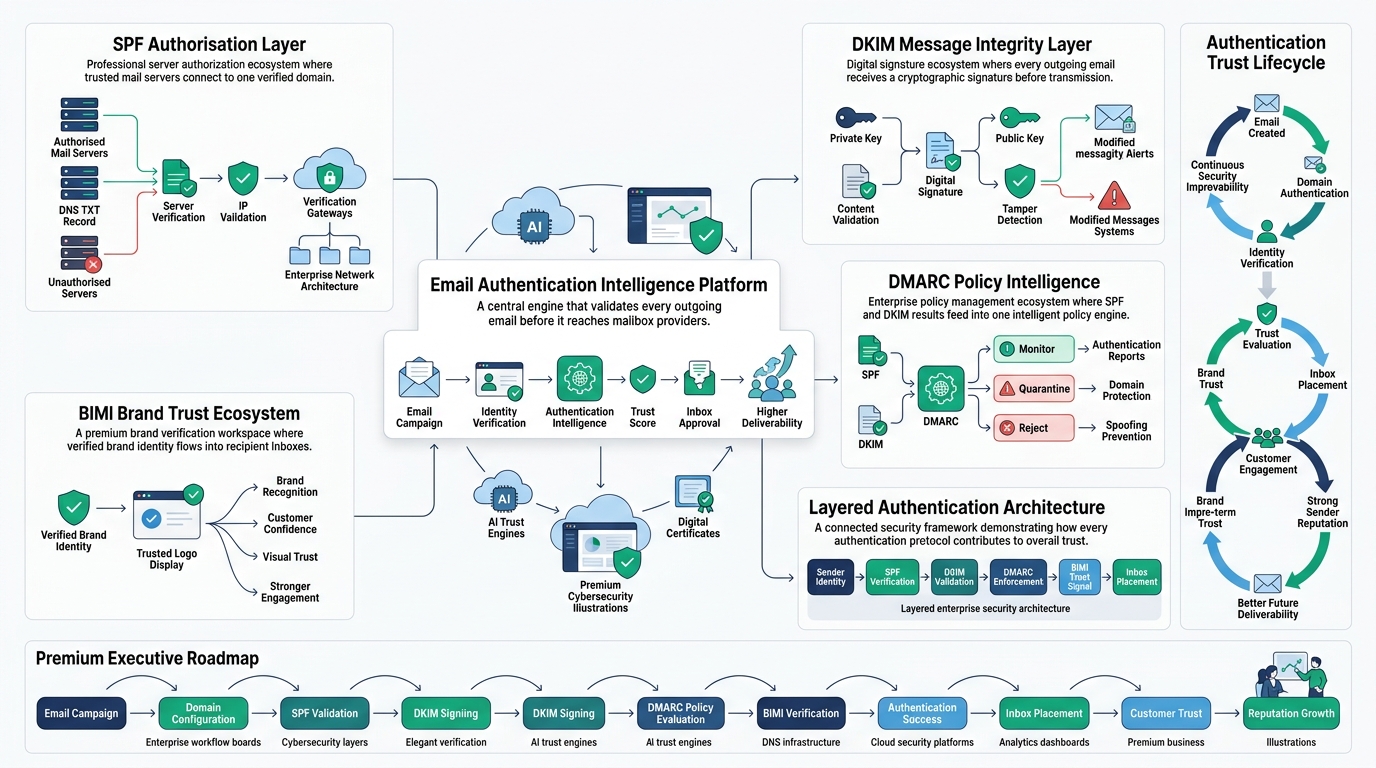
Authentication is the technical backbone of email deliverability, and it’s the single most common gap between businesses that consistently land in the inbox and ones that don’t.
What Is Email Authentication and Why It Matters
Email authentication is the set of DNS-based protocols that let receiving mail servers verify an email actually originated from who it claims to be from. Without authentication, anyone can send an email pretending to be from your domain, which is exactly how most phishing scams work. The purpose is proving legitimacy, and the direct benefit is trust: authenticated domains get meaningfully better inbox placement than unauthenticated ones, all else being equal.
SPF: Sender Policy Framework
SPF publishes a list of servers authorized to send on behalf of your domain in a DNS TXT record. When an email arrives, the receiving server checks the sending IP against that list. A basic SPF record looks like v=spf1 include:_spf.google.com include:sendgrid.net ~all, where each include adds another authorized sender. The most common mistake businesses make is exceeding the 10 DNS lookup limit SPF allows, which causes the entire record to fail silently, often after adding a fifth or sixth marketing tool without realizing the ceiling exists.
DKIM: DomainKeys Identified Mail
DKIM works through public-private key cryptography. Your sending server signs each outgoing email with a private key, and the receiving server checks that signature against a public key published in your DNS. If anything in the email was altered in transit, or if the signature doesn’t match, DKIM fails. This matters because it verifies content integrity, not just sender identity, which SPF doesn’t do on its own.
DMARC: Domain-based Message Authentication, Reporting and Conformance
DMARC ties SPF and DKIM together and defines a policy: what should happen when an email fails one or both checks. The policy can be set to p=none (monitor only, take no action), p=quarantine (send failing emails to spam), or p=reject (block failing emails outright). DMARC also generates aggregate reports sent to an email address you specify, showing every server sending mail using your domain, which is often how businesses discover unauthorized use of their domain for the first time. Most deliverability experts recommend starting at p=none to monitor for a few weeks, then moving to p=quarantine, and eventually p=reject once you’re confident every legitimate sender is properly authenticated.
BIMI: Brand Indicators for Message Identification
BIMI lets your verified brand logo appear directly next to your email in the recipient’s inbox, which is a visible trust signal that most competitors don’t have set up yet. To qualify, you need a fully enforced DMARC policy at p=quarantine or p=reject, a square SVG version of your logo, and in most cases a Verified Mark Certificate (VMC) purchased through a certificate authority. The benefit goes beyond aesthetics: a recognizable logo next to your sender name measurably increases open rates because it signals legitimacy before the recipient even reads the subject line.
How SPF, DKIM, and DMARC Work Together
Think of it as a layered chain of trust. SPF verifies the sending server is authorized. DKIM verifies the message content wasn’t tampered with. DMARC sits on top of both, checking that at least one of them passed and aligns with the domain in the “From” address, then enforces a policy based on the result. When all three pass and align correctly, mailbox providers award meaningfully higher trust to that email, which directly improves the odds of inbox placement over Promotions or spam.
Domain Reputation vs IP Reputation
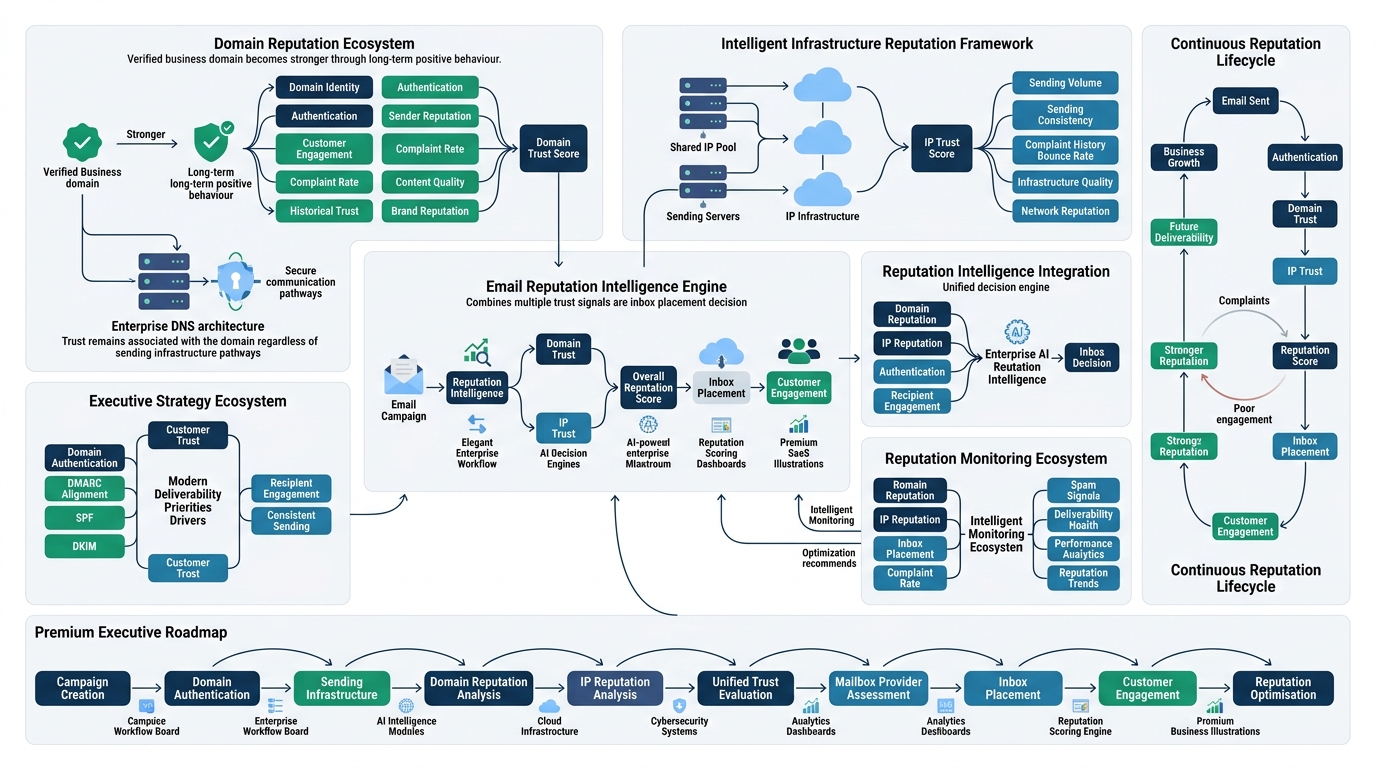
These two get confused constantly, and the confusion matters because fixing one doesn’t automatically fix the other.
Domain Reputation
Domain reputation is tied to your sending domain itself (yourbrand.com) and follows it regardless of which server or IP address the email was sent from. It’s built from engagement history, complaint rates, authentication status, and content patterns associated with that domain over time. Because it’s domain-based, it travels with you even if you switch email service providers, which is why simply moving to a new ESP doesn’t erase a bad reputation the way some marketers hope it will.
IP Reputation
IP reputation is tied specifically to the sending IP address. On a shared IP (the default with most ESPs like Mailchimp or Klaviyo on lower tiers), your reputation is partially influenced by every other sender using that same IP pool, which can hurt you if a bad actor shares your pool. A dedicated IP gives you full control over your own reputation, isolated from other senders, but it requires enough consistent volume to build a history on, generally recommended only once you’re sending 50,000+ emails a month, because a dedicated IP with low, inconsistent volume actually looks more suspicious than a well-established shared pool.
Which Matters More Today
Modern email service providers and deliverability experts increasingly point to domain reputation as the more influential factor, especially after Gmail and Yahoo’s 2024 sender guidelines shifted emphasis toward domain-level authentication and DMARC enforcement. IP reputation still matters, particularly for high-volume senders on dedicated infrastructure, but for most small and mid-sized businesses sending through an ESP, getting domain authentication and engagement right will move the needle more than agonizing over IP setup.
How to Monitor Both
Google Postmaster Tools gives free, direct visibility into how Gmail specifically views your domain reputation. Microsoft SNDS provides the equivalent for Outlook and Hotmail addresses, showing complaint rates and trap hits tied to your sending IP. Checking both regularly, not just after a deliverability problem shows up, catches reputation damage early enough to fix before it snowballs into a full domain-wide filtering problem.
Email List Hygiene Best Practices for Deliverability
List hygiene is the unglamorous maintenance work that determines whether every other deliverability effort actually pays off.
Cleaning Your List Regularly
Run a full list cleaning pass at minimum every quarter, removing hard bounces, unengaged subscribers, and flagged invalid addresses. Waiting a full year between cleanings lets dead weight accumulate to a point where a single campaign can meaningfully damage your reputation before you even notice the problem.
Removing Inactive Users
Subscribers who haven’t opened or clicked anything in 6 to 12 months are actively dragging your engagement metrics down every time you email them. Move them into a separate re-engagement flow, and if they don’t respond after a couple of targeted attempts, remove them from your main sending list entirely. It feels counterintuitive to shrink your list on purpose, but a smaller, engaged list consistently outperforms a bloated, disengaged one on every metric that actually matters.
Double Opt-In
Double opt-in requires a new subscriber to confirm their email address through a follow-up link before they start receiving campaigns. It filters out typos, bots, and people who don’t actually want your emails at the point of entry, which means your list starts clean instead of needing to be cleaned later. Single opt-in grows lists faster on paper, but the quality gap shows up fast in bounce and complaint rates.
Invalid Addresses and Role-Based Emails
Addresses like info@, admin@, sales@, or support@ are role-based rather than tied to an individual, and they’re far more likely to be treated as spam traps or simply ignored by whoever manages that inbox. Filtering these out at signup, or flagging them for removal during a list clean, prevents them from quietly dragging down engagement metrics.
Spam Traps
Spam traps are addresses maintained by mailbox providers and anti-spam organizations specifically to catch senders using bad data practices. Pristine traps were never real addresses and only end up on a list through scraping or purchasing. Recycled traps were once real addresses that got abandoned and reactivated as traps after a period of inactivity. Hitting even a small number of traps in a single send can trigger a blacklisting, which is exactly why purchased and scraped lists are so dangerous regardless of how good the content is.
Email Verification
Running new addresses through a verification service (ZeroBounce, NeverBounce, Kickbox) before they enter your sending list catches typos, disposable addresses, and dead domains before they ever get a chance to hurt your bounce rate. This is one of the cheapest deliverability investments available and one of the most consistently skipped.
Sunset Policy and Re-Engagement Campaigns
A sunset policy defines exactly when and how you stop emailing unengaged subscribers: for example, moving them to a reduced-frequency track after 90 days of no engagement, then to a final re-engagement attempt at 180 days, then removal at 270 days if there’s still no response. Re-engagement campaigns before that final cutoff, offering something specific to win back attention, often recover a meaningful chunk of subscribers who would otherwise have just been dead weight.
Suppression Lists
A suppression list tracks every address that should never receive email again, whether from unsubscribes, hard bounces, spam complaints, or manual removal requests. Every campaign should check against this list automatically before sending, because accidentally emailing someone who complained previously is one of the fastest ways to trigger repeat complaints and confirm to mailbox providers that you’re ignoring signals they’ve already given you.
How to Improve Email Deliverability: A Step-by-Step Approach
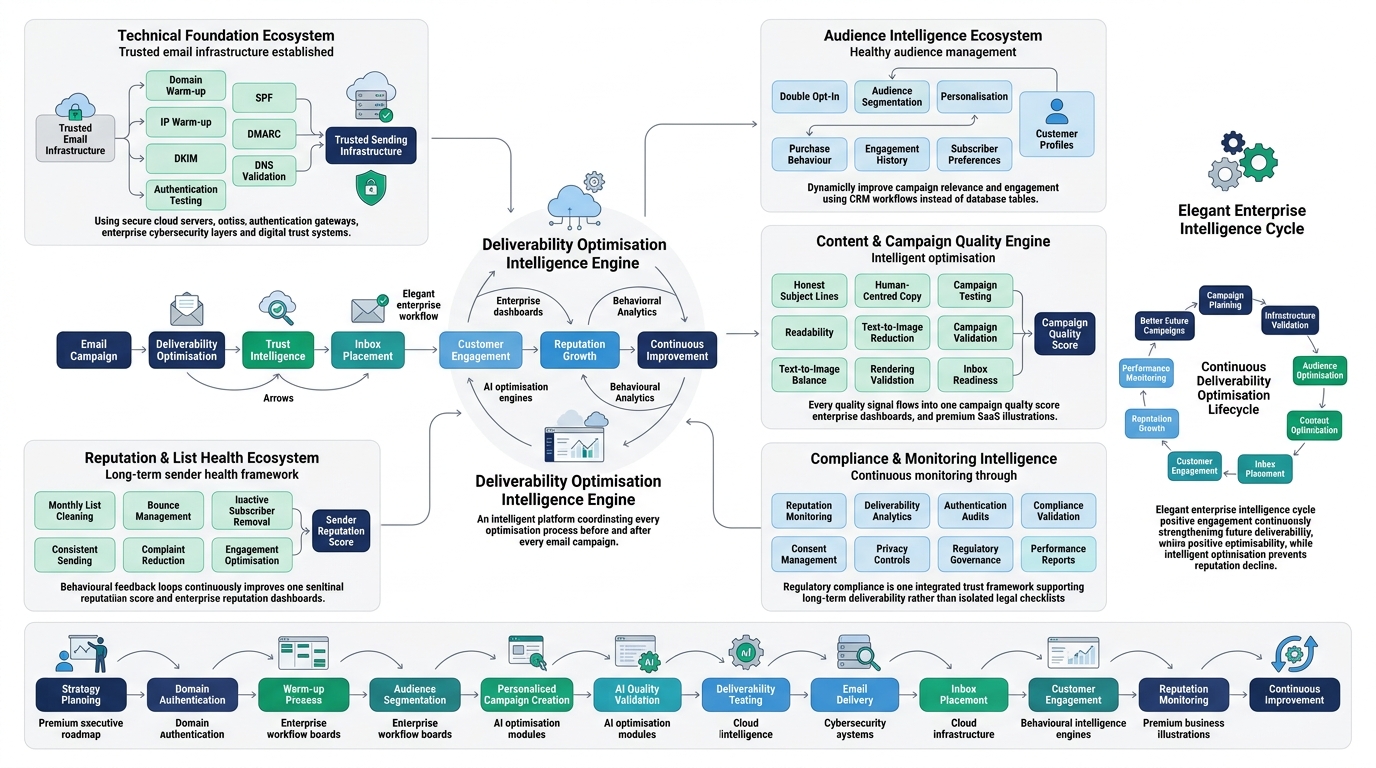
This is where everything above turns into an actual plan.
Warm Up New Domains and IPs
Start any new sending domain at low volume, a few hundred emails a day to your most engaged existing contacts, and increase gradually over 2 to 4 weeks. Skipping this step is one of the single biggest reasons new domains get filtered into spam immediately.
Authenticate Your Domain Completely
Set up SPF, DKIM, and DMARC before you send a single campaign from a new domain, and verify all three are passing correctly using a tool like MXToolbox before going live. This is not optional in 2026 for any meaningful sending volume.
Use Double Opt-In From the Start
Confirming new subscribers before they enter your active sending list keeps your data clean from day one instead of requiring cleanup work later.
Segment Your Audience
Group subscribers by behavior, purchase history, or engagement level, and send content relevant to each segment rather than blasting everyone identically. Segmented campaigns consistently see higher open and click rates, and both feed directly back into sender reputation.
Personalise Every Campaign
Go beyond inserting a first name. Use purchase history, browsing behavior, or stated preferences to tailor subject lines and content, since relevance is the single biggest driver of genuine engagement.
Send Consistently
Establish a predictable cadence and stick to it. Consistency in volume and timing builds trust with mailbox providers over time, while erratic bursts of sending look suspicious regardless of content quality.
Clean Lists Monthly
Don’t wait for a quarterly review to catch problems. A lightweight monthly pass removing hard bounces and recently flagged addresses prevents small issues from compounding.
Remove Inactive Subscribers Proactively
Move unengaged contacts through a sunset flow rather than continuing to email them indefinitely, since ongoing low engagement drags your entire domain’s reputation down over time.
Optimise Subject Lines Honestly
Write subject lines that accurately reflect the email content. Misleading or clickbait subject lines drive opens short-term but generate complaints and disengagement long-term, both of which hurt deliverability more than the initial open gain helps.
Write Better, More Human Email Copy
Avoid excessive spam trigger phrases, keep a healthy text-to-image ratio, and write like you’re talking to one person rather than broadcasting to a list. Content that reads naturally performs better with both human recipients and machine learning based spam filters.
Reduce Spam Complaints Proactively
Make the unsubscribe link obvious and easy to find. A frustrated recipient who can’t find how to unsubscribe will hit the spam button instead, and that single action does more reputation damage than a normal unsubscribe ever would.
Test Before Sending Every Campaign
Run every campaign through a tool like Mail Tester or GlockApps before the full send, checking for authentication issues, spam score, and rendering across major email clients. Catching a broken SPF record before a send goes out to your whole list saves the reputation damage entirely.
Monitor Reputation Continuously
Check Google Postmaster Tools and Microsoft SNDS on a regular schedule, not just when something goes wrong. Reputation problems are far easier to fix when caught early.
Follow CAN-SPAM, GDPR, CASL, and PECR
CAN-SPAM (United States) requires clear sender identification, an accurate subject line, and a working unsubscribe mechanism honored within 10 business days. GDPR (European Union) requires explicit opt-in consent and clear data usage disclosure. CASL (Canada) requires express or implied consent before sending commercial email. PECR (United Kingdom) governs electronic marketing consent alongside UK GDPR. Compliance with these regulations isn’t just a legal requirement, it directly supports deliverability, because the practices they mandate (clear consent, easy unsubscribe, accurate sender info) are the same practices that keep complaint rates low and sender reputation healthy.
Best Email Deliverability Tools
Google Postmaster Tools
Free and directly tied to Gmail’s own data, Postmaster Tools shows domain reputation, IP reputation, spam rate, feedback loop data, and authentication status specifically for how Google sees your sending. The main limitation is that it only covers Gmail addresses, so it tells you nothing about how Outlook or Yahoo view your domain.
Microsoft SNDS
Smart Network Data Services is Microsoft’s equivalent, showing complaint rates, trap hits, and filtering data tied to your sending IP for Outlook, Hotmail, and Live addresses. It requires manual IP registration and reads less intuitively than Postmaster Tools, but it’s essential if a meaningful chunk of your list uses Microsoft email addresses.
GlockApps
GlockApps runs inbox placement tests across dozens of real mailbox providers simultaneously, showing you exactly where a test email lands (inbox, Promotions, spam) at Gmail, Outlook, Yahoo, and more. It’s one of the more direct ways to see actual inbox placement rather than inferring it from your own campaign metrics.
Mail Tester
Mail Tester gives you a free spam score out of 10 for any individual email, checking authentication, content, blacklist status, and technical formatting in one report. It’s the fastest way to catch an obvious authentication failure before a campaign goes out.
MXToolbox
MXToolbox is a broader DNS and email diagnostics tool, useful for verifying SPF, DKIM, and DMARC records are correctly published, checking blacklist status across dozens of blacklist databases, and diagnosing MX record issues.
Litmus
Litmus focuses primarily on email rendering across dozens of email clients and devices, though it also includes spam testing and analytics features. It’s more of a design and QA tool than a pure deliverability tool, but broken rendering is itself a factor that can hurt engagement and, indirectly, reputation.
Validity Everest
Validity Everest (formerly Return Path) is an enterprise-grade deliverability monitoring platform offering inbox placement testing, reputation monitoring, and detailed analytics, generally used by larger senders with dedicated deliverability budgets.
ZeroBounce, NeverBounce, and Kickbox
These three are email verification services that check addresses for validity, catch disposable and role-based emails, and flag spam traps before you ever send to them. ZeroBounce and NeverBounce both offer free trial credits and pay-as-you-go pricing, while Kickbox differentiates with a “sendex” score rating overall list quality alongside basic verification.
Tool Comparison
| Tool | Best For | Free Plan | Authentication Testing | Inbox Placement Testing | Blacklist Monitoring | Pricing |
|---|---|---|---|---|---|---|
| Google Postmaster Tools | Gmail-specific reputation | Yes | Yes | No | No | Free |
| Microsoft SNDS | Outlook-specific reputation | Yes | No | No | Partial | Free |
| GlockApps | Inbox placement testing | Limited trial | Yes | Yes | Yes | Paid tiers from ~$29/mo |
| Mail Tester | Quick spam score checks | Yes (limited) | Yes | No | Yes | Free / paid tiers |
| MXToolbox | DNS and record diagnostics | Yes (limited) | Yes | No | Yes | Free / paid tiers |
| Litmus | Rendering and QA | Trial only | Partial | No | No | Paid from ~$99/mo |
| Validity Everest | Enterprise reputation monitoring | No | Yes | Yes | Yes | Custom enterprise pricing |
| ZeroBounce | List verification | Free credits | No | No | No | Pay-as-you-go |
| NeverBounce | List verification | Free credits | No | No | No | Pay-as-you-go |
| Kickbox | List verification with scoring | Free credits | No | No | No | Pay-as-you-go |
Email Deliverability Checklist
Run through this before, during, and after every campaign.
Before Sending
- Confirm SPF, DKIM, and DMARC are all published and passing
- Verify the sending domain has completed warm-up if it’s new
- Check current domain reputation in Google Postmaster Tools
Authentication
- Test authentication status with MXToolbox or Mail Tester
- Confirm DMARC policy is set appropriately (none, quarantine, or reject)
- Verify BIMI is configured if brand logo display is a goal
Content
- Check text-to-image ratio is balanced
- Scan for excessive spam trigger phrases
- Confirm all links work and avoid shortened URLs
- Verify HTML renders correctly across major clients
Recipients
- Confirm list has been cleaned within the last 30 to 90 days
- Remove hard bounces and flagged invalid addresses
- Segment audience appropriately for the campaign
Testing
- Run a Mail Tester spam score check before full send
- Test rendering across Gmail, Outlook, and Apple Mail
- Send a small test batch to gauge engagement before full deployment on new campaigns
Monitoring
- Check Google Postmaster Tools and Microsoft SNDS weekly
- Monitor bounce and complaint rates after every send
- Watch for sudden reputation score drops
After Sending
- Review inbox placement rate through GlockApps or a similar tool
- Move unengaged recipients toward a sunset or re-engagement flow
- Document any deliverability issues for the next campaign’s planning
Common Email Deliverability Mistakes
Ignoring authentication entirely is the single most common mistake, usually because it feels like a one-time technical setup task that nobody revisits after the initial launch, even as new sending tools get added without updating SPF records.
Buying email lists remains a persistent temptation because it looks like a fast way to grow reach, and it remains one of the fastest ways to permanently damage a domain’s reputation through spam trap hits and high complaint rates.
Sending cold emails incorrectly without proper warm-up, personalization, or compliance with consent regulations triggers spam filters and complaint rates that a well-executed cold outreach strategy would avoid entirely.
Poor segmentation leads to irrelevant content reaching the wrong people, which drives up unsubscribes and complaints across an otherwise healthy list.
No list cleaning lets dead weight accumulate silently for months, until a single campaign to a stale list triggers a reputation drop that then affects every future send.
Spammy design choices, heavy image use, excessive punctuation, all-caps subject lines, read as low-effort spam patterns to both filters and human recipients.
Using URL shorteners in marketing emails raises suspicion because shortened links are commonly abused to mask malicious destinations, and filters can’t verify the true destination without following the redirect.
Ignoring analytics means deliverability problems go unnoticed until they’re severe enough to show up as an obvious revenue drop, rather than being caught early through routine metric review.
Changing domains frequently resets sender reputation each time, since reputation is domain-specific and doesn’t transfer, so businesses that hop between domains chasing a fresh start end up permanently stuck rebuilding from zero.
Sending too frequently without corresponding value drives fatigue and complaints, particularly on segments that were already borderline disengaged before the frequency increase.
The Future of Email Deliverability
Spam filtering is moving further toward AI-driven, behavior-based scoring rather than static rule sets, which means the old approach of avoiding a list of trigger words is becoming close to irrelevant compared to actual engagement patterns and sender history. Machine learning models at Gmail and Microsoft now weigh individual recipient behavior so heavily that the exact same email can land in the inbox for one subscriber and spam for another, based entirely on that person’s past interaction with your domain.
Reputation scoring is also becoming more domain-centric and less forgiving of ESP-hopping as a workaround, especially after Gmail and Yahoo’s 2024 bulk sender requirements pushed domain-level authentication and one-click unsubscribe into mandatory territory for anyone sending meaningful volume. BIMI adoption is climbing as more brands realize a visible verified logo in the inbox is a genuine trust signal that most competitors still haven’t bothered setting up. And privacy-first changes, following Apple’s lead with Mail Privacy Protection, are likely to keep eroding the reliability of open rate as a metric, pushing serious marketers further toward click-based and conversion-based measurement instead. Predictive deliverability monitoring, tools that flag a reputation problem before it fully materializes rather than after, is the direction the tooling space is heading, and it’s worth watching which platforms build this out well over the next year or two.
Conclusion
Email deliverability isn’t a technical afterthought you handle once and forget about. It’s the foundation everything else in email marketing sits on top of, and no amount of clever subject lines or beautiful design fixes a broken SPF record or a domain reputation that’s been quietly bleeding out for months. Strong sender reputation, complete authentication through SPF, DKIM, and DMARC, a genuinely clean list, relevant content, and consistent sending habits are what actually move the needle on inbox placement, and every one of those things requires ongoing attention rather than a single setup session.
Go audit your current setup this week. Check whether your SPF and DKIM records are actually passing, pull up your domain reputation in Google Postmaster Tools, and look honestly at how long it’s been since you last cleaned your list. Run through the checklist in this guide before your next campaign, and keep tracking the metrics that actually reflect inbox placement rather than the ones that just look good on a dashboard.
Frequently Asked Questions
What is email deliverability?
Email deliverability is the measure of whether your emails actually reach the recipient’s inbox rather than getting filtered into spam or Promotions. It’s broader than delivery rate, which only tells you whether the receiving server accepted the email, not where it ended up once it got there.
What is a good email deliverability rate?
A healthy delivery rate sits at 95% or above, with inbox placement rate ideally above 85%. Bounce rate should stay under 2%, and spam complaint rate needs to stay below 0.3%, with anything under 0.1% considered genuinely safe.
Why are my emails going to spam?
The most common causes are missing or broken authentication (SPF, DKIM, DMARC), a poor sender reputation built up from low engagement or high complaints, a stale or purchased email list, and content patterns that trigger spam filters like excessive images or spam trigger phrases. Usually it’s a combination of two or three of these rather than a single cause.
How do I improve email deliverability?
Start by authenticating your domain completely with SPF, DKIM, and DMARC, then clean your list to remove inactive and invalid addresses. Segment your audience, personalize content, send consistently, and monitor your reputation regularly through Google Postmaster Tools and Microsoft SNDS.
What is SPF?
SPF (Sender Policy Framework) is a DNS record that lists the mail servers authorized to send email on behalf of your domain. It lets receiving servers verify that an email actually came from a server you’ve approved, which prevents domain spoofing and supports better inbox placement.
What is DKIM?
DKIM (DomainKeys Identified Mail) attaches a cryptographic signature to outgoing emails, letting the receiving server verify the message wasn’t altered in transit and genuinely came from your domain. It works through a public-private key pair, with the public key published in your DNS records.
What is DMARC?
DMARC (Domain-based Message Authentication, Reporting and Conformance) builds on SPF and DKIM by defining what should happen when an email fails either check, whether to allow it through, quarantine it, or reject it outright. It also provides reporting that shows every server sending email using your domain.
What is BIMI?
BIMI (Brand Indicators for Message Identification) allows a verified brand logo to display next to your emails in supported inboxes like Gmail and Yahoo. It requires enforced DMARC at the quarantine or reject level and, in most cases, a Verified Mark Certificate.
How do I check my domain reputation?
Google Postmaster Tools shows your domain reputation directly for Gmail, rated from Bad to High. Microsoft SNDS provides similar visibility for Outlook and Hotmail addresses, though it requires manual IP registration to access the data.
What is inbox placement?
Inbox placement refers to where a delivered email actually lands, whether that’s the primary inbox, the Promotions tab, or spam. It’s different from delivery rate, which only confirms the receiving server accepted the email, not where it was routed afterward.
Does personalisation improve deliverability?
Yes, indirectly. Personalized, relevant content drives higher engagement (opens, clicks, replies), and mailbox providers use that engagement data as a trust signal that feeds directly into sender reputation and future inbox placement.
What is sender reputation?
Sender reputation is the trust score mailbox providers assign to your sending domain and IP based on historical behavior, including engagement rates, complaint rates, bounce rates, and authentication status. It’s built gradually over time and can drop quickly after a bad campaign.
How long does it take to improve email reputation?
Reputation recovery typically takes anywhere from a few weeks to a few months depending on how damaged it was and how consistently you correct the underlying issues. Mailbox providers deliberately make reputation slow to rebuild, so there’s no way to shortcut this timeline, only consistent good behavior sustained over time.
Can purchased email lists hurt deliverability?
Yes, significantly. Purchased lists are full of unengaged recipients, invalid addresses, and spam traps, and sending to them generates high complaint and bounce rates that can damage domain reputation within a single campaign, sometimes leading to a full blacklisting.
How often should I clean my email list?
A quarterly deep clean is the general baseline, with lighter monthly passes to remove recent hard bounces and clearly invalid addresses. Businesses sending high volume or seeing engagement decline should clean more frequently, closer to monthly or even biweekly.
Does email frequency affect deliverability?
Yes. Sending too frequently without corresponding value drives complaints and unsubscribes, while inconsistent, erratic sending patterns look suspicious to mailbox providers. A predictable, sustainable cadence tends to perform better than either extreme.
How do Gmail spam filters work?
Gmail relies heavily on machine learning models that track engagement per recipient, meaning the same email from the same sender can land differently for different people based on their individual interaction history with that domain. It also checks authentication status, content patterns, and overall domain reputation before deciding placement.
What is an email suppression list?
A suppression list tracks every email address that should never receive future campaigns, including unsubscribes, hard bounces, and spam complaints. Every send should be checked against this list automatically to avoid re-emailing someone who has already opted out or flagged your emails as unwanted.
What tools help improve email deliverability?
Google Postmaster Tools and Microsoft SNDS provide free reputation monitoring, GlockApps and Validity Everest test actual inbox placement, Mail Tester and MXToolbox check authentication and spam scores, and ZeroBounce, NeverBounce, and Kickbox handle list verification to keep bounce rates low.
Is email authentication mandatory?
It’s effectively mandatory for anyone sending meaningful volume today. Gmail and Yahoo’s 2024 bulk sender guidelines require SPF, DKIM, and DMARC for any sender pushing more than 5,000 emails a day to their addresses, and unauthenticated senders below that threshold still see meaningfully worse inbox placement even without formal enforcement.