


Every blogger hits the same wall eventually. You publish for a few weeks, maybe a few months, feeling good about the momentum, and then one Tuesday morning you open a blank document and just… stare at it. Nothing comes. You scroll through old notes, check a few competitor sites, maybe type “blog post ideas” into Google out of desperation, and close the laptop feeling like the well has run dry.
Here’s the thing nobody tells you when you start blogging: running out of blog post ideas has almost nothing to do with running out of things to say about your industry. It has everything to do with how you’re generating ideas in the first place. Most bloggers rely on inspiration. They wait for a spark, a random thought in the shower, a “genius” concept that hits them out of nowhere. That’s not a content strategy. That’s gambling with your publishing schedule, and eventually the odds catch up with you.
Blogs that never seem to run out of blog post ideas aren’t staffed by more creative people. They’re run by people who built a system. They pull ideas from customer conversations, keyword data, competitor gaps, and structured frameworks instead of waiting around for lightning to strike. That’s the entire difference between a blog that publishes consistently for two months and dies, and one that’s still cranking out content five years later with more topics on the list than when it started.
This guide walks through exactly how that system works. Not vague tips about “staying inspired” or “reading more books,” but the actual sources, formats, and frameworks that professional content teams use to generate hundreds, sometimes thousands, of blog post ideas without ever feeling stuck. You’ll see where to find real questions people are asking, how to turn one topic into thirty articles, how topic clusters work, and how to build a capture system so ideas stop disappearing before you get a chance to use them.
What You Will Learn in This Guide
- Why bloggers actually run out of ideas, and why the popular advice about it is mostly wrong.
- Fifteen reliable sources that generate a constant stream of real, audience-validated blog post ideas.
- Twenty-five blog post formats you can apply to almost any topic to multiply your content output.
- How to build topic clusters so one pillar page can spin off a hundred supporting articles.
- How keyword research turns a single seed term into hundreds of specific, searchable topics.
- Content frameworks that professional teams use instead of random brainstorming sessions.
- A practical example of turning one blog post into thirty new ones.
- How to use AI tools for brainstorming without letting them write generic, forgettable content.
- How to build a content calendar and an idea capture system so nothing gets lost again.
This guide is for bloggers who’ve hit the wall, marketers managing a content calendar for a business, agency writers juggling multiple clients, and anyone who’s tired of the “just write what you’re passionate about” advice that falls apart the moment you actually sit down to write.
Why Finding Blog Post Ideas Is Harder Than Ever
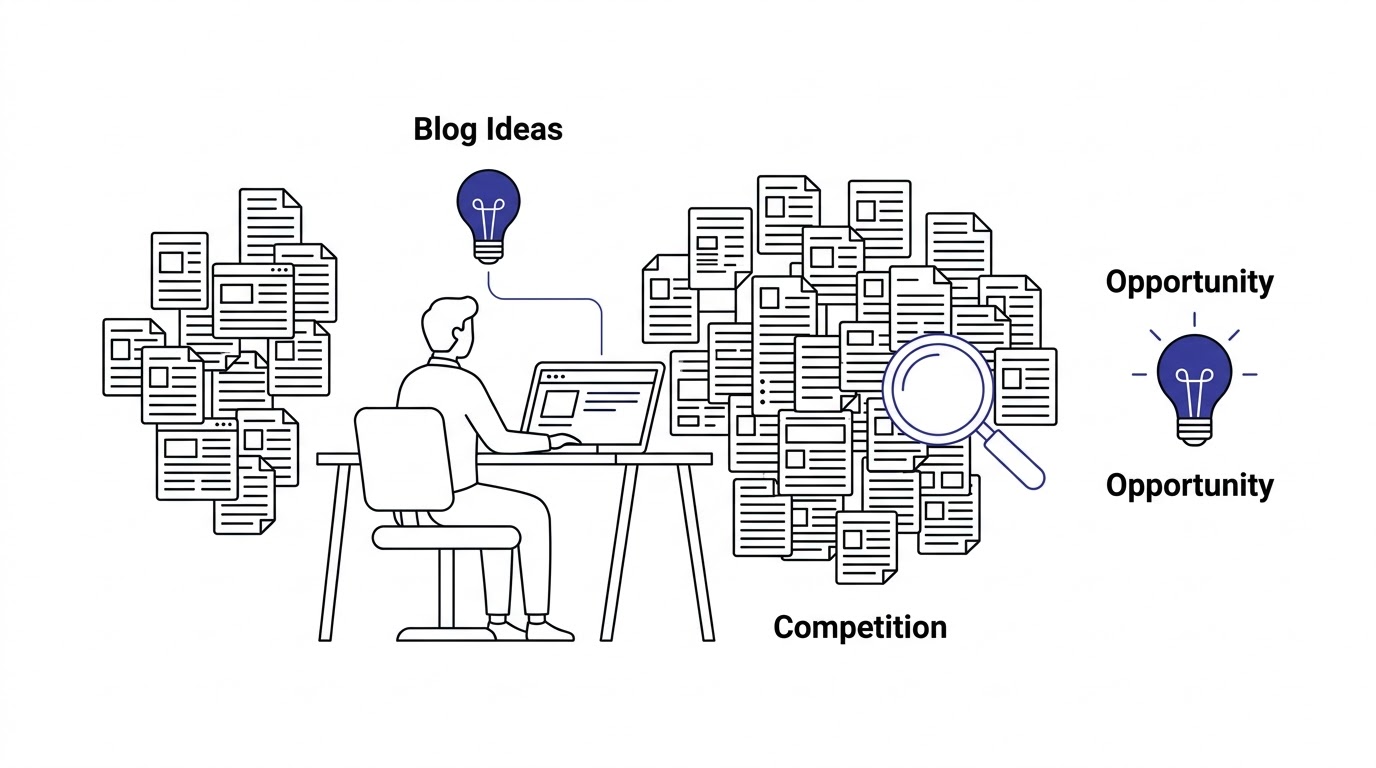
Look, blogging isn’t 2012 anymore. Back then, publishing consistently on almost any topic was enough to build an audience because there just wasn’t that much competition. Now every niche, no matter how small, has dozens or hundreds of blogs fighting for the same search terms. Finding blog post ideas that actually stand a chance of ranking or getting shared requires more than just picking a topic and writing about it.
Content Saturation Has Changed the Game
Millions of blog posts get published every single day. Depending on which estimate you trust, that number sits somewhere between two and seven million posts daily across platforms like WordPress alone, not counting Medium, Substack, LinkedIn articles, and company blogs. On top of that, AI tools have made it trivially easy for anyone to spin up generic content at scale, which means the internet is now flooded with thin, forgettable articles covering the exact same ten blog post ideas everyone else already wrote about.
That’s why originality matters more now than it ever did. If your blog post ideas can be summarized in a single sentence that ten other articles already used, you’re not adding anything. Search engines and readers both notice when content is a rehash. The blogs winning right now aren’t the ones publishing the most; they’re the ones publishing the most specific, most useful, hardest-to-replicate content in their niche.
Common Reasons Bloggers Run Out of Ideas
Most bloggers who say they’ve run out of ideas haven’t actually run out of things to write about. They’ve run out of the one method they were using to find ideas. Depending only on inspiration is the biggest culprit. Waiting to “feel creative” before writing means your output is tied to your mood, and moods are unreliable.
Not understanding audience needs is another huge one. If you’re guessing what your readers want instead of asking them or watching their behavior, you’ll eventually run out of guesses. Lack of keyword research means you’re writing blind, with no idea whether anyone is even searching for what you’re about to spend six hours writing. Ignoring customer questions, the actual things people ask in emails, DMs, and support tickets, means you’re skipping the easiest source of proven demand sitting right in front of you. And having no documented content strategy means every week starts from zero instead of building on what came before.
Why Great Blogs Never Actually Run Out of Topics
Here’s what changes once you fix those problems: content starts compounding. Every article you publish creates new angles, follow-up questions, and related subtopics you hadn’t thought of before writing it. A single post about “email marketing tips” naturally opens doors to posts about subject lines, automation, segmentation, deliverability, and a dozen other spinoffs.
Audience behavior also keeps shifting. New tools launch, new questions come up, algorithms change, and trends move. A blog that’s paying attention to its audience will never run dry, because the audience itself keeps generating new demand. The blogs that “run out of ideas” are almost always the ones that stopped listening to their readers months before they stopped publishing.
The Foundation of Unlimited Blog Post Ideas Starts With Your Audience
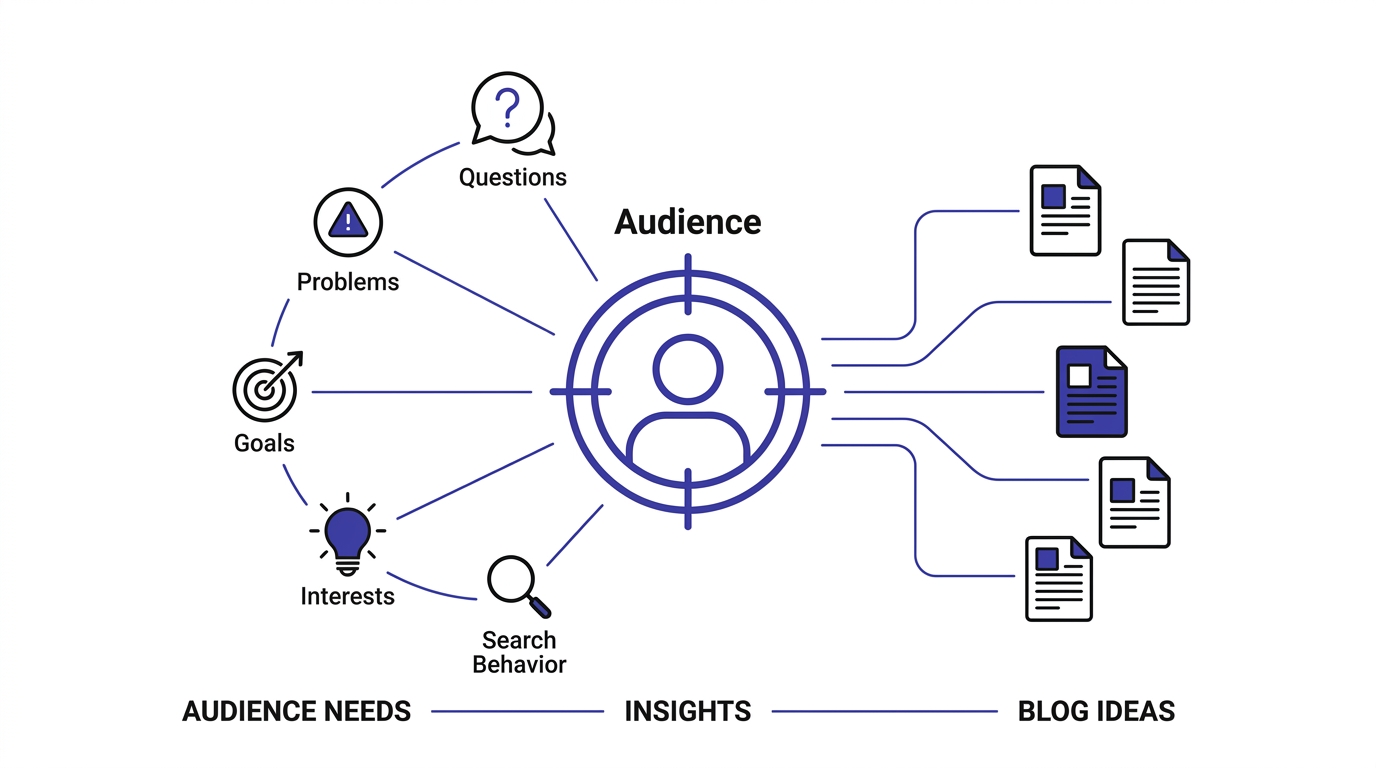
Before diving into tools and frameworks, you need to get one thing straight: blog post ideas that don’t come from real audience needs are a waste of time no matter how clever they sound. The foundation of a content pipeline that never dries up is knowing exactly who you’re writing for and what keeps them up at night.
Understand Your Audience First
Every strong blog post idea starts with a real pain point, goal, question, or objection your audience actually has. Pain points are the frustrations they’re actively trying to solve right now, the stuff that makes them open a new tab and start typing into Google at 11pm. Goals are where they want to end up, the outcome they’re chasing, whether that’s more traffic, a healthier relationship, or a faster website.
Questions are the literal things people type into search bars or ask in forums, and they’re often more specific and more useful than you’d expect. Objections are the doubts holding someone back from taking action, like “is this actually worth the money” or “will this work for a small business like mine.” And buying stage matters too: someone just discovering a problem needs different content than someone comparing two tools before purchase. Mixing these up is why some blog posts get traffic but never convert into anything.
Build Audience Personas
A persona isn’t a fluffy marketing exercise where you name a fake person “Sarah” and give her a stock photo. Done right, it’s a working reference that shapes what you write. Include demographics like age range, job title, or industry, since a blog written for solo freelancers reads differently than one written for enterprise teams. Include search intent, meaning what they’re typically trying to find when they land on your site, whether it’s a quick answer or a deep comparison.
Note their experience level too. A beginner audience needs definitions and step-by-step walkthroughs, while an advanced audience wants nuance and gets bored fast if you explain basics they already know. Include the industry context they operate in, because the same topic (say, “content calendar”) looks different for an ecommerce brand versus a SaaS company. And map their decision-making behavior: do they research for weeks before acting, or do they move fast on a recommendation? All of this directly shapes which blog post ideas will actually land.
Match Content to the Customer Journey
Not every blog post idea belongs at the same stage of the funnel, and treating them all the same is a fast way to confuse your readers and waste your effort. Awareness-stage content answers “what is this” and “why does this matter,” pulling in people who don’t even know your product category exists yet. Consideration-stage content compares options and goes deeper into specific solutions, aimed at people who now understand the problem and are weighing how to solve it.
Decision-stage content is where comparisons, case studies, and “best tools for X” posts live, built for readers close to choosing. Retention content serves people who are already customers or subscribers, helping them get more value and stick around longer. Advocacy content turns happy readers or customers into promoters, through shareable frameworks, referral incentives, or content worth tagging a friend in. Mapping your blog post ideas against these five stages instantly reveals gaps you didn’t know you had.
The 15 Best Sources for Endless Blog Post Ideas
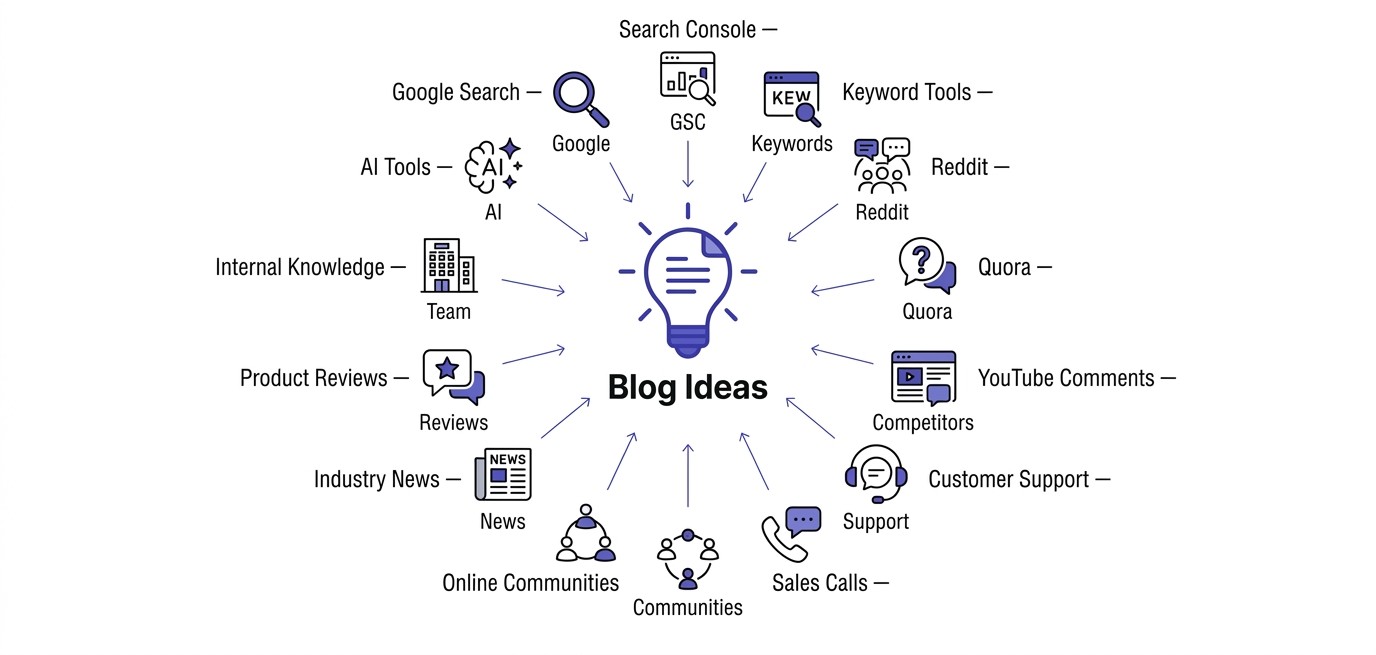
This is the part that actually solves the problem. Instead of waiting for inspiration, pull blog post ideas from these fifteen sources and you’ll never sit in front of a blank page again. Each one taps into real, existing demand instead of guesswork.
Google Search
Type your seed keyword into Google and look at what happens before you even hit enter. Google Autocomplete shows you the exact phrases people are typing right now, which is essentially free keyword research handed to you. Scroll down and check “People Also Ask,” a goldmine of real questions people search for that you can turn directly into H2s or standalone posts.
“Related Searches” at the bottom of the results page shows adjacent topics people search for around the same query, often revealing angles you hadn’t considered. And search suggestions that appear as you type longer phrases show you long-tail variations with lower competition and higher specificity, which usually convert better than broad, generic terms.
Google Search Console
If your blog already has some traffic, Search Console is sitting on a pile of blog post ideas you haven’t touched yet. Check which keywords you’re already ranking for on page two or three; those are topics Google already thinks you’re relevant for, and a dedicated, deeper article can push them onto page one. Look for low CTR opportunities, queries where you’re ranking decently but people aren’t clicking, which usually means your title or meta description needs work, or that the topic deserves its own dedicated page instead of a passing mention.
Also pay attention to queries that keep showing up in your search terms report that you don’t have a dedicated page for at all. Those are proven demand signals straight from Google, telling you exactly what to write next instead of you guessing.
Keyword Research Tools
Tools like Ahrefs, SEMrush, Ubersuggest, Moz, and KeywordTool.io exist specifically to generate blog post ideas at scale. Plug in a seed keyword and you’ll get hundreds of related terms with search volume attached, showing you exactly how many people are looking for that topic each month. Difficulty scores tell you how hard it’ll be to rank, which matters if you’re a newer blog competing against established sites.
Intent labels (informational, commercial, transactional, navigational) help you match content type to what searchers actually want to do. And clustering features in most modern tools will group related keywords together automatically, essentially handing you a content outline for a topic cluster without you having to build it manually.
Reddit is one of the most underused sources for blog post ideas because it’s unfiltered. People aren’t performing for an audience; they’re asking real questions and venting real frustrations in relevant subreddits. Search your niche’s subreddit and sort by “top” or “hot” to find frequently asked questions that come up again and again, a strong signal that a lot of people share the same confusion.
Look at comment threads for pain points people describe in their own words, often more specific and more emotionally honest than anything you’d find in a survey. And read the actual conversations, not just the post titles, because the real gold is often three replies deep where someone explains exactly why the obvious solution didn’t work for them.
Quora
Quora works similarly to Reddit but with a slightly different flavor: it’s built entirely around questions, which makes it even more directly useful for blog post ideas. Search your topic and look specifically for questions with a decent number of views but weak or outdated answers. That’s an unanswered gap you can fill with a genuinely useful post, and often you can rank for the exact question phrase since it mirrors real search queries almost word for word.
YouTube Comments
Video comments are an overlooked goldmine. People leave comments on tutorials and explainer videos saying things like “this didn’t cover X” or “can someone explain why Y happens.” That’s viewer confusion in plain text, telling you exactly what content creators in your niche are missing. Look for repeated questions across multiple videos on the same topic; if five different commenters ask the same thing on five different channels, that’s a content gap worth filling with a dedicated blog post.
Competitor Blogs
Reading competitor blogs isn’t about copying; it’s about finding what they’re missing. Go through their top content and note the topic gaps, the subtopics they mention in passing but never fully cover. Look for better angles, ways to approach the same core topic that are more specific, more current, or more actionable than what’s already published.
Also check their older posts for content that’s outdated, whether the tools mentioned have changed, the stats are stale, or the advice no longer applies. Updating outdated competitor content with a sharper, more current version is one of the fastest ways to outrank an established page.
Customer Support Tickets
If you run a business blog, your support inbox is sitting on dozens of ready-made blog post ideas. Every recurring question customers ask is proof that real people, often paying customers, need an answer to that exact thing. Pull the most common tickets from the last few months and turn each one into a full article. This works especially well because these posts double as support resources you can link customers to directly, cutting down repetitive support work while building organic traffic at the same time.
Sales Calls
Sales teams hear objections all day long, and objections make excellent blog post ideas. “It’s too expensive,” “we already use a competitor,” “I’m not sure this will work for my industry,” these are the exact hesitations your prospects have, and addressing them publicly in blog form does double duty: it helps convert future leads and gives your sales team something to send mid-conversation. Ask your sales team what questions come up in almost every call. Those patterns are content gold.
Online Communities
Facebook Groups, LinkedIn Groups, Discord servers, and Slack communities built around your niche are full of real-time conversations you can mine for blog post ideas. Unlike public forums, these spaces often skew toward more engaged, more specific audiences, meaning the questions tend to be sharper and more advanced. Join a handful of active communities in your space, watch the recurring threads, and note what people struggle with repeatedly. It’s slower than a keyword tool but the ideas you get are usually more original because fewer people are mining these spaces for content.
Industry News
Staying on top of industry news isn’t just for staying informed; it’s a direct pipeline of blog post ideas. Newsjacking, writing a fast, well-reasoned take on a breaking industry development, can bring in a spike of traffic if you move quickly. Expert commentary posts, where you react to a new report, tool launch, or regulation change with your own perspective, position you as someone actually paying attention rather than recycling old advice. Trend analysis posts that connect a few recent developments into a bigger pattern tend to get shared more than single-news reactions because they offer readers a framework, not just a headline.
Social Media Comments
Comments sections on Instagram, LinkedIn, X, and Facebook posts, both yours and your competitors’, are full of real questions from real people. Someone asking “wait, how do you actually do that” under a LinkedIn post is handing you a blog post idea for free. Screenshot or note these questions as they come up, because social comments tend to be more casual and specific than search queries, often revealing exactly where confusion sits.
Product Reviews
Reviews, whether on your own site, Amazon, G2, Capterra, or Trustpilot, are packed with frustrations and desired features stated in plain language. A one-star review that says “I wish this could also do X” is a blog post idea about a workaround, a comparison, or a feature explainer. Even reviews for competitor products are useful, since the gaps customers complain about in a rival’s tool are angles you can address directly in your own content.
Internal Company Knowledge
Some of the best blog post ideas never leave the building because nobody thought to ask. Interview your sales team about common objections, your customer success team about onboarding confusion, your founders about the “why” behind product decisions, and your engineers about how things actually work under the hood. These conversations surface angles no external tool will ever hand you, because they’re specific to your business, your product, and your customers’ actual experience.
AI Tools
Tools like ChatGPT, Claude, Gemini, and Perplexity are genuinely useful for brainstorming blog post ideas, but they work best as an expansion tool, not a replacement for human expertise. Feed an AI tool a seed topic and ask it to generate related subtopics, common questions, or content gaps, and you’ll get a fast first draft of a list. The catch: AI-generated idea lists tend to be generic unless you feed them specific context about your audience, your niche, and your existing content. Treat the output as a starting point to react to and refine, not a finished plan to publish as-is.
25 Proven Blog Post Formats That Generate Endless Blog Post Ideas
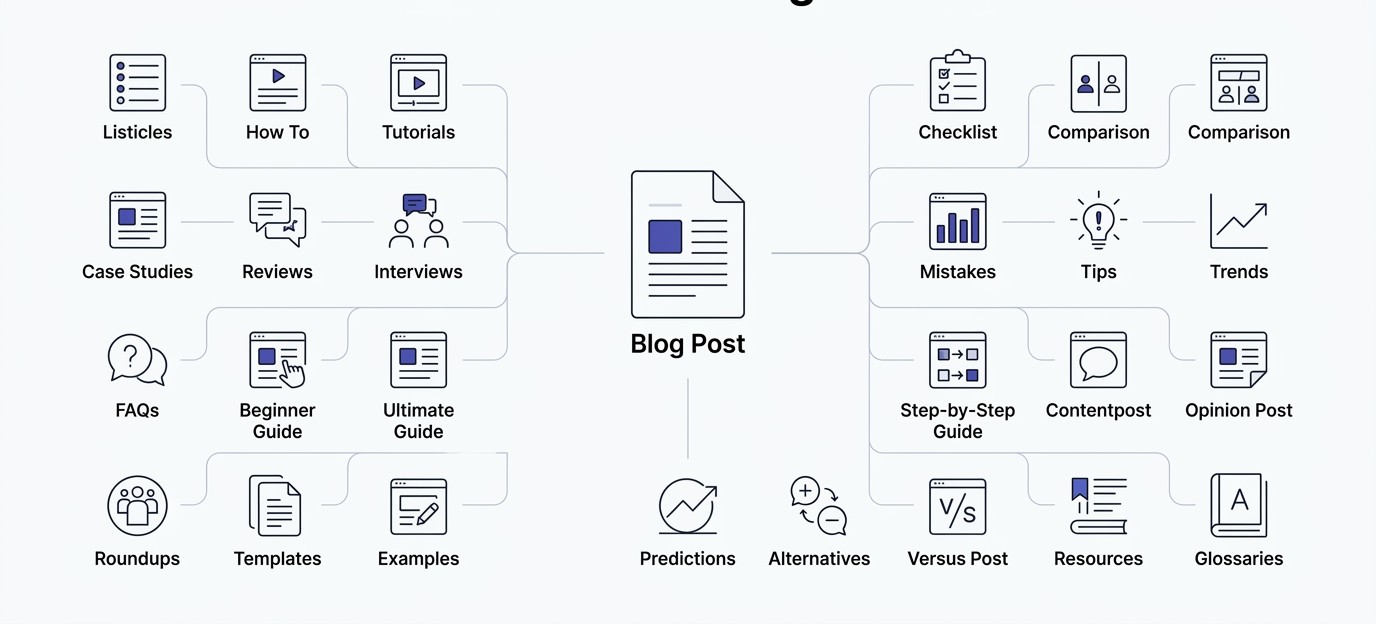
Once you have a topic, the format you choose can turn it into five or six different blog post ideas instead of just one. Here are twenty-five formats worth having in your back pocket, each suited to a different purpose and stage of the reader’s journey.
How-to guides walk readers through completing a specific task step by step, ideal for capturing “how do I” search queries with strong SEO value since they often win featured snippets. Example: “How to Build a Content Calendar From Scratch.”
Ultimate guides cover a broad topic comprehensively in one long, authoritative resource, best used as pillar content anchoring a topic cluster. Example: “The Ultimate Guide to SEO Content Writing.”
Beginner guides simplify a topic for people with zero prior knowledge, useful for capturing top-of-funnel traffic and building trust early. Example: “Blogging for Beginners: Where to Start.”
Advanced tutorials go deep into a specific technique for readers who already understand the basics, valuable for retaining an experienced audience and building topical authority. Example: “Advanced Internal Linking Strategies for Large Sites.”
Listicles present a numbered collection of ideas, tools, or tips, easy to skim and highly shareable, which makes them strong for social traffic. Example: “17 Blog Post Ideas You Can Publish This Week.”
Checklists give readers a step-by-step list to follow or tick off, great for practical, action-oriented searches and easy to repurpose as a downloadable lead magnet. Example: “The Pre-Publish Blog Checklist.”
Templates provide a ready-to-use framework readers can copy directly, high conversion value since people bookmark and return to templates repeatedly. Example: “Free Content Calendar Template.”
Case studies show a real result achieved through a specific strategy, building credibility through proof rather than claims. Example: “How We Grew Organic Traffic 300% in Six Months.”
Comparisons put two options side by side, ideal for capturing “X vs Y” searches from people deep in the decision stage. Example: “Ahrefs vs SEMrush: Which Is Better for Bloggers.”
Alternatives posts list substitutes for a well-known tool or approach, useful for capturing searches from people unhappy with a competitor. Example: “Best Notion Alternatives for Content Planning.”
Mistakes posts highlight common errors people make in a given area, which work well because readers are often more motivated to avoid a mistake than to chase a best practice. Example: “9 Blog Post Ideas Mistakes That Kill Your Traffic.”
Statistics posts compile relevant data points on a topic, valuable for earning backlinks since other writers cite stat pages constantly. Example: “50 Content Marketing Statistics for 2026.”
FAQs answer common questions in a structured format, strong for capturing voice search and AI Overview citations. Example: “Blog Post Ideas: Frequently Asked Questions.”
Glossaries define key terms in a niche, useful for beginners and for ranking on definitional searches like “what is.” Example: “Content Marketing Glossary: 40 Terms Explained.”
Trends posts cover what’s currently shifting in an industry, good for positioning your blog as current and relevant. Example: “5 Content Marketing Trends Worth Watching.”
Predictions posts forecast where an industry is heading, which tend to generate discussion and shares even when readers disagree. Example: “What Blogging Will Look Like in Five Years.”
Interviews feature a conversation with an expert or customer, adding a fresh voice and often bringing in that person’s own audience when they share it. Example: “How a Solo Blogger Hit 100K Monthly Visitors.”
Expert roundups collect short answers from multiple experts on one question, useful for networking and often generating backlinks when contributors share the post. Example: “12 Experts Share Their Best Blog Post Idea Sources.”
Product reviews give an honest evaluation of a tool or product, valuable for affiliate revenue and for readers in the decision stage. Example: “Ahrefs Review: Is It Worth the Price in 2026.”
Tool comparisons evaluate multiple tools against each other on specific criteria, strong for capturing high-intent commercial searches. Example: “Best Keyword Research Tools Compared.”
Resource collections compile useful tools, articles, or references into one page, valuable as a link-worthy asset other sites reference. Example: “50 Free Tools for Content Creators.”
Myth vs fact posts correct common misconceptions in a niche, engaging because they challenge what readers already believe. Example: “5 Blogging Myths That Are Costing You Traffic.”
Best practices posts outline the standard, proven approach to doing something well, foundational content that ages well and gets linked to often. Example: “SEO Blog Writing Best Practices.“
Step-by-step walkthroughs break a process into clear sequential stages with detail at each step, similar to how-to guides but usually longer and more granular. Example: “A Step-by-Step Walkthrough of Building a Topic Cluster.”
Success stories highlight a specific win, often from a customer or reader, building social proof through narrative rather than data alone. Example: “How One Reader Doubled Their Email List Using This Framework.”
Build a Topic Cluster Instead of Chasing Random Blog Post Ideas
Random blog post ideas, even good ones, don’t compound the way a structured topic cluster does. If you want a blog that builds authority over time instead of publishing disconnected posts, topic clusters are the model worth adopting.
What Is Topic Clustering?
Topic clustering means organizing your content around one central theme with multiple related articles linking back to it. Instead of writing one post about “content marketing” and moving on to something unrelated, you build a whole network of content around that theme, covering every subtopic a reader (and Google) would expect to find. This structure signals to search engines that your site has real depth on a subject, not just a single surface-level mention.
Pillar Content
The pillar page is the broad, comprehensive piece that covers a topic at a high level, like this guide covering “blog post ideas” as a whole. It’s meant to rank for the head term and act as a hub, linking out to every supporting article that dives deeper into a specific piece of the topic. Pillar pages are usually long, thorough, and updated regularly since they carry the most search weight in the cluster.
Supporting Articles
Supporting articles cover one specific subtopic in depth, something the pillar page only mentions briefly. Each supporting article should target a more specific, often lower-competition keyword, and link back to the pillar page along with a few sibling articles in the same cluster. This is where most of your blog post ideas actually live, since a single pillar topic can spin off dozens of supporting pieces without ever repeating itself.
Internal Linking
Internal linking is what actually ties a cluster together, both for readers and for search engines. Every supporting article should link back to the pillar, and the pillar should link out to every supporting article, creating a web of relevance around the core topic. Beyond SEO value, internal linking keeps readers on your site longer, moving from one relevant article to the next instead of bouncing after a single page.
Topical Authority
Topical authority is the reputation your site builds with search engines once you’ve published enough interconnected, high-quality content on a subject. It’s the reason a site with fifty well-linked articles on content marketing will consistently outrank a site with one excellent standalone article on the same topic. Building topical authority is a long game, but it’s also the single biggest reason topic clusters outperform random, disconnected blog post ideas over time.
Example cluster:
Pillar: Content Marketing
Supporting articles: Content calendar, keyword research, SEO writing, evergreen content, AI writing, content promotion, content ROI, repurposing content, and content analytics.
Notice how one pillar topic alone generates nine distinct supporting articles without stretching for filler. In reality, most pillar topics can support well over a hundred supporting articles once you factor in variations by industry, audience segment, and format. That’s the real answer to “how do I never run out of blog post ideas”: stop treating each post as a standalone decision and start treating your blog as a network of interconnected clusters.
How Keyword Research Generates Hundreds of Blog Post Ideas
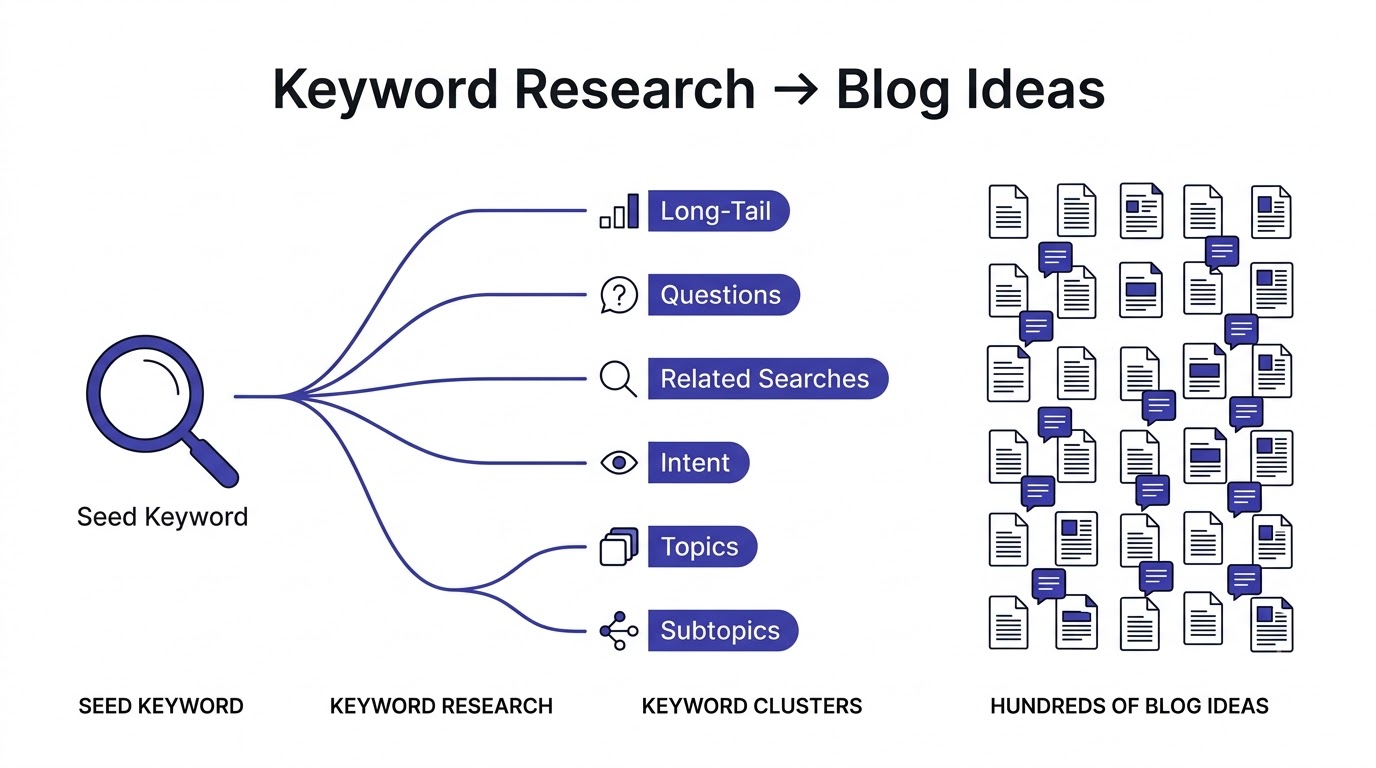
Keyword research isn’t just for SEO nerds obsessing over rankings. It’s one of the fastest, most reliable ways to generate a long list of blog post ideas backed by actual search demand instead of guesswork.
Finding Seed Keywords
Start with broad seed keywords, the core topics your business or blog revolves around. If you run a fitness blog, seed keywords might be “strength training,” “weight loss,” or “home workouts.” These aren’t blog post ideas on their own; they’re the starting point every other keyword and idea gets built from.
Expanding Long-Tail Keywords
Once you have seed keywords, expand them into long-tail variations, the longer, more specific phrases people actually type when they know what they want. “Strength training” is a seed keyword; “strength training for beginners over 40” is a long-tail keyword and a full blog post idea by itself. Long-tail keywords convert better because they capture more specific intent, and they’re usually far less competitive than the broad seed term.
Using Search Intent
Every keyword carries an intent behind it, and matching your content to that intent matters more than just matching the words. Informational intent means the searcher wants to learn something, like “what is strength training.” Commercial intent means they’re comparing options before buying, like “best strength training programs.” Transactional intent means they’re ready to act right now, like “buy strength training equipment.” Navigational intent means they’re searching for a specific brand or site, like “Peloton strength training app.” Mapping keywords to the right intent stops you from writing a sales-heavy post for someone who just wants a beginner’s explanation.
Keyword Clustering
Keyword clustering groups related keywords that share the same search intent into a single article instead of splitting them across separate thin posts. If “strength training for beginners” and “beginner strength training tips” both show similar results in Google, they belong in the same article, not two competing ones. This prevents keyword cannibalization, where your own pages compete against each other instead of ranking together.
Competitor Keyword Gap Analysis
A gap analysis compares your ranking keywords against a competitor’s, revealing exactly what they rank for that you don’t. Most keyword tools have a built-in feature for this. Run your top three competitors through it and you’ll typically walk away with dozens of blog post ideas you hadn’t considered, all backed by proof that they already drive traffic somewhere.
Seasonal Keywords
Some topics spike at predictable times of year, like “best gym gear for New Year’s resolutions” in December and January. Seasonal keywords are worth planning months in advance since content needs time to rank before the demand window opens. A quick check of Google Trends for your niche’s core terms will reveal these patterns clearly.
Evergreen Keywords
Evergreen keywords stay relevant year-round with steady, consistent search volume, unlike seasonal spikes. “How to build muscle” is evergreen; it doesn’t lose relevance in six months. A healthy blog post ideas pipeline mixes evergreen content, which builds compounding long-term traffic, with seasonal and trending content, which captures short-term spikes.
Content Idea Frameworks Used by Professional Content Teams
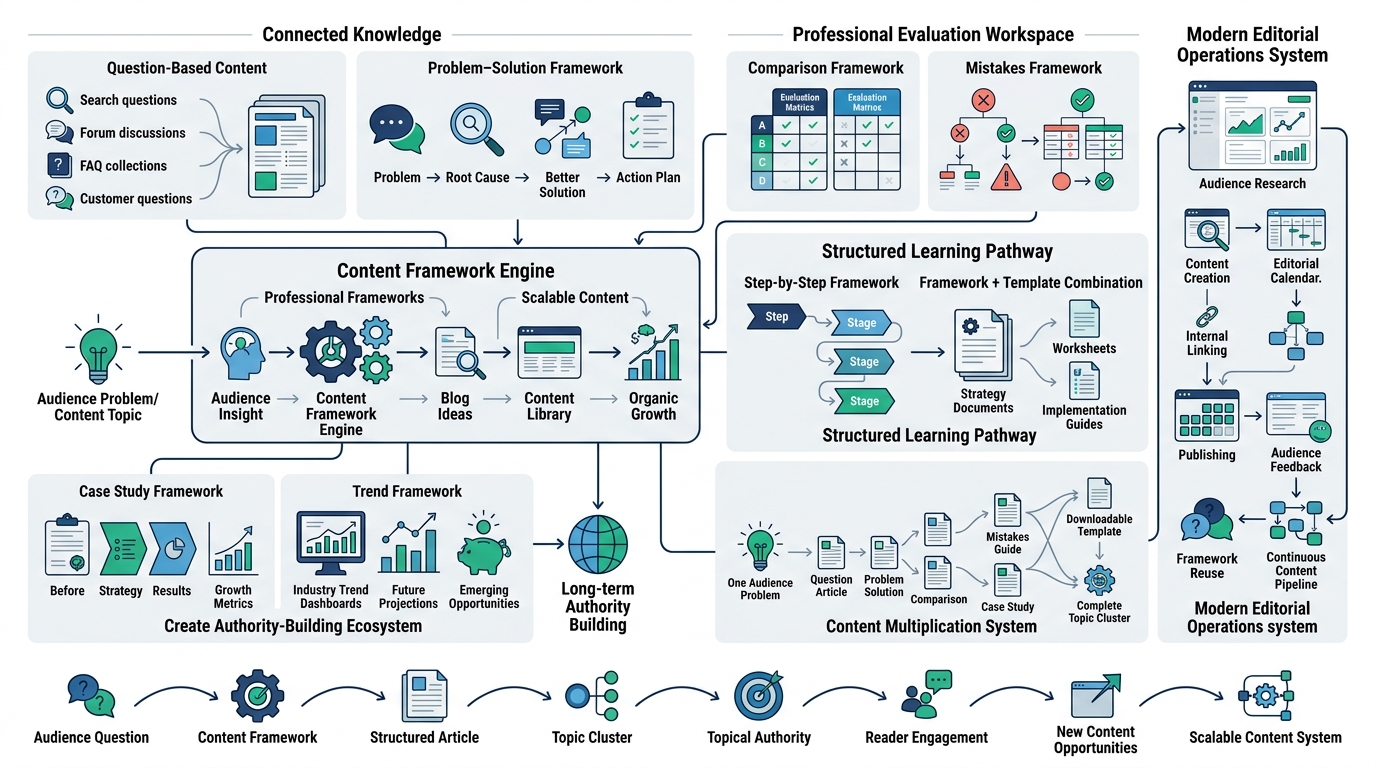
Instead of one-off brainstorming sessions that leave you starting from scratch every time, professional content teams rely on repeatable frameworks. Apply any of these to your niche and you’ll generate blog post ideas on demand instead of hoping for a lucky flash of inspiration.
Question-Based Content takes every common question your audience asks and turns it into a standalone article, using the exact phrasing people search for as the title. This framework alone can generate dozens of ideas just by mining forums, comment sections, and support tickets for real questions.
Problem-Solution Framework identifies a specific pain point and structures the entire article around solving it, moving from the problem, to why common approaches fail, to the actual fix. This format tends to perform well because it mirrors exactly how someone thinks when they open a search bar in the first place.
Comparison Framework places two or more options side by side across relevant criteria, ideal for readers deciding between tools, methods, or approaches. This works for products, but also for strategies, like “SEO vs paid ads for blog traffic.”
Mistakes Framework lists common errors people make in a given area along with what to do instead, tapping into loss aversion since people are often more motivated to avoid a mistake than to chase a generic best practice.
Step-by-Step Framework breaks a process into a clear, ordered sequence, ideal for tasks that intimidate beginners because they don’t know where to start. Numbering each step reduces overwhelm and makes the article easy to follow along with in real time.
Case Study Framework documents a real result, whether yours or a customer’s, with specific numbers and a clear before-and-after structure. This framework builds trust faster than almost any other format because it shows proof instead of just making claims.
Trend Framework analyzes what’s shifting in your industry right now and explains what it means for your reader, positioning your blog as a source that’s actually paying attention rather than recycling old advice.
Framework + Template Combination pairs an explanation of a strategy with a ready-to-use template readers can copy directly, which tends to drive strong engagement since people bookmark and return to templates far more than they return to pure explainer content.
Turn One Blog Post Into 30 New Blog Post Ideas
Here’s a practical way to see how much content really lives inside a single topic once you stop treating it as one article. Take “Email Marketing” as the original topic.
From that single seed, you can derive: an email marketing guide, an email marketing mistakes post, a roundup of email marketing tools, a post on the best subject lines, automation tips, key metrics to track, segmentation strategies, personalization tactics, deliverability best practices, ready-to-use templates, an A/B testing guide, a breakdown of welcome email sequences, a guide to writing better newsletters, re-engagement campaign strategies, a compliance overview covering regulations like GDPR and CAN-SPAM, a look at AI in email marketing, real case studies, a dedicated FAQ post, a trends roundup, a beginner’s guide, an advanced guide for experienced marketers, industry-specific examples, a checklist, an ROI breakdown, a myths post correcting common misconceptions, a best practices post, integration guides with tools like CRMs, a mobile optimization guide, B2B-specific strategies, and future predictions for where email marketing is heading.
That’s thirty distinct blog post ideas from one starting topic, and none of them feel like filler because each one addresses a genuinely different angle, audience need, or search intent. This is the exercise worth running on every core topic in your niche. Pick one seed topic, spend fifteen minutes listing every subtopic, format, and angle you can think of, and you’ll walk away with a month or two of content planned out.
Using AI to Brainstorm Better Blog Post Ideas
AI tools have changed how fast you can generate a starting list of blog post ideas, but using them well requires understanding what they’re actually good at and where they fall flat.
What AI Does Well
AI tools are genuinely fast at generating a broad list of subtopics, questions, and angles once you give them a seed topic. They’re useful for spotting patterns across a niche you might not have noticed, summarizing what competitors commonly cover, and expanding a single idea into multiple related variations in seconds instead of the twenty minutes it might take you manually. For volume and speed, nothing beats them.
Where AI Falls Short
AI-generated idea lists tend to be generic unless you feed them specific, detailed context, and even then they often surface the same obvious topics everyone else’s AI tool is also suggesting. They don’t know your actual customer conversations, your support tickets, or the nuance of what your specific audience struggles with. Relying entirely on AI for blog post ideas is how you end up with a blog that reads like every other blog in your niche, indistinguishable and forgettable.
AI Prompt Examples
For SEO-focused brainstorming, try prompting with your seed keyword and asking for related long-tail variations grouped by search intent. For topic clustering, ask the tool to suggest ten to fifteen supporting article ideas for a given pillar topic, specifying your audience’s experience level. For content gaps, feed it a competitor’s blog structure and ask what subtopics seem to be missing. For FAQs, ask for the ten most common questions people ask about your topic, then cross-check them against actual “People Also Ask” results, since AI tools sometimes invent plausible-sounding but unverified questions. For long-tail ideas, ask for niche-specific variations of your seed keyword aimed at a particular audience segment, like small business owners or beginners specifically.
Human Editing Still Matters
Every AI-generated list needs a human pass before it becomes your actual content plan. Cut the generic suggestions, keep the specific ones, and add context the AI couldn’t know, like what your customers actually ask or what your competitors are missing. Treat AI as a brainstorming partner that speeds up the first draft of your idea list, not as the final decision-maker on what gets published.
Create a Content Calendar That Prevents Idea Burnout
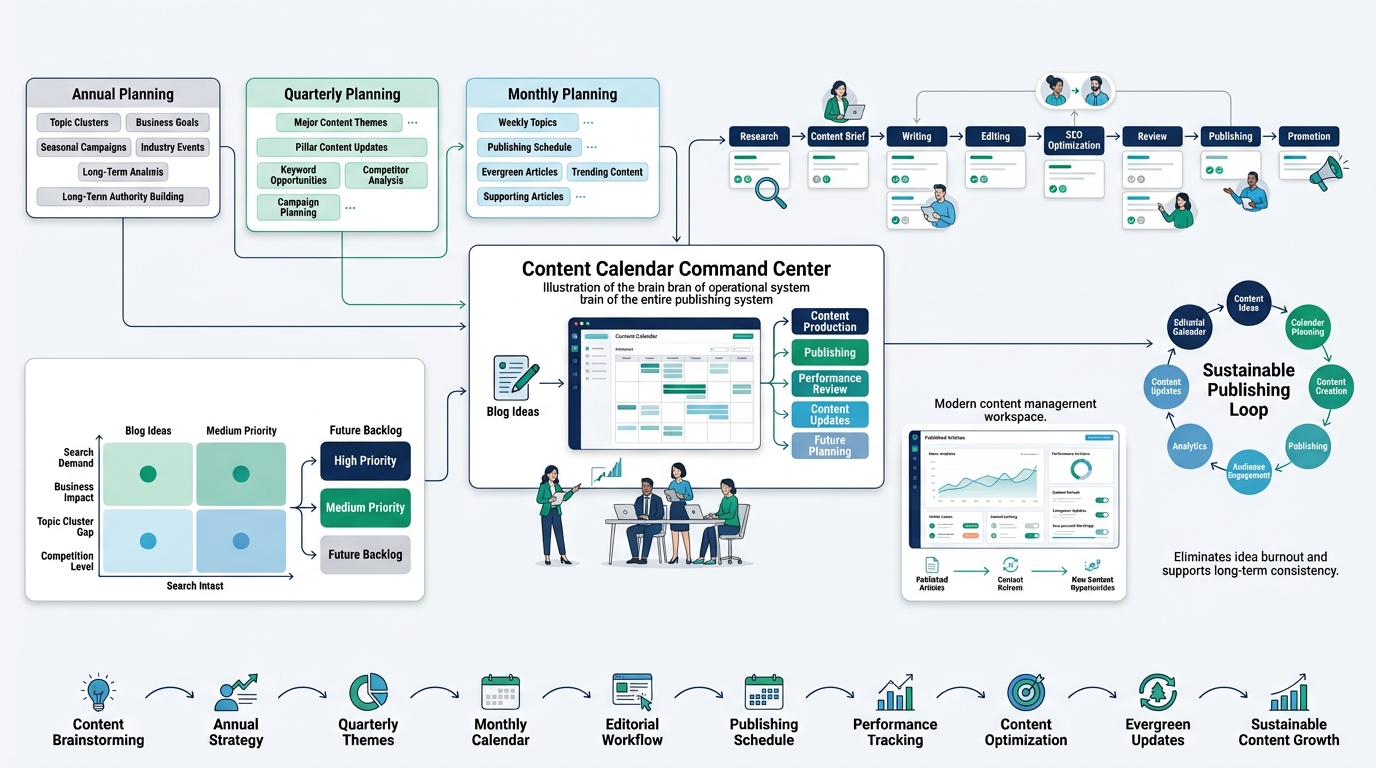
Even a great list of blog post ideas is useless if it’s scattered across sticky notes and half-remembered conversations. A content calendar turns your idea list into an actual publishing rhythm.
Monthly Planning
Monthly planning maps out which specific topics get published in the coming four weeks, ideally mixing evergreen content, trending topics, and at least one supporting article for an existing pillar. Reviewing your monthly plan at the start of each month keeps you from scrambling for a topic the night before a deadline.
Quarterly Planning
Quarterly planning zooms out to look at bigger themes, seasonal opportunities, and whether your published content is actually covering your topic clusters completely. This is also the right cadence to check which pillar pages need an update based on new keyword data or competitor movement.
Annual Planning
Annual planning sets the big picture: which topic clusters you’re building out this year, major industry events or seasonal spikes worth planning around months in advance, and roughly how many posts you can realistically commit to given your team’s capacity. This is where long-term topical authority actually gets built, one deliberate year at a time instead of reactive month-to-month scrambling.
Editorial Workflow and Publishing Frequency
An editorial workflow defines who researches, who writes, who edits, and who publishes, so ideas don’t stall out in someone’s inbox for three weeks. Publishing frequency should match what you can sustain with quality intact; two excellent posts a week beats five mediocre ones every time, especially now that content saturation punishes thin, generic articles harder than ever.
Assigning Priorities and Tracking Published Topics
Not every blog post idea deserves the same urgency. Assign priority based on search volume, business impact, and how well it fills a gap in an existing topic cluster. Keep a simple tracker of what’s already published so you’re not accidentally duplicating a topic six months later, and revisit that tracker regularly to flag older posts that need an update rather than a brand-new article.
Build an Idea Capture System for Blog Post Ideas
The best blog post idea in the world is worthless if you forget it by lunchtime. A capture system fixes that permanently.
Never Rely on Memory
Ideas show up at inconvenient times: in the shower, mid-conversation, scrolling social media at midnight. If you’re not writing them down the moment they occur, you’re losing a meaningful chunk of your best material. Relying on memory alone is one of the quietest reasons bloggers feel like they’re running out of ideas when really they just forgot half of what they already had.
Creating a Swipe File
A swipe file is a running collection of interesting headlines, angles, questions, and snippets you come across, whether from competitor content, forum threads, or your own random thoughts. It’s not meant to be organized perfectly; it’s meant to be a fast, low-friction dump you can mine later when planning your next batch of content.
Using Notion, Trello, Google Sheets, or Airtable
Pick one tool and commit to it rather than scattering ideas across five different apps. Notion and Airtable work well if you want to tag and filter ideas by category. Trello suits a visual, kanban-style workflow where ideas move from “captured” to “researched” to “scheduled.” Google Sheets is the simplest option if you just want a straightforward list with columns for keyword, format, and priority. The tool matters less than actually using it consistently.
Tagging and Reviewing Ideas Weekly
Tag each idea by topic, funnel stage, and target keyword so you can quickly pull a list when planning a specific type of content. Set aside fifteen minutes a week to review new ideas that came in, tag them properly, and move the strongest ones into your content calendar. Without this weekly review, even a great capture system turns into a graveyard of forgotten notes.
Mistakes That Kill Your Blog Post Ideas Pipeline
A few recurring mistakes quietly drain a content pipeline even when the blogger thinks they’re doing everything right. Only following trends means your content ages out fast and never builds the kind of steady, evergreen traffic that compounds over time. Ignoring SEO entirely means even brilliant ideas never get discovered because nobody’s searching in a way that matches your content.
Writing without research leads to shallow, generic posts that repeat what’s already out there instead of adding something new. Repeating competitors word for word in structure and angle means you’re fighting an uphill battle against a page that already has authority and backlinks. Publishing without audience validation, skipping the step of checking whether anyone actually wants this content, wastes hours on posts nobody reads.
No keyword clustering leads to cannibalization, where multiple pages on your own site compete against each other instead of reinforcing one another. No internal links means your content never builds the topical authority that comes from a connected cluster. No content updates means older posts quietly decay in rankings while newer competitor content overtakes them. Depending entirely on AI produces generic, forgettable posts that blend into the noise instead of standing out. And not measuring performance means you keep repeating the same mistakes without ever knowing which blog post ideas actually worked.
Measuring Whether Your Blog Post Ideas Are Actually Working
Publishing consistently means nothing if you’re not tracking whether the content is actually doing its job. A handful of KPIs tell you the real story.
Organic traffic shows whether your content is being discovered at all, and tracking it over time reveals which topics are gaining momentum. Keyword rankings show whether you’re climbing toward page one for the terms you actually targeted. CTR (click-through rate) reveals whether your title and meta description are compelling enough to earn the click once you’re showing up in search results.
Time on page indicates whether people are actually reading once they land, or bouncing immediately because the content didn’t match what they expected. Bounce rate tells a similar story from a different angle, flagging pages that aren’t holding attention. Conversions matter most for business blogs, showing whether readers are taking the next step, whether that’s signing up, downloading something, or making a purchase.
Backlinks indicate whether other sites find your content valuable enough to reference, which also feeds into search authority over time. Returning visitors show whether your blog is building a loyal audience rather than just capturing one-off search traffic. Lead generation and revenue contribution, when trackable, are the ultimate proof that your blog post ideas aren’t just generating traffic, they’re generating business results. Use these numbers to double down on the topics, formats, and sources that are actually working, and quietly retire the ones that aren’t.
Conclusion
Inspiration fades. It always does, no matter how passionate you are about your niche. Systems, on the other hand, scale. The bloggers and content teams who never seem to run out of blog post ideas didn’t get lucky with an endless supply of creativity; they built a repeatable process pulling from real audience needs, structured keyword research, competitor gaps, and internal team knowledge, then organized everything into topic clusters instead of scattered one-off posts.
Start by picking three sources from this guide you haven’t used yet, whether that’s Google Search Console, customer support tickets, or Reddit threads in your niche. Spend an hour mining them for real questions and pain points, then run the “one post into thirty ideas” exercise on your biggest existing topic. By the end of that hour, you’ll have more blog post ideas than you know what to do with, and a system in place that keeps generating more long after this session ends. Stop chasing inspiration and start building the pipeline instead. Your content calendar, and your traffic, will thank you for it.
Frequently Asked Questions
How do bloggers find new content ideas?
Bloggers who never run out of ideas rely on multiple structured sources instead of waiting for inspiration, pulling from keyword research tools, customer questions, competitor gaps, forums like Reddit and Quora, and internal team knowledge. Combining even three or four of these sources consistently produces far more blog post ideas than any single blogger can act on.
How many blog ideas should I keep in reserve?
A healthy buffer is somewhere between two and three months’ worth of ideas, which for most blogs publishing once or twice a week means roughly twenty to thirty topics sitting in your capture system at any given time. Fewer than that and you’ll feel the pressure of scrambling; far more and ideas tend to go stale before you get to them.
What are evergreen blog topics?
Evergreen blog topics stay relevant and continue attracting search traffic for years without needing constant rewrites, unlike trending or seasonal content that spikes and fades. Examples include foundational how-to guides, definitional glossary posts, and best-practice roundups that address core, unchanging questions in a niche.
Can AI generate blog ideas?
Yes, AI tools like ChatGPT and Claude can generate a fast, broad list of subtopics and questions when given a seed topic, but the output tends to be generic unless you provide specific audience and niche context. Treat AI-generated lists as a starting point that needs human editing and validation against real search data, not a finished content plan.
How often should I publish blog posts?
Publishing frequency should match what you can sustain without sacrificing quality, and two well-researched posts a week consistently outperforms five rushed, generic ones. Consistency matters more than raw volume; a predictable schedule that you can actually maintain builds trust with both readers and search engines over time.
What tools help generate blog ideas?
Keyword research tools like Ahrefs, SEMrush, and Ubersuggest are the most reliable for volume-backed ideas, while Google Search Console reveals ideas based on your existing site’s ranking data. Reddit, Quora, and YouTube comments are useful for finding real, unfiltered questions, and AI tools like ChatGPT or Claude speed up the brainstorming process once you feed them specific context.
Should I copy competitors’ topics?
Copying a competitor’s exact topic and angle rarely works well since they already have whatever authority and backlinks got them ranking in the first place. Instead, use competitor content to find gaps they missed or outdated information you can replace with a more current, more thorough version.
How do I know if a topic has search demand?
Plug the topic into a keyword research tool and check the monthly search volume; anything with consistent volume and a difficulty score that matches your site’s current authority is worth pursuing. You can also check Google Autocomplete and “People Also Ask” for the topic, since both reflect real, current search behavior.
How do I organize blog ideas?
Use a simple tool like Notion, Airtable, Trello, or Google Sheets to capture every idea the moment it occurs, tagging each one by topic, target keyword, and funnel stage. Review the list weekly to move the strongest ideas into your content calendar and avoid letting good ideas go stale unused.
What should I write when I have no inspiration?
Skip waiting for inspiration entirely and pull directly from a structured source instead, like Google Search Console’s low-CTR queries, a recurring customer support question, or a “People Also Ask” result for your niche’s core keywords. Inspiration is unreliable; structured sources of real demand are not.
How long does it take to build a full topic cluster?
Building out a complete topic cluster, meaning one pillar page and ten to twenty supporting articles, typically takes two to four months for a solo blogger publishing once or twice weekly, faster for teams with multiple writers. The pillar page itself usually gets published first, with supporting articles rolling out afterward and linking back to it as each one goes live.
Is it better to write long or short blog posts?
Length should match the topic’s complexity and search intent rather than following a fixed word count rule; a quick definitional post might only need 500 words, while a comprehensive guide competing for a competitive head term often needs several thousand. What matters more than length is whether every paragraph adds real value instead of padding the post out artificially.
How do I turn one blog post into multiple ideas?
Break the original topic down by subtopic, format, and audience segment, the same way “Email Marketing” expands into dozens of related posts covering tools, mistakes, metrics, templates, and beginner versus advanced guides. Spend fifteen minutes brainstorming every angle a topic touches and you’ll usually walk away with ten or more spinoff ideas from a single starting point.
Why do some blog post ideas fail to get traffic even with good content?
Even well-written posts fail to get traffic when they target keywords with no real search demand, compete against pages with far more established authority, or don’t match the actual search intent behind the target keyword. Checking search volume and intent before writing, not after, prevents most of these misses.