

Here’s the thing nobody wants to admit when they’re staring at their email dashboard at 2 am wondering why open rates keep dropping. Sending the same email to everyone on your list stopped working a long time ago, and honestly, most businesses know this deep down but keep doing it anyway because segmentation sounds like extra work. It’s not extra work. It’s the work that actually moves the needle, while blasting one generic email to 10,000 people just makes noise.
Look at the numbers, because they’re not subtle. Segmented campaigns consistently pull higher open rates than one-size-fits-all sends, sometimes by a wide enough margin that it changes how you think about email entirely. Click-through rates jump when the content actually matches what someone cares about. Conversions go up. Revenue per email goes up. And on the flip side, unsubscribe rates and spam complaints drop, because people stop feeling like they’re getting spammed by a brand that doesn’t know anything about them.
Segmentation, personalization, and automation aren’t three separate things you bolt onto your email strategy. They’re one system. Segmentation groups people based on who they are or what they’ve done. Personalization uses that grouping to tailor the actual message. Automation makes sure the right message reaches the right segment at the right moment, without you manually hitting send every time. Skip segmentation and your personalization has nothing to work with. Skip automation and your segmentation just sits there as a static list nobody acts on.
The common mistakes here are almost always the same ones, over and over. Businesses either don’t segment at all, or they go overboard and create forty tiny segments nobody has time to manage. Some rely purely on demographic data like age and location, which honestly tells you very little about buying intent. Others never clean their list, so their “engaged subscriber” segment is quietly full of people who haven’t opened an email in eight months.
This guide is for small business owners trying to get more out of a modest list, SaaS companies trying to reduce churn through better onboarding emails, ecommerce brands chasing higher cart recovery rates, B2B teams trying to nurture leads without annoying them, agencies managing multiple client accounts, and bloggers or creators who want their content to actually land with the right readers. Wherever you fall on that list, the fundamentals below apply to you.
And honestly, the businesses that put this off the longest usually regret it. Every month you wait to segment is another month of average performance across your entire list, when a handful of your subscribers, the ones actually ready to buy, are getting drowned out by generic content built for the lowest common denominator. There’s no perfect moment to start. Whether you’ve got 200 subscribers or 200,000, the sooner you start grouping people by what they actually do and care about, the sooner your open rates stop looking flat and your revenue per email starts climbing instead of stalling.
What You Will Learn in This Guide
- What email list segmentation actually means and how it differs from basic list management
- Why segmented campaigns consistently outperform generic ones
- The different types of segmentation, from demographic to behavioral to lifecycle-based
- The most effective ways to segment your list based on real data, not guesswork
- How to collect the right data without crossing into creepy territory
- A step-by-step process for building segments that actually convert
- Segmentation strategies broken down by business type
- Advanced techniques like predictive segmentation and RFM analysis
- How segmentation and automation work together
- Which email platforms handle segmentation best
- Common mistakes and how to avoid them
- How to measure whether your segmentation strategy is actually working
What Is Email List Segmentation?
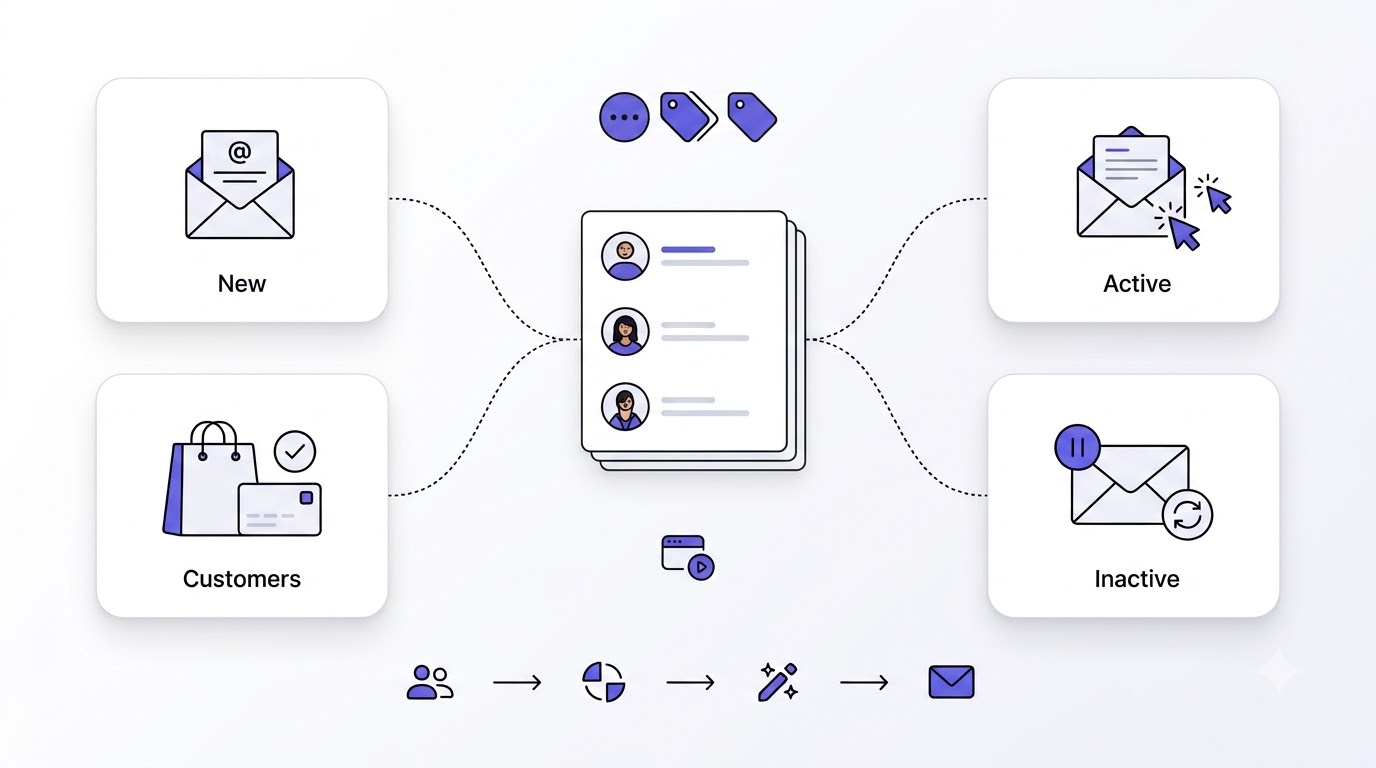
Before going further, it’s worth nailing down exactly what we’re talking about, because the term gets thrown around loosely enough that people mean different things by it. Segmentation isn’t just “organizing your list.” It’s a specific practice with real mechanics behind it, and understanding those mechanics is what separates people who segment well from people who just think they do.
Email segmentation means dividing your subscriber list into smaller groups based on shared characteristics or behaviors, so you can send each group content that’s actually relevant to them instead of one generic blast. Lists, groups, tags, and segments get confused constantly, so let’s clear that up. A list is usualy your entire subscriber base or a major division of it. Tags are labels you apply to individual contacts, like “downloaded ebook” or “attenlded webinar.” Segments are the actual groupings built from those tags, fields, or behaviors, used to target specific campaigns. Static segments are fixed at a moment in time, like “everyone who signed up in March.” Dynamic segments update automatically as contacts meet or stop meeting the criteria, which is honestly the more useful approach for most modern email strategies.
Why Email Segmentation Matters
Better personalization happens naturally once you’re not sending the same message to your whole list. Higher engagement follows because people respond to content that’s actually about them. Improved deliverability comes from higher engagement rates, since inbox providers reward emails people actually open and click. Better customer experience means subscribers feel like a brand gets them instead of shouting at them. And increased ROI ties all of this together, since relevant emails convert at meaningfully higher rates than generic ones, which means more revenue from the exact same list size.
Segmentation vs Personalization
These two get used interchangeably way too often, and that’s a mistake. Segmentation is the grouping. Personalization is what you do with that grouping, tailoring subject lines, content, offers, and timing to match each group’s specific situation. They work together like this: you segment your list into “customers who bought running shoes in the last 60 days,” and then you personalize the email with product recommendations for running gear, maybe even using their first name and referencing their specific purchase. Segmentation without personalization is just sorting contacts into buckets and doing nothing with it. Personalization without segmentation is guessing at relevance without any real data behind it.
Why Segmented Email Campaigns Perform Better
This section is where the actual case for segmentation gets made, because talking about it in the abstract only gets you so far. The performance gap between segmented and non-segmented campaigns shows up in nearly every metric that matters.
Open rates climb when subject lines and send timing match what a specific segment actually responds to. Click-through rates follow the same pattern, since content relevance is the single biggest driver of whether someone clicks through or just deletes the email. Conversions improve because segmented offers match actual intent, like sending a discount code to cart abandoners instead of blasting it to your entire list, including people who bought last week. More revenue comes directly from that improved conversion rate, spread across every campaign you send. Lower unsubscribe rates happen because people aren’t getting bombarded with irrelevant content that makes them want out. Lower spam complaints follow the same logic, since relevant emails rarely get marked as spam. Improved customer retention rounds it out, because ongoing relevance keeps people engaged with your brand instead of quietly tuning out.
The psychology behind this isn’t complicated, honestly. People respond to things that feel relevant to their own situation. A generic email feels like it’s talking at you. A segmented email feels like it’s talking to you specifically, even if it’s technically going out to a thousand other people who share your same behaviour or interest. That perceived relevance is what drives every single metric listed above.
How Email Segmentation Works
Understanding the actual process matters more than memorizing definitions, because segmentation isn’t a one-time setup; it’s an ongoing loop that keeps refining itself as you collect more data.
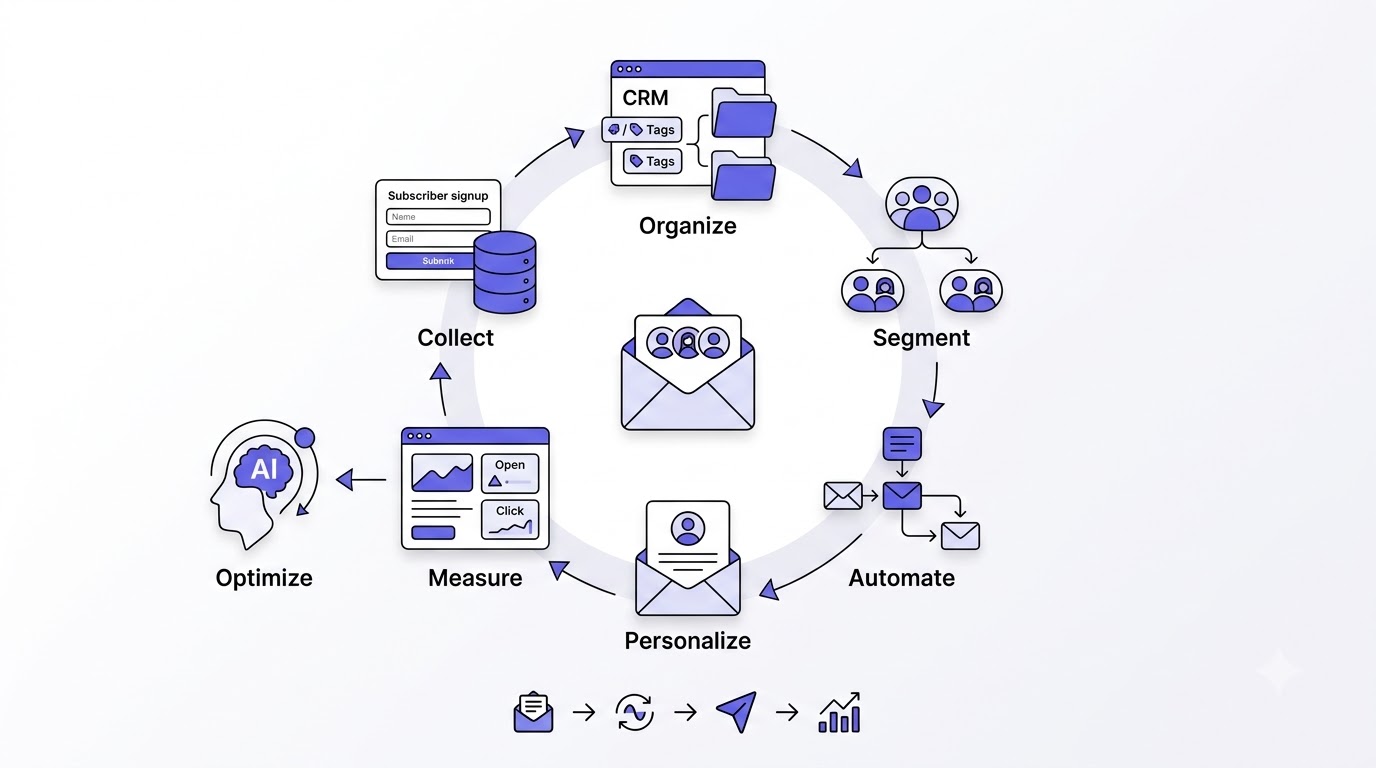
It starts with collecting subscriber data, whether that’s through signup forms, purchase history, website behavior, or survey responses. From there, you organize contacts, tagging them based on the data you’ve gathered and structuring your CRM or email platform so that data is actually usable. Next comes creating segments, building the actual groupings based on the criteria that matter for your business, whether that’s purchase behavior, engagement level, or lifecycle stage.
Once segments exist, you trigger automations, connecting specific segments to specific email flows so the right message goes out automatically based on segment membership. Then you personalize content, tailoring subject lines, body copy, and offers to match what each segment actually cares about. After that, you measure performance, tracking how each segment responds compared to others and compared to your unsegmented baseline. And finally, you optimize continuously, refining segments based on what the data tells you, removing ones that aren’t performing and building new ones as patterns emerge.
Think of it as a loop, not a checklist. Collect, organize, segment, automate, personalize, measure, optimize, and then right back to collecting more data based on what you just learned. Businesses that treat segmentation as a “set it up once and forget it” task usually see their results plateau within a few months, because customer behavior shifts and segments that were accurate a year ago stop reflecting reality.
How to Segment Your Email List Without Overcomplicating It
Every guide about segmentation, this one included, throws a lot of frameworks and terminology at you, and it’s easy to walk away thinking you need a data science degree to do any of this properly. You don’t. If you’re wondering how to segment your email list starting from literally nothing, the honest answer is to start with one segment that solves one real problem, not ten segments built off a spreadsheet of theoretical use cases.
Pick the one behavior in your business that most clearly separates people who buy from people who don’t. For an ecommerce store, that’s usually cart abandonment. For a SaaS company, it’s often feature activation in the first week. For a B2B company, it’s typically pricing page visits or demo requests. Build that one segment first, connect it to one automation, and watch what happens over a month. Once that’s working and you trust the data behind it, add a second segment. This slow, deliberate approach beats trying to map your entire customer base into a perfect taxonomy on day one, which usually just leads to analysis paralysis and a segmentation project that never actually ships.
The businesses that struggle most with segmentation aren’t the ones with too little data, they’re the ones who tried to build a complete system before sending a single targeted campaign. Ship the simple version first. Refine it once it’s live and generating real numbers you can act on.
Types of Email List Segmentation
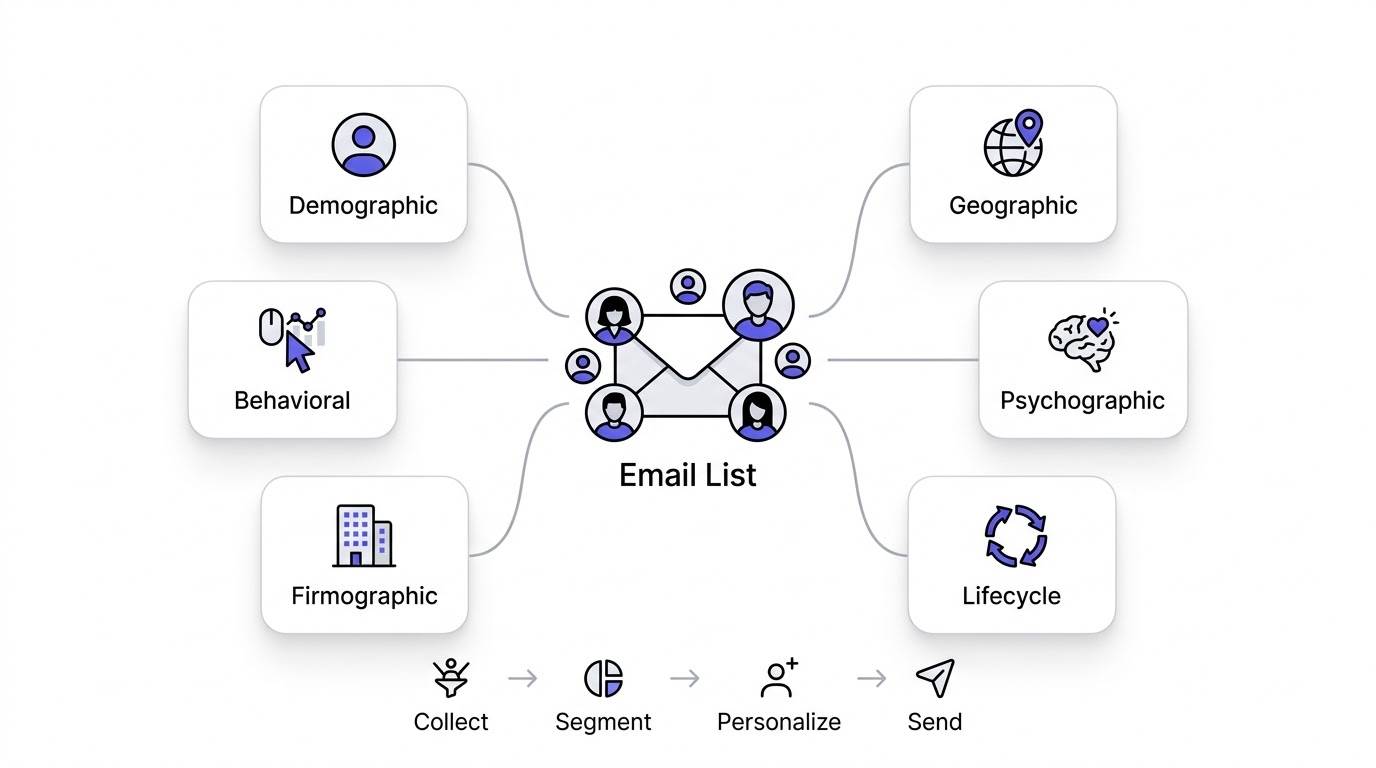
There isn’t just one way to slice your list, and honestly, the businesses that get the most out of segmentation usually combine several of these approaches rather than picking just one.
Demographic Segmentation
This covers basics like age, gender, occupation, income, and education level. It’s the oldest form of segmentation and honestly the least powerful on its own these days. Use it when your product genuinely varies by demographic, like a skincare brand targeting different age groups with different product lines. The advantage is it’s easy to collect through a simple signup form. The limitation is that demographic data tells you very little about actual buying intent or engagement, two people the same age can have completely different purchase behavior.
Geographic Segmentation
Country, state, city, climate, language, and time zone all fall under this category. Use cases include sending weather-appropriate product recommendations, adjusting send times based on time zone so emails land at a reasonable hour, and localizing language or currency for international audiences. A clothing brand might segment by climate to promote winter coats to colder regions while pushing summer gear to warmer ones at the same time.
Behavioral Segmentation
This one covers website visits, page views, product views, cart abandonment, email engagement, and purchase history. It’s genuinely the highest-performing segmentation method available, and there’s a simple reason why: behavior tells you what someone is actually doing right now, not just who they are on paper. Someone who visited your pricing page three times this week is a far stronger signal than someone who just matches a demographic profile. Behavioral segments react to real, current intent, which is exactly why they convert better than almost anything else on this list.
The other reason behavioral data works so well is that it’s honest in a way self-reported data sometimes isn’t. Someone might tell a survey they’re “very interested” in a product category, but their actual clicking and browsing behavior tells you whether that interest is real or just polite. That’s not a knock on surveys, they still matter for psychographic depth, but when the two disagree, trust the behavior. Actions consistently predict future purchases better than stated preferences do, and that gap is exactly why ecommerce platforms like Klaviyo build their entire segmentation architecture around behavioral triggers first.
Psychographic Segmentation
Interests, lifestyle, values, goals, challenges, and buying motivation fall into this bucket. It’s harder to collect than behavioral data since it usually requires surveys or preference centers rather than passive tracking, but it adds a layer of understanding that pure behavior can’t capture. Knowing someone cares about sustainability, for example, lets you lead with eco-friendly messaging instead of a generic sales pitch.
Firmographic Segmentation (B2B)
For B2B businesses, this replaces demographic segmentation almost entirely. Industry, company size, revenue, employee count, job title, and decision-maker level all matter here. A CFO at a 500-person company needs a completely different email than a junior marketing coordinator at a 10-person startup, even if they both downloaded the same whitepaper. Firmographic data helps route the right message to the right level of decision-making authority.
Lifecycle Stage Segmentation
New subscribers, leads, marketing qualified leads, sales qualified leads, customers, repeat buyers, VIP customers, and inactive users each need fundamentally different messaging. A new subscriber needs a welcome sequence, not a hard sell. A VIP customer needs recognition and exclusive perks, not the same generic newsletter everyone else gets. Inactive users need a win-back attempt, not more of whatever already failed to keep them engaged. Mapping your list to lifecycle stages is honestly one of the fastest ways to see immediate improvement in engagement.
The Most Effective Ways to Segment Your Email List
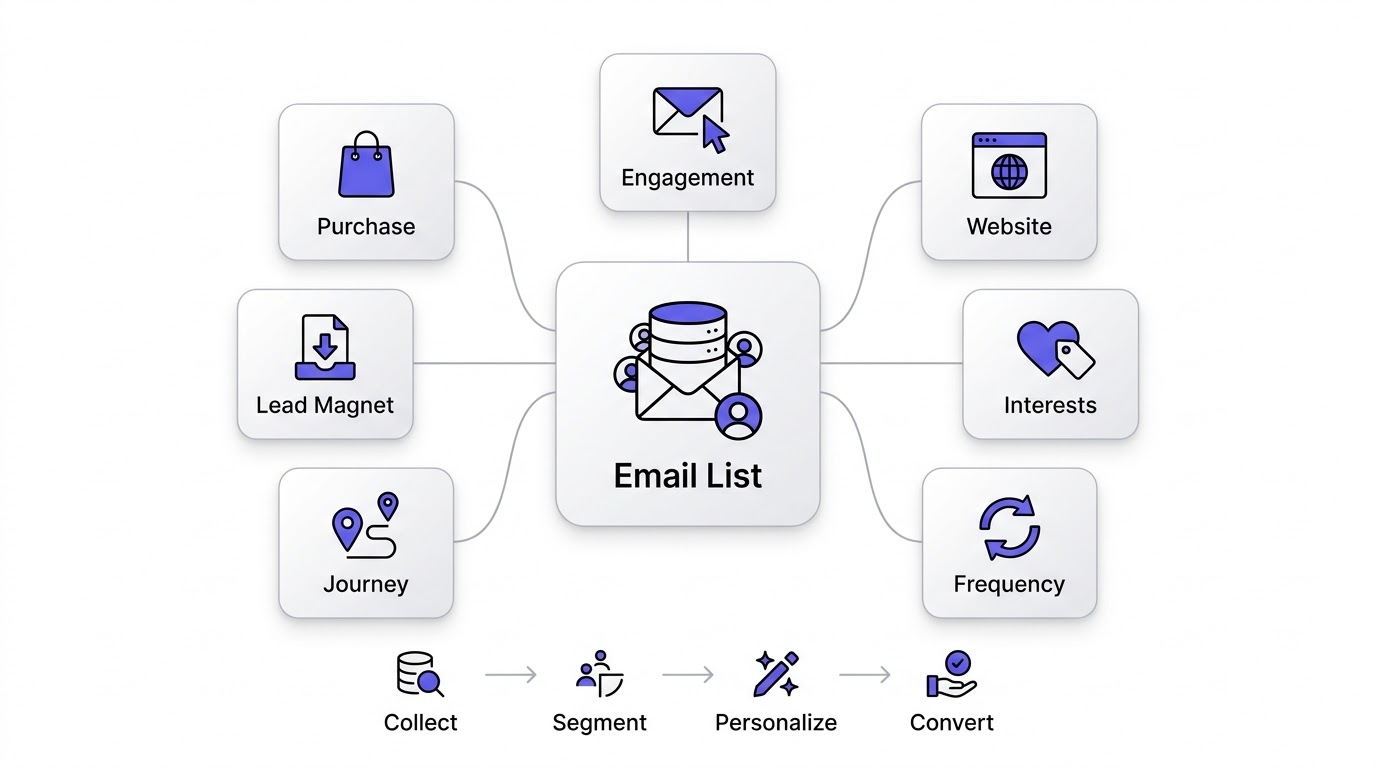
Now let’s get practical, because knowing the types of segmentation is one thing, actually applying them to build segments that convert is another.
By Purchase History
First-time buyers deserve a different email than repeat customers, since they’re still forming their opinion of your brand. High-value customers, the ones spending significantly more than average, deserve VIP treatment, maybe early access to new products or exclusive discounts. Seasonal buyers, people who only purchase around specific times like holidays, respond well to reminder campaigns timed to their past buying pattern. Subscription customers need entirely different messaging focused on retention and reducing churn rather than driving a first purchase.
By Email Engagement
Active subscribers, the ones consistently opening and clicking, are your most valuable audience and deserve your best content. Inactive subscribers need a re-engagement campaign before you consider removing them. Frequent openers who rarely click might respond better to different content formats or calls to action. Frequent clickers are prime candidates for more direct offers, since they’ve already shown they’ll act on your emails. Non-openers, if they stay non-openers after a genuine win-back attempt, should eventually get removed to protect your deliverability.
By Website Behaviour
Blog readers who never visit product pages need nurturing content, not a sales pitch. Pricing page visitors are showing strong purchase intent and deserve a more direct follow-up. Product viewers who didn’t buy are prime targets for a gentle nudge, maybe with social proof or a limited-time incentive. People who downloaded a resource are further along than someone who just browsed, and demo requesters are often your hottest leads, needing fast, direct follow-up rather than a slow nurture sequence.
By Lead Magnet Download
Different lead magnets attract different intents. Someone who downloaded “10 Beginner Tips” is clearly earlier in their journey than someone who downloaded “Advanced Implementation Guide.” Segmenting by which specific lead magnet someone grabbed lets you tailor your follow-up sequence to match their actual sophistication level and interest, rather than sending everyone the same generic nurture sequence regardless of what they originally showed interest in.
By Customer Interests
Product categories, services, industries, and content preferences all give you a way to segment based on what someone actually cares about rather than guessing. A subscriber who consistently clicks on articles about a specific topic is telling you exactly what to send them more of. Ignoring that signal and sending generic content to everyone wastes data you’re already sitting on.
By Customer Journey Stage
Awareness stage subscribers need educational content, not a sales pitch. Consideration stage subscribers benefit from comparison content and case studies. Decision stage subscribers respond well to testimonials, guarantees, and clear calls to action. Retention stage customers need ongoing value and check-ins. Advocacy stage customers, your happiest ones, are prime candidates for referral programs and reviews requests, since they’re already sold on your brand.
By Purchase Frequency
One-time purchasers need a nudge toward a second purchase, often the hardest conversion to get. Monthly buyers can be nurtured toward even higher frequency or larger basket sizes. High-frequency customers deserve loyalty recognition. Dormant customers, people who used to buy regularly but stopped, need a genuine win-back campaign, ideally with an incentive strong enough to overcome whatever caused them to drift away.
How to Collect Data for Better Segmentation
None of the segmentation types above work without actual data behind them, so let’s talk about where that data comes from and how to collect it responsibly.
Signup forms are the starting point for almost every business, and the fields you include shape what segmentation is even possible later, so think carefully about what you ask upfront. Surveys let you collect psychographic data directly, since you can’t infer values or goals from behavior alone. Preference centers let subscribers tell you what they want to hear about, which honestly produces some of the most accurate segmentation data available since it comes straight from the source.
Progressive profiling spreads data collection across multiple touchpoints instead of overwhelming someone with a giant form on day one, asking a new question each time they engage. CRM data, if you’re running a connected system, feeds sales interactions and deal history directly into your segmentation. Website tracking and cookies capture behavioral signals passively, showing what pages someone visits without requiring them to fill out anything. Customer support interactions reveal pain points and interests that rarely show up anywhere else. Purchase history remains one of the strongest predictors of future behavior, and event tracking captures specific actions like button clicks or video views. Third-party integrations pull in data from tools you already use, like your CRM, helpdesk, or ecommerce platform.
Best practice here comes down to one core principle: collect first-party data transparently, tell people why you’re asking, and never collect more than you’ll actually use. Piling on unnecessary form fields hurts signup conversion and creates data you’ll never actually act on. And with privacy regulations tightening across regions, respecting consent isn’t optional anymore, it’s baseline table stakes for running email marketing responsibly in 2026.
It’s also worth saying that data collection works best when it feels like a natural part of the relationship rather than an interrogation. Asking someone for their birthday on a signup form, without explaining why, feels intrusive. Asking for it later, framed as “so we can send you a birthday discount,” feels like a fair trade. The same logic applies to every piece of data you collect. If a subscriber can immediately see the benefit of giving you information, they’ll give it willingly. If it feels like data collection for its own sake, expect lower form completion rates and, honestly, a bit of resentment that shows up later as higher unsubscribe rates.
How to Create High-Converting Segments
Here’s a practical, step-by-step process you can actually follow instead of just reading about segmentation in the abstract.
Step 1: Define your goals. Are you trying to recover abandoned carts, reduce SaaS churn, nurture B2B leads, or boost repeat purchases? Your goal determines which segments actually matter, so don’t skip this step just to jump straight into building segments blindly.
Step 2: Identify available customer data. Look at what you’re already collecting, purchase history, website behavior, form responses, and figure out what’s usable right now versus what you’d need to start collecting.
Step 3: Choose segmentation criteria. Pick the type or combination of types, behavioral, demographic, lifecycle, that best matches your goal from step one. Don’t try to segment by everything at once.
Step 4: Create dynamic segments. Build segments that update automatically as contacts meet or stop meeting your criteria, rather than static lists that go stale the moment you build them.
Step 5: Build targeted campaigns. Design content specifically for each segment rather than tweaking one generic email slightly for each group. The content itself should feel different, not just the subject line.
Step 6: Measure results. Track how each segment performs compared to your baseline and compared to each other, looking at opens, clicks, conversions, and revenue.
Step 7: Optimize regularly. Refine segments based on what’s working, retire the ones that aren’t producing results, and build new ones as you notice new patterns in your data.
A quick example to make this concrete: say your goal is reducing SaaS churn. You’d identify usage data as your key criteria, segment users by feature adoption and login frequency, build a targeted re-engagement campaign for users who haven’t logged in for two weeks, measure whether that campaign actually reduces churn in that segment compared to users who never received it, and then refine the timing or messaging based on what you learn.
Email Segmentation Strategies for Different Businesses
Ecommerce Stores
Product interests drive relevant recommendation emails instead of generic catalog blasts. Cart abandonment segments recover revenue that would otherwise just disappear within hours of someone leaving your site. Repeat purchase segments nudge people back in based on typical reorder timing for whatever they bought. Customer lifetime value segments help you identify who’s actually worth extra marketing spend. VIP customer segments let you reward your best buyers with early access or exclusive perks, which keeps them loyal instead of shopping around.
A practical starting point for most stores is layering just two segments together: recency of last purchase and product category. That combination alone lets you distinguish a customer who bought skincare last week from one who bought it eight months ago, and send each a genuinely different message, one a complementary product suggestion, the other a “we miss you” style win-back offer. It’s a small setup that punches well above its complexity once it’s running.
SaaS Companies
Trial users need onboarding-focused content that gets them to their first “aha moment” fast. Active users benefit from feature education and upsell opportunities. Feature adoption segments let you nudge people toward features they haven’t discovered yet, which correlates strongly with retention. Subscription plan segments let you tailor messaging based on what tier someone’s on. Product usage segments reveal engagement trends before they become a churn problem. Churn risk segments, built from declining usage patterns, let you intervene before someone actually cancels rather than after.
B2B Companies
Industry segments let you speak directly to pain points specific to that sector instead of generic business language. Job role segments matter enormously, since a decision-maker and an end user need completely different messaging even within the same company. Company size segments help you match messaging to budget reality. Sales funnel stage segments ensure leads get nurtured appropriately rather than pushed toward a sale too early. Account value segments help prioritize your best-fit accounts for more personalized outreach.
Bloggers and Publishers
Topics of interest, built from what someone clicks on most, let you send more of what already resonates. Reading behavior, like how often someone opens your newsletter, tells you who your most engaged readers actually are. Subscriber source, meaning where someone signed up from, hints at what content originally attracted them. Engagement level segments help you focus your best content on the readers most likely to actually consume it, rather than treating your whole list identically.
Agencies
Service interest segments route leads toward the right team or offer based on what they’re actually asking about. Business size segments help tailor pricing conversations appropriately. Budget segments prevent wasting time pitching enterprise packages to businesses that clearly can’t afford them. Industry segments let you showcase relevant case studies. Proposal stage segments keep prospects moving through your pipeline with appropriately timed follow-ups instead of generic check-ins.
Advanced Email Segmentation Techniques
Once you’ve got the basics down, there’s a whole layer of more sophisticated segmentation that separates good email marketers from great ones.
Predictive segmentation uses historical data patterns to forecast future behavior, like predicting who’s likely to make a purchase in the next two weeks based on browsing patterns similar to past buyers. AI-powered segmentation takes this further, automatically identifying patterns in your data that a human might never spot manually, grouping contacts based on subtle behavioral similarities. RFM analysis, which stands for Recency, Frequency, and Monetary value, scores customers based on how recently they purchased, how often they purchase, and how much they typically spend, giving you a genuinely powerful way to identify your best customers versus ones drifting away.
Customer Lifetime Value segmentation groups people based on their predicted total value to your business, letting you invest marketing spend where it actually pays off. Lead scoring assigns numerical values to leads based on their engagement and fit, helping sales teams prioritize who to contact first. Behavioral scoring works similarly but focuses purely on engagement actions like email opens, clicks, and website visits. Intent-based segmentation looks for specific signals, like repeated visits to a pricing page, that indicate someone’s close to a buying decision right now. Real-time segmentation updates instantly as behavior happens, rather than on a daily or weekly batch update, which matters enormously for time-sensitive triggers like cart abandonment.
Implementation here usually requires a platform with genuine automation depth, since most of these techniques rely on continuously updating data rather than a one-time segment build. Klaviyo and ActiveCampaign both handle several of these natively, while simpler platforms often require manual workarounds or third-party tools to achieve the same result.
Worth being honest here too: not every business needs the full advanced toolkit. RFM analysis makes obvious sense for a retail brand with frequent repeat purchases, but it’s a lot less useful for a business selling a single high-ticket product once every few years. Lead scoring makes sense the moment you’ve got a sales team following up on leads, but it’s overkill for a solo creator selling a $47 course. Match the sophistication of your segmentation to the actual complexity of your sales cycle, not to whatever the most advanced platform on the market happens to offer.
Email Automation and Segmentation
Segmentation on its own is just organization. Pair it with automation and it becomes a system that actually runs your email marketing without you manually sending every campaign.
Welcome series trigger the moment someone joins a specific segment, like new subscribers from a particular lead magnet. Cart abandonment automations trigger based on the behavioral segment of people who added items but didn’t check out. Product recommendation emails pull from purchase history segments to show genuinely relevant items instead of random picks. Birthday emails trigger based on a data field collected at signup, often paired with a special discount to drive action. Win-back campaigns trigger when someone falls into your inactive or dormant segment, giving them one more reason to re-engage before you write them off.
Upsell campaigns target existing customers based on what they’ve already bought, suggesting complementary or premium options. Cross-sell campaigns work similarly but suggest products in different categories based on purchase patterns. Re-engagement workflows specifically target the inactive engagement segment with a sequence designed to win back attention or clean the list if it fails. Renewal reminders trigger based on subscription or contract end dates, pulled from lifecycle segments. Onboarding sequences trigger for new customer segments, walking them through getting value from their purchase.
The connection between triggers and segments is really the whole engine here. A trigger without a segment sends the same automation to everyone, which defeats the purpose. A segment without a trigger just sits there as a static grouping nobody acts on. Together, they create a system where the right message reaches the right person automatically, based on real, current data.
It helps to picture this as a factory floor rather than a single machine. Segmentation is the sorting mechanism, deciding which conveyor belt a contact moves onto. Automation is the actual conveyor belt, moving them through a sequence of steps without a human standing there flipping switches. Personalization is what gets stamped onto the product along the way, tailoring the message to fit that specific belt. When all three are working together properly, a new subscriber can join your list, get sorted into the right welcome sequence, receive content tailored to how they signed up, and eventually land in a customer segment, all without anyone on your team manually intervening at any step.
Best Email Marketing Platforms for Segmentation
Not every platform handles segmentation equally well, and picking the right one matters enormously for how effective your strategy can actually be.
Mailchimp
Strengths: Solid basic segmentation, easy tagging system, decent behavioral triggers for a beginner-friendly platform. Weaknesses: Advanced segmentation like RFM analysis or predictive scoring isn’t natively available. Best for: Small businesses and beginners who need straightforward segmentation without much complexity.
Klaviyo
Strengths: Deep behavioral and purchase-based segmentation, real-time updates tied directly to ecommerce store data, predictive analytics built in natively. Weaknesses: Less useful outside ecommerce contexts, and pricing scales quickly with list size. Best for: Ecommerce brands that want segmentation driven by actual purchase and browsing behavior.
ActiveCampaign
Strengths: Powerful conditional segmentation tied to CRM data, lead scoring, and behavioral tracking, genuinely flexible for complex B2B use cases. Weaknesses: Steeper learning curve, and building sophisticated segments takes more setup time than the other platforms. Best for: B2B and sales-driven businesses that need segmentation tied to a full sales pipeline.
HubSpot
HubSpot combines CRM depth with segmentation tools that pull from marketing, sales, and support data all in one place, which makes it a strong option for larger teams needing cross-department alignment on contact data. It’s not cheap once you scale past the entry tiers, but for businesses already living inside the HubSpot ecosystem, segmentation feels genuinely native rather than bolted on.
ConvertKit (Kit)
ConvertKit, now branded as Kit, focuses heavily on creator-friendly segmentation, built around tagging subscribers based on content interests, purchase behavior for digital products, and engagement level. It’s simpler than Klaviyo or ActiveCampaign but genuinely well suited for bloggers, course creators, and newsletter writers who need straightforward segmentation without enterprise complexity.
Brevo
Brevo, formerly Sendinblue, offers solid segmentation at a genuinely affordable price point, combining email and SMS data into unified segments. It doesn’t go as deep as Klaviyo on ecommerce-specific behavior, but for small to mid-sized businesses wanting decent segmentation without a steep price jump, it’s a reasonable middle-ground option.
| Platform | Segmentation Depth | Dynamic Lists | Automation | CRM Integration | AI Features | Ecommerce Integration | Pricing | Ease of Use | Reporting |
|---|---|---|---|---|---|---|---|---|---|
| Mailchimp | Basic to moderate | Yes | Moderate | Limited | Yes | Moderate | Affordable | Easy | Good |
| Klaviyo | Advanced, ecommerce-focused | Yes | Advanced | Limited | Yes | Deep | Mid to high | Moderate | Excellent |
| ActiveCampaign | Advanced, CRM-driven | Yes | Advanced | Full CRM | Yes | Moderate | Mid to high | Moderate to hard | Excellent |
| HubSpot | Advanced, cross-department | Yes | Advanced | Full CRM | Yes | Moderate | High | Moderate | Excellent |
| ConvertKit (Kit) | Moderate, creator-focused | Yes | Moderate | None | Limited | Basic | Affordable | Easy | Good |
| Brevo | Moderate | Yes | Moderate | Basic | Limited | Basic | Affordable | Easy | Good |
Common Email Segmentation Mistakes to Avoid
Too many segments is a real problem, not just a theoretical one. When you’ve got forty overlapping segments, nobody on your team actually knows which one to use for which campaign, and most of them end up ignored entirely. The fix is starting with a handful of high-impact segments tied directly to business goals, then expanding only when you’ve got a clear reason to.
Too few segments creates the opposite problem, where you’re barely better off than sending one generic blast. The fix is identifying at least the core behavioral and lifecycle segments covered earlier in this guide before calling your segmentation strategy complete.
Poor data quality undermines everything else, since segments built on outdated or incorrect data send the wrong message to the wrong people. Fix this by cleaning your data regularly and validating fields at collection. Ignoring inactive subscribers lets dead weight drag down your deliverability, since inbox providers notice when a chunk of your list never engages. The fix is a genuine win-back sequence followed by removal if it doesn’t work.
Never updating segments means static groupings that stop reflecting reality within months. The fix is treating segments as dynamic and reviewing them quarterly at minimum. Over-personalization, weirdly, can also backfire, making subscribers feel surveilled rather than understood, so it’s worth dialing back references to specific behavior that feels invasive rather than helpful.
Not testing segments means you’re guessing whether your segmentation strategy is actually working. The fix is running A/B tests comparing segmented sends against a control group regularly. Focusing only on demographics ignores the behavioral data that actually predicts intent, so the fix is layering behavioral signals on top of any demographic segmentation you’re already doing. Ignoring behavioral data entirely is the same mistake in a different flavor. And failing to clean email lists lets bounced, invalid, and disengaged addresses quietly wreck your sender reputation, so regular list hygiene has to be a standing habit, not an occasional cleanup project.
One more mistake worth naming directly: treating segmentation as a marketing-only project. If your sales team, support team, or product team never sees the same customer data marketing uses to build segments, you end up with a fragmented customer experience where email says one thing and a support rep says another. The businesses that get the most value from segmentation treat it as shared infrastructure across the whole company, not a private marketing tool nobody else touches.
Measuring the Success of Your Segmentation Strategy
Segmentation without measurement is just a guess dressed up as a strategy. Open rate remains a baseline metric, though it’s gotten less reliable since privacy features started masking real opens. Click-through rate tells you whether content actually resonated enough to act on. Click-to-open rate, meaning clicks as a percentage of opens rather than total sends, isolates content relevance from subject line performance.
Conversion rate ties everything back to actual business outcomes, whether that’s a purchase, signup, or booked call. Revenue per email lets you compare segments directly on dollar impact rather than just engagement numbers. Unsubscribe rate and spam complaint rate both signal when a segment’s getting content that doesn’t match their expectations. Customer lifetime value, tracked over time by segment, shows which groups are actually worth the most to your business long term. Repeat purchase rate reveals whether your segmentation and automation combo is actually driving loyalty. Engagement over time, tracked as a trend rather than a single snapshot, shows whether a segment’s health is improving or declining.
A/B testing lets you directly compare a segmented approach against a control group receiving the generic version, which is honestly the clearest way to prove segmentation’s actual impact rather than just assuming it’s working. Cohort analysis, grouping subscribers by when they joined or first converted, helps you spot patterns in how engagement evolves over the customer lifecycle, which segments naturally feed into and refine.
Don’t fall into the trap of measuring segmentation success purely by vanity metrics like open rate in isolation. A segment can have a fantastic open rate and still be underperforming on actual revenue if the content isn’t driving action. The metrics that matter most, ultimately, are the ones tied to money: conversion rate, revenue per email, and customer lifetime value by segment. Everything else, opens, clicks, engagement trends, are useful diagnostic signals for figuring out why a segment is or isn’t converting, but they shouldn’t be the final scorecard on their own.
Real-World Examples of Email Segmentation
Example 1: Ecommerce Store
A home goods retailer was sending one weekly newsletter to their entire list regardless of purchase history. The challenge was flat engagement and stagnant repeat purchase rates. Their segmentation strategy split the list by product category interest and purchase recency, combined with an automated post-purchase flow suggesting complementary items. The automation triggered a follow-up email ten days after a kitchen product purchase, recommending related items. Results: noticeably higher click-through rates on the targeted emails compared to the old generic newsletter, plus a measurable bump in repeat purchase rate within the first quarter.
Example 2: SaaS Business
A project management tool was struggling with trial users who signed up but never activated key features. The challenge was low trial-to-paid conversion. Their segmentation strategy grouped trial users by which features they’d used in their first three days, triggering feature-specific tutorial emails for whichever core feature they hadn’t touched yet. The outcome was a clear lift in feature adoption rates during the trial period, which correlated directly with a stronger trial-to-paid conversion rate compared to the previous generic onboarding sequence.
Example 3: B2B Company
A software vendor selling to mid-market companies had leads sitting in one undifferentiated nurture sequence regardless of role or company size. Their lead segmentation split contacts by job title and company size, feeding decision-makers into a more direct, ROI-focused nurturing workflow while routing end users into a more educational, feature-focused sequence. The sales impact showed up as shorter sales cycles for decision-maker leads, since they were receiving content aligned with what they actually needed to make a purchasing call, rather than generic feature announcements.
Example 4: Online Course Creator
A creator selling a cohort-based course had a list of several thousand subscribers with wildly different interests spanning multiple course topics. Their interest-based segmentation tracked which blog posts and lead magnets each subscriber engaged with, tagging them by topic area. During their next launch campaign, each segment received messaging tailored to the specific topic they’d shown interest in, rather than one generic launch sequence. Conversion improvements showed up clearly, with segments receiving topic-matched messaging converting at meaningfully higher rates than the portion of the list still receiving generic launch emails.
Email Segmentation Best Practices Checklist
Here’s a practical checklist you can actually run through when auditing your current segmentation strategy or building one from scratch.
- Collect quality first-party data through forms, surveys, and preference centers rather than relying purely on third-party sources
- Keep segments dynamic so they update automatically as contact behavior changes, rather than going stale
- Regularly clean your list, removing bounced and consistently inactive addresses to protect deliverability
- Align every segment with a specific business goal instead of segmenting just for the sake of it
- Combine segmentation with genuine personalization rather than just changing a first name field
- Use behavioral triggers wherever possible, since they consistently outperform static or purely demographic segments
- Test campaigns frequently, comparing segmented performance against a control group
- Monitor performance metrics beyond just opens, tracking revenue and conversion by segment
- Review segments quarterly at minimum, retiring ones that aren’t producing results and building new ones as patterns emerge
- Respect privacy regulations and be transparent with subscribers about what data you’re collecting and why
Conclusion
Segmentation isn’t a nice-to-have anymore, it’s genuinely essential for delivering email experiences that feel relevant instead of generic. The businesses seeing real results from email marketing in 2026 aren’t the ones with the biggest lists, they’re the ones sending the right message to the right group at the right time, based on actual data rather than guesswork.
Behavioral and lifecycle-based segmentation consistently outperform basic demographic approaches, because they reflect what someone is actually doing and where they actually stand in their relationship with your brand, rather than static facts that tell you little about intent. Combining segmentation with automation and genuine personalization compounds the effect, driving higher engagement, better deliverability, stronger customer relationships, and meaningfully increased revenue, all from the same list you already have.
If you’re starting from scratch, don’t try to build twenty segments on day one. Start with a few high-impact ones, maybe new subscribers, active customers, and inactive subscribers, get those working well, measure the results honestly, and expand from there as your data and confidence grow. Segmentation rewards patience and iteration far more than it rewards a perfect setup on the first attempt. Get the fundamentals right, keep refining based on what the data actually tells you, and the results will follow.
And if there’s one thing worth remembering after everything covered in this guide, it’s that segmentation isn’t really about the technology or the platform you pick. It’s about paying attention to what your subscribers are actually telling you through their behavior, and respecting that enough to send them something worth opening. Every open, click, and purchase is a small signal about what someone wants from you. Segmentation just makes sure you’re actually listening to those signals instead of ignoring them in favor of one generic email that tries to be everything to everyone and ends up meaning nothing to anyone.
Frequently Asked Questions
What is email list segmentation?
Email list segmentation means dividing your subscriber base into smaller, more specific groups based on shared characteristics or behavior, so you can send each group content that’s actually relevant to them instead of one generic email to everyone.
Why is segmentation important in email marketing?
It directly improves open rates, click-through rates, conversions, and revenue, while lowering unsubscribe and spam complaint rates. Relevant emails simply perform better than generic ones across nearly every metric that matters.
What are the different types of email segmentation?
The main types include demographic, geographic, behavioral, psychographic, firmographic for B2B, and lifecycle stage segmentation. Most effective strategies combine several of these rather than relying on just one.
How many email segments should I have?
There’s no fixed number, but starting with a handful of high-impact segments tied to clear business goals works better than building dozens of overlapping segments nobody actually uses.
What is behavioral segmentation?
Behavioral segmentation groups subscribers based on actions they’ve taken, like website visits, product views, cart abandonment, or purchase history. It’s generally the highest-performing segmentation method since it reflects real, current intent.
What is dynamic segmentation?
Dynamic segmentation automatically updates segment membership as a contact’s behavior or data changes, unlike static segments which stay fixed once created. This keeps your targeting accurate over time without manual rebuilding.
How often should I update my segments?
Review your segmentation strategy at least quarterly, though dynamic segments update continuously on their own as long as they’re set up correctly from the start.
Which email platform has the best segmentation features?
It depends on your business type. Klaviyo leads for ecommerce, ActiveCampaign and HubSpot lead for B2B and CRM-driven segmentation, and Mailchimp or ConvertKit work well for simpler needs.
Can small businesses benefit from segmentation?
Yes, absolutely. Even a small list benefits from basic segments like new subscribers versus existing customers, or active versus inactive engagement, without needing enterprise-level complexity.
What data should I collect for segmentation?
Focus on purchase history, website behavior, email engagement, and any preference data collected directly from subscribers, while avoiding unnecessary fields that won’t actually inform your segmentation strategy.
Does segmentation improve deliverability?
Yes. Sending relevant content to engaged segments improves open and click rates, which signals to inbox providers that your emails are wanted, ultimately improving your sender reputation and inbox placement.
How does segmentation increase conversions?
By matching the message to the recipient’s actual intent or stage in the customer journey, segmented emails feel relevant rather than generic, which drives significantly higher action rates than one-size-fits-all campaigns.
What’s the difference between segmentation and tagging?
Tagging applies labels to individual contacts based on specific actions or attributes. Segmentation uses those tags, along with other data, to build actual groups you can target with campaigns. Tags are the building blocks, segments are the structure.
How do I segment inactive subscribers?
Define inactivity based on a specific window, like no opens or clicks in 90 days, then build a dedicated segment for a win-back campaign before considering removal if they still don’t re-engage.
How do I measure segmentation success?
Track open rate, click-through rate, conversion rate, and revenue per email by segment, comparing performance against your unsegmented baseline through regular A/B testing.
Can AI improve email segmentation?
Yes, AI-powered segmentation can identify patterns in behavior and purchase data that would be difficult to spot manually, and predictive models can forecast future behavior like likelihood to purchase or churn.
Is segmentation necessary for automation?
Practically, yes. Automation without segmentation just sends the same flow to everyone, which defeats much of its purpose. Pairing triggers with specific segments is what makes automation genuinely effective.
How do I avoid over-segmentation?
Tie every segment to a specific, measurable business goal, and consolidate or retire segments that aren’t driving distinct campaign strategies or measurable performance differences.
What are the best practices for list management?
Clean your list regularly, keep segments dynamic, collect quality first-party data, and review your overall strategy on a consistent schedule rather than letting it run untouched for years.
Which segmentation strategy delivers the highest ROI?
Behavioral and lifecycle-based segmentation tend to outperform purely demographic approaches, since they’re built on actual intent and current customer relationship stage rather than static personal attributes.