

Open a brand new Google Ads account, and here’s what usually happens. One campaign gets created. Every keyword the business can think of goes into one ad group. Running shoes, formal shoes, sandals, all sitting in the same bucket, all served by the same two generic ads. Budget goes in. A week later, spend is gone, leads are thin, and nobody can say which keyword actually worked and which one just burned money.
That’s not a rare story. It’s the default story. Most people don’t set out to build a messy account, it just happens because nobody explained that structure is a decision you make on purpose, not something that sorts itself out once ads start running.
This post is for two kinds of people. The first is setting up an account for the first time and doesn’t want to make that same mess. The second inherited an account that already looks like the mess above and needs to know how to pull it apart and rebuild it properly. Either way, by the end of this, the hierarchy, the logic behind it, and the actual steps to build it should make sense, not as jargon, but as something you could explain to a colleague over coffee.
What “Account Structure” Actually Means
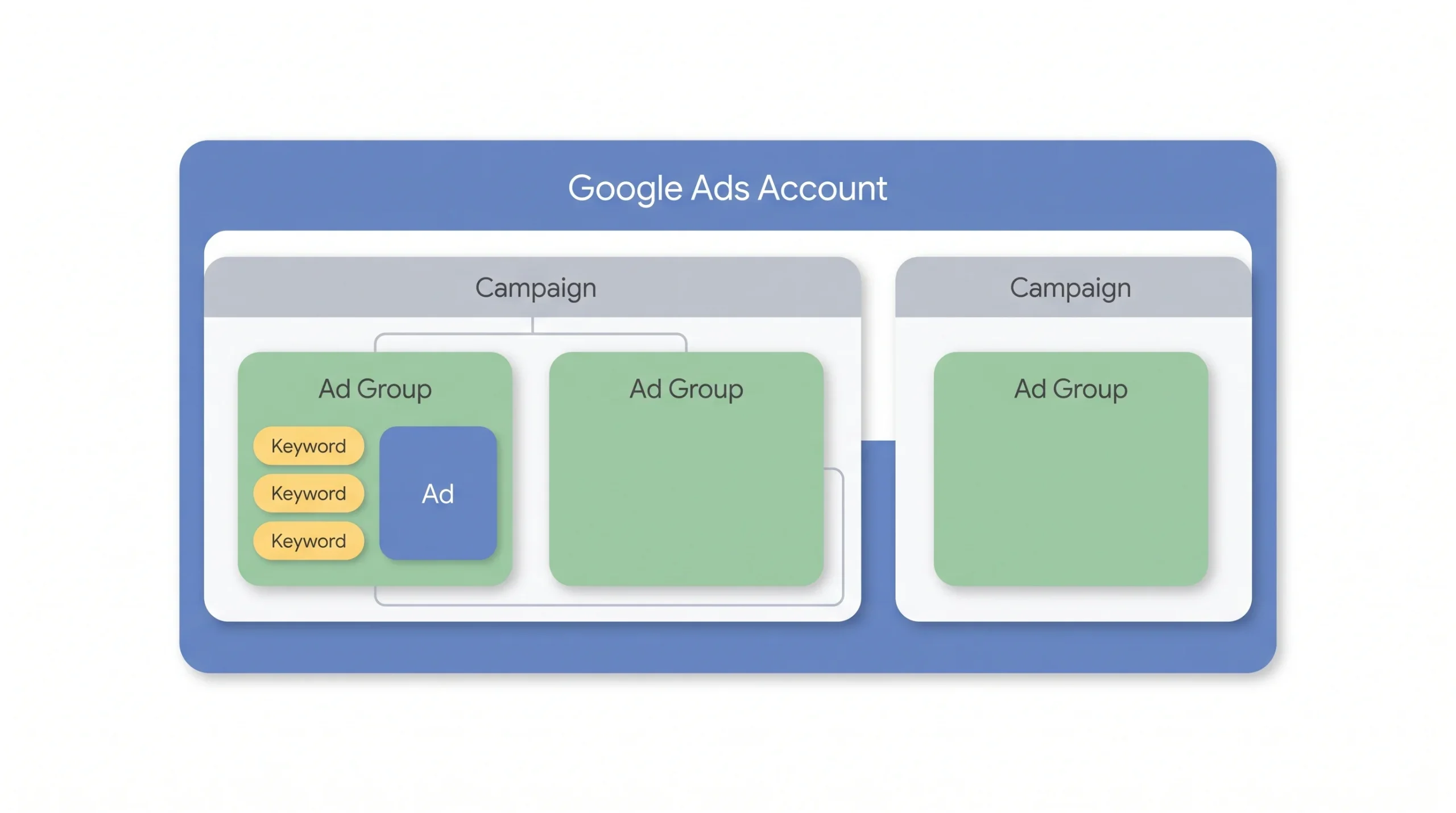
Before throwing terms like “campaign” and “ad group” around, it helps to picture what’s actually being built. Think of it like a filing cabinet. The account is the cabinet itself, holding everything and tied to one business and one payment method. Inside it, drawers represent campaigns, each one built around a single goal and a single budget. Inside each drawer, folders represent ad groups, each folder holding a tightly related set of papers, or in this case, keywords and the ads tied to them. And inside each folder, the individual papers are the keywords and ads themselves, each with its own settings.
That’s the whole system. Four levels, stacked on top of each other, and every decision made at one level affects what happens at the level below it.
| Level | What it is | What you control here |
|---|---|---|
| Account | The outer shell, business info, billing, access | Who gets access, payment method |
| Campaign | A container tied to one goal and one budget | Budget, bidding strategy, location and language targeting, network |
| Ad Group | A themed cluster inside a campaign | Keywords, ads tied to that theme |
| Keyword / Ad | The trigger and the message | Match type, bids, ad copy, landing page |
If you can’t explain why a keyword lives in a specific ad group in one sentence, it’s probably in the wrong one.
Here’s the thing worth knowing early. This same skeleton shows up on Microsoft Ads and Amazon Ads too, not just Google. The vocabulary shifts a little, Performance Max on Google calls its groupings “asset groups” instead of ad groups, but the underlying logic stays the same everywhere. Learn this structure once, and it transfers.
Why Structure Actually Matters (Not Just “Being Tidy”)
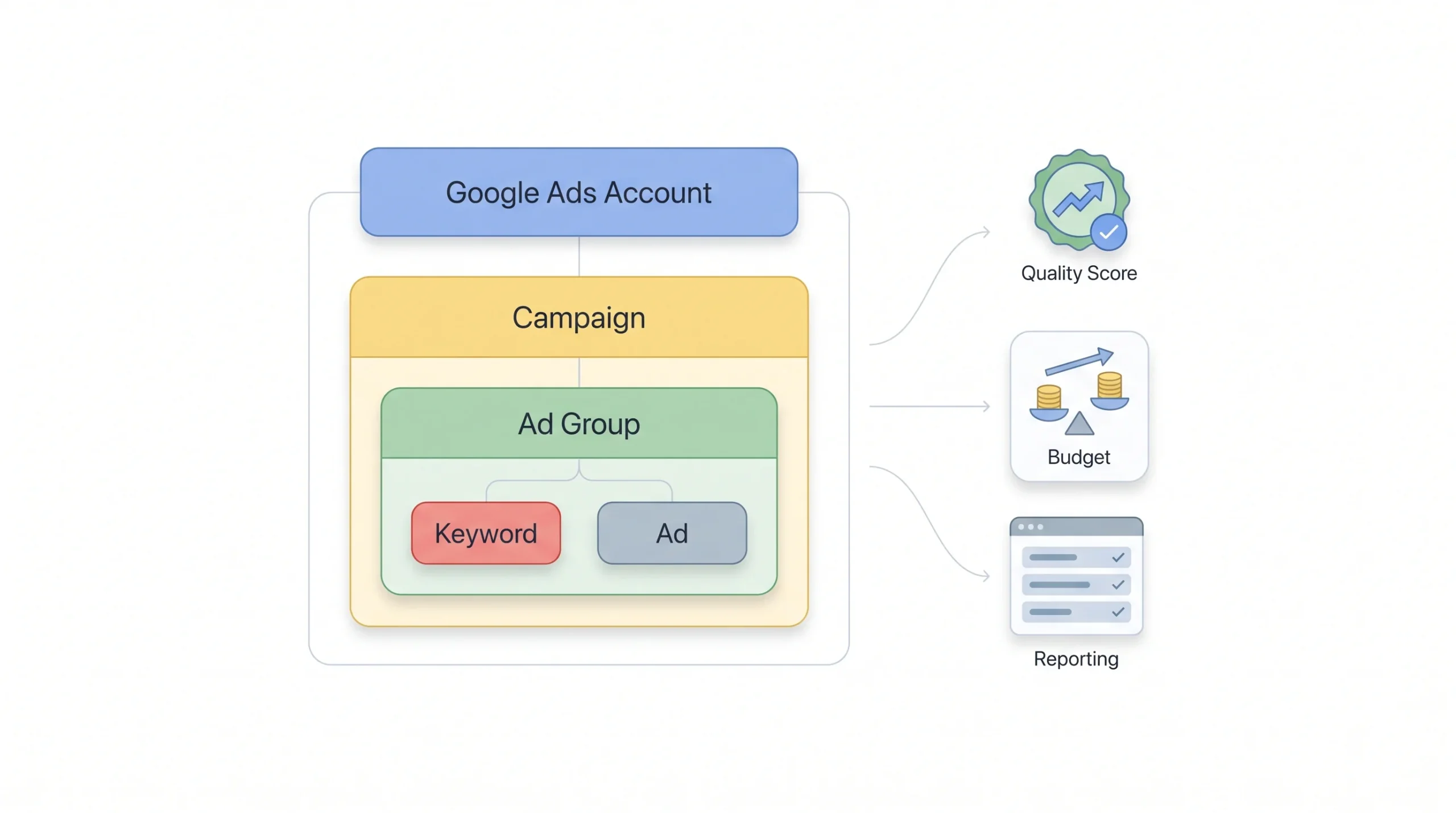
A lot of guides frame structure as a housekeeping issue. Keep things neat, they say, and life gets easier. True, but that undersells it. Structure isn’t cosmetic. It changes three things that actually show up on the invoice and in the results: cost per click, budget control, and whether the reporting tells the truth.
Start with Quality Score, since that one has a direct line to cost. Google rewards ads that feel relevant to the search someone just typed. An ad group stuffed with loosely related keywords produces one generic ad trying to cover too much ground, and that ad won’t feel relevant to most of the searches triggering it. Lower relevance means a lower Quality Score, and a lower Quality Score means paying more for the same position. Split that same ad group into tightly themed clusters, each with its own specific ad copy, and the relevance goes up. The cost per click usually comes down as a result. This isn’t a minor tweak, it’s one of the few structural levers that directly affects price.
Then there’s budget control, which is where a lot of accounts quietly bleed money. Say a campaign has one high-volume broad keyword, maybe a brand name, sitting next to a handful of low-volume product keywords. Left in one bucket without separation, the broad, high-volume term can eat most of the daily budget before the smaller keywords ever get a look in. Split brand into its own campaign with its own budget, and suddenly both get the spend they need instead of one starving the other.
And reporting. This is the one people underestimate the most. A campaign that blends brand and non-brand traffic, or blends five different product lines into one ad group, produces one blended number. Average CPC, average conversion rate, average everything. But averages hide the story. Brand traffic almost always converts better and costs less, simply because those people already know the business. If brand and non-brand sit in the same campaign, the strong brand numbers mask what’s actually a weak non-brand campaign, and there’s no way to see that unless the two are split apart and reported separately.
A messy account doesn’t just look bad. It actively hides the data needed to make good decisions.
That’s really the core argument for structure. It’s not about being organised for its own sake. It’s about being able to trust the numbers enough to act on them.
Step 1: Start With Your Goals, Not Your Products
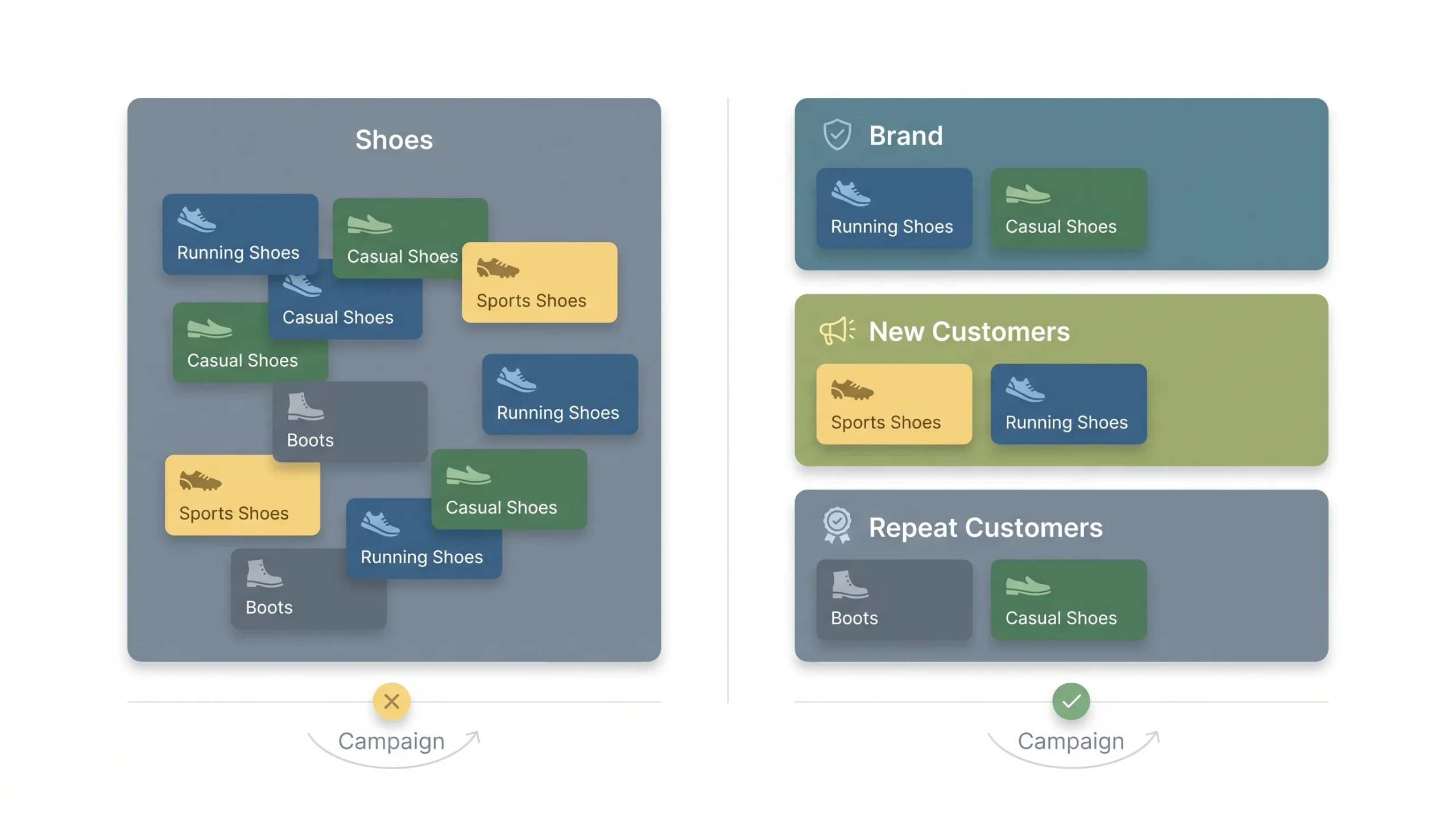
Here’s the mistake almost everyone makes on their first account: they structure around what they sell instead of what they want each campaign to actually do. A shoe brand builds a campaign called “Shoes” and calls it done. But “Shoes” isn’t a goal. Getting more first-time buyers to try the brand is a goal. Getting repeat customers to reorder is a different goal. Those two things need different messaging, different budgets, and honestly, different success metrics, so they shouldn’t live in the same campaign just because they both involve shoes.
Before opening the ads platform, figure out what each campaign is actually trying to achieve. A few common ways to split things up, each useful in different situations:
- By funnel stage. Someone searching “what is running shoe drop” is nowhere near ready to buy. Someone searching “buy Asics Gel-Nimbus 26” is one click away from a cart. Treating both the same way wastes money on one end and undersells intent on the other.
- By product or service line. If a business sells running shoes and yoga mats, those are different audiences with different search behaviour. Separate campaigns mean separate budgets, separate messaging, and the ability to see which line is actually pulling its weight.
- By geography. A business running ads in Jaipur and Mumbai probably needs different budgets and maybe different messaging for each city, especially if one location has more competition or higher costs than the other.
- By conversion action. Some campaigns exist to get phone calls, others to get form fills, others to drive straight sales. Mixing these confuses automated bidding, since the system doesn’t know which action to optimise toward.
- By brand vs non-brand. This one is close to mandatory. Brand keywords, people already searching for the business by name, behave completely differently from non-brand keywords, people who don’t know the business exists yet. Different intent, different cost, different conversion rate. Keeping them apart isn’t optional if the goal is honest reporting.
| Segmentation approach | Best for | Watch out for |
|---|---|---|
| Funnel stage | Businesses with a longer consideration cycle | Overlap between mid-funnel and bottom-funnel intent |
| Product/service line | Multi-product businesses | Ending up with too many low-volume campaigns |
| Geography | Multi-location businesses, region-specific budgets | Splitting too thin and losing enough data to optimise |
| Conversion type | Businesses tracking calls, forms, and sales separately | Sending mixed signals to Smart Bidding |
| Brand vs non-brand | Almost every business running ads | Forgetting to exclude brand terms from non-brand campaigns |
None of these are mutually exclusive, by the way. A real account often layers two or three of these together, brand vs non-brand as the first split, then product line within non-brand. The point isn’t to pick one model and force everything into it. It’s to have a reason for every campaign that exists, one that can be said out loud in a sentence.
Step 2: Building Campaigns the Right Way
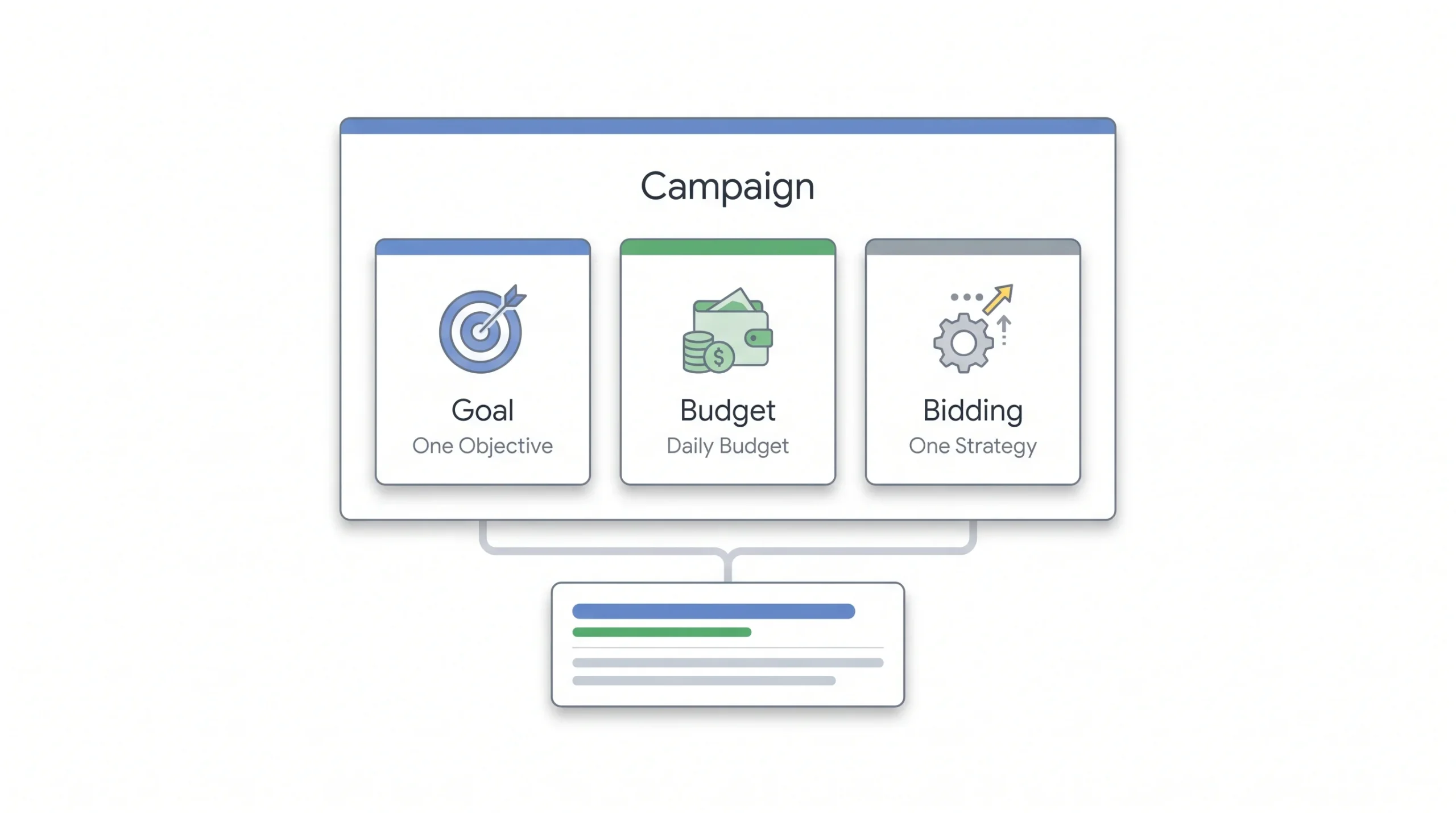
Once the segmentation model is decided, the actual campaign settings need attention. This is where budget and bidding strategy live, and getting these wrong undoes all the planning from the last step.
Start with the one goal per campaign rule. It sounds obvious written down, but it’s broken constantly. A campaign chasing both “brand awareness impressions” and “form fill conversions” at the same time confuses Smart Bidding, because the algorithm needs one clear signal to optimise toward. Feed it two competing goals and it splits the difference, doing an average job at both instead of a good job at either.
Budget comes next, and this is where a lot of new accounts get it wrong in a quiet way. Budgets get set at the campaign level, and Google also offers a shared budget option that spreads one daily amount across a group of campaigns. Whatever the setup, the budget needs to be big enough that ads can actually run through the full day, not just the first three hours before the money runs out. An account with five campaigns each fighting for slices of a budget too small to support any of them isn’t really running five campaigns, it’s running five half-campaigns.
If a campaign can’t sustain its own daily budget, it’s not ready to be its own campaign yet. Fold it into something bigger until it earns the split.
Then there are the settings people forget to check, and these quietly waste money more often than anyone would guess. Search Partners is one, a setting that lets search ads show on partner sites beyond Google’s own results, sometimes with lower-quality traffic attached. The Display Network opt-out is another, because a standard search campaign has an old default that can serve ads on the Display Network unless it’s unchecked, mixing two very different ad formats into one budget without meaning to.
Bidding strategy deserves a mention here too, though it’s a big enough topic to earn its own separate piece. For now, the beginner version: newer campaigns without much conversion history usually need a simpler bidding approach until enough data builds up, while established campaigns with steady conversion volume can hand more control to automated strategies like Target CPA or Target ROAS. The mistake to avoid is switching a brand new campaign straight to an aggressive automated strategy before it has the data to actually learn from.
Step 3: Structuring Ad Groups So They Actually Work
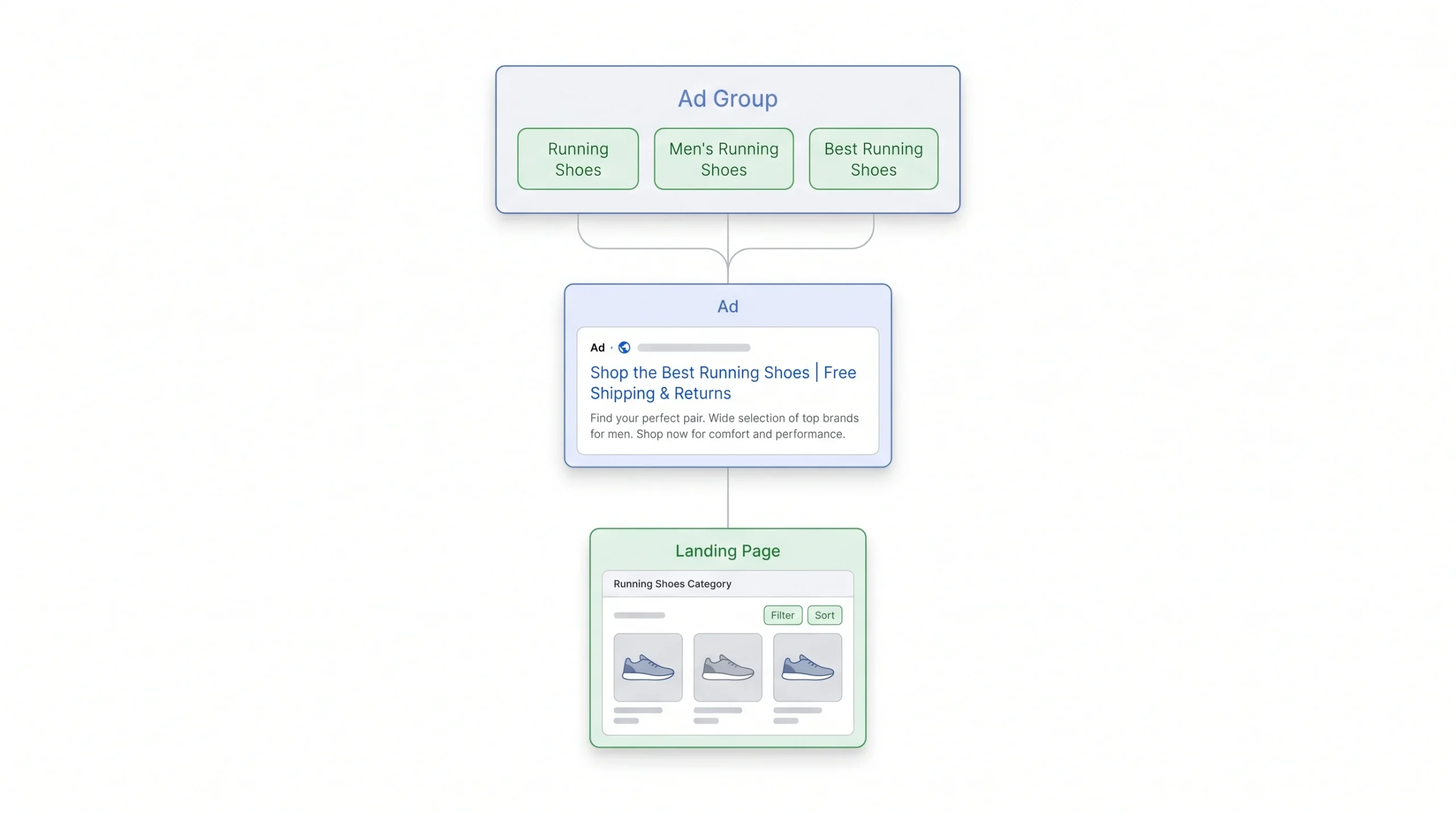
This is where most guides get lazy. They say “keep ad groups tightly themed” and move on, without explaining what that actually looks like in practice or why it matters as much as it does.
Here’s the honest version. A tightly themed ad group means every keyword inside it could plausibly trigger the exact same ad without that ad sounding generic. Take a shoe retailer selling both running shoes and high heels. Throwing “running shoes,” “best running shoes,” and “high heels” into one ad group forces the ad copy to try covering both, which means it ends up specific to neither. Split them into two ad groups instead, one for running shoes and one for high heels, and now each ad can speak directly to what the person actually searched for.
| Loosely themed | Tightly themed | |
|---|---|---|
| Keywords | running shoes, high heels, sandals | running shoes, running shoes for men, best running shoes |
| Ad copy | Generic, tries to cover everything | Specific to running shoes |
| Landing page | Homepage | Running shoes category page |
| Result | Lower CTR, lower Quality Score | Higher relevance, lower CPC |
There’s no fixed number for how many ad groups a campaign should have. Anyone who gives a hard rule like “always have five ad groups per campaign” is guessing. The real test is whether each theme inside the campaign is distinct enough to deserve its own ad copy and landing page. Too few ad groups, and themes blur together, hurting relevance. Too many, and management becomes a nightmare, plus each ad group ends up with too little traffic for Smart Bidding to learn anything useful from it.
That second failure mode has a name: SKAG, or single keyword ad groups, where advertisers used to split every single keyword into its own dedicated ad group for maximum control. It made more sense years ago, when bidding was mostly manual and advertisers needed that granularity to manage bids keyword by keyword. With automated bidding now handling most of that work, SKAGs have mostly fallen out of favour, since splitting things that thin usually starves each ad group of the volume it needs to perform well. It still shows up occasionally for high-value, high-search-volume terms where that level of control is worth the tradeoff, but it’s the exception now, not the default approach.
One more piece that gets skipped constantly: ad groups shouldn’t just connect to ad copy, they should connect to a landing page too. An ad group about running shoes sending traffic to a general homepage instead of the running shoes category page is leaving conversions on the table. The keyword, the ad, and the landing page all need to tell the same story.
Step 4: Keyword Organisation and Match Types
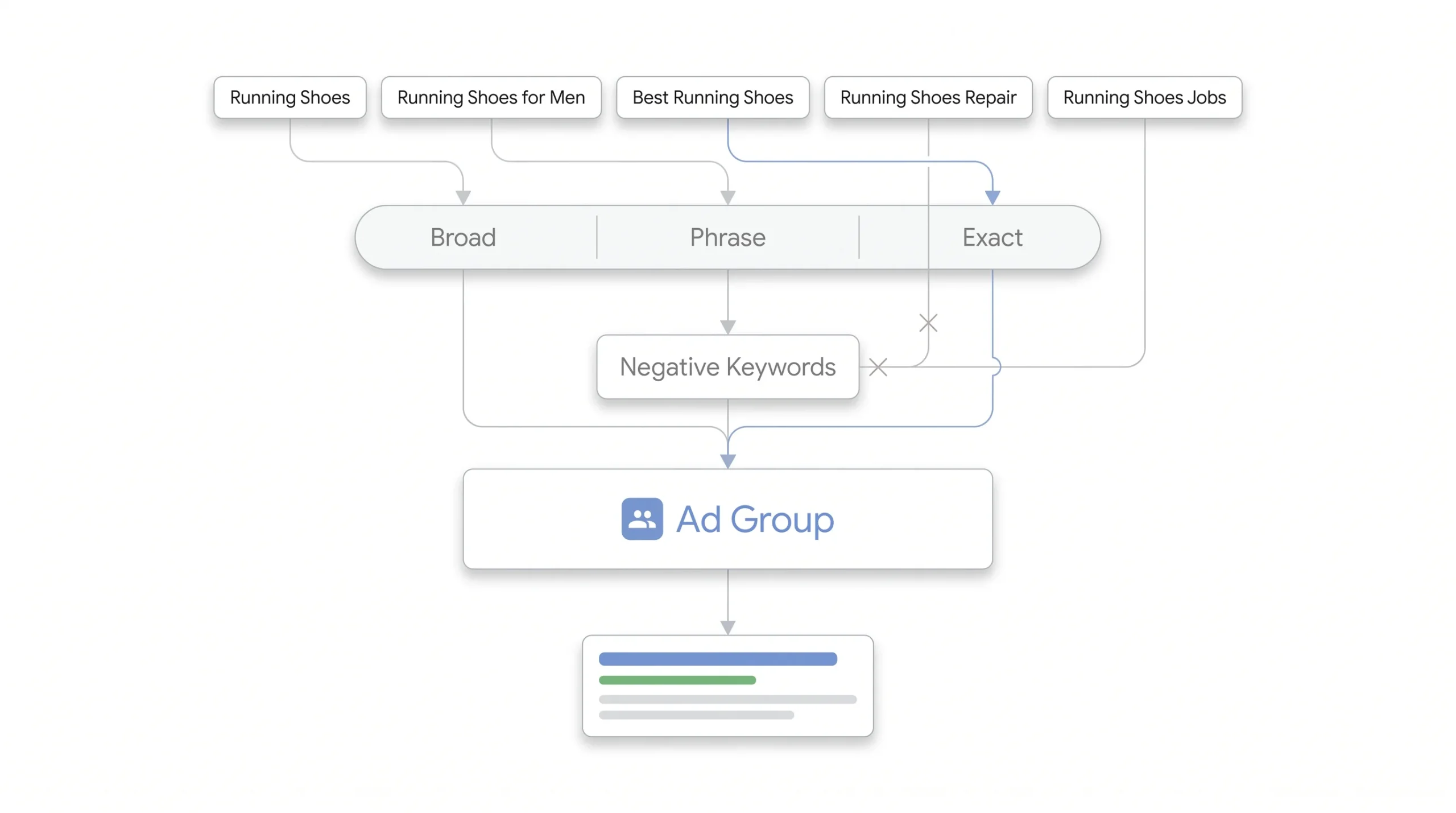
Once ad groups are themed properly, the next question is what actually goes inside them and how tightly those keywords are controlled.
Match types decide how closely someone’s search has to match a keyword before an ad is allowed to show. Three main types exist, and they’re worth understanding in plain terms rather than platform jargon.
Broad match is the loosest. A keyword like running shoes on broad match can trigger for related searches like “shoes for jogging” or even “best sneakers for exercise,” since Google interprets intent broadly. That reach can be useful for discovery, but it also opens the door to irrelevant traffic if not watched closely.
Phrase match sits in the middle. The keyword “running shoes” in phrase match will trigger for searches that include that phrase in the right order, things like “buy running shoes online” or “running shoes for flat feet,” but won’t trigger for something loosely related like “jogging sneakers.”
Exact match is the tightest. It triggers only for searches that mean essentially the same thing as the keyword itself, close variants included, but nothing broader. This gives the most control and usually the highest relevance, at the cost of lower search volume.
None of these live in isolation from the ad group structure built in the last step. The keywords sitting inside a tightly themed ad group are what make that theme real. A “running shoes” ad group might combine a phrase match version to catch general searches and an exact match version to bid more precisely on the highest-intent term.
Negative keywords deserve a spot in this conversation too, and they usually get treated as an afterthought when they shouldn’t be. A negative keyword list stops an ad from showing for searches it has no business appearing in. Sell running shoes, and “running shoes” on broad match might also trigger for “running shoes repair” or “running shoes jobs,” searches that have nothing to do with buying a product. Negative keywords block that from happening.
These can live at two levels. Campaign-level negatives apply only within one campaign, useful for excluding terms specific to that campaign’s theme. Account-level negative lists apply everywhere, useful for blocking terms that are irrelevant across the whole business, like “jobs,” “internship,” or “free,” if none of those apply to what’s being sold. Building this list isn’t a one-time task either, it’s worth revisiting through the search terms report regularly, since new irrelevant queries show up as the account runs.
Step 5: Naming Conventions (The Part Everyone Skips)
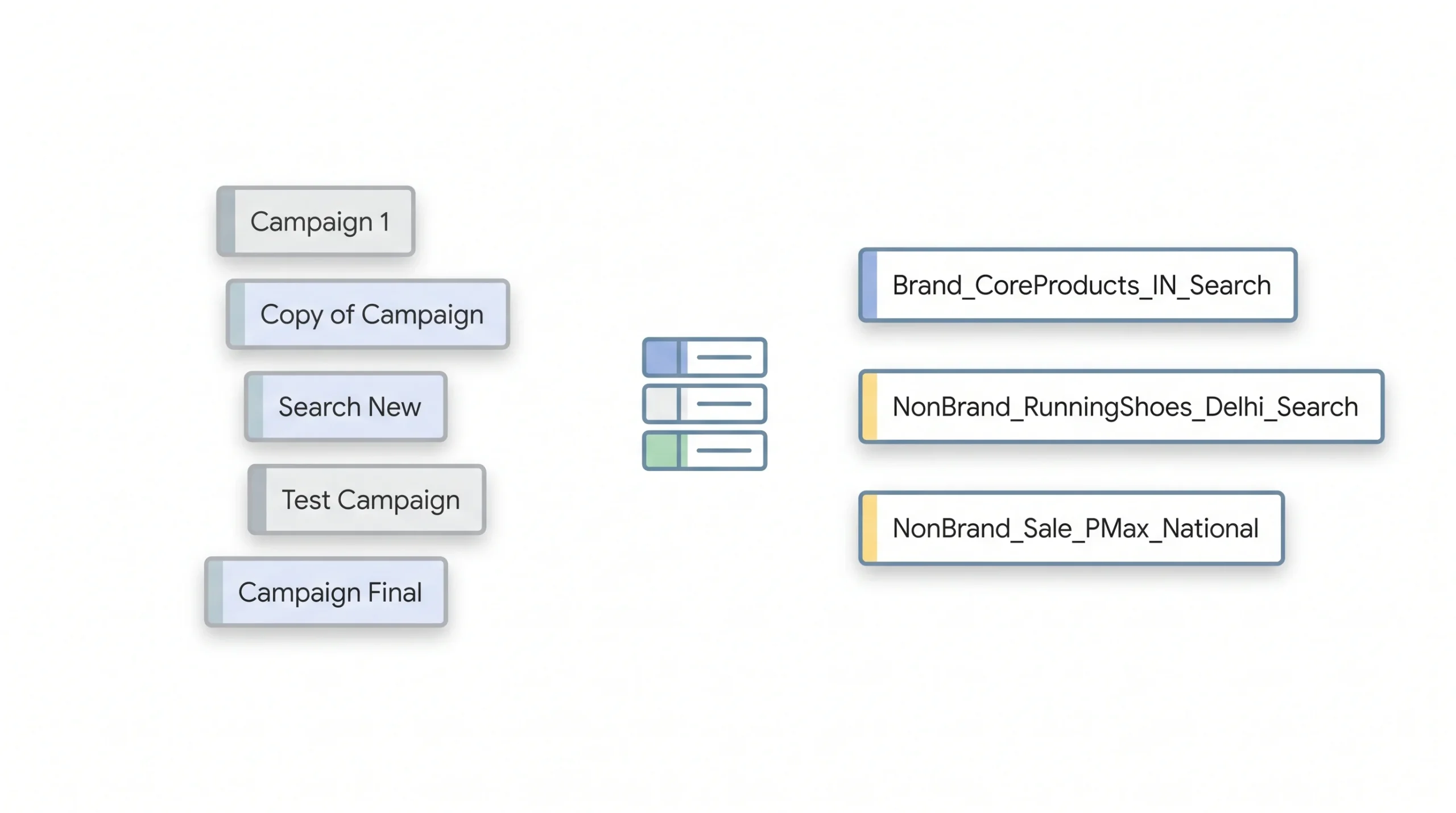
Most guides on this topic mention naming conventions in a single throwaway line and move on. That’s a mistake, because this is genuinely one of the highest-value, lowest-effort things to get right, and almost nobody explains how to actually do it.
Here’s why it matters. An account with three campaigns doesn’t need a naming system, anyone can keep track of three things in their head. An account with thirty campaigns is a different story. Without a system, campaign names turn into things like “Campaign 1,” “Copy of Campaign 1,” or “New Search Jan,” and six months later nobody, including the person who built it, can tell what any of them actually do without clicking into each one individually.
A simple formula fixes this before it becomes a problem: [Brand/Non-Brand]_[Product/Service]_[Location]_[Campaign Type]
| Campaign name | What it tells you at a glance |
|---|---|
| Brand_CoreProducts_IN_Search | Brand campaign, core products, targeting India, running on Search |
| NonBrand_RunningShoes_Delhi_Search | Non-brand campaign, product-specific, city-targeted to Delhi |
| NonBrand_Sale_PMax_National | Performance Max campaign, national sale push |
The exact formula matters less than having one at all, and sticking to it without exception. Some businesses prefer date ranges in the name for seasonal campaigns, others prefer a shorthand for conversion goal. Whatever gets chosen, write it down somewhere the whole team can see, a shared spreadsheet works fine, so the convention survives even when the person who built it moves to a different project.
A good naming convention means anyone on the team can understand what a campaign does without opening it.
This becomes especially valuable during reporting. Pull a performance report with a hundred campaigns in it, and consistent naming means filtering and grouping by brand, location, or campaign type takes seconds instead of requiring someone to manually tag every row.
Structuring for Performance Max (2026 Context)
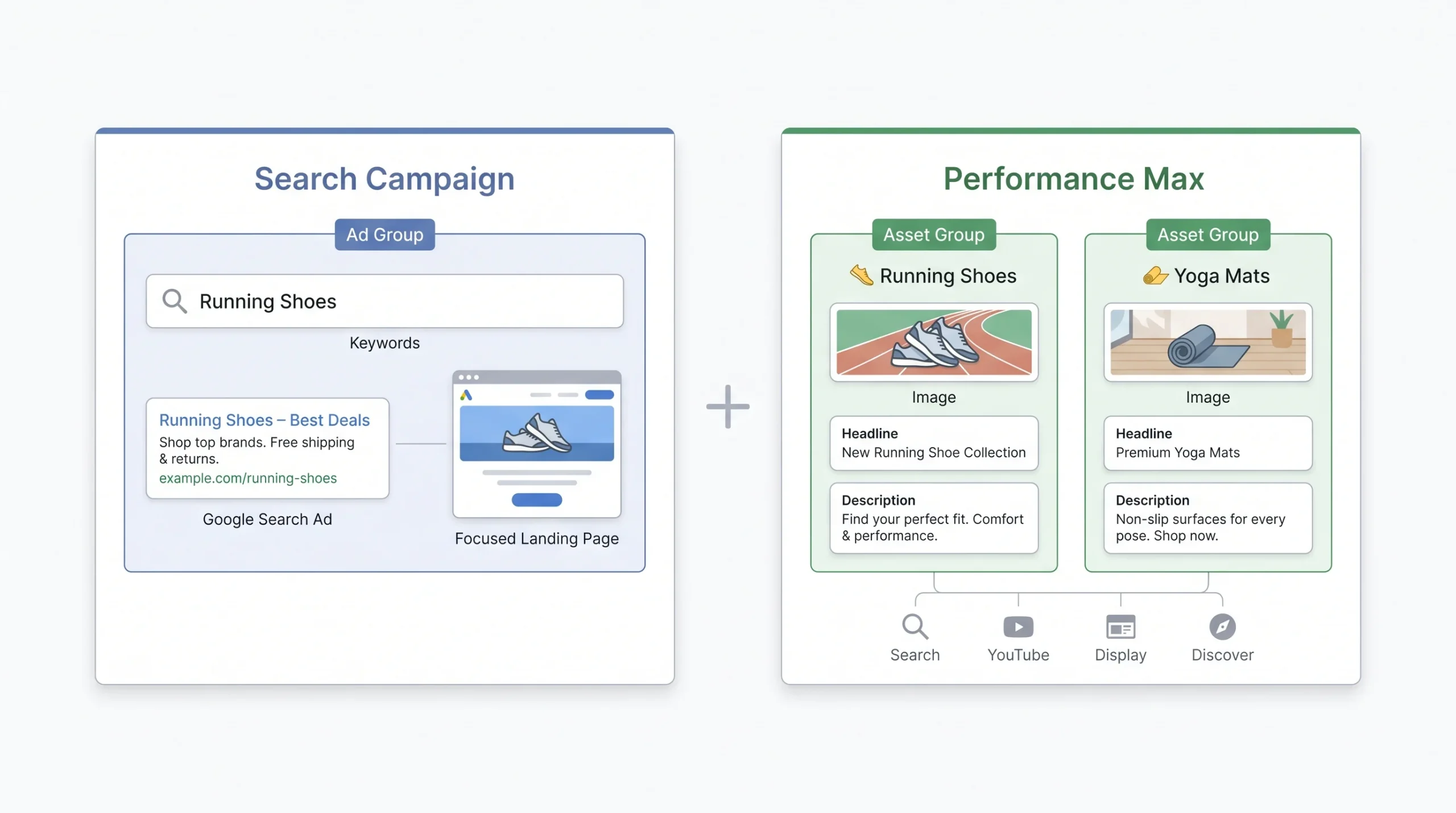
Performance Max changes the hierarchy discussed so far, and it’s worth understanding how, since it’s become a bigger part of most accounts over the past couple of years.
Instead of ad groups, Performance Max campaigns use asset groups. The concept is nearly identical though. Just like a tightly themed ad group focuses on one product or service, a tightly themed asset group should focus on one product line or audience segment rather than trying to represent an entire catalog in a single group. A business selling running shoes and yoga mats through Performance Max should build separate asset groups for each, feeding relevant images, headlines, and descriptions specific to that product line, rather than dumping everything into one asset group and hoping Google’s automation sorts it out.
The bigger question most beginners have is when Performance Max should sit next to standard Search campaigns versus replacing them entirely. The honest answer: Performance Max is genuinely useful for reaching audiences across Google’s full inventory, Search, Display, YouTube, Discover, all through one campaign, and it can pick up incremental conversions that standard Search alone would miss. But it comes at a cost to visibility. Performance Max reporting is far less granular than Search, since Google controls a lot of the targeting and placement decisions behind the scenes, which makes it harder to know exactly which keyword or placement drove a given result.
That’s the real reason it’s worth keeping some standard Search campaigns running alongside Performance Max rather than replacing everything with it. Search campaigns keep reporting clarity and control over exact match keywords, especially for high-value, high-intent terms like brand names, where knowing precisely what triggered a conversion matters. Performance Max can then handle the broader reach play. Running both side by side, each doing what it’s actually good at, tends to outperform going all-in on either one alone.
Common Structure Mistakes (and What They Actually Cost)
Knowing the mistakes matters less than knowing what they actually cost, since that’s what makes them worth fixing.
| Mistake | What it actually costs you |
|---|---|
| Mixing brand and non-brand in one campaign | Brand’s low CPC and high conversion rate mask how inefficient the non-brand side really is |
| Too few ad groups | Ad copy stays generic, Quality Score drops, CPC rises |
| Too many ad groups (over-segmentation) | Not enough traffic per ad group for Smart Bidding to learn from |
| No naming convention | Reporting turns into guesswork as the account scales past a handful of campaigns |
| No negative keyword strategy | Budget quietly leaks out on searches that were never a fit |
| Ignoring landing page match | High click-through rate but poor conversion rate, since the click promised one thing and the page delivered another |
Every one of these mistakes is fixable without starting the account over from scratch. That’s honestly the good news here. Structure isn’t something that has to be perfect on day one, it’s something that gets corrected once the gaps show up in the data, as long as someone’s actually looking for them.
Building Your Structure: A Step-by-Step Checklist
Pulling everything together, here’s the order this actually happens in when building an account from scratch or rebuilding a messy one.
Start with the goal, not the product list. Decide what each campaign needs to achieve before naming a single keyword. Once that’s clear, pick a segmentation model, brand versus non-brand as the first split for almost everyone, then layer in product line, funnel stage, or geography depending on the business. From there, set campaign-level budgets and bidding strategy, making sure each campaign can actually sustain itself through a full day rather than sharing scraps with three others. Next comes building the ad groups themselves, keeping each one tightly themed enough that one piece of ad copy could honestly serve every keyword inside it. Assign keywords to those ad groups with the right match types, and build out negative keyword lists at both the campaign and account level before the first click ever happens. Apply the naming convention from the start, not as a cleanup step after the fact, since retrofitting names onto fifty existing campaigns is far more painful than naming them correctly the first time. Decide where Performance Max fits into the picture, running it alongside Search rather than as a replacement for it. And finally, document all of it somewhere the whole team can see, not just in one person’s head.
Before touching the ads platform itself, map all of this out in a spreadsheet first. Campaign names, budgets, ad group themes, keyword lists. It sounds like an extra step, but it catches structural problems on paper, where they’re free to fix, instead of inside the platform, where they’re expensive to fix after spend has already gone out the door.
Conclusion
Come back to that messy account from the start of this post. One campaign, every keyword crammed into a single ad group, budget disappearing without a clear story of what worked. That’s not a sign the business did anything wrong, it’s just what happens when nobody explains that structure is a choice, not a default setting. Every business, from the small one running its first few thousand rupees a month to the one managing a dozen product lines across cities, runs into the same wall eventually. Ads stop performing not because the product is wrong or the offer is weak, but because the account underneath it was never built to hold up under growth.
Structure isn’t a one-time setup either. It’s a system that has to keep working as new products launch, campaigns multiply, and more people touch the account over time. Get the foundation right early, brand separated from non-brand, ad groups actually themed, a naming convention that makes sense to more than just one person, and every optimisation decision after that gets easier. Skip it, and every future decision gets made on top of a mess that keeps growing harder to untangle.
Frequently Asked Questions
How many campaigns should a small business start with?
There’s no universal number, but starting too broad usually works better than starting too narrow. A small business might begin with two campaigns, one for brand and one for the highest-priority non-brand product line, then expand from there once each campaign is proving it can sustain its own budget and generate enough data to optimise against.
What’s the difference between an ad group and a campaign?
A campaign is the container that controls budget, bidding strategy, and targeting settings like location and network. An ad group lives inside a campaign and holds a tightly themed set of keywords and the ads tied to them. Campaigns answer “what’s the goal and how much are we spending,” ad groups answer “what specific theme is this set of keywords and ads about.”
Should branded keywords be separated into their own campaign?
Yes, in almost every case. Branded searches come from people who already know the business and convert at a different rate and cost than non-branded searches from people discovering it for the first time. Keeping them in separate campaigns means each gets reported on honestly instead of one masking the other’s real performance.
How often should an account get restructured?
Restructuring isn’t something to do on a fixed schedule, it’s something to do when the data or the business changes enough to demand it. New product lines, a shift in what’s actually converting, or an account that’s grown past the point where the original structure still makes sense are all good triggers. Small optimisations, adjusting negative keywords or tightening an ad group, should happen regularly. A full restructure is a bigger, less frequent decision.
Does Performance Max replace the need for ad groups?
Not exactly. Performance Max replaces the concept with asset groups, which work on the same underlying logic, tightly themed groupings built around one product line or audience rather than everything at once. The terminology changes, but the discipline of keeping things themed and organised carries over completely.