

So you’ve been running ads for a few months, or maybe you’re about to start, and someone in a Facebook group tells you “just use Instagram Ads, they convert better.” Then your marketing agency sends over a proposal that says “Meta Ads Campaign” and now you’re sitting there wondering — wait, are these the same thing? Did I miss something?
Honestly, this confusion is everywhere. I’ve seen business owners split their budget thinking they’re diversifying across two separate ad networks, when really they’re just running the same ads through the same dashboard, just choosing different checkboxes. I’ve also seen agencies charge clients extra for “Instagram-specific campaigns” like it’s some separate service. It’s not malicious, most of the time. It’s just that Meta did a terrible job explaining the rebrand to regular business owners back in 2021, and the confusion never really went away.
Here’s the short version before we get into the long version: Instagram Ads are not a separate advertising platform. They’re a placement option inside Meta Ads. Meta is the company (formerly Facebook Inc.) and it owns Facebook, Instagram, Messenger, and WhatsApp. When you build a campaign in Meta Ads Manager, you’re deciding whether that ad shows up on Facebook, Instagram, Messenger, or across Meta’s partner apps and websites (Audience Network). Instagram is one destination inside a much bigger machine.
But that “short version” undersells how much this actually matters for your budget, your creative strategy, and your results. Knowing the difference between the ecosystem and the platform changes how you plan campaigns, how you brief your designer, and honestly how you spend money. That’s what this guide is for.
What You Will Learn in This Guide
- What Meta Ads actually means as a system, not just a buzzword
- What Instagram Ads means specifically, and where those ads show up
- The real, practical differences between “running Meta Ads” and “running Instagram-only Ads”
- How targeting, budgets, and placements work across both
- A full breakdown of ad formats available on each
- Cost comparisons — CPC, CPM, CPA, ROAS — and what actually drives those numbers
- Which businesses get better returns focusing on Instagram, and which do better going broad across Meta
- Step-by-step setup instructions inside Meta Ads Manager
- Common mistakes that quietly burn ad budget
- A decision framework so you’re not guessing anymore
- Answers to the questions people actually type into Google about this topic
Grab a coffee. This one’s long because the topic deserves it — there’s a lot of nuance that gets flattened into soundbites elsewhere.
What Are Meta Ads?
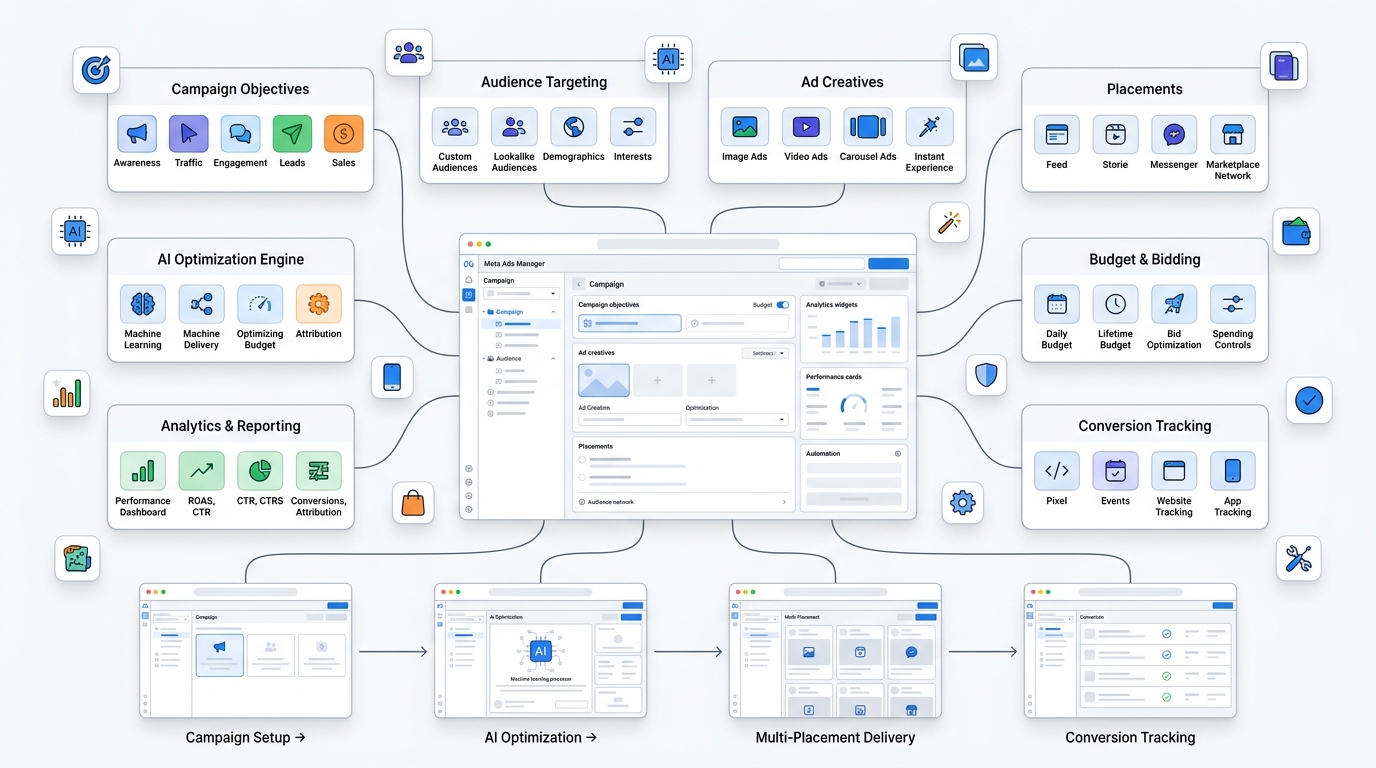
Meta Ads is the umbrella term for any advertisement you create and manage through Meta’s advertising infrastructure — primarily Meta Ads Manager (previously called Facebook Ads Manager, before that, Power Editor, for anyone who’s been doing this since the early 2010s).
What Is Meta?
Meta Platforms, Inc. is the parent company behind Facebook, Instagram, Messenger, WhatsApp, and a chunk of AR/VR stuff under Reality Labs that we don’t need to get into here. The name change from “Facebook, Inc.” to “Meta” happened in October 2021, and it wasn’t just a rebrand for fun — it reflected the company positioning itself as bigger than one app. For advertisers, the practical effect was that “Facebook Ads Manager” became “Meta Ads Manager,” and the tool started treating all its owned platforms as one connected inventory rather than separate silos.
Meta’s Advertising Ecosystem
When people say “Meta Ads,” they usually mean the whole pool of places an ad can appear once you launch a campaign through Meta’s system. That includes:
- Facebook Feed, Stories, Reels, Marketplace, and in-stream video
- Instagram Feed, Stories, Reels, Explore, and Shopping
- Messenger inbox placements and sponsored messages
- Audience Network — third-party apps and websites that show Meta ads
You don’t have to use all of them. But when you create a campaign, Meta defaults you into “Advantage+ placements,” which basically means “let our algorithm decide where your ad performs best across all of this.” A lot of advertisers never turn that off, which is part of why the Meta vs Instagram confusion sticks around — your ad might be running everywhere and you didn’t consciously choose Instagram specifically.
The Evolution From Facebook Ads to Meta Ads
Back in like 2012-2015, “Facebook Ads” and “Instagram Ads” really were separate things you set up in different places. Instagram didn’t even open its ad platform to all advertisers until 2015. For a few years after that, you could genuinely run an Instagram-only campaign through Instagram’s own tools separate from Facebook Ads Manager.
That changed. Facebook (now Meta) merged the backend infrastructure, and by 2017-2018, every serious advertiser was running everything through one dashboard — Ads Manager. Since then, Instagram advertising has functionally been “checking a placement box,” not a separate system. This matters because a lot of outdated blog content online (some of it ranking on page one, unfortunately) still talks about these as if they’re parallel platforms you choose between. They’re not, not anymore.
How Meta Ads Work
At a mechanical level, here’s what happens when you launch a Meta ad:
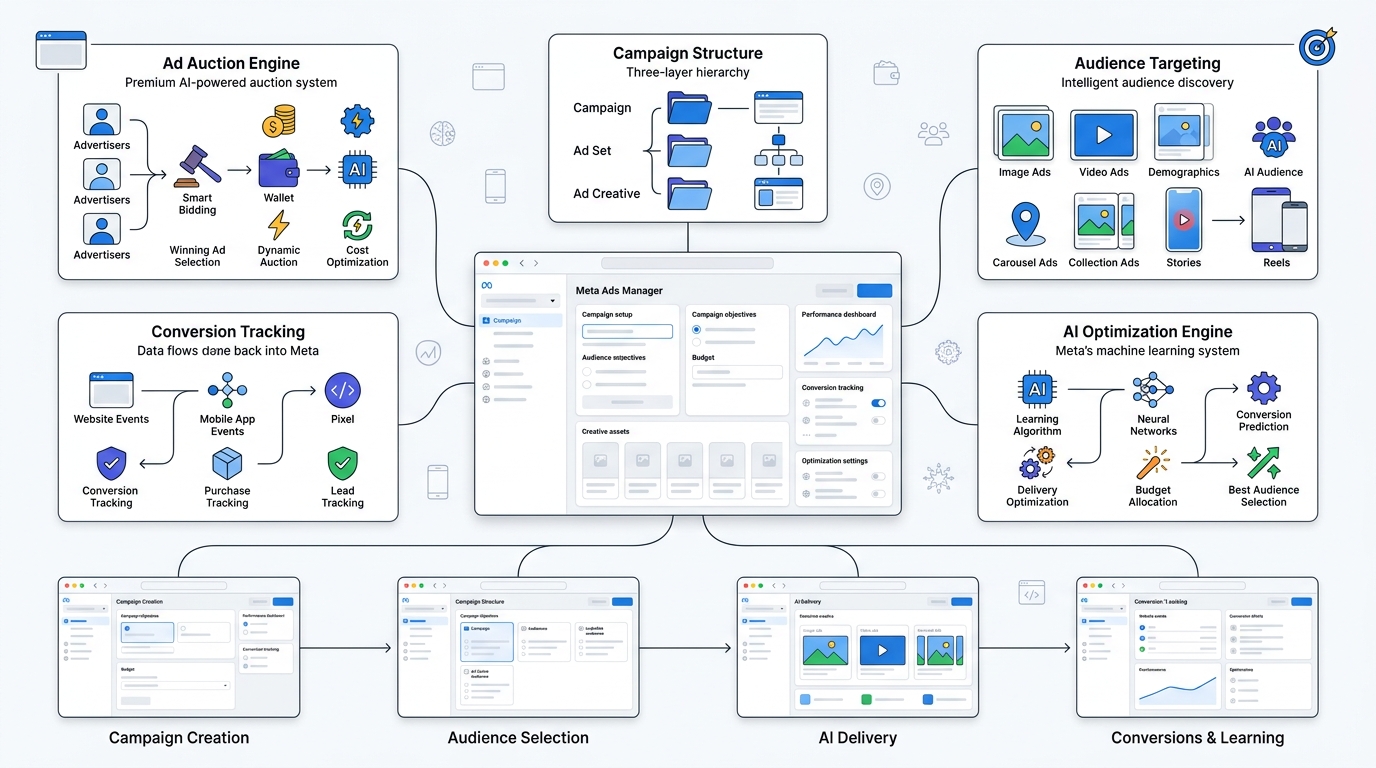
Meta runs an ad auction. You’re not paying a fixed price — you’re bidding (directly or through automated bid strategies) against other advertisers targeting similar audiences. The winner isn’t purely the highest bidder either. Meta factors in your bid, your ad’s estimated action rate (basically, will people actually engage with this), and ad quality/relevance.
Campaigns are structured in three layers: Campaign (your objective — awareness, traffic, leads, sales, etc.), Ad Set (your audience, budget, and placements), and Ad (the actual creative — image, video, copy). This structure is identical whether you’re running on Facebook, Instagram, or both. There’s no separate “Instagram Ads Manager” layer.
Machine learning does a lot of the heavy lifting now. Meta’s algorithm learns from pixel data, app events, and Conversion API signals to figure out who’s likely to convert, and it shifts delivery toward those people automatically. This is a huge shift from ten years ago when advertisers manually built out dozens of tiny interest-based audiences. Now, broad targeting plus good creative plus proper conversion tracking usually beats micro-targeting.
What Are Instagram Ads?
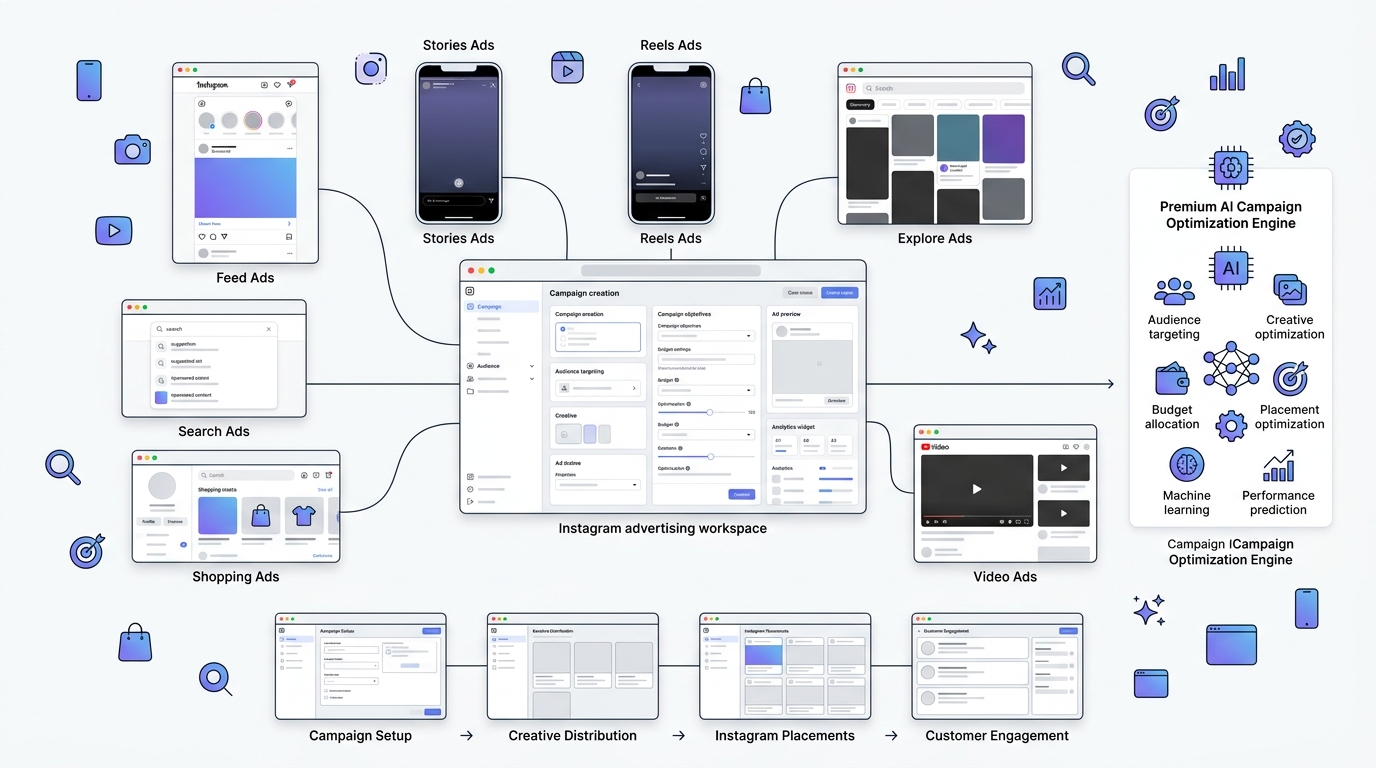
Instagram Ads, specifically, refers to paid content that shows up within the Instagram app — but built and managed through the same Meta Ads Manager infrastructure described above. There is no truly independent “Instagram Ads platform” anymore for standard advertisers.
How Instagram Advertising Works
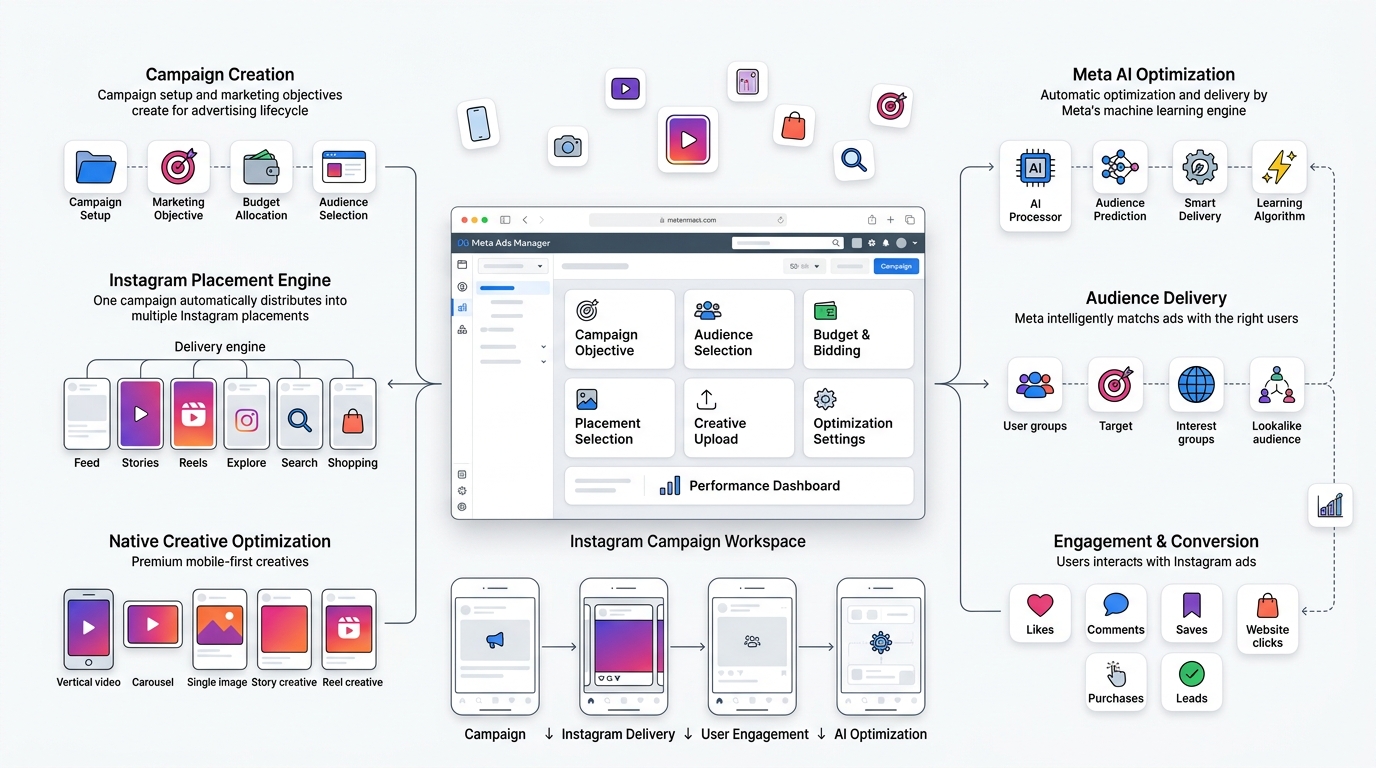
When you build a campaign and either manually select Instagram placements or let Advantage+ placements include Instagram, your ad becomes eligible to show in Instagram’s various surfaces. The targeting, bidding, and optimization all run through the same Meta algorithm — it’s just that the ad’s visual container (feed post, story, reel) is native to Instagram’s design.
One thing worth knowing: Instagram ads generally need to look and feel native to the platform to perform well. An ad that looks like a corporate banner ripped from a website tends to underperform badly on Instagram specifically, way more than it would hurt you on Facebook, where users are a bit more tolerant of “salesy” looking content.
Where Instagram Ads Appear
- Feed — the classic scrollable placement, blends in with regular posts from accounts you follow
- Stories — full-screen, vertical, disappears in 24 hours (unless it’s an ad, which just stops showing once budget/schedule ends)
- Reels — short-form video, currently Instagram’s highest-growth placement and honestly where a lot of budget should be going in 2026
- Explore — the discovery grid, good for reaching people who don’t follow you yet
- Profile Feed — appears when someone visits a business profile page
- Search Results — newer placement, shows ads within Instagram’s search feature
- Shopping — tagged product ads that link straight to a shop or product page
- In-stream video placements — ads that play within longer-form video content
Types of Instagram Ads
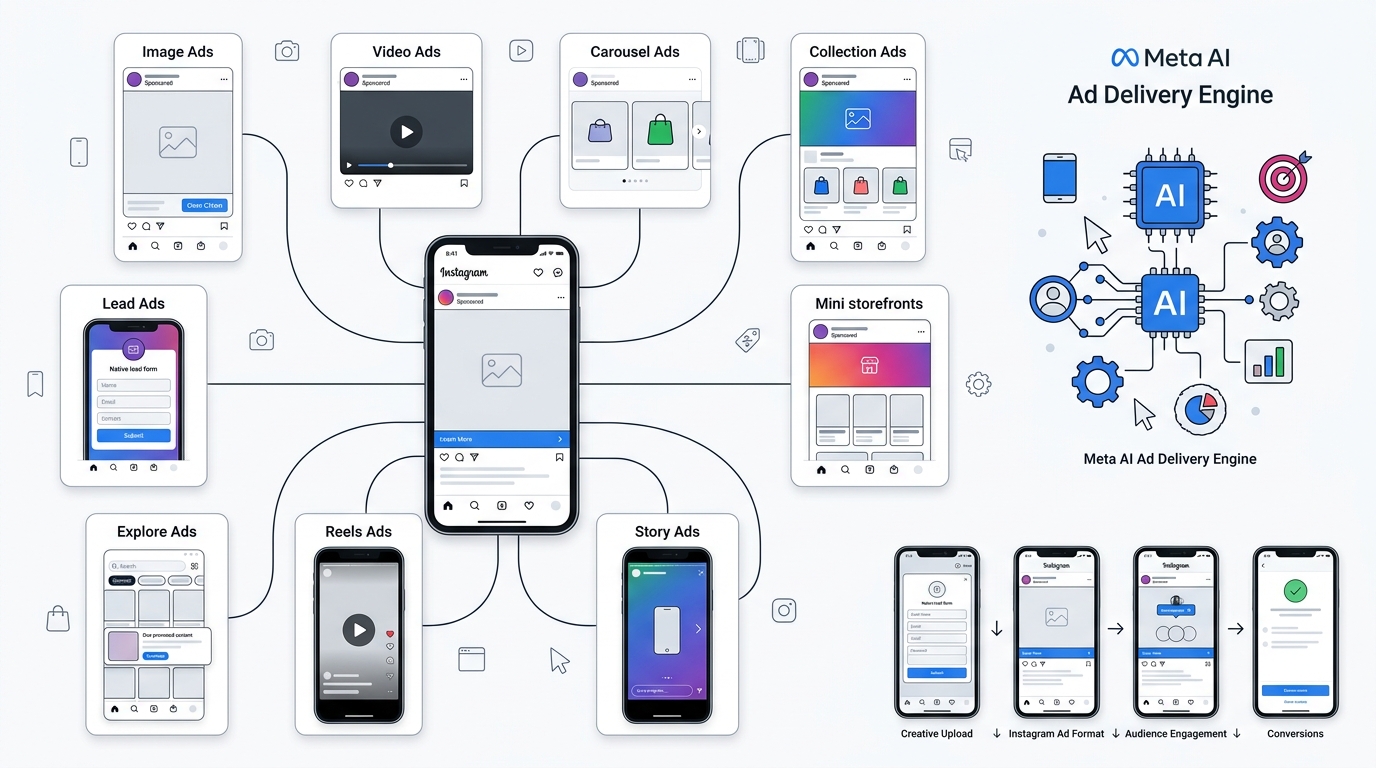
Image Ads. Single static image, simplest format. Still works fine for straightforward product shots or offer-driven promotions, though it’s becoming a smaller slice of what performs well.
Video Ads. Standard video format, works across Feed, Stories, and in-stream placements. Length and aspect ratio recommendations vary by placement, and yeah, this trips people up constantly — a square video built for Feed looks cropped and awkward in Stories.
Carousel Ads. Multiple images or videos users swipe through, each with its own link. Good for showcasing a product line or walking through a step-by-step benefit.
Collection Ads. A cover image or video with a grid of product images below it, opens into an Instant Experience (a full-screen mini storefront) when tapped. E-commerce brands lean on this one hard.
Story Ads. Full-screen vertical format between organic Stories. High attention, but also high skip rate if the first two seconds don’t hook someone.
Reels Ads. Vertical, full-screen, plays within the Reels feed. This is where organic-style content (not obviously “produced” ads) tends to win.
Explore Ads. Appear as users browse the Explore grid, good for cold discovery.
Shopping Ads. Product tags linked to a catalog, letting users tap straight into checkout flow or product detail.
Lead Ads. Open a native form within Instagram itself, no landing page required — useful for service businesses collecting quote requests or consultations.
Meta Ads vs Instagram Ads: Quick Comparison
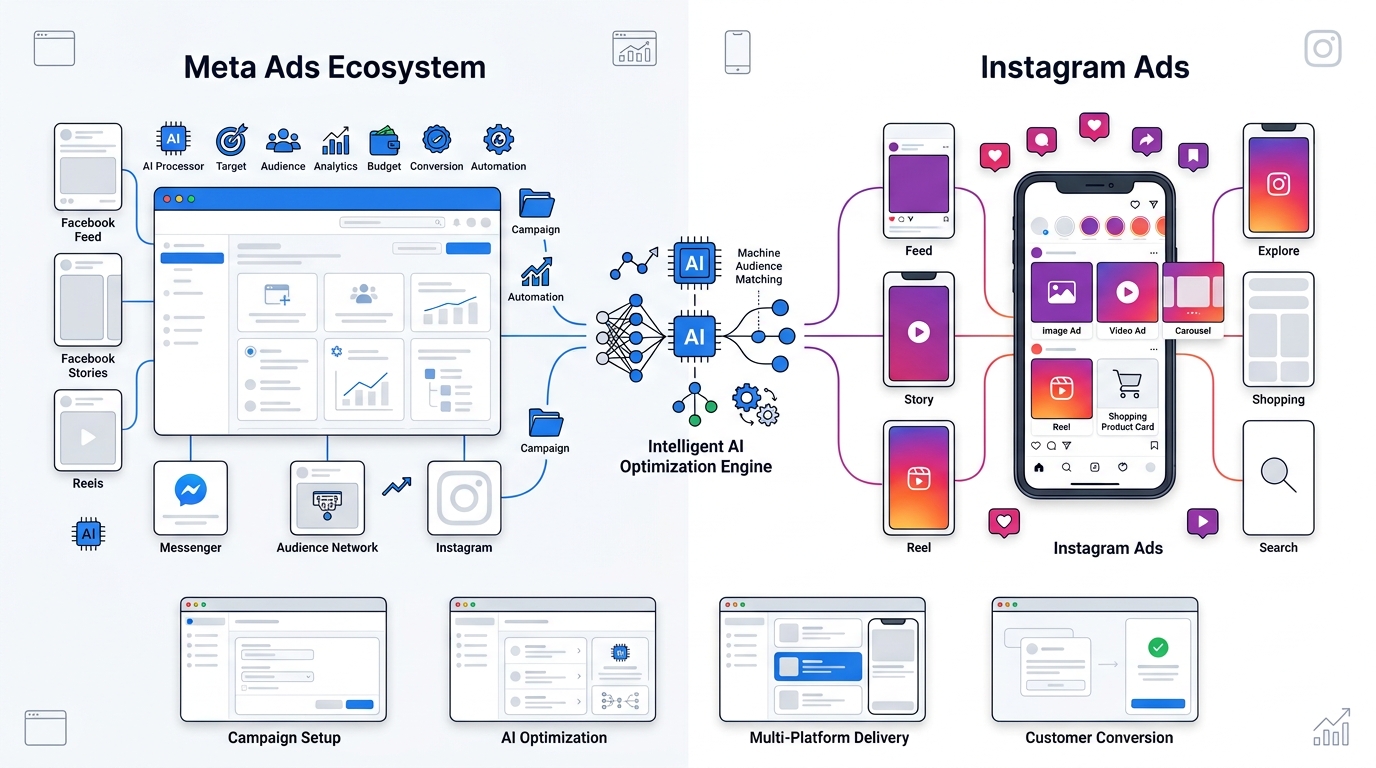
Look, a table isn’t going to capture everything, but it helps to see this side by side before we go deeper.
| Feature | Meta Ads (Full Ecosystem) | Instagram Ads (Placement) |
|---|---|---|
| Definition | The entire advertising system across all Meta-owned platforms | One specific placement/destination within that system |
| Platforms | Facebook, Instagram, Messenger, Audience Network | Instagram app only |
| Audience | Broader, spans multiple age groups and behaviors | Skews younger, visually-driven users |
| Placements | 15+ placements across apps | Feed, Stories, Reels, Explore, Search, Shopping |
| Ad Formats | All formats available | Same formats, Instagram-optimized |
| Targeting | Same targeting engine used for both | Same, no separate targeting system |
| Campaign Management | Meta Ads Manager | Also Meta Ads Manager (or Instagram Boost for basic use) |
| Cost | Blended CPM/CPC across placements | Often slightly higher CPM than Facebook, varies by industry |
| Engagement | Mixed, depends on placement | Generally higher engagement rate per impression |
| Best For | Broad reach, full-funnel campaigns | Visual products, younger audiences, brand discovery |
| Conversion Rate | Strong for retargeting, lead gen, e-commerce | Strong for impulse and visually-driven purchases |
| Brand Awareness | Strong across Facebook + Instagram combined | Very strong via Reels/Explore |
| Lead Generation | Strong, especially Facebook Lead Ads | Decent, growing with Instagram-native lead forms |
| E-commerce | Strong, dynamic product ads across placements | Very strong, Shopping tags integrated directly |
| B2B Marketing | Moderate, Facebook slightly better for B2B | Weaker, unless targeting founders/creators |
| B2C Marketing | Strong | Very strong |
Is Instagram Ads Different from Meta Ads?
This is genuinely the question people search for the most, so let’s slow down here.
Why Instagram Ads Are Actually Part of Meta Ads
Instagram doesn’t have its own separate ad-buying system for regular advertisers. When you go into Instagram’s app and tap “Boost Post,” that request still gets routed through Meta’s backend — Meta’s ad auction, Meta’s targeting engine, Meta’s billing. Instagram is the storefront window; Meta is the whole building behind it.
Difference Between Platform and Advertising System
Think of it like this: Instagram is a platform, like a physical mall location. Meta Ads is the advertising system, like the leasing company that decides which billboards go where across five different malls it owns (Facebook, Instagram, Messenger, Audience Network, and technically WhatsApp for certain click-to-chat formats). You don’t rent ad space from “Instagram” directly. You rent it from Meta, and choose Instagram as one of the spots to display it.
Running Ads Only on Instagram
You absolutely can restrict your campaign to Instagram-only placements. This is a deliberate choice inside Ad Set placement settings — you manually deselect Facebook, Messenger, and Audience Network, leaving only Instagram surfaces checked. Plenty of brands do this on purpose, especially fashion, beauty, fitness, and lifestyle brands where the visual culture of Instagram just fits better than Facebook’s older, more text-heavy feed culture.
Running Ads Across Meta Platforms
Alternatively, you let the algorithm decide, or you deliberately spread across Facebook and Instagram together. This is usually the default recommendation from Meta itself (via Advantage+ placements) because it gives the delivery algorithm more inventory to find cheap, high-quality impressions. Restricting to Instagram-only sometimes increases CPMs because you’ve shrunk the available inventory the algorithm can bid into.
Common Beginner Confusion
The confusion usually comes from three places. One, people set up their first ad through the Instagram app itself (Boost Post) and never realize it’s the same system as Facebook. Two, agencies sometimes market “Instagram Ad Management” as a distinct service line, which — not wrong, exactly, but it does reinforce the idea that it’s a separate platform. Three, older blog content from 2014-2017, when Instagram genuinely did have more separation, still ranks on Google and hasn’t been updated.
Real-World Examples
Say you’re a skincare brand. You launch a Sales campaign, target women 25-45 interested in skincare, and let Advantage+ placements run. Meta might show 60% of impressions on Instagram Reels, 25% on Instagram Feed, 10% on Facebook Feed, and 5% on Audience Network — all from one campaign, one budget, one ad creative set. You didn’t “run Meta Ads and also Instagram Ads.” You ran one Meta campaign that happened to lean heavily Instagram because that’s where your audience and creative performed best.
Meta Ads vs Instagram Ads: Key Differences
Now that the conceptual stuff is out of the way, here’s where the practical differences actually live — not between “Meta” and “Instagram” as competing systems, but between running broad Meta campaigns versus deliberately narrowing to Instagram-only placements.
Platform Coverage
Meta-wide campaigns cover Facebook, Instagram, Messenger, and Audience Network. Instagram-only campaigns limit you to Instagram’s five to six placement types. Broader coverage generally means more available inventory, which usually (not always) brings costs down through more competition among ad slots for the algorithm to bid into.
Audience Reach
Facebook’s user base skews older on average, and it’s still enormous globally. Instagram’s audience skews younger and leans more heavily into a visual-first, mobile-native browsing habit. If your product is genuinely for a 45+ demographic — think retirement planning, certain healthcare services, home services for homeowners — you’re leaving reach on the table by going Instagram-only.
Campaign Objectives
Both use the same six objective categories in current Meta Ads Manager: Awareness, Traffic, Engagement, Leads, App Promotion, and Sales. There’s no separate objective list for Instagram. What differs is which objectives tend to perform best on Instagram specifically — Awareness and Sales (especially with Shopping tags) tend to shine there, while Lead objectives sometimes do better pulling in Facebook inventory too.
Ad Placements
Covered above, but worth repeating: Instagram gives you Feed, Stories, Reels, Explore, Search, Shopping, and Profile Feed. Full Meta gives you all of that plus Facebook’s own Feed, Stories, Reels, Marketplace, in-stream video, right column ads (desktop), and Audience Network.
Targeting Capabilities
Identical targeting engine. Demographics, interests, behaviors, Custom Audiences, Lookalikes — none of it changes based on whether you select Instagram or Facebook placements. This one surprises people. There’s no “Instagram-specific targeting” that’s smarter or different.
Budget Management
Same budget tools apply either way — daily or lifetime budgets, Campaign Budget Optimization (CBO), manual or automatic bidding. The difference shows up in how far that budget stretches. Narrower placement selection (Instagram-only) sometimes raises your average CPM because you’ve reduced the auction pool.
AI Optimization
Meta’s delivery algorithm and Advantage+ features apply system-wide. There’s no separate “Instagram AI.” The algorithm optimizes across whatever placements you allow it into, using the same signals — pixel/Conversions API events, engagement history, and account-level learnings.
Reporting and Analytics
You can break down performance by placement inside Ads Manager (Facebook Feed vs Instagram Reels vs Instagram Stories, etc.), which is honestly the single most useful report for figuring out where your money’s actually working. A lot of advertisers never check this breakdown and just look at the campaign-level total, which hides a ton of useful information.
Creative Formats
Both support the same format types — image, video, carousel, collection — but Instagram is far less forgiving of creative that looks like a traditional ad. Reels especially reward raw, native-feeling video over polished commercial production.
Conversion Tracking
Identical setup — Meta Pixel plus Conversions API, tracked through the same events manager regardless of which placements you’re running.
Business Goals
Meta-wide campaigns suit full-funnel strategies where you want maximum reach and are optimizing purely for cost-per-result. Instagram-focused campaigns suit brands where visual identity and platform culture are core to the product itself.
Automation Features
Advantage+ Shopping Campaigns, Advantage+ Audience, automated creative optimization — all apply across the whole Meta system, not separately for Instagram.
Meta Ads Ecosystem Explained
Let’s actually walk through every piece of the ecosystem, because most guides skip half of these and it leaves people without the full picture.
Still the largest platform by monthly active users globally, even if it’s less “cool” among younger users these days. Facebook Feed remains one of the most reliable placements for lead generation and older-demographic targeting.
Covered extensively above — visual-first, younger-skewing, strong for lifestyle, fashion, beauty, fitness, food, and DTC product brands.
Messenger
Ads can appear directly in the Messenger inbox, or campaigns can be built around click-to-Messenger, where clicking the ad opens a conversation with your business. Good for service businesses that want to qualify leads through conversation before a sales call.
Audience Network
This is Meta’s off-platform inventory — third-party apps and mobile websites that have agreed to show Meta ads in exchange for revenue share. It’s often the cheapest placement by CPM, but conversion quality varies a lot depending on your industry, so keep an eye on it.
Marketplace
Facebook Marketplace ads show up between listings, and honestly this placement is underused. For local businesses and certain retail categories, it can be surprisingly cheap and effective.
Facebook Video Feed and Reels
Facebook has its own Reels feed now too, separate from Instagram Reels, and it’s grown a lot as Meta pushes short-form video hard across both apps to compete with TikTok.
Stories and Explore
Both Facebook and Instagram have Stories placements, and Instagram additionally has Explore, which functions like a discovery engine for people who don’t follow your account yet.
Types of Meta Ads
Here’s the full format list across the whole ecosystem, not just Instagram.
Image Ads — simple, cheap to produce, still fine for direct-response offers.
Video Ads — the workhorse format across nearly every placement now.
Carousel Ads — multiple cards, good for storytelling or product ranges.
Collection Ads — storefront-style, strong for e-commerce catalogs.
Instant Experience Ads — full-screen mobile experiences that open after a tap, combining video, images, and product grids into one immersive unit.
Lead Ads — native forms, no landing page needed, huge for service businesses and local lead gen.
Messenger Ads — appear in Messenger inbox or trigger a chat.
Reels Ads — short-form vertical video across Facebook and Instagram Reels.
Stories Ads — full-screen vertical between organic stories.
Dynamic Product Ads — automatically pull products from your catalog and show them to users who viewed or added to cart, based on their actual browsing behavior. This one’s a workhorse for e-commerce retargeting.
Shopping Ads — tagged product placements linking to checkout.
Click-to-WhatsApp Ads — opens a WhatsApp conversation, hugely popular in markets like India, Brazil, and Southeast Asia where WhatsApp is the default messaging app for business.
App Promotion Ads — drive installs, tracked through app events.
Catalog Sales Ads — broad catalog-based campaigns pulling from your full product feed rather than individual SKUs.
Types of Instagram Ads
Already covered the list above in detail, but to reinforce with examples: a Feed Ad for a coffee brand might show a still shot of a latte with a discount code. A Stories Ad for the same brand might be a nine-second clip of someone pouring that latte with an upbeat sound clip. A Reels Ad might be a barista doing latte art with trending audio, feeling almost indistinguishable from a regular creator’s content — that’s usually the version that performs best because it doesn’t interrupt the scrolling experience the same way a polished commercial does.
Meta Ads Objectives Explained
Meta simplified its objectives a few years back into six clean categories, and understanding when to use each one genuinely changes your results.
Awareness. Choose this when you want maximum reach and recall, not clicks or purchases. Good for new product launches or rebrands where the goal is just “get seen by as many relevant people as possible.”
Traffic. Drives clicks to a destination — website, app, or Messenger. Useful for content marketing, blog traffic, or top-of-funnel campaigns feeding into retargeting later.
Engagement. Optimizes for likes, comments, shares, video views, or Page follows. Underrated for building social proof before running harder sales campaigns — an ad with 400 comments converts better later than one with zero engagement.
Leads. Optimizes for form fills, either through Meta’s native lead forms or an external landing page. Strong for service businesses, real estate, education, and B2B where the sale doesn’t happen instantly.
App Promotion. Optimizes for installs and, more usefully, for in-app events like purchases or subscriptions once you’re tracking properly through your app’s SDK.
Sales. Optimizes for purchases, whether through a website with Conversions API tracking or directly through Shopping placements. This is where most e-commerce budget lives.
When to Choose Each Objective
Honestly, most beginners jump straight to Sales objective even when they haven’t built enough pixel data yet, and it backfires — the algorithm doesn’t have enough conversion signal to optimize properly, so costs balloon. If you’re brand new with a fresh pixel, starting with Traffic or Engagement for a couple weeks to feed data, then shifting to Sales, often performs better than going straight for Sales on day one.
Instagram Ads Objectives
Instagram supports the exact same six objectives — there’s no separate list. What differs is performance patterns by objective. Sales objective campaigns using Shopping tags tend to punch above their weight on Instagram because the purchase path is so short (tap the tag, land on product page, done). Leads objective campaigns sometimes underperform slightly on Instagram-only compared to blending in Facebook, simply because Facebook users are more habituated to filling out forms from ads (older platform, older behavior pattern).
Audience Targeting: Meta Ads vs Instagram Ads
Since the targeting engine is shared, this section applies equally to both — but it’s worth going deep here because targeting mistakes waste more budget than almost anything else.
Demographics
Age, gender, location, language. Basic, but still the first filter that shapes your entire audience pool.
Interests
Based on what people engage with — Pages they’ve liked, content they interact with. Interest targeting has gotten less precise over the years as Meta’s algorithm relies more on behavioral signals than declared interests, but it’s still a useful starting filter, especially for smaller niche audiences.
Behaviors
Purchase behavior, device usage, travel patterns — a separate targeting category from interests, based more on activity patterns than stated preferences.
Lookalike Audiences
Built from a source audience — your customer list, website visitors, or pixel-tracked purchasers — and Meta finds new people who resemble that source. A 1% Lookalike is tighter and more similar to your source; a 5-10% Lookalike is broader and cheaper but less precisely matched.
Custom Audiences
Built from your own data — email lists, phone numbers, website visitors, app users, or people who’ve engaged with your Facebook/Instagram content. This is the backbone of retargeting.
Website Visitors
A specific Custom Audience type built from pixel data — people who visited your site but didn’t convert. Classic retargeting fuel.
Customer Lists
Upload a CSV of existing customers or leads, and Meta matches them to user profiles for targeting or exclusion (useful for excluding existing customers from new-customer acquisition campaigns).
Engagement Audiences
People who’ve interacted with your Page, Instagram profile, posts, or videos. Warm audience, cheap to reach, often skipped by advertisers who go straight for cold targeting.
Advantage+ Audience
Meta’s current default recommendation — instead of manually defining interests, you give the algorithm broad signals (or none at all) and let it find converters based on pixel data and creative performance. For accounts with decent conversion volume already flowing, this often outperforms manual targeting now, which is a real shift from how things worked five years ago.
AI Audience Expansion
Even within manually defined audiences, Meta will sometimes expand slightly beyond your set parameters if it predicts better performance. This can be toggled off in certain campaign types if you want strict targeting control.
Ad Placements Comparison
Quick rundown of where the money tends to go and why.
Facebook Feed
Reliable, broad reach, works for nearly every objective. Often the cheapest CPM among major placements.
Instagram Feed
Slightly higher CPM than Facebook Feed typically, but often better engagement rates and stronger visual impact for product-based brands.
Facebook Stories and Instagram Stories
Full-screen, high attention if the hook lands in the first two seconds, high skip rate if it doesn’t.
Facebook Reels and Instagram Reels
The fastest-growing placement category. Meta has been actively incentivizing advertisers into Reels inventory because it’s competing directly with TikTok for watch time, and frankly it shows in how much cheaper Reels CPMs sometimes run compared to Feed.
Messenger Inbox
Niche placement, works best for service businesses wanting conversational lead qualification.
Audience Network
Often the cheapest CPM of all, but conversion quality is hit-or-miss — worth monitoring separately rather than lumping into blended reporting.
Explore
Instagram-only, strong for cold discovery among users who don’t follow your account.
Marketplace
Facebook-only, underused, sometimes surprisingly cheap for local and retail categories.
Automatic vs Manual Placements
Meta recommends automatic (Advantage+) placements for most campaigns because it gives the algorithm room to find the cheapest, best-converting inventory across everything you allow. Manual placement selection makes sense when you have a specific strategic reason — brand guidelines that only fit Instagram’s visual culture, or a B2B product where Facebook’s older demographic genuinely converts better and you don’t want budget diluted into weaker Instagram inventory.
Meta Ads Manager Explained
What Is Meta Ads Manager?
It’s the single dashboard where every Meta ad, across every platform, gets built, launched, and measured. If you’ve ever heard someone say “log into Ads Manager,” this is what they mean — not a separate Instagram tool.
Dashboard Overview
The main view shows your campaigns, ad sets, and ads in a nested table, with columns you can customize for whatever metrics matter to you — spend, results, cost per result, CTR, CPM, ROAS if you’ve got e-commerce tracking set up.
Campaign Structure
Campaign — where you set the objective (Awareness, Traffic, Leads, Sales, etc.) and, if using Advantage+ Shopping Campaigns, budget too.
Ad Set — where you define audience, budget (if not set at campaign level), placements, and schedule.
Ad — the actual creative — images, videos, headlines, descriptions, and destination URLs.
Pixel Setup
The Meta Pixel is a small snippet of code installed on your website that tracks visitor behavior and reports it back to Meta — page views, add-to-carts, purchases. Without it, your optimization is basically flying blind.
Conversion API
A server-side tracking method that sends conversion data directly from your server to Meta, bypassing some of the browser-based tracking limitations that iOS privacy changes introduced back in 2021 (the infamous ATT prompt that tanked pixel accuracy for a lot of advertisers). If you’re only using the Pixel and not Conversions API in 2026, you’re leaving conversion data on the table — this isn’t optional anymore for serious accounts.
Reporting
Breakdown reports by placement, age, gender, device, and platform let you see exactly where performance is strong or weak, rather than trusting the blended campaign total.
Budget Management
Campaign Budget Optimization spreads one central budget across ad sets automatically, letting the algorithm shift spend toward whichever audience or creative performs best in real time.
Automation
Rules can be set to automatically pause underperforming ads, increase budgets on winners, or send alerts — useful for accounts managing several campaigns at once without staring at the dashboard all day.
A/B Testing
Meta’s built-in split testing tool lets you isolate one variable — audience, creative, or placement — and test it cleanly without the algorithm’s normal cross-contamination between ad sets.
Can You Run Instagram Ads Without Meta Ads Manager?
Technically, yes, sort of. Let’s break down the two paths.
Boosting Posts From the Instagram App
You can tap “Boost” on an existing Instagram post directly from the app. This creates a simplified ad using Meta’s backend but skips most of the advanced controls — limited targeting options, limited objective choices, no access to Conversions API setup, no A/B testing.
Creating Ads Through Meta Ads Manager
This is the full version — every targeting option, every objective, every placement, full reporting, budget optimization, creative testing tools.
Advantages and Limitations of Each Method
Boosting is fast and simple, genuinely fine for a small local business wanting quick visibility on a single post with a tiny budget. But it caps your ability to scale, and the targeting options are noticeably watered down.
When Beginners Can Use Boost
If you’re testing the waters with under $10-20 a day and don’t yet have conversion tracking set up, Boost is a reasonable low-stakes entry point. Nothing wrong with starting there.
When Businesses Should Switch to Ads Manager
The moment you’re spending meaningful budget, need proper conversion tracking, or want to run more than a single creative test, move to full Ads Manager. Sticking with Boost past a certain spend level is honestly just wasting money on inefficient targeting.
Cost Comparison: Meta Ads vs Instagram Ads
Numbers here shift constantly and vary hugely by industry, but general 2026 benchmark ranges look something like this across most Western markets:
| Metric | Facebook-Heavy Campaigns | Instagram-Heavy Campaigns |
|---|---|---|
| Average CPC | $0.60 – $1.50 | $0.70 – $1.80 |
| CPM | $7 – $14 | $9 – $18 |
| CPA (Leads) | $15 – $50 | $18 – $60 |
| CPL (Local Services) | $10 – $35 | $12 – $40 |
| ROAS (E-commerce) | 2.5x – 5x | 3x – 6x |
Take these ranges as a rough compass, not gospel — highly competitive industries like legal services, insurance, or finance will blow way past these numbers, while low-competition local categories can beat them easily.
Factors Affecting Costs
Industry. Legal, finance, insurance, and real estate consistently see the highest CPCs due to intense competition and high customer lifetime value driving up bids.
Audience competition. Broad, popular demographics (say, women 25-34 interested in fashion) cost more to reach than niche B2B audiences with less advertiser competition.
Placement. Instagram Reels and Stories tend to run cheaper CPMs than Instagram Feed lately, as Meta pushes advertisers toward video inventory.
Seasonality. Q4, especially late November through December, sees costs spike across the board as every e-commerce brand fights for the same holiday shopper attention.
Creative quality. Genuinely one of the biggest levers. A strong hook and native-feeling creative can cut CPA by 30-50% compared to a generic stock-photo ad, all else equal.
Campaign objective. Sales objective campaigns typically cost more per result than Traffic or Engagement, simply because purchase intent is a harder action to drive than a click.
Relevance score / quality ranking. Meta grades your ad on quality, engagement rate, and conversion rate compared to competing ads targeting the same audience. Low-quality ads get penalized with higher costs.
Which Platform Delivers Better ROI?
This depends heavily on your business type, so here’s the honest breakdown rather than a one-size-fits-all answer.
E-commerce — Instagram tends to edge ahead here, especially with Shopping tags and Reels driving impulse purchases for visually appealing products.
SaaS — Facebook usually performs better for SaaS, especially B2B tools, because the demographic skews more toward decision-makers who spend more time on Facebook than Instagram.
Local Businesses — Blended campaigns across both usually win, with Facebook often driving cheaper leads and Instagram driving brand visibility.
B2B Companies — Facebook, generally, though LinkedIn often beats both for pure B2B lead gen. Meta still works for B2B brand awareness and retargeting website visitors.
Coaches — Instagram, hands down, especially for fitness, business, and lifestyle coaches building a personal brand.
Real Estate — Facebook Lead Ads still dominate here for lead volume, though Instagram helps with listing visibility and agent branding.
Healthcare — Facebook, mostly, due to demographic skew and the sensitivity of ad review policies around health claims.
Education — Mixed, depends heavily on the age of the target learner — younger audiences (online courses, bootcamps) lean Instagram; adult professional education leans Facebook.
Restaurants — Instagram, easily, food photography and Reels crush it here.
Travel — Instagram for inspiration and awareness, Facebook often closes better for bookings among older, higher-spending travelers.
Agencies — Depends entirely on which clients they’re running, obviously, but agency’s own lead gen for themselves usually performs better on Facebook and LinkedIn combined.
Advantages of Meta Ads
Running across the full Meta ecosystem gives you unified campaign management from one dashboard, broader audience reach across both younger and older demographics, and access to advanced targeting tools like Lookalikes and Custom Audiences that work identically no matter which placement wins the impression. The AI optimization has genuinely gotten sharper over the past couple years — cross-platform placements let the algorithm chase the cheapest converting inventory wherever it lives, and attribution has improved with Conversions API filling gaps left by iOS privacy changes. Objectives stay flexible enough to run full-funnel strategies from one campaign structure, automation handles a lot of the tedious optimization work, and budget optimization spreads spend intelligently across whichever ad sets are winning in real time.
Advantages of Instagram Ads
Instagram specifically brings high visual engagement that plain product photography or lifestyle video captures better than text-heavy Facebook posts ever could. The demographic skews younger, which matters enormously if your product targets Gen Z or younger millennials. The creator ecosystem around Instagram means influencer-style native ads blend seamlessly into feeds and Reels, and discovery through Reels and Explore genuinely introduces brands to cold audiences at a scale that’s hard to replicate elsewhere right now. For lifestyle and product marketing specifically — fashion, beauty, food, fitness — Instagram consistently pulls higher engagement rates per impression across most B2C niches tested.
Limitations of Meta Ads
There’s a real learning curve here, especially for anyone managing campaign structure, bidding strategy, and pixel setup for the first time. Competition has intensified across nearly every industry over the past few years, which keeps pushing ad costs upward year over year. Creative fatigue sets in fast — the same ad shown to the same audience for weeks starts losing performance, sometimes within just 7-10 days for smaller audiences. Policy restrictions around certain categories (health claims, financial services, political content) can get ads rejected or accounts flagged for review, sometimes frustratingly without clear explanation. And privacy changes, particularly Apple’s App Tracking Transparency rollout, permanently degraded some tracking accuracy that advertisers used to take for granted.
Limitations of Instagram Ads
Instagram-only campaigns show limited effectiveness for a lot of B2B campaigns, where the platform’s visual-first culture just doesn’t match how business buyers research and evaluate vendors. There’s a real creative-first requirement — low-effort, generic creative gets punished harder here than on Facebook. The placement inventory is smaller than the full Meta ecosystem, meaning narrower reach and sometimes higher CPMs from reduced auction competition. And popular niches — fashion, beauty, fitness — see brutal competition for the same visually-engaged audience, driving costs up in exactly the categories that most want to be there.
Meta Ads vs Instagram Ads for Different Business Types
Local Businesses should generally run blended campaigns, leaning Facebook for lead forms and Instagram for local brand visibility among younger residents.
E-commerce Stores should lean heavily Instagram-inclusive with Shopping tags active, but keep Facebook placements on too — Advantage+ placements usually outperform Instagram-only restriction here.
SaaS Companies should prioritize Facebook, supplementing with Instagram mainly for brand awareness content rather than direct conversion campaigns.
Coaches and Consultants should go Instagram-heavy, building personal brand content that supports paid amplification through Reels and Stories.
Marketing Agencies should test both aggressively for clients but default to broader Meta placement for their own internal lead gen.
B2B Companies should keep Facebook as the primary driver, using Instagram sparingly for brand content, not conversion-focused campaigns.
Restaurants should go heavily Instagram, food content simply performs better there.
Healthcare providers should lean Facebook due to demographic fit and easier compliance navigation, while keeping a light Instagram presence for brand trust-building.
Education brands should split based on the learner’s age — younger audiences skew Instagram, adult professional learners skew Facebook.
Real Estate agents should run Facebook Lead Ads as the core lead engine, using Instagram for listing photography and agent personal branding.
Nonprofits generally see stronger donation conversion through Facebook’s older, more established donor base, while using Instagram for awareness and volunteer recruitment among younger supporters.
Personal Brands almost universally benefit from leaning Instagram-heavy, especially those building around visual identity, lifestyle content, or creator-style positioning.
Best Practices for Running High-Performing Campaigns
Audience Research
Don’t guess who your customer is. Pull actual data from past purchasers, website analytics, and existing customer surveys before building targeting, rather than assuming based on gut feeling.
Strong Creative Strategy
Creative is doing more of the targeting work than actual targeting settings these days. A hook that stops the scroll in the first two seconds matters more than perfectly refined interest targeting.
Mobile-First Design
Over 90% of Meta ad impressions happen on mobile now. Design vertically, keep text large enough to read on a small screen, and never build desktop-first creative and just resize it as an afterthought.
Effective Ad Copy
Lead with the problem or the hook, not your company name. Nobody scrolling Instagram cares who you are in the first line — they care whether this solves something for them.
Clear CTAs
Every ad needs one obvious next action. “Learn More,” “Shop Now,” “Book a Call” — pick one, don’t confuse the algorithm or the user with mixed signals.
Landing Page Optimization
A great ad sending traffic to a slow, cluttered landing page is money wasted. Match the page experience to what the ad promised, and keep load times fast.
Conversion Tracking
Set up Pixel and Conversions API properly before spending serious budget. Bad tracking data leads the algorithm to optimize toward the wrong signals entirely.
Retargeting
Warm audiences — website visitors, past engagers, cart abandoners — convert at a fraction of the cost of cold audiences. Always run retargeting alongside cold acquisition.
Budget Allocation
Don’t spread too thin across too many ad sets early on. Concentrated budget gives the algorithm enough data per ad set to actually learn and optimize.
A/B Testing
Test one variable at a time — creative, audience, or placement — using Meta’s built-in split testing tool rather than changing five things at once and guessing what worked.
Creative Refresh Cycles
Plan to refresh creative roughly every 2-4 weeks for smaller audiences, longer for larger ones, before fatigue sets in and CPMs start climbing.
Performance Monitoring
Check placement-level breakdowns weekly, not just campaign totals. Blended numbers hide which specific placements are actually earning their keep.
Step-by-Step: How to Run Instagram Ads Through Meta Ads Manager
Although people often say they’re “running Instagram ads,” the reality is that almost all professional Instagram advertising is managed through Meta Ads Manager. Instagram doesn’t have a separate, full-featured advertising platform. Instead, Meta Ads Manager is the central dashboard where you create, manage, optimize, and analyze campaigns across Instagram, Facebook, Messenger, Threads (where available), and the Meta Audience Network.
Step 1: Create a Meta Business Account
Go to business.facebook.com and set up a Business Manager account if you don’t already have one. This centralizes your ad accounts, Pages, and Instagram profiles under one roof.
Optimization tip: use a business email address, not a personal one, so account access doesn’t get tangled up if staff or agencies change later.
Step 2: Set Up Meta Ads Manager
Within Business Manager, navigate to Ads Manager and create an ad account, assigning it a payment method and currency.
Optimization tip: set a spending limit early on while you’re still learning the platform, to avoid runaway costs from a misconfigured campaign.
Step 3: Connect Your Instagram Account
Link your Instagram business profile within Business Settings so Ads Manager can pull it as an ad placement and post directly from that identity.
Optimization tip: make sure your Instagram account is set to Business or Creator, not Personal, or the connection will fail.
Step 4: Install the Meta Pixel and Conversion API
Add the Pixel base code to your website, then set up Conversions API through a partner integration if you’re on Shopify, WordPress, or a similar platform — most have one-click Meta integrations now.
Optimization tip: test your Pixel firing correctly using Meta’s Pixel Helper browser extension before launching any paid campaign.
Step 5: Choose a Campaign Objective
Select from Awareness, Traffic, Engagement, Leads, App Promotion, or Sales based on what action actually matters for this specific campaign.
Optimization tip: match the objective to where your pixel has enough data — jumping straight to Sales with zero historical conversion data often underperforms.
Step 6: Define Your Audience
Set demographics, and either build a manual interest-based audience or lean into Advantage+ Audience if you’ve got decent conversion history already.
Optimization tip: start broader than feels comfortable — Meta’s algorithm generally narrows in on converters faster with more room to search.
Step 7: Select Placements
Choose Advantage+ placements to let the algorithm decide, or manually restrict to specific placements like Instagram Feed and Reels if you have a strategic reason.
Optimization tip: even if you want Instagram-heavy delivery, leave Facebook and Audience Network on initially — you can review the placement breakdown after a week and adjust based on real data instead of assumption.
Step 8: Set Budget and Schedule
Decide on daily or lifetime budget, and whether to run continuously or on a fixed schedule.
Optimization tip: give any new ad set at least 3-4 days before judging performance — the algorithm needs time to exit the learning phase.
Step 9: Design the Ad Creative
Build image, video, or carousel assets sized correctly for each intended placement, with copy that leads with a hook, not a brand introduction.
Optimization tip: create at least 3-5 creative variations per ad set so the algorithm has options to test against each other.
Step 10: Publish and Monitor Performance
Launch the campaign, then check performance daily for the first week, weekly afterward, using placement and demographic breakdowns rather than just the campaign total.
Optimization tip: resist the urge to make major changes daily — frequent edits reset the learning phase and hurt performance more than they help.
Case Studies
The best way to understand the power of Meta Ads Manager is to look at how real businesses use it to achieve measurable results. From global brands to small businesses, advertisers rely on Meta’s advertising platform to reach Instagram users with highly targeted campaigns.
Case Study 1: E-commerce Brand
Challenge. A mid-sized skincare brand was running Instagram-only campaigns and hitting a plateau around $40 CPA, well above their $25 target.
Strategy. Switched from Instagram-only placement restriction to Advantage+ placements, letting Facebook and Audience Network back into the mix, while keeping Reels-native video creative as the primary format.
Results. CPA dropped to roughly $22 within six weeks, and overall conversion volume increased by around 60%, since the algorithm had more inventory to find efficient converters across the full Meta ecosystem instead of a restricted slice of it.
Key lessons. Restricting to Instagram-only felt intuitive because their brand “looked like” an Instagram brand, but the actual buyers were spread across placements the manual restriction had cut off.
Case Study 2: SaaS Company
Objective. Generate demo requests for a project management tool targeting small business owners and operations managers.
Audience. Custom Audience built from website visitors combined with a 2% Lookalike sourced from existing paying customers.
Campaign setup. Facebook-heavy placement selection, Leads objective using a landing page (not native lead form) to allow for better qualification before the sales team followed up.
Performance improvements. Cost per demo request dropped from around $65 to $38 over two months after shifting budget away from Instagram placements, which were pulling in a lot of unqualified younger audience clicks that rarely converted into actual demo bookings.
Case Study 3: Local Service Business
Meta placement strategy. A residential HVAC company split budget roughly 70/30 between Facebook and Instagram, using Facebook Lead Ads as the primary conversion mechanism.
Instagram-focused creatives. Behind-the-scenes video content showing technicians on jobs, building trust and local brand recognition even though direct conversions from Instagram stayed lower than Facebook.
Lead generation outcomes. Facebook drove the bulk of actual booked appointments at roughly $28 per lead, while Instagram contributed meaningfully to brand recall in post-campaign surveys, even without directly driving as many form fills — a reminder that not every placement needs to carry equal conversion weight to be worth the spend.
Essential Tools for Meta and Instagram Advertising
| Tool | Primary Purpose | Best Use Case | Free/Paid | Key Advantage |
|---|---|---|---|---|
| Meta Ads Manager | Campaign creation and management | All Meta advertising | Free (pay for ad spend) | Central hub for everything |
| Meta Business Suite | Organic + paid content management | Small businesses managing both | Free | Combines posting and ads in one place |
| Meta Pixel | Website conversion tracking | Any site running conversion campaigns | Free | Core data source for optimization |
| Conversion API | Server-side tracking | Recovering lost browser tracking data | Free | More accurate post-iOS14 tracking |
| Google Analytics 4 | Website behavior analysis | Understanding traffic beyond Meta’s own reporting | Free | Cross-channel visibility |
| Google Tag Manager | Tag and pixel management | Managing multiple tracking scripts | Free | Simplifies technical implementation |
| Looker Studio | Custom reporting dashboards | Agencies and multi-account reporting | Free | Flexible visual reporting |
| Canva | Creative design | Fast ad creative production | Freemium | Speed and templates |
| CapCut | Video editing | Reels and Stories creative | Free | Mobile-friendly, native-feeling edits |
| Adobe Express | Creative design | Brand-consistent asset creation | Freemium | Stronger brand kit tools |
| Semrush | Competitor and keyword research | Understanding competitor ad strategy | Paid | Deep competitive insight |
| Hotjar | Landing page behavior tracking | Diagnosing landing page drop-off | Freemium | Heatmaps and session recordings |
| Microsoft Clarity | Landing page behavior tracking | Free alternative to Hotjar | Free | No cost, solid heatmap data |
| Triple Whale | E-commerce attribution | Shopify-based ad tracking | Paid | Cleaner ROAS attribution |
| Shopify Analytics | Store performance tracking | E-commerce sales data | Included with Shopify | Native store integration |
Meta Ads vs Instagram Ads: Decision Framework
Rather than guessing, run through this quick mental checklist before deciding how to weight your placements.
Business goals — awareness-heavy goals lean toward broader Meta placement; direct-response sales goals often benefit from Instagram-heavy weighting if the product is visual.
Budget — smaller budgets generally benefit from broader placement to give the algorithm enough auction inventory to find efficient impressions; very small daily budgets restricted to Instagram-only can struggle to exit the learning phase.
Industry — B2B and professional services lean Facebook-heavy; visual consumer products lean Instagram-heavy.
Audience age — under-35 skews toward Instagram; 35+ skews toward blended or Facebook-heavy.
Creative resources — if you can produce native, high-quality video regularly, Instagram (especially Reels) rewards that investment. If creative resources are limited, broader Meta placement is more forgiving.
Sales cycle — short sales cycles and impulse purchases fit Instagram well; longer consideration cycles (B2B software, real estate, high-ticket services) often convert better through Facebook Lead Ads and retargeting.
Conversion goals — direct purchase goals lean Instagram Shopping; lead form goals lean Facebook.
Brand awareness needs — Instagram Reels and Explore currently offer some of the cheapest, highest-reach awareness inventory in the whole ecosystem.
Lead generation requirements — Facebook Lead Ads still generally outperform Instagram-native lead forms in raw volume and cost efficiency.
Based on where you land across these factors, you’re generally choosing between three approaches: Instagram-only placements for visually-driven, younger-skewing consumer brands with strong creative output; Facebook-only placements for B2B, older-demographic, or lead-gen-heavy businesses; or full Meta ecosystem placement for most everyone else, especially anyone still building out conversion data and wanting the algorithm to have maximum room to optimize.
Conclusion
At the end of all this, here’s the thing worth remembering: Instagram Ads aren’t a rival to Meta Ads, they’re a piece of it. The real decision isn’t “Meta or Instagram” — it’s how much of the Meta ecosystem you want your specific campaign to touch, based on your audience, your creative capacity, and what you’re actually trying to get someone to do.
Businesses that treat this as an either/or choice usually end up either overspending on unnecessary restriction or underspending their reach potential by staying too narrow. The ones getting real results tend to test both broad and Instagram-focused placement strategies, actually look at the placement breakdown reports instead of ignoring them, and adjust based on what the data says rather than what feels intuitively “right” for their brand.
Use Meta Ads Manager to its full capability — proper targeting, Conversions API tracking, A/B testing, and real reporting breakdowns — instead of leaning on Boost Post as a long-term strategy. Test placements deliberately. Give campaigns enough time and budget to actually learn before judging them. And stop assuming your gut feeling about where your audience “must be” is automatically correct — sometimes the data says otherwise, and that’s exactly when it’s worth paying attention.
Go audit your current campaigns this week. Check your placement breakdown. You might be surprised where your actual conversions are coming from.
Frequently Asked Questions
Are Meta Ads and Instagram Ads the same?
Not exactly the same, but Instagram Ads are a subset of Meta Ads. Meta Ads is the whole system; Instagram is one placement destination within it. You can’t really “compare” them as competitors because one contains the other.
Can I advertise only on Instagram?
Yes. Inside Ad Set placement settings, deselect Facebook, Messenger, and Audience Network, leaving Instagram-only placements active. Just know this sometimes raises your CPM slightly due to reduced auction inventory.
Do I need Meta Ads Manager to run Instagram Ads?
Not strictly — you can Boost posts directly from the Instagram app for basic campaigns. But full targeting control, Conversions API tracking, and A/B testing all require Meta Ads Manager.
Which is cheaper: Meta Ads or Instagram Ads?
Broader Meta placements (including Facebook and Audience Network) are often cheaper on average CPM than Instagram-only campaigns, simply because there’s more auction inventory for the algorithm to bid into.
Which platform has better ROI?
Depends entirely on your business type. E-commerce, fashion, beauty, food, and fitness brands often see stronger ROI leaning Instagram-heavy. B2B, SaaS, and professional services usually see better ROI leaning Facebook-heavy or fully blended.
Are Instagram Ads better for small businesses?
Not universally. Local service businesses often see cheaper leads through Facebook, while product-based small businesses with strong visual branding tend to do better on Instagram. It really comes down to what you’re selling.
Can I run the same ad on Facebook and Instagram?
Yes, and Meta will even auto-generate placement-specific versions of your creative if you upload the right aspect ratios, though hand-crafting each placement’s creative usually performs noticeably better than relying on automatic resizing.
What is Advantage+ in Meta Ads?
Advantage+ refers to Meta’s suite of AI-driven automation features — Advantage+ Audience, Advantage+ Placements, and Advantage+ Shopping Campaigns — that hand more optimization control to Meta’s algorithm instead of manual advertiser settings.
Which platform is better for B2B marketing?
Facebook generally performs better than Instagram for B2B, though honestly LinkedIn tends to beat both for direct B2B lead generation. Meta still holds value for B2B brand awareness and retargeting warm website traffic.
Which platform is better for e-commerce?
Instagram, especially with Shopping tags and Reels driving impulse purchases, though a full Meta ecosystem approach (not Instagram-only) usually delivers stronger overall results than restricting placements.
How much should beginners spend on Meta Ads?
There’s no universal number, but many advertisers start testing around $10-20 a day per campaign to gather enough data before scaling. Spending too little across too many ad sets simultaneously starves each one of learning data.
Do Instagram Ads work without a website?
Yes. Lead Ads use native in-app forms, and Click-to-Messenger or Click-to-WhatsApp ads open conversations directly, no website required for either format.
Can I measure conversions accurately?
More accurately than a few years ago, if you’ve properly set up both Meta Pixel and Conversions API together. Relying on Pixel alone since iOS privacy changes rolled out has left meaningful gaps in tracking accuracy for a lot of advertisers.
How often should I optimize campaigns?
Weekly reviews for most accounts, checking placement and demographic breakdowns rather than just campaign totals. Avoid daily tinkering, which resets the algorithm’s learning phase and hurts performance more than it helps.
What are the biggest mistakes advertisers make?
Treating Instagram and Meta as separate systems, restricting placements without real data justifying it, skipping proper conversion tracking setup, and judging campaign performance too early before the algorithm has exited its learning phase.