

Most brands don’t actually have a social media strategy. They have a posting habit. Someone on the team opens Canva on a Tuesday, throws together a graphic, writes a caption that sounds fine, and hits publish. Then a week later nobody can say why engagement dropped, or why the last campaign didn’t move a single sale. That’s not a strategy problem exactly. It’s a “there was never a plan in the first place” problem.
Here’s the thing though: almost everyone knows they’re supposed to have a strategy. Ask any marketer and they’ll nod along, sure, absolutely, we need one. But knowing you need something and actually sitting down to build it are two very different jobs. One takes five seconds. The other takes real work, and it’s the kind of work that gets pushed to “next week” for months at a stretch.
This guide is that work, done for you. By the end, there’s a full plan sitting in front of you, not just theory about why plans matter. It covers everything from figuring out where the brand currently stands, to setting goals that actually connect to business outcomes, to picking the right platforms, building content that ladders up to something bigger than a single post, and measuring whether any of it worked. Eleven steps. No fluff steps padded in just to hit a number either. Each one earns its place.
None of this needs to be a 40-page document nobody opens after week one either. It needs to answer a handful of honest questions. Who’s the audience, where do they actually spend time, what’s the content supposed to accomplish, and how does anyone know if it worked. Answer those properly and everything else, the posting, the engagement, the reporting, gets a lot easier to manage.
What Is a Social Media Strategy?
A social media strategy, stripped of the jargon, is a written plan that connects what the business wants (more sales, more awareness, better retention) to how social media actually gets used to get there. It covers the goals, the audience, the platforms, the content, and how success gets measured. That’s it. Nothing mystical about it.
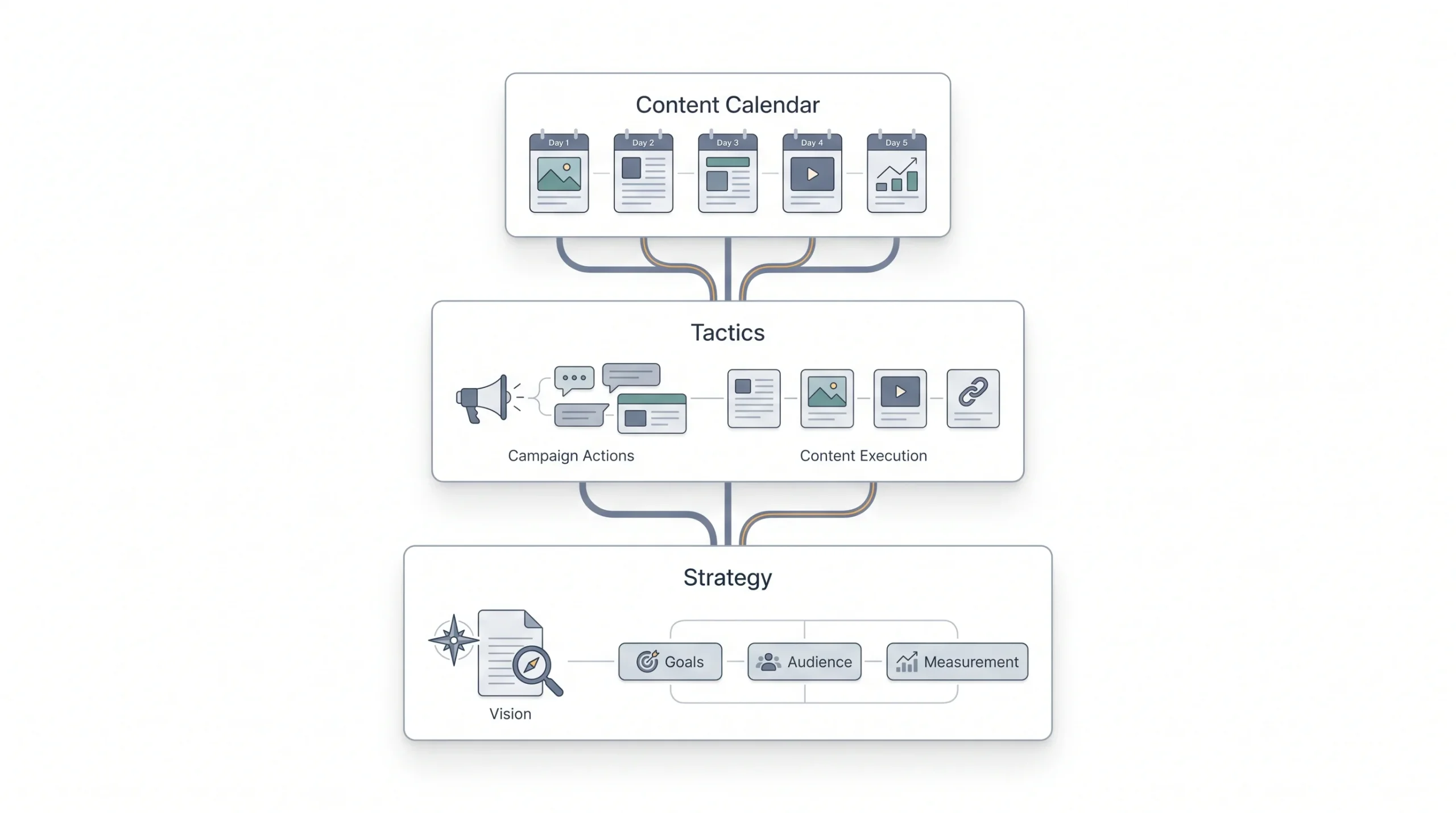
Where people get confused is mixing up strategy with tactics, and tactics with a content calendar. Those are three different things sitting on top of each other, and most brands only ever build the top layer.
A content calendar tells the team what to post and when. It’s a schedule. A tactic is a specific move, like running a giveaway or jumping on a trending audio. A strategy is the reason any of that exists at all. It’s the “why” underneath the “what” and the “when.”
Quick distinction: A content calendar tells you what to post and when. A strategy tells you why you’re posting it at all.
Brands that skip the strategy layer and go straight to posting tend to run into the same problems. Messaging gets inconsistent because there’s no throughline connecting posts. Ad spend gets wasted because nobody defined what “working” even looks like. And when leadership asks for proof that social media is doing anything for the business, there’s nothing solid to hand over. Just vibes and follower counts.
There’s also a resourcing side to this that doesn’t get talked about enough. Without a strategy, every posting decision becomes a fresh debate. Should this be a Reel or a static post? Should the caption be funny or serious? Should this go out today or next week? Multiply that by every single post, every single week, and it’s easy to see why teams burn out running social media without a plan. A strategy removes most of that daily back-and-forth because the big decisions, tone, platform, content type, already got made once, upfront, instead of being re-litigated constantly.
Step 1: Audit Your Current Social Media Presence
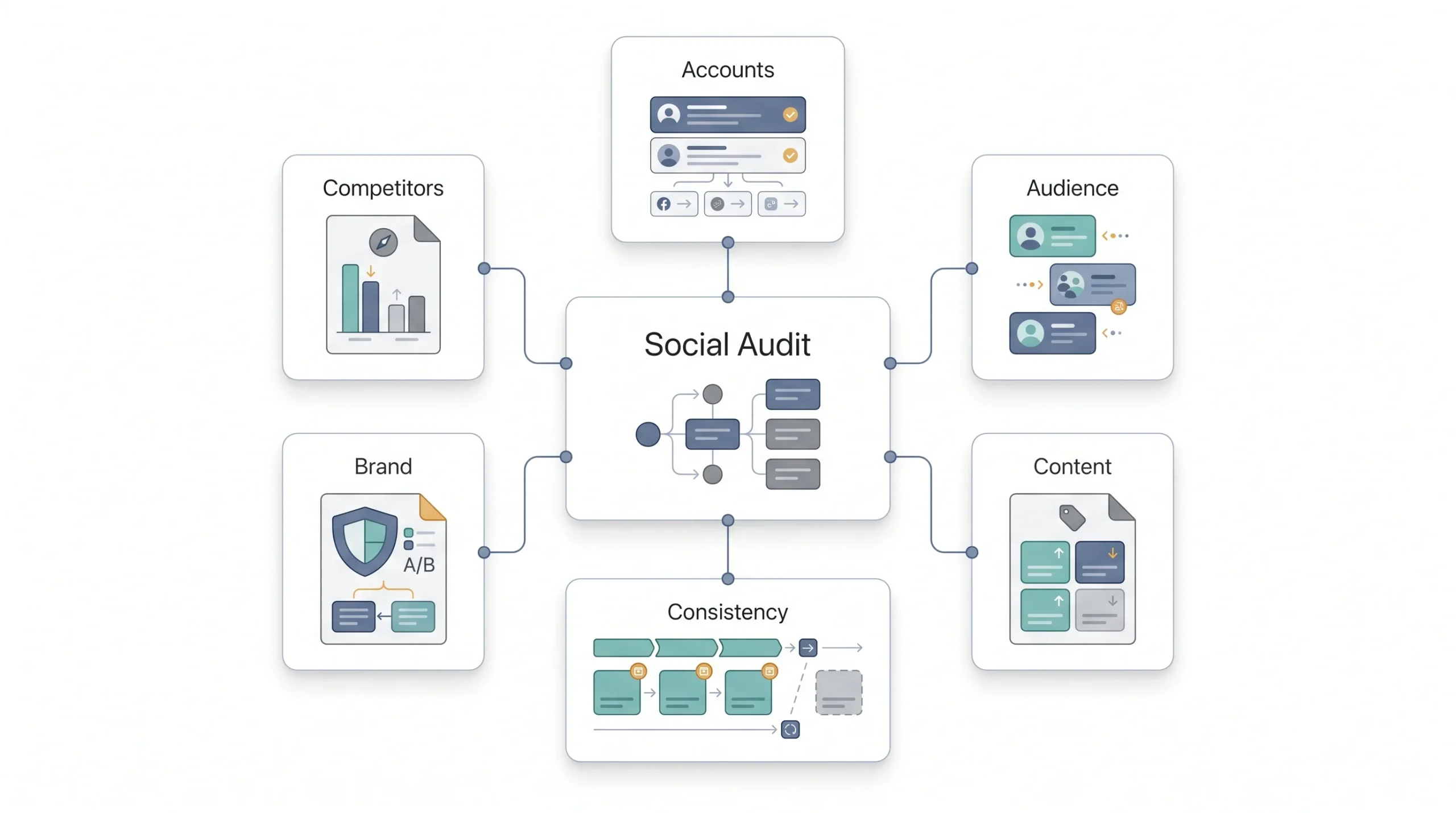
Before building anything new, it helps to know where things actually stand today. That sounds obvious, but a lot of brands skip straight to “let’s post more” without ever checking what’s already working and what’s dead weight. An audit fixes that. It’s basically taking stock: what accounts exist, how they’re performing, and where the gaps are.
If there’s genuinely zero social presence right now, this step can be skipped for the moment. Come back to it after 60 to 90 days of posting, once there’s actual data to look at.
For everyone else, the audit needs to answer a handful of questions. What platforms is the brand actually active on, and are all of them still relevant? What’s the follower count and growth trend on each one? Which posts performed well, and which ones flopped? Is the posting schedule consistent, or has it gone quiet for stretches at a time? And does the brand look and sound the same across every account, or does the bio on Instagram contradict the tone on LinkedIn?
Native analytics tools do most of the heavy lifting here. Meta Business Suite covers Facebook and Instagram, LinkedIn has its own analytics dashboard, and Google Analytics helps track how much actual website traffic is coming from social referrals. None of this requires expensive software to get started.
Table: Social Media Audit Checklist
| Audit area | What to check | Why it matters |
|---|---|---|
| Account inventory | Active platforms, handles, login access | Some accounts get abandoned or duplicated over time |
| Audience snapshot | Follower count, growth rate, demographics | Sets the baseline for future comparison |
| Content performance | Top 5 and bottom 5 posts by engagement | Shows what already resonates with the audience |
| Posting consistency | Frequency, gaps, last active date | Reveals discipline gaps in the current process |
| Brand consistency | Bio, profile image, tone across platforms | Impacts trust and recognition |
| Competitor comparison | Follower count, engagement rate vs yours | Gives a realistic sense of where the brand stands |
Once the audit is done, there’s usually a clear picture forming. Maybe Instagram is strong but Facebook has been abandoned since last year. Maybe engagement is fine but none of it’s translating into website clicks. Whatever it shows, that’s the starting line for everything that follows.
Worth being honest during this step too, not just going through the motions. It’s tempting to look at a graph that’s flat for six months and explain it away as “the algorithm changed” or “it’s just a slow season.” Sometimes that’s true. More often, the flat graph is just telling the truth about content that stopped being interesting or a posting schedule that got inconsistent somewhere along the way. The audit only works if the read on it is honest.
It’s also worth checking who’s actually engaging, not just how many. A brand with 10,000 followers and barely 20 likes per post has a different problem than a brand with 2,000 followers and 150 likes per post. The second one has a smaller audience, sure, but a far more engaged one, and that changes what the strategy should prioritize going forward. Growth for growth’s sake isn’t the goal here. An audience that actually reacts, comments, and shares is worth more than a bigger number sitting there doing nothing.
Step 2: Set Goals Using the OST Framework (Outcome, Size, Time)
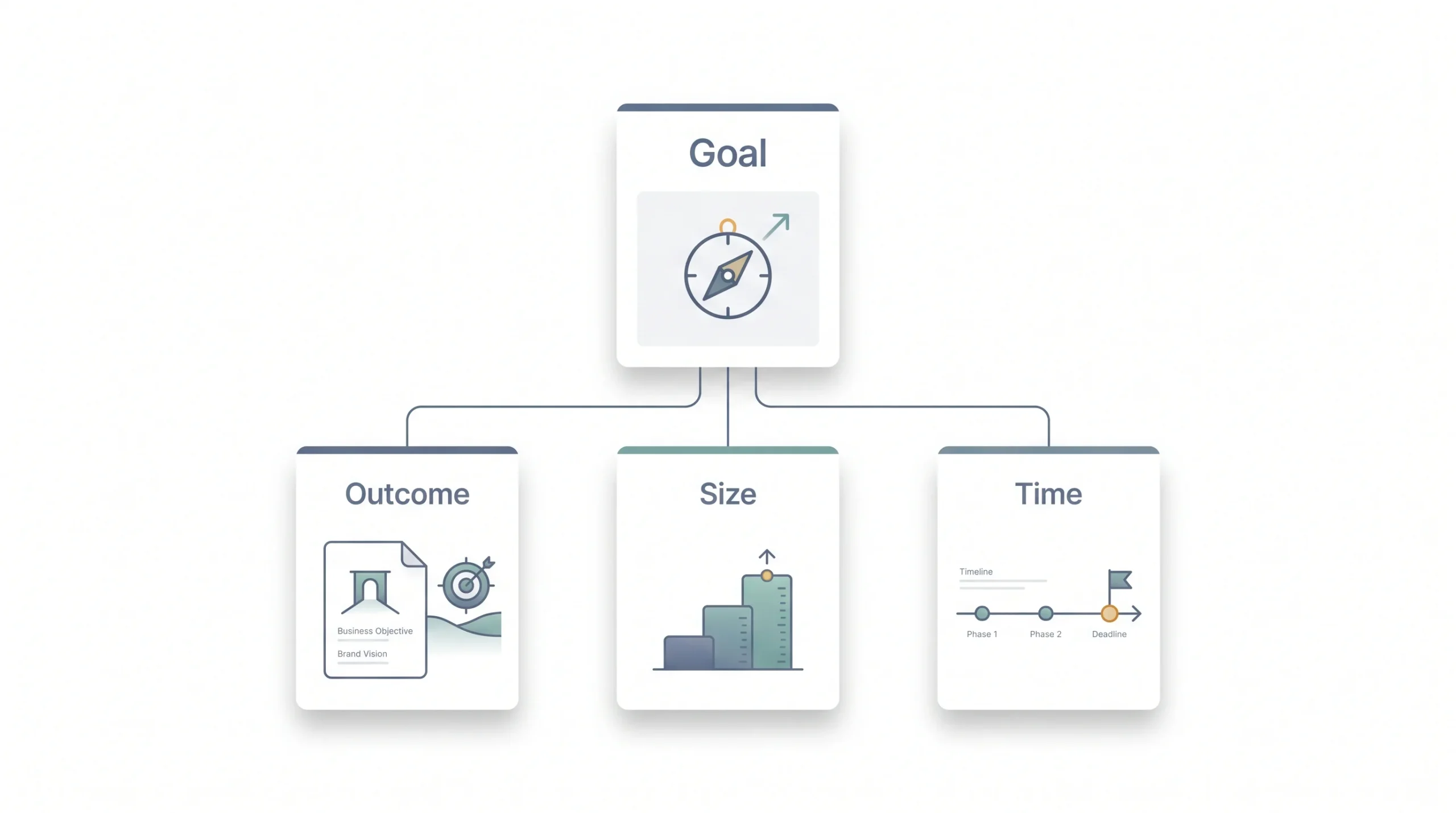
SMART goals get mentioned in basically every marketing guide ever written, so there’s no need to re-explain specific, measurable, achievable, relevant, timely here. Everyone’s heard it. What’s actually useful is a sharper way to think about the goal before it even gets written down, and that’s the OST framework: Outcome, Size, Time.
Outcome is what the goal is actually chasing, sales, awareness, leads, retention, whatever it is. Size is how big a change is being aimed for. Time is the deadline for hitting it. Three questions, and answering all three forces a vague wish into something you can actually plan against.
Say a small ecommerce brand is currently pulling in 100 sales-driven followers a month and wants to get to 300 a month. That’s the size. If the deadline is one quarter, that’s the time. The outcome is sales-driven growth, not just follower count for its own sake. Once that’s locked in, it changes everything downstream. Content needs to skew more toward conversion-focused posts, not just brand-awareness fluff. Budget probably needs to lean into paid promotion instead of relying purely on organic reach, because tripling growth in 90 days organically is a tall order for most brands.
Table: Common Social Media Goals Mapped to Business Objectives
| Business objective | Social media goal example | Primary funnel stage |
|---|---|---|
| Brand awareness | Increase reach and impressions by a set percentage | TOFU |
| Community building | Grow an engaged follower base | TOFU/MOFU |
| Lead generation | Drive traffic to landing pages | MOFU |
| Sales/conversions | Increase click-throughs to product pages | BOFU |
| Customer retention | Improve response time and repeat engagement | BOFU |
Tip: Vanity metrics like likes and follows feel good, but they rarely prove ROI on their own. Tie every goal to a number the business actually cares about.
One more thing worth saying here: don’t set five goals at once. Two or three, tracked separately, is plenty. Trying to chase awareness, leads, and retention all through the same handful of posts usually means none of them get hit particularly well.
There’s a temptation to write goals that sound impressive rather than goals that are actually achievable given the current size and budget. A brand with 500 followers setting a goal to hit 50,000 in three months isn’t setting a goal, it’s setting up a disappointment. Better to look honestly at the audit numbers from Step 1 and set something ambitious but grounded in what the current trajectory actually supports, then stretch it a bit further with a clear plan for how the stretch gets covered, whether that’s more content, more budget, or both.
Different goals also deserve different owners on the team, if there’s more than one person involved. Whoever’s responsible for a lead-generation goal should be looking at click-throughs and landing page visits weekly, not waiting for a quarterly report to find out things went sideways two months ago. Assign the goal, assign the number, assign the person checking it.
Step 3: Define Your Target Audience
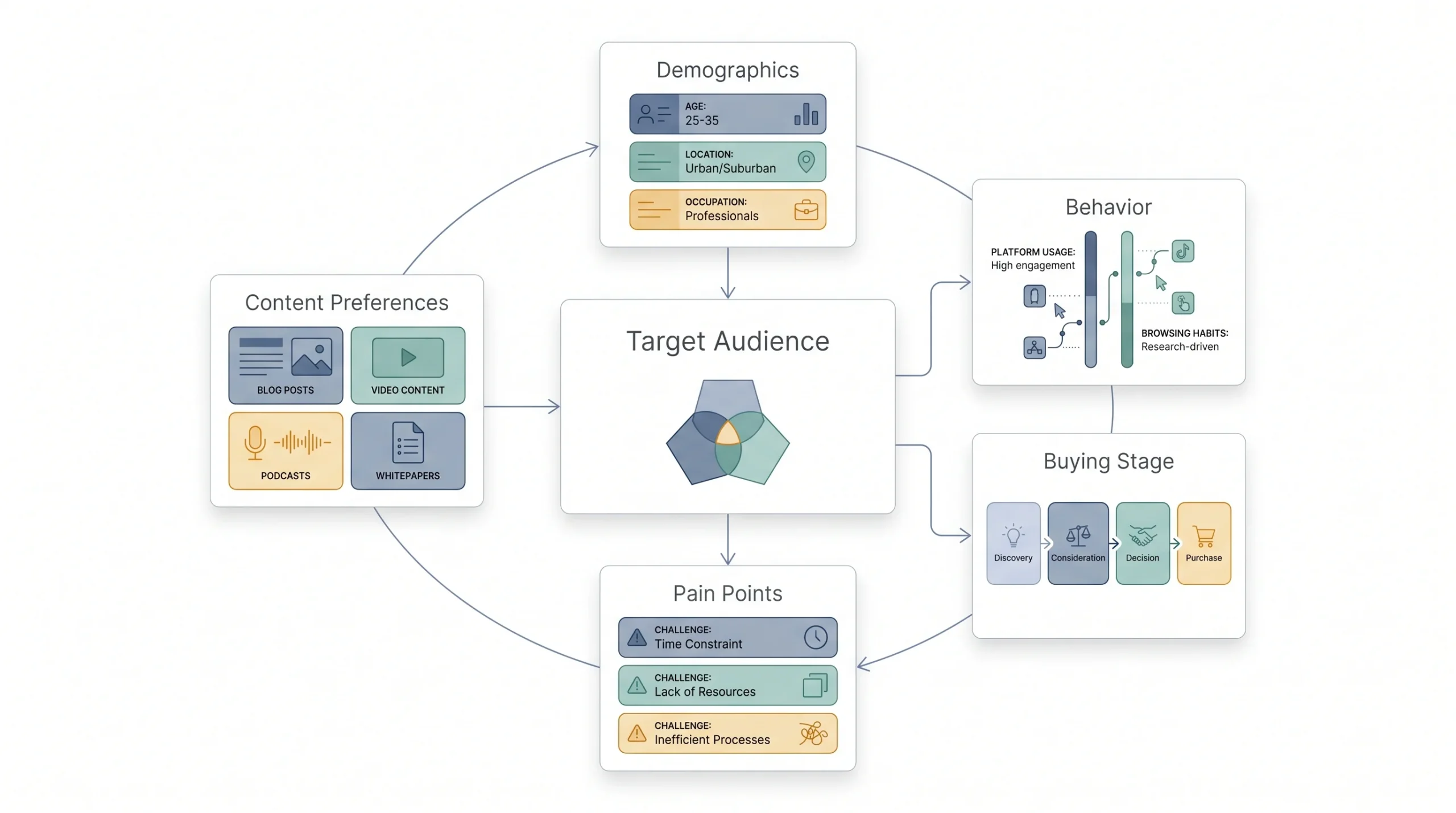
“Everyone” is not an audience. It’s the opposite of one. The more specific the audience definition, the easier every decision after this point becomes, from what to post to which platform to be on.
Two layers matter here. Demographic research covers the basics: age range, gender, location, income bracket, language. Psychographic research goes deeper: what problems does this person actually have, what’s stopping them from buying, what content style do they respond to. A brand selling premium skincare to working professionals in their 30s needs a very different tone than one selling budget gadgets to college students, even if both technically fall under “ecommerce.”
Building one or two audience personas helps make this concrete instead of theoretical. It doesn’t need to be an elaborate 10-page document. Just enough detail that anyone on the team could picture the actual person they’re writing for.
Table: Audience Persona Snapshot Template
| Persona element | Questions to answer |
|---|---|
| Demographics | Age range, location, income bracket, occupation |
| Platform behavior | Which platforms, what time of day, device used |
| Pain points | What problem are they trying to solve |
| Content preference | Video, carousel, text, memes, long-form |
| Buying stage | Just discovering, comparing options, ready to buy |
Where does this data actually come from? Start with what’s already there. Existing followers, existing customers, past purchase data. That’s first-party data and it beats guesswork every time. Third-party research and industry reports can round things out, but they should never replace looking at real people who already interact with the brand.
This step feeds directly into the next two. Platform choice depends on where this audience actually spends time, and content pillars later on depend on what stage of the buying journey they’re sitting in.
A mistake worth calling out directly: building a persona around who the brand wishes it was talking to instead of who’s actually buying. It’s easy to picture an aspirational, aesthetic customer and build content for them, while the real buyers, the ones already commenting and purchasing, look nothing like that picture. Pull actual data before writing the persona. Check the age and location breakdown in Instagram Insights. Look at who’s actually leaving reviews. Read the DMs coming in. The real audience is usually sitting there in the data already, it just needs someone to actually look.
For brands serving more than one type of customer, it’s fine to build two personas instead of forcing everyone into one bucket. A B2B education brand, for instance, might be talking to both college-going students and the parents footing the bill, and those two groups need very different messaging even though the product’s the same.
Step 4: Choose the Right Platforms (Not All of Them)
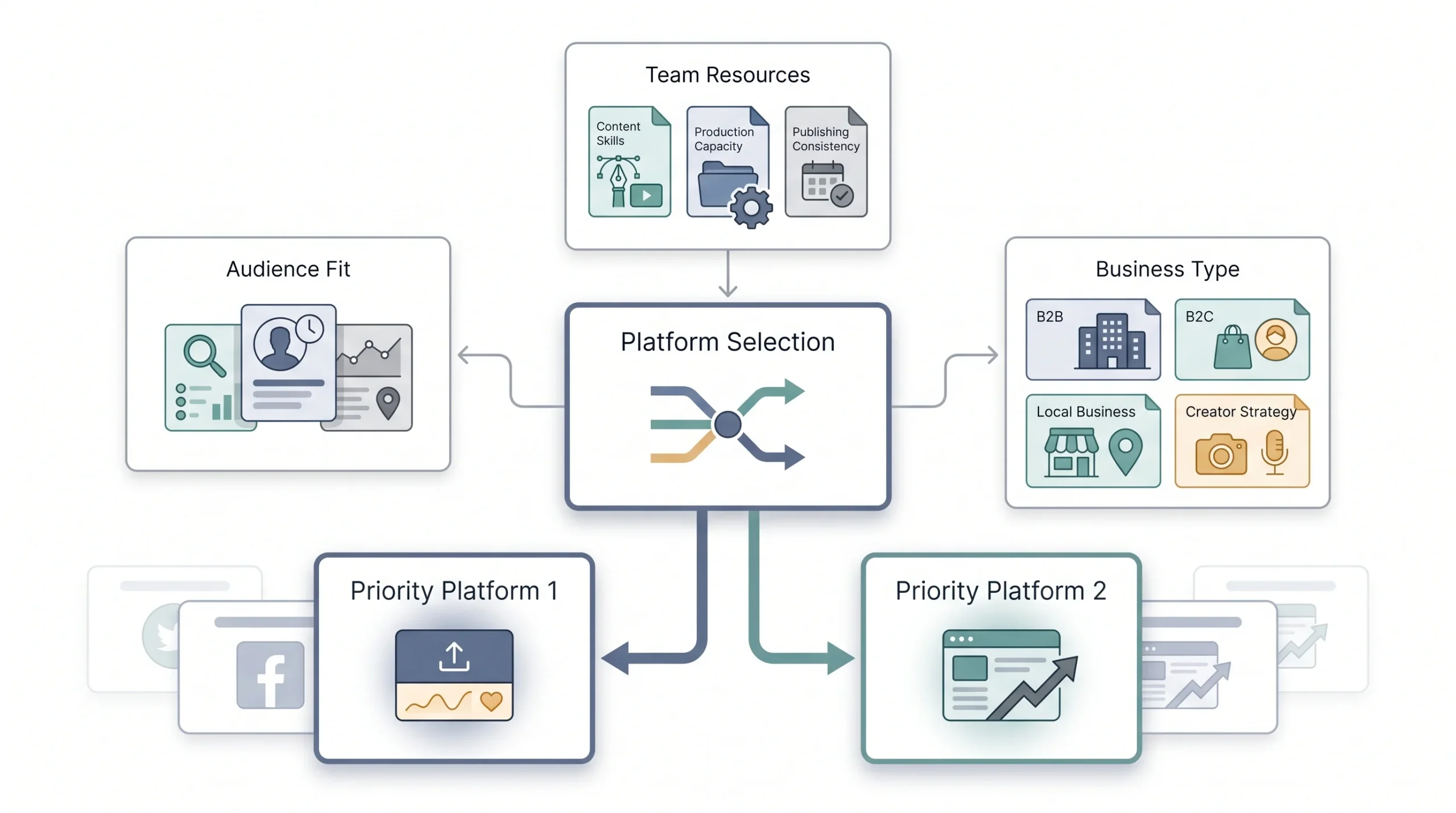
Platform selection is one of the highest-leverage decisions in this entire process, and it’s also where a lot of beginners get it wrong. The instinct is to be everywhere. Instagram, Facebook, LinkedIn, TikTok, X, Pinterest, all of it, because more platforms must mean more reach, right? Nope. That’s usually how a brand ends up posting mediocre content in five places instead of great content in two.
The right platforms depend entirely on the business type and, more importantly, on where the audience defined in Step 3 actually hangs out.
Table: Platform Selection Matrix by Business Type
| Business type | Best-fit platforms | Why |
|---|---|---|
| B2B / services | LinkedIn, X (Twitter), YouTube | Professional audience, longer sales cycle |
| B2C / retail & ecommerce | Instagram, Facebook, TikTok, Pinterest | Visual discovery, more impulse-driven buying |
| Local business | Facebook, Instagram, Google Business Profile | Local search and community trust matter more here |
| Creator / personal brand | Instagram, YouTube, LinkedIn | Built around a direct audience relationship |
| B2B in India specifically | LinkedIn tends to carry the most weight for enterprise and education-sector outreach | WhatsApp Business is also underused as a direct engagement channel here, worth testing |
Strategy tip: Two platforms done consistently outperform five platforms done sporadically.
Once a shortlist exists, the real test is checking it against the audience personas built earlier. If the persona spends most of their time on LinkedIn and barely touches Pinterest, don’t build a Pinterest-first strategy just because a competitor happens to be there. Go where the actual audience is, not where the brand assumes it should be seen.
Team bandwidth matters here too, and it doesn’t get talked about enough. Each platform has its own content requirements. Video-first platforms need editing skills and time. LinkedIn rewards written thought pieces and needs someone comfortable writing in that register. Picking a platform that plays to the team’s actual strengths, at least at the start, tends to produce better content than forcing a format nobody on the team is good at yet. Skills can be built over time, but starting with a mismatch between platform demands and team capability is a rough way to begin.
It also helps to think about platforms in terms of what job they’re doing. Instagram tends to do the heavy lifting for visual discovery and community. LinkedIn does the heavy lifting for credibility and professional trust. YouTube, when used well, does the heavy lifting for depth, the kind of content that actually explains something instead of just teasing it. Knowing the job each platform is meant to do makes it a lot easier to resist spreading content too thin across all of them in the same shallow way.
Step 5: Analyze Your Competitors
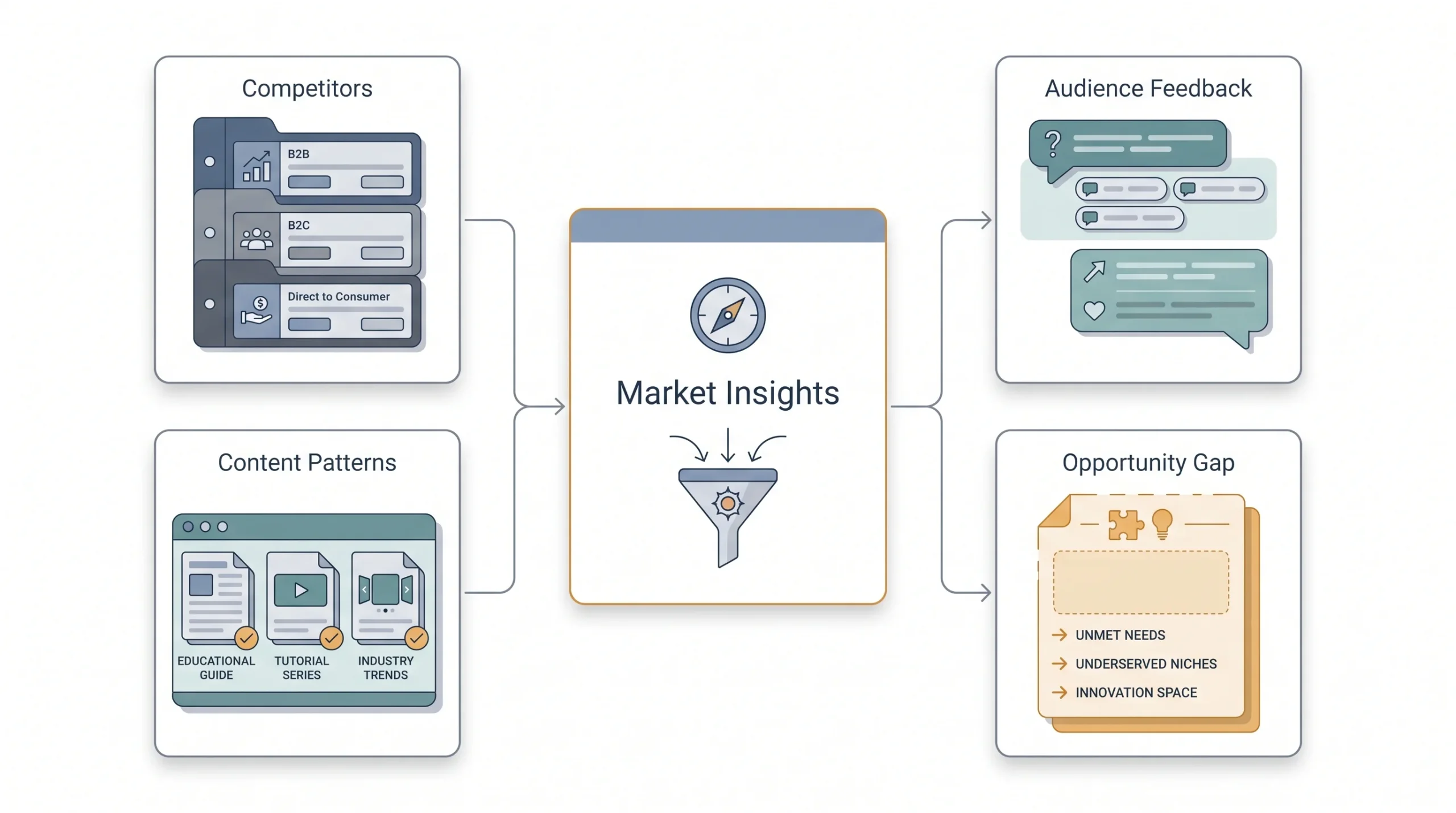
Even brand-new accounts with zero followers and zero history should do this step. It’s not optional just because there’s no existing data of your own to compare against yet. Competitor accounts already have the data, and that data is sitting there in public view for free.
Start by picking three to five direct competitors, not the giant industry leaders with ten times the budget, but brands actually competing for the same customer. Look at which platforms they’re active on, how often they post, what themes keep showing up in their content, and how their audience actually reacts. Engagement numbers tell part of the story. Comments tell the rest. Scrolling through the comments on a competitor’s posts often surfaces exactly what their audience is confused about, annoyed by, or asking for, which doubles as free FAQ and content research.
Table: Competitor Benchmarking Template
| Metric | Your brand | Competitor A | Competitor B |
|---|---|---|---|
| Platforms active | |||
| Follower count | |||
| Avg. posts/week | |||
| Avg. engagement rate | |||
| Top content format | |||
| Notable gaps/opportunities |
None of this requires expensive tooling to get started. A spreadsheet and some manual tracking each week does the job just fine, especially early on. The point isn’t to copy what competitors are doing. It’s to find the gap, the thing their audience keeps asking for that nobody’s actually delivering yet.
Social listening deserves a mention here too, separate from just watching direct competitors. That means keeping an eye on relevant industry keywords and hashtags, not just accounts. Sometimes the most useful insight doesn’t come from a competitor’s post at all, it comes from a random customer complaint or a trending conversation happening somewhere else entirely, one that a brand could jump into or address before a competitor even notices it’s happening.
Worth repeating because it trips people up constantly: this step is not about copying. Reposting a competitor’s format with different colors isn’t strategy, it’s just delayed imitation, and audiences tend to notice when a brand feels like a knockoff of something else. The benchmarking table exists to spot patterns and gaps, not templates to trace over.
Step 6: Build Your Content Pillars and Strategy
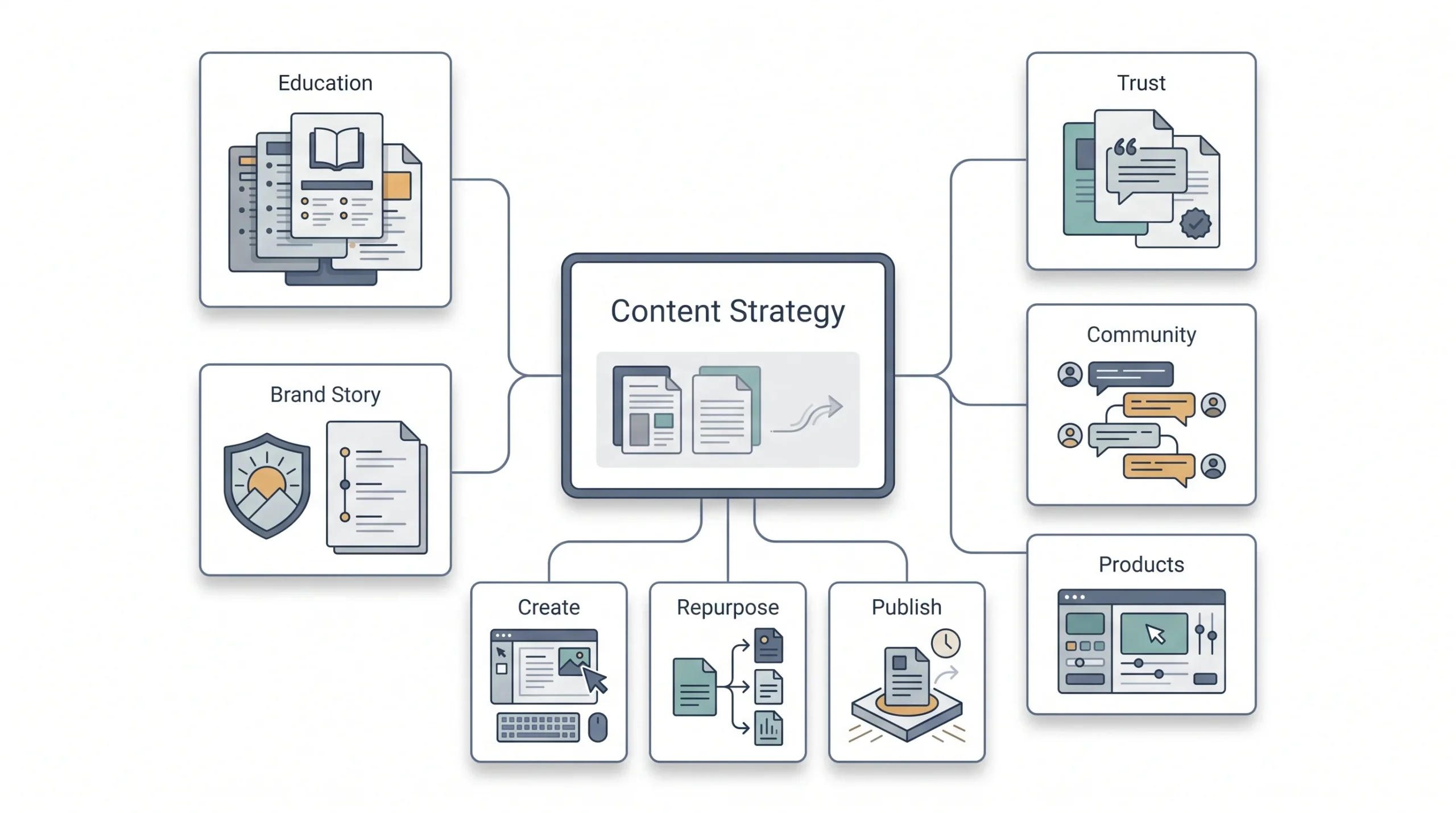
This is where most of the actual output lives, so it’s worth slowing down here.
What Are Content Pillars
Content pillars are the three to five recurring themes everything gets built around. Instead of scrambling for a new idea every single day, posts get pulled from these fixed buckets. A fitness brand, for example, might build pillars around workout tutorials, nutrition tips, client transformations, and behind-the-scenes gym culture. Every post falls into one of those, which keeps the account feeling coherent instead of random.
The number of pillars matters more than it seems. Fewer than three and the content starts feeling repetitive fast. More than five and it gets hard to stay consistent across all of them, so some quietly get dropped after a few weeks. Three to five is the sweet spot for most brands, enough variety to keep the feed interesting, few enough to actually maintain.
Each pillar should trace back to something real about the brand, not just a generic content category copied from a template somewhere. A digital marketing agency, say, might build pillars around campaign case studies, platform updates and news, quick tactical tips, and client success stories. Those four categories cover awareness, credibility, usefulness, and proof, all at once, and none of them require guessing what to post next.
Map Content to the Funnel (TOFU/MOFU/BOFU)
Content pillars work best when they’re also mapped against where the audience sits in the buying journey. Someone discovering the brand for the first time needs a different kind of post than someone who’s already comparing options and close to buying.
Table: Content Types by Funnel Stage
| Funnel stage | Goal | Content types |
|---|---|---|
| TOFU (Top of Funnel) | Awareness, reach | Educational reels, trending audio, memes, brand story posts |
| MOFU (Middle of Funnel) | Consideration, engagement | Carousels, how-to posts, testimonials, behind-the-scenes |
| BOFU (Bottom of Funnel) | Conversion | Product demos, offers, UGC, direct CTAs, DM and comment follow-up |
Most accounts lean way too heavy on TOFU content and barely touch BOFU, which explains why engagement can look healthy while sales stay flat. All three stages need actual attention, not just the top of the funnel because it’s the easiest to make.
A rough mix worth aiming for, adjustable depending on the goal from Step 2: somewhere around half TOFU content to keep reach and awareness moving, a third MOFU content to build consideration and trust, and the rest BOFU content that actually asks for the sale or the sign-up. That last chunk feels uncomfortable for a lot of brands, there’s a fear of sounding “too salesy.” But an account that never asks for anything rarely gets anything either. The audience needs at least some content that makes the ask clear.
Content Mix: Original vs Curated vs UGC
Three types of content, and a healthy account uses all three. Original content is anything created from scratch, the core of most strategies. Curated content means sharing or reacting to relevant content from other sources, useful for filling gaps without constant production pressure. UGC, user-generated content, means testimonials, customer photos, reviews, and mentions from actual customers. UGC tends to carry more trust than brand-made content because it’s coming from someone with nothing to sell.
One thing worth doing more of: repurposing. A single blog post can become a carousel, a short video script, and a LinkedIn text post, all from the same core idea, adjusted for how each platform’s audience actually consumes content.
Idea: Repurposing isn’t recycling. Reframe one core piece of content, like a blog post, into a carousel, a Reel script, and a LinkedIn text post. Same idea, three different consumption habits.
A decent starting ratio for the mix, again adjustable, is somewhere around 70 percent original content, 20 percent curated, and 10 percent UGC, shifting more toward UGC as a customer base grows and there’s actual material to pull from. Early on, when there aren’t many customers yet, that ratio naturally leans almost entirely original, and that’s fine. UGC and curated content become more useful once there’s a real community generating them.
Content Formats to Prioritize in 2026
Short-form video keeps leading the pack for discovery right now, no argument there. Carousels still do heavy lifting for saves and shares, especially on Instagram and LinkedIn. Stories and live formats matter for real-time engagement and feel less produced, which audiences respond to.
That said, format choice should follow what the audience data and platform behavior actually show, not just whatever’s trending that week. Chasing every new format without checking if it fits the audience is how brands end up with a feed that feels scattered instead of intentional.
Worth saying plainly: production value matters less than it used to, and polish isn’t the same thing as performance. A phone-shot video with a genuinely useful tip can easily outperform an expensive studio shoot that says nothing new. That doesn’t mean quality doesn’t matter at all, it means the idea and the hook at the start carry more weight than the lighting setup.
Step 7: Build a Content Calendar and Publishing Workflow
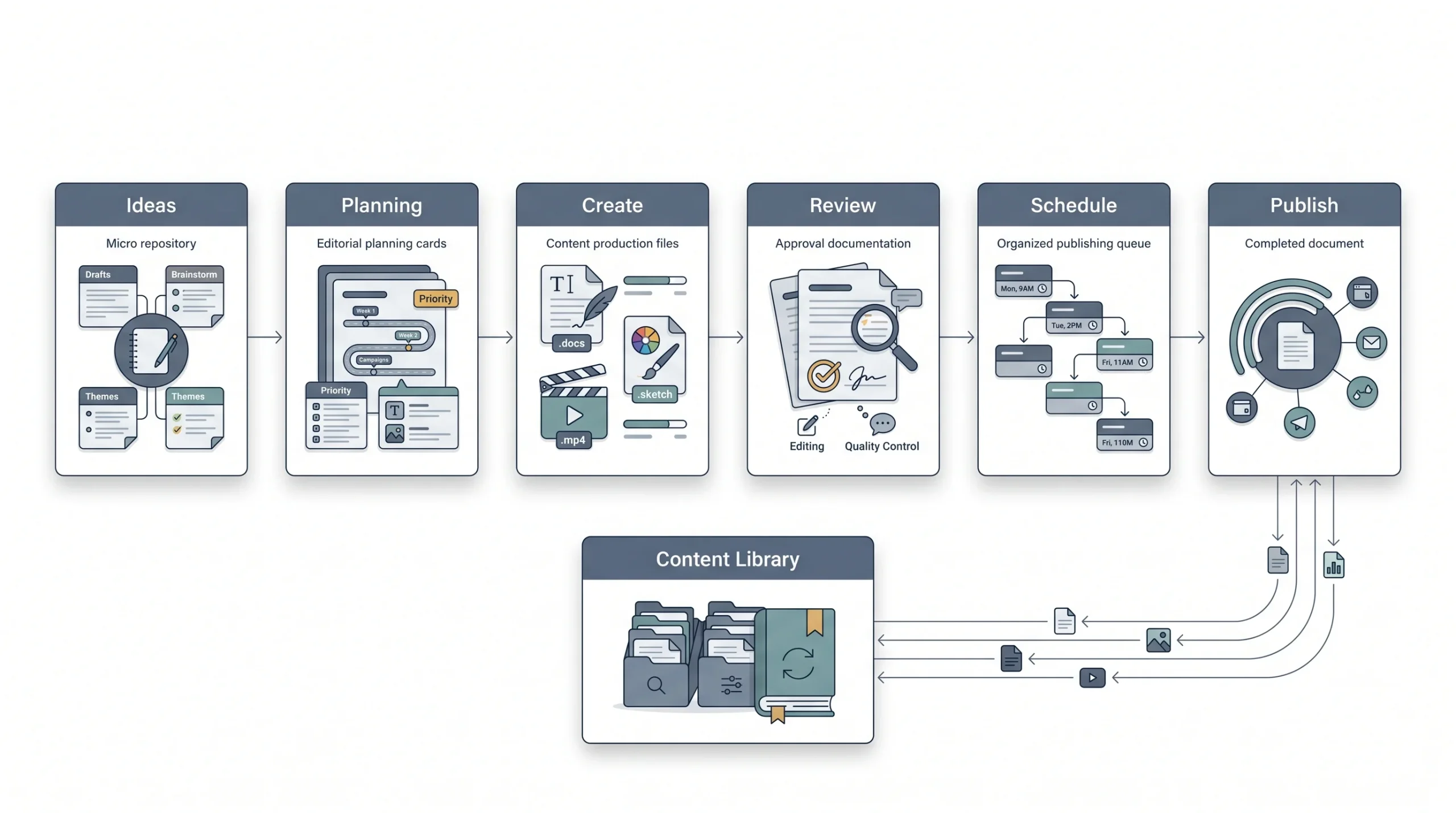
Posting without a calendar works fine for about two, maybe three weeks. Then the ideas dry up, someone forgets to post for four days straight, and the whole thing falls apart. A calendar removes that daily decision fatigue. Instead of asking “what do I post today,” the answer’s already sitting there from planning done a week or two earlier.
Cadence needs to be realistic, not aspirational. Posting daily on every platform sounds great in theory and burns teams out in practice. Better to commit to a frequency that’s actually sustainable and stick with it consistently than to post seven times a week for a month and then vanish.
Table: Sample Weekly Posting Cadence by Platform
| Platform | Minimum viable frequency | Best content type |
|---|---|---|
| 3 to 4x/week (feed + Stories daily) | Reels, carousels | |
| 2 to 3x/week | Text posts, articles, carousels | |
| 3 to 5x/week | Mixed: video, curated, community | |
| X (Twitter) | Daily | Short text, threads |
| 2 to 3x/week | Vertical pins linking to blog or site |
Tools like Notion, Trello, or Asana work well for tracking the production pipeline, from idea to outline or script, to shoot or design, to edit, to approval, to publish. Native scheduling tools handle the actual publishing side. None of this needs to be complicated software. It just needs to exist and get used consistently.
Batching content tends to work better than the daily scramble too. Sitting down once a week or once every two weeks to plan and shoot a batch of content, instead of producing something fresh every single morning, saves a surprising amount of time and mental energy. It also means there’s a buffer if something urgent comes up and a day or two gets skipped. Nothing derails a strategy faster than a single sick day turning into a two-week content drought because there was never anything queued up in advance.
The calendar should also leave room for real-time, unplanned content. Trending moments, timely news, or something happening in the industry that’s worth reacting to fast. A calendar that’s booked solid three weeks out with zero flexibility ends up missing these moments entirely, and reactive content like that often outperforms the scheduled stuff simply because it feels current.
Step 8: Plan Your Budget (Organic + Paid)
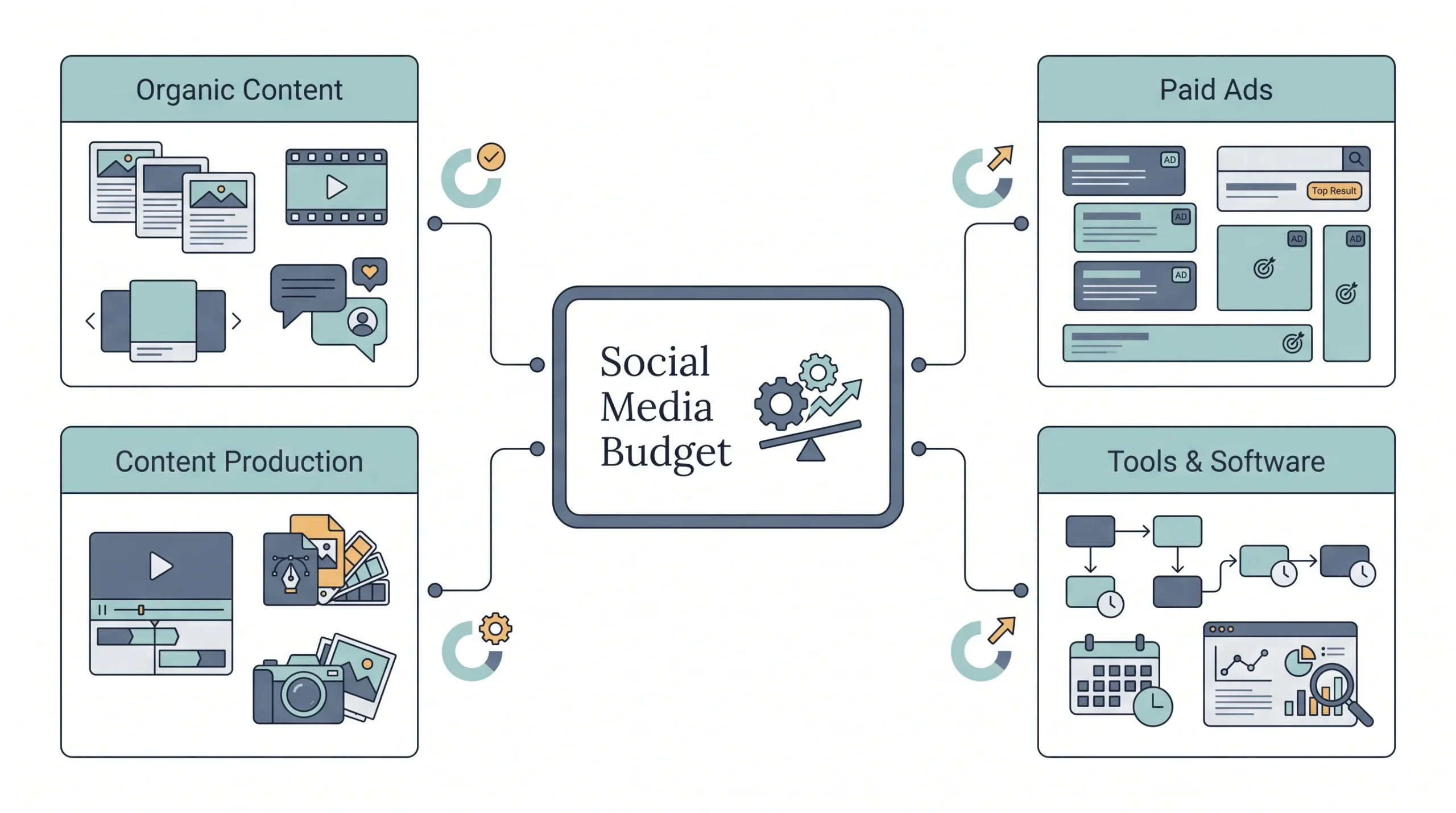
This part gets skipped constantly, and it shouldn’t be. A strategy without a budget attached is a wish list, not a plan.
The first real decision is organic-only versus a hybrid of organic plus paid. Pure organic can work, especially for community-driven or service-based brands with time to invest, but it’s slower and less predictable. Adding paid promotion, even a small amount, tends to accelerate results considerably, especially for awareness and conversion goals.
Budget needs to cover more than just ad spend too. Content production costs (design, video editing, photography), scheduling tool subscriptions, and potentially influencer or creator collaborations all need a line item.
Table: Budget Allocation Starting Point by Goal
| Primary goal | Suggested split (organic : paid) | Notes |
|---|---|---|
| Brand awareness | 40 : 60 | Paid reach tends to accelerate discovery faster than organic alone |
| Community/engagement | 70 : 30 | Organic relationship-building matters more here |
| Lead generation | 50 : 50 | A mix of content and targeted ads usually works best |
| Sales/conversion | 30 : 70 | Paid retargeting typically outperforms organic at this stage |
Reality check: There’s no universal “right” split. This is a starting point to test and adjust once real performance data comes in.
Tie this back to the goal set in Step 2. An awareness-focused goal justifies leaning harder into paid reach. A community goal means organic engagement time matters more than ad dollars. The split isn’t arbitrary, it follows from what’s actually being chased.
Small budgets shouldn’t be a reason to skip paid entirely either. Even a modest daily spend, tested carefully and tracked closely, tends to teach a brand more about what resonates than months of pure organic guessing. The mistake isn’t spending a small amount, it’s spending a small amount without watching the results closely enough to learn anything from it.
Step 9: Set Up Engagement and Community Management Practices
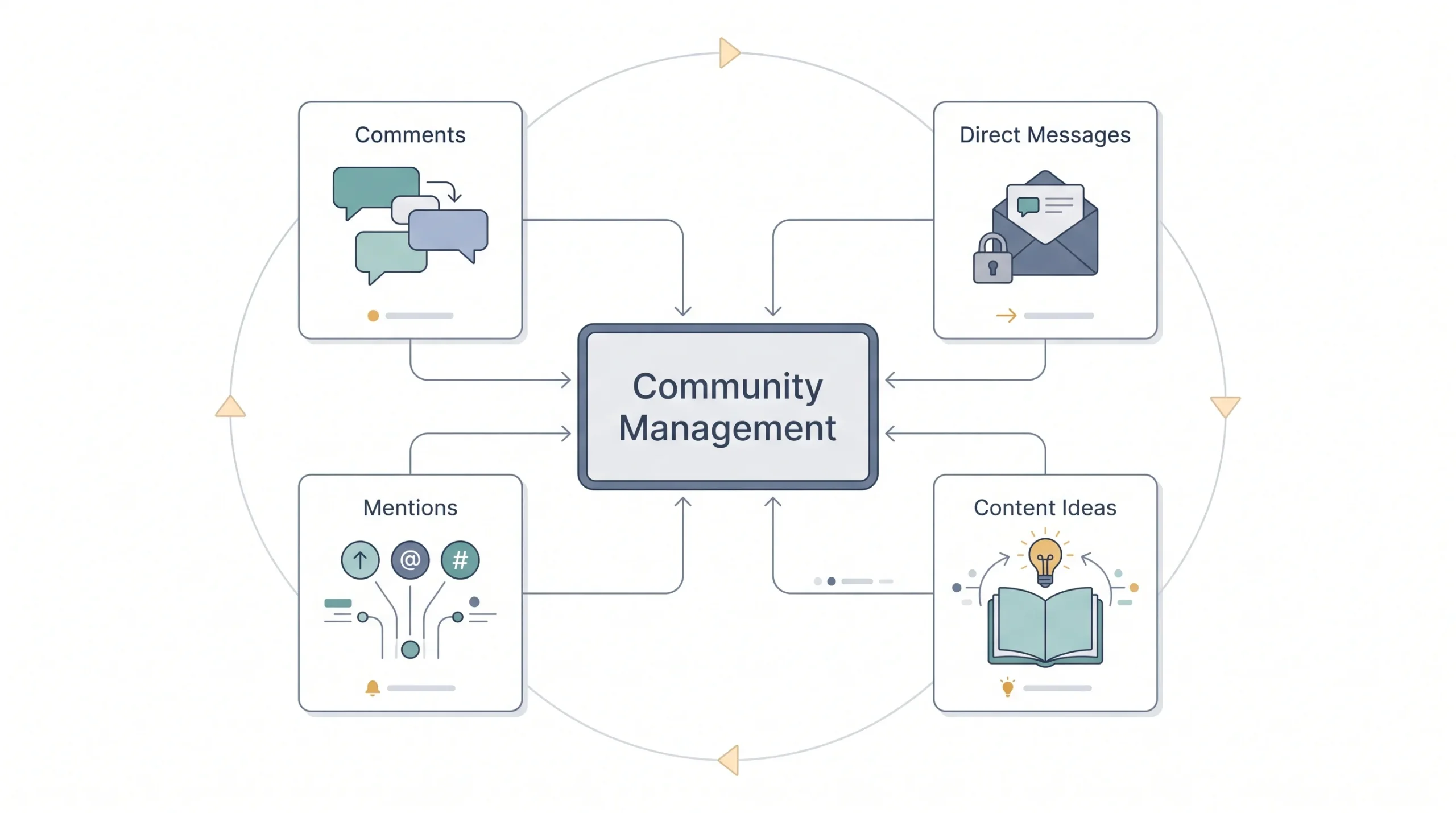
Strategy doesn’t end once the post goes live. Honestly, that’s where a big chunk of the real work starts. Comments, DMs, mentions, all of it needs a plan, not just an afterthought handled whenever someone remembers to check.
Response time matters more than most brands realize. Nobody expects an instant reply at 2 a.m., but letting comments and DMs sit unanswered for days sends a clear signal that nobody’s actually paying attention on the other end.
Negative comments and reviews need a level head, not a defensive one. Acknowledging the issue publicly and moving the detailed conversation to DMs or email usually works better than arguing it out in the comment section for everyone to watch.
Proactive engagement helps too. Commenting on relevant posts within the industry, or even on competitor content where appropriate, puts the brand in front of new eyes without spending a rupee on ads. If a team is handling this, ownership needs to be assigned clearly so it doesn’t fall through the cracks between people assuming someone else has it covered.
Community management also feeds straight back into content ideas, which is easy to forget. Questions that keep showing up in the comments or DMs are basically free content prompts. If three different people ask the same question in a week, that’s not a coincidence, that’s a signal the answer deserves its own post instead of just a reply buried in the comments.
Step 10: Track KPIs and Measure Success
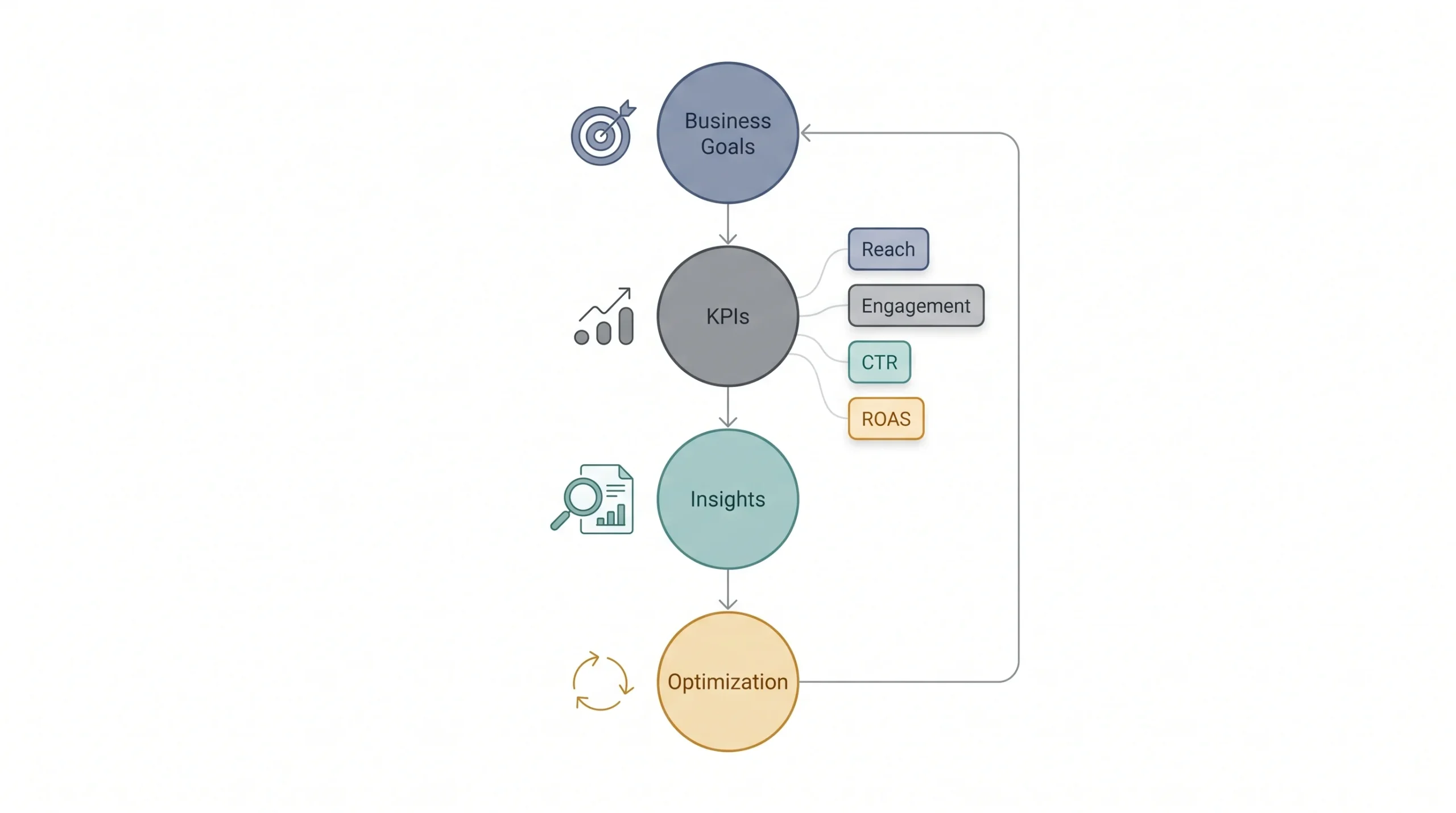
Every goal from Step 2 needs a matching KPI here. This is where a lot of strategies quietly fall apart, because the metrics being tracked don’t actually connect back to what was originally set out to achieve.
Table: Goal → KPI → Tracking Tool Mapping
| Goal | Key KPI(s) | Where to track |
|---|---|---|
| Brand awareness | Reach, impressions, follower growth rate | Native analytics |
| Engagement/community | Engagement rate, comments, shares, saves | Native analytics |
| Lead generation | Click-through rate, landing page visits | Google Analytics + UTM tracking |
| Sales/conversion | Conversion rate, ROAS, cost per acquisition | Ads Manager + Google Analytics + CRM |
| Customer service/retention | Response time, resolution rate, repeat engagement | Platform inbox tools |
Likes and follower counts are easy to track and easy to feel good about, but they don’t prove much on their own. A post can rack up hundreds of likes and still not send a single visitor to the website. The metrics that actually matter are the ones tied to the business objective from the start.
A monthly or quarterly review rhythm keeps this honest. During each review, a few questions are worth asking every time: Did the goals from last period actually get hit? What content consistently over-performed, and what consistently flopped? Is the current platform mix still the right one, or has audience behavior shifted?
Worth setting up UTM tracking early if traffic and conversions are part of the goal set, because without it there’s no reliable way to tell how much of a website visit or a sale actually came from social versus somewhere else entirely. It takes maybe ten minutes to set up per campaign link and saves a lot of guesswork later when someone asks whether social media actually contributed to a sale or if it just happened to coincide with one.
One more habit worth building here: keep a running log of what was tried and what happened, not just the raw numbers. A spreadsheet that just says “engagement rate: 3.2%” for six months in a row tells nobody anything useful. A log that says “switched to shorter captions in March, engagement rate went from 2.1% to 3.2%” actually explains why the number moved. That’s the difference between reporting and learning.
Step 11: Test, Adjust, and Iterate
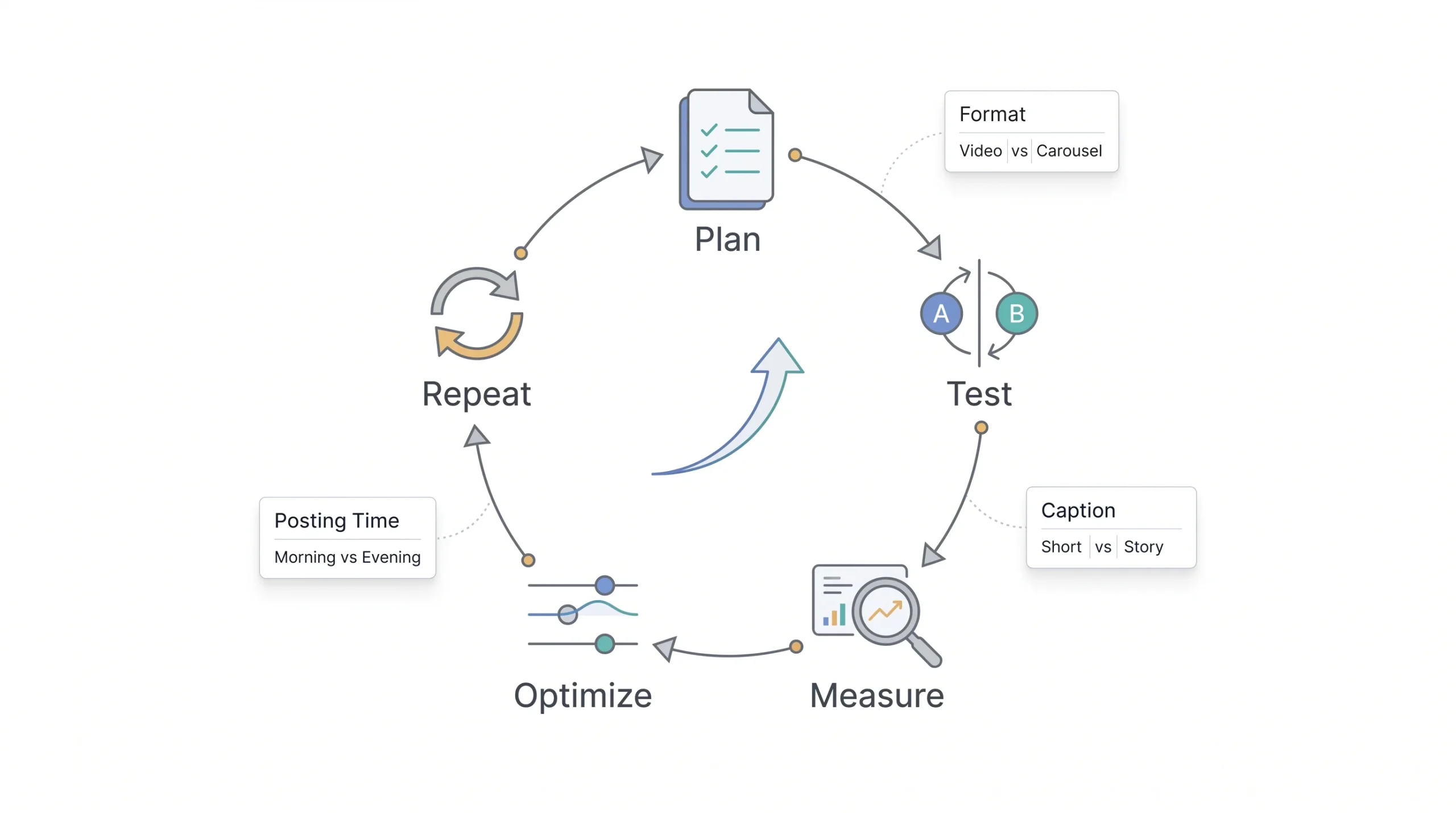
A social media strategy isn’t something that gets written once and locked away in a folder. It’s a living document, and the brands that treat it that way tend to outperform the ones chasing a “perfect” plan from day one.
Testing should happen constantly, but with discipline. Post formats can be tested against each other, video versus static image, carousel versus single post. Caption styles matter too, short and punchy versus story-driven and longer. Posting times, CTA styles, ad creative, all of it can and should be tested over time.
The key rule here is testing one variable at a time. Changing the format, the caption style, and the posting time all in the same week means there’s no way to actually tell which change moved the needle.
Tip: Test one variable at a time. Changing the format and the caption and the posting time in the same week tells you nothing about what actually moved the needle.
Revisit the full strategy document on a quarterly basis, with lighter monthly check-ins in between just to catch anything that needs quicker attention.
It’s worth giving each test enough time before calling it a win or a loss too. A caption style tested for two days doesn’t tell much of anything, algorithms and audience behavior fluctuate day to day for reasons that have nothing to do with the actual test. Two to four weeks per test, depending on posting frequency, gives a much more honest read on what’s actually working versus what just had a lucky Tuesday.
And when something works, scale it deliberately instead of assuming it’ll keep working forever without attention. Audiences get bored of the same format eventually, even a winning one. Revisiting and refreshing what’s working every so often keeps the account from going stale just because nobody wanted to mess with something that used to perform well.
What’s Changing in Social Media Strategy in 2026
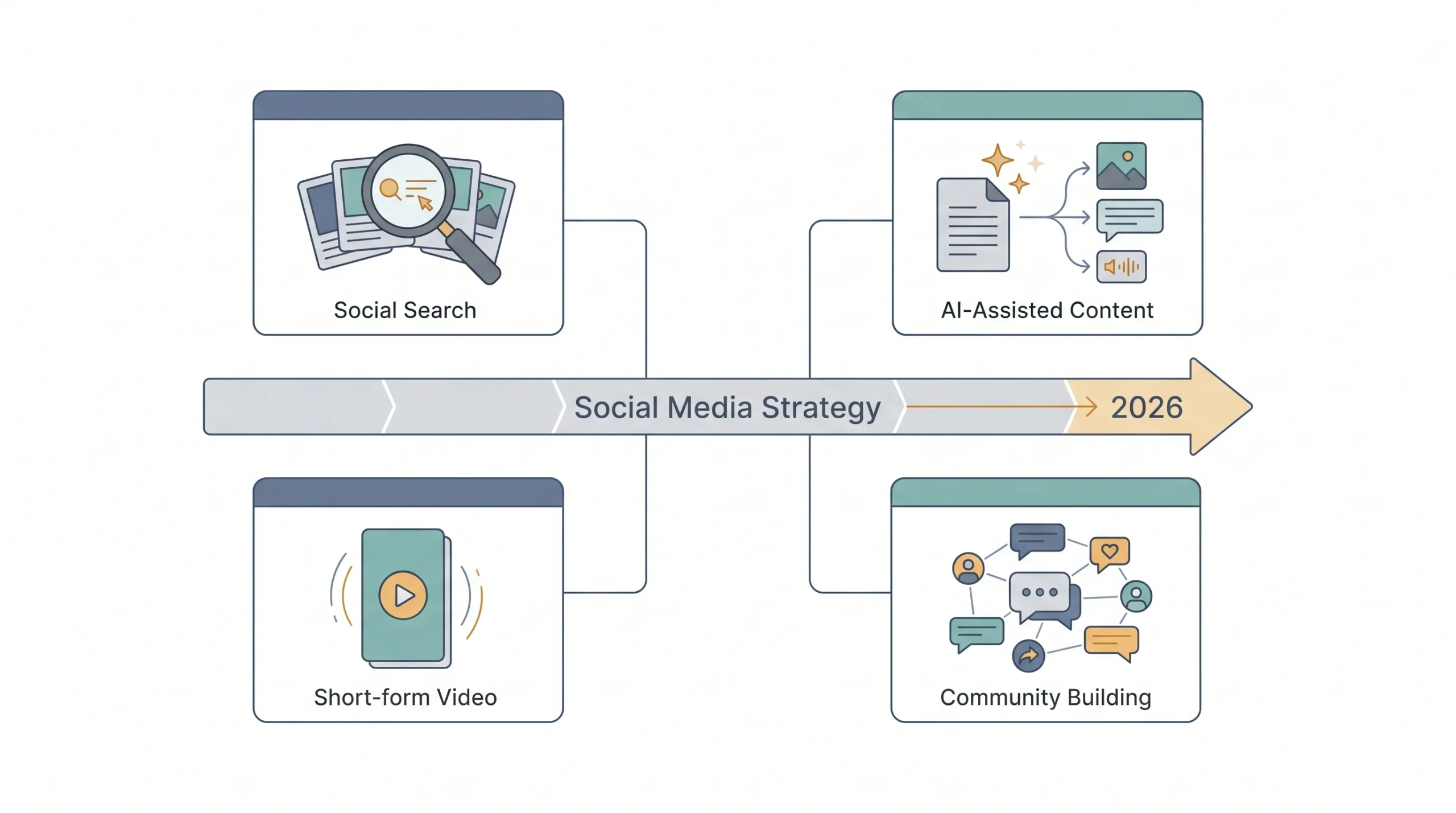
A few shifts worth actually paying attention to, without treating any of them as a mandatory pivot overnight.
Social platforms are increasingly functioning like search engines. People are searching directly within Instagram, TikTok, and even LinkedIn instead of opening Google first for certain kinds of queries. That makes captions, alt text, and keyword-aware copy worth more attention than they used to get.
AI tools are showing up everywhere in content production now, mostly for drafting and repurposing content faster. That’s useful, but the brands getting real value out of it are still keeping a human hand on final editing and voice. AI-drafted content that goes out untouched tends to read flat, and audiences notice.
Short-form video is still leading for discovery, no real argument there. But there’s a pull back toward longer-form and community-focused content for retention, once someone’s already found the brand and needs a reason to stick around.
None of these are reasons to blow up an existing strategy overnight. Treat them as things to test in small doses before committing real budget to a full pivot.
Common Mistakes to Avoid When Building a Social Media Strategy
A handful of mistakes show up again and again, across pretty much every industry.
Table: Common Mistakes vs Better Approach
| Mistake | Better approach |
|---|---|
| Being on every platform at once | Pick 2 to 3 platforms based on actual audience data |
| Copy-pasting the same content everywhere | Adapt format and tone for each platform |
| Chasing vanity metrics | Track metrics tied directly to business goals |
| No content calendar | Build a repeatable production workflow |
| Treating strategy as one-and-done | Review and adjust it every quarter |
None of these mistakes are complicated to fix once they’re spotted. The hard part is actually spotting them before three months of wasted effort go by.
Conclusion
A social media strategy isn’t a document that gets finished once and filed away. It’s closer to a system, one that keeps getting refined as real data comes in from real posts and real people responding to them. The brands that get this right aren’t the ones with the flashiest content. They’re the ones willing to sit down, write the plan out, and actually check whether it’s working every few weeks.
Going back to where this started: the gap isn’t between brands that post and brands that don’t. Almost everyone’s posting something. The gap is between brands posting with a plan behind it and brands just filling a calendar because silence feels worse than mediocre content. Don’t try to build all eleven steps perfectly in one sitting. Start with the audit and pick one goal this week. The rest builds from there.
Frequently Asked Questions
How long does it take to build a social media strategy?
For a small business, a solid first draft usually takes anywhere from a few days to two weeks, depending on how much of the audit and competitor research is already done. It doesn’t need to be perfect on the first pass. It needs to be usable, and then it gets refined once real data starts coming in.
How often should a social media strategy be updated?
A full review once a quarter works well for most brands, with lighter monthly check-ins in between to catch anything urgent. Platforms change, audience behavior shifts, and a strategy that made sense six months ago might not fit anymore.
What’s the difference between a social media strategy and a content calendar?
A strategy is the “why,” the reasoning connecting business goals to platform choice, audience, and content direction. A content calendar is the “what” and “when,” the actual schedule of posts. One doesn’t work without the other, but they’re not the same document.
Do small businesses need a social media strategy on every platform?
No, and trying to be everywhere usually backfires. Two or three platforms, chosen based on where the actual target audience spends time, tend to outperform a scattered presence across five or six.
How much should a small business budget for social media?
There’s no fixed number that fits every business. It depends on the goal. Awareness-focused goals usually need more paid spend to accelerate reach, while community-focused goals can lean more heavily on organic effort and less on ad dollars.
What are the most important social media KPIs to track?
Whichever ones connect directly back to the goal that was set. Reach and impressions matter for awareness goals. Click-through rate and landing page visits matter for lead generation. Conversion rate and cost per acquisition matter for sales. Tracking metrics unrelated to the actual goal wastes time.
Can a social media strategy work without paid ads?
Yes, particularly for community-building and engagement-focused goals, though it usually takes longer and requires more consistent organic effort. For faster awareness or conversion goals, some paid spend tends to speed things up considerably.