


Most people don’t sit down to plan content. They sit down to fill a blank calendar because someone said “we need three posts this week” and now it’s Tuesday night and nobody has a topic. So you write whatever comes to mind. A tip here, a trend piece there, maybe something about a competitor’s product launch because it felt urgent. Six months later you look back and there’s no shape to any of it. Fifty posts, zero pattern, and readers who found one article through Google and never came back because there was nothing else for them to click into.
Nobody sets out to build a messy blog on purpose. It happens gradually, one deadline at a time, until one day someone asks “does this connect to anything else we’ve written” and the honest answer is no. That’s the actual problem content pillars solve. Not “brand consistency” in the abstract sense agencies love to throw around, but the very practical issue of not knowing what to write next, and readers landing on your site with nowhere else to go. A content pillar gives you a structure to build around instead of guessing every single week. It’s the difference between a library with a filing system and a pile of books on the floor.
Here’s the thing nobody tells beginners: content pillars aren’t some clever hack. They’re basically what a good librarian does with books, except applied to a blog. Group similar things together, connect them, make it easy for someone to go from one thing to the next thing they’d want. That’s it. The SEO benefits and the traffic numbers come later, as a side effect of doing that grouping properly. Most people get this backwards. They chase the SEO benefit first and skip the actual organizing, which is why so many “content pillar strategies” fall apart within a few months.
This post covers what a content pillar actually is (and why the term gets used two different ways, which trips up almost everyone), why it matters for your traffic and your sanity, and a real step-by-step process for building one, from the first Google search to the moment you hit publish.
What Is a Content Pillar?
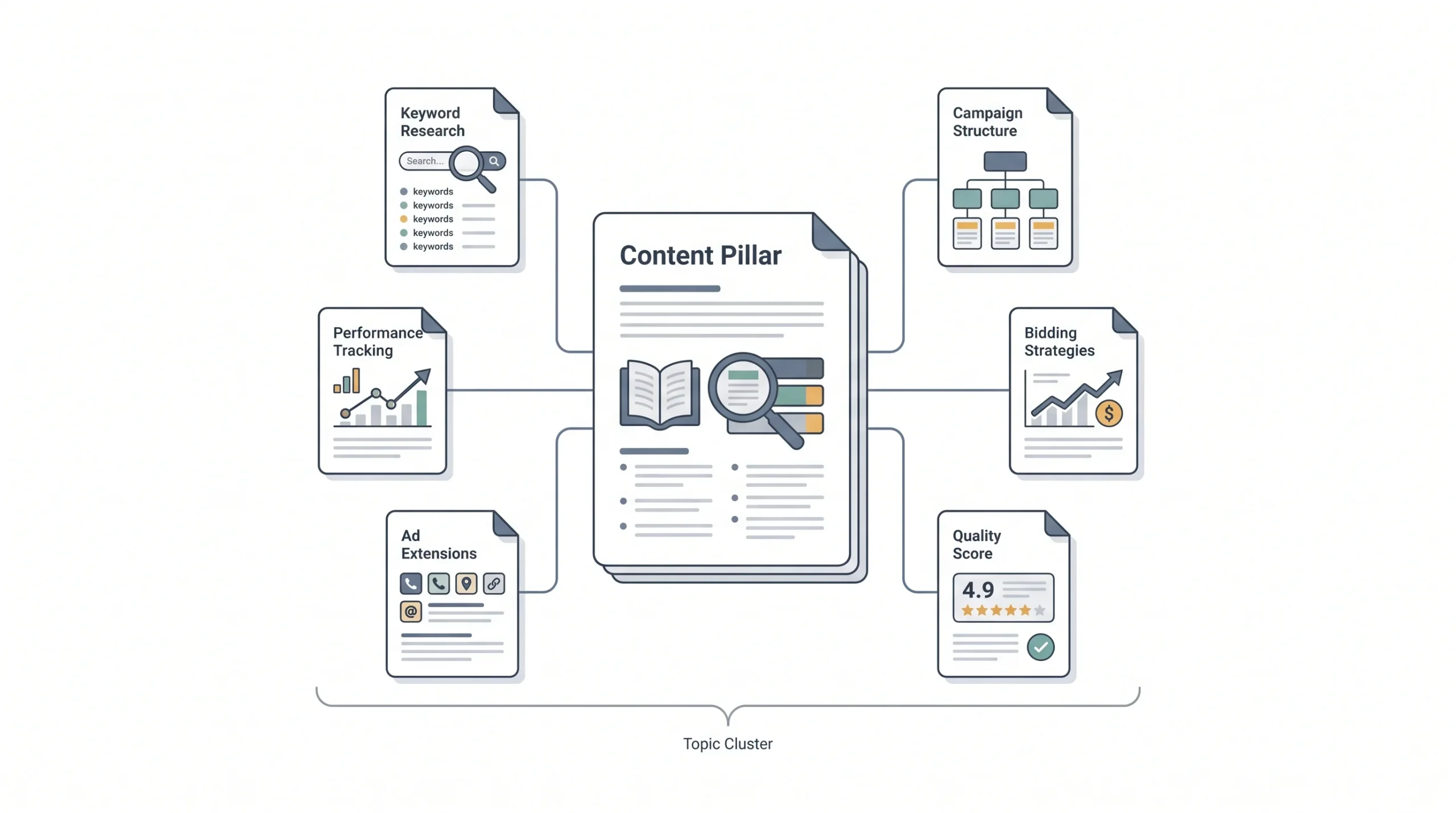
Here’s the short version: a content pillar is a core theme that your content strategy is organized around. Something broad enough to support dozens of articles, but specific enough that it actually means something. “Marketing” is not a content pillar. “Google Ads bidding strategies” is closer. “PPC advertising” as a whole, with bidding, campaign structure, and Quality Score living underneath it, that’s a pillar.
Now here’s where it gets confusing, and honestly, most articles online don’t clear this up. The term “content pillar” gets used in two different ways depending on who’s talking.
Social media people use it to mean a theme or category, like “educational posts,” “behind-the-scenes,” or “customer stories.” It’s a bucket you sort content into. No single page or asset represents it, it’s just a lens you use when planning what to post.
SEO and content marketing people use “content pillar” (or “pillar page,” “pillar content”) to mean an actual page. A long, comprehensive piece of writing that covers a topic in full and links out to smaller articles that go deeper on specific pieces of it.
Both are legit. Both get called “content pillars” constantly, and that’s exactly why people get confused mid-conversation. Someone says “let’s build a content pillar for SEO” and one person starts thinking about a theme for the content calendar while the other starts outlining a 5,000-word page. This post covers both, because if you’re building a real content strategy, you need the theme first and the page second. One doesn’t work without the other.
Think about it this way. If a pillar is just a theme with no actual page behind it, it’s basically a label. You’ve sorted your content into folders, sure, but nothing on your site is actually serving as the anchor for that folder. Search engines have nothing central to point to, and readers have no single place to start. On the flip side, if you write a long comprehensive page without first deciding it belongs to a real theme with real subtopics underneath it, you end up with one really long blog post sitting by itself. It might be good. It’s just not a pillar, because there’s no cluster around it, no smaller pieces feeding into it, no system.
So a genuine content pillar strategy needs both halves working together. The theme decides what you’re building authority around. The page is the physical proof of that authority, the thing Google crawls and readers land on. Everything else described in this post, the clusters, the linking, the promotion, all of it exists to connect those two halves properly.
If someone tells you “write a content pillar,” ask them whether they mean a theme or a page. Half the confused briefs in content marketing come from that one ambiguity.
Content Pillar vs. Pillar Page vs. Topic Cluster vs. Cornerstone Content
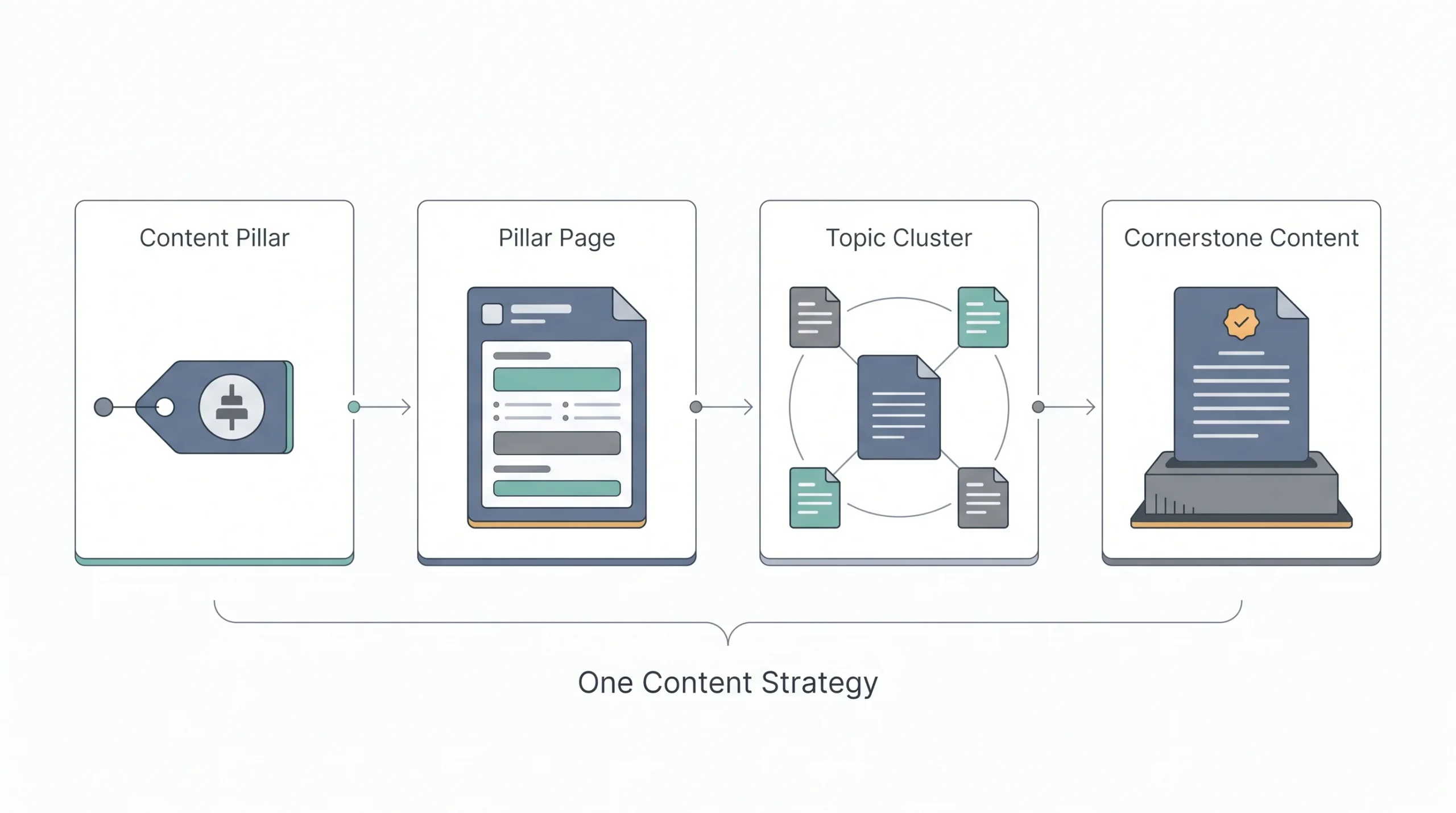
Since these four terms get thrown around like they’re interchangeable, and they’re not, here’s what each one actually means.
A content pillar is the theme. It’s conceptual. You don’t publish a “content pillar,” you organize content under one.
A pillar page is the physical thing. One long, in-depth webpage that covers a topic broadly enough to act as the hub for everything else related to it. If your pillar is “PPC Advertising,” your pillar page is the actual article titled something like “The Complete Guide to PPC Advertising” that lives on your blog.
A topic cluster is the linking structure that connects a pillar page to a bunch of smaller, more specific articles. The pillar page links out to each cluster article, and each cluster article links back to the pillar page. That two-way linking is what tells Google (and readers) that all these pages belong together and that your site actually knows what it’s talking about on this topic.
Cornerstone content is a slightly older term, mostly from the Yoast SEO world, and it overlaps heavily with pillar pages. It refers to your most important pages, the ones you want to rank for your most valuable keywords. In practice, most cornerstone content and pillar pages end up being the same pages wearing different names.
Where people get tripped up is thinking these four terms describe four separate things they need to build. They don’t. They describe four angles on the same project. You pick a theme (content pillar), you write a hub page for it (pillar page), you connect it to smaller articles (topic cluster), and once it’s live and performing, it becomes one of your most valuable assets (cornerstone content). Same project, four names depending on which part of it you’re talking about at that moment.
It’s worth mentioning that “pillar content” gets used loosely too, sometimes to mean the pillar page itself, sometimes to mean the whole system including the clusters. Don’t get hung up on being precise about which exact term applies in casual conversation. Just be precise about what you’re actually building, because that’s what determines whether the strategy works.
| Term | What it is | Format | Primary purpose |
|---|---|---|---|
| Content pillar | A core theme/category | Concept, not a single asset | Organizes what you create content about |
| Pillar page | A long-form page on one core topic | Single in-depth webpage | Ranks broadly, links to supporting content |
| Topic cluster | The linking structure around a pillar page | Pillar page + linked subtopic articles | Builds topical authority with search engines |
| Cornerstone content | Your most important, evergreen pages | Usually overlaps with pillar pages | Anchors site navigation and internal linking |
Once you’ve got this sorted, the rest of this post gets a lot easier to follow, because “building a content pillar” really means two things happening together: picking the theme, and building the page that represents it.
Why Content Pillars Matter
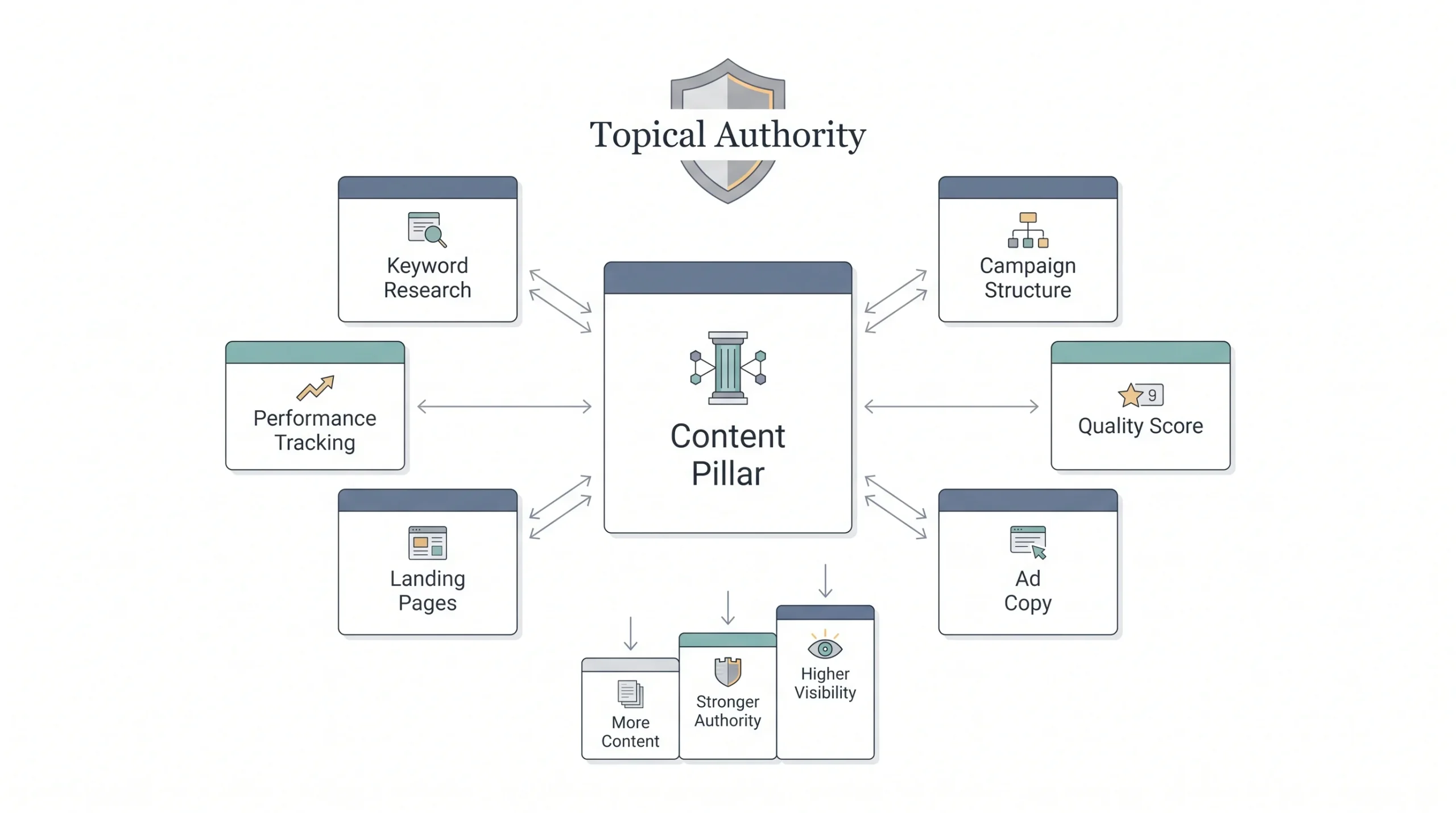
Google doesn’t rank pages in isolation anymore. It hasn’t for a while now. It’s trying to figure out whether your entire site knows what it’s talking about on a topic, not just whether one page has the right keyword in the title. That’s the whole idea behind topical authority. If you’ve got one page about “Google Ads bidding” and nothing else related to Google Ads anywhere on your site, that page has to fight alone. If that same page sits inside a cluster of ten related articles, all linking to and from each other, Google reads that as depth. And depth ranks.
There’s a planning benefit too, and honestly this one matters more day to day than the SEO angle. Once you’ve got your pillars set, you stop asking “what do we post this week” and start asking “which pillar needs content.” That’s a completely different mental exercise. One is a blank page. The other is filling in a system that already exists.
Then there’s what happens to the actual reader. Someone lands on your “Quality Score” article from a Google search. If there’s nothing else to click into, they read it, maybe bookmark it, and leave. If your pillar page and cluster are set up right, that same reader can go from Quality Score to bidding strategies to campaign structure without ever leaving your site. More pages per session. More time on site. Both of those are things Google notices, and both of those are things that turn a random visitor into someone who actually remembers your brand.
And underneath all of it, pillars force you to connect content to business goals instead of whatever topic feels interesting that day. A pillar built around “Working With Our Agency” isn’t there because it’s fun to write. It’s there because it moves someone from reading to booking a call.
There’s also a compounding effect that doesn’t show up right away but matters a lot over time. Every new cluster article you publish makes the pillar page it links to a little stronger, and a stronger pillar page makes every cluster article under it easier to rank, since it’s now getting internal link authority passed down from a page Google already trusts. Ten unconnected blog posts don’t compound like that. Each one starts from zero. Ten cluster articles under one pillar build on each other. That’s the actual mechanical reason pillar-based sites tend to outperform sites publishing the same volume of disconnected content.
None of this happens overnight, to be fair. A brand new pillar page competing against sites that have been building topical authority for years isn’t going to outrank them in month one. But the trajectory is different. A disconnected blog plateaus. A pillar-based one keeps climbing as the cluster fills in.
Types of Content Pillars
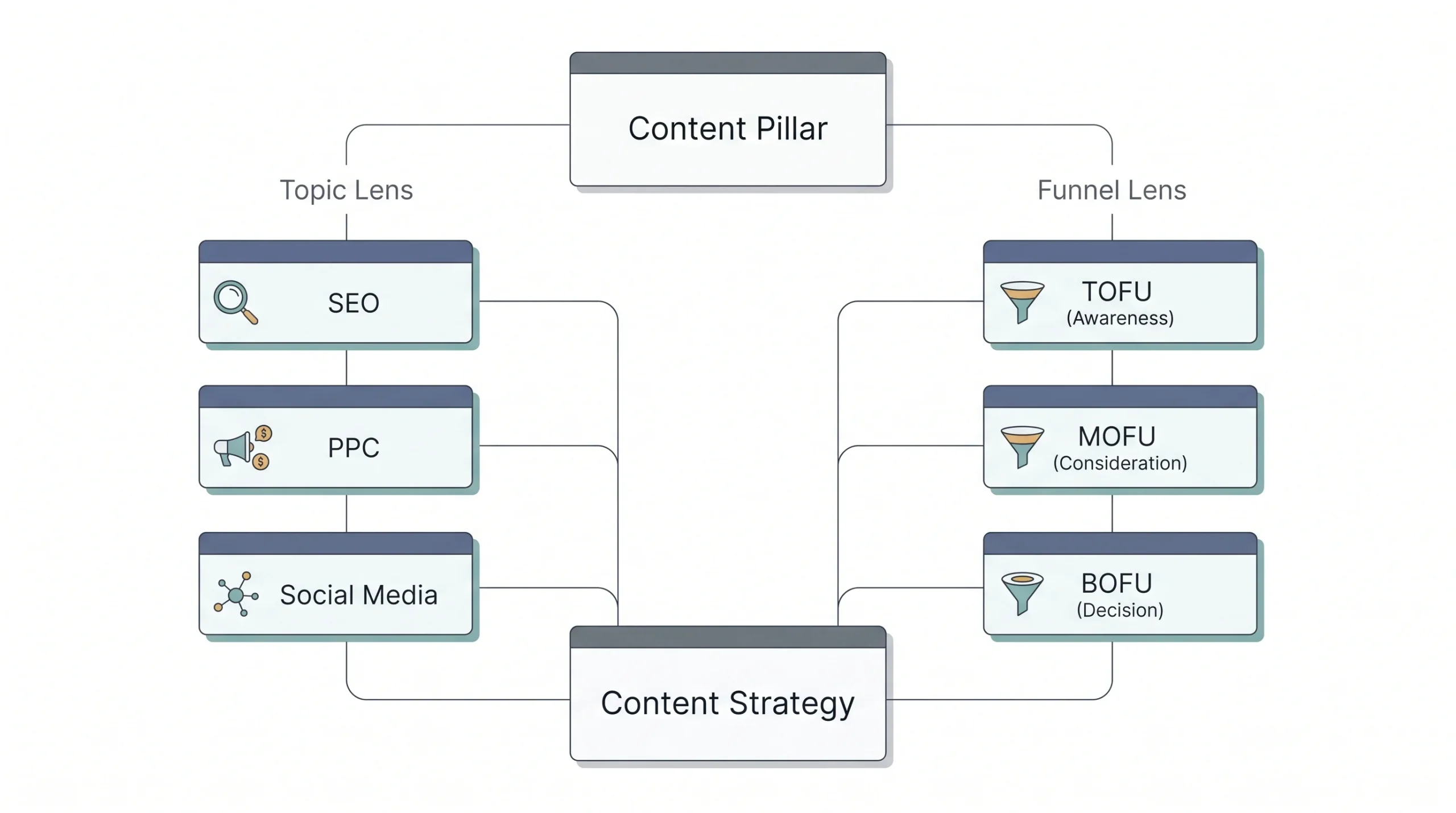
Pillars usually get organized two ways, and the honest answer is you want both lenses running at once, not picking one over the other.
The first lens is topic. What subject is this pillar about? SEO, PPC, social media, email marketing, whatever fits your business.
The second lens is funnel stage. Is this pillar meant to introduce someone to a problem they didn’t know they had (top of funnel), help them compare their options once they know what they need (middle of funnel), or push them toward a decision (bottom of funnel)?
Most solid content strategies map every pillar against both. A pillar about “PPC Advertising” is a topic. But inside it, some articles will be TOFU (what is PPC, basically explaining the concept to someone brand new) and some will be BOFU (why work with an agency instead of running it yourself). Same topic, different funnel jobs.
Beyond the funnel split, pillars also tend to fall into a few recurring types by intent. Educational or how-to pillars, which teach something. Inspirational or brand-story pillars, which build a connection rather than teach a skill. Product or conversion pillars, aimed straight at getting someone to buy or sign up. Community and social proof pillars, built around testimonials, case studies, and user stories. And trend or commentary pillars, which react to what’s happening in the industry right now.
| Funnel stage | Pillar goal | Example content pillar | Example content format |
|---|---|---|---|
| TOFU | Awareness | “Digital Marketing Basics” | Beginner guides, explainer posts |
| MOFU | Consideration | “Choosing the Right Ad Platform” | Comparison posts, case studies |
| BOFU | Decision | “Working With Our Agency” | Service pages, testimonials, pricing guides |
None of these types are mutually exclusive, by the way. A single pillar page can carry TOFU content at the top (the basic explainer) and BOFU content near the bottom (a section on why hiring help beats doing it alone). That’s actually how most good pillar pages are structured. Start wide, narrow down as the reader keeps scrolling.
Worth saying too, not every pillar needs to be a mix of all these types in equal amounts. A brand-new blog with no traffic yet usually gets more value leaning hard into educational, TOFU-heavy pillars first, since that’s what actually gets found in search when nobody knows your name yet. A more established brand with steady traffic can afford to lean more into conversion and community pillars, because it already has an audience showing up, it just needs to convert them. Knowing which stage your blog is at should shape which pillar types you prioritize, not just picking one of each because it looks balanced on paper.
How Many Content Pillars Do You Need?
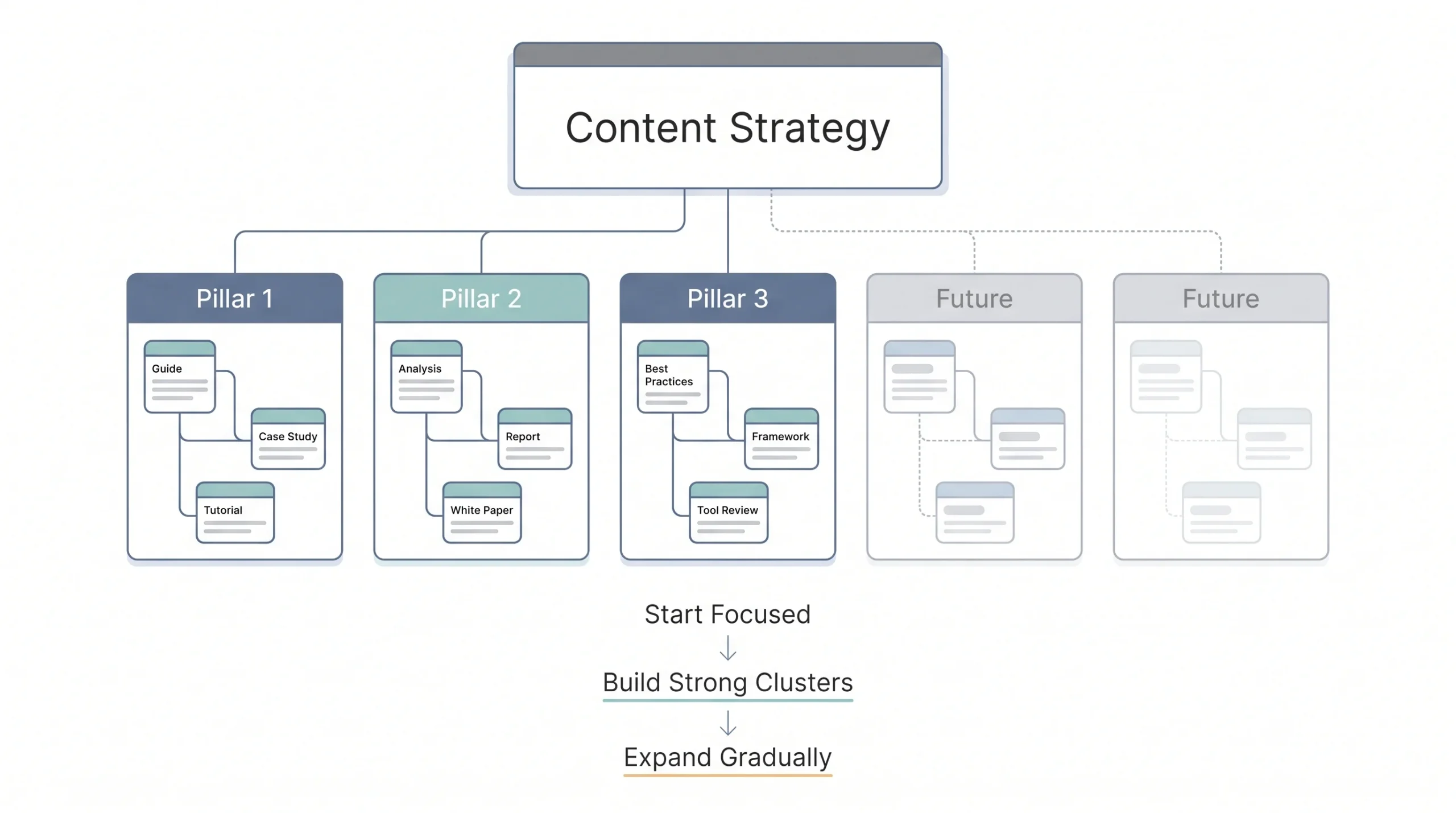
Somewhere between three and five is the range that works for most blogs and most brands. Fewer than three and everything starts sounding repetitive because you don’t have enough categories to rotate through. More than five and you start splitting your internal linking and your SEO authority so thin that no single pillar gets strong enough to actually rank for anything competitive.
The right number really comes down to how big your business is and how many distinct services or products you’re covering. A one-person consultancy probably needs three pillars. An agency running SEO, PPC, social, and email for clients might genuinely need five, one for each service line, because trying to cram email marketing content under a “PPC” pillar makes no sense to anyone. It also comes down to how much content your team can realistically produce. Five pillars sitting mostly empty look worse than three pillars that are actually full of solid cluster content.
There’s a rough way to sanity check the number that works well in practice. Ask whether each pillar can realistically support at least eight to ten cluster articles over the next year without repeating itself. If a pillar can only stretch to three or four before running dry, it’s probably not a real pillar, it might just be a subtopic of a bigger one you haven’t identified yet. And if it’s easy to picture twenty or thirty distinct articles under a single pillar, there’s a decent chance it should actually split into two.
It’s also fine, and honestly normal, to start with fewer pillars than you’ll eventually have. Launching with two solid pillars and adding a third once those are mature beats spreading thin across five from day one. Nothing says the number has to stay fixed forever either. As a business grows into new services or a blog’s audience shifts, pillars can be added, merged, or occasionally retired if a topic stops being relevant.
How to Build a Content Pillar: Step-by-Step Framework
This is the part that actually matters, so here’s the process from start to finish. It’s not complicated, but skipping steps is exactly how people end up with a “pillar page” that’s just a long blog post with no strategy behind it.
Step 1: Audit Your Existing Content
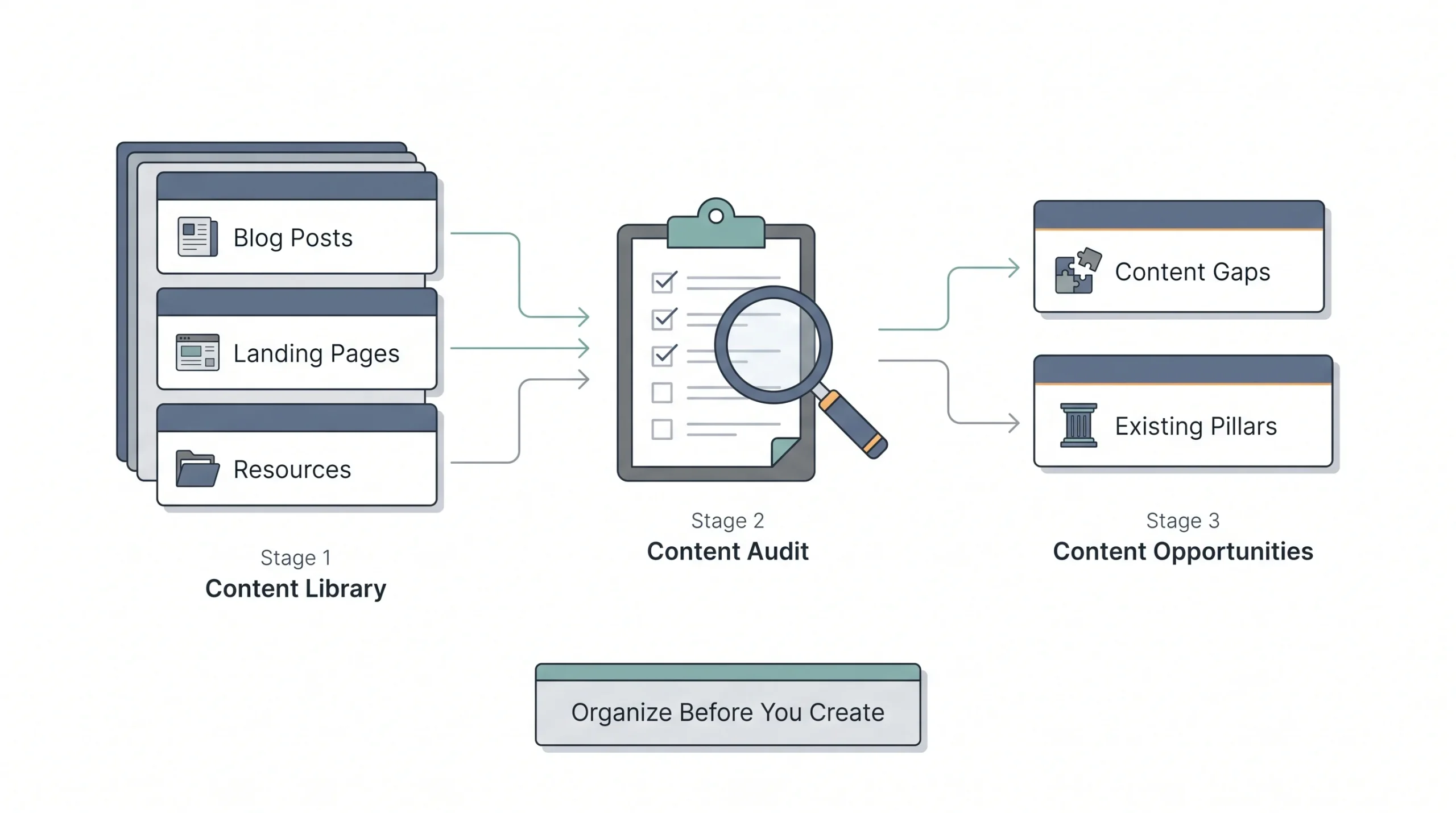
Before creating anything new, look at what’s already there. Pull every blog post, landing page, and piece of content your site has published and group it loosely by subject. A simple spreadsheet works fine for this, one row per URL, a column for rough topic, a column for approximate word count, maybe a column for whatever traffic data you have access to.
This step alone usually reveals two things. First, gaps, topics you should be covering but aren’t. Second, and just as often, hidden pillars, a theme you’ve already been writing about without realizing you had ten posts on it. If you’ve already written seven articles that touch on SEO in some way, you don’t need to invent a new pillar. You need to formalize the one that’s basically already sitting there.
This is also the point where you’ll notice content that doesn’t fit anywhere. Old posts about a one-off topic nobody asked for twice, or something published years ago that no longer matches where the business is headed. Nothing wrong with leaving those alone for now, but don’t force them into a pillar structure just because they exist. A content pillar strategy works best when it’s honest about what actually deserves ongoing investment, not when it tries to retrofit every old post into a tidy system.
Step 2: Research Your Audience and Competitors
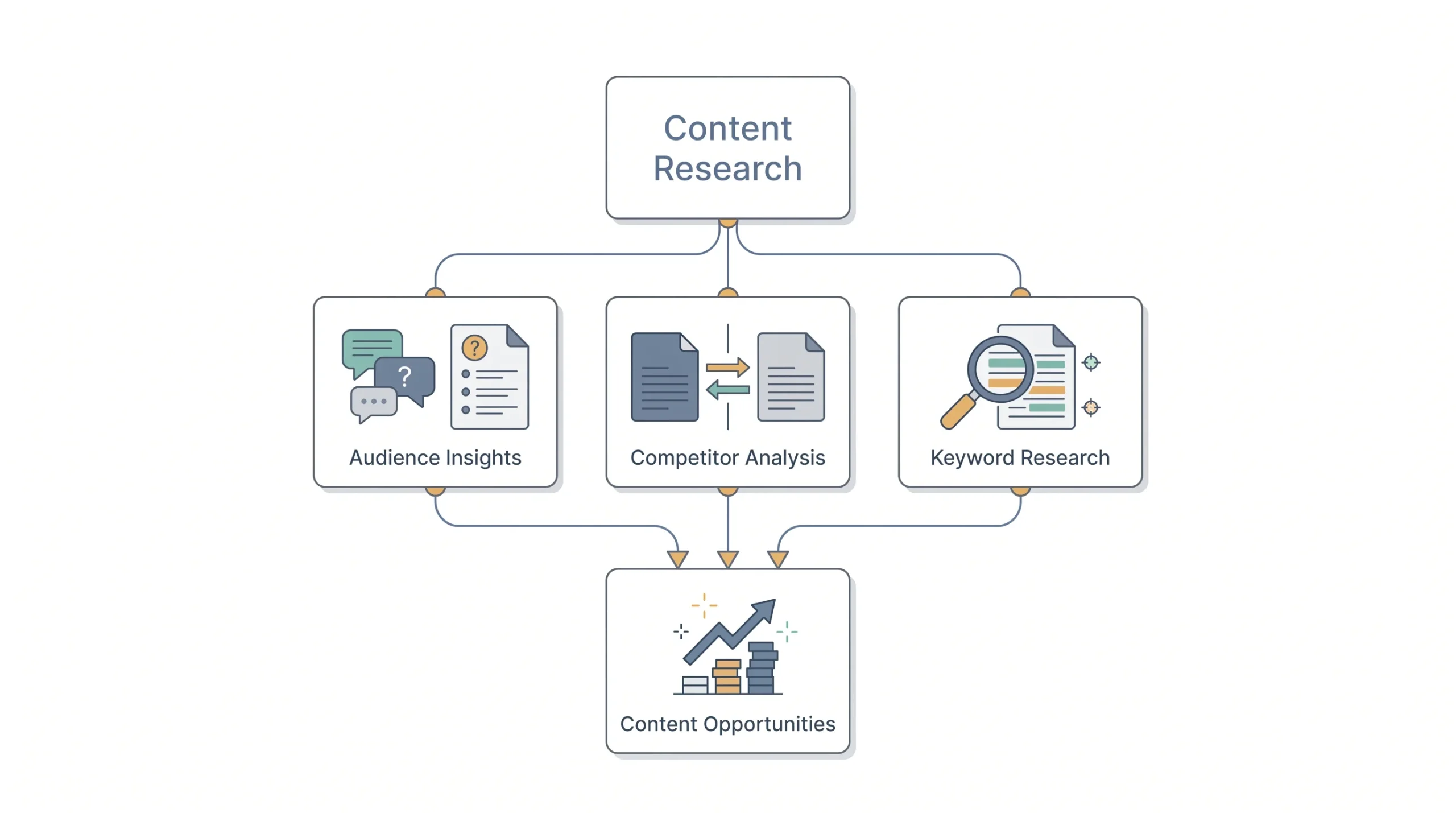
This is where you figure out what people are actually searching for instead of guessing. Look at the questions your audience asks in comments, emails, sales calls, wherever that feedback lives. If you run an agency, your own sales calls are honestly one of the best keyword research tools you have, because prospects say the exact phrases they’d type into Google, just out loud instead.
Look at what your competitors are ranking for on the same broad topics you’re considering too. Not to copy them, but to understand the shape of the space. If three competitors all have a comprehensive PPC guide and none of them cover Quality Score properly, that’s not a reason to skip the topic, that’s the gap you write into.
Basic keyword research fits here as well. Not to obsess over search volume numbers, but to get a sense of what phrases real people type into Google when they’re trying to solve the problem your pillar is about. Pay attention to the “People also ask” boxes and related searches at the bottom of a results page too. Those are basically Google handing you a list of subtopics for free.
Step 3: Choose Your Core Pillar Topics
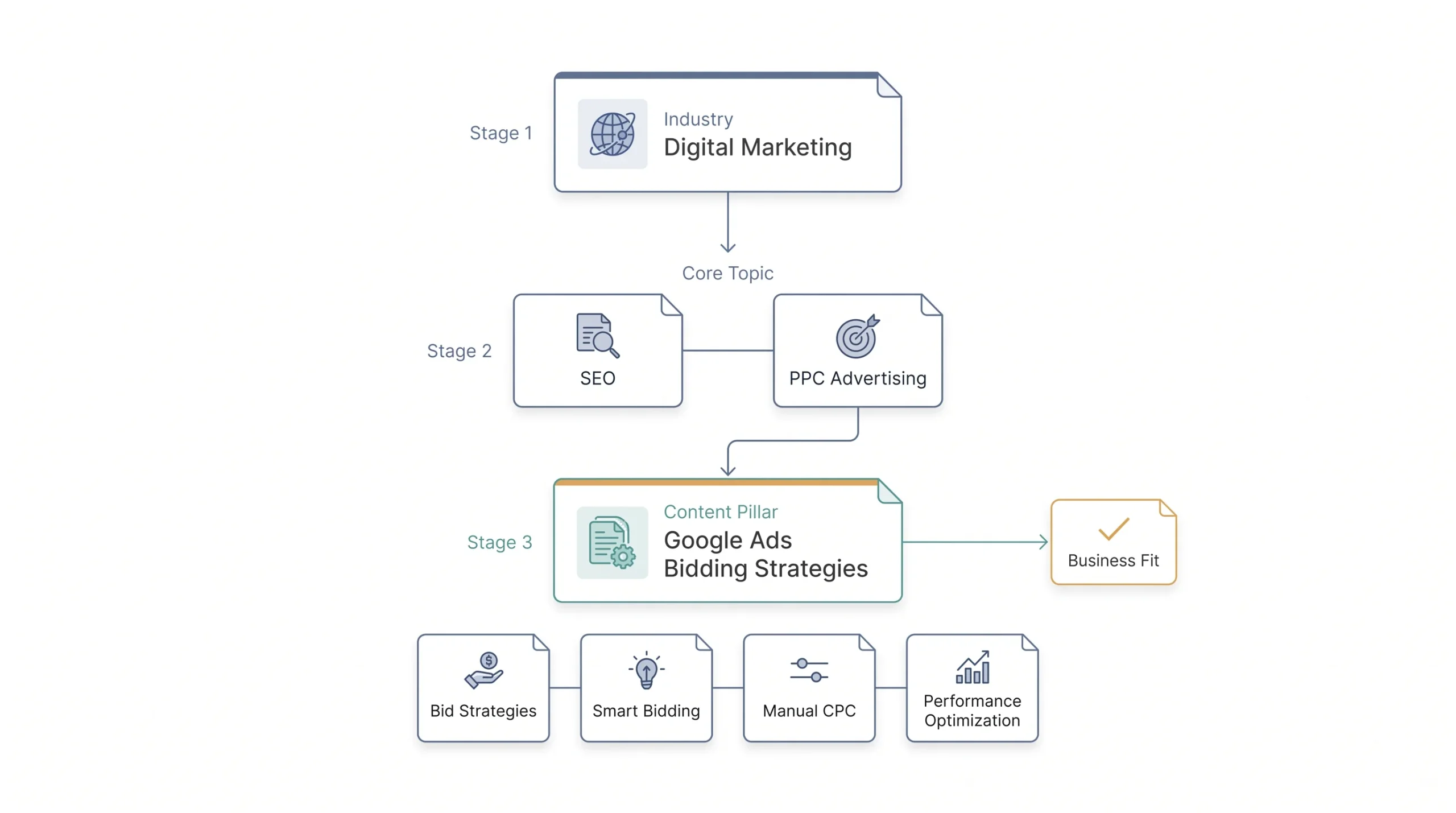
Picking the right scope for a pillar is trickier than it sounds. Too broad, and you can never cover it fully. Too narrow, and you don’t have enough subtopics to build a cluster around.
One way to think about this is in tiers. Start with your broad industry, something like “digital marketing.” That’s tier one, way too big to be a pillar. Narrow it to tier two, something like “PPC advertising” or “SEO.” Still broad, but getting closer. Then narrow again to tier three if needed, like “Google Ads bidding strategies.” That third tier is usually where a genuine pillar sits, broad enough to support real depth, narrow enough that you can actually cover it without writing forever.
A quick test that helps here: can you list at least six or seven distinct subtopics under this pillar without repeating yourself or stretching for filler? If yes, the scope is probably right. If you’re struggling to come up with more than two or three subtopics, the topic is too narrow to be a pillar, it’s really just one cluster article wearing a pillar’s clothes. And if you’re listing thirty subtopics and none of them feel closely related to each other, the topic is too broad and probably needs to split into two or three separate pillars instead of one.
It also helps to sanity check the topic against your actual business. A pillar only earns its place if it eventually connects back to something you sell or something your audience genuinely needs from you long term. Interesting isn’t the same as useful here.
Step 4: Map Your Subtopics and Keyword Clusters
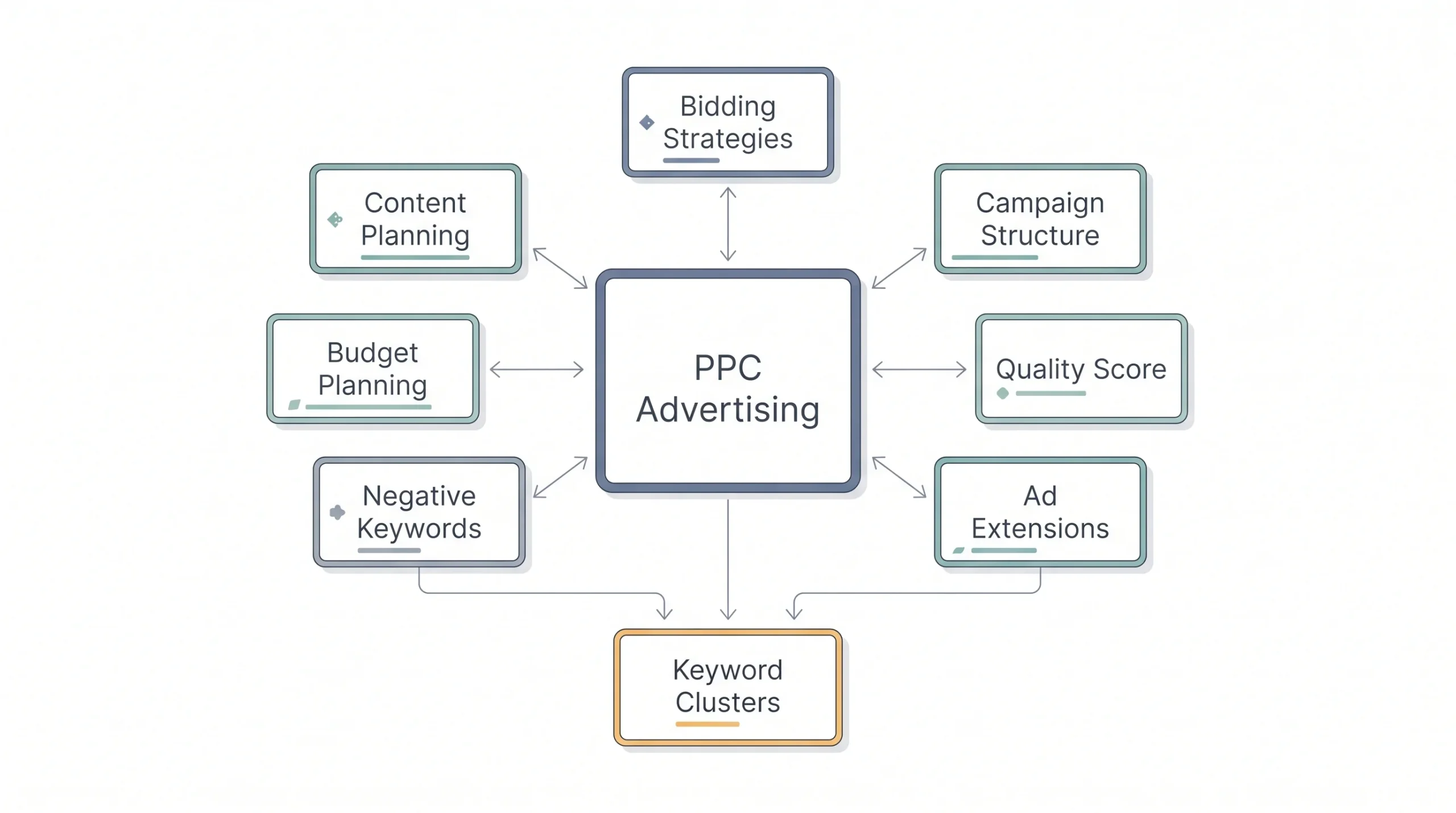
Once the pillar topic is locked, brainstorm everything that could live underneath it. A simple way to do this is mind-mapping. Put the pillar topic in the center, then branch out with every subtopic, question, and related keyword you can think of. Group the ones that overlap. Each group becomes a candidate for a cluster article.
For a “PPC Advertising” pillar, that mapping might turn up bidding strategies, campaign structure, Quality Score, ad extensions, negative keywords, and budget planning, each one specific enough to be its own article, each one clearly belonging under the bigger topic.
Don’t try to nail this list perfectly on the first pass either. Most pillars grow their cluster over months, not all at once. Start with five or six subtopics you’re confident about, publish those, and let audience questions and search data guide which subtopics get added six months down the line. Trying to map out every possible cluster article before writing a single word usually just delays everything.
Step 5: Create the Pillar Page Itself
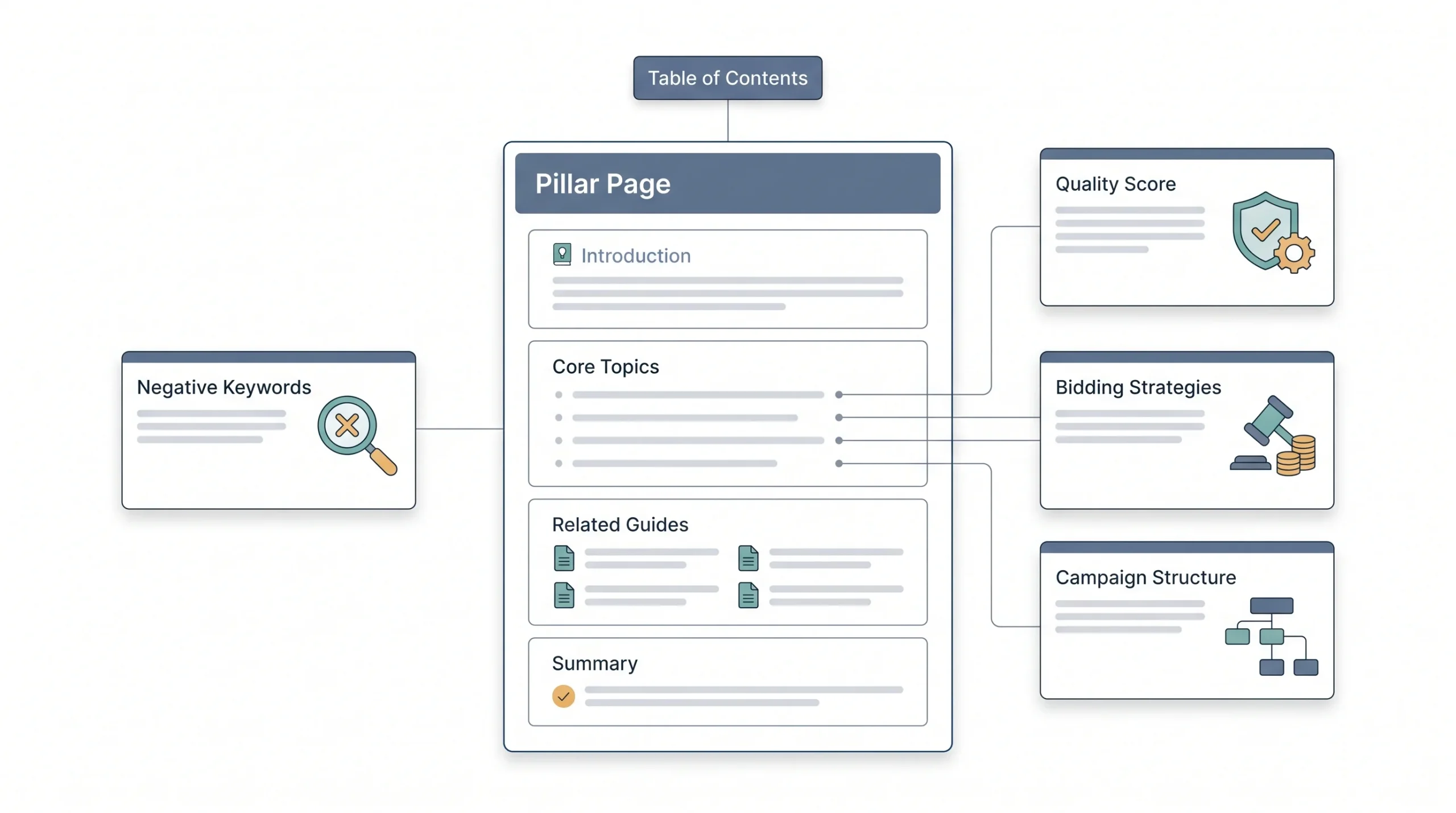
This is the anchor. The pillar page needs to cover its topic comprehensively, not exhaustively on every micro-detail, but broadly enough that someone landing on it gets a real understanding of the whole subject before being pointed toward deeper content.
Structurally, a strong pillar page usually includes a table of contents near the top with jump links, clear H2 and H3 headings for every major subtopic, and enough length to actually do the topic justice. Most solid pillar pages run 3,000 words or more, sometimes a lot more, because covering a broad topic properly just takes space. Length isn’t the goal by itself. It’s a side effect of actually covering the topic properly.
Write the pillar page like it’s the front door to the whole topic, not the final word on every detail. Each section should give a real, useful answer, but it should also make it obvious that there’s more to explore. That’s actually where the cluster links come in naturally. A section on Quality Score inside the pillar page doesn’t need to be a full deep dive, three or four solid paragraphs covering the essentials plus a link out to the dedicated Quality Score article is exactly the right amount. Try to write the full deep dive on every subtopic directly inside the pillar page and you’ll end up with something so long nobody finishes reading it, and you’ll have nothing left to say in the cluster articles anyway.
Step 6: Build Supporting Cluster Content
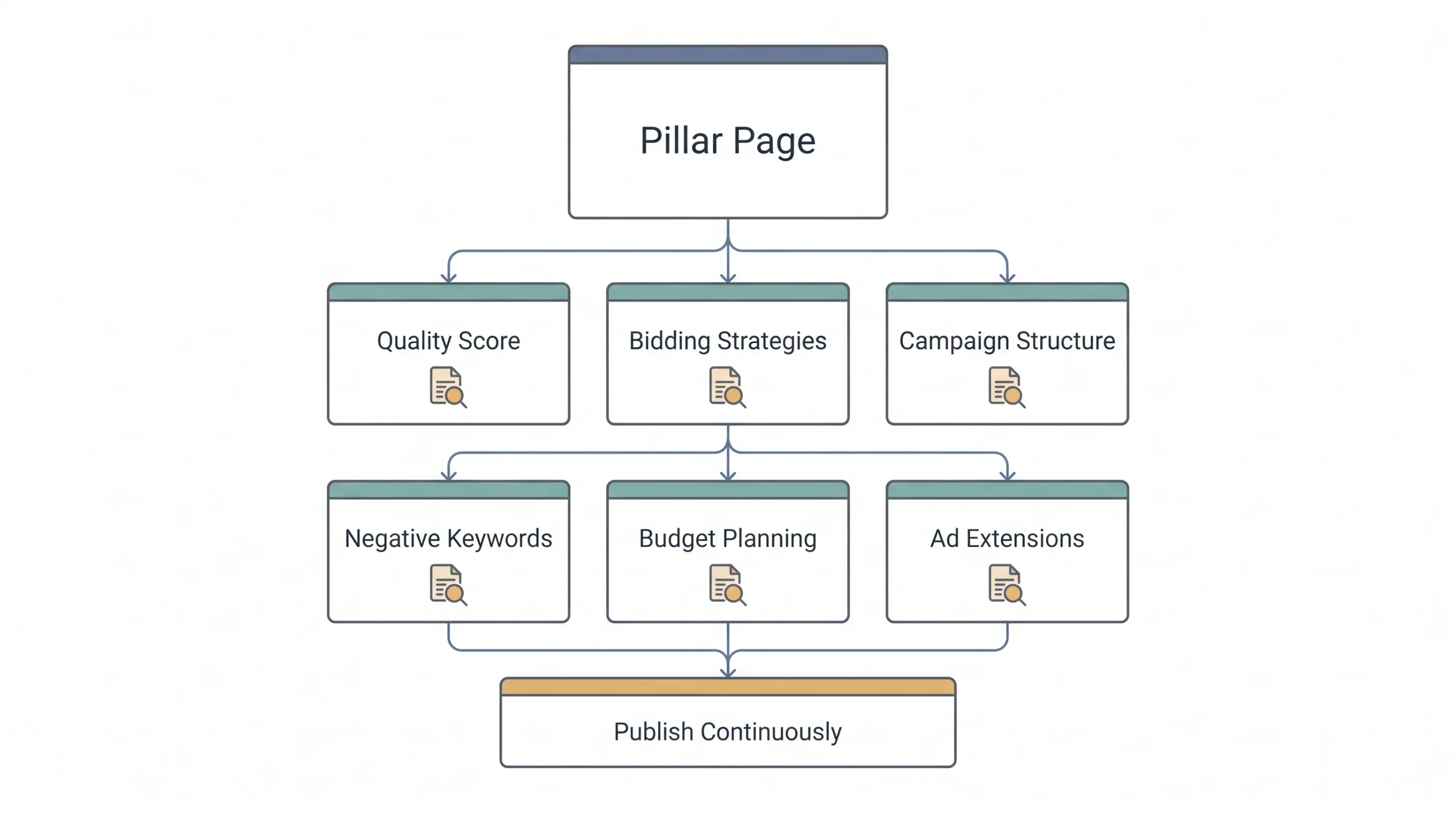
Now write the smaller pieces. Each cluster article takes one subtopic from your mapping in Step 4 and goes deep on just that one thing. A “Quality Score” article doesn’t need to explain what PPC is from scratch, that’s the pillar page’s job. It just needs to nail Quality Score specifically.
This is also where most of your actual publishing volume happens. A pillar page might take real effort to research and write, but you only write it once, or update it periodically. The cluster articles are what you’re publishing week after week, and each one is a much smaller, more manageable piece of writing than the pillar page itself. If you’re planning a content calendar, this is the part that fills most of it.
Keep cluster articles focused. Resist the urge to cover three related subtopics in one article just because they feel connected. Splitting them into separate pieces means more pages, more internal linking opportunities, and more chances to rank for more specific searches. A single article trying to cover bidding strategies, Quality Score, and campaign structure all at once ends up doing a mediocre job at all three instead of a great job at one.
Step 7: Interlink Everything
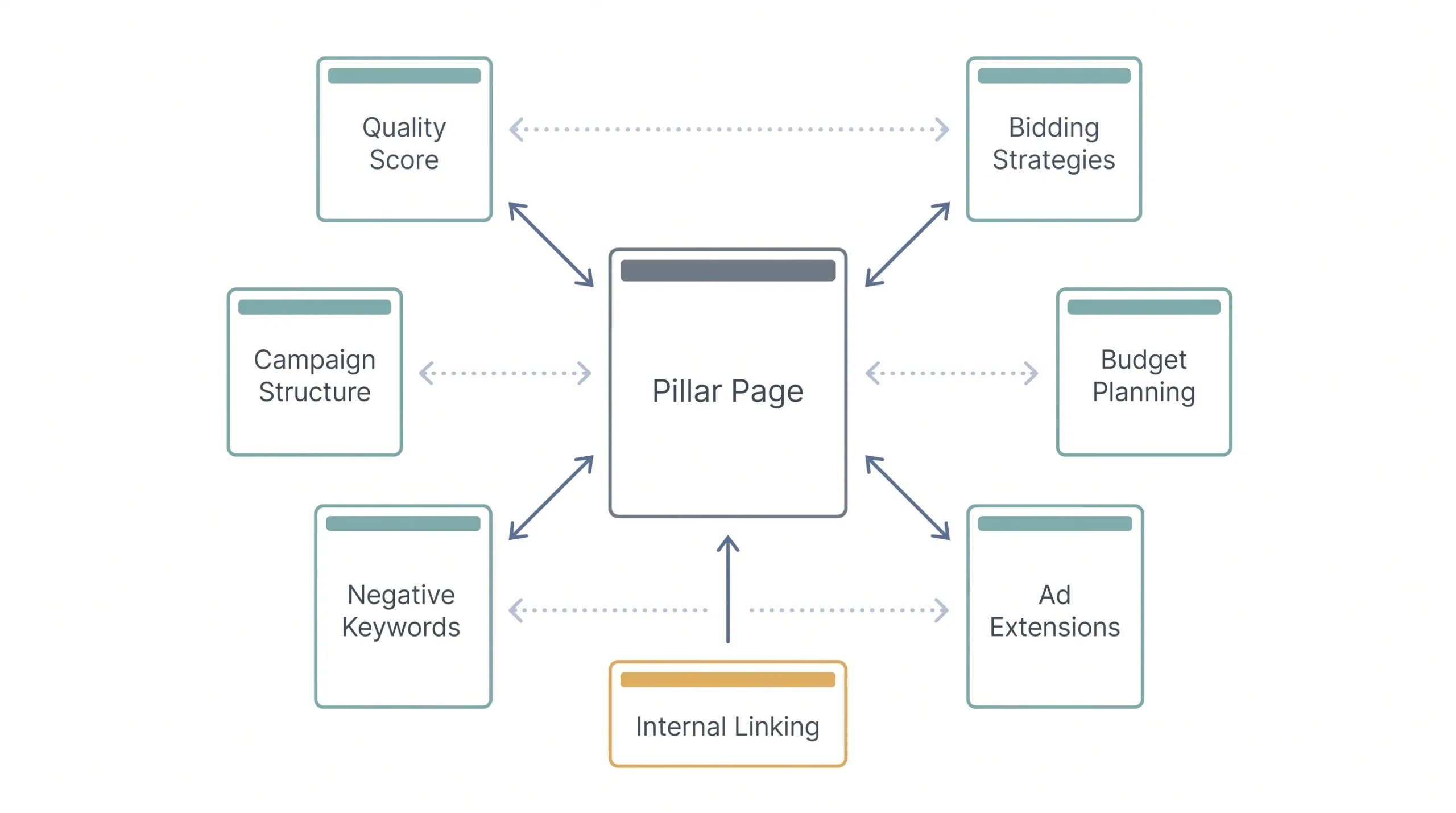
This step is where most people get lazy, and it’s the one that makes or breaks the whole structure. The pillar page has to link out to every cluster article. And every cluster article has to link back to the pillar page. Both directions, every time. Skip this and you don’t have a topic cluster, you just have a bunch of unrelated articles that happen to share a subject. Use anchor text that actually describes what the linked page covers instead of generic phrases like “click here,” since that helps both readers and search engines understand the connection.
Worth going further than the bare minimum too. Cluster articles don’t just need to link back to the pillar page, they should link to each other whenever it’s genuinely relevant. A “bidding strategies” article that naturally references Quality Score partway through should link to that article right there, not just at the very end in a “related posts” list nobody clicks. That kind of contextual linking, in the middle of a sentence where it actually makes sense, tends to get clicked far more than a list of links dumped at the bottom.
And when a new cluster article gets added months after the pillar page was published, go back and add the link into the pillar page itself. It’s easy to publish the new article and forget this step, but an outdated pillar page missing links to your newest content is basically leaving money on the table.
Step 8: Promote and Distribute
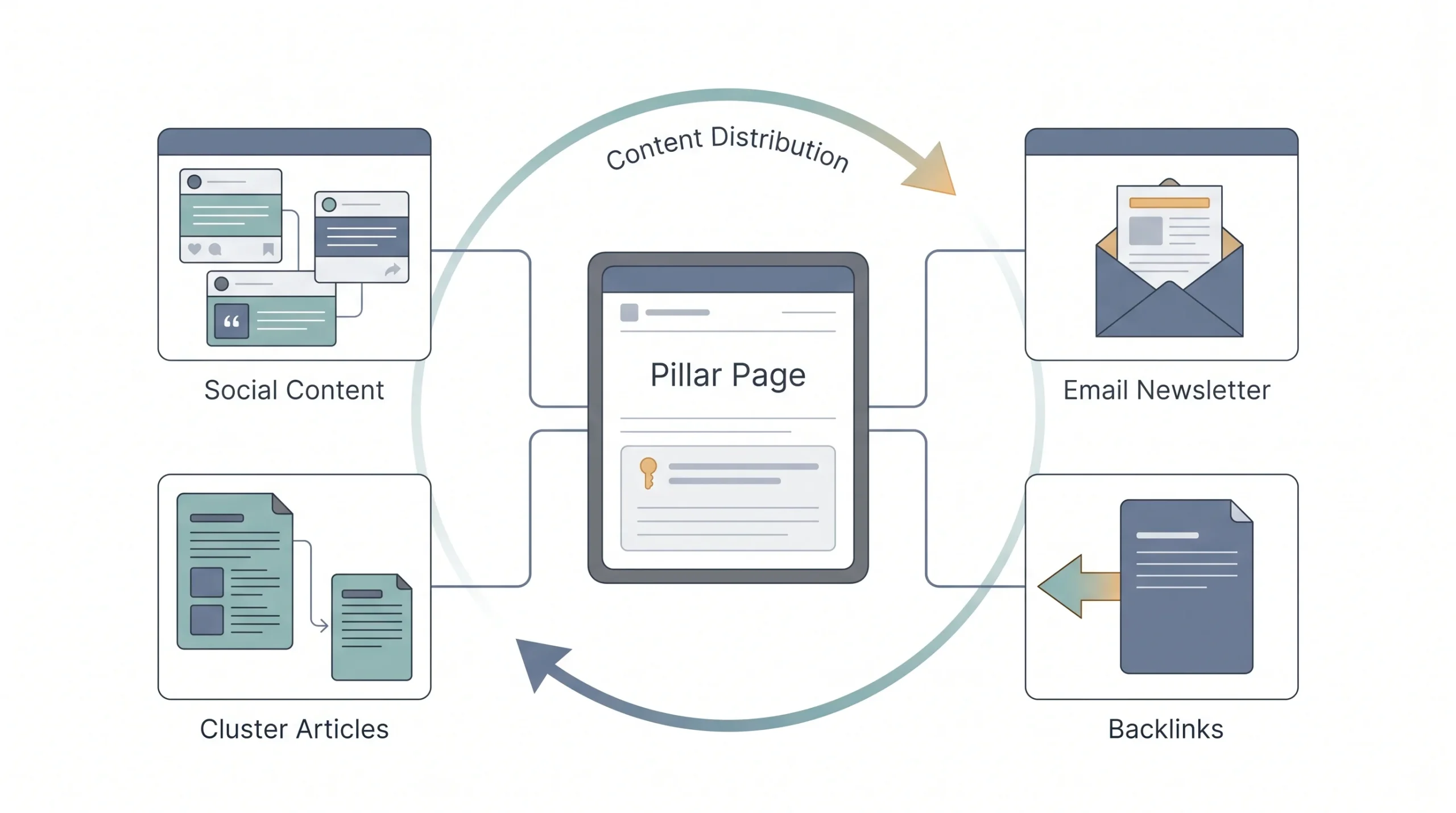
A pillar page doesn’t do its job sitting quietly on your blog waiting to be found. Repurpose it. Pull sections out for social posts, turn key stats or steps into an email, reference it in future cluster articles as they get published. The pillar page is the piece of content you should be linking to most often across every channel you run.
This matters more than people give it credit for, especially early on when the page has no organic traffic yet and no backlinks pointing to it. Every social post, every email, every mention of it somewhere else on your site sends a small signal that this page matters. Over time, those small signals add up, especially if any of that promotion earns an actual backlink from someone else’s site, which does far more for the pillar page’s ranking potential than another cluster article ever will.
Step 9: Measure and Refresh
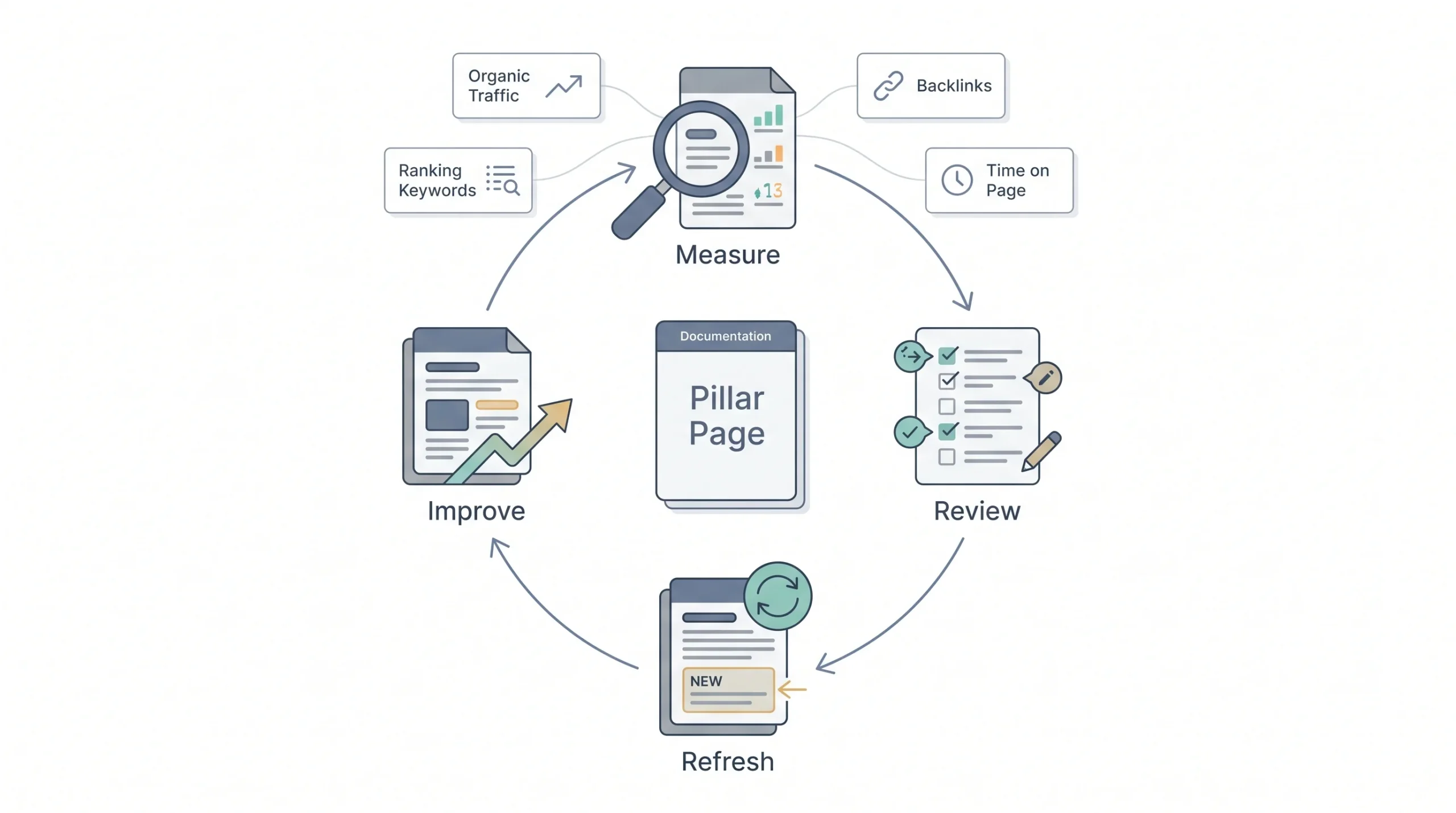
Track organic traffic to the pillar page, time on page, how many ranking keywords it’s picking up, and backlinks pointing to it. And then actually go back and update it. A pillar page from two years ago that still mentions outdated platform features or old pricing isn’t helping anyone, no matter how well it ranked when it was first published.
A reasonable rhythm for most pillars is a real look every six months or so, checking whether the ranking keywords have shifted, whether new cluster articles need linking in, and whether anything in the page itself has gone stale. Platforms like Google Ads change their interface and features often enough that a PPC pillar page written two years ago and never touched again is probably describing screens and settings that don’t even exist anymore. That’s not a small detail, it’s the kind of thing that quietly tanks trust with a reader who notices the mismatch.
A pillar page that never gets updated is just a long blog post with extra steps. Treat it like a living document, not a one-time project.
Content Pillar Examples by Industry
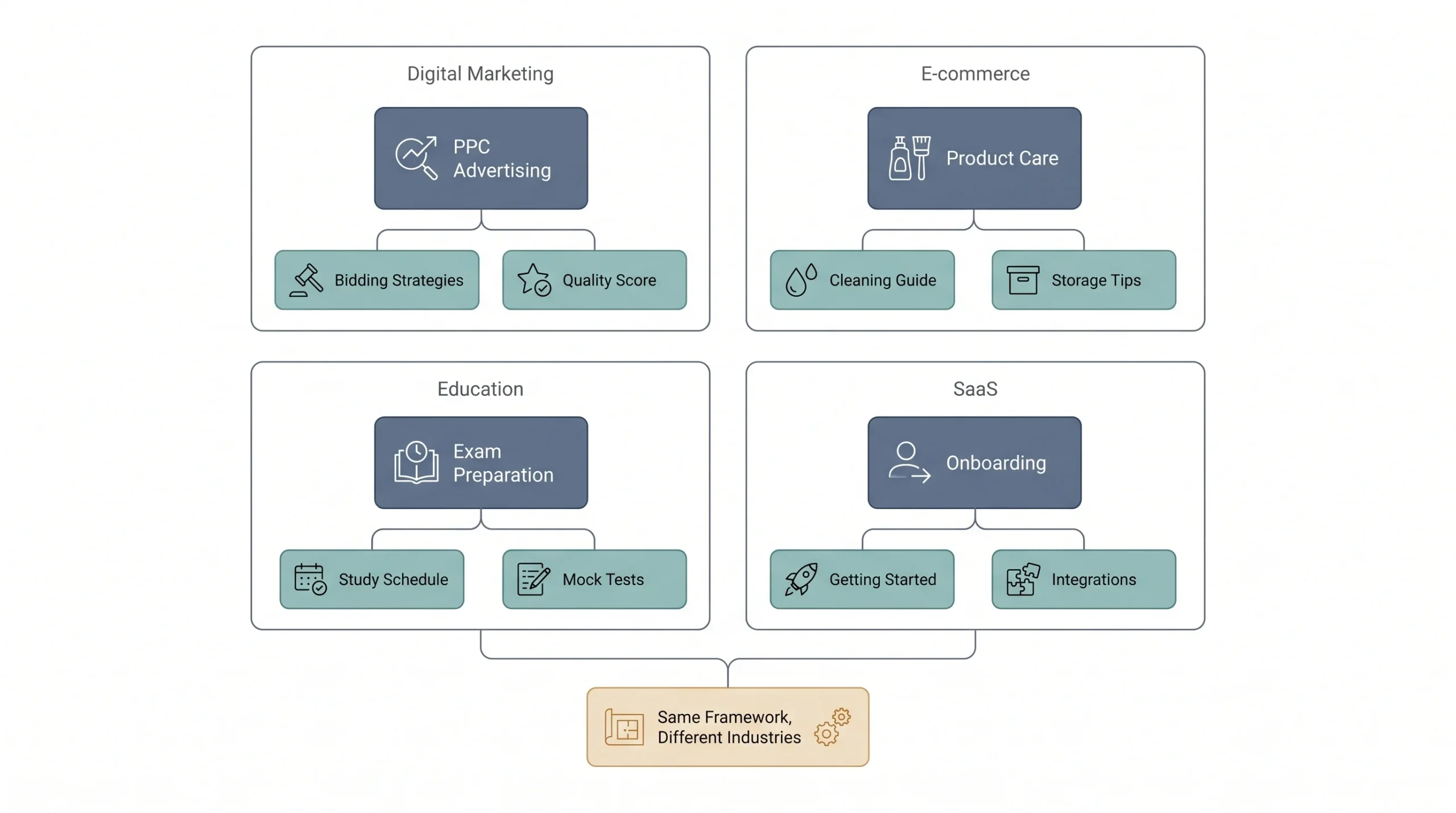
Seeing this mapped out for a few different industries makes the whole concept click faster than any abstract explanation.
| Industry | Example content pillar | Example cluster topics |
|---|---|---|
| Digital marketing agency | PPC Advertising | Google Ads bidding, Quality Score, campaign structure |
| E-commerce | Product Care & Maintenance | Cleaning guides, storage tips, FAQs |
| Education/EdTech | Exam Preparation | Study schedules, subject-wise guides, mock test tips |
| SaaS | Onboarding & Setup | Getting started guides, integration tutorials |
Notice the pattern in every row. The pillar itself is broad enough to matter to a wide chunk of the audience, and every cluster topic underneath it is specific enough to answer one clear question. That’s the balance you’re aiming for no matter what industry you’re in.
Take the e-commerce row as an example of how this plays out in practice. A store selling leather bags probably isn’t going to rank for “leather bags” against giant marketplaces, no matter how good the content is. But “Product Care & Maintenance” as a pillar, with cluster articles on cleaning leather, storing bags properly, and dealing with common wear issues, that’s a topic a small store can genuinely own. It answers real questions from real customers, it builds trust, and it’s specific enough that competing against Amazon on that particular search isn’t even the fight happening. The EdTech example works the same way. Nobody expects to outrank a national exam board on “exam preparation” broadly, but a well-built cluster around study schedules and subject-wise guides for one specific exam is a completely winnable space.
Pillar Page SEO Best Practices
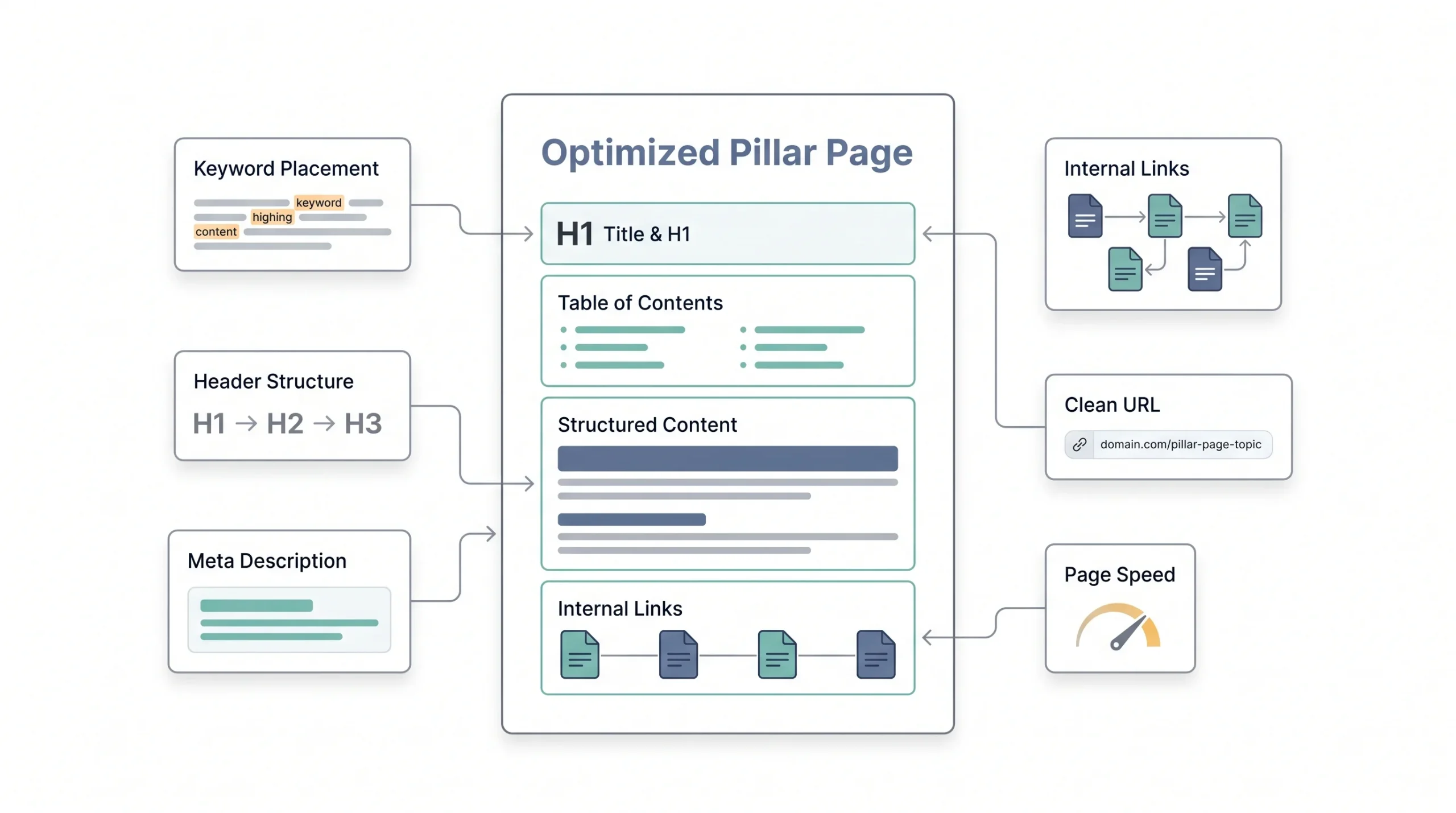
A few on-page basics make a real difference to how a pillar page performs, beyond just writing good content and hoping for the best.
Keyword placement still matters. Your primary keyword should show up early, ideally in the first paragraph, and naturally throughout the headers, not stuffed in but not avoided either. Header hierarchy matters too. One H1 for the title, H2s for major sections, H3s for subsections within those. That structure helps readers scan and helps search engines understand what the page is actually organized around.
Internal linking density is worth paying attention to specifically on pillar pages, since this is the page that’s supposed to be the hub. It should have noticeably more internal links than a typical blog post, because it’s linking out to every cluster article that exists underneath it.
Meta descriptions matter here just like they do on every other post, under 145 characters, with the focus keyword placed early so it shows up in the visible part of the search snippet.
On the content side, depth beats length every time. A 3,000-word pillar page that actually answers every question someone might have will outperform an 8,000-word page padded with repetition. Word count is a byproduct of doing the topic justice, not a target to hit for its own sake. And because these pages are long, readability matters more than usual. Short paragraphs, a table of contents, and visual breaks like tables or callouts keep readers from bouncing halfway through.
URL structure is another small thing that ends up mattering. A clean, keyword-relevant URL for the pillar page, and URLs for cluster articles that make sense alongside it, helps both readers and search engines understand the relationship between pages just by glancing at the address bar. It’s a small detail, but small details add up across a whole site.
Page speed and mobile formatting deserve a mention too, even though they’re not unique to pillar pages specifically. A 5,000-word page loaded with unoptimized images is going to lose readers before they get past the introduction, no matter how good the writing is underneath.
Simple Content Pillar Planning Template
A basic table like this is enough to plan out a pillar before writing a single word of it. Fill in one row per pillar you’re considering.
| Pillar topic | Funnel stage | Target audience | 3–5 supporting subtopics | Primary keyword |
|---|---|---|---|---|
| PPC Advertising | MOFU | Small business owners running their own ads | Bidding strategies, Quality Score, campaign structure, negative keywords | PPC advertising guide |
Keep it this simple. The goal isn’t a fancy document, it’s just forcing yourself to answer these five questions before you start writing.
Tools That Help You Build and Manage Content Pillars
A handful of tool categories make this whole process easier, without needing to name specific products or pretend one tool solves everything.
Keyword research tools help with Steps 2 and 4, figuring out what people search for and mapping out subtopics. Content calendar and planning tools help keep pillars and their cluster articles organized on a real publishing schedule instead of a mental list. Internal linking and site audit tools catch the broken or missing links between pillar pages and cluster content before they become a problem. And analytics tools handle Step 9, tracking whether a pillar page is actually performing or quietly going stale.
None of these tools build the strategy for you. They just make the manual parts of it faster once the thinking is already done.
Honestly, plenty of solid content pillar strategies got built with nothing more than a spreadsheet and a free keyword tool, especially in the early stages. Tools become genuinely useful once a pillar has grown large enough that tracking everything by memory stops being realistic, which usually happens somewhere after the tenth or fifteenth cluster article. Before that, the bottleneck is almost never the tooling. It’s whether the research and mapping in Steps 2 through 4 actually got done properly.
Conclusion
A content pillar isn’t a trend or a buzzword some agency invented to sound smart in a pitch deck. It’s a genuinely practical fix for the blank calendar problem and the disconnected content problem, two things almost every blog runs into eventually. Pick the theme, build the page, connect the clusters, and content stops being a guessing game every single week.
Once the structure is in place, the actual writing gets easier too. Instead of asking what to publish next, the question becomes which cluster article is still missing under a pillar that’s already proven it works. That’s a much better problem to have.
Start small if that feels less overwhelming. One pillar, five or six cluster articles, proper linking between all of them. Get that right before trying to run three or four pillars at once. A single pillar built properly beats five half-finished ones every time, and it’s a lot easier to see what’s working when there’s less noise to sort through.
Frequently Asked Questions
What is the difference between a content pillar and a pillar page?
A content pillar is the theme, the broad category your content is organized around, like “PPC Advertising.” A pillar page is the actual long-form webpage built to cover that theme comprehensively. The pillar is the idea. The page is the thing you publish. People use the terms interchangeably in conversation, but technically one is conceptual and the other is a real URL on your site.
How long should a pillar page be?
Most solid pillar pages land somewhere around 3,000 words or more, though there’s no fixed number that works for every topic. The real test isn’t length, it’s whether the page covers its topic broadly enough to act as a genuine hub. A page padded out to hit a word count without actually saying anything new does more harm than good. Length should be a result of covering the topic properly, not a target set in advance.
How many content pillars should a website have?
Somewhere between three and five works for most businesses and blogs. Fewer than that and the content starts feeling repetitive. More than that and you end up spreading internal linking and SEO authority too thin for any single pillar to build real strength. The right number ultimately depends on how many distinct services, products, or topics the business actually needs to cover.
Can content pillars work for social media too?
Yes, and this is actually where the term originally comes from in a lot of marketing conversations. On social media, a content pillar usually means a recurring theme, like “tips,” “customer stories,” or “behind-the-scenes,” that guides what gets posted week to week. It’s the same core idea as a blog pillar, just without a dedicated long-form page behind each one.
How often should you update pillar content?
A real check every six months is a reasonable rhythm for most pillar pages. That’s enough time to catch outdated information, platform changes, or pricing that’s shifted, without turning it into a constant task. Anything referencing tools, platform features, or numbers that change often, like Google Ads or SEO content, tends to need more frequent attention than something more evergreen.
What’s the difference between a content pillar and a topic cluster?
The content pillar is the theme. The topic cluster is the actual structure built around it, meaning the pillar page plus every smaller cluster article linked to and from it. A pillar without a cluster is just a lone page. A cluster without a clear pillar theme tying it together is just a pile of loosely related articles.
Do I need a separate URL for every cluster article, or can they be sections within the pillar page?
Separate URLs work better in almost every case. Splitting subtopics into their own pages means each one can rank for its own specific keyword, gets its own space to go deep, and creates more internal linking opportunities between pages. Cramming everything into one giant page might feel simpler to manage, but it usually ends up competing with itself in search results instead of building the kind of cluster that actually helps rankings.
What happens if I don’t link my cluster articles back to the pillar page?
The whole system falls apart. Without that two-way linking, there’s no signal to search engines or readers that these pages belong together. It stops being a topic cluster and becomes a handful of unrelated articles that happen to cover a similar subject. This is one of the most common mistakes, and it’s usually not intentional, it just gets skipped in the rush to publish.
Should a content pillar always be tied to SEO, or can it exist without ranking goals?
It doesn’t have to be SEO-driven. Some pillars exist purely to organize a content calendar or keep a brand’s messaging consistent across social channels, with no expectation of ranking anywhere. That said, most blogs get more value out of a pillar when it’s built with real keyword research behind it, since that’s what turns an organizational tool into something that also drives traffic.
Can an existing blog post become a pillar page, or does it have to be written from scratch?
An existing post can absolutely become a pillar page, and it often should, especially if that post is already one of the strongest performers on the site. Expanding it, restructuring it with proper headings and a table of contents, and building cluster articles around it is usually faster than starting from a blank page, since the foundation and any existing traffic or backlinks carry over.
How do I know if a pillar topic is too broad or too narrow?
A decent test is trying to list six or seven distinct subtopics under it without repeating yourself. If that feels like a stretch, the topic is probably too narrow to be a real pillar. If listing subtopics turns into twenty or thirty ideas that barely relate to each other, the topic is too broad and likely needs to split into two or more separate pillars instead.
Does a content pillar strategy work for a brand-new blog with no existing traffic?
Yes, and it’s arguably more useful for a new blog than an established one. Starting with a clear pillar structure from day one avoids the mess of publishing random, disconnected posts for a year and having to reorganize everything later. New blogs usually get the most value leaning into educational, top-of-funnel pillars first, since that’s what tends to get found in search before the brand has any recognition of its own.