

Type something into Google and hit enter. Results show up in under a second. Nobody thinks twice about it anymore, it just feels like magic that happened to work. But behind that half-second gap sits one of the most complicated systems ever built by a company, and honestly, most people writing about SEO don’t actually explain how it works. They just say “get backlinks” and “write good content” and call it a day.
Here’s the thing though. Google isn’t searching the internet when you type a query. Not in real time, not even close. It’s searching a copy of the internet that it built ahead of time, stored, organized, and constantly updates. That copy comes from three separate stages, each one doing a completely different job: crawling, indexing, and ranking. Mix these up, and you’ll spend weeks trying to fix a “ranking problem” that’s actually an indexing problem, or worse, a crawling problem you didn’t even know existed. That happens more than people admit. So before getting into tactics or checklists, it’s worth understanding what’s actually happening in that pipeline, because almost every SEO issue traces back to a breakdown in one of these three stages.
The Big Picture: Google’s Three-Stage Pipeline
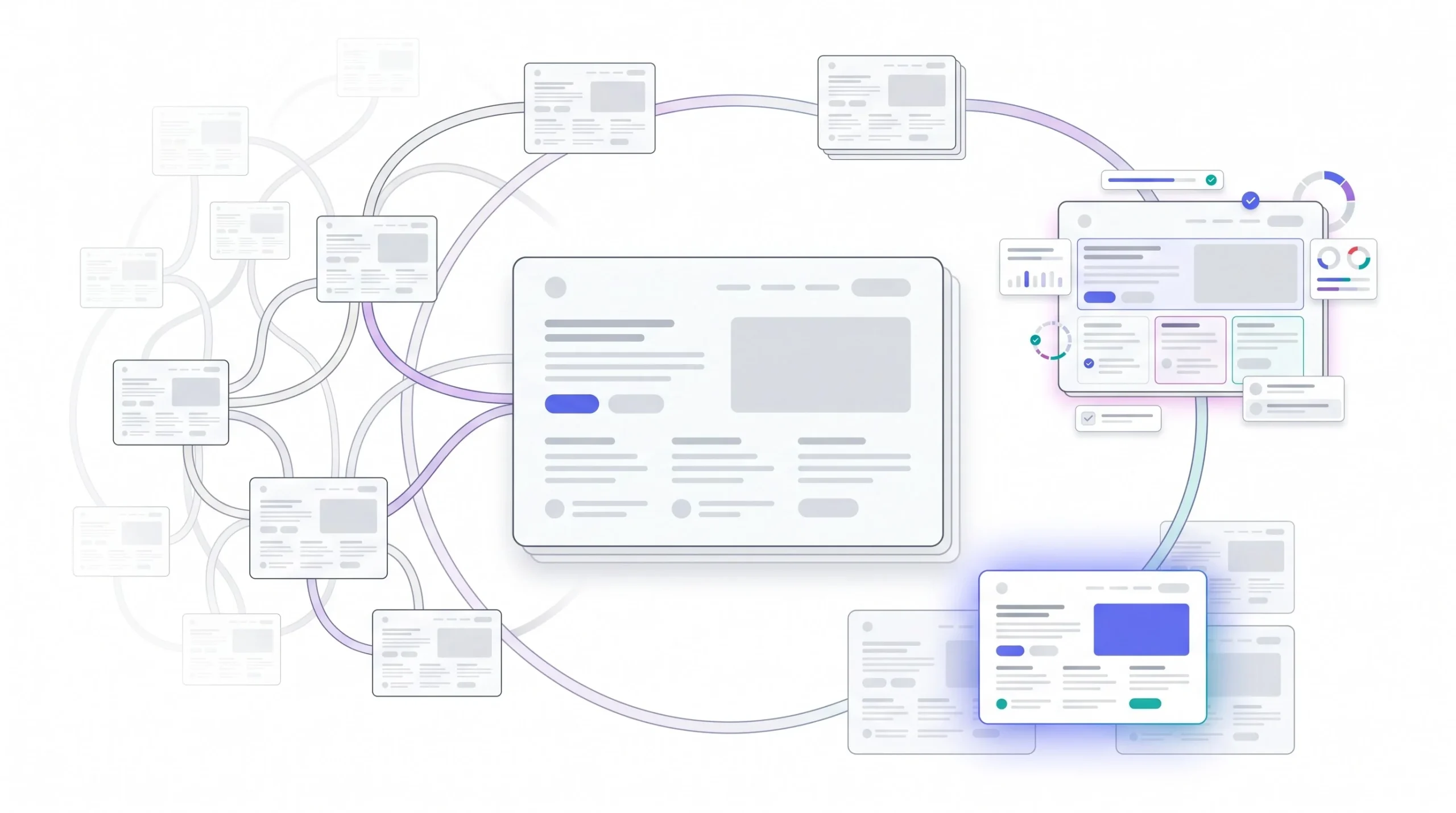
Think of it like this: crawling is Google finding your page. Indexing is Google understanding your page and deciding whether to keep it. Ranking is Google deciding, out of everything it kept, what order to show it in for a specific search. Three different jobs, three different failure points, and here’s the part that trips people up: they’re not strictly sequential. A page gets indexed, then it might get crawled again later because something changed, and ranking is recalculated constantly, independent of whether a new crawl even happened. So it’s less like a straight line and more like a loop that never fully stops.
This matters because “why isn’t my page ranking” is honestly the wrong question about 40% of the time. The real question is usually “was my page ever indexed in the first place,” and that’s a completely different problem with a completely different fix. Somebody spends a month building backlinks to a page that was never even in the index. That’s not a ranking failure. That’s an indexing failure wearing a ranking costume.
Crawling vs. Indexing vs. Ranking at a Glance
| Stage | What Happens | Google’s Question | Common Failure Point |
|---|---|---|---|
| Crawling | Bots discover and fetch pages | “Does this page exist?” | Blocked by robots.txt, orphan pages |
| Indexing | Content gets processed and stored | “What is this page about?” | Noindex tags, duplicate content, thin content |
| Ranking | Stored pages get ordered for a query | “Is this the best answer?” | Weak relevance or authority signals |
Crawling: How Google Discovers Your Content
What Crawling Actually Is
Googlebot isn’t one program crawling the web. It’s actually a family of bots, Googlebot Smartphone, Googlebot Desktop, Google-InspectionTool, plus separate crawlers for images, video, and news. Most of the discovery work today runs on the smartphone version, because Google moved to mobile-first indexing a while back. That’s not a small detail either, it means the mobile version of a page is basically the version Google judges everything on, even if most of the actual traffic still comes through desktop for some sites.
People love the spider metaphor, and it’s fine as a starting image, but it’s a little outdated. Nobody’s crawling in real time like a spider walking a web thread by thread. It’s closer to a scheduling system. Googlebot has a queue of URLs to visit, it fetches them in batches, and the order isn’t random, it’s prioritized based on signals it already has about a site.
How Googlebot Discovers URLs
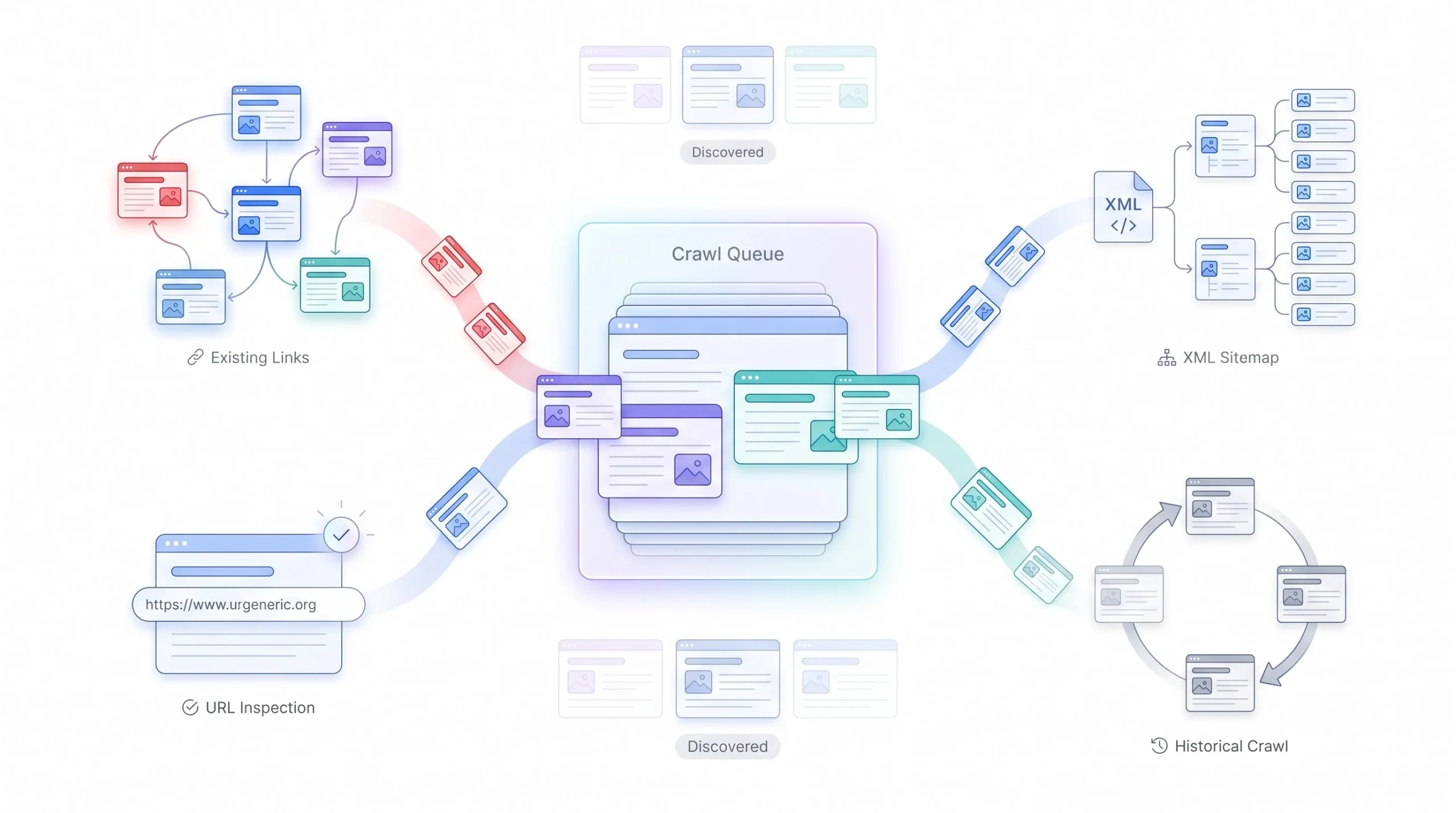
There are basically four ways a URL ends up in Google’s crawl queue. Existing links, meaning Googlebot follows a link from a page it already knows about to a page it doesn’t. XML sitemaps, which is a file telling Google “here’s a list of URLs, please check these.” Manual submission through Search Console’s URL Inspection tool. And historical crawl data, meaning URLs Google has visited before and keeps coming back to check on.
Here’s a distinction almost nobody explains clearly: discovery and crawling are not the same thing. A URL can sit in Google’s queue, fully discovered, and just never get crawled. Maybe it’s low priority. Maybe the site’s crawl budget is maxed out elsewhere. This shows up in Search Console as “Discovered, currently not indexed,” and it confuses people constantly because they assume discovery means Google already looked at the page. It didn’t. It just knows the URL exists.
Crawl Budget: The Concept Most Beginners Skip
Crawl budget is really two things combined. Crawl rate limit, which is how many requests Googlebot can make to a server without slowing it down or annoying it. And crawl demand, which is how much Google actually wants to crawl a given site based on its perceived value and how often it changes.
Now, straight talk here: for a site with 200 pages, crawl budget almost never matters. Google can crawl that entire site in an afternoon without breaking a sweat. Crawl budget becomes a real, practical problem once a site crosses into the tens of thousands of pages, think large e-commerce catalogs or big publishers. So if someone’s running a small blog and worrying about crawl budget, that’s usually energy spent in the wrong place. Fix the crawl budget conversation for big sites, not five-page brochure sites.
What actually drains crawl budget on large sites: faceted navigation (think filter combinations on an e-commerce category page generating thousands of near-duplicate URLs), infinite scroll setups that generate endless paginated URLs, duplicate parameter URLs like ?sort=price&color=red&color=blue, and slow server response times, because Google backs off crawling a site that’s struggling to respond fast.
robots.txt: Mechanics, Not Just Definition
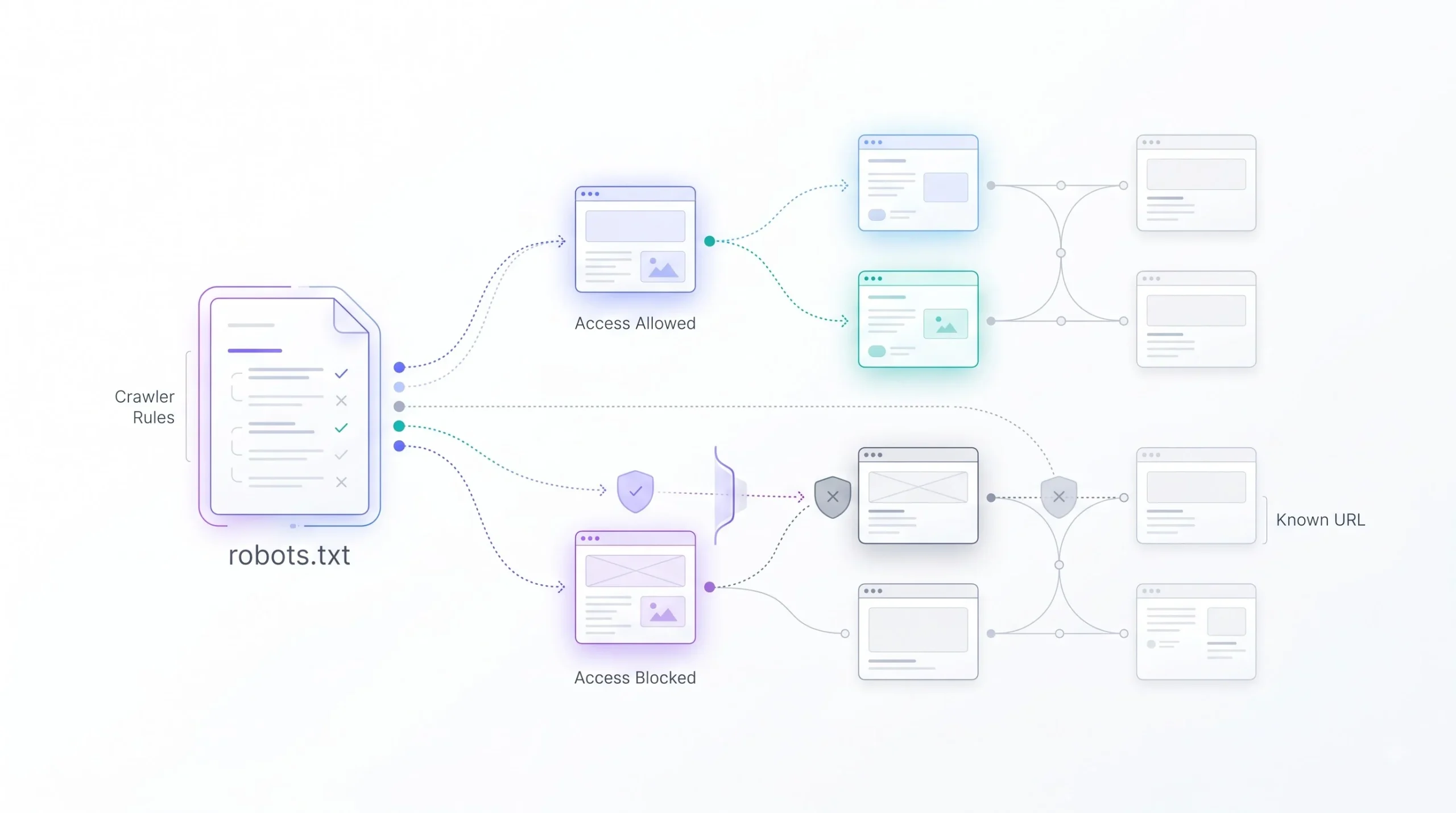
robots.txt sits at the root of a domain and tells crawlers what they’re allowed to fetch. It works with user-agent groups, so a site could tell Googlebot one thing and a different bot something else entirely. Directives get parsed with a precedence system, more specific rules beat general ones, and wildcards can match patterns of URLs instead of listing every single one.
Here’s the mistake that costs people real traffic: blocking a page in robots.txt does not remove it from the index. If Google already has that page indexed and then robots.txt blocks it, Google can’t recrawl it to see it’s been removed or noindexed, so the URL can actually sit in the index with no description, just the URL itself showing up in results, because Google can’t read the page anymore to update anything. This connects straight into the indexing section below, worth remembering.
JavaScript Rendering and the Two-Wave Indexing Process
This is where things get genuinely technical, and it’s worth slowing down for. When Googlebot hits a page built with a lot of JavaScript, like a React or Vue site, it doesn’t always see the final rendered content immediately. There’s a first wave, where Google crawls and indexes the raw HTML, which for JS-heavy sites might be close to empty, just a script tag and a div. Then there’s a second wave, where the page goes into a rendering queue and gets processed through headless Chromium, essentially a browser running in the background, to actually execute the JavaScript and see the final content.
The gap between wave one and wave two isn’t instant. It can take anywhere from a few seconds to, in some documented cases, weeks, depending on how backed up the rendering queue is and how much of a priority the site is. So a JavaScript-heavy site might get crawled fine but sit around with content Google technically hasn’t “seen” yet for a stretch of time. This is exactly why server-side rendering or pre-rendering solutions exist, they skip the second wave entirely by giving Google fully-formed HTML on the first pass.
Crawl Frequency: What Actually Influences It
A handful of things push crawl frequency up: site authority (bigger, more trusted sites get crawled more often), how frequently content actually updates, freshness signals in the XML sitemap, how deep a page sits in the internal linking structure (pages closer to the homepage tend to get crawled more), and general server response health.
One myth worth killing here: getting crawled more often is not itself a ranking factor. Crawl frequency is a symptom of a healthy, authoritative site, not a cause of good rankings. A page can get crawled daily and still rank on page four if the content doesn’t deserve better.
Tip: To see when Googlebot last actually crawled a specific URL, use the URL Inspection tool in Search Console. Paste the URL in, and it’ll show the last crawl date along with whether the indexed version matches what’s live right now. If those two dates are far apart and the page has changed a lot since, that’s usually a signal worth investigating.
Indexing: How Google Understands and Stores Your Content
What Happens After a Crawl
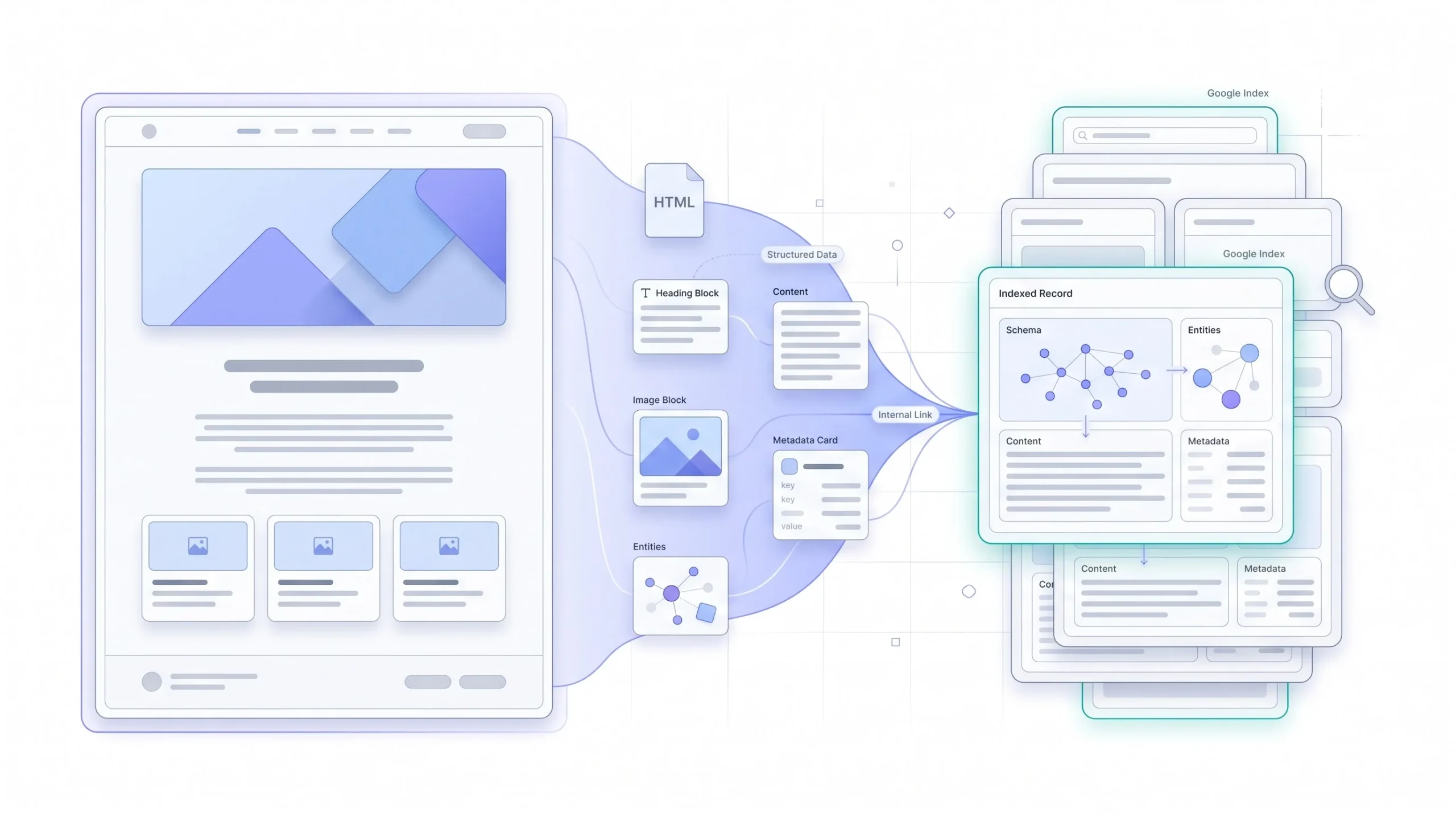
Once a page gets fetched, Google doesn’t just save a screenshot of it. It parses the HTML structure, pulls out headings, reads schema markup if it’s there, extracts the text content, and builds something closer to a structured record of the page rather than a flat copy. That record includes what the page appears to be about, what entities it mentions, what it links to, and increasingly, how it’s structured for things like featured snippets or rich results.
Google’s Index Infrastructure
Google’s indexing system runs on infrastructure called Caffeine, which replaced the older batch-based indexing system years back. The old system processed the web in layers, updating in big batches that could take days. Caffeine moved things toward continuous, near real-time indexing, meaning new or updated content can, in theory, get indexed within minutes for high-priority sites, not days. That’s a meaningful shift, especially for anything time-sensitive like news content.
Canonicalization: The Most Misunderstood Indexing Concept
Here’s a concept that trips up even people who’ve been doing SEO for years. Google doesn’t index every URL as a separate, unique thing. It clusters together pages it considers duplicates or near-duplicates, and picks one version from that cluster to actually show in search results. That chosen version is the canonical URL.
Several signals feed into which URL gets picked as canonical: the rel=canonical tag if one’s present, redirect patterns, which version gets linked to more internally, and whether a URL is included in the XML sitemap. And here’s the part that surprises people: rel=canonical is a hint, not a command. Google can, and does, ignore it if other signals point somewhere else. So setting a canonical tag isn’t a guarantee, it’s a strong vote, not a directive.
A real scenario where this bites people: e-commerce sites with filter and sort parameters. A product category page might generate URLs like /shoes?color=black, /shoes?sort=price-asc, /shoes?color=black&sort=price-asc, all showing basically the same products in a different order or subset. Without clear canonical signals, Google might cluster all of these together and pick a version the site owner never intended to be the “main” one, sometimes even a filtered version instead of the clean category page.
Why Pages Get Excluded From the Index
Not every crawled page makes it into the index. The main reasons: a noindex tag telling Google explicitly not to index it, the page getting canonicalized to a different URL, duplicate content without a clear canonical signal, content Google judges as too thin or low-value to be worth storing, and soft 404s, where a page technically returns a 200 status code but the content looks like an error page or has basically nothing on it.
This section functions almost like a diagnostic. If a page isn’t showing up in search, the fix usually starts with figuring out which of these categories it falls into, because the fix for a noindex tag is completely different from the fix for thin content.
Common Indexing Exclusion Reasons and Fixes
| Search Console Status | What It Means | Typical Fix |
|---|---|---|
| Crawled, currently not indexed | Google fetched it but chose not to index | Improve content depth and uniqueness |
| Discovered, currently not indexed | Known but not yet crawled | Crawl priority or budget issue |
| Duplicate without user-selected canonical | Google merged it into a cluster | Add an explicit rel=canonical tag |
| Excluded by noindex tag | Deliberately or accidentally blocked | Check the meta robots tag |
Index Bloat and Why It Hurts Larger Sites
Index bloat happens when a site has way more indexed pages than it actually needs, usually thin category pages, tag archives, filtered URLs, or auto-generated pages with barely any unique content. The mechanism here is worth understanding: it’s not that Google punishes a site directly for having too many pages. It’s that a huge pile of low-value indexed pages dilutes how Google perceives the overall quality of the site, and it eats into crawl budget that could be going toward pages that actually matter.
The fix usually involves choosing between three tools, and this trio confuses almost everyone: noindex, robots.txt, and canonical tags. Use noindex when a page should stay accessible to users but shouldn’t appear in search at all, like an internal search results page. Use robots.txt when a whole section shouldn’t be crawled at all, like admin areas or duplicate parameter-heavy paths, keeping in mind the earlier warning that this doesn’t remove already-indexed pages. Use canonical tags when multiple URLs legitimately show similar content and one version should get credit, like the e-commerce filter example above. Mixing these up, like noindexing a page that’s also blocked in robots.txt, actually backfires, because Google can’t crawl the page to see the noindex tag in the first place.
Ranking: How Google Decides What’s Best
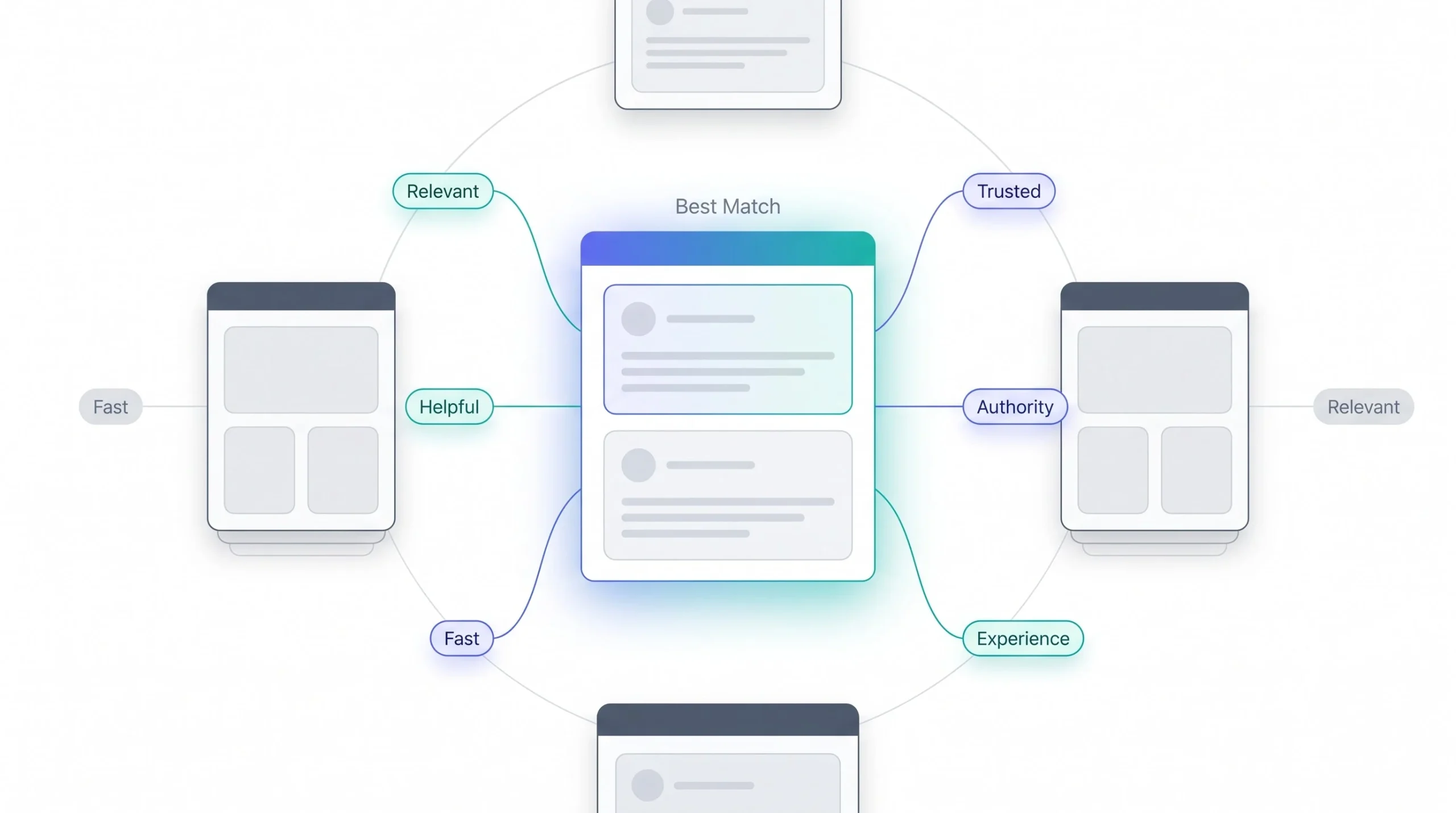
The Core Ranking Question
Ranking isn’t a one-time event that happens when a page gets indexed. It’s continuous. Google re-evaluates rankings constantly against everything already sitting in the index, reacting to new content being added, existing content changing, competitors improving, and algorithm updates shifting how signals get weighted. A page can rank well for months with zero changes to it, then quietly drop because something else in the index got better.
The Major Ranking Signal Categories
Relevance Signals
Old-school SEO was about matching keywords. Type “best running shoes,” rank the page with “best running shoes” repeated the most times. That world is mostly gone. Google’s matching has moved toward semantic and entity-based understanding, meaning it tries to grasp what a query actually means and what a page is actually about, not just whether the exact words line up.
Query intent matters a lot here, and it breaks into four rough types: informational (someone wants to learn something), navigational (someone’s trying to reach a specific site or page), transactional (someone’s ready to buy or take an action), and commercial investigation (someone’s comparing options before deciding). Match the wrong intent, and even keyword-perfect content won’t rank. A “best running shoes” page written as a hard sales pitch instead of a comparison guide is fighting the intent of the query, not helping it.
Content Quality and E-E-A-T
E-E-A-T stands for Experience, Expertise, Authoritativeness, and Trust. Worth being precise here: E-E-A-T isn’t a literal score sitting on a page somewhere. It’s a quality framework Google’s search quality raters use to evaluate content, and it’s baked into the algorithm indirectly through signals that correlate with each piece.
Experience gets signaled through things like first-hand detail, original photos, specific outcomes described, the kind of stuff that reads like someone actually did the thing being written about. Expertise shows up through depth, accuracy, and the credentials of whoever wrote it. Authoritativeness relates to the site’s overall reputation in its space, often reflected in who links to it and mentions it. Trust ties into things like accurate information, transparent sourcing, secure browsing, and a track record of not misleading people. None of these are directly measurable inputs Google plugs into a formula. They’re outcomes that get approximated through dozens of smaller signals working together.
Authority and Backlink Signals
PageRank is still part of the equation, just evolved a lot since the original version. Links still act as a vote of confidence from one page to another, but the quality of that vote matters more than the raw count. A single link from a genuinely relevant, respected site in the same space carries more weight than fifty links from low-quality directories. Anchor text relevance plays in too, meaning the actual clickable text of a link gives Google context about what the linked page covers. And referring domain diversity matters, meaning fifty links from fifty different domains typically counts for more than fifty links from the same domain.
Usability Signals
Core Web Vitals break into three specific measurements, and each one measures something different. LCP, Largest Contentful Paint, measures how long it takes for the biggest visible element on a page to load, basically a loading speed measurement from the user’s perspective. INP, Interaction to Next Paint, measures how responsive a page feels when someone actually clicks or taps something, replacing the older First Input Delay metric. CLS, Cumulative Layout Shift, measures how much stuff jumps around on the page while it’s loading, that annoying thing where a button shifts right as someone’s about to click it and they end up clicking an ad instead.
Beyond Core Web Vitals, mobile-friendliness, HTTPS, and avoiding intrusive interstitials (those popups that cover the whole screen before someone can even read anything) round out the usability side. None of these alone is a massive ranking factor. But stack a few of them badly at once, slow load, layout jumping, an ad blocking half the screen, and it adds up.
Context and Personalization Signals
Two people searching the exact same query, same time, can get different results. Location plays a huge role, obviously relevant for anything local. Language and regional settings shift results too. Search history and general behavior patterns factor in, though less dramatically than people assume. Device type matters as well, since mobile and desktop results aren’t always identical for the same query.
Freshness
Freshness matters a lot for some queries and barely at all for others, and this nuance gets skipped constantly in beginner content. For anything news-related or trending, like “election results” or “iPhone 17 release date,” freshness is a heavy signal, Google wants the newest, most current information front and center. For evergreen, reference-style content, like “how photosynthesis works,” freshness barely matters. A well-written explanation from three years ago can easily outrank something published yesterday if the older piece is simply better and more complete. Chasing constant “content refreshes” on evergreen material without an actual improvement in substance doesn’t move the needle much.
Algorithm Systems Worth Naming
A handful of named systems are worth understanding, not as a history lesson, but because each one solves a specific problem in how Google interprets the signals above.
RankBrain handles ambiguous or completely novel queries, ones Google’s never seen before, roughly 15% of daily searches are queries Google hasn’t encountered in that exact form. It uses machine learning to guess intent based on similar past queries. BERT improved how Google understands the context of words within a full sentence, meaning prepositions and phrasing that used to get ignored now actually change how a query gets interpreted. MUM goes further, understanding information across multiple formats and languages at once, so it can pull together an answer that might involve text in one language and images in another. The Helpful Content System operates differently from the others, it’s a site-wide signal, not a per-page one, and it’s built to catch content made primarily to rank in search rather than to genuinely help a reader.
Key Google Systems and What They Actually Do
| System | Core Function | Practical Implication for Content |
|---|---|---|
| RankBrain | Interprets ambiguous or novel queries | Write for meaning, not exact-match keywords |
| BERT | Understands word context within sentences | Natural phrasing beats keyword stuffing |
| MUM | Multimodal, multilingual understanding | Comprehensive topic coverage gets rewarded |
| Helpful Content System | Site-wide content quality signal | Penalizes content built mainly for search engines |
Worth knowing: More backlinks doesn’t automatically mean better rankings if the content itself doesn’t answer the query well. And crawling a page more often is not a ranking boost, it’s a byproduct of the site already being seen as valuable. Cause and effect get confused constantly in SEO advice, and it’s worth being skeptical of anything that treats a symptom like a lever.
How Crawling, Indexing & Ranking Connect
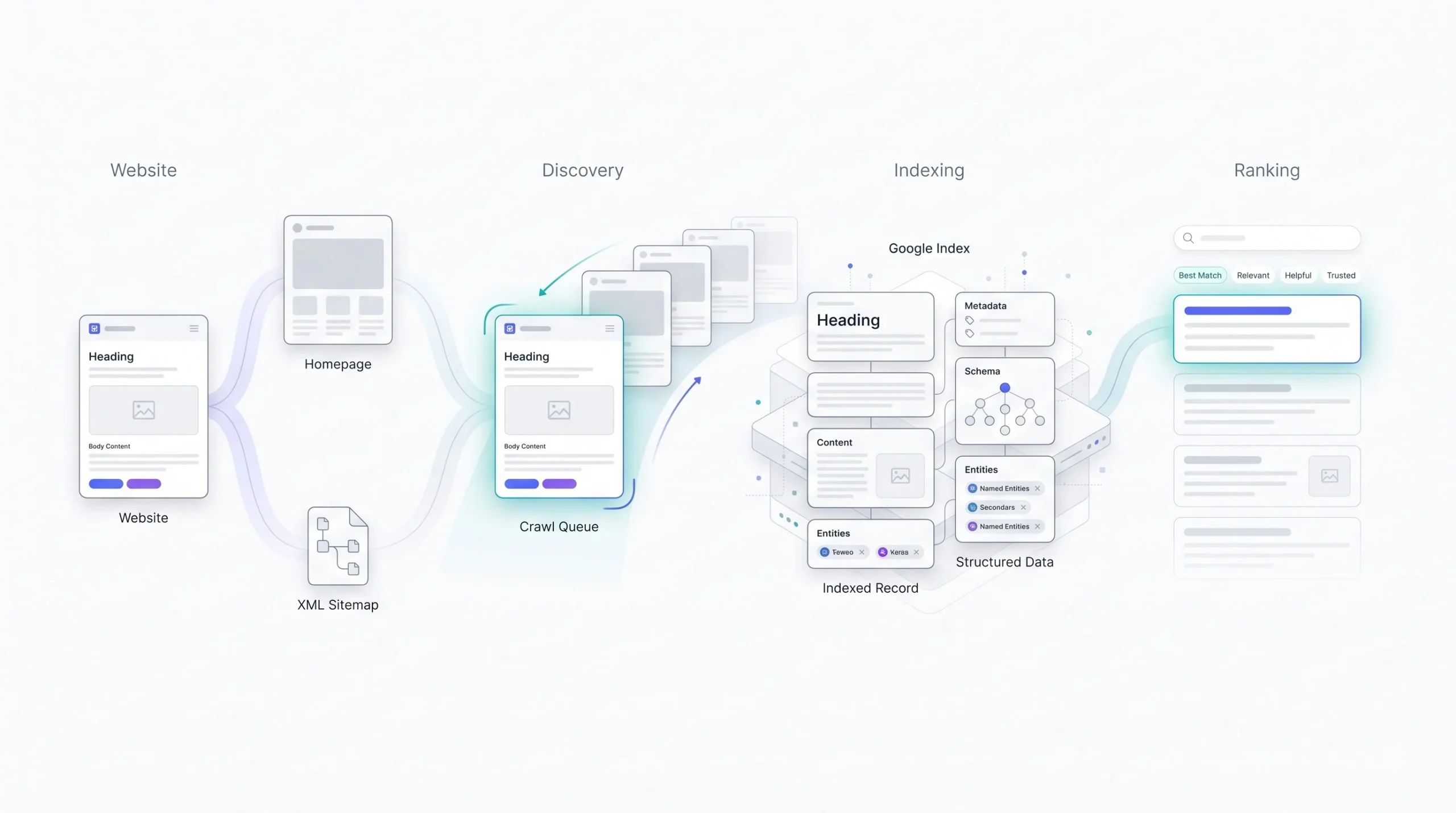
Take one page and follow it through the whole pipeline, start to finish, because seeing it as a single continuous journey makes the whole system click in a way that reading the three sections separately doesn’t.
A blog post goes live on a Tuesday. It gets linked from the homepage and dropped into the XML sitemap, that’s the discovery step, Google now knows the URL exists somewhere out there. A few days pass. Googlebot fetches it, that’s crawling, and if the page is JavaScript-heavy, this is where the two-wave thing kicks in, the raw HTML gets grabbed first, and the fully rendered version with all the JS executed might not get processed until the second wave catches up, sometimes hours later, sometimes longer if the rendering queue is backed up. Assuming nothing blocks it along the way, no accidental noindex tag left over from staging, no canonical tag quietly pointing somewhere else, no duplicate content clustering it into a different URL, it gets added to the index. That’s indexing complete, and honestly this is the point where most people assume the job is done. It isn’t.
The page now exists somewhere in Google’s system, but it’s not ranking for anything specific yet, or it’s ranking on page six for something nobody searches. Over the following weeks, Google keeps re-evaluating it against every other indexed page competing for similar queries, weighing relevance, E-E-A-T signals, backlinks, page experience, all of it, continuously and quietly in the background, not as a one-time judgment. That’s ranking, and it never really stops, it just keeps recalculating as the competitive landscape around that query shifts.
Here’s where it gets useful practically. Say that same blog post breaks at the crawling stage instead, maybe robots.txt accidentally blocks the folder it lives in. It never even makes it to indexing, so there’s nothing to rank, and Search Console will show it as blocked, not as a low performer. Say it breaks at indexing instead, content judged too thin, or canonicalized into a different page entirely. It sits crawled but excluded, and no amount of link building will touch that, because it’s not even competing yet. Only if it clears both of those hurdles does it reach the ranking conversation, where the usual levers, content depth, authority, user experience, actually start to matter.
That’s the whole reason keeping these three stages separate matters so much when something isn’t working. Somebody diagnosing “poor rankings” with a content rewrite when the real problem is a blocked crawl path is going to waste a month and see zero movement, because the fix that actually works, editing a robots.txt rule, sits three steps earlier in the pipeline than the fix they applied.
Practical Checklist: Helping Google Crawl, Index & Rank a Site
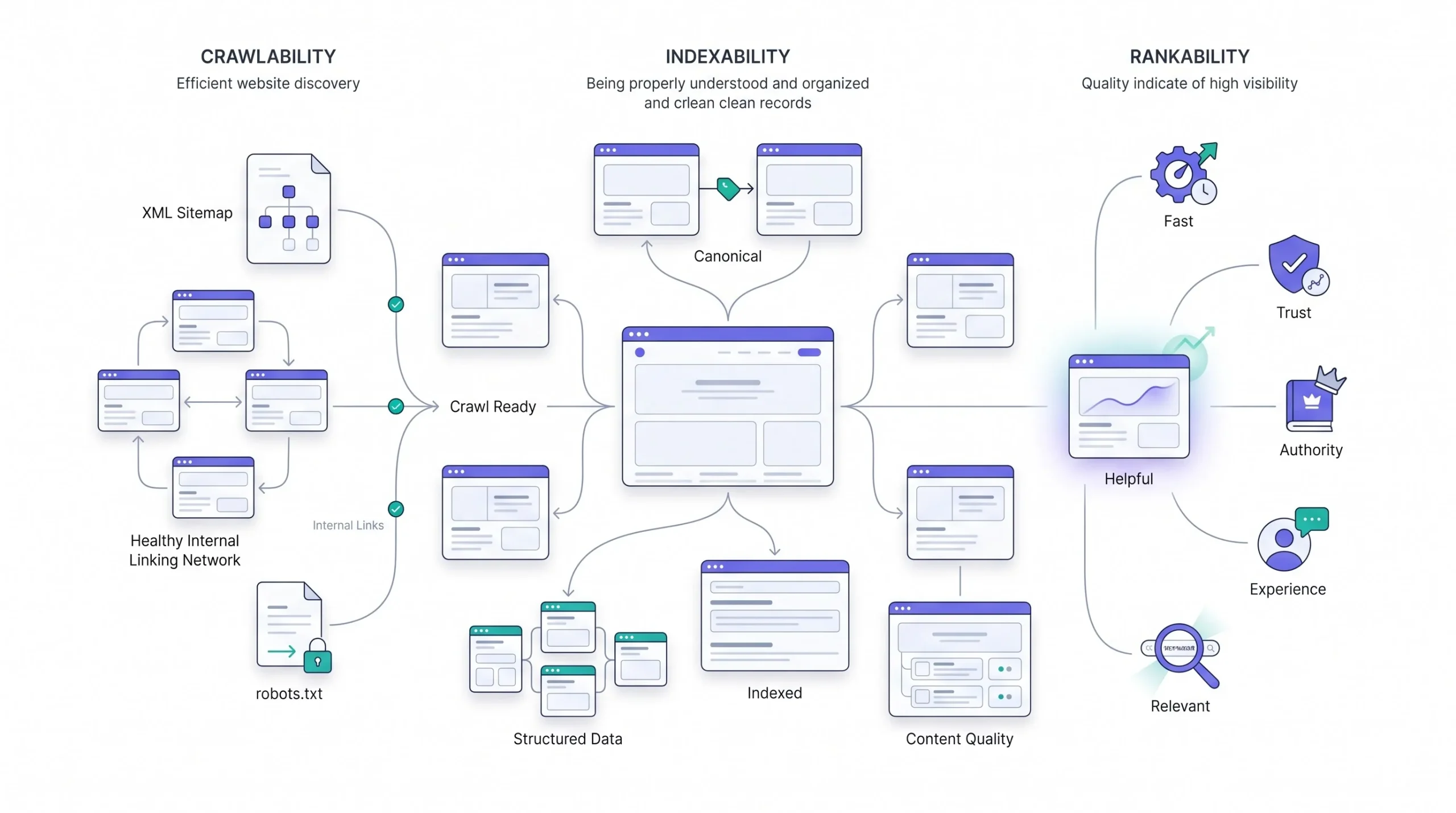
Crawlability starts with the basics that get overlooked constantly. Keep the XML sitemap clean and current, meaning it only lists real, indexable URLs, not a dumping ground of every URL that’s ever existed on the site. Build internal linking that actually connects important pages to each other instead of leaving new content orphaned with zero internal links pointing to it. And check Search Console regularly for crawl errors, server errors and redirect chains quietly choke off crawl efficiency over time.
- Keep the XML sitemap updated and free of broken or redirected URLs
- Link to new and important pages from other pages on the site, don’t leave anything orphaned
- Fix server errors (5xx) and long redirect chains that waste crawl budget
- Check the robots.txt file isn’t accidentally blocking sections that should be crawled
Indexability comes down to being deliberate with the tools covered earlier. Have a clear canonical strategy instead of letting Google guess. Avoid accidental noindex tags, a shockingly common issue happens when a site moves from staging to live and forgets to remove the noindex directive that was there for testing. And actively resolve duplicate content instead of letting Google’s clustering system make the decision by default.
- Set explicit rel=canonical tags on pages with similar or duplicate content
- Double-check meta robots tags after any site migration or redesign
- Consolidate near-duplicate pages instead of letting them compete against each other
- Use 301 redirects for permanently moved content instead of leaving old URLs live
Rankability is where the real, ongoing work sits. Content needs actual depth, not padded word count. E-E-A-T signals need to be visible, real author bios, cited sources, transparent information. Core Web Vitals need attention, particularly on mobile where a huge share of search traffic now happens. And backlink strategy should chase relevance over raw volume.
- Write content that actually answers the query’s intent completely, not just partially
- Add visible author credentials and sourcing where it’s relevant to the topic
- Test and improve Core Web Vitals, especially LCP and CLS on mobile devices
- Build links from sites genuinely relevant to the topic instead of chasing link volume alone
Tools for Monitoring Each Stage
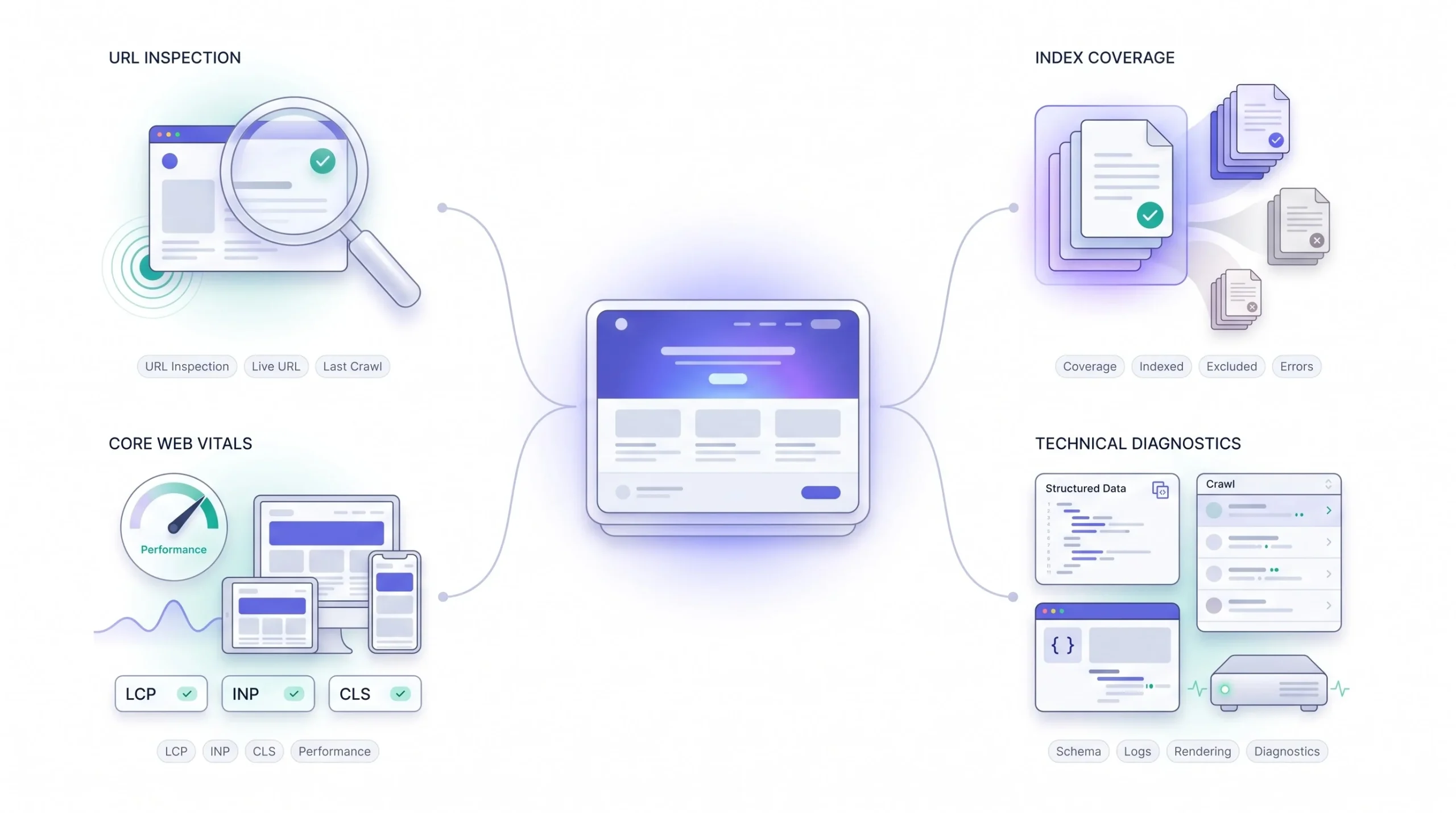
Search Console is really the only tool that gives visibility into all three stages using Google’s own data, not a third party’s estimate of what Google might be doing, which is exactly why it’s worth learning properly instead of glancing at it once a month and closing the tab.
Start with the URL Inspection tool, because it’s the most granular. Paste in a single URL and it shows the last crawl date, whether Google used the mobile or desktop version to inspect it, and critically, whether the currently indexed version actually matches what’s live on the site right now. That last part catches a specific, sneaky problem: a page gets updated with new content, but Google’s indexed copy is still the old version from three weeks ago, meaning any ranking evaluation happening right now is judging outdated content. The tool also has a “Test Live URL” button that runs a fresh check on demand, useful right after fixing something, instead of waiting around for a natural recrawl.
- What it shows: last crawl date, mobile vs. desktop version used, whether the live page matches the indexed version
- Best for: debugging one specific URL that isn’t behaving as expected
- Use “Test Live URL” right after a fix to force a fresh check instead of waiting for a natural recrawl
The Coverage report, which shows up as the Indexing report in newer versions of the interface, works at a completely different scale, the whole site instead of one URL. It buckets every known URL into categories: Valid (indexed and fine), Valid with warnings, Excluded (not indexed, for reasons like a noindex tag, a duplicate canonicalized elsewhere, or content judged too thin), and Error (something actively broken, like a server error or a redirect problem). This report is where a pattern becomes visible that a single URL check would never reveal, say 4,000 URLs suddenly landing in “Duplicate without user-selected canonical” after a site migration. That’s not something anyone catches by inspecting pages one at a time, it only shows up when looking at the aggregate.
- What it shows: site-wide indexing status, bucketed into Valid, Valid with warnings, Excluded, and Error
- Best for: spotting patterns across hundreds or thousands of URLs at once, not one-off issues
- Watch for: sudden spikes in any one category right after a migration, redesign, or CMS change
The Core Web Vitals report ties directly into the ranking side of things, and it’s worth noting it pulls from real-world data collected from actual Chrome users visiting the site, not a lab simulation. That distinction matters, a page might pass every synthetic speed test in a tool like Lighthouse and still show poor real-world LCP scores because actual visitors on slower connections or older phones are having a rougher experience than the test environment simulated. Google groups pages into URL groups with similar templates for this report, so fixing one templated issue, like a bloated hero image on every blog post, can move dozens of pages at once.
- What it shows: real-world LCP, INP, and CLS scores pulled from actual visitor data, not a synthetic test
- Best for: catching page experience issues a lab test like Lighthouse might miss entirely
- Bonus: pages are grouped by template, so one fix can improve scores across dozens of URLs at once
A few other tools fill in gaps the core Search Console reports don’t cover:
- Rich Results Test — checks whether structured data is actually eligible for enhanced search features, separate from basic indexing
- Chrome DevTools (Coverage and Performance tabs) — helps debug what’s technically slowing a page down before Core Web Vitals even flags it
- Log file analysis — pulling raw server logs to see exactly which URLs Googlebot is hitting and how often, the most direct read on real crawl behavior, though it needs server access and isn’t something the average site owner sets up casually
Stacked together, these tools don’t show ranking position with full transparency, Google deliberately keeps a lot of that mechanism opaque, but they cover enough of the pipeline that most problems get caught before they turn into an unsolvable mystery six months later.
Conclusion
Crawling, indexing, and ranking aren’t three interchangeable words for “SEO stuff happening.” They’re three distinct systems, each with its own failure points, its own fixes, and its own tools for diagnosing what’s actually going wrong. A page invisible in search might be sitting fine in the index just ranking poorly, or it might have never made it past crawling in the first place, and those two situations call for completely different responses. Understanding the difference between them turns a vague, frustrating problem into something that’s actually diagnosable, which honestly is most of what good SEO work comes down to in the first place.
FAQs
Why is my page crawled but not indexed?
This status means Google actually fetched the page and looked at it, then made an active decision not to store it in the index. That’s different from never being crawled at all. The usual causes: the content reads as too thin or too similar to something already sitting in the index, it doesn’t clear whatever quality bar Google’s using for that topic right now, or there’s a competing version of the same page that got chosen as canonical instead. Worth checking the Coverage report first to see if it’s isolated to one page or a pattern across many, because the fix looks completely different depending on which one it is.
How long does Google take to index a new page?
No fixed number, and anyone giving one is guessing. Well-established sites that publish often and already have Google’s trust can see new pages indexed within a few hours. Smaller or newer sites with less crawl demand attached to them might sit for days, sometimes a couple of weeks, especially if internal linking to the new page is weak or the sitemap hasn’t been resubmitted. Submitting a URL manually through Search Console’s URL Inspection tool can speed this up, but it’s a nudge, not a guarantee.
Does robots.txt affect rankings directly?
No, not directly, and this distinction matters more than it sounds like it should. robots.txt only controls crawling. If a page is already indexed and then gets blocked afterward, it doesn’t get pulled from search results automatically, it can sit there as a bare URL with no title or description, because Google can no longer recrawl it to see anything changed. So the effect on rankings is indirect and often messier than people expect, not a clean on-off switch.
What’s the difference between noindex and robots.txt?
Noindex lets Googlebot crawl the page normally but tells it, once it gets there, not to include the page in search results. robots.txt works one step earlier, it blocks the crawl entirely, meaning Googlebot never even reaches the page to see a noindex tag if one exists. Using both together on the same page is actually a common mistake, because the noindex instruction never gets read.
Why do two people see different results for the same search?
Location is the biggest factor for most queries, especially anything with local intent. Language and regional settings shift things too. Device type matters, mobile and desktop result sets aren’t always identical for the same search. And there’s a layer of personalization from search history and behavior, though it tends to be smaller in effect than people assume, most of the variation people notice comes from location and device, not some hidden personal profile reshaping everything.
Is crawl budget something small sites need to worry about?
Generally, no. Crawl budget becomes an actual practical constraint mainly once a site crosses into the tens of thousands of pages, think large e-commerce catalogs or big publishers with years of archives. A site with a few hundred pages gets crawled thoroughly without much effort from Google, so spending time optimizing crawl budget there is usually solving a problem that doesn’t exist yet.
Does having more backlinks always improve rankings?
No, and this is one of the more persistent myths in SEO. Link quality and topical relevance matter far more than raw count. A handful of links from sites genuinely respected and relevant in the same space typically outweighs a large pile of low-quality, unrelated links, and in some cases a spammy link profile can actively work against a site rather than help it.
What is a soft 404 and why does it hurt indexing?
A soft 404 happens when a page returns a normal 200 “OK” status code, technically telling browsers and crawlers everything’s fine, but the actual content looks like an error page, is nearly empty, or says something like “no results found” without a proper 404 status. Google treats these as low-value pages and typically excludes them from the index, and they’re worth checking for specifically after things like product pages going out of stock or search result pages returning nothing.
Does JavaScript hurt SEO?
Not inherently, but it can introduce real delays if it’s not handled carefully. Heavy JavaScript sites go through a two-wave indexing process, raw HTML gets crawled first, then the fully rendered version goes through a separate rendering queue that can lag behind by anywhere from seconds to weeks. Server-side rendering or pre-rendering solutions sidestep this by handing Google fully-built HTML on the first pass instead of making it wait for the second wave.
How often does Google update its ranking algorithm?
Constantly, in small, mostly invisible ways, layered with occasional larger, publicly acknowledged updates that get names and generate actual news coverage. Rankings aren’t recalculated on some fixed monthly schedule, it’s closer to continuous, background recalculation that responds to new content entering the index and existing content changing.
Can a page rank without any backlinks?
Yes, particularly for lower-competition, specific queries where few other pages are competing directly. Backlinks are one signal among many feeding into ranking, not a strict requirement, though for competitive, high-volume queries, having zero backlinks makes it a lot harder to break through against pages that do have them.
Does site speed matter more than content quality?
No, not even close. Content relevance and quality carry far more weight in ranking than speed does. Site speed and Core Web Vitals function more like a threshold to clear than a primary driver, a slow site can hold a good page back somewhat, but a fast site with weak, shallow content isn’t going to outrank a slower site with genuinely better answers.
What’s the fastest way to tell if a ranking problem is actually an indexing problem?
Check the URL directly in Search Console’s URL Inspection tool before touching anything else. If it says “URL is not on Google,” the page was never ranking in the first place, no amount of content or backlink work fixes that until the indexing issue underneath it gets resolved. If it says the URL is indexed, then the problem genuinely sits in the ranking stage, and that’s where signals like content depth, E-E-A-T, and backlinks actually come into play.