

Here’s a number that should bother anyone spending money on ads: somewhere between 96% and 98% of people who land on a website leave without buying anything, filling out a form, or doing whatever it is that site wanted them to do. Not because the product is bad. Not because the offer is weak. They just… leave. Maybe they got distracted by a phone call. Maybe they wanted to compare prices on three other sites first. Maybe they were on the toilet scrolling Instagram and clicked a link they forgot about ten seconds later.
That’s not a small leak. That’s most of your traffic walking out the door and never coming back, unless you do something about it.
Retargeting is the “something.” It’s the reason you look up a pair of running shoes once and then spend the next two weeks getting chased by that exact pair of shoes on every website, every app, and every YouTube video you watch. Annoying? Sometimes. Effective? Extremely, when it’s done right. And when it’s done badly, it’s the reason people install ad blockers.
This guide covers what retargeting actually is, how it works under the hood (pixels, cookies, audience lists, all of it), the difference between retargeting and remarketing (people use these words wrong constantly), every major platform you can run it on, real campaign examples from ecommerce to SaaS to real estate, and what’s changing now that third-party cookies are dying. By the end, there shouldn’t be a single “wait, how does that part work?” left in your head.
What You Will Learn in This Guide
- What retargeting actually means and why it exists as a marketing tactic
- The exact step-by-step mechanics of how a retargeting campaign runs, from pixel to conversion
- Why retargeting and remarketing are not the same thing, even though everyone mixes them up
- The different types of retargeting (pixel-based, search, email, dynamic, CRM, cross-device)
- How retargeting actually functions on Google, Meta, LinkedIn, TikTok, and Microsoft Ads
- Which audiences to build first and why some matter more than others
- Real-world examples across ecommerce, SaaS, real estate, and travel
- A strategy framework that goes beyond “just run some ads”
- The mistakes that quietly burn budget without anyone noticing
- What’s happening to retargeting now that third-party cookies are getting phased out
- A full FAQ section answering the questions people actually type into Google
What Is Retargeting?
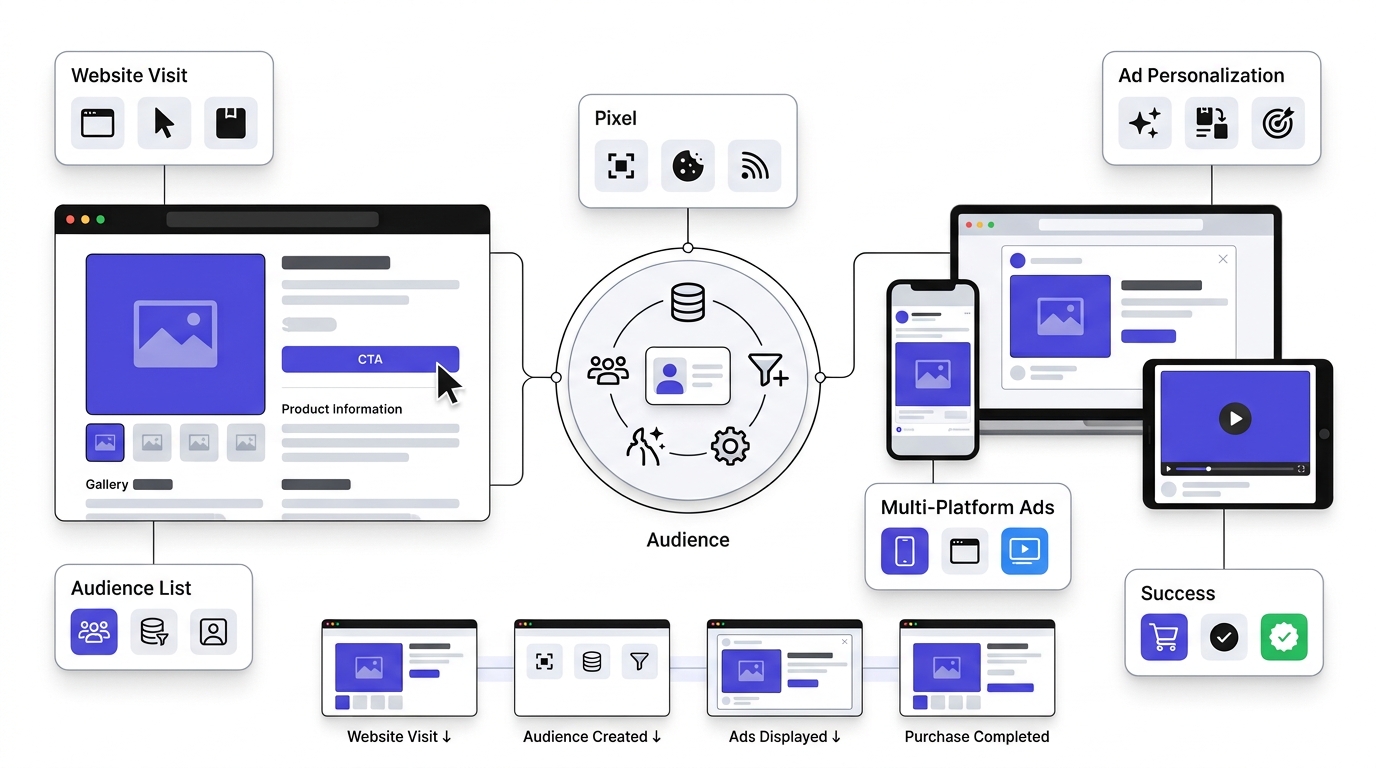
Retargeting is a form of online advertising that shows ads specifically to people who already visited a website, used an app, or interacted with a brand in some way, instead of showing ads to strangers who’ve never heard of the business. It’s built on the idea that a visitor who already showed interest is a far easier sell than someone starting from zero.
Think about it from a plain math perspective. Cold traffic (people who’ve never heard of you) converts at maybe 1-2% on a good day. Warm traffic, people who already visited your site and looked at a product, converts anywhere from 2x to 10x higher depending on the industry. That gap is the entire reason retargeting exists as a category.
Why Retargeting Exists in the First Place
Nobody buys anything the first time they see it, unless it’s cheap and impulse-driven, like a $12 t-shirt. Anything with real consideration behind it, a mattress, a SaaS subscription, a flight, a car, gets researched. The customer journey isn’t a straight line from “sees ad” to “buys product.” It’s messy. People bounce between five tabs, compare three competitors, read two reviews, get pulled away by a Slack message, and forget the whole thing existed by dinnertime.
Marketers used to just accept that loss. Someone leaves, they’re gone, move on to the next visitor. Retargeting flipped that. Instead of treating a bounced visitor as a dead end, it treats them as unfinished business. The visitor already did the hardest part, showing up and looking around. Retargeting’s job is just to remind them that the thing they were looking at still exists and they still need it.
A Simple Example That Makes It Click
Picture someone shopping for running shoes. They go to Nike.com, click into a pair of Pegasus shoes, maybe even scroll through the size chart, and then close the tab because their lunch break ended. Nothing happens. No purchase, no email sign-up, nothing.
Later that day, that same person opens Instagram and sees an ad for the exact pair of shoes they looked at, sometimes even the exact color they clicked on. Then they watch a YouTube video and see the same shoes again in a pre-roll ad. Then Google shows them a banner on a random news site with the shoes and a small “10% off” badge.
That’s not a coincidence and it’s not creepy magic. That’s a pixel that fired when they visited the product page, an audience list that got built from that pixel data, and an ad campaign that specifically targets people on that list. That entire loop, visit, track, list, target, is retargeting in its most basic form.
Why Most Visitors Don’t Convert the First Time
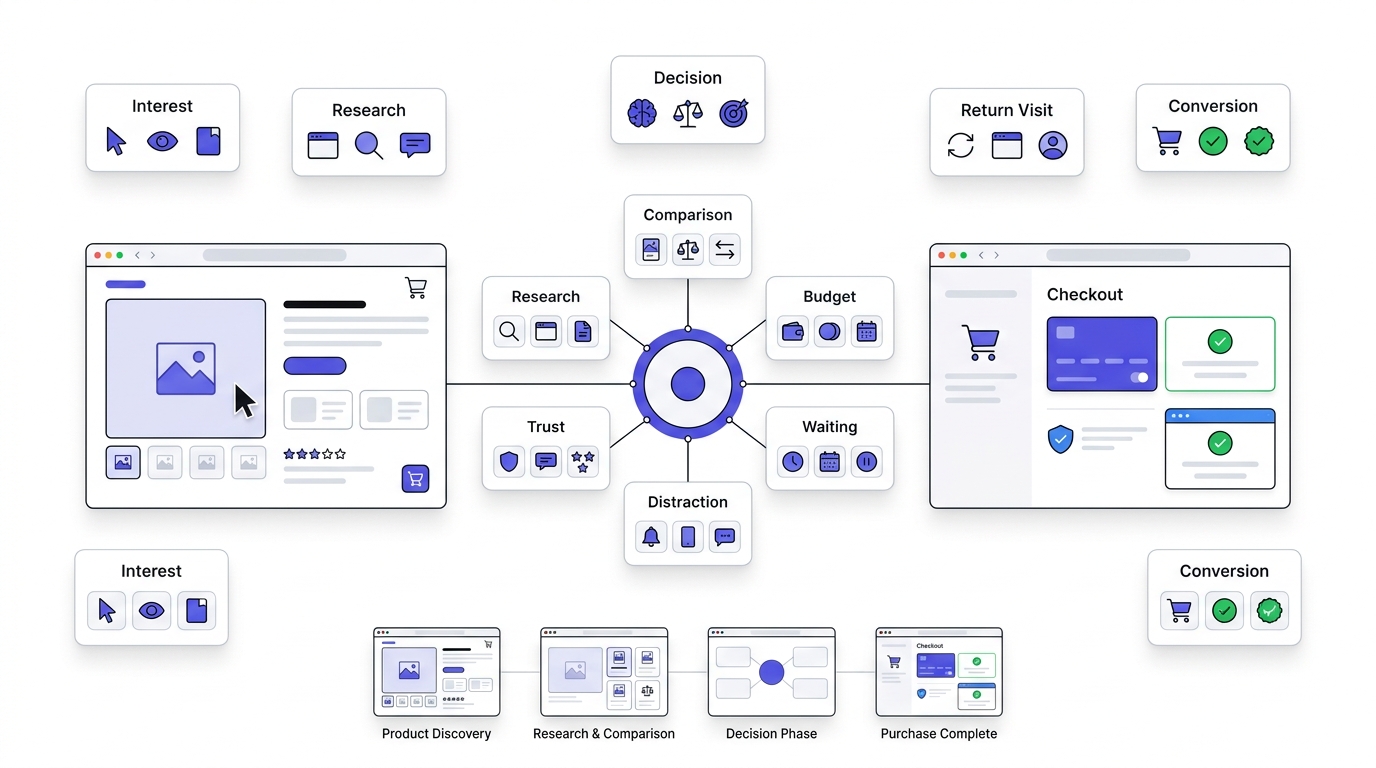
Understanding retargeting means understanding why it’s needed at all, and that comes down to how people actually shop, not how marketers wish they shopped.
People Need Time to Decide
Big purchases involve research. Someone shopping for a $2,000 laptop isn’t buying on visit one. They’re checking specs on the brand site, reading reviews on Reddit, watching a YouTube unboxing, comparing the price on three retailers, and maybe asking a friend what they think. That whole process can take days or weeks. If a business only had one shot per visitor, most of that research phase would end in nothing.
Even smaller purchases go through a mini version of this. A $40 skincare product still gets a quick scan of reviews before checkout, because nobody wants to waste money on something that doesn’t work.
The Real Reasons People Leave Without Buying
There’s a handful of reasons that cover almost every case:
- Just browsing. No intent to buy today, just curious what’s out there.
- Got distracted. A phone call, a kid walking in, a Slack ping, whatever. The internet is one giant distraction machine.
- No urgency. The product isn’t going anywhere (as far as they know), so there’s no reason to buy this second.
- Budget concerns. They like it, but payday is Friday.
- Comparison shopping. They want to check two other brands before committing.
- Trust hesitation. First time hearing about the brand, want to see reviews or social proof before typing in a credit card number.
None of these reasons mean the visitor was never going to buy. They mean the visitor wasn’t ready to buy at that specific second. That distinction is everything, because it means the sale isn’t lost, it’s just delayed. And a delayed sale that gets nudged back into view is exactly what retargeting is built to capture.
The Numbers Behind This
Across most industries, average website conversion rates sit somewhere between 1% and 3% on cold traffic. That means for every 100 people who show up, 97 to 99 of them leave without converting. Cart abandonment rates in ecommerce specifically are even worse, often reported around 70%, meaning seven out of ten people who add something to their cart never finish the purchase.
That’s the gap retargeting is built to close. Not by inventing new customers out of thin air, but by going after the ones who already raised their hand and then wandered off.
How Does Retargeting Work? Step-by-Step Process
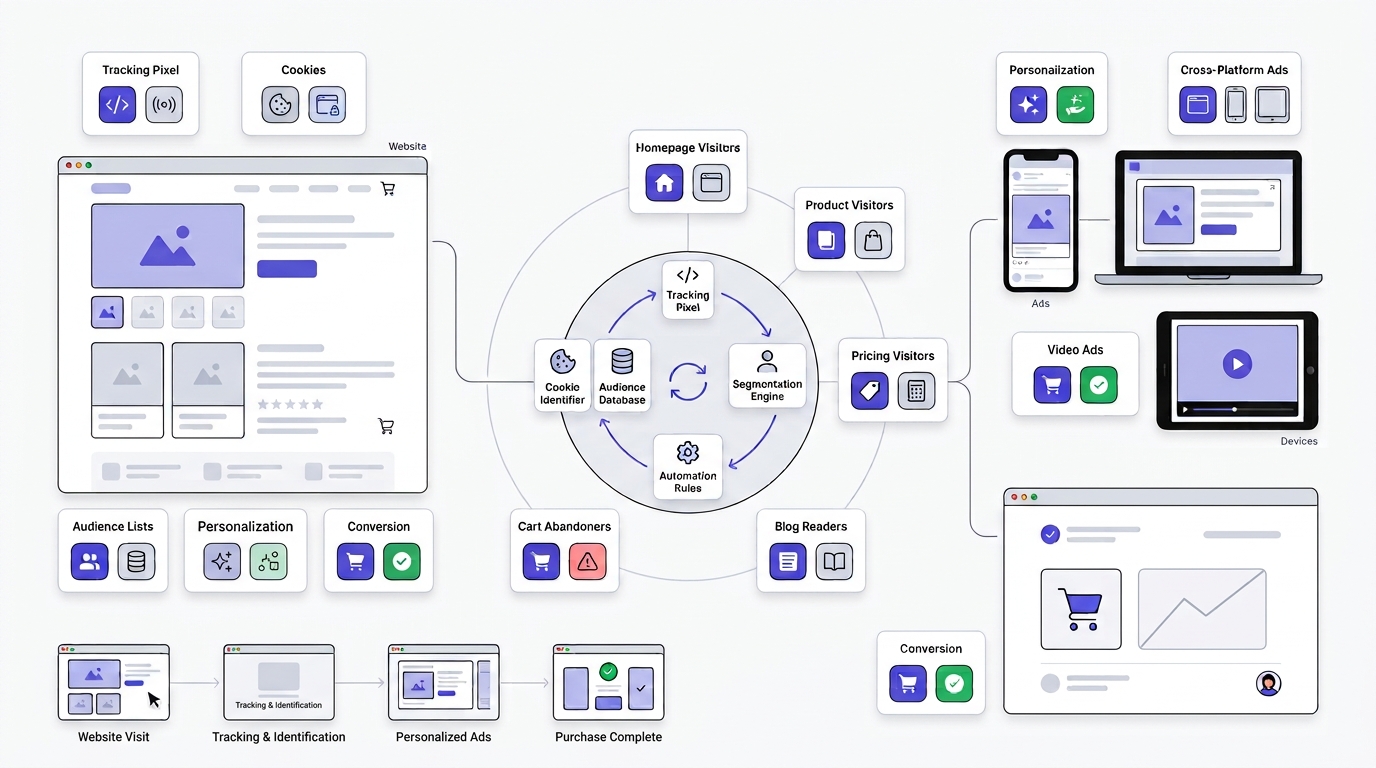
This is the part most explanations gloss over. So here’s the actual mechanical process, step by step, the way it happens behind the scenes.
Step 1: A Visitor Lands on the Website
It starts with any kind of traffic source: organic search, a social media post, a paid ad, an email newsletter link, doesn’t matter. Someone arrives on the site. This first visit is the trigger for everything that follows.
Step 2: A Tracking Code Collects Visitor Data
The moment that visitor lands, a small piece of tracking code, usually called a pixel, fires in the background. Nobody sees it happen. It’s a tiny snippet of JavaScript sitting in the site’s header that quietly logs the visit.
What is a pixel, exactly? It’s a small, mostly invisible piece of code (technically it used to be a literal 1×1 pixel image, now it’s just a script) that a platform like Meta or Google gives a business to install on their site. When a page loads, the pixel sends a signal back to that platform saying “this browser just visited this page.” Over time, that signal builds a profile of what pages a specific visitor looked at.
Cookies, explained without the jargon. A cookie is a small text file stored in the visitor’s browser that holds an identifier, basically a random string of letters and numbers that says “this is browser #48291.” When that same browser visits the site again, or visits another site that also uses that platform’s ad network, the cookie lets the system recognize it’s the same visitor.
First-party vs third-party cookies matters a lot right now. First-party cookies are set by the website the person is actually visiting, and browsers generally still allow these. Third-party cookies are set by an outside company (like an ad network) tracking behavior across multiple sites the visitor didn’t directly interact with, and this is exactly the kind of tracking that Safari, Firefox, and now Chrome have been restricting or blocking outright. This shift is a massive deal for retargeting and gets its own section later in this guide.
Step 3: Audience Lists Get Built From That Data
Once the pixel is collecting data, it starts sorting visitors into buckets, called audiences or audience lists. This is where retargeting gets its precision. Instead of one giant blob of “everyone who visited the site,” businesses can build specific lists like:
- Homepage visitors (broadest, least specific intent)
- Product page visitors (looked at something specific)
- Pricing page visitors (high intent, comparing cost)
- Cart abandoners (added something, didn’t check out, highest intent of all)
- Blog readers (top of funnel, probably not ready to buy)
Each of these lists gets treated differently in campaigns, because someone who abandoned a cart needs a very different ad than someone who read one blog post and left.
Step 4: Ads Get Displayed Across Platforms
Once a list exists, it gets uploaded (or, more accurately, connected in real time) to ad platforms. Ads then start showing to people on that list as they browse elsewhere: Google’s Display Network (which covers millions of partner websites), Facebook and Instagram feeds and stories, LinkedIn’s feed, YouTube pre-roll, and other partner sites in whatever ad exchange the campaign is running through.
The ad creative itself varies. Some retargeting ads are static banners. Some are dynamic, meaning they automatically pull in the exact product the visitor looked at (more on dynamic retargeting below). Some are video. All of them share one thing: they’re only shown to people already on the list, nobody else.
Step 5: The Visitor Returns and (Hopefully) Converts
The visitor sees the ad somewhere else, clicks it, lands back on the site, and this time actually buys, signs up, or fills out the form. Or they don’t click but see the brand enough times that when they’re finally ready to buy, they search for the brand directly instead of a competitor. Either outcome counts as retargeting doing its job, because brand recall on its own drives a chunk of conversions that never get a direct click credited to them.
The Full Loop, Visually
Visit → Track → Segment → Retarget → Convert. That’s the whole cycle. Five steps, running mostly on autopilot once it’s set up, which is exactly why it’s one of the highest ROI tactics in digital advertising once it’s configured correctly.
Retargeting vs Remarketing: The Difference Everyone Gets Wrong
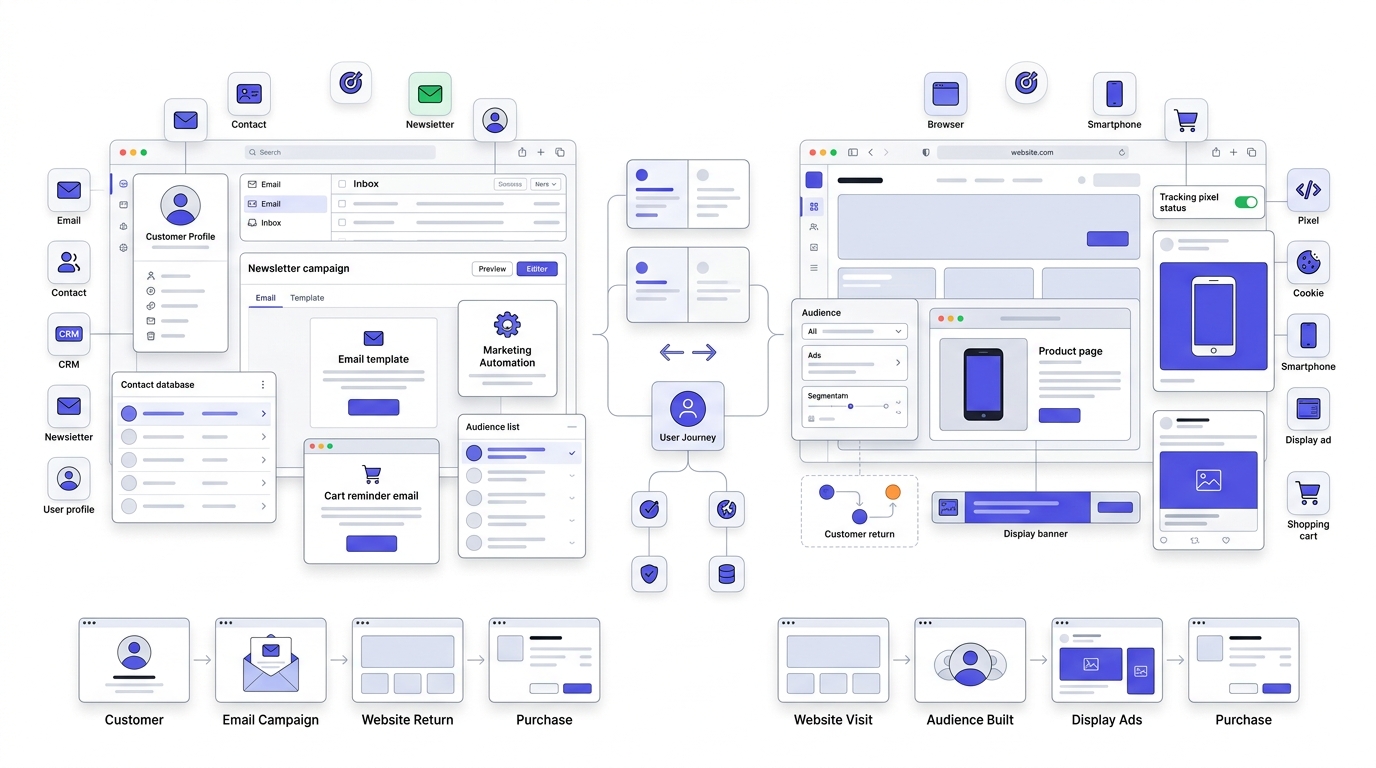
People use “retargeting” and “remarketing” interchangeably constantly, including plenty of marketers who should know better. They’re related but not identical, and the difference actually matters for how a campaign gets built.
What Is Remarketing?
Remarketing, in its original and technically correct meaning, refers to re-engaging existing contacts, usually through email. Someone who gave their email address (a lead, a past customer, a newsletter subscriber) gets targeted again through email campaigns based on their past behavior. Amazon sending “you left this in your cart” emails is classic remarketing.
What Is Retargeting?
Retargeting specifically refers to using paid ads (display, social, video) to re-engage anonymous website visitors who are identified purely through cookies or pixels, not through an email address they gave. It doesn’t require the visitor to have given contact info at all. The pixel just needs to have seen them.
Google actually muddies this further because Google Ads literally calls its retargeting feature “remarketing” inside the platform. That’s a huge source of the confusion. Functionally, what Google Ads calls “remarketing” is what the rest of the industry calls retargeting.
The Major Differences, Laid Out Plainly
| Factor | Retargeting | Remarketing |
|---|---|---|
| Tracking method | Cookies/pixels on anonymous visitors | Known contact data (email, phone) |
| Primary channel | Paid display, social, and video ads | Email, SMS |
| Audience | Anyone who visited, identified or not | People who gave contact info |
| Goal | Bring back anonymous browsers | Re-engage known leads/customers |
| Cost | Ongoing ad spend | Mostly the cost of an email platform |
| Automation | Platform-driven audience building | Behavior-triggered email flows |
Which One Should a Business Use?
Both, honestly, and most mature marketing programs run them side by side rather than picking one. Retargeting catches the anonymous majority, the 97% who never gave an email address. Remarketing nurtures the smaller group who did convert into a lead but hasn’t bought yet. Running only one leaves a gap. A cart abandoner who gave their email should get both a remarketing email sequence and a retargeting ad, because different people respond to different channels, and hitting both increases the odds of getting a response from either one.
Types of Retargeting You Should Know
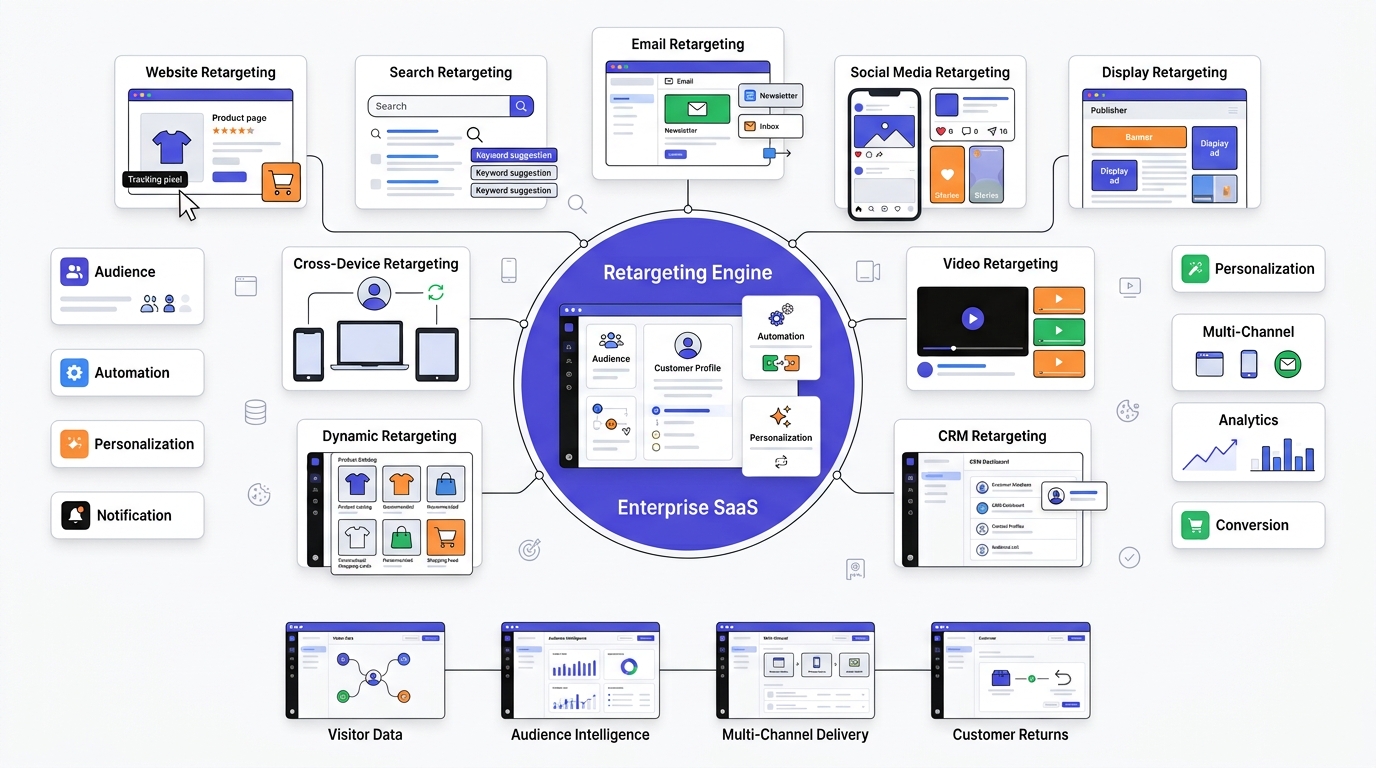
Retargeting isn’t one single tactic. It splits into several distinct types depending on what triggers the targeting and where the ads show up.
Website Retargeting (Pixel-Based)
This is the standard version already covered above: a pixel tracks site visitors and shows them ads afterward. It’s the foundation almost every other type builds on.
Search Retargeting
Instead of tracking who visited a website, search retargeting targets people based on the search terms they typed into Google or Bing, even if they never landed on the site at all. If someone searches “best CRM for small business” and clicks a competitor’s result instead, search retargeting can still put that person into an audience and show them ads based on that search intent. It’s a way to reach high-intent people who never touched the actual website.
Email Retargeting
This one tracks engagement with email campaigns, opens and clicks specifically, and triggers ad targeting based on that behavior. Someone who opened three emails about a product but never clicked through can get pulled into a retargeting audience and shown ads reinforcing that same offer.
Social Media Retargeting
Platform-specific retargeting run through Facebook, Instagram, LinkedIn, X, and Pinterest, using each platform’s own pixel and audience tools. Facebook’s version (Custom Audiences) is the most widely used because of Meta’s massive reach and detailed targeting options.
Display Retargeting
Banner ads that follow visitors across the web through networks like Google Display Network, showing on news sites, blogs, and other partner properties. This is the classic “shoes following you everywhere” experience most people associate with retargeting in general.
Video Retargeting
Targeting people who watched a certain percentage of a video (say, 50% or more) with follow-up video ads on YouTube, connected TV (OTT), or other video platforms. This works particularly well for brand storytelling, since it lets a business build on a narrative someone already started watching.
CRM Retargeting
Uploading a list of existing customers or contacts directly into an ad platform and running campaigns specifically to that list. Useful for upselling existing customers or winning back people who churned, without wasting spend targeting brand-new prospects.
Dynamic Retargeting
The most personalized form: ads automatically populate with the exact product a visitor viewed, pulled straight from a product catalog feed. If someone looked at a blue jacket in size medium, the ad shows that exact jacket. This gets its own deep dive later in the guide because it’s genuinely one of the highest-converting formats in ecommerce.
Cross-Device Retargeting
Tracking a visitor across multiple devices, phone, laptop, tablet, so the same person gets recognized whether they’re browsing on their phone during lunch or on their laptop that night. This relies on logged-in signals (like being signed into Google or Facebook on both devices) rather than cookies alone, since cookies don’t carry over between devices.
How Retargeting Works on Different Platforms
The mechanics stay similar across platforms, pixel fires, audience builds, ad shows, but each platform has its own tools and quirks worth knowing.
Google Ads Retargeting
Google runs retargeting (which it labels “remarketing” inside the platform) through a few different campaign types. Display campaigns show banner ads across the Google Display Network, which reaches over 90% of internet users globally through partner sites. Search campaigns can layer a “Remarketing List for Search Ads” (RLSA) on top of regular search campaigns, letting a business bid more aggressively or show different ad copy to people who already visited the site. Performance Max campaigns blend retargeting signals in automatically across Search, Display, YouTube, and Gmail without needing separate campaigns for each. And YouTube retargeting shows video ads to people who visited the site or engaged with a channel’s videos before.
Meta (Facebook and Instagram) Retargeting
Meta’s system runs on the Facebook Pixel (or the newer Conversions API, which sends data server-side to work around browser tracking restrictions). Once installed, it powers Custom Audiences, which lets a business build lists from website visitors, video viewers, or people who engaged with an Instagram profile. Meta also offers Lookalike Audiences, which technically isn’t retargeting itself but often gets paired with it: Meta finds new people who resemble the existing retargeting audience, expanding reach beyond just past visitors.
LinkedIn Retargeting
LinkedIn uses the Insight Tag, its version of a pixel, mostly aimed at B2B companies running lead generation campaigns. It’s more expensive per click than Meta or Google, often significantly so, but the targeting precision by job title, company size, and industry makes it worthwhile for B2B where the customer lifetime value justifies the higher cost.
Microsoft Advertising
Runs on Bing’s network and works almost identically to Google’s system, using UET (Universal Event Tracking) tags instead of a standard pixel name. Often overlooked, but Bing traffic tends to skew slightly older and higher-income, which can matter depending on the product.
TikTok Retargeting
Uses the TikTok Pixel to build audiences from site visitors and app users, then serves native-feeling video ads back to them in-feed. Works especially well for products with strong visual appeal, since TikTok’s format rewards creative that doesn’t look like a traditional ad.
Pinterest Retargeting
Built around the Pinterest Tag, targeting people who saved or clicked pins related to a product. Pinterest users often research purchases weeks or months in advance, so retargeting windows here tend to run longer than on other platforms.
Retargeting Audiences You Should Actually Create
Not all audiences deserve the same budget or attention. Here’s the priority order that actually makes sense for most businesses:
Cart abandoners sit at the top. These are people who added a product to their cart and left before paying, which is about as close to “ready to buy” as a visitor gets without actually buying. Checkout abandoners are even further along, they started the payment process and stopped, often due to shipping cost surprise or a form error. Pricing page visitors signal serious buying intent in SaaS or service businesses specifically, since nobody checks pricing out of idle curiosity. Product page visitors showed interest in something specific, even if they didn’t add it to cart. High-intent visitors is a broader bucket that can combine multiple signals, like people who viewed 3+ pages or spent over 2 minutes on site.
Lower down the priority list but still worth building: existing customers (for upsell and cross-sell), email subscribers (for consistency across channels), video viewers (people who watched brand content but haven’t visited the site), lead magnet downloads (people who traded an email for a resource but never bought), blog readers (top of funnel, needs nurturing not a hard sell), and all website visitors (the broadest net, useful for brand awareness retargeting but converts the lowest of any list).
The mistake most businesses make is running everyone through the exact same ad. A cart abandoner and a blog reader need completely different messaging, one needs a nudge to finish checkout, maybe with a discount, the other needs to be introduced to the product in the first place.
Benefits of Retargeting
Higher conversion rates. This is the headline benefit and it’s not close. Retargeted visitors convert at rates several times higher than cold traffic across nearly every study and every industry benchmark, simply because they already know the brand exists.
Lower customer acquisition cost. Because conversion rates are higher, the cost to actually get a sale (as opposed to just a click) drops. Spending the same ad budget on warm traffic instead of cold traffic almost always produces cheaper conversions.
Better brand recall. Even without a click, repeated ad exposure builds familiarity. Someone who sees a brand’s ad five times over two weeks is far more likely to recognize and trust that brand when they’re finally ready to buy something in that category, even if they search generically instead of clicking the ad directly.
Personalized advertising. Dynamic retargeting specifically lets ads show the exact product someone looked at, which feels less like generic advertising and more like a helpful reminder, when it’s not overdone.
Cross-selling and upselling opportunities. CRM retargeting lets a business show existing customers ads for complementary products or upgrades, turning a one-time buyer into a repeat customer.
Better return on ad spend. All of the above compounds into a simple outcome: retargeting campaigns consistently produce a higher ROAS (return on ad spend) than cold prospecting campaigns, which is why almost every serious advertiser allocates budget to it even if it’s a smaller slice than top-of-funnel spend.
Real-World Retargeting Examples
Ecommerce Example
Someone browses a pair of shoes on an online shoe retailer’s site, checks the size chart, then closes the tab. That evening, a dynamic retargeting ad shows up on Instagram featuring that exact shoe with a “still thinking about these?” style message. Three days later, if they still haven’t bought, the ad shifts to include a 10% discount code, adding urgency that wasn’t there in the first ad. This kind of sequencing, informational first, incentive second, is standard practice in ecommerce because hitting someone with a discount immediately trains them to always wait for one.
SaaS Example
A visitor starts a free trial signup on a project management tool but abandons the form halfway through. A retargeting campaign kicks in showing ads that highlight a specific feature (say, Gantt chart views or Slack integration) rather than a generic “sign up now” message, because at this stage the goal is answering the unspoken objection (“is this actually better than what I use now?”) rather than just repeating the same CTA that already didn’t work once.
Real Estate Example
A prospective buyer views three listings on a real estate site but doesn’t contact an agent. Retargeting ads then show those specific properties again across Facebook and Google Display, sometimes paired with “price reduced” or “open house this weekend” messaging that creates a reason to act now instead of continuing to browse indefinitely.
Healthcare Example
Someone researches a specific procedure on a clinic’s website, say, LASIK surgery, but doesn’t book a consultation. Retargeting here needs to be handled carefully due to privacy regulations (HIPAA in the US restricts how health-related browsing data can be used for ad targeting), so many healthcare marketers retarget based on broader page categories rather than specific condition pages to stay compliant.
Education Example
A prospective student downloads a program brochure from a university’s site but doesn’t start an application. Retargeting ads then highlight application deadlines, financial aid information, or student testimonials, addressing the hesitation points that typically stop someone from finishing an application.
Travel Example
Someone searches flights from New York to Lisbon on a travel booking site but doesn’t complete the purchase. Dynamic retargeting shows that exact route and price again days later, often flagging if the price has changed, which creates urgency without needing an artificial discount.
Dynamic Retargeting Explained
Dynamic retargeting deserves its own section because it’s meaningfully different from standard retargeting, not just a fancier version of it.
What Makes It Different
Standard retargeting shows the same static ad to everyone on a list. Dynamic retargeting automatically generates a personalized ad for each individual visitor based on the exact product or page they viewed, pulled live from a product catalog feed. No two people necessarily see the same ad creative, even though they’re both technically in the “product page visitors” audience.
How the Product Catalog Powers It
This requires uploading a product feed (a structured file listing every product, its image, price, availability, and a unique ID) into the ad platform. When the pixel detects a visitor viewed product ID #4471, the ad system automatically pulls that product’s image, price, and title from the feed and slots it into a template ad, live, in real time, without a human building a single individual ad.
The Ecommerce Workflow, Step by Step
A visitor views a product page. The pixel logs the product ID they viewed. That ID feeds into a dynamic audience. When that visitor browses elsewhere, the ad platform checks the catalog feed for that product ID and generates an ad showing that exact item, often alongside a couple of related products the system predicts might also interest them (this is where “customers also viewed” style recommendation logic gets baked into the ad itself).
Best Platforms for Dynamic Retargeting
Meta’s Dynamic Ads and Google’s Dynamic Remarketing are the two dominant options, both requiring a connected product feed through platforms like Google Merchant Center or a direct catalog upload. Criteo built its entire business model around this exact tactic and remains a strong third option, particularly for larger ecommerce catalogs.
Retargeting Strategy That Actually Works
Running retargeting without a strategy behind it usually just means showing the same ad to everyone forever, which burns budget and annoys people. Here’s what a real strategy looks like.
Segment Visitors Instead of Lumping Them Together
Break audiences apart by intent level, as covered earlier. A cart abandoner and a homepage visitor should never see identical ad copy.
Build Multiple Audiences With Different Windows
A cart abandoner might get targeted for 3-7 days with urgency-driven messaging, since that intent fades fast. A blog reader might get targeted for 30-60 days with softer, educational content, since that relationship takes longer to develop.
Personalize Messaging by Stage
Someone who just discovered the brand needs trust-building content (reviews, guarantees, social proof). Someone who compared pricing needs a value-focused message (what makes it worth the cost). Someone who abandoned checkout needs friction removal (free shipping, simplified returns, a limited-time discount).
Use Frequency Capping
Showing the same person 20 ad impressions a day doesn’t increase conversions, it just annoys them into blocking the brand mentally (or literally installing an ad blocker). Most platforms let advertisers cap frequency, commonly somewhere around 3-5 impressions per user per week for retargeting specifically.
Run Sequential Ads
Instead of one static ad running on repeat, build a sequence: ad one reintroduces the product, ad two adds social proof or reviews, ad three adds an incentive if they still haven’t converted. This mimics how a good salesperson would actually handle a hesitant customer, rather than repeating the same pitch on a loop.
Always Exclude Converted Users
This sounds obvious but gets missed constantly. Someone who already bought the product should not keep seeing “still thinking about this?” ads for the exact item they own. Every platform allows exclusion audiences, use them.
Make Sure the Landing Page Matches the Ad
If the ad promises 10% off, the landing page needs that discount visible immediately, not buried three clicks deep. Mismatched expectations between ad and landing page kill conversion rates fast.
Best Practices for Retargeting Campaigns
Beyond strategy, there’s a set of tactical practices that separate campaigns that perform from campaigns that quietly waste money.
Keep Ad Frequency Under Control
As mentioned above, capping impressions matters. Beyond a certain point (research generally points to diminishing returns past 5-7 impressions per week), additional exposure doesn’t help and can actively hurt brand perception.
Refresh Creative Regularly
Ad fatigue is real. The same creative running for months starts getting ignored, or worse, starts generating negative sentiment. Rotating creative every 2-4 weeks keeps things feeling fresh instead of stale.
Personalize Wherever Possible
Dynamic ads, first-name personalization in some formats, product-specific messaging, all of it performs better than generic “come back!” messaging.
Nail the Mobile Experience
A huge share of retargeting impressions happen on mobile, and if the landing page is slow or clunky on a phone, that click just got wasted. Page load speed and mobile-friendly checkout flows matter as much as the ad creative itself.
Test Everything
A/B test ad copy, images, CTAs, and audiences against each other constantly. What works for one brand’s cart abandoners won’t necessarily work for another’s, industry, price point, and audience all shift what resonates.
Stay on Top of GDPR and Consent Requirements
In the EU (and increasingly elsewhere), tracking requires explicit user consent before a pixel can even fire. Consent management platforms handle this, but skipping this step isn’t just a compliance risk, it can mean losing tracking data entirely for a chunk of visitors who never consented.
Retargeting Metrics You Should Track
Running a campaign without watching the right numbers is basically flying blind. Here’s what actually matters:
CTR (Click-Through Rate) shows what percentage of people who saw the ad clicked it, a basic signal of how compelling the creative is. CPC (Cost Per Click) shows how much each click costs, useful for comparing efficiency across campaigns. CPM (Cost Per Thousand Impressions) matters more for awareness-focused retargeting than direct-response. CPA (Cost Per Acquisition) is the number that usually matters most: how much does it actually cost to get one conversion from this audience. Conversion rate shows what percentage of clicks actually turn into a sale or lead, the truest measure of whether the audience and offer match up.
ROAS (Return on Ad Spend) and ROI measure the actual financial return, factoring in revenue generated versus money spent, arguably the metric that ultimately decides whether a campaign keeps running. View-through conversions track people who saw an ad, didn’t click, but converted later anyway, an often-underrated signal since it captures the brand-recall effect that a click-only view of performance misses entirely. Frequency shows average impressions per user, critical for catching ad fatigue before it tanks performance. Reach shows the total unique people the campaign hit. Cost per conversion ties spend directly to outcomes and is usually the number that gets reported up the chain to whoever’s approving the budget.
Privacy, Cookies, and the Future of Retargeting
This is the section that actually changes how retargeting gets built going forward, and it’s worth taking seriously.
Cookie Deprecation Is Reshaping Everything
Third-party cookies, the backbone of traditional cross-site retargeting, have been getting phased out for years. Safari and Firefox already block them by default. Chrome, which still holds the largest browser market share, has been rolling out its own restrictions through its Privacy Sandbox initiative. The practical effect: the old method of “track someone across every site on the internet using a third-party cookie” is quietly dying, and advertisers who built their entire retargeting stack on that method are having to rebuild.
First-Party Data Is the Replacement
Data collected directly by a business, email addresses, purchase history, on-site behavior tracked through first-party cookies, isn’t going anywhere and is becoming the foundation for retargeting going forward. Businesses that build strong email lists and logged-in user experiences have a real advantage here, because that data belongs to them directly rather than depending on a browser allowing third-party tracking.
Server-Side Tracking
Instead of relying purely on a browser-based pixel (which ad blockers and browser restrictions can interfere with), server-side tracking sends conversion data directly from a business’s server to the ad platform. Meta’s Conversions API and Google’s Enhanced Conversions both work this way, and they’ve become close to essential for maintaining accurate tracking as browser-based methods keep getting restricted.
Consent Mode and Regulations
Google’s Consent Mode adjusts how tags behave based on whether a user has given tracking consent, still collecting some modeled data even when full tracking isn’t allowed. This ties directly into regulations like GDPR in the EU, CCPA in California, and the broader ePrivacy Directive, all of which require clear user consent before tracking cookies can be set. Non-compliance isn’t just a legal risk, fines under GDPR specifically can run into the millions for serious violations.
Where Retargeting Is Headed
AI-powered retargeting is already handling a lot of the audience-building and bid-optimization work automatically, platforms like Google’s Performance Max lean heavily on machine learning to figure out who’s likely to convert rather than relying purely on manually defined audience rules. And “cookieless advertising” solutions, contextual targeting (showing ads based on page content rather than user history), cohort-based targeting, and first-party data matching, are becoming the practical path forward as the industry adjusts to a world with far less third-party tracking than it had even a couple years ago.
Tools for Running Retargeting Campaigns
Most of the time, retargeting doesn’t need a fancy third-party tool at all. The native ad platforms handle it fine on their own, and that’s where most businesses should start:
- Google Ads – runs retargeting through Display remarketing and RLSA (Remarketing Lists for Search Ads), covering banner ads across the Display Network plus tailored search bidding for people who already visited the site.
- Meta Ads Manager – powers Facebook and Instagram retargeting through Custom Audiences and Dynamic Ads, the go-to option for most ecommerce brands because of sheer reach and creative flexibility.
- LinkedIn Campaign Manager – built for B2B, using the Insight Tag to retarget by job title, company size, and industry. Expensive per click, but the precision usually justifies it for high-ticket B2B deals.
- Microsoft Advertising – Bing’s version of the same playbook, using UET tags. Often skipped, but worth running alongside Google since Bing traffic tends to skew older and higher-income.
- TikTok Ads Manager – retargets through the TikTok Pixel, best suited for visually strong products and brands that can make native-feeling video creative instead of repurposed static banners.
- Pinterest Ads – built around the Pinterest Tag, useful for products with long research cycles, since Pinterest users often plan purchases weeks or months out.
Then there’s a second tier: tools built specifically for retargeting instead of general ad management, worth looking at once a business is running multi-channel campaigns and wants everything in one place.
- AdRoll – specializes in cross-platform retargeting and dynamic product ads, popular with ecommerce brands that don’t want to manage five separate dashboards.
- Criteo – basically built its whole business around dynamic retargeting. Strong pick for larger product catalogs where personalized ads matter a lot.
- Perfect Audience – another dedicated retargeting platform, simpler setup, good for smaller teams that don’t need the full complexity of Criteo or AdRoll.
- RollWorks – leans B2B and account-based marketing rather than individual consumer retargeting, so it fits companies targeting specific accounts rather than a broad consumer audience.
Honestly, most businesses don’t need to touch the dedicated tools until they’re running serious spend across multiple channels. Starting with the native platforms (Google, Meta, maybe LinkedIn for B2B) covers 90% of what most retargeting campaigns actually need.
Who Should Use Retargeting?
Pretty much anyone running paid traffic benefits from it, but some business types get outsized returns. Ecommerce brands see the clearest wins thanks to dynamic retargeting and cart abandonment recovery specifically. SaaS companies use it heavily for trial signups and free-to-paid conversion. B2B companies, particularly through LinkedIn, use it for longer, multi-touch sales cycles where a single ad impression was never going to close a deal alone. Agencies run it constantly across client accounts because it’s one of the most reliably positive ROI tactics available. Coaches and consultants use it to stay top-of-mind with people who checked out a program page but weren’t ready to book a call. Local businesses use geographically limited retargeting to bring back people who visited a service page but didn’t call or book. Healthcare, education, real estate, and travel all use it too, as covered in the examples section above, each with its own specific compliance or messaging considerations.
How to Launch a First Retargeting Campaign, Step by Step
Launching a retargeting campaign for the first time feels more intimidating than it actually is. Once the pixel is installed and audiences are segmented properly, most of the “hard part” is done. What trips people up is skipping steps or rushing through them because they’re excited to get ads live. Here’s the full process, broken down properly.
Step 1: Install the Tracking Pixel
Nothing in retargeting works without this step. It’s the foundation everything else sits on top of.
Get the pixel code. Every platform, Meta, Google, LinkedIn, gives out a unique snippet of code tied to that specific ad account. This isn’t a generic script, it’s tied to the business’s account ID, so grabbing the wrong one or copying someone else’s won’t work.
Install it site-wide, not just on the homepage. A pixel that only lives on the homepage misses everyone who lands directly on a product page from a Google search or a social link, which is a huge chunk of traffic for most sites. It needs to fire on every page.
Use a tag manager instead of hardcoding. Google Tag Manager is the standard tool here. Instead of pasting pixel code directly into the site’s HTML, a tag manager lets every pixel (Meta, Google, LinkedIn, whatever gets added later) get managed from one dashboard. The practical benefit shows up down the line: adding a new platform’s pixel six months from now takes a few clicks instead of digging back into the site’s code and risking something breaking.
Step 2: Verify Tracking Is Actually Working
This is the step almost everyone skips, and it’s exactly why so many first campaigns quietly underperform with nobody able to explain why.
Use the platform’s built-in verification tools. Meta has a free browser extension called Meta Pixel Helper. Install it, visit the site, and it shows in real time whether the pixel fired and which events it captured. Google Tag Manager has a preview mode that does the same job, showing exactly which tags fired on which page.
Check that specific events are captured correctly. It’s not enough for the pixel to just “be there.” It needs to correctly log page views, add-to-cart actions, and purchases, whatever events the campaign will actually target. A pixel that fires on page load but never registers a purchase event means the audience lists downstream will be incomplete or wrong.
Do this before spending a single dollar. Running ads against a broken or misconfigured pixel means paying to build an audience that’s either empty, too small, or targeting the wrong behavior entirely. Nobody notices until the results come back flat, and by then, budget’s already gone.
Step 3: Create Segmented Audiences
This is where retargeting either becomes genuinely powerful or turns into a waste of money.
Break visitors into distinct groups based on behavior, not just “everyone who visited.” At minimum, most businesses should build:
- Cart abandoners (added something, didn’t check out)
- Product page visitors (looked at something specific but didn’t add to cart)
- Pricing page visitors (comparing cost, high intent)
Base these lists on actual site structure. This means knowing which URLs correspond to product pages, which correspond to the pricing page, and setting up audience rules around those specific paths rather than guessing.
Avoid the catch-all “everyone” audience as the main strategy. It’s fine to have a broad audience for general brand awareness, but if that’s the only audience running, the entire precision advantage of retargeting gets thrown away. A cart abandoner and someone who read one blog post are not the same person and shouldn’t see the same ad.
Step 4: Design Ad Creatives
Build multiple variations per audience, not one ad running everywhere. A cart abandoner audience might get two or three creative versions to test against each other from day one.
Mix formats deliberately. Include a static image ad, a dynamic product ad if there’s a catalog feed connected, and ideally a short video. Different people respond to different formats, and there’s no way to know which performs best without having more than one running.
Build for testing, not just for launch. The goal isn’t to find one “perfect” ad before going live. It’s to have enough variation running that data starts coming in on what actually works within the first week or two, instead of waiting a month to even start testing.
Step 5: Write Ad Copy That Matches Intent
Match the message to where that audience actually is. This is the step that separates good retargeting from generic retargeting.
For cart abandoners: they already decided to buy, they just didn’t finish. Copy here should push urgency, maybe pair it with a small incentive, a discount code or free shipping, something that removes the last bit of friction.
For pricing page visitors: they’re comparing cost, so copy should reinforce value. Highlight what’s included, a guarantee, or a comparison point that justifies the price rather than just repeating “buy now.”
For blog readers or top-of-funnel visitors: they haven’t decided anything yet. Hitting them with hard-sell copy this early usually backfires. This audience needs a softer introduction to the product, more educational, less transactional.
Step 6: Set a Budget
Start conservative. Retargeting audiences are almost always much smaller than cold prospecting audiences, sometimes a few thousand people compared to millions in a cold campaign. That means a modest daily budget, even $10-20 a day for a smaller list, can fully cover the audience without overspending or running out of people to show ads to.
Don’t assume bigger budget equals better results early on. Overspending against a small audience just means the same people see the ad too many times too fast, which burns through frequency caps and leads to fatigue before there’s even enough data to know if the creative works.
Step 7: Launch the Campaign
Get it live and watch the first 48 hours closely. This window catches setup issues before they become expensive problems: a pixel that stopped firing, an audience too small to deliver ads efficiently, or a bidding strategy that’s spending faster than expected.
Check delivery, not just spend. If a campaign shows spend but very few impressions, that usually signals an audience size issue or a targeting conflict worth fixing immediately rather than letting it run for days unnoticed.
Step 8: Monitor Results Closely
Check CTR, CPA, and conversion rate daily for the first one to two weeks. Early data reveals fast whether an audience or a specific creative is working or falling flat. Waiting a month to look at numbers means a month of wasted spend on something that could’ve been fixed in week one.
Compare performance across audiences, not just overall. A campaign might look “fine” on average while one audience (say, cart abandoners) is crushing it and another (blog readers) is dragging the numbers down. Averages hide that.
Step 9: Optimize Weekly
Pause what’s underperforming. If a creative or audience consistently shows a high CPA with no signs of improving, cut it rather than letting it keep spending out of habit.
Scale what’s working. Once a specific ad or audience proves itself, increasing budget there usually produces more return than spreading budget evenly across everything.
Refresh creative before fatigue sets in. Watch the frequency metric specifically, once it climbs past 5-7 impressions per person per week, performance typically starts dropping. Swap in new creative before that happens rather than after results already slipped.
Keep adjusting audience segments as new data comes in. Retargeting isn’t something to set up once and leave alone. New behavior patterns show up over time, new pages get added to the site, and audiences need to evolve alongside all of that to keep performing.
Conclusion
Retargeting isn’t complicated once the mechanics are clear: a pixel tracks visitors, that data builds segmented audience lists, and ads get shown specifically to people already familiar with the brand instead of complete strangers. That warm-audience advantage is why it consistently outperforms cold prospecting on cost per conversion and overall ROI across nearly every industry that’s tested it.
What separates a retargeting campaign that actually moves revenue from one that just burns budget comes down to the details covered throughout this guide: proper audience segmentation instead of one giant list, frequency caps so ads don’t turn into an annoyance, personalized messaging that matches where someone actually is in their decision process, and a first-party data strategy that holds up as third-party cookies keep disappearing.
Anyone running paid traffic right now without a retargeting layer running underneath it is leaving conversions sitting on the table. The visitors already showed up once. Getting them back is the cheap part, if the pixel’s installed, the audiences are built right, and the ads actually speak to why they left in the first place.
Frequently Asked Questions
What is retargeting in digital marketing?
Retargeting is a paid advertising method that shows ads specifically to people who already interacted with a website or app, using tracking pixels and cookies to identify and re-engage them after they leave without converting. It’s built on the fact that warm traffic, people already familiar with a brand, converts at a much higher rate than cold traffic that’s never encountered the business before.
How does retargeting work?
A tracking pixel installed on a website logs when a visitor lands on specific pages, that data builds audience lists based on behavior (like viewing a product or abandoning a cart), and ad platforms then show targeted ads to people on those lists as they browse elsewhere online. The process runs largely on autopilot once it’s set up, continuously showing ads to qualified visitors until they convert or drop out of the targeting window.
Is retargeting the same as remarketing?
No, though the terms get used interchangeably constantly. Retargeting typically refers to paid ads shown to anonymous website visitors tracked via cookies, while remarketing traditionally refers to re-engaging known contacts (people who gave an email address) through email or SMS campaigns. Google adds to the confusion by calling its retargeting feature “remarketing” inside Google Ads, even though functionally it works like retargeting.
What is a retargeting pixel?
A retargeting pixel is a small piece of tracking code installed on a website that logs visitor behavior and sends that data back to an ad platform like Meta or Google. This data builds audience lists that ad platforms use to show targeted ads specifically to people who already visited certain pages on the site.
What platforms support retargeting?
Google Ads, Meta (Facebook and Instagram), LinkedIn, Microsoft Advertising, TikTok, and Pinterest all support retargeting through their own pixel and audience-building tools. Dedicated retargeting platforms like AdRoll and Criteo also exist for businesses that want to manage cross-platform retargeting campaigns from a single dashboard.
Does retargeting still work without third-party cookies?
Yes, though the methods are shifting significantly. Businesses are increasingly relying on first-party data (email lists, on-site behavior, logged-in user data), server-side tracking through tools like Meta’s Conversions API, and contextual targeting rather than depending purely on third-party cookies that browsers like Safari, Firefox, and increasingly Chrome are restricting or blocking.
What is dynamic retargeting?
Dynamic retargeting automatically generates personalized ads showing the exact product or page a specific visitor looked at, pulled live from a connected product catalog feed. Unlike standard retargeting where everyone on a list sees the same ad, dynamic retargeting means two different visitors on the same audience list can see completely different ad creative based on their individual browsing behavior.
How long should a retargeting campaign run?
It depends entirely on the audience and buying cycle. Cart abandoners typically get targeted for 3 to 7 days since that intent fades quickly, while broader audiences like blog readers or general site visitors can run for 30 to 90 days since those relationships take longer to develop into a purchase decision.
What is the ideal retargeting audience size?
Most platforms recommend a minimum audience size of at least 1,000 people for efficient ad delivery, though effectiveness generally improves with larger lists since the algorithm has more data to optimize against. Very small audiences (under a few hundred people) often struggle to deliver ads consistently and can end up with wasted budget due to inefficient delivery.
How much does retargeting cost?
Retargeting typically costs less per click and per conversion than cold prospecting campaigns because it targets a warmer, smaller, more qualified audience, though exact costs vary heavily by industry and platform. B2B retargeting through LinkedIn, for example, runs significantly more expensive per click than ecommerce retargeting through Meta or Google Display.
Can small businesses use retargeting?
Yes, retargeting works well for small businesses precisely because it targets a smaller, already-interested audience rather than requiring a massive budget to reach cold strangers. Even a modest daily budget can effectively cover a small business’s retargeting audience, since the list size itself is naturally limited by actual site traffic.
Is retargeting effective for B2B companies?
Yes, particularly through LinkedIn where precise targeting by job title, company, and industry aligns well with longer B2B sales cycles that require multiple touchpoints before a decision gets made. B2B retargeting tends to focus less on immediate conversion and more on staying visible throughout a research and decision-making process that can span weeks or months.